200 COIs, One Spreadsheet
Batch-Verify Limits and Expiry Dates
A mid-size general contractor with 80 active subcontractors manages roughly 350 certificates of insurance across liability, auto, workers' comp, and umbrella policies. Each one expires on a different date. Each one must meet different contractual limits per project, per trade, and per owner requirement. The standard approach — open each PDF, scan the coverage grid, type limits into a spreadsheet, compare against the contract — takes 10 to 15 minutes per certificate. Multiply by 200 COIs arriving in a quarterly renewal wave: that's 33 to 50 hours of manual compliance review. And the error rate compounds with every fatigued hour.
Key Takeaways
- You have all the COIs on file and assume your subcontractor compliance is solid.
- IRMI data shows 9 out of 10 certificates fail contract insurance specifications — not because anyone was negligent, but because human attention collapses after reading the same coverage grid 40 times.
- Stop verifying COIs with your eyes — extract all 200 into one spreadsheet, write 10 conditional rules once, and every non-compliant row flags itself in seconds.
The numbers behind the 33-to-50-hour figure are conservative. An IRMI audit of contractor insurance programs found that more than 9 out of 10 certificates of insurance failed to meet the insurance specifications in the underlying contract — while every single certificate on file appeared fully compliant. The industry's own data says the manual process isn't catching the gaps. So what would it take to actually catch them at scale — without hiring a full-time compliance coordinator or paying per-certificate SaaS pricing for 200+ vendors?
This article walks through a practical batch verification workflow: extract all ACORD 25s into one spreadsheet, apply conditional rules that flag non-compliant certificates automatically, and generate a compliance dashboard that shows which subcontractors need action — before the project audit finds them first. For the fundamentals of single-certificate extraction — what fields to pull, how the ACORD 25 form is structured, and why semantic AI handles carrier-to-carrier format differences — see our guide to extracting ACORD 25 COI data to Excel. This article assumes you have that extraction capability and focuses on what changes when you apply it across 200 certificates simultaneously.
The Batch Verification Gap: Why 10 Minutes Per COI Doesn't Scale
When you manage 10 subcontractors on one project, manual COI verification works. You know each sub by name. You remember which one has $2M umbrella and which one's workers' comp expires in March. The Open-PDF-Scan-Type cycle takes 10 minutes per certificate, but across 10 subs that's less than two hours — manageable inside a workday.
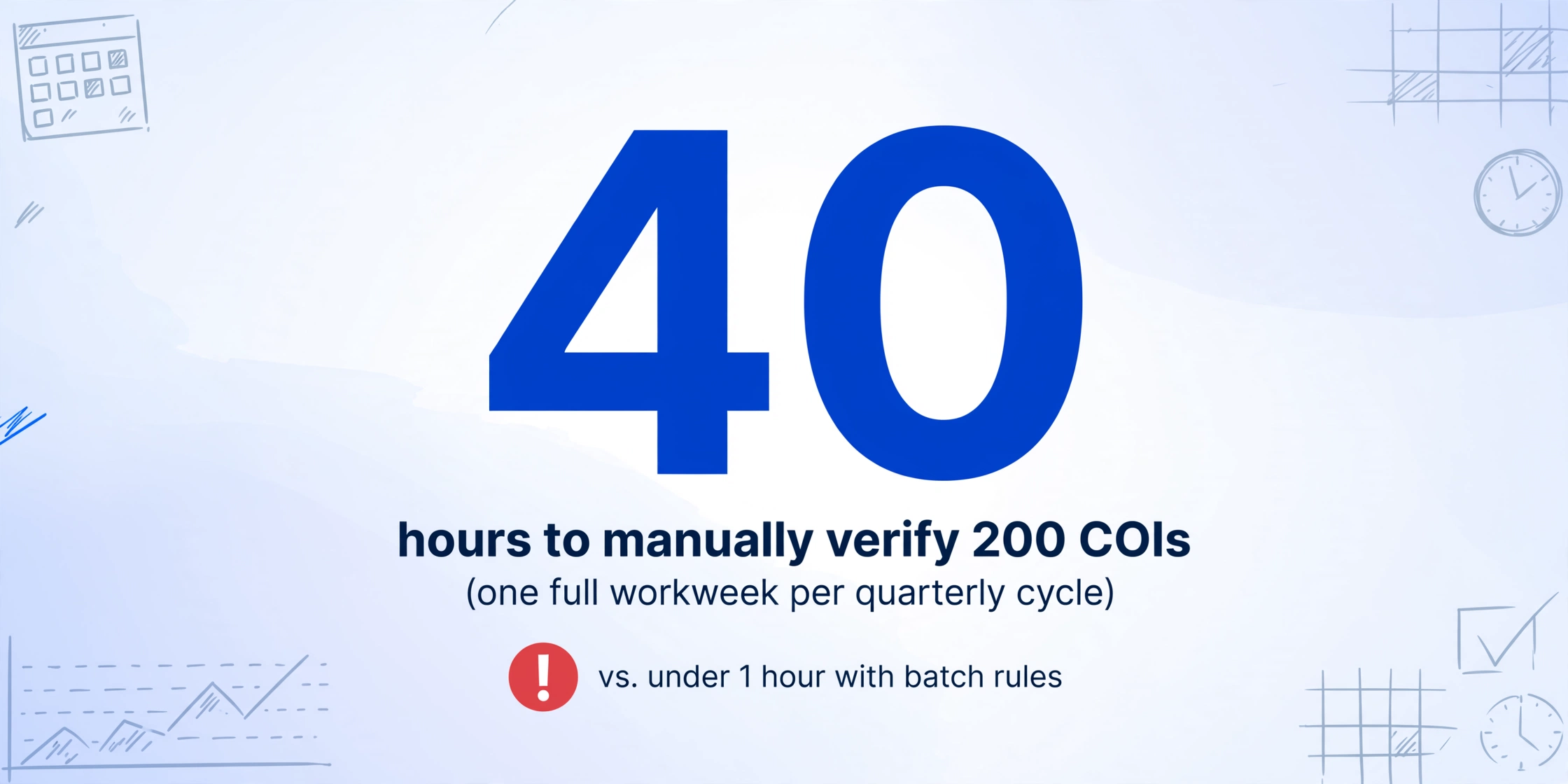
At 50 subcontractors, the cracks start showing. Some have multiple policies. Some renew mid-project and send updated certificates you need to compare against the previous version. Some carriers issue ACORD 25s with handwritten adjustments that take longer to read. The time per COI creeps toward 15 minutes. And at 200+ — the scale most regional general contractors, large property managers, and enterprise construction firms operate at — the math breaks: 200 certificates × 12 minutes each = 2,400 minutes, or 40 hours. One full workweek. And that's just one quarterly cycle.
The more insidious problem isn't time — it's inconsistency. At COI number 47, your eyes are reading the same coverage grid for the forty-seventh time. A $500,000 per-occurrence GL limit looks like $1,000,000 because both start with a number followed by zeros. A policy expiring 08/15/2026 gets typed as 08/15/2025. An Additional Insured checkbox marked "Y" is accepted without verifying whether the CG 20 10 endorsement was actually attached. The 9-out-of-10 failure rate IRMI found isn't about negligence — it's about human attention bandwidth at volume.
This is the batch verification gap: the distance between "I can check one COI carefully" and "I can check 200 COIs consistently." Bridging it requires changing the workflow itself — shifting from human review of each document to automated extraction followed by rule-based compliance checks.
What Batch Verification Actually Checks: 6 Dimensions Beyond the Coverages Grid
Before automating anything, it's worth defining exactly what "verified" means. A COI that passes a batch compliance check isn't just "has coverage listed" — it meets specific, measurable criteria across six dimensions. These are the rules your conditional engine will evaluate.
| Dimension | What the Rule Checks | Example Threshold | Non-Compliance Flag |
|---|---|---|---|
| 1. Coverage Types Present | Are all required coverage lines listed (GL, Auto, Workers' Comp, Umbrella)? | At minimum: GL + Workers' Comp + Auto (if sub drives on-site) | "Missing Workers' Comp" |
| 2. General Liability Limits | Does each occurrence and aggregate limit meet the contract minimum? | $1M per occurrence / $2M general aggregate | "GL limit below $1M/$2M" |
| 3. Umbrella / Excess Limits | Is umbrella listed and does it follow-form over GL and Auto? | $2M minimum (60% of programs per Certificial benchmark) | "Umbrella missing or below $2M" |
| 4. Policy Dates | Is the policy currently active? Has it expired? Is it expiring within 30 days? | Policy expiration > today's date; flag if ≤ 30 days out | "EXPIRED", "Expires in 15 days" |
| 5. Additional Insured Endorsements | Are CG 20 10 (ongoing ops) and CG 20 37 (completed ops) listed? | Both form numbers present on COI or attached endorsement page | "Missing CG 20 37" |
| 6. Certificate Holder & Cancellation | Is your company listed as the certificate holder? Is ≥30 days notice of cancellation stated? | Correct entity name; 30+ days notice specified | "Wrong certificate holder", "No cancellation notice" |
These six dimensions are the checklist every compliance reviewer runs — mentally, one COI at a time. The batch approach turns each dimension into a spreadsheet formula that evaluates every row simultaneously. One person writing rules once; 200 COIs evaluated in seconds.
A few nuances worth noting. Additional Insured status deserves particular attention because it's the most commonly misunderstood line on the ACORD 25. The form itself, in bold text, warns that a checkmark in the AI column "does not confer rights to the certificate holder in lieu of such endorsement(s)." The actual endorsement — typically CG 20 10 for ongoing operations and CG 20 37 for completed operations — must be a separate document attached to the policy. A compliant batch verification process doesn't just check for a "Y" in the Additional Insured column. It checks whether the endorsement form numbers appear in the Description of Operations field or on an attached ACORD 101 schedule. IRMI's guidance on COIs is unambiguous: the certificate is evidence of coverage, not a contract granting coverage. Only the endorsement does that.
Cancellation notice is another dimension where the form's language matters more than what most contracts require. Since 2010, the standard ACORD 25 cancellation clause reads "notice will be delivered in accordance with the policy provisions" — which means the insurer commits to nothing beyond what the policy already says, and the policy often says nothing about notifying certificate holders. A 30-day notice of cancellation endorsement (sometimes called a "notice of cancellation endorsement" or "NOC endorsement") is a separate addendum to the policy — not something the ACORD 25 itself provides. If your contract requires 30 days' notice, verifying that language appears in the Description of Operations section is the minimum; confirming the actual endorsement exists is the gold standard.
Step 1: Extract All COIs into One Spreadsheet
The batch workflow starts with extraction — turning 200 PDFs into one structured spreadsheet. This is the step where most teams stall. Manual data entry from 200 ACORD 25s isn't just slow; it introduces transcription errors at the exact moment when accuracy matters most.
The alternative is AI-powered extraction using Custom Column Extraction: you define the output columns you want, and the AI reads each ACORD 25 PDF to locate the corresponding values — not by matching a template or by checking fixed positions on the page, but by understanding what each field means. You type column names like "GL Each Occurrence Limit" or "Umbrella Policy Expiration" and the AI finds those values anywhere on the form, regardless of which insurance carrier's agency management system generated it.
This semantic approach — understanding field meaning rather than matching field position — is what makes batch ACORD 25 extraction reliable. Applied Epic, Vertafore, and other agency management systems format dates differently. Some carriers print policy numbers across field boundaries. Handwritten broker adjustments appear in unpredictable positions. A position-based template fails on any of these variations. Semantic extraction doesn't care where the value sits — it reads the document and pulls what you asked for.
Here's the column set to define for a compliance-focused batch extract. These 14 columns capture every dimension the conditional rules will evaluate:
| Column Name | What It Extracts | Role in Compliance Check |
|---|---|---|
| Subcontractor Name | Named Insured from ACORD 25 header | Identifies which sub this COI belongs to |
| GL Carrier | Insurer name for Commercial General Liability line | Verify carrier is A-rated or above (check AM Best) |
| GL Policy Number | Policy number from GL coverage line | Unique identifier for claim reference |
| GL Each Occurrence | Per-occurrence limit amount from GL row | Compare against contract minimum (typically $1M) |
| GL General Aggregate | Aggregate limit from GL row | Compare against contract minimum (typically $2M) |
| GL Policy Expiration | Expiration date from GL coverage line | Is it active? Expiring soon? Already expired? |
| Auto Liability Limit | Combined single limit from Auto row | Typically $1M; check if sub operates vehicles on-site |
| Umbrella Limit | Each occurrence limit from Umbrella/Excess row | Compare against contract requirement (often $2M+) |
| Workers' Comp Status | Whether WC coverage is listed + statutory limits | Required unless sub is sole proprietor in exempt state |
| Additional Insured Endorsement | CG 20 10, CG 20 37, CG 20 33, or blanket AI language | Verify both ongoing ops (CG 20 10) and completed ops (CG 20 37) |
| Waiver of Subrogation | Y/N from the Waiver of Subrogation checkbox column | Flag if required by contract but marked N or blank |
| Certificate Holder | Entity name in the Certificate Holder box | Must match your company's legal entity name exactly |
| Cancellation Notice | Days of notice from Description of Operations or Cancellation section | Flag if less than 30 days or not specified |
| Description of Operations | Full text of the Description of Operations free-text field | Manual review for project-specific language, contract numbers, special conditions |
For a broader overview of COI extraction — including how it fits alongside contract extraction, endorsement verification, and compliance tracking across multiple document types — see the complete guide to COI extraction.
Once you've defined these columns, upload all 200 ACORD 25 PDFs in a single batch. The AI processes them in parallel and outputs the results into one spreadsheet — every sub gets one row, every field you specified gets one column. This extraction step is what replaces the Open-PDF-Scan-Type cycle. From here on, compliance review happens in the spreadsheet, not in the PDFs.
Files are processed securely and not stored.
The output you get from this extraction step is the raw compliance dataset — 200 rows × 14 columns of structured data. The next step turns that raw data into actionable compliance intelligence.
Step 2: Build Conditional Rules to Flag Non-Compliance
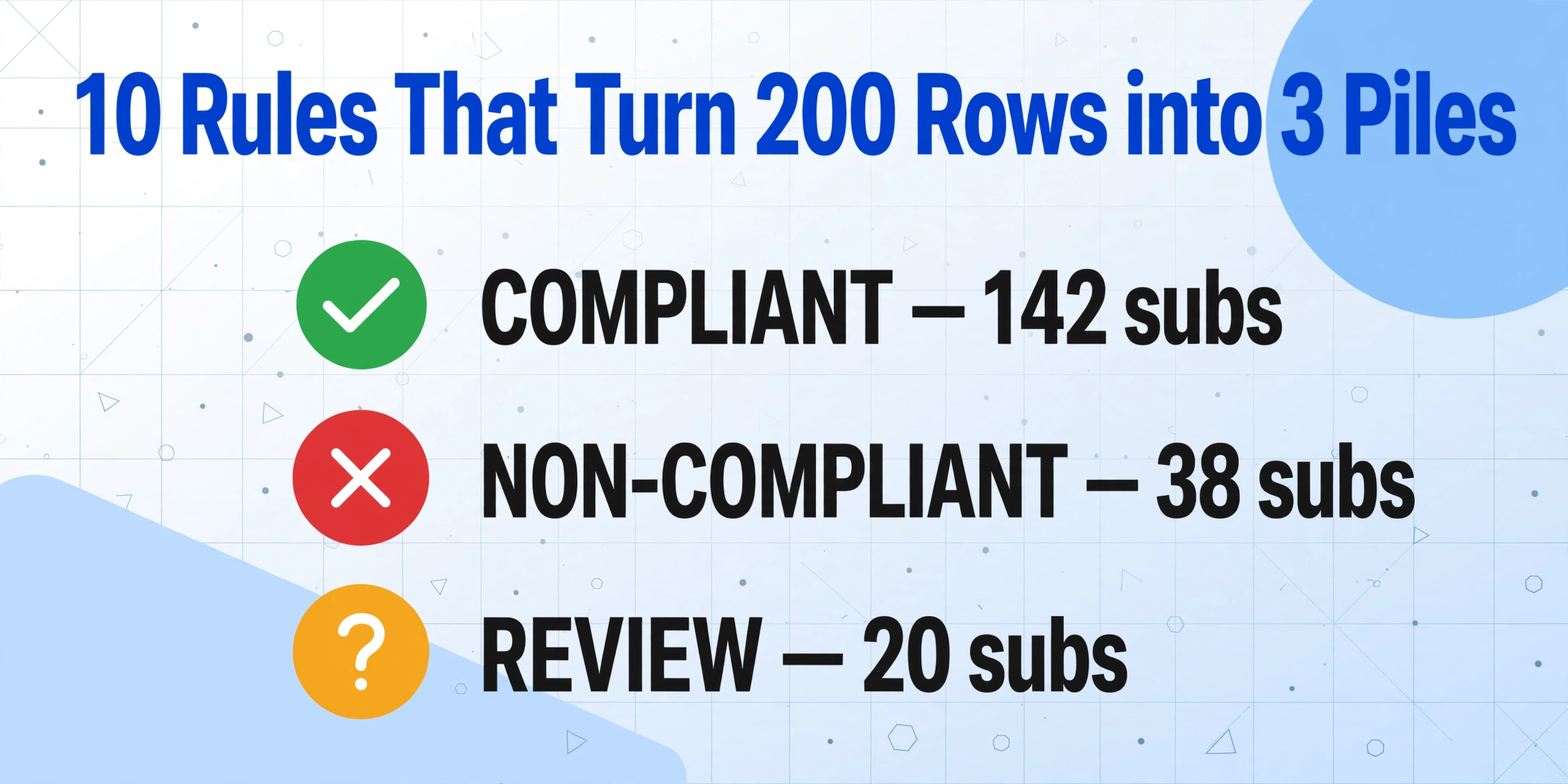
Extraction gives you data. Conditional rules give you decisions. The goal here is simple: every row in your spreadsheet should end up in one of three piles — compliant, non-compliant (needs immediate action), or review required (edge case that needs human judgment).
Setting up these rules in Excel or Google Sheets requires no programming. Each rule is a conditional formula that checks a specific cell against a threshold and returns a flag. When a row accumulates flags, it gets escalated. Here's the rule set, built dimension by dimension:
| Rule # | Dimension | Conditional Logic | Flag Output |
|---|---|---|---|
| 1 | GL Each Occurrence | IF GL_Each_Occurrence < 1000000 | "GL below $1M" |
| 2 | GL General Aggregate | IF GL_General_Aggregate < 2000000 | "GL aggregate below $2M" |
| 3 | Umbrella Limit | IF Umbrella_Limit < 2000000 | "Umbrella below $2M" |
| 4 | Policy Expiration | IF GL_Expiration < TODAY() | "EXPIRED" |
| 5 | Policy Expiration (soon) | IF GL_Expiration <= TODAY()+30 | "Expires in [N] days" |
| 6 | Workers' Comp | IF WC_Status = "" OR WC_Status = "N/A" | "Missing Workers' Comp" |
| 7 | Additional Insured | IF AI_Endorsement NOT CONTAINS "CG 20 10" | "Missing CG 20 10" |
| 8 | Additional Insured (completed ops) | IF AI_Endorsement NOT CONTAINS "CG 20 37" | "Missing CG 20 37" |
| 9 | Certificate Holder | IF Cert_Holder <> "Your Company Legal Name" | "Wrong certificate holder" |
| 10 | Cancellation Notice | IF Cancellation_Days < 30 | "Insufficient cancellation notice" |
In practice, you'd implement these as additional columns in your spreadsheet. Create a column called "Flags" that concatenates all triggered rule outputs for each row. Then create a "Status" column with a simple formula:
=IF(Flags="","COMPLIANT",IF(OR(ISNUMBER(SEARCH("EXPIRED",Flags)),ISNUMBER(SEARCH("Missing",Flags))),"NON-COMPLIANT","REVIEW"))This formula sorts everything into three categories without you looking at a single PDF. The COIs that come back clean — no flags — are compliant. Those with expired policies, missing required coverage, or limits below contract thresholds go straight to non-compliant. Edge cases (like a borderline umbrella limit or an AI endorsement that mentions CG 20 33 instead of CG 20 10) go to review for a human to make the call.
One critical note: these rules evaluate what's on the certificate, not what's necessarily in the policy. The distinction matters. An ACORD 25 that shows $2M umbrella with CG 20 10 and CG 20 37 listed in the Description of Operations passes every automated check — but if the underlying policy doesn't actually carry those endorsements, the certificate is misleading. This is why the IRMI 9-of-10 statistic exists. For low-risk subcontractors performing routine work, automated COI-level verification is sufficient. For high-risk trades doing structural, excavation, or roofing work, supplement with endorsement-level verification — requesting actual copies of the CG 20 10 and CG 20 37 endorsement pages.
Step 3: Generate the Compliance Dashboard
With 200 rows flagged and categorized, the raw spreadsheet is still information overload. The compliance dashboard distills it into the three numbers your project manager or risk committee actually needs: how many subs are fully compliant, how many have actionable issues, and what the most common gap is.
The simplest dashboard is a pivot table. Set the "Status" column (COMPLIANT / NON-COMPLIANT / REVIEW) as rows, and count the subcontractor names as values. You'll get something like:
| Status | Count | % of Total |
|---|---|---|
| COMPLIANT | 142 | 71% |
| NON-COMPLIANT | 38 | 19% |
| REVIEW | 20 | 10% |
That's the big-picture view: 71% of your subcontractors are compliant right now, 19% have issues that need resolution before they step on-site, and 10% need a closer look. The next layer of the dashboard goes deeper into the non-compliant group — which specific gaps are driving the 38 flagged certificates:
| Non-Compliance Reason | Count |
|---|---|
| Expired policy | 14 |
| GL limit below $1M/$2M | 9 |
| Missing CG 20 37 (completed ops) | 11 |
| Missing Workers' Comp | 6 |
| Wrong certificate holder | 5 |
| Insufficient cancellation notice | 3 |
This second layer tells you where to direct your effort. If the most common issue is expired policies, you focus on sending renewal requests — not on renegotiating limits. If missing CG 20 37 is the pattern, you send a template email explaining what it is and why it's required. The dashboard transforms "we have 200 COIs to review" into "we have 14 expired policies to chase, 9 subs who need higher limits, and 11 who need to add a completed operations endorsement." That's a manageable action list — not a pile of PDFs.
For teams that need to share compliance status with project managers, a simple conditional formatting layer makes the dashboard readable at a glance. Green rows for compliant subs, red for non-compliant, yellow for expiring within 30 days. Filter by project, by trade, or by compliance gap. Scaling to 200 subcontractors doesn't mean spending proportionally more time on compliance — it means building a system where the time per certificate approaches zero after the rules are set.
The Quarterly Rhythm: Why Batch COI Verification Is a Recurring Process, Not a One-Time Project
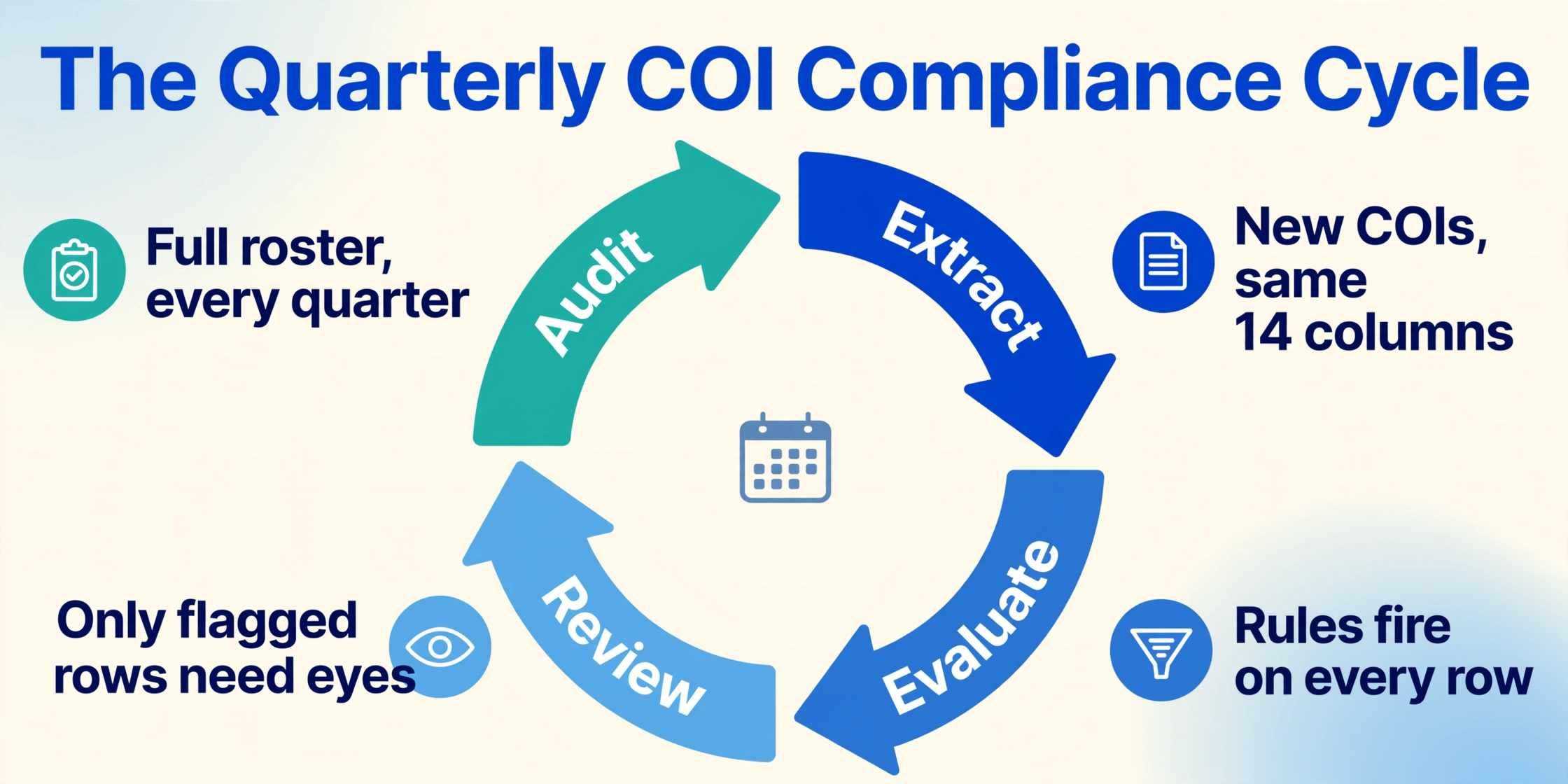
Insurance policies renew annually, but subcontractors don't all renew on the same date. A general contractor with 80 active subs might see new or updated certificates arriving every week — and then a surge every quarter as contracts renew and project phases shift. This recurring rhythm is what makes batch processing the natural workflow for COI compliance.
Set up three repeating cycles:
Weekly intake. As new COIs arrive from subs or updated certificates come in after renewals, add them to a running batch. Extract the new files against the same 14-column template — they slot directly into the existing spreadsheet. The conditional rules fire automatically. You're not starting over; you're appending.
Quarterly full audit. Once per quarter, run the entire vendor roster through a full batch verification. Pull all active subs, request updated COIs from anyone whose policy expired in the last 90 days, and re-extract everything. This is the cycle that catches the 9-out-of-10 gaps — the ones that weren't visible when each COI was individually filed months ago but become visible when you compare all 200 rows side by side.
Pre-project mobilization check. Three weeks before a subcontractor is scheduled to mobilize on-site, pull their row from the compliance dashboard. If the status is anything other than COMPLIANT, flag it for the project manager. The cost of COI non-compliance — project delays averaging $3,500 per day, uncovered liability claims, and audit recapture — is entirely avoidable when you catch the gap three weeks before mobilization instead of the day the sub is supposed to start work.
The spreadsheet you built in Step 2 and Step 3 isn't a one-time artifact. It's the living compliance record that grows with your vendor base and catches issues in time to fix them.
Where Batch Automation Hits Its Limits — and Where Human Judgment Still Wins
Automated batch verification is powerful, but it operates on what's visible on the ACORD 25 form. There are gaps it cannot close on its own, and knowing them upfront prevents false confidence.
Handwritten or non-standard certificates. Some carriers still issue ACORD 25s that are partially handwritten, especially for smaller subcontractors whose brokers make manual adjustments. AI extraction handles handwriting significantly better than template OCR, but accuracy drops compared to machine-printed forms. For these, batch-extract first, then manually review the flagged rows — the AI will get most fields right but may miss a handwritten policy number or a broker's margin note.
Endorsement language interpretation. An extraction tool can confirm whether "CG 20 10" appears on the certificate. It cannot read the actual endorsement page and determine whether the language covers the specific project scope or whether an exclusion buried in paragraph 4 undercuts the coverage. For high-risk trades — structural steel, excavation, roofing, demolition — the conditional rules should trigger a "REVIEW" flag that routes the certificate to a human with insurance expertise. The rules narrow the pile from 200 to maybe 20 that need expert reading. They don't replace the expert.
Policy-level vs. project-level aggregate. The ACORD 25's "GENERAL AGGREGATE LIMIT APPLIES PER" column has three options: POLICY, PROJECT, and LOCATION. A $2M aggregate that applies per-policy covers all projects the sub works on — if they're on three of your projects, one claim on project A eats into the coverage available for project B. A per-project aggregate means each project gets its own $2M limit. The conditional rules can flag "per-policy aggregate" as a review item, but the decision about whether to accept it depends on your risk tolerance and the sub's project load.
Batch verification isn't "set rules and walk away." It's "let rules handle the routine 80% so humans can focus on the judgment-intensive 20%." The IRMI statistic — 9 out of 10 COIs fail to meet contract specs — reflects a world where humans are trying to do the routine 80% manually and running out of bandwidth before they reach the judgment-intensive 20% at all. Flipping that allocation is the point.
Spreadsheet Rules vs. COI Management Software: When Each Makes Sense
The previous sections describe a spreadsheet-based conditional rules approach. For some teams, dedicated COI management software — Billy, Jones, myCOI, CertFocus — is the right choice. The distinction isn't about quality; it's about volume and complexity.
A spreadsheet-based workflow with AI extraction makes sense when you manage 20 to 200 subcontractors and need compliance verification without per-certificate pricing ($3 to $30 per vendor per year adds up fast) or six-month implementation timelines. The extraction happens once per batch; the rules run automatically; the dashboard updates in real time. The total cost is the AI processing credits for extraction — not a per-vendor subscription.
Dedicated COI software makes more sense when you manage 500+ subcontractors across multiple projects, need Procore or CMiC integration, or want automated vendor follow-up for renewals. These platforms add value through embedded workflows: auto-emailing subs 60 days before expiration, maintaining a vendor portal for self-service COI uploads, and providing audit-trail reporting for enterprise compliance requirements. But they also add cost and complexity — most require sales calls, annual contracts, and dedicated onboarding.
The practical path for many mid-size GCs: run the spreadsheet-based batch workflow described here, and only graduate to dedicated software when the volume crosses a threshold where the time saved by automated vendor follow-up exceeds the platform cost. The conditional rules and compliance dimensions are the same either way — what changes is the delivery mechanism.
FAQ
Does batch extraction handle COIs from different insurance carriers with different layouts?
Yes, because the extraction is semantic rather than position-based. The AI reads "General Liability Each Occurrence" and finds the corresponding dollar amount regardless of whether it's printed at position (x=400, y=280) for one carrier and (x=415, y=295) for another. Some carrier-generated ACORD 25s shift the coverage grid by half an inch or wrap policy numbers across two lines — these variations are normal and handled without reconfiguration. The one exception: non-ACORD carrier-issued certificates that use entirely different field labels. In those cases, you'll want to run a small test batch first and confirm the AI is finding the right values before processing the full set.
How long does it take to extract and verify 200 COIs with this workflow?
The extraction itself takes 5 to 10 seconds per COI — roughly 15 to 30 minutes total for the batch upload and processing. Setting up the 14 columns and 10 conditional rules takes about 45 minutes the first time. After that, each quarterly cycle takes under an hour: 30 minutes for extraction, 15 minutes for rule evaluation (which runs automatically once the formulas are in place), and 15 minutes to review the 20 or so COIs flagged for human judgment. Contrast with the manual approach: 33 to 50 hours of Open-PDF-Scan-Type per cycle.
What if a subcontractor's COI uses a pre-2010 ACORD 25 form version?
The data fields are the same — insured name, coverages grid, limits, dates, certificate holder — but the layout may differ slightly, particularly in the cancellation language (older forms used "will endeavor to mail __ days written notice" rather than the current "in accordance with the policy provisions"). Semantic extraction handles both because it reads field meaning, not form version. The cancellation notice extraction column will capture whatever language appears, which you can then evaluate with your conditional rule.
Can this workflow verify blanket Additional Insured endorsements?
Partially. A blanket Additional Insured endorsement typically states that any entity the named insured has agreed in a written contract to add as an additional insured is automatically covered. The ACORD 25 may reference this language in the Description of Operations field (e.g., "Blanket Additional Insured per written contract"). The extraction tool can capture that text. But verifying whether the blanket language triggers properly requires confirming two things exist: (1) the blanket endorsement in the policy, and (2) a written contract between you and the sub that requires AI status. The conditional rules can flag COIs that reference blanket language for human review, but they cannot independently verify that a written contract exists. That's in the judgment-intensive 20%.
What accuracy can I expect from AI extraction on ACORD 25 forms?
On standard machine-printed ACORD 25 forms, AI extraction achieves above 99% accuracy for clearly printed fields like policy numbers, dates, and dollar amounts. Handwritten entries — still common on certificates issued by smaller regional brokers — reduce accuracy to approximately 90-95% for the handwritten portions. The Description of Operations field, which is free-text and can run to multiple paragraphs, may show minor formatting differences in output (line breaks, punctuation) but captures the substantive content reliably. For compliance-critical fields, the batch workflow's efficiency gain is that you're reviewing extracted data in a spreadsheet — scanning 200 rows for flags — rather than reading 200 PDFs and typing the values yourself.
From 200 PDFs to One Actionable Compliance Report
The gap between "we have the COIs on file" and "we know which ones are compliant" is wider than most construction teams realize. The IRMI finding — 9 of 10 certificates fail to meet contract specs while appearing compliant — quantifies what every risk manager who's been through a claim already knows: the ACORD 25 form is evidence, not protection. Evidence without verification is paperwork. Verification at scale requires a process that doesn't depend on human attention surviving 200 repetitions.
The three-step workflow — extract all COIs into one spreadsheet, apply conditional rules across every row simultaneously, generate a dashboard that separates the compliant from the actionable — turns a 40-hour manual cycle into a recurring process that takes under an hour. The rules you write once evaluate every new certificate that arrives next week and next quarter. What changes is your exposure window: instead of discovering a coverage gap when a claim is already filed, you see it in a flagged row on a dashboard — with time to fix it.
Try the extraction on your own stack of ACORD 25 PDFs. See what your compliance dashboard looks like when the rules run for the first time. The 9-of-10 statistic suggests the results will be sobering. Better to see them now than after an incident.