15 Leavers This Month, 15 P45s
Build a Leaver Database Without Double Entry
Under Regulation 36 of the Income Tax (Pay As You Earn) Regulations 2003 (SI 2003/2682), every UK employer must issue a P45 when an employee stops working for them — completed on the day employment ends "or without unreasonable delay." The regulation does not distinguish between a company losing one employee in March and a company losing fifteen in a restructuring. Either way, fifteen Forms P45 must be generated, fifteen Part 1s submitted to HMRC via RTI, and fifteen sets of Parts 1A, 2, and 3 delivered to departing employees — all while HR tracks exit reasons, line managers confirm final dates, and IT recovers equipment. The P45 itself is not the bottleneck: Sage 50cloud, BrightPay, QuickBooks Online Payroll, Moorepay, and IRIS each generate a compliant P45 in seconds for a single leaver. The bottleneck is the structural gap between payroll software that thinks one employee at a time, and an HR operation that needs to track fifteen departures in a month, verify that Parts 2 and 3 were issued correctly to each leaver, and feed that departure data into turnover analytics — without entering the same NI number, leaving date, total pay, and tax paid into a separate spreadsheet by hand.
Key Takeaways
- Every P45 your payroll software generates already contains the exit database fields you need — but someone retypes them all into a spreadsheet that payroll never sees, while the original data sits unqueried in a PDF archive.
- The moment you hand the P45 to the employee, its pay and tax data becomes dead — you cannot aggregate who left, what they earned, or whether their tax codes cluster around a pattern, because the data was generated but never captured.
- Upload the month's leaver P45s in one batch after each pay run with a fixed column schema — the same extraction feeds HMRC compliance verification and HR exit analytics, and six monthly batches stacked together become a queryable leaver database nobody had to type.
Monthly Leavers Are a Different Problem from a Single P45
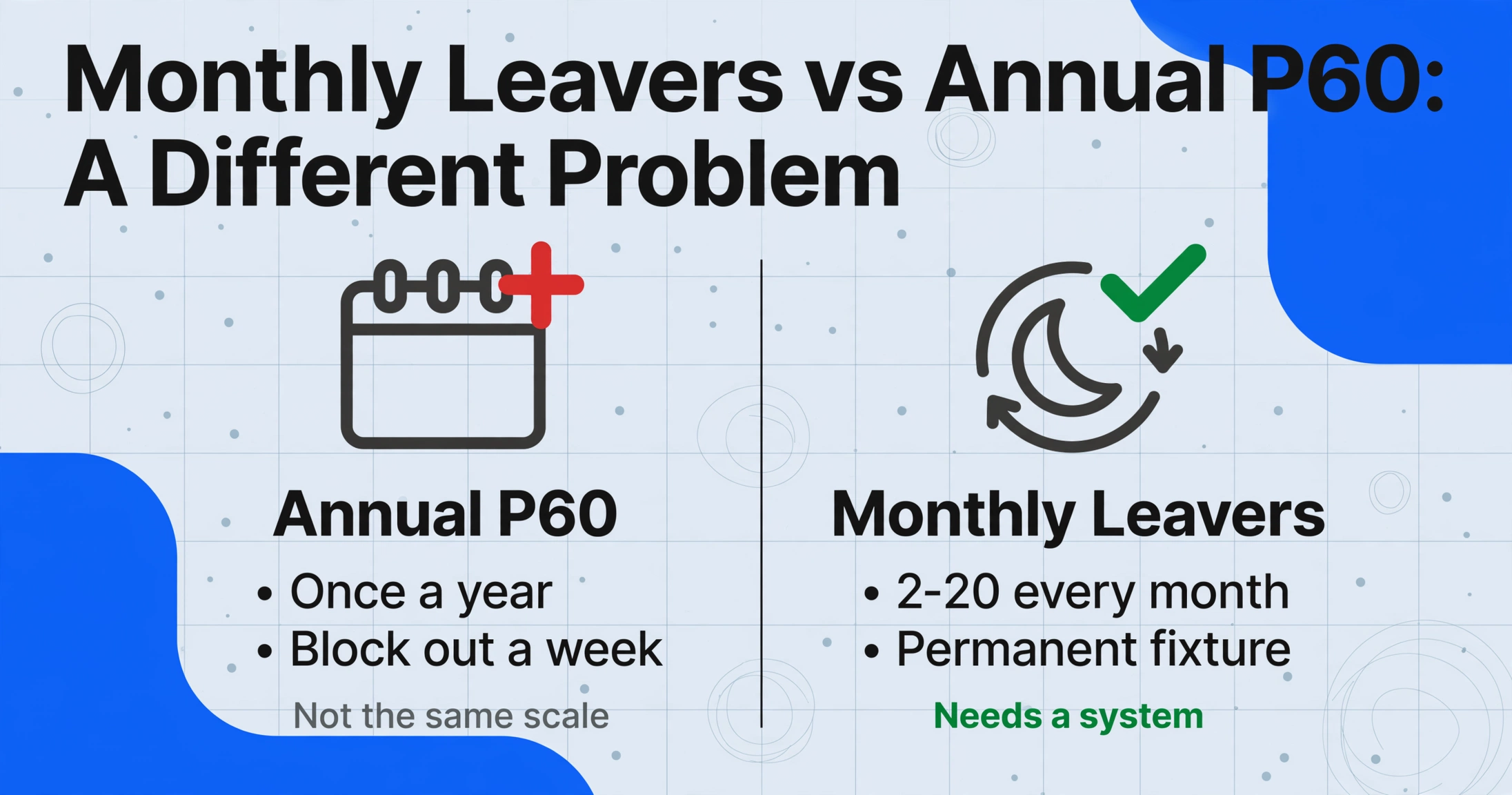
The annual P60 exercise happens once. Every employee on payroll as of 5 April gets one. The payroll team can block out a week in May, run the batch, and reconcile against Full Payment Submissions. The monthly leaver process — by contrast — is a permanent fixture on the payroll calendar. Every month, somewhere between two and twenty employees leave: resignations, redundancies, fixed-term contract ends, retirements. Every departure generates a P45. And every P45 is not just a compliance obligation sent to HMRC and handed to the leaver — it is a data point that HR needs for an entirely different purpose: knowing who left, why they left, what they were paid, and whether their departure fits a pattern.
Processing a single P45 is straightforward. Extracting its fields into a spreadsheet takes attention, not specialized tools. The moment you process leavers at the monthly cadence that most companies actually operate on, three structural problems appear that do not exist at single-leaver scale.
1. Information arrives from three directions, at three different times
HR receives the resignation letter and knows the leaving date first — and that letter is structured data too, so converting a termination letter to Excel records the last working day, reason for separation, and notice period before the P45 is even generated. Payroll may not receive the formal notification for days — especially if the line manager delays the approval. By the time the P45 is generated through Sage or BrightPay, HR has already recorded the leaver in the HRIS. The P45 now contains data — NI number, total pay, tax paid, final tax code — that HR's exit tracking spreadsheet does not have. Someone manually copies those fields across. For fifteen leavers, that is fifteen cross-system copy-paste operations every month, each one a potential mismatch between what HR recorded and what payroll actually processed.
2. The four-part P45 creates its own audit trail — but only if you preserve it
Part 1 is sent to HMRC through RTI when you submit the Full Payment Submission. Parts 1A, 2, and 3 go to the employee. The employee keeps Part 1A and gives Parts 2 and 3 to their new employer. From the issuing employer's perspective, once the P45 is generated and handed over, the underlying data lives in payroll software archives — not in a format HR can query. If three months later someone asks "how many leavers in Q1 had total pay above £30,000," the answer is in Sage's individual employee records, not in a report. The data was generated. It just was never captured.
3. Edge cases multiply with volume
A company processing three leavers per month might encounter one edge case. A company processing fifteen will hit three or four every month: the leaver whose final pay includes a large bonus that pushes their year-to-date total above a tax threshold; the zero-earnings leaver (on payroll with a tax code but never actually paid) who still requires a P45 under Regulation 36; the employee who gave notice in March but whose final working day falls on 7 April — crossing a tax year boundary and changing which year's cumulative totals appear on the P45. Each edge case interrupts a manual workflow: you stop transcribing, investigate the exception, resolve it, then resume. At batch scale, those interruptions are the workflow.
The monthly leaver batch is not a smaller version of the annual P60 exercise. It is a different problem — one where the P45 is simultaneously a compliance document you must issue, a payroll record you must archive, and an exit data point your HR team needs for an entirely unrelated purpose. The same P45 PDF can serve all three — if you stop treating it as a form to be printed and start treating it as a structured data source.
The 4-Part P45 at Scale: What Goes Where and What Goes Wrong
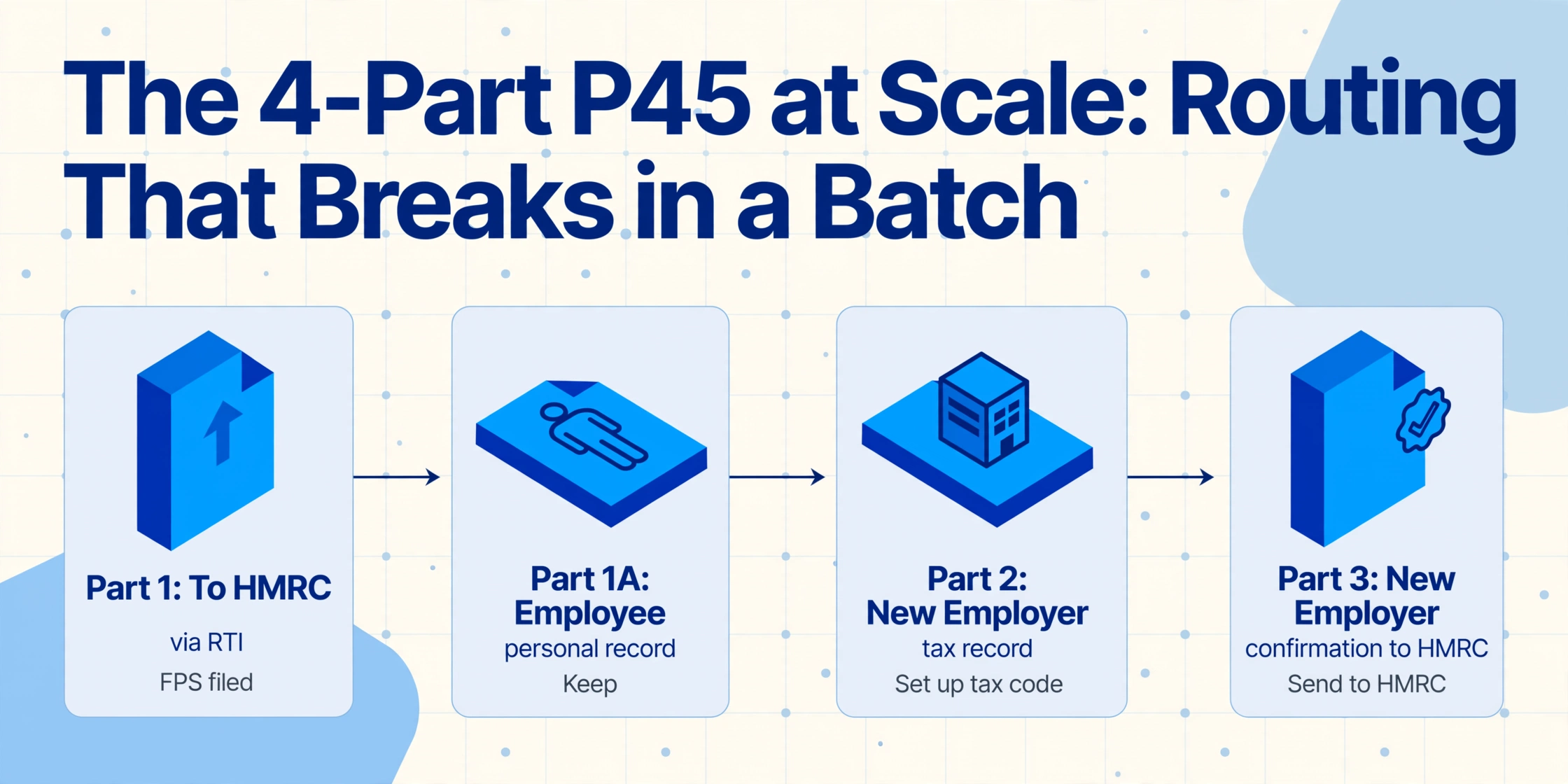
The P45 consists of four parts. The distinction matters in a batch workflow because getting the routing wrong at scale creates a cascade of corrections that manual, one-at-a-time processing masks.
Part 1 — to HMRC (via RTI)
Submitted automatically when your payroll software sends the Full Payment Submission marking the employee as a leaver. You do not physically send Part 1 — the payroll software generates the P45 data and transmits it as part of the RTI filing.
Part 1A — employee's own record
The employee keeps this. It shows the same data as Part 2 and 3 — total pay, total tax, tax code, leaving date — but is for the employee's personal tax records. No new employer sees it.
Part 2 — new employer (tax record)
The new employer uses this to set up the employee's payroll record with the correct tax code and year-to-date figures. Without Part 2, the new employer must use a Starter Checklist — which often results in an emergency tax code until HMRC corrects it.
Part 3 — new employer (confirmation)
The new employer completes Part 3 with their own PAYE reference, start date, and the tax code they will use — then sends Part 3 to HMRC. This confirms the employment transition and allows HMRC to reconcile the employee's tax record across the gap between jobs.
In a single-leaver workflow, the four-part routing is a checkbox: Part 1 filed, Parts 1A/2/3 handed over. In a batch of fifteen, the routing becomes a tracking problem. Which leavers have been marked as leavers on the FPS? Are all Parts 2 and 3 correctly matched to the right employee — or did someone hand John Smith's P45 to the other John Smith? If a leaver loses their P45, you cannot issue a replacement (HMRC explicitly prohibits it) — you can only provide a statement of earnings. That means the single P45 PDF you generated is the only official record. Losing it — or misrouting it — is an irrecoverable error.
The practical safeguard at batch scale is to capture every P45's data into a spreadsheet at the moment of generation — before Parts 1A/2/3 leave your hands. The spreadsheet becomes your internal audit record: proof of what each P45 contained, issued on what date, for which leaver. If an ex-employee contacts you six months later claiming their P45 showed the wrong tax code, you have a verifiable row — not a payroll system login and a memory of what you think you printed.
From P45 PDF to Exit Database: Columns That Serve Both HMRC and HR
The column names you define before uploading a batch of P45s are the single most consequential decision in the workflow. A column schema built for payroll compliance alone captures the statutory fields — total pay, total tax, tax code, leaving date — and stops there. That is enough to verify the P45 against the FPS. It is not enough to feed HR's exit analytics, where the questions are different: which departments are losing people, what are the common tax code patterns among leavers, do higher-paid leavers leave for different reasons than lower-paid leavers.
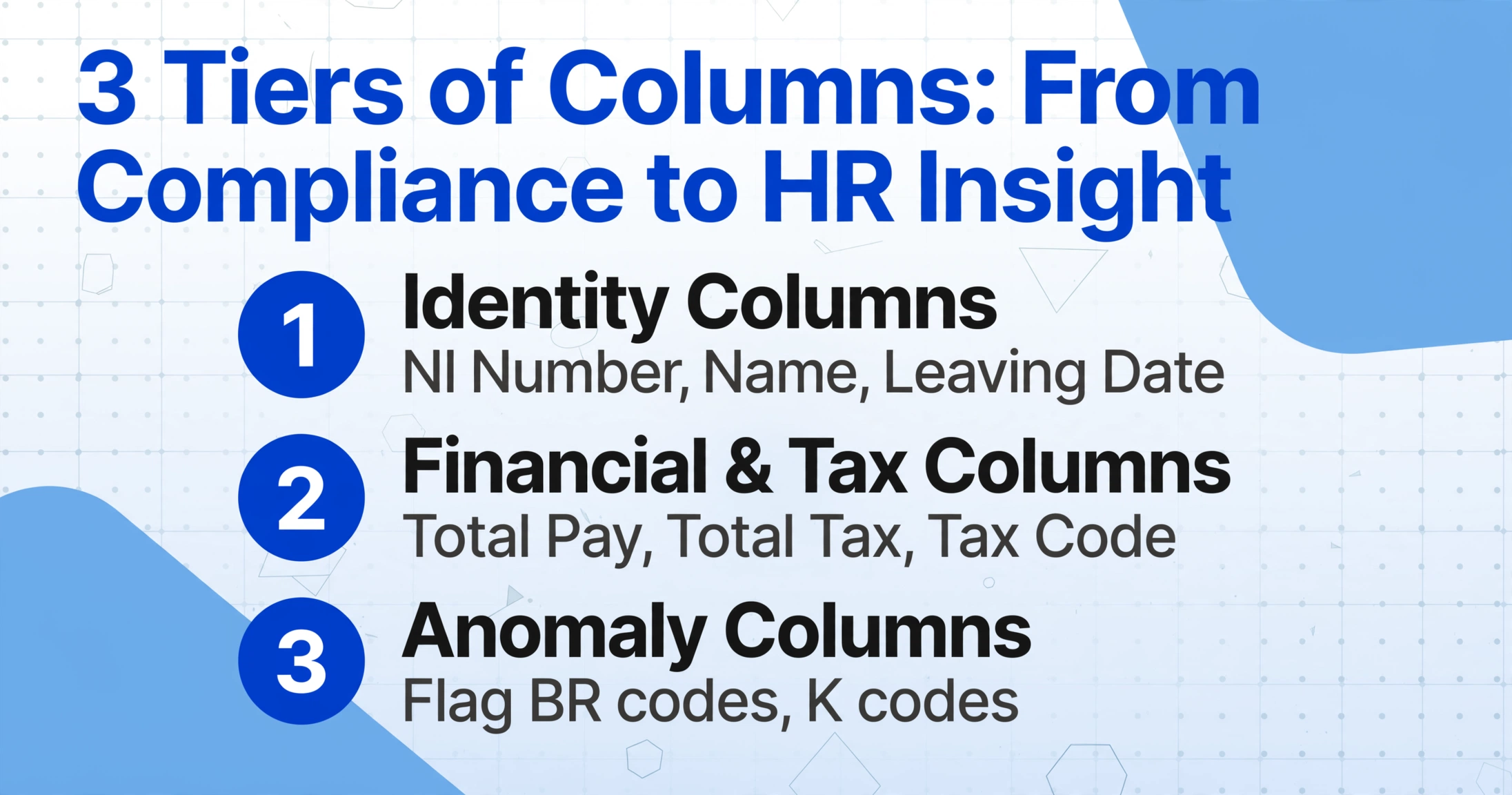
A column schema that serves both purposes is built on three tiers. The first tier gets you compliant. The second tier gives HR data they can actually use. The third tier surfaces anomalies before they become HMRC queries.
1. Identity columns — the leaver's composite key
NI Number, Employee Name, Leaving Date, and PAYE Reference. NI Number is the natural primary key — it is unique, permanent, and appears on every P45. The PAYE Reference (NNN/XXNNNNN format per PAYE20005) identifies which employer scheme this P45 belongs to — critical if your company runs multiple PAYE schemes or acquired another entity. Including the leaving date in the identity block distinguishes a leaver who left, returned, and left again.
2. Financial and tax columns — the statutory core
Total Pay to Date (£), Total Tax to Date (£), Tax Code at Leaving Date, Week 1 / Month 1 Indicator (capture the 'X' suffix), Student Loan Deductions (Plan 1, Plan 2, Plan 4, Postgraduate — separating these into individual columns is essential: a single "Student Loan (£)" column makes it impossible to distinguish which plan each deduction relates to, and HMRC's SL1/SL2 stop notices are plan-specific).
3. HR analytics columns — turning compliance data into exit intelligence
These are columns that do not appear on the P45 but are populated from the P45 data during extraction. A "Leaver Category" inferred column — where the AI classifies the leaver based on context you provide (options: Resignation/Redundancy/Dismissal/Retirement/Fixed-Term End). A "Tax Code Type" computed column that classifies each code as "Cumulative / Non-Cumulative (M1/W1) / BR-D0-D1 / K Code / NT" — a K code leaver (deductions exceed allowances) tells a different workforce story than a 1257L leaver. A "Leaving Quarter" column derived from the leaving date for instant pivot-table segmentation. None of these columns increase transcription work — the AI populates them in the same extraction pass that reads the statutory fields.
For a concrete walkthrough of extracting the statutory fields from a single P45 — the NI number, the tax code, the total pay and tax figures — the single P45 extraction guide covers each field in detail. This article picks up where that one leaves off: what changes when you feed fifteen P45s into the same column schema every month, and the long-term database you build from doing it.
The schema is what makes a P45 to Excel setup reusable month after month — define the columns once and every later leaver arrives as another row under the same headers, with no re-mapping between batches.
Multi-Department Coordination: Closing the Gap Between HR Notification and P45 Issuance
The P45 regulation says "on the day employment ends or without unreasonable delay." In practice, that statement hides a coordination chain. HR receives the resignation. The line manager confirms the final working date — sometimes days later. Payroll receives the formal leaver notification — sometimes after the line manager's confirmation, sometimes before, depending on whether the company's process is HR-led or payroll-led. Payroll then processes the final pay, marks the employee as a leaver in Sage or BrightPay, generates the P45, and submits the FPS. Only then does the P45 exist. The time between "employee resigns" and "P45 is generated" can be anywhere from the same day to two weeks — and in that gap, HR has already recorded the departure in a spreadsheet that does not yet have the P45 data.
This is the hidden cost of a manual exit database: duplicate data entry that happens in two different systems at two different times. HR enters the leaver's name, department, leaving reason, and final date when the resignation is confirmed. Payroll enters the same name, NI number, total pay, total tax, and tax code when the P45 is generated — a week later. The two datasets rarely meet in the same spreadsheet. The result is an HR exit tracker that knows why people left but not what they earned, and a payroll archive that knows what people earned but not why they left.
The batch workflow eliminates this gap not by changing anyone's process, but by changing when the data capture happens. Instead of payroll generating P45s and HR separately maintaining an exit tracker, the P45 PDFs become the single source for both. Upload the month's P45 batch after the pay run — when all leavers have been processed and all P45s generated — and extract into a spreadsheet that includes both the statutory payroll fields (from the P45 itself) and the HR context fields (from inferred columns). One extraction pass. Both teams get their data. The HR team adds the exit reason column based on the resignation letters they already have; the payroll team verifies the tax figures against the FPS. Both are working from the same NI number, same leaving date, same row.
For companies already handling P60s at year-end using a similar approach, the monthly P45 workflow follows the same pattern: standardize column names, batch by month, verify against the FPS. The P60 batch audit workflow covers file naming, column design, and multi-employer merging in detail — the column schema is document-specific but the batch approach is identical.
Cross-Provider Reality: Sage, BrightPay, QuickBooks, and the Leaver Who Switched Departments Mid-Year
HMRC does not mandate a single P45 layout. Under HMRC's RTI specifications, payroll software must include the statutory fields — employer PAYE reference, employee NI number, name, leaving date, tax code, total pay, total tax — but the visual arrangement is left to each vendor. The result is that a P45 from Sage 50cloud Payroll looks different from a P45 from BrightPay, which looks different from a QuickBooks Online Payroll P45, which looks different from a Moorepay P45. The employee's NI number might be in the top-right box on one and beneath the employee name on another. The tax code might be printed next to the PAYE reference on one and in a separate bordered box on another.
This layout variation creates a subtle but significant cost in manual batching. Every time the payroll administrator switches from reading a Sage P45 to reading a BrightPay P45, they visually re-scan to locate each field. Across fifteen P45s split across three payroll providers — which happens naturally when a company acquires another entity and inherits its payroll software for a transition period — that visual re-scan adds roughly ten seconds per document. Across a month's worth of leavers, that is minutes of dead scanning before a single keystroke of transcription.
Semantic extraction eliminates the provider-specific re-scan by reading the document for meaning rather than position. You define the column you want — "NI Number" — once. The AI locates the NI number on a Sage P45 by understanding what a National Insurance number looks like (two letters, six digits, one letter: AB123456C), not by knowing that Sage prints it at grid coordinate (x=72mm, y=38mm). A BrightPay P45, a QuickBooks P45, a Moorepay P45, and a scanned paper P45 from an employee who lost theirs all feed into the same column definition. The output column populates identically across providers.
This provider-agnostic behavior is particularly valuable in the common scenario where an employee who left partway through the year was on a different payroll system than the current one. A company that switched from Sage to BrightPay in September will have leavers whose P45s were generated by Sage (pre-September departures) and leavers whose P45s were generated by BrightPay (post-September departures). In a manual workflow, the payroll administrator processes each batch separately because the two P45 layouts demand different visual approaches. A semantic extraction batch can handle both in the same upload — the AI reads the values, not the layout. The "PAYE Reference" column populates identically for all leavers from the same employer, regardless of which software generated the P45.
Turning Monthly P45 Batches Into an Exit Analytics Feed
Most companies track leavers in a spreadsheet that HR updates manually — name, department, leaving date, reason. It answers the question "who left this month." It does not answer "what is the average total pay of leavers from the engineering department versus those who stay," "are leavers on non-cumulative tax codes leaving at a higher rate," or "did Q3 leavers have a different tax code mix than Q2 leavers." Answering those questions requires the P45 data — the pay and tax figures that only payroll holds — joined to the HR data — the department and reason fields that only HR holds.
A monthly P45 batch extraction produces exactly that joined dataset. Each month, you extract the P45 batch into a spreadsheet with the same column schema. Over six months, you have six spreadsheets. Because the column names are identical across months, stacking them into an annual dataset is an append operation — no column remapping, no field alignment. Add a "Month" column to each batch as a fixed value, and suddenly you have six months of leaver data with pay, tax, tax code, NI number, and leaving date — queryable by month, by tax code type, by total pay band.
The payroll data alone tells you things that exit interview transcripts cannot. A cluster of leavers on BR (Basic Rate) tax codes — indicating they likely held a second job — suggests a set of employees who may already have been economically disengaged from the organization before resigning. A cluster of leavers on K codes — where total deductions exceed allowances — may indicate employees with complex tax affairs (company car, benefits in kind) whose departure decisions correlate with benefit structures rather than salary dissatisfaction. None of this is visible in an exit interview. It is visible in the P45 data — if you capture it.
The monthly batch cadence also surfaces timing patterns that annual look-backs miss. Is there a spike in leavers in January (post-bonus departures)? In April (post-tax-year-end, employees wait for their P60 then leave)? In September (post-summer, new graduate intakes push out existing staff)? A single-month snapshot cannot answer that. Six months of stacked batches can. The pattern emerges not from analyzing one spreadsheet, but from having built the database month by month.
FAQ: Batch-Processing UK P45 Leaver Forms
Can I process P45s from multiple tax years in one batch?
Technically yes — the AI will extract data from any P45 regardless of tax year — but you should batch by tax year. A leaver whose final working day is 31 March 2026 has their P45 in the 2025-26 tax year. A leaver whose final working day is 7 April 2026 has their P45 in the 2026-27 tax year, even though they handed in notice in March. These two P45s look identical but represent different tax years. If you batch them together, the "Total Pay to Date (£)" column contains figures from different cumulative periods, making them incommensurable. Batch by tax year and add a fixed-value "Tax Year" column so the year is explicit in every row.
What about the zero-earnings P45 — an employee on payroll who was never paid?
Under HMRC guidance, if a tax code was allocated and the employee was reported on an FPS — even with zero pay — you must issue a P45 when they leave. The P45 will show £0.00 total pay and £0.00 total tax. In a manual batch, the payroll administrator might skip this P45 because "there's no data to enter." In an extraction batch, include it — the zero values are data. A zero-earnings leaver who was on the payroll for three months without receiving pay is a significant HR signal: it may indicate someone added to payroll in advance of a start date who never actually started, or a statutory leave period where no pay was due. That signal matters in exit analytics.
What if an employee's P45 tax code has the Week 1 / Month 1 'X' indicator?
The 'X' marker — applied when the tax code is operated on a non-cumulative (Week 1 / Month 1) basis — means the year-to-date figures on the P45 may not represent a full cumulative calculation. This matters for exit analytics because a leaver on 1257L M1 earning £25,000 year-to-date is not directly comparable to a leaver on 1257L (cumulative) earning £25,000 — the M1 leaver's tax was calculated per-period without reference to previous earnings, so their total tax figure may differ from the cumulative equivalent. Capture the 'X' indicator in a dedicated column (don't append it to the tax code column as text — "1257L X" breaks sorting). A separate "M1/W1 Indicator" column lets you filter non-cumulative leavers out of aggregate tax comparisons.
Can I include the P45 Part 2/3 issue date as a column?
The P45 itself does not show the date Parts 2 and 3 were handed to the employee — it shows the leaving date. The issue date is a function of when payroll was run, not a field on the form. If your month-end P45 batch is generated the day after the pay run, the issue date is the same for every P45 in the batch — add it as a fixed-value column. If P45s are issued on different dates (some leavers processed in the first pay run of the month, some in the second), create separate batches per pay run and use the batch-level date as the issue date. The "File Name" column in the output — which ImageToTable.ai includes by default — provides per-document provenance regardless.
What happens with student loan deductions on a P45 — do I need separate columns per plan?
Yes. UK P45s include student and postgraduate loan deduction information by plan type (Plan 1, Plan 2, Plan 4, Postgraduate Loan). The HMRC specification requires these to be reported separately. Define one column per plan — "Student Loan Plan 1 (£)," "Student Loan Plan 2 (£)," "Postgraduate Loan (£)" — rather than a combined "Student Loan (£)" column. An employee repaying both Plan 1 and Plan 2 will have two non-zero fields on the P45. A single column that sums them makes it impossible to respond to a plan-specific SL1/SL2 stop notice from HMRC — you would not know which plan's deductions to stop. At batch scale, separate plan columns also let you analyze which leaver groups carry which types of student loan — a data point that HR analytics can cross-reference against department, pay band, and leaving reason.
How does batch extraction handle P45s where the NI number is unclear or partially obscured?
The NI number is the single most important field on a P45 for audit and analytics — it is the unique identifier that links this P45 to every other payroll record for the same employee. If a scanned P45 renders the NI number illegible (low resolution scan, physical damage to the paper copy), the AI will either extract it incorrectly or leave it blank. In a batch workflow, a missing NI number breaks the downstream analytics because the row cannot be joined to any other dataset. The practical safeguard is a computed verification column — "NI Number Format Check" — that flags any NI number not matching the standard AA###### pattern. Rows flagged by this check should be manually verified against the payroll system before the spreadsheet is used for audit or analytics. For digitally generated P45s from Sage, BrightPay, or QuickBooks, NI number extraction accuracy is consistently high because the text is machine-printed in a standard position.
Every P45 your payroll software generates contains the same data you would type into an exit database by hand. The regulation requires you to issue it. It does not require you to lose the data in the process. Define your columns once. Upload the month's leaver batch. Let the spreadsheet populate itself — and six months from now, you will have not just a compliance record, but a dataset that can answer questions your exit interviews never asked.
Try It on Your P45s