Google Vision vs AWS Textract vs Azure:
Cloud OCR Comparison 2026
Your cloud stack determines which OCR API has the lowest integration cost. A team already on AWS pays nothing extra for Textract's IAM and S3 integration. A Google Cloud shop gets the same advantage with Vision API's Cloud Storage pipeline. And a Microsoft house shortens its evaluation by starting with Document Intelligence in Azure Foundry. The question isn't which OCR engine is technically best — it's which one your infrastructure makes cheapest to adopt.
Key Takeaways
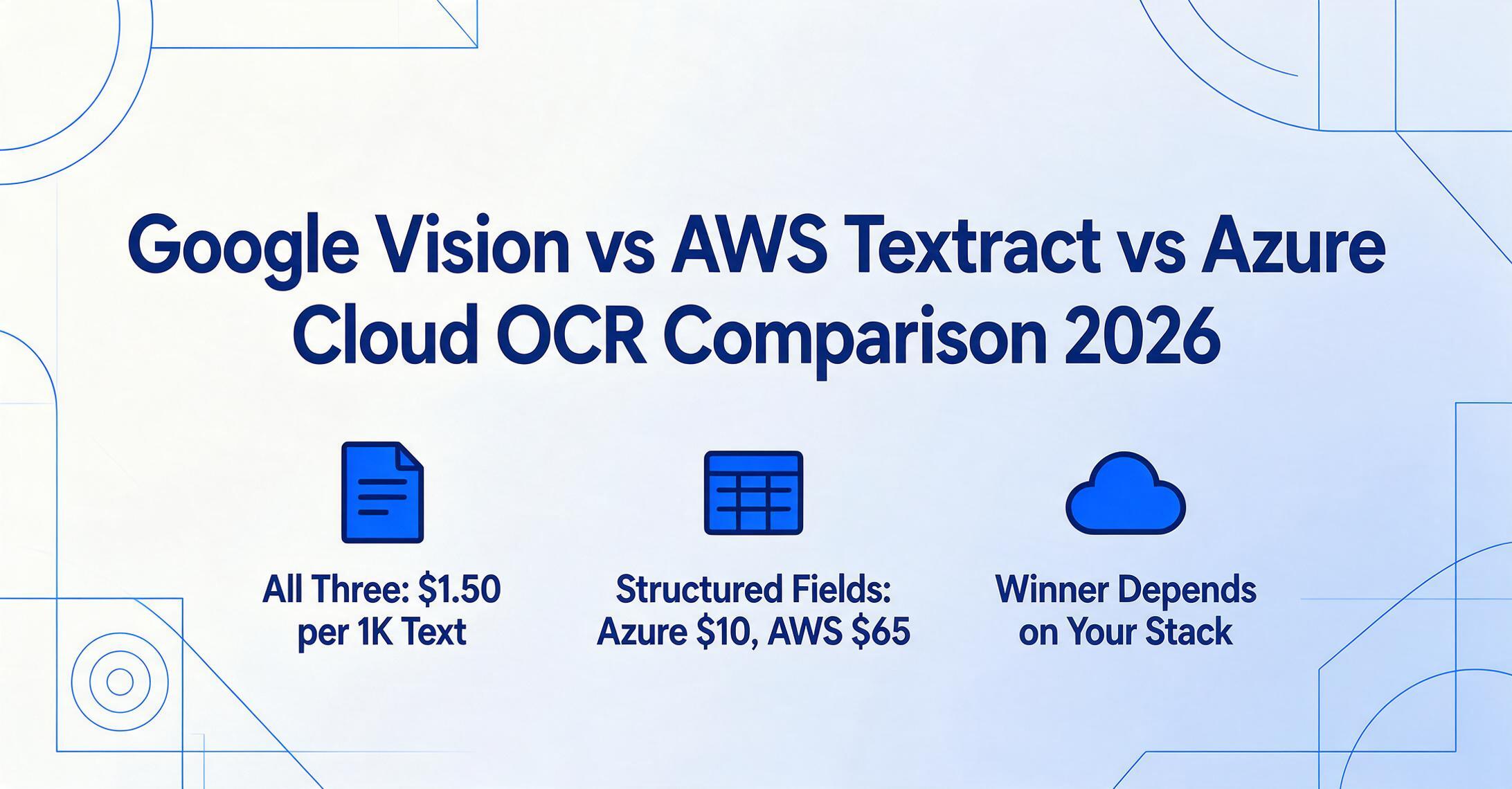
- Three cloud OCR APIs, three spec sheets, and they all look identical — $1.50 per 1,000 pages for text extraction at ~95% printed-text accuracy.
- The price that matters is not the basic OCR rate — it is the structured extraction tier, where Textract jumps from $1.50 to $65 per 1,000 pages while Azure's prebuilt models stay at $10.
- Your cloud stack already decided the cheapest OCR API to adopt before you opened a single doc — a team on AWS pays zero IAM integration overhead for Textract, and the same infrastructure advantage applies on Google Cloud and Microsoft 365.
Quick Comparison: Three Cloud OCR APIs Side by Side
Before diving into each dimension, here is the headline view. These numbers are the US East baseline for the first million pages per month. Prices shift by region and volume tier, but the relative positions stay consistent.
| Dimension | Google Cloud Vision | AWS Textract | Azure Document Intelligence |
|---|---|---|---|
| Basic OCR (per 1K pages) | $1.50 | $1.50 | $1.50 |
| Table extraction (per 1K pages) | Not available (Vision API) | $15.00 | $10.00 |
| Form/key-value (per 1K pages) | Not available (Vision API) | $50.00 | $10.00 (prebuilt) |
| Handwriting support | Yes (DOCUMENT_TEXT_DETECTION) | English only | 9 languages |
| Printed text accuracy | ~95% (DeltOCR Bench) | ~95% (DeltOCR Bench) | ~96% (DeltOCR Bench) |
| Free tier | 1,000 units/month per feature | 1,000 pages/mo (3 months) | 500 pages/month (F0) |
| Languages (printed) | 200+ | 6 (EN, ES, DE, FR, IT, PT) | 100+ |
| SDK languages | Python, Java, Node.js, Go, C#, PHP, Ruby | Python, Java, .NET, Ruby, PHP, Go, C++ | Python, C#, Java, JavaScript, Go |
| Prebuilt document models | Invoice, receipt, bank statement, W-2, pay slip, utility, identity (via Document AI) | Invoice/expense, identity, lending | Invoice, receipt, ID, W-2, 1098, health card, contract, marriage certificate |
The most important takeaway from this table: Google Cloud Vision and AWS Textract are not equivalent products. Vision API is a general image-analysis service that includes OCR. Textract is a purpose-built document extraction service. Google's equivalent to Textract is Document AI, but Document AI's pricing starts higher — $10-$30 per 1,000 pages for specialized processors. For a fair comparison, this article covers Vision API (basic OCR) and Document AI (structured extraction) where relevant.
Dimension 1: Pricing — The Per-Page Breakdown
For teams evaluating OCR APIs, the monthly bill is the first number that matters. But cloud OCR pricing is layered, and the cheapest option at 1,000 pages per month is not the cheapest at 100,000.
Google Cloud Vision Pricing
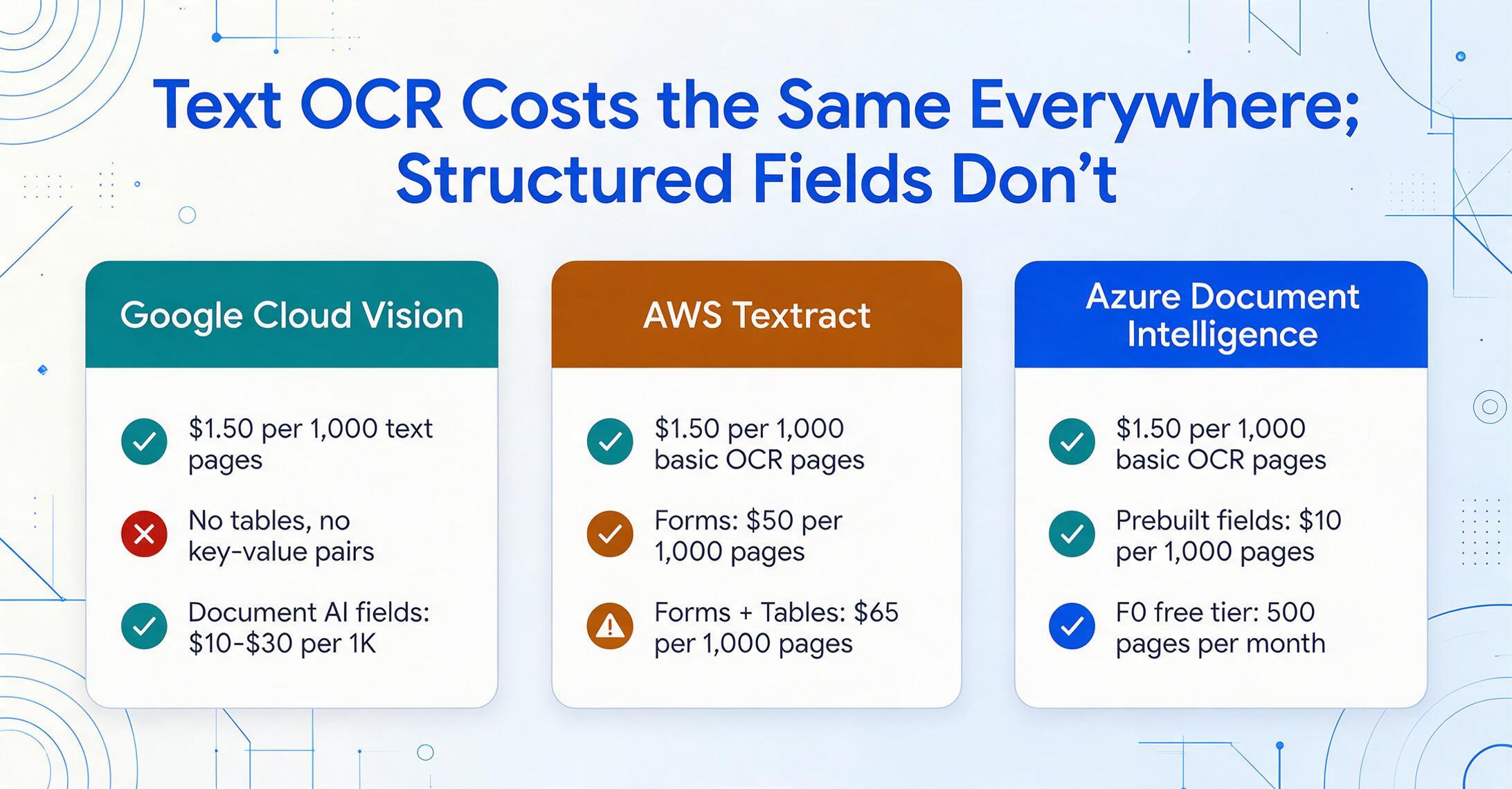
Cloud Vision uses a per-feature unit model. TEXT_DETECTION and DOCUMENT_TEXT_DETECTION each cost $1.50 per 1,000 units after the first 1,000 free units per month. Above 5 million units, the price drops to $0.60 per 1,000. But each feature request counts as a separate unit — analyzing one image for both text and labels costs 2 units. For a pure OCR workload, a single TEXT_DETECTION call is one unit. At 100,000 pages per month, you pay $150.
If you need structured extraction (invoices, forms, tables), Vision API alone won't get you there. You need Document AI, where the Enterprise Document OCR Processor runs $1.50 per 1,000 pages, but specialized processors like Invoice Parser or Form Parser cost $10-$30 per 1,000 pages.
AWS Textract Pricing
Textract bills by the page, but the rate depends entirely on which API you call. DetectDocumentText (basic OCR) costs $1.50 per 1,000 pages for the first million — the same as Google's baseline. Beyond one million pages, it drops to $0.60 per 1,000. The difference appears when you need structured data: AnalyzeDocument with Forms costs $50 per 1,000 pages, Tables adds $15 per 1,000, and Queries run $15 per 1,000. Combine all three and you pay $65 per 1,000 pages.
Volume discounts apply above one million pages per month, but below that threshold, the costs add up fast. A developer quoted Textract's basic OCR price ($0.0015/page) and built a budget, then discovered that the forms and tables features they actually needed cost 30-40x more. This is the most common Textract pricing surprise.
Azure Document Intelligence Pricing
Azure splits its offerings into Read, Layout, Prebuilt, and Custom tiers. The Read model (OCR-only) costs around $1.50 per 1,000 pages. Layout and prebuilt models (Invoice, Receipt, ID, W-2, etc.) run approximately $10 per 1,000 pages. Custom extraction models cost around $50 per 1,000 pages after free training on up to 500 documents. Add-on capabilities like query fields and formula extraction layer a 20-30% surcharge on top of the base model cost.
Where Azure wins on pricing is the prebuilt model tier: $10 per 1,000 pages for invoice and receipt extraction versus Textract's $50 per 1,000 for Forms. That 5x difference matters at scale. A team processing 50,000 invoices per month pays $500 with Azure prebuilt models versus $2,500 with Textract's Forms API.
Pricing Verdict
For basic OCR-only workloads, all three are essentially tied at $1.50 per 1,000 pages. The divergence happens when you need structured extraction. Azure's prebuilt models are the cheapest path to invoice/receipt parsing. Textract's combination pricing punishes teams that need forms + tables + queries simultaneously. Google's Document AI sits in the middle but requires migrating from Vision API to a different product tier.
Dimension 2: Document Features — Tables, Forms, Handwriting, and Languages
Raw OCR accuracy on clean printed text is table stakes — every cloud API exceeds 94% on typed documents. The real differentiators are the document types they handle well and the ones they don't.
Tables and Forms
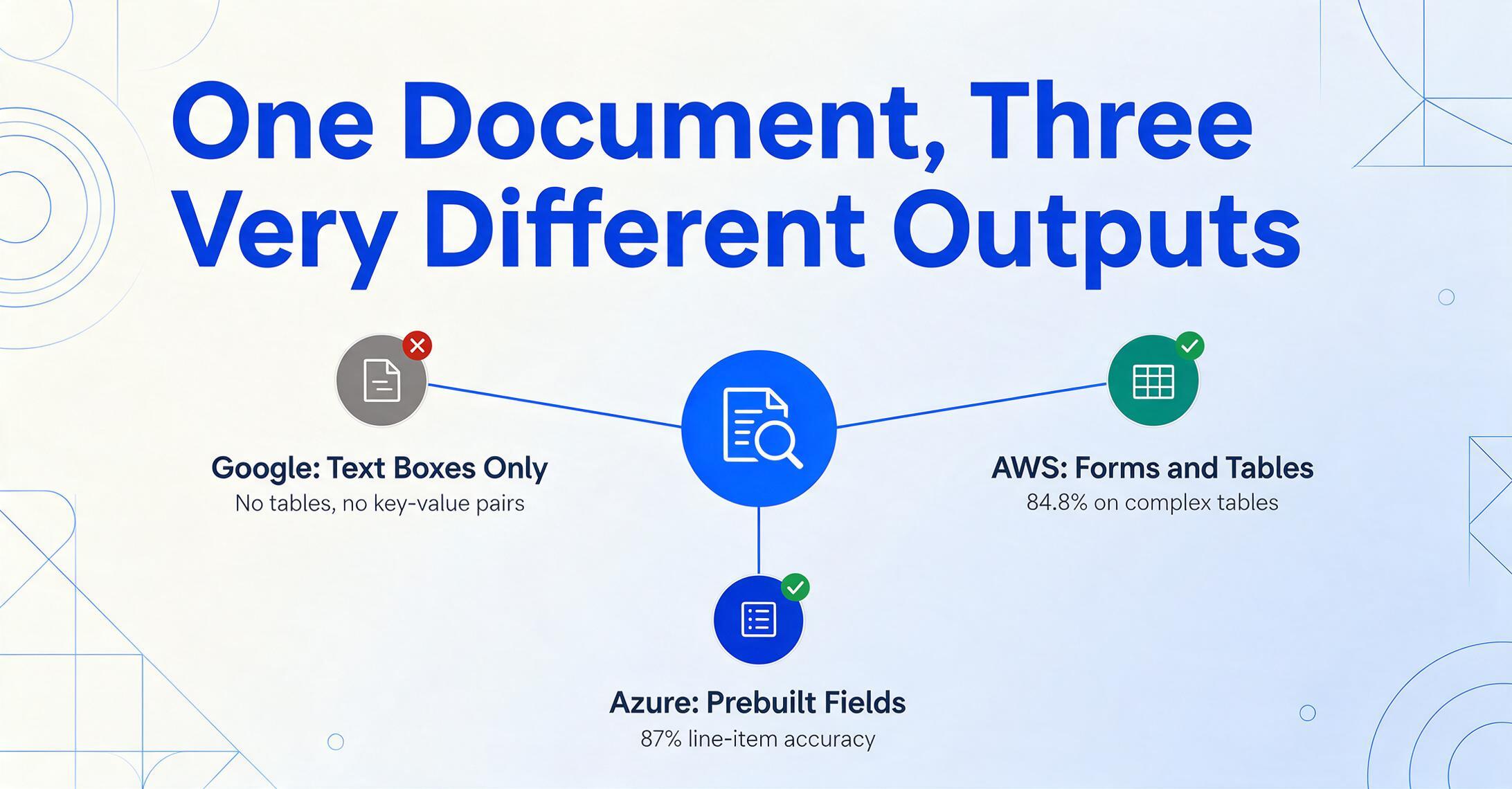
This is the dimension where the three APIs diverge most sharply. Google Cloud Vision (the base OCR product) does not extract tables or key-value pairs. It returns bounding boxes around detected text with a structural hierarchy — page, block, paragraph, word — but no understanding of table cells or form fields. If you need table extraction on Google Cloud, you must use Document AI's Layout Parser ($10 per 1,000 pages) or a custom processor.
AWS Textract's AnalyzeDocument API has dedicated Forms and Tables features. Forms returns key-value pairs (label: value) with confidence scores. Tables returns cell-level data with row/column indices and merged-cell handling. Independent benchmarks show Textract achieves approximately 84.8% accuracy on complex table extraction, though results vary significantly by document quality.
Azure Document Intelligence's Layout model handles tables and selection marks natively, and its prebuilt Invoice model outputs structured fields including line items — which is what most teams building invoice pipelines actually need. Benchmark data shows Azure achieving 87% line-item extraction accuracy, slightly ahead of both competitors on this specific task.
Handwriting
Google Cloud Vision supports handwriting through its DOCUMENT_TEXT_DETECTION feature, covering printed and handwritten text in a single call. The accuracy on clean handwriting is competitive, but degrades significantly on cursive or low-contrast scans.
AWS Textract added handwriting recognition in 2022, but it is limited to English documents and accuracy is noticeably lower than printed-text performance. The AWS documentation itself recommends a minimum of 150 DPI and upright text orientation for best results. On handwriting-heavy documents, many teams export Textract output to a downstream LLM for cleanup — a pattern seen frequently on Stack Overflow and AWS re:Post.
Azure Document Intelligence supports handwriting in nine languages including English, French, German, Italian, Japanese, Korean, Portuguese, Spanish, and Chinese Simplified. Benchmark data places Azure's printed/handwritten mixed-document accuracy above Textract's, though pure handwriting recognition still trails purpose-built VLM solutions.
Language Support
Google Cloud Vision leads here with support for 200+ languages for printed text and 50+ for handwriting. Azure Document Intelligence supports 100+ languages for printed text and 9 for handwriting. AWS Textract trails significantly with only six languages for printed text (English, Spanish, German, Italian, French, and Portuguese) and English-only for handwriting. If your document pipeline processes invoices from Japanese suppliers or contracts in Arabic, Textract is effectively unusable without a separate translation layer.
Dimension 3: Integration — SDK Quality, Ecosystem, and Documentation
This is the dimension that most comparison articles skip, but it determines whether your team ships in two weeks or two months.
Google Cloud Integration
Google's Python SDK is well-designed — the google-cloud-vision library is consistent with other Google Cloud client libraries, and the API reference is thorough. The Vision API supports direct image upload, base64 encoding, and Cloud Storage URIs, with Cloud Storage being the fastest option by roughly 25% over base64. Google Cloud's network infrastructure — running on the same private fiber that powers Search and YouTube — delivers 15-25% lower cross-region latency than AWS or Azure default networking tiers.
The downside: Google's product naming causes confusion. A developer who searches "Google Cloud OCR" finds Cloud Vision, Document AI, and the deprecated OCR On-Prem (shut down September 2025). Picking the wrong product means rebuilding the extraction layer later. Vision API gives you text with coordinates. Document AI gives you structured fields. The gap between them is a full engineering project.
AWS Integration
Textract's strongest integration advantage is native access through the AWS SDK in every major language. If your pipeline already uses S3 for document storage, Lambda for serverless processing, and Step Functions for orchestration, Textract drops in without cross-cloud configuration. The boto3 SDK is mature, well-documented, and consistent with the broader AWS API pattern.
However, common Stack Overflow complaints include: pagination handling that requires manual NextToken tracking, a 100-concurrent-job soft limit that requires quota increase requests for high-volume pipelines, and the need to build custom post-processing to reconstruct table structure from Textract's block-based response JSON. One Stack Overflow thread notes that Textract "strips the document of any structure like tabular information" in raw OCR mode, requiring developers to re-infer structure themselves.
Azure Integration
Azure Document Intelligence benefits from the broader Microsoft ecosystem. SDKs are available for Python, C#, Java, and JavaScript with full async support. For low-code teams, Power Automate connectors enable document processing workflows without any custom code — a significant advantage for organizations that already use Microsoft 365 and Power Platform.
The Document Intelligence Studio provides immediate accuracy metrics and field-level confidence scores during testing, which reduces the feedback loop during pilot evaluation. One r/AZURE user processing ~2.6 million pages of burst ingestion noted the service scaled without issues in about 12 hours, with prepaid volume discounts bringing down first-month costs. Azure's documentation is comprehensive but spread across Foundry Tools, AI Services, and legacy Cognitive Services pages — a reorganization that frustrates developers during initial setup.
Dimension 4: Accuracy — What the Benchmarks Actually Say
Cloud OCR vendors publish accuracy claims, but independent benchmarks tell a more nuanced story. The DeltOCR Bench (November 2025) evaluated leading OCR services on mixed document types and found the following printed-text accuracy scores:
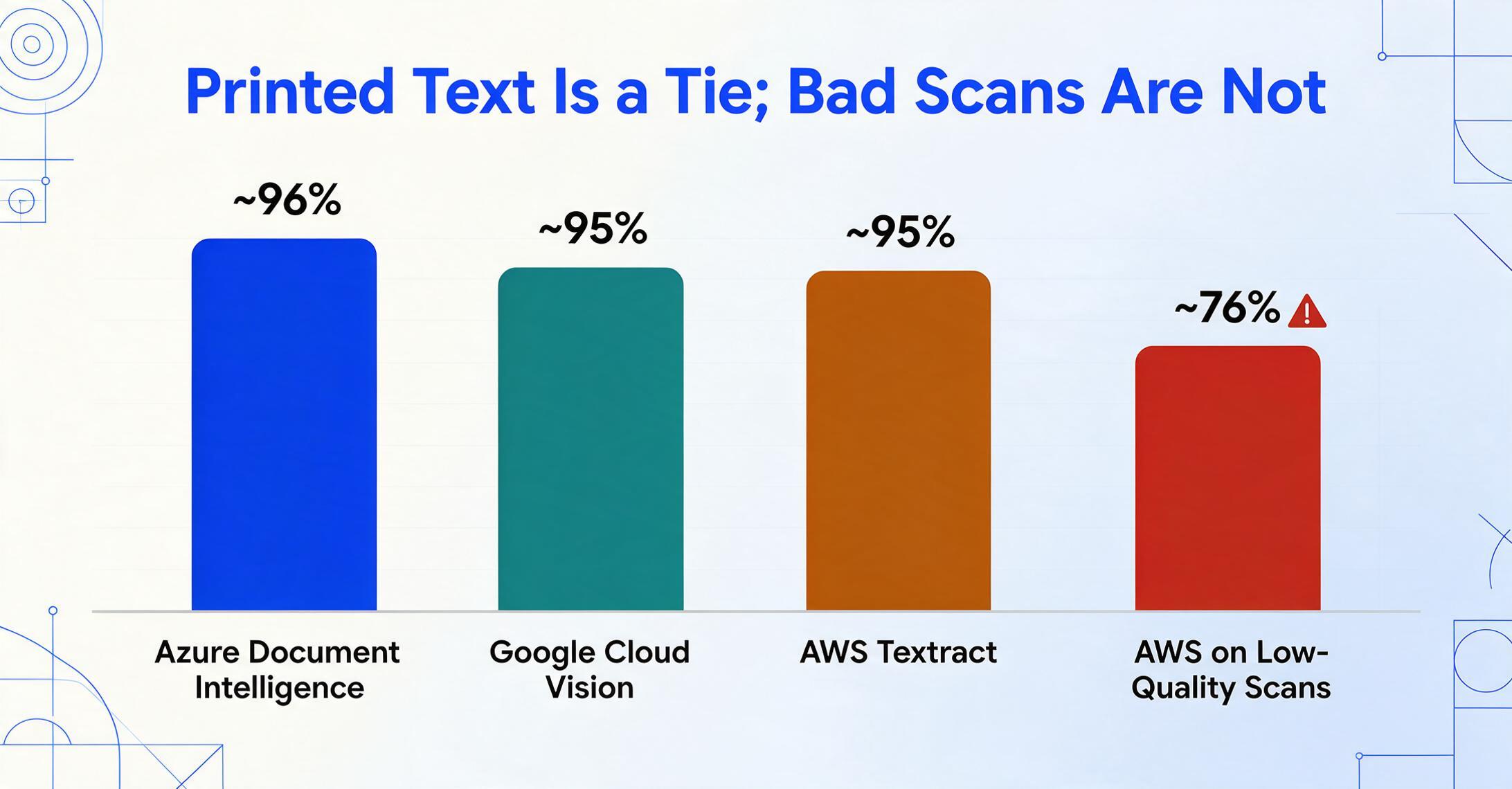
- Azure Document Intelligence: ~96% — highest printed-text accuracy among the three, particularly strong on standard forms and clean documents
- Google Cloud Vision: ~95% — essentially tied with Textract on printed text, with slightly better performance on dense document pages
- AWS Textract: ~95% — competitive on typed text but drops to ~76% on low-quality scans (per independent testing)
The BusinessWareTech 2025 invoice extraction benchmark tested field-level accuracy across five tools and found wider variance on financial documents:
- Azure Document Intelligence: 93% field accuracy on invoices
- Google Document AI: 82% field accuracy
- AWS Textract: 78% field accuracy
What to take from these numbers: On clean, typed documents, all three are excellent and the accuracy differences are marginal for most use cases. On invoices, complex layouts, and poor-quality scans, the gap widens — and Azure consistently outperforms in those harder scenarios. On handwriting, all three trail purpose-built VLM solutions, though Azure offers the broadest language coverage among the three.
One Stack Overflow user testing both Google Vision and Tesseract reported that "Google Vision landed on 66.6% accuracy" while Tesseract achieved 82% on their specific dataset — a reminder that accuracy is document-dependent and benchmarks are directional, not absolute. Always test with your own documents.
Key insight
The accuracy gap between cloud OCR APIs is smaller than the accuracy gap between any cloud OCR API and a vision-language-model approach. For complex documents, multi-modal LLMs (GPT-4o, Gemini, Claude) now achieve 95-98% field accuracy — a meaningful jump over the 78-93% range of traditional cloud OCR services. The trade-off is cost and latency, but the direction of travel is clear.
When Google Vision Makes More Sense
Google Cloud Vision is the right choice when you already run workloads on Google Cloud and your need is general-purpose OCR rather than structured document extraction. The first 1,000 units per month per feature are free, making it zero-cost for low-volume evaluation. The 200+ language support is unmatched — if your documents span Japanese, Arabic, Hindi, and European languages, Vision API handles them in a single call.
For teams that only need text (not tables, not forms), Vision API's $1.50 per 1,000 pages is competitive, and its throughput is excellent — one 2026 benchmark described it as the "speed king" for raw OCR processing. If your pipeline is "extract all text from 10,000 images and store it," Vision API is the fastest and cheapest path on Google Cloud.
But be precise about what you're evaluating. Cloud Vision is not a drop-in replacement for Textract or Document Intelligence. If you need structured extraction — invoices with line items, forms with key-value pairs — the comparison shifts to Google Document AI, which has its own pricing and learning curve.
When AWS Textract Makes More Sense
AWS Textract is the natural choice when your entire document pipeline already lives in AWS. If you store documents in S3, process them with Lambda, orchestrate with Step Functions, and review results through Amazon A2I, Textract integrates without any cross-cloud configuration — no VPC peering, no separate API keys, no different IAM patterns.
Textract's AnalyzeExpense API is purpose-built for invoice and receipt extraction and returns typed ExpenseDocument objects with summary fields and line-item groups — no need to build an extraction layer on top of raw OCR output. For teams processing standardized document types (same vendors, consistent layouts) at high volumes (50,000+ pages per month), Textract's predictable per-page pricing and volume discounts make it cost-predictable.
The Queries feature — where you ask natural-language questions like "what is the invoice total?" — is genuinely useful for extracting specific fields without building a schema. However, the 30-query-per-page limit and $15 per 1,000 pages cost for the Queries feature add up. And the six-language ceiling is a hard constraint for multilingual document pipelines.
When Azure Document Intelligence Makes More Sense
Azure Document Intelligence wins on three fronts: prebuilt model breadth, printed-text accuracy, and Microsoft ecosystem integration.
If your organization runs on Microsoft 365, uses SharePoint for document storage, or has Power Automate licenses, Document Intelligence is the lowest-integration-effort option. The prebuilt model library covers invoices, receipts, ID documents, W-2s, 1098 tax forms, health insurance cards, contracts, and marriage certificates — more specialized processors than either Google or AWS offers out of the box. For teams that process diverse document types, this reduces the need for custom model training.
The independent benchmark data consistently places Azure at or near the top for printed-text accuracy. On invoice extraction specifically, Azure's 93% field accuracy outpaces Google (82%) and AWS (78%) by a meaningful margin. If accuracy on complex or variable-format documents is your primary concern, Azure is the strongest traditional cloud OCR choice.
Azure's handwritten text support in nine languages gives it an edge over Textract's English-only handwriting. For mixed printed/handwritten documents like medical intake forms or field inspection reports, Azure handles both in a single pass.
No-Code Alternative: When You Don't Want to Build an OCR Pipeline at All
There is a scenario that none of the cloud OCR vendors directly address: you need document extraction but you are not a cloud-native engineering team. Building a pipeline around Vision API, Textract, or Document Intelligence requires — at minimum — writing code to upload documents, parse JSON responses, map fields to your output schema, and handle errors. This is a multi-week engineering project even for experienced teams.
ImageToTable.ai fills that gap. It sits in a different category from the three cloud OCR APIs — AI data extraction rather than OCR. Built on vision language models rather than traditional OCR, it understands documents semantically rather than by character recognition. You upload a document, type the column names you want (e.g., "Invoice Number," "Due Date," "Total"), and the AI locates each value by meaning — regardless of where it appears on the page or which vendor layout you are dealing with.
Where the cloud OCR APIs give you coordinates and confidence scores that you must assemble into answers, ImageToTable.ai gives you a spreadsheet. It supports batch processing — upload 50 invoices and get one Excel file — computed columns that calculate results during extraction (like "Line Total = Qty × Unit Price"), and a Google Sheets add-on that writes extracted data directly into your spreadsheet without any API integration.
If you are an engineering team evaluating cloud OCR APIs, ImageToTable.ai is not a replacement — it is a different tool for a different user. But if your organization has documents to extract and no dedicated integration team, it is worth testing before committing to a cloud OCR pipeline that would take weeks to build. See how it differs from traditional OCR versus AI extraction. And if you want these three cloud APIs weighed against the full OCR market — desktop tools, free converters, and AI extraction apps together — our OCR software market map covers that wider comparison.
FAQ
Which cloud OCR API is cheapest at 10,000 pages per month?
For basic OCR (text only), all three cost roughly the same — about $15 per month at 10,000 pages. For structured extraction (invoices with line items), Azure's prebuilt models at $10 per 1,000 pages are the cheapest, followed by Google Document AI at $10-$30 per 1,000 pages, with AWS Textract's Forms + Tables combination at $65 per 1,000 pages being the most expensive.
Which API handles handwriting best?
None of the three cloud OCR APIs are best-in-class for handwriting — purpose-built VLM solutions like GPT-5 (~95%) and Mistral OCR 3 (~89%) outperform all of them on isolated handwriting. Among the three, Azure Document Intelligence offers the broadest language support for handwriting (9 languages). Google Vision handles English handwriting adequately. AWS Textract only supports English handwriting with noticeably lower accuracy than printed text.
Can I use these APIs without a cloud account?
No. All three require an active cloud billing account. Google offers $300 in free credits for new customers. AWS provides a 3-month free tier (1,000 pages per month for Textract). Azure offers a free F0 tier at 500 pages per month. None of them work offline or without a registered payment method.
Which API supports the most languages?
Google Cloud Vision leads with 200+ languages for printed text and 50+ for handwriting. Azure Document Intelligence supports 100+ languages for printed text and 9 for handwriting. AWS Textract supports only 6 languages for printed text and English-only for handwriting — a significant limitation for multilingual document processing.
Do I need to train custom models?
For standard document types (invoices, receipts, W-2s, IDs), all three offer prebuilt models that work out of the box. For custom or unusual document formats, Azure and Google Document AI support custom training. AWS Textract supports custom adapters trained on your own documents (free to train, $25 per 1,000 pages at inference). Custom training typically improves accuracy on your specific document format by 5-15%, per vendor benchmarks.
What is the difference between Google Cloud Vision and Document AI?
Cloud Vision is a general-purpose image analysis API that includes OCR as one of its features. It returns text with bounding boxes and a structural hierarchy (page → block → paragraph → word). Document AI is a document-specific platform with specialized processors for invoices, receipts, bank statements, and other document types. Document AI returns structured fields (e.g., "Invoice Total: $1,234.56") rather than raw text. Cloud Vision is the cheaper, faster option for simple OCR. Document AI is the more accurate option for structured document extraction. For a detailed explanation of how these differ from AI extraction, see OCR vs AI Extraction.
Your Cloud Stack Decides
Google Cloud Vision, AWS Textract, and Azure Document Intelligence are each the right answer for a specific infrastructure context. If you are on Google Cloud and need text, use Vision API. If you are on AWS and need structured invoice extraction, use Textract's AnalyzeExpense. If you are on Microsoft 365 and need accurate prebuilt extraction across multiple document types, use Document Intelligence.
The temptation is to treat this as a benchmark question — which API has the highest accuracy? — and pick the winner. But the accuracy differences between the three on clean, typed documents are within 1-2%. The real cost difference is not cents per page; it is engineering hours spent on integration. And that cost is determined almost entirely by how well the API fits your existing infrastructure.
If you are not tied to a specific cloud and simply want to extract document data without writing integration code, consider starting with a tool designed for that use case. Test ImageToTable.ai on your own documents — no SDK installation required.