Why OCR Accuracy Drops on
Handwriting, Scanned PDFs & Tables — And What You Can Do
When an OCR vendor says "99% accuracy," they're almost always talking about character-level accuracy on clean, printed, English text — not whether the total on your supplier's handwritten delivery note will come out right. That number is real, but it comes with fine print: it was measured on documents selected to produce good results. Swap in a crumpled receipt photographed on a desk, a scanned contract from a fax machine, or a form filled out in ballpoint pen, and that same tool can deliver 60%, 40%, or lower. The accuracy doesn't drop randomly — it drops in predictable ways depending on what kind of document you feed it. Understanding those patterns is the difference between picking the right tool and blaming the wrong one.
Key Takeaways
- OCR vendors aren't lying about 99% accuracy — but the number comes from clean digital PDFs; swap in handwriting, a phone photo, or a complex table, and the same engine drops below 60%.
- The drop is predictable, not random — cursive eliminates the character gaps segmentation depends on, phone photos compound five simultaneous distortions, and merged table cells create structural ambiguity no pixel-level engine can resolve.
- A vision-language model reads semantically — it infers that a smudged digit between "$" and ".00" is a 9, not an 8 — the same mechanism that makes cursive and table cells readable; test your own three worst documents.
The Misconception About OCR Accuracy
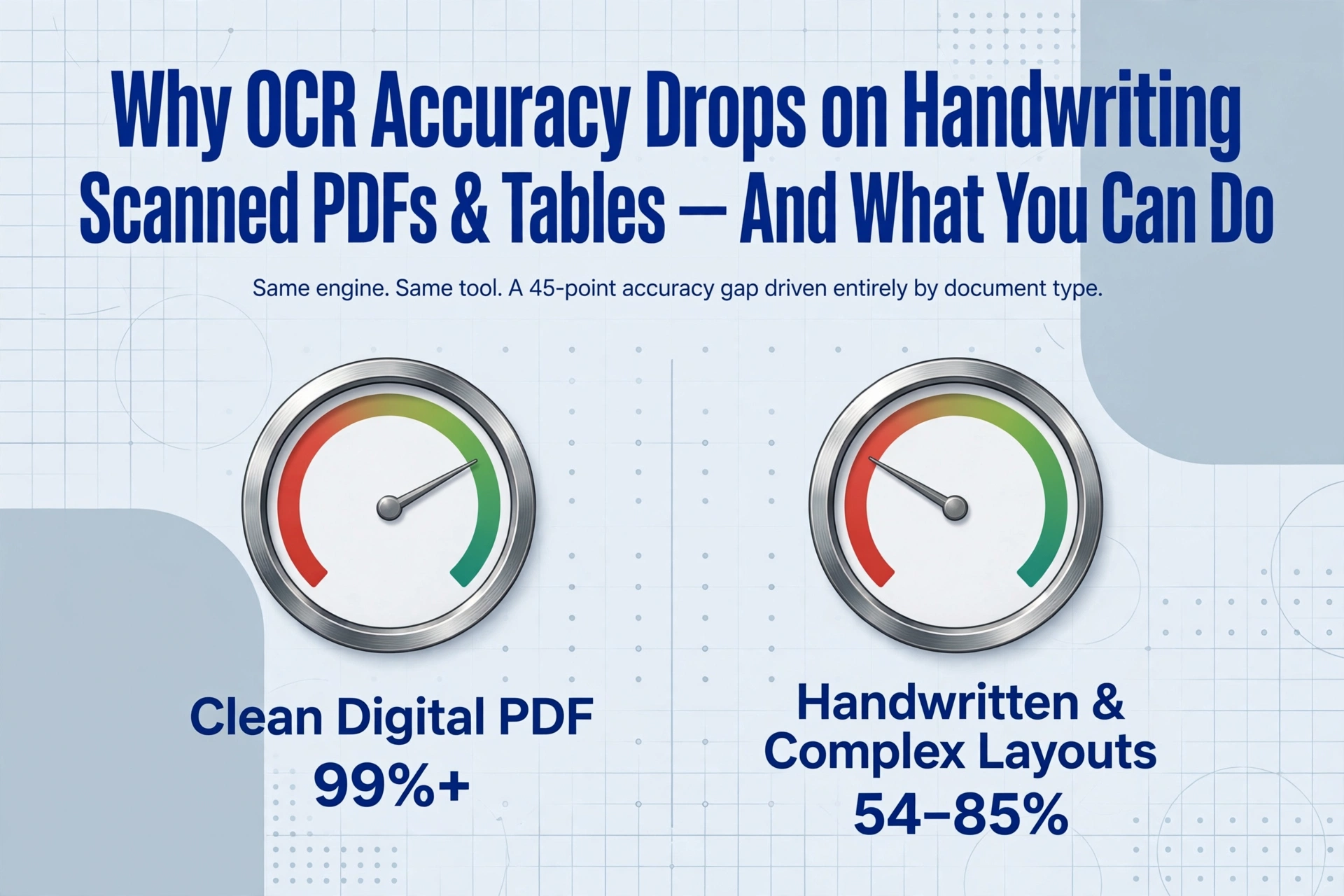
Every OCR tool on the market claims high accuracy — Tesseract, Google Cloud Vision, Amazon Textract — they all publish numbers in the 95-99% range. The AIMultiple OCR Benchmark confirms that leading cloud OCR services exceed 99.2% on Category 1 documents: typed texts on clean, high-contrast backgrounds. But that same benchmark reveals something else — on Category 3 (handwritten and complex layout documents), accuracy collapses to between 54% and 85%. Same tools. Same engines. A 45-point gap driven entirely by what kind of document goes in.
The Baseline — Clean Digital PDFs
A clean digital PDF — an invoice exported from accounting software, a contract saved from Word, a bank statement downloaded from a web portal — is the ideal input for any OCR system. The text is sharp, the fonts are standard, and contrast is near-perfect. On these documents, modern OCR engines routinely exceed 99% character accuracy. Remaining errors are typically confined to edge cases: unusual ligatures, very small font sizes (below 6pt), or ornamental characters in headers. This is the scenario that powers the "99% accuracy" claim — and it is the baseline from which every other document type represents a measurable degradation.
Scanned PDFs — Where Quality Degradation Begins
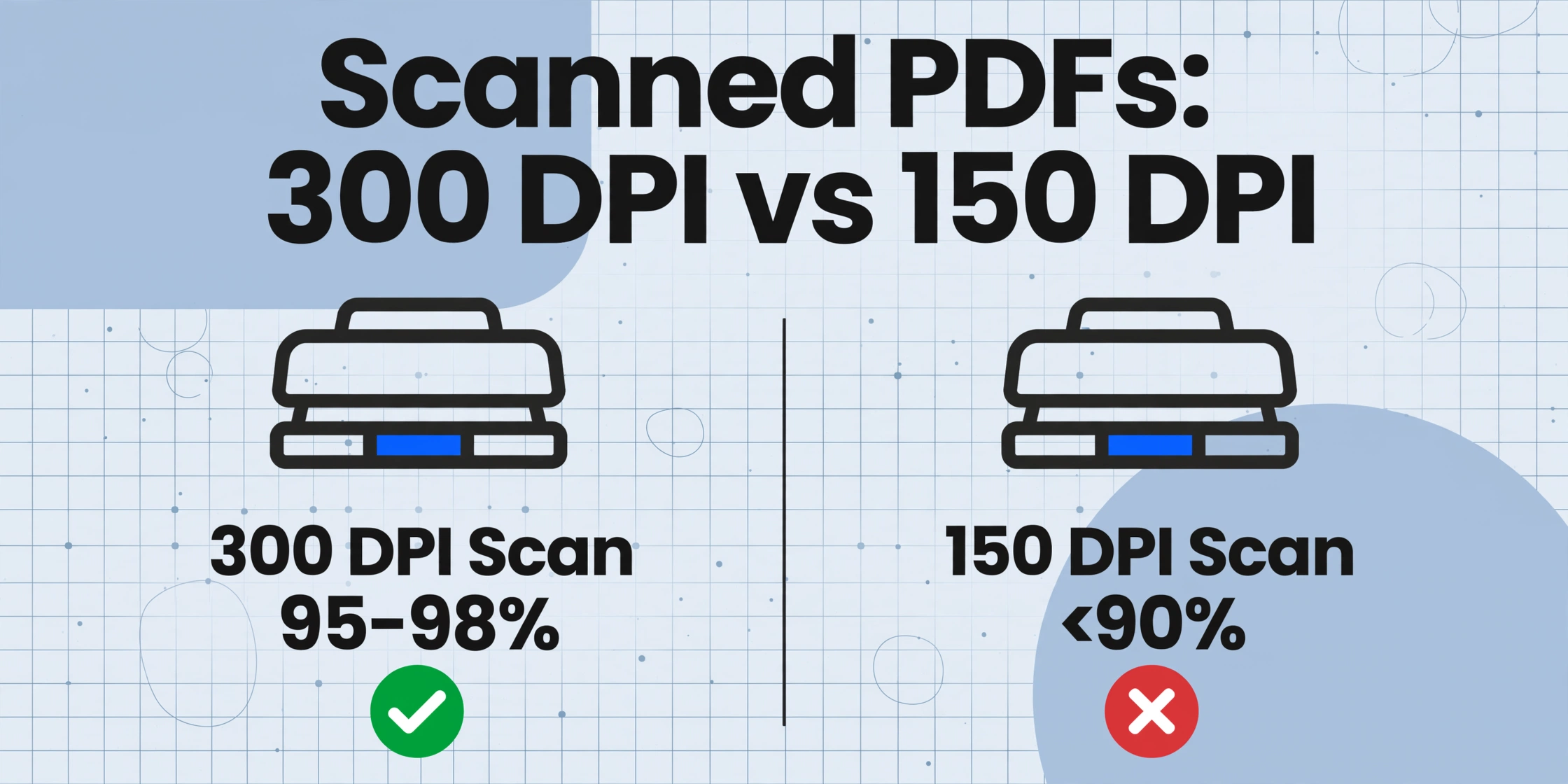
A scanned PDF is a photograph of a printed page, and that image introduces several sources of error a digital PDF does not have. Resolution loss is the first: a scan at 200 DPI gives the engine roughly 8 pixels of height for a 10-point character. Drop to 150 DPI — common in batch scanning — and the same character is just 6 pixels tall. The engine has to guess strokes from a handful of pixels.
Noise and artifacts add another layer. Scanner sensors introduce grain; paper texture (newsprint, thermal paper, recycled stock) adds patterns the engine can misinterpret as part of a character. Skew — even 2-3 degrees off straight — forces the engine to correct rotation before segmenting characters, measurably increasing error rate. And overlapping content — stamps, signatures, watermarks on top of printed text — creates ambiguity no pixel-level OCR can resolve: a "PAID" stamp across an invoice total renders both unreadable.
A good 300 DPI scan of clean printed text still achieves 95-98% character accuracy. A low-quality 150 DPI scan of the same document can drop below 90%.
Handwriting — The Fundamental Boundary Problem
Handwritten text is not a harder version of printed text. It is a fundamentally different recognition problem. Printed characters have clear, consistent boundaries — gaps between letters, uniform baselines, predictable shapes. An OCR engine segments a printed word into individual characters using those gaps, then matches each shape against a library. This works because the segmentation cue (the gap) is reliable.
Cursive handwriting removes those boundaries entirely. Letters connect. The end of one character is the beginning of the next. A lowercase "n" followed by an "i" can look identical to a "u." An "r" followed by an "n" can look like an "m." The engine cannot segment the word because the gaps have been deliberately eliminated by writing quickly.
The industry numbers confirm this. AIMultiple's benchmarks show that traditional cloud OCR services exceeding 99% on printed text drop into the 60-85% range on handwriting. On messy cursive or mixed printed-and-handwritten documents, the gap can reach 40 percentage points or more. Printed-style handwriting — block capitals — fares better because it preserves boundaries, but introduces its own problem: infinite shape variability. No two people form a "G" the same way, and any pattern-matching library has blind spots. For tools designed to handle this, see our handwriting OCR comparison.
Phone Photos — Multiple Degradation Factors Combined
If scanned documents degrade accuracy through two or three factors, phone photos combine five or six simultaneously. Perspective distortion is the most destructive: unless the phone is held perfectly parallel to the document — which almost never happens — the page is photographed at an angle, creating a trapezoid where character sizes and line spacing vary inconsistently across the image.
Lighting variation compounds the problem: a bright spot in the center, shadows at the edges, a shadow across a row of numbers that makes characters appear to merge. Motion blur from even a subtle hand tremor blurs character edges by 1-2 pixels. Reflections and glare from glossy paper can wash out entire sections of text entirely.
The cumulative effect is dramatic. A tool that scores 99% on a digital PDF can drop below 70% on a phone photo of the same document. The information is all there on the physical page, but the image has degraded it past reliable recognition.
Complex Tables and Merged Cells — When Structure Collapses
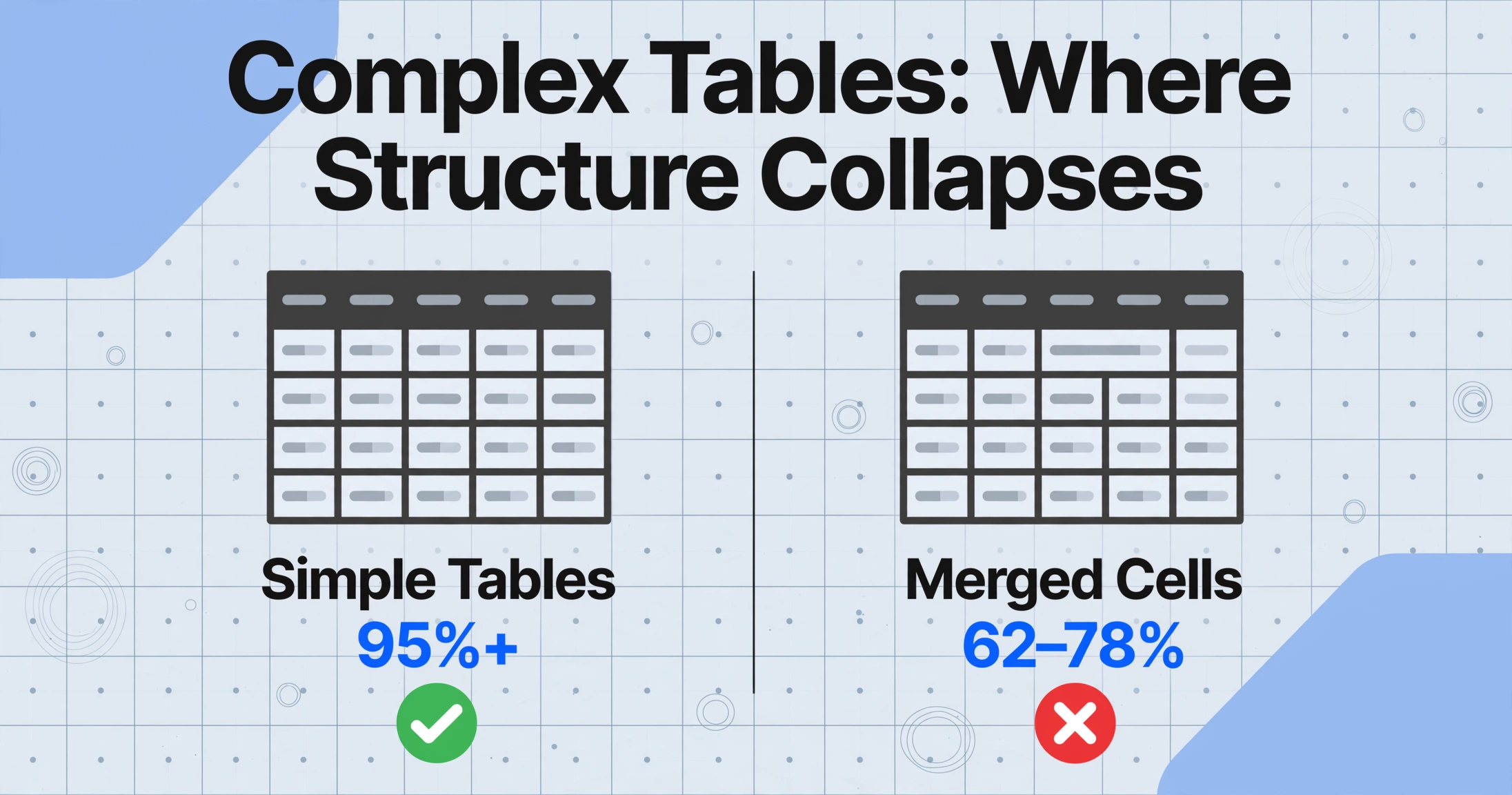
Tables pose a different kind of challenge. It is not about reading characters — modern OCR can read the numbers inside cells reasonably well. The problem is structural: the engine must determine which cell each value belongs to, and that requires understanding the table's grid, not just its characters. Merged cells are the most common breaker. A header spanning three columns, a "Notes" cell spanning two rows, a subtotal label merging across the first column — these patterns break the row-by-row assumption most OCR engines use to reconstruct tables.
Academic research confirms this is an open problem. A 2024 arXiv study found that even specialized table extraction models achieve only 62-78% accuracy on complex tables with merged cells and irregular structures — a 20+ point gap below simple table recognition. Nested tables and multi-page tables where headers shift position push failure rates even higher. VLM-based extraction reads tables semantically — it can recognise that "Item Description" governs the column beneath it regardless of how many cells that header spans. For more on how field-level accuracy differs from character metrics, see our guide on what OCR accuracy actually means.
What You Can Actually Control
Several accuracy factors are within your control, and addressing them can often yield bigger gains than switching engines:
Document preparation. Scan at 300 DPI minimum — the universally recommended OCR resolution. Use black ink on white paper for maximum contrast. Flatten folded or wrinkled documents before scanning; a crease through a line of text is the same as missing data.
Tool selection. The critical differentiator is whether a tool uses pattern-matching OCR (Tesseract, classic ABBYY, most cloud APIs) or vision-language model extraction (ImageToTable.ai and newer LLM-powered services). VLM-based tools read documents semantically — they can use surrounding context to resolve ambiguous characters. A smudged digit between a dollar sign and ".00" is almost certainly a 9, not an 8 — a VLM can make that inference; a pixel-based OCR engine cannot.
Post-processing validation. Build format expectations into your workflow: an invoice number follows a pattern, a date follows a calendar, a total is a positive number. When extracted data violates a pattern, flag it for review — not because the tool is bad, but because certain document types always produce uncertain results. Rules like "Total must equal the sum of line items ± 0.01" catch the errors that matter most without reviewing every field.
How to Read Vendor Accuracy Claims
Every OCR vendor publishes numbers. Here is how to read them:
Ask what document type was tested. If the vendor does not specify, assume the easiest type available. Ask what metric was used. Character-level accuracy (CER) is the most forgiving. Field-level accuracy — whether each extracted data point is completely correct — determines whether your workflow works. A tool with 99% CER can have 80% field-level accuracy on the same document, as explained in our OCR accuracy metrics guide. Ask about error distribution. If errors cluster in numbers, codes, and identifiers — which they often do, because these are the characters that look most similar to OCR engines — the same error rate can be catastrophic. Test on your own documents. Three of your worst-case documents, five minutes of testing, will tell you more than any published benchmark.
FAQ
Why does OCR accuracy drop so much on handwriting?
Traditional OCR works by segmenting text into individual characters. Cursive removes the gaps that segmentation depends on — letters connect, so the engine cannot determine where one character ends and the next begins. This is a structural problem, not a quality problem. Even perfect-resolution scans of cursive produce lower accuracy than mediocre scans of printed text.
What is the best resolution for scanning documents for OCR?
300 DPI is the industry standard. Below 200 DPI, accuracy drops measurably as character edges become too coarse for reliable segmentation. Above 600 DPI, file sizes grow without further accuracy gains.
Can AI-based OCR tools handle document types that traditional OCR cannot?
Vision-language model (VLM) tools handle a wider range of document types because they read semantically rather than pixel-by-pixel. They use context to resolve ambiguous characters and maintain structural awareness of tables and merged cells. However, no tool achieves equal accuracy across all types, and very poor-quality inputs degrade any system.
Does document format (PDF vs JPG vs PNG) affect OCR accuracy?
The format matters less than what is in it. A digital PDF with embedded text needs no OCR — the text is already machine-readable. A scanned PDF and a JPG of the same document produce equivalent accuracy at equal resolution and compression.
Why does my OCR tool work well on invoices but fail on delivery notes?
This is a structure issue. Invoices follow predictable key-value layouts. Delivery notes often use complex tables with merged cells, irregular row heights, and multi-line cells — structural patterns that traditional OCR handles poorly. The engine has not changed; the document has crossed a structural threshold the tool cannot parse.
Can preprocessing improve OCR accuracy on difficult document types?
Basic preprocessing — deskewing, grayscale conversion, adaptive thresholding — can improve accuracy by 5-15% on scanned documents and phone photos. But it will not close the gap on handwriting or complex tables because those are structural recognition problems, not image quality problems.