7 PAYG Summary Data Errors That Trigger
ATO Reconciliation Mismatches
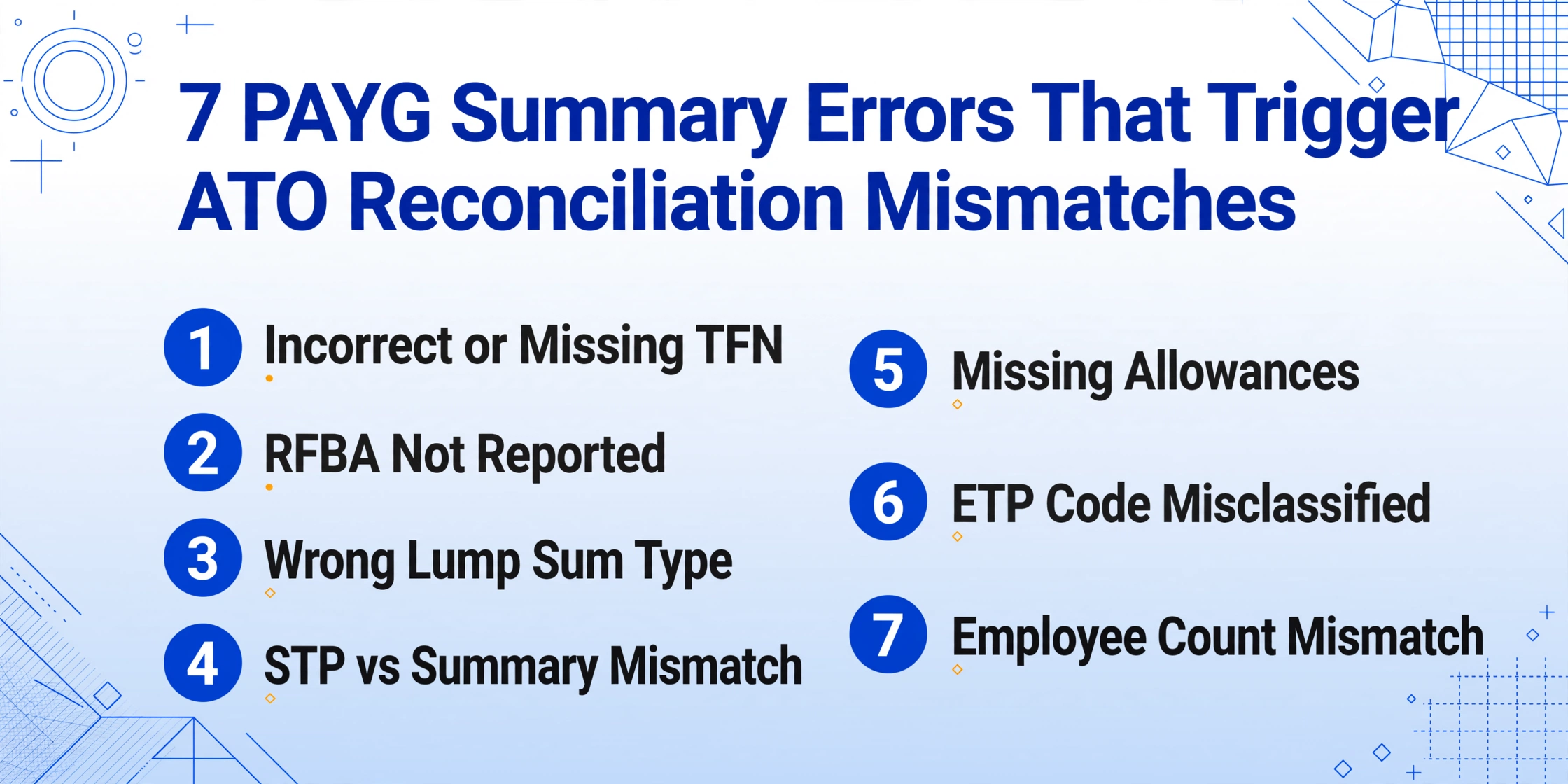
A payroll officer at a mid-size manufacturing company in Brisbane spent three days in September 2025 resolving a single ATO data-matching query. The query was triggered by a $210 discrepancy on one employee's PAYG payment summary — the difference between $87,450 (what the employer reported as gross payments) and $87,240 (what the employee declared on their tax return, based on their final payslip). The root cause: a manual pay adjustment for $210, processed after the STP finalisation declaration had been submitted, was reflected in the payroll system but not on the payment summary. The correction required an amended STP report, a reissued payment summary, and a response to the ATO's query letter — approximately six hours of work to resolve a three-digit discrepancy. And this is not unusual: the ATO's data-matching system flags discrepancies automatically, and 85-89% of flagged cases result in an actual adjustment. This article covers the seven most common PAYG summary errors, the specific ATO consequence each triggers, and — most importantly — how to prevent them during data extraction rather than fix them after lodgment.
Key Takeaways
- A Brisbane payroll officer spent six hours resolving a single $210 discrepancy — one pay adjustment processed after STP finalisation — because the ATO's automated data-matching flags discrepancies of any size and 85–89% end in adjustments.
- The seven most common PAYG errors share one root cause that isn't carelessness: the gap between payroll system output and reconciliation spreadsheet is bridged by human eyes during a compressed July window when the same person is simultaneously handling STP finalisation, super deadlines, and employee inquiries.
- Your role during extraction is not data entry — it's exception management: Computed Columns validate TFNs, flag RFBA gaps, cross-reference lump sum types against termination status, and surface the 8 rows out of 310 that actually need a second look.
How PAYG Summary Errors Reach the ATO — and Why Most Are Caught After the Fact
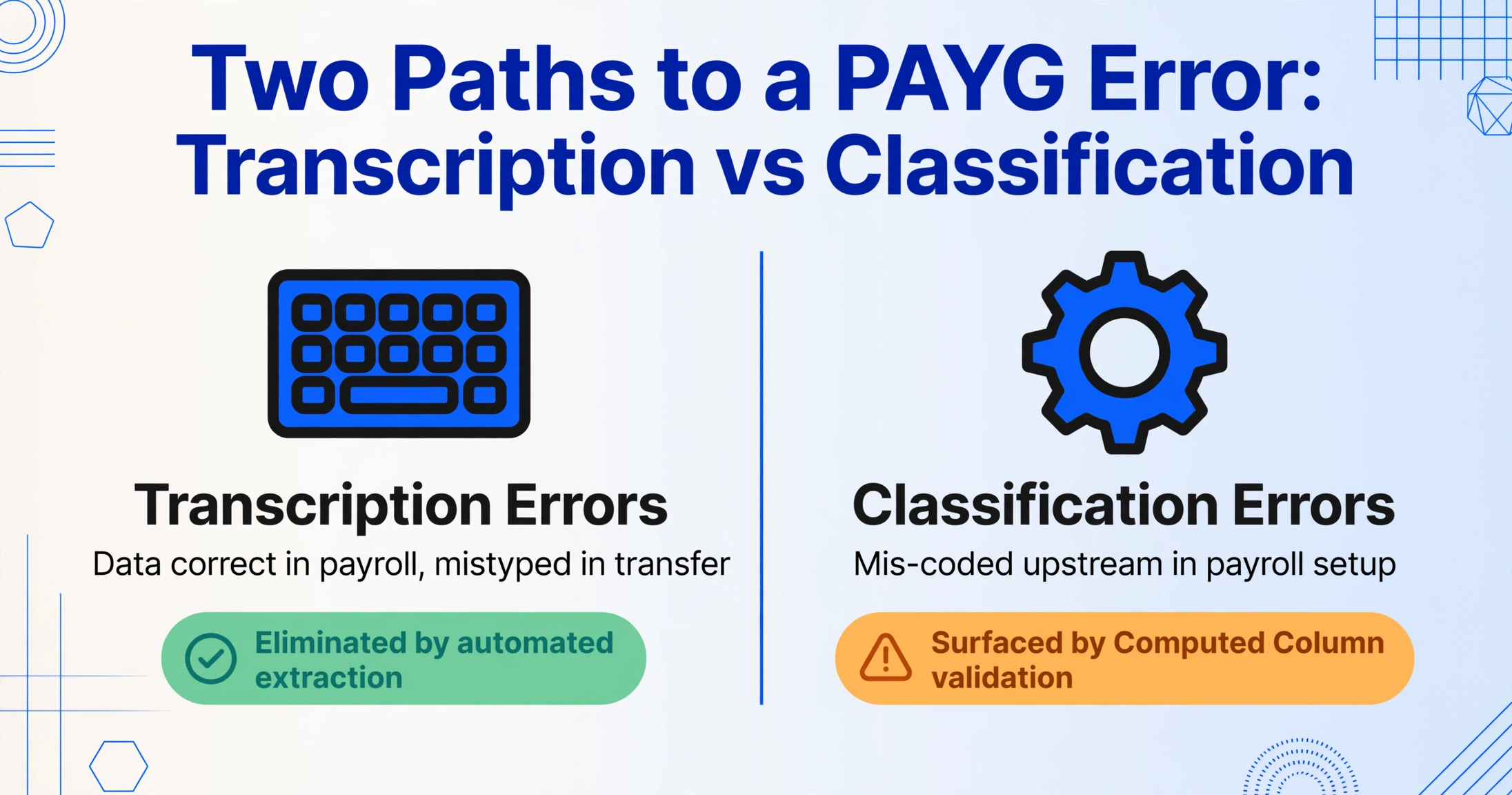
PAYG payment summary errors fall into two categories: transcription errors (data that was correct in the payroll system but was mistyped when transferred to the summary or reconciliation spreadsheet) and classification errors (data that was incorrectly categorised in the payroll system and therefore appears incorrectly on the summary). Transcription errors are the easier type to prevent — automated extraction eliminates them because the machine reads the summary directly, with no human typing step between the document and the output. Classification errors are harder to prevent at the extraction stage because the error originates upstream — in the payroll system configuration, the STP reporting setup, or the manual coding of a payment type — but extraction can still surface them through Computed Column validation rules that flag anomalous patterns before the summary reaches an employee or the ATO.
Both types of errors, once lodged, trigger one of two ATO responses: a data-matching query (the ATO's automated system detects a mismatch between the employer's reported figure and the employee's tax return, and issues a letter requesting explanation) or — if the error is discovered during a formal review or audit — a shortfall penalty of 25% to 75% of the underpaid tax, depending on whether the ATO assesses the error as failure to take reasonable care, recklessness, or intentional disregard. The seven errors below are ordered from most common to most consequential — but any one of them, if repeated across multiple employees, can escalate from a single query letter to a systemic compliance review.
Error 1: Incorrect or Missing TFN — The Nine-Digit Landmine
ATO Consequence: Withholding at 47% (top marginal rate + Medicare levy) instead of the employee's marginal rate if the TFN is missing. If the TFN is present but incorrect — typically two digits transposed — the employee's myGov pre-fill shows an employer they do not recognise, the employee disputes the income statement, and the ATO issues a data-matching query to the employer. Resolution: 30 minutes to two hours per affected employee.
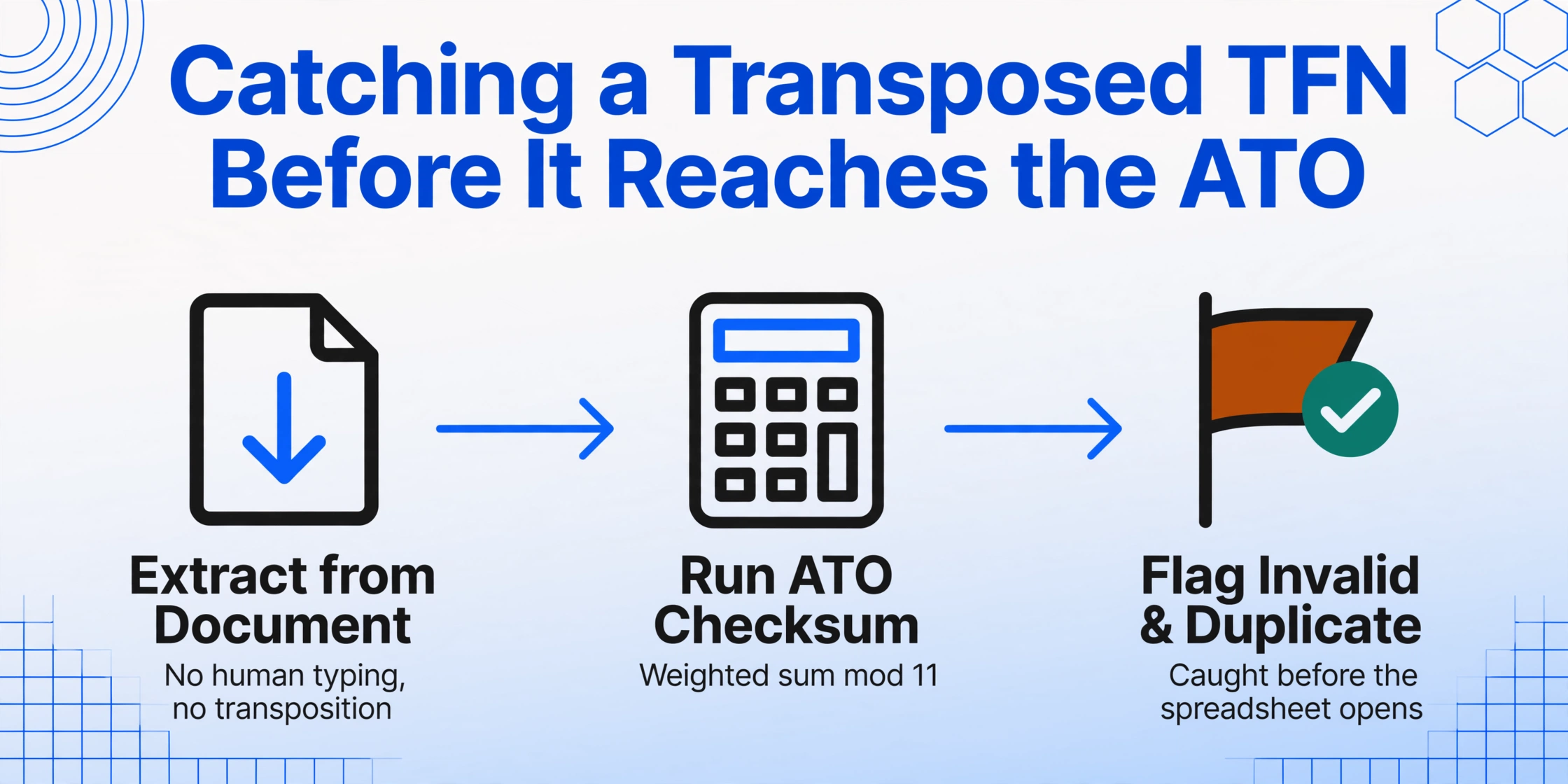
How It Happens: The payroll officer types the TFN from the payment summary into the reconciliation spreadsheet and transposes two digits — 123 456 789 becomes 123 456 798. All nine digits are present, so a visual scan does not catch the error. The spreadsheet is used to verify STP data, and the incorrect TFN makes it into the finalisation. For paper summaries from third-party providers, the TFN may be handwritten and difficult to read — an '8' that looks like a '3' under poor scan quality becomes a three-hour investigation.
Prevention During Extraction: Automated extraction reads the TFN from the document's visual content — no human typing, no transposition. For batch processing, a Computed Column that runs the ATO's TFN checksum algorithm (weighted sum of first eight digits modulo 11 must equal the ninth digit) on every extracted TFN flags invalid numbers before the spreadsheet opens. An additional column that flags duplicate TFNs across rows catches the scenario where two employees share the same incorrectly entered TFN — a pattern that would otherwise survive both extraction and visual review.
Error 2: Reportable Fringe Benefits Not Reported — or Reported Incorrectly
ATO Consequence: If RFBA is omitted from the summary but the employee actually received reportable fringe benefits, the employee's income for Medicare levy surcharge and HELP repayment purposes is understated. The employee may receive a tax refund they are not entitled to, or avoid a levy they should have paid. When the ATO cross-references the employer's FBT return (lodged by 21 May for the FBT year ending 31 March) against the RFBA amounts reported on PAYG summaries, a discrepancy triggers an employer-level review — not just a single-employee query. An incorrect RFBA on one summary can cascade into a compliance review of the employer's entire FBT reporting.
How It Happens: The FBT year (1 April to 31 March) and the financial year (1 July to 30 June) do not align. A fringe benefit provided in April 2026 belongs to the 2026-27 FBT year but may appear on an employee's 2025-26 PAYG summary if the payroll team incorrectly applies financial-year logic to the RFBA field. Alternatively, the RFBA figure was correctly calculated for the FBT return but never updated in the payroll system — the summary shows $0 RFBA, but the FBT return reports a non-zero grossed-up value for that employee, and the ATO's automated cross-reference flags the inconsistency.
Prevention During Extraction: A Computed Column that checks: if an employee's total remuneration (Gross Payments + any salary sacrifice) exceeds $100,000 and RFBA = $0, flag for review — high-income employees are statistically more likely to receive reportable fringe benefits. A separate validation rule: for any employee with a known fringe benefit arrangement (company car, health insurance, entertainment benefits), confirm RFBA is non-zero and matches the FBT return schedule. The extraction spreadsheet, cross-referenced against the FBT return before the 14 July finalisation, catches RFBA mismatches while there is still time to correct the summary.
Error 3: Wrong Lump Sum Type — When A, B, D, and E Get Mixed Up
ATO Consequence: Misclassifying a lump sum payment changes the employee's assessable income and tax liability. Entering a $15,000 genuine redundancy payment as Lump Sum A (taxable unused annual leave) instead of Lump Sum D (tax-free redundancy component) means the employee's income statement shows $15,000 of additional assessable income. The employee faces tax on that amount — potentially $4,875 at the 32.5% marginal rate plus Medicare levy — disputes the assessment, and lodges a complaint. The employer must reissue the summary, submit an amended STP report, and potentially compensate the employee for any penalty interest the ATO charged on the incorrect assessment. Worse: a liquidator or administrator reviewing a business that has been misclassifying lump sum payments across multiple employees for multiple years may identify a systemic payroll compliance failure — a far more serious finding than a single misclassified payment.
How It Happens: The payroll software's termination payment workflow asks the payroll officer to select a lump sum type from a dropdown. The officer, unfamiliar with the tax distinction between Type A (annual leave — taxable) and Type D (redundancy — tax-free), selects the wrong option. The software generates the summary with the incorrect classification, and no subsequent review catches it because the dollar amount — $15,000 — appears plausible regardless of the type. The error only surfaces when the employee's tax return is assessed and the ATO's system detects that a lump sum D was reported by the employer but the employee's return shows taxable income that includes the amount — or vice versa.
Prevention During Extraction: Create a validation rule during extraction: for any employee with a non-zero Lump Sum D, flag the row for verification of a genuine redundancy or early retirement scheme — and require documentation (redundancy letter, early retirement scheme approval) before the summary is issued. For any employee with a non-zero Lump Sum A or B, confirm that the employee actually terminated during the financial year — a current employee should not have unused leave lump sums. A Computed Column that cross-references leave balances from the payroll system against the lump sum amounts on the summary catches discrepancies where the leave payout figure on the summary does not match the accrued leave balance at termination.
Error 4: STP Finalisation Figures Not Matching Payment Summary Figures
ATO Consequence: For employees reported through STP, the STP finalisation declaration and the PAYG payment summary (if both exist for the same employee for the same period — which they should not, but sometimes do) must report identical figures. A mismatch means the employee receives two different versions of their income from the same employer: one through myGov (STP) and one on the paper/PDF summary. The employee's tax return — which uses the myGov pre-fill — may not match the payment summary they hold. The ATO's data-matching detects the inconsistency and queries both the employer and the employee. Resolution: the employer must determine which figure is correct, correct the incorrect one (STP update event or reissued summary), and notify the employee.
How It Happens: The most common scenario: an employee transitioned from a pre-STP period to an STP period within the same financial year (e.g., the employer implemented STP in October 2025). The payroll system generates a PAYG payment summary for the July-September pre-STP period and STP data for the October-June period. If the two datasets are not reconciled before finalisation, the employee may appear in both reports with overlapping or inconsistent figures. A less common but equally problematic scenario: a manual pay adjustment entered after STP finalisation updates the payroll system but the corresponding STP update event is not submitted — the STP data the ATO holds is now out of date, but no discrepancy flag is visible within the employer's own systems.
Prevention During Extraction: For any employee who received both a traditional PAYG summary (pre-STP period) and STP-reported data (post-transition period) within the same financial year, extract both data sources into the reconciliation spreadsheet and reconcile the combined totals against the payroll system's full-year report. The extraction spreadsheet becomes the single source of truth: VLOOKUP each employee's TFN against the STP data and the pre-STP summary, confirm the sum of gross payments and tax withheld across both sources equals the payroll year-to-date report, and flag any employee whose combined figure does not match. This prevents the scenario where the STP data and the summary both look internally consistent but report different totals for the same employee.
Error 5: Missing Allowances — When Tax-Free Payments Go Unreported
ATO Consequence: Allowances must be separately itemised on the PAYG payment summary because different allowance types have different tax treatments. A tool allowance may be tax-free up to a specified ATO rate; a travel allowance may be partly taxable depending on whether a travel diary was maintained; a first aid allowance is fully taxable. If an allowance is lumped into Gross Payments without separate itemisation, the employee cannot claim the correct tax treatment on their return. If the allowance is omitted entirely from the summary, the employee's reported income is understated — and the ATO's data-matching (which compares the employer's BAS wage totals against the sum of employee summary figures) detects the gap. An allowance discrepancy typically surfaces as a BAS-to-summaries mismatch — the wages reported on BAS are higher than the sum of gross payments on summaries, triggering an ATO query about unreported employee income.
How It Happens: The payroll system may code allowances as part of gross wages for internal reporting purposes but print them as a separate line on the PAYG summary. If the payroll officer extracting the summary types the gross payment figure as it appears in the payroll register — which may include allowances — but the summary prints allowances separately, the extracted figure is too high. Conversely, if the payroll officer types the allowance amounts from the summary but forgets to include them in the gross payment total, the extracted figure is too low. The error is a mismatch between what the payroll system reports internally and what the summary reports externally — and the extraction spreadsheet that trusts one source without verifying against the other propagates the error.
Prevention During Extraction: Extract allowances as separate columns in the output schema. A Computed Column that sums Gross Payments plus all allowance columns and compares the result against the payroll system's year-to-date gross earnings report catches the case where allowances were included in gross in one source but separated in another. A separate validation column that flags any non-zero allowance type where the amount appears implausible — a $50,000 tool allowance for an office worker, or a $200 travel allowance for a field technician who travelled 5,000 km during the year — catches misclassification without requiring line-by-line review.
Error 6: ETP Components Misclassified — Wrong Code, Wrong Tax
ATO Consequence: An Employment Termination Payment (ETP) is assigned an ETP code that determines its tax treatment: R for genuine redundancy, O for other (resignation, dismissal, golden handshake), D for death benefit, B for invalidity, N for non-excluded payments. The ETP cap — the maximum amount that receives concessional tax treatment — depends on the code. A payment coded as O (other) when it should be R (redundancy) means the employee receives a lower ETP cap: $245,000 for 2025-26 (indexed annually) for code R, but potentially only the whole-of-income cap of $180,000 minus other taxable income for code O — a difference of tens of thousands of dollars in taxable vs concessionally taxed income. The employee discovers the error when their tax return shows a much larger tax liability on the ETP than expected. The employer must reissue the ETP payment summary with the correct code, recalculate the tax withheld, and potentially compensate the employee for any additional tax and interest.
How It Happens: The payroll officer processing the termination in the payroll software is presented with a dropdown of ETP codes — R, O, D, B, N — with minimal on-screen explanation of what each code means for tax purposes. The officer selects the code that "sounds right" rather than the code that matches the termination reason. For a redundancy where the employee signed a deed of release (which may use language like "ex gratia payment" or "termination payment" without specifying "redundancy"), the officer may select O (other) because the deed does not use the word "redundancy" — even though the termination meets the ATO's definition of genuine redundancy. The code is stored in the payroll system, printed on the ETP summary, and reported to the ATO through STP — and no subsequent review catches the misclassification because the total ETP amount is correct regardless of the code.
Prevention During Extraction: Extract the ETP code as a separate column and cross-reference it against the termination reason recorded in the HR system. A Computed Column that flags any ETP with code O where the termination reason is "redundancy" or "retrenchment" — or code R where the termination reason is "resignation" — surfaces potential misclassifications before the summary reaches the employee. For batch extraction of multiple ETP summaries, a column that groups ETP amounts by code and compares the distribution against expected patterns (a company going through a single redundancy round should not have a mix of R and O codes for employees terminated in the same process) catches systemic coding errors.
Error 7: Employee Count Mismatch — Someone Is Missing from the Reconciliation
ATO Consequence: The number of employees for whom PAYG summaries are issued must match the number of employees for whom PAYG withholding was reported to the ATO — through STP, BAS, and the annual report. An employee who was paid during the year but did not receive a summary has no record of their income and tax withheld, cannot complete their tax return accurately, and — when they eventually receive a summary or discover the omission — may already have lodged an incorrect return. The ATO's data-matching flags the gap: the total number of employees with PAYG withholding on the annual report is fewer than the number of employees on the BAS, or the total gross payments on the summaries is less than the wages reported on BAS. The employer must explain the discrepancy and, if employees were missed, issue retrospective summaries — potentially for a tax year that has already closed.
How It Happens: Employees who left during the financial year but worked for part of it are the most commonly omitted group. The payroll officer generates summaries from the current employee list — which excludes terminated employees — and does not cross-check against the full-year payroll register. Casual employees who worked a single shift and had $12 in tax withheld are another common omission: the payroll team may assume a threshold below which summaries are not required, but the ATO requires a summary for every worker who had tax withheld, regardless of the amount. Contractors under a voluntary withholding agreement who received a separate NAT 72545 summary (business and personal services income) may be omitted from the annual report if the payroll team thinks only NAT 0046 summaries count.
Prevention During Extraction: Before finalising, extract every PAYG summary — including ETP summaries, business and personal services income summaries, and summaries for terminated and casual employees — into a single spreadsheet. Add a Computed Column that counts unique TFNs in the extraction and displays the total number of employees. Compare this count against: (a) the number of employees on the payroll system's year-to-date report who had PAYG withholding (not just the current active employee list), (b) the number of employees reported on the four quarterly BAS, and (c) the number of employees with STP data finalised. Any difference between these counts — even a difference of one — requires investigation before the annual report is lodged. A single missing summary is an ATO query waiting to happen.
Building an Error Prevention System Into the Extraction Workflow
Each of the seven errors above shares a root cause: the gap between data generation (the payroll system producing the summary) and data verification (the reconciliation spreadsheet confirming the numbers are correct) is bridged by human review — and human review, during a compressed July deadline, misses errors that automated validation catches consistently.
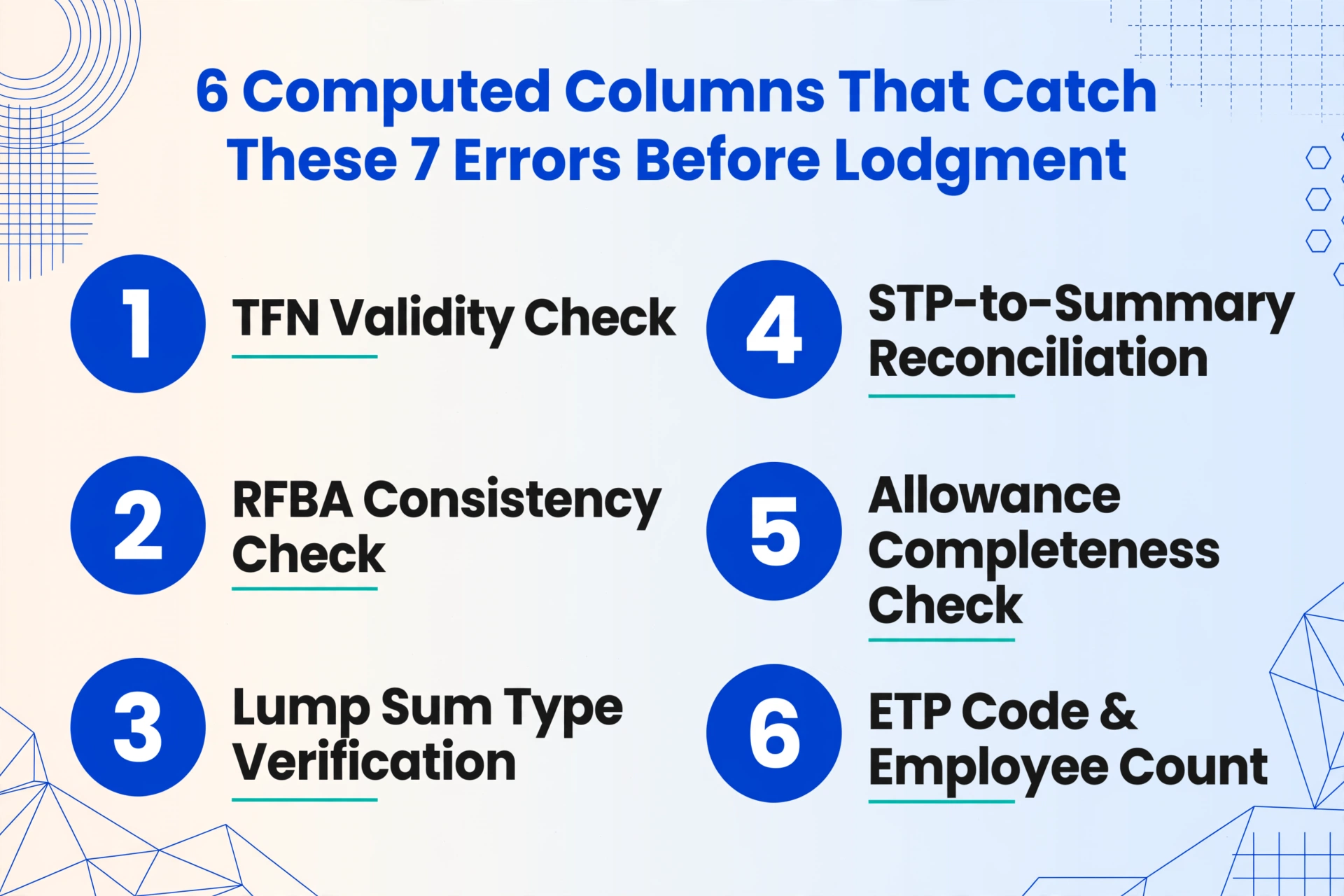
Embedding Computed Columns into the extraction workflow converts the reconciliation spreadsheet from a passive record into an active validation tool. Six Computed Columns that catch the seven errors above before any summary reaches an employee or the ATO:
TFN Validity Check: A column that flags TFNs failing the ATO checksum algorithm — catches Error 1 before lodgment.
RFBA Consistency Check: A column comparing RFBA against total remuneration thresholds — flags employees with suspiciously zero RFBA where benefits are expected — catches Error 2.
Lump Sum Type Verification: A column cross-referencing lump sum types against employee termination status — catches Error 3.
STP-to-Summary Reconciliation: A column that compares total gross payments from extracted summaries against STP-reported totals per employee — catches Error 4.
Allowance Completeness Check: A column comparing the sum of extracted allowances plus gross against the payroll system's all-inclusive gross figure — catches Error 5.
ETP Code and Employee Count: Columns flagging ETP code termination-reason mismatches and unique TFN count vs BAS employee count — catches Errors 6 and 7.
For more detail on setting up these validation rules during extraction, see the complete PAYG extraction guide and the step-by-step extraction workflow. The same error-prevention logic applies across tax jurisdictions — UK payroll teams processing P60 forms and P45 leaver certificates face the same taxonomy of transcription and classification errors with HMRC-equivalent consequences.
Frequently Asked Questions
How does the ATO actually detect PAYG summary errors — is it all automated?
The ATO uses a multi-layered data-matching system. The first layer is automated: when an employee lodges their tax return, the ATO's system compares the salary and wage figures on the return against the PAYG withholding data reported by the employer (through STP or the annual report). A discrepancy of any size triggers a flag — there is no de minimis threshold; a $210 discrepancy triggers the same automated flag as a $21,000 one. The second layer is human review: a flagged case is assessed for materiality and pattern. A single small discrepancy may be resolved with an automated letter; multiple discrepancies across multiple employees from the same employer escalates to a compliance review. The system also cross-references between different data sources the employer has submitted — BAS withholding totals vs annual report totals, STP data vs payment summary data, FBT returns vs RFBA on summaries. Inconsistencies between the employer's own reports are a stronger compliance signal than a single employee-employer mismatch.
What is the penalty if the ATO finds a PAYG summary error that resulted in underpaid tax?
The penalty depends on the ATO's assessment of the employer's behaviour. For failure to take reasonable care: 25% of the tax shortfall. For recklessness: 50%. For intentional disregard: 75%. A single misclassified lump sum payment that caused $4,875 in underpaid tax could attract a penalty of $1,219 (25%) to $3,656 (75%) on top of the tax owed, plus interest. The penalty can be reduced by up to 80% if the employer voluntarily discloses the error before the ATO detects it — which is why having an extraction-and-validation workflow that surfaces errors before lodgment is not just a time-saving measure but a penalty-avoidance mechanism. The ATO's remission guidelines consider whether the employer had "reasonable systems and processes" in place to prevent the error — an employer using automated extraction with validation rules can demonstrate this; an employer relying on manual data entry with no verification step has a harder case.
Can I fix a PAYG summary error after the 14 July deadline?
Yes. For STP-reported employees: submit an update event through your STP-enabled software with the corrected figures. The employee's income statement in myGov will update to reflect the correction — but only if the employee has not already lodged their tax return. If they have lodged, they may need to request an amendment to their assessment. For traditional PAYG summaries: issue a corrected payment summary to the employee, clearly marked as "Amended," and lodge a revised PAYG payment summary annual report (NAT 3447) if the correction changes the totals. The process is straightforward — issuing corrected summaries is a routine payroll compliance activity — but the time cost (locating the original error, calculating the correction, reissuing the document, lodging the amendment, communicating with the employee) is the hidden penalty that automated extraction and validation avoids by catching the error before the original lodgment.
Which PAYG summary error is the most expensive to fix?
In direct financial terms: a misclassified ETP code (Error 6) where the employer selected code O (other) instead of R (redundancy), reducing the employee's ETP cap and causing an additional $30,000+ of the termination payment to be taxed at the top marginal rate. The tax difference alone can exceed $14,000, and if the ATO determines the error was reckless (the payroll officer should have known the difference between redundancy and resignation), the 50% penalty on the underpaid amount can push the total cost past $20,000 for a single employee. In terms of systemic risk: Error 7 (employee count mismatch) is the most dangerous because it is rarely a single-employee error — if the employer systematically omitted a category of workers (terminated employees, casuals, contractors) from the annual report, the ATO's review escalates from a data-matching query to a compliance audit covering multiple tax years.