How to Turn Monthly CIS Statements
Into a Subcontractor Tax Ledger
The Construction Industry Scheme withholds 20% of your labour income before you receive a penny — or 30% if you are not registered. On £40,000 of subcontracting work across three contractors in a year, that is £8,000 sent directly to HMRC before your personal allowance, before your van insurance, before the tools you bought. The system collects tax upfront. It has no idea what you actually owe. That is why, year after year, CIS subcontractors file their Self Assessment and discover HMRC has been sitting on their money.
Key Takeaways
- The flat 20% CIS deduction ignores your personal allowance, business expenses, and NICs — which is why data shows 95% of subcontractors who file a claim receive a tax refund, averaging £1,700 per year.
- That refund is not automatic — every missing or mismatched monthly statement gives HMRC grounds to disallow the deduction credit, and a single gap can erase hundreds of pounds you were owed.
- A running extraction ledger costs seconds per statement on the day it arrives, and it transforms January's Self Assessment from a multi-day reconstruction of scattered paper into a review of numbers already in place.
What a CIS Deduction Statement Contains
Every month, each contractor you worked for must give you a payment and deduction statement — also called a PDS or CIS statement — within 14 days of the tax month ending. A tax month runs from the 6th of one month to the 5th of the next, so if you worked through the period 6 May to 5 June, your statement must land by 19 June.
HMRC lays out the required fields in CIS 340, the official guide for contractors and subcontractors. The statement is simple in structure, but each line feeds into a larger tax calculation you will need later:
| Field | What It Means | Why It Matters |
|---|---|---|
| Gross amount paid (excl VAT) | Total labour + materials invoiced, VAT stripped out | This is your turnover figure. It goes on your SA103 as self-employment income — the starting number before any deductions are applied. |
| Less cost of materials | What you spent on materials for this job, if you told the contractor | Materials are exempt from CIS deduction. If your contractor did not deduct materials cost, you overpaid tax on that portion. |
| Amount liable to deduction | Gross minus materials — the labour-only figure | This is what the 20% (or 30%) rate applies to. If this looks too high, check whether materials were excluded. |
| Amount deducted | 20% or 30% of the amount liable — the tax sent to HMRC | This is the number you sum across all statements into SA103 Box 21 (short) or Box 81 (full). It reduces your final tax bill — or generates your refund. |
| Amount payable (net) | What actually lands in your bank account: gross minus deduction | Cash flow reality. But this is not your profit — do not use it as your income figure for tax. |
The statement also carries the contractor's name, address and Employer Tax Reference, plus your name and Unique Taxpayer Reference (UTR). If a deduction was made at the 30% higher rate, the statement includes a Verification Number — you will need that when claiming credit for those deductions.
Why Flat-Rate Deductions Mean You Almost Certainly Overpay
CIS deduction rates are fixed: 20% for registered subcontractors, 30% for unregistered, and 0% for those with gross payment status. But here is the part that catches most people out: those percentages have nothing to do with your actual tax rate.
Your real tax liability is calculated through Self Assessment at the end of the year. It accounts for things the flat rate ignores entirely:
- Your personal allowance — the first £12,570 of profit is tax-free (2024/25 and 2025/26). A 20% deduction taken off every pound you earn means you are paying tax on income that should have been covered by the allowance.
- Business expenses — tools, van costs, insurance, protective equipment, accountancy fees, training. These reduce your taxable profit, but CIS deductions are calculated on gross labour income before any of them are subtracted.
- Class 4 National Insurance — paid at 6% on profits above £12,570, not 20%. CIS deductions over-collect against your total liability because the 20% rate does not distinguish between Income Tax and NICs.
The Low Incomes Tax Reform Group calls this out explicitly: "The 20% tax deducted is treated as an advance payment towards your income tax and National Insurance contributions." The word advance is the operative one — you are lending money to HMRC interest-free until you file your return and prove you overpaid.
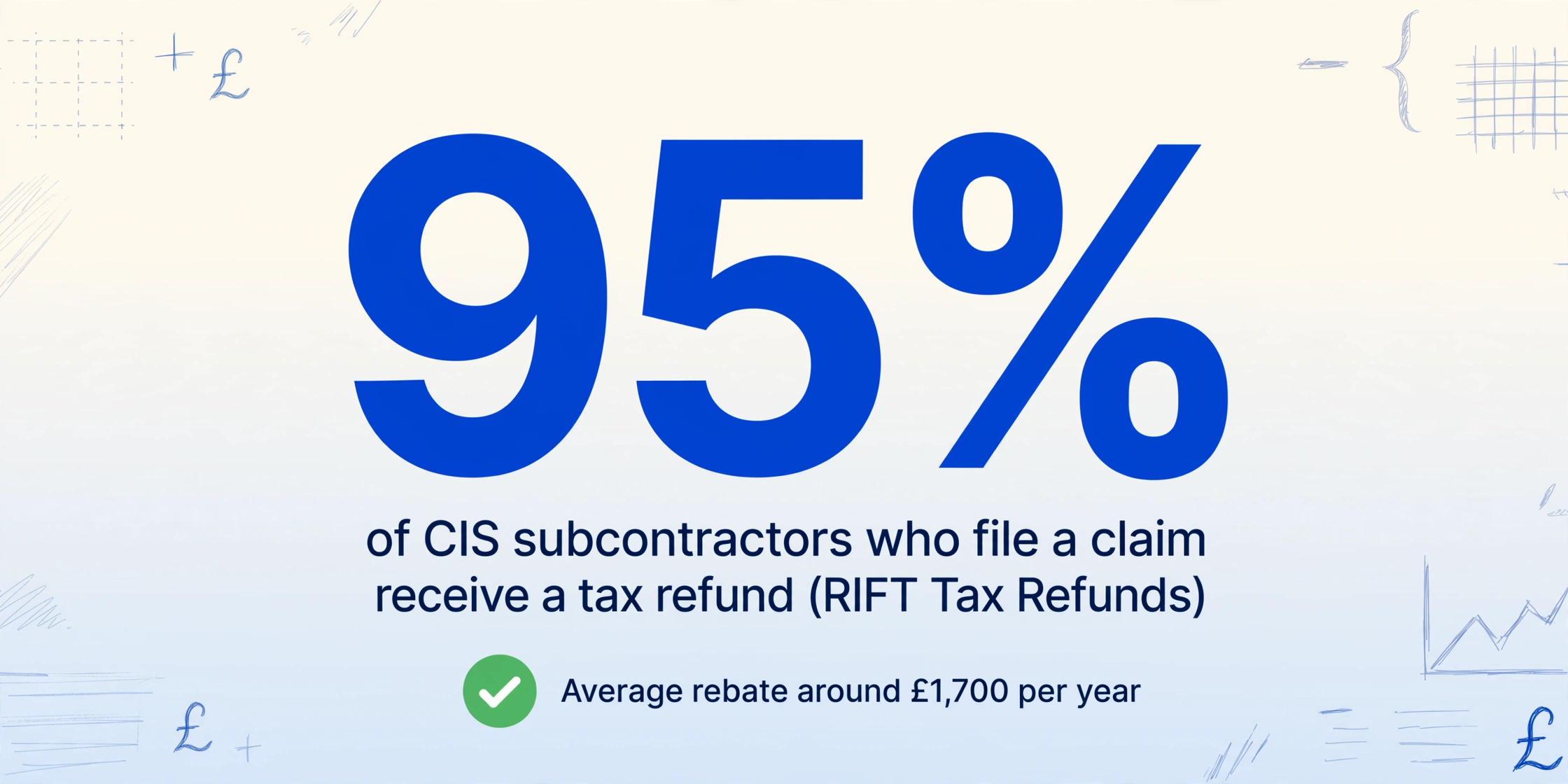
Data from RIFT Tax Refunds shows that 95% of CIS subcontractors who file a claim receive a tax refund, with the average rebate around £1,700 per year. At Dearne Accountancy in South Yorkshire, the typical first-time claimant sees £1,500 to £2,000 come back. For the full breakdown of why the flat-rate system over-collects and where that money sits until you claim it, the CIS overpayment trap guide walks through the entire chain.
A subcontractor earning £38,000 gross with £10,000 in expenses has a taxable profit of £28,000. Their actual tax bill — Income Tax at 20% plus Class 4 NICs — comes to roughly £4,000. But their contractors deducted £7,600 (20% of £38,000). That is a £3,600 overpayment sitting at HMRC until a Self Assessment return claims it back.
The Multi-Contractor Tracking Problem
Most subcontractors do not work for one firm all year. You might spend four months with a groundworks contractor, three months with a housebuilder, and the rest picking up jobs from two or three smaller builders. Each one issues its own CIS statement on its own timeline — sometimes a printed sheet handed over on site, sometimes a PDF emailed weeks late.
By the time January arrives and you sit down to file your Self Assessment, you could be staring at 12 to 40 separate statements from four different contractors. The questions that need answering are not just "how much did I earn" — they are:
- Did every contractor actually report the deductions they took from me to HMRC?
- Did contractor A correctly exclude my materials costs before calculating the deduction?
- Did contractor B apply 20% or 30% — and if 30%, am I registered with HMRC to fix that?
- If I lost a statement from March, how do I know what was deducted that month?
Each of these questions matters because the numbers you enter on SA103 need to match what HMRC already has from the contractors' monthly CIS300 returns. A mismatch triggers a compliance check — and if you cannot produce the paper trail, HMRC disallows the deduction credit. That refund you were counting on vanishes.
This is the gap that every CIS how-to article skips over. The articles tell you to "enter your total CIS deductions in Box 21" as if that total magically appears. It does not. Someone has to add up every line on every statement — and when you are handing over paper receipts to an accountant in April, that someone is either you or a billable professional charging per hour to add up numbers.
How to Extract CIS Statement Data Without Typing Every Number
CIS statements are not complex documents. They contain six to eight data points in a predictable layout: contractor name, tax month, gross payment, materials, amount liable, deduction, net payment, and perhaps a verification number. But when you multiply that by five contractors and twelve months, you are looking at manually typing several hundred numbers — with a transposition error waiting to happen in every row.
The manual approach — open statement, squint at the figures, type into Excel, repeat — is not just tedious. It is the point at which subcontractors give up and hand everything to an accountant, or worse, estimate their deductions and hope HMRC does not check.
There is a faster way. AI-powered document extraction reads the CIS statement as a visual document — the same way you do — and pulls the structured fields into a spreadsheet automatically. Unlike traditional OCR, which treats every document as a grid of text characters, this approach understands what each field means. It knows "£5,450.36" next to "Gross amount paid" is the gross figure, and "£973.12" next to "Amount deducted" is the deduction — regardless of where those numbers sit on the page or which contractor's letterhead is at the top.
You type the column names you want — Gross Amount, CIS Deduction, Net Payment, Contractor Name, Tax Month — and the AI locates each value by understanding what it represents, not by matching a fixed layout. This matters because no two contractors format their statements identically. One might put the deduction in bold at the bottom. Another might list it in a table alongside the gross figure. The AI reads both the same way you would: by understanding the document's content, not its coordinates.
Files are processed securely and not stored.
The extraction work that used to take an evening of squinting and typing takes a few seconds per statement. Upload a photo of the statement from your phone or the PDF the contractor emailed — the output is the same structured data, ready to drop into your ledger. If you use the same approach for your P60, P45, or P11D documents, you can build a complete tax-year picture from one tool.
Building a CIS Deduction Ledger That Survives a Self Assessment Check
Having the extraction tool pull numbers from each statement is the first step. The second is organising those numbers so they answer the questions HMRC will ask if it inspects your return.
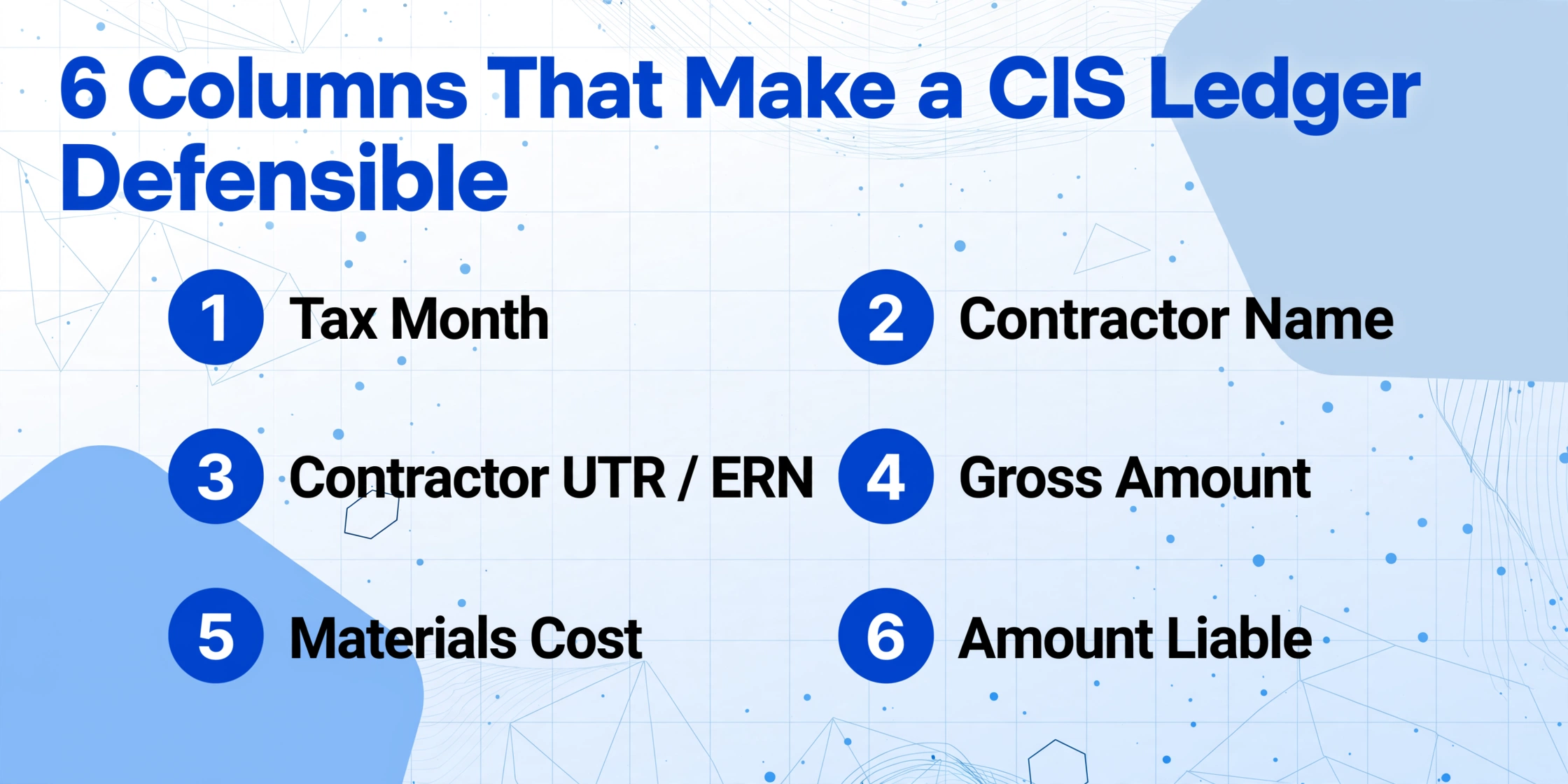
A CIS deduction ledger needs columns that go beyond a simple total. Here are the columns that turn a heap of extracted numbers into a defensible tax record:
| Column | Source | Purpose |
|---|---|---|
| Tax Month | Statement header | Group deductions by HMRC tax month (6th to 5th), not calendar month. This is the period HMRC uses to match your deductions against contractors' CIS300 returns. |
| Contractor Name | Statement header | Track which contractor deducted what. If a contractor's total reported to HMRC does not match what your statements show, you know exactly where to look. |
| Contractor UTR / ERN | Statement header | The Employer Reference Number uniquely identifies the contractor in HMRC's system. Without it, HMRC cannot trace which contractor's CIS300 return to cross-reference against your claim. |
| Gross Amount | Statement: "Gross amount paid" | Your total turnover from this contractor in this tax month. Sum this across all contractors to get your total self-employment income. |
| Materials Cost | Statement: "Less cost of materials" | If this field is blank or lower than your actual materials spend, the contractor may have deducted CIS on money that should have been exempt. Flag it and request a corrected statement. |
| Amount Liable | Statement: calculated field | Verify the maths: Gross minus Materials should equal Amount Liable. If it does not, the contractor made an error on the statement. |
| Deduction Rate | HMRC verification result | Record whether the contractor applied 20%, 30%, or gross payment (0%). If you are registered but a contractor deducted 30%, you need to address that now — do not wait until filing. |
| CIS Deduction Amount | Statement: "Amount deducted" | The tax already paid on your behalf. The sum of this column across all rows is the figure that goes into SA103 Box 21 (short) or Box 81 (full). |
| Net Payment | Statement: "Amount payable" | What landed in your bank. Use this to reconcile against your bank statements — it is how you prove you actually received payment for the work. |
Once the ledger is built, a pivot by contractor shows you at a glance whether any contractor's total deductions look suspicious — a gap of even £500 over a year could mean the contractor under-reported deductions to HMRC and pocketed the difference. That is your money, credited against your tax bill, that you would never see refunded.
Processing multiple statements at once — what the tool calls batch processing — transforms this from a multi-hour reconciliation chore into a single upload session. You drop all twelve months of statements from a contractor into one upload, extract the fields once, and the merged output gives you that contractor's full-year ledger in one sheet.
How CIS Deductions Offset Your Self Assessment Bill
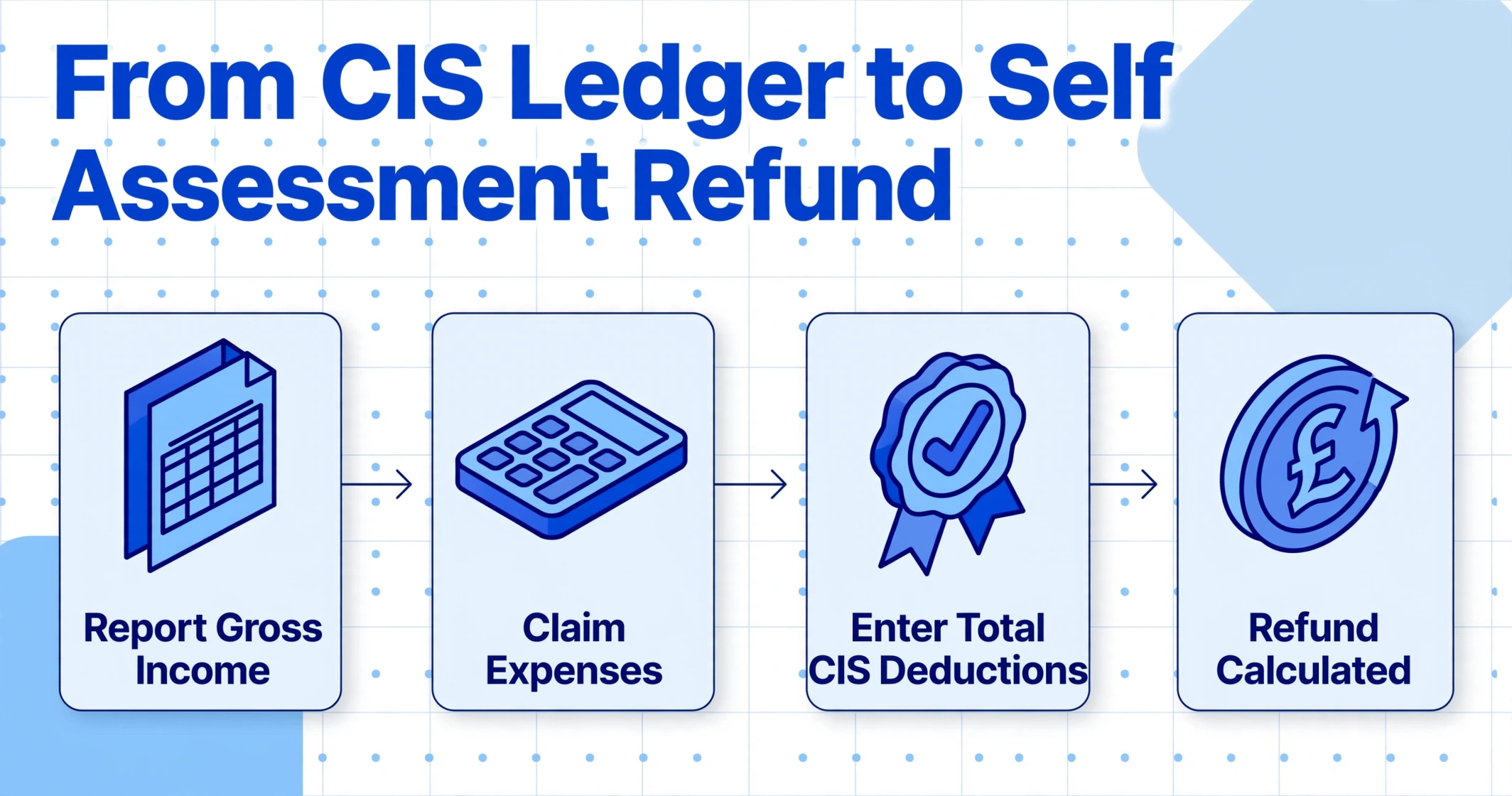
The ledger you have built feeds directly into your SA100 Self Assessment. Here is the path those numbers take:
Step 1: Report your gross income. On the self-employment pages — SA103S (short) or SA103F (full) — you enter your total construction income as turnover. This is the sum of all "Gross Amount" values across your ledger. Do not reduce this by CIS deductions. HMRC expects the full gross figure.
Step 2: Claim your expenses. Materials, tools, van costs, insurance, protective clothing, training — all the business expenses you incurred during the year are deducted from your turnover to arrive at your taxable profit. The CIS flat rate ignored these; your Self Assessment does not.
Step 3: Enter total CIS deductions. The sum of the "CIS Deduction Amount" column from your ledger goes into SA103S Box 21 (short form) or SA103F Box 81 (full form). This is the field labelled "CIS deductions made from your income as a subcontractor."
Step 4: Let HMRC do the maths. HMRC calculates your actual tax and NIC bill on your taxable profit, then subtracts the CIS deductions you entered. If the deductions exceed the bill — and for most subcontractors they do — the difference is your refund.
A concrete example: Sarah earned £40,000 gross from two contractors in 2025/26. Her materials and expenses total £8,000, leaving a taxable profit of £32,000. Her actual tax bill — basic-rate Income Tax on £19,430 (profit minus £12,570 allowance) plus Class 4 NICs — is roughly £5,050. Her contractors deducted £8,000 from her payments over the year. HMRC refunds her £2,950.
Filing deadline: online Self Assessment must be submitted by 31 January following the end of the tax year (5 April). Paper returns are due 31 October. If you miss the January deadline, an automatic £100 penalty applies — even if HMRC actually owes you money.
For subcontractors juggling multiple income streams — CIS work alongside PAYE employment or property income — the same ledger discipline applies. Your total tax liability is calculated across all income sources, and CIS deductions offset the combined bill. If you are also processing P11D benefits data from employment or P45 leaver statements from a previous job, extracting all of them into structured data saves the same manual-entry time.
What to Do When a CIS Statement Goes Missing
Contractors are legally required to issue a statement within 14 days of the tax month end, but enforcement is uneven. A subcontractor who worked for a small builder in March might still be chasing the statement in July. If you cannot get the document from the contractor, you have two routes:
- Ask HMRC directly. Write to PT Operations, HM Revenue and Customs, BX9 1BX, requesting your missing Payment and Deduction Statements. HMRC holds the data from the contractor's CIS300 monthly returns. They aim to respond within 15 working days, and the information they provide can serve as your record if the original statement never materialises.
- Reconstruct from bank records. Your net payment — what actually landed in your bank — is evidence of the transaction. If you know the contractor used 20% deduction and materials cost was zero, you can work backwards: Net payment ÷ 0.8 = Gross payment. But this is a last resort. It does not prove the deduction rate, and HMRC may not accept it without corroboration from the contractor's side.
The far better option: build the habit of extracting each statement into your ledger the week it arrives. You will know immediately if a month is missing, and you can chase it while the tax month is still recent — not thirteen months later at filing time. For the full year-end sequence — when to gather, verify, and total every contractor's statements before filing — the CIS tax year-end roundup guide schedules the whole process.
From Statement Ledger to Tax Return: Completing the Loop
There is a subtlety in the CIS system that most guides gloss over: the deductions on your statements are not your final tax bill — they are a provisional withholding. Your actual liability is determined by your Self Assessment, and the deductions function as a credit against it. This means the quality of your statement ledger directly determines whether your tax return is right or wrong.
If your ledger understates gross income, HMRC may flag a discrepancy against the contractors' CIS300 filings. If it overstates deductions because you double-counted a month, HMRC may reject the excess credit after review — and reclaim the overpaid refund. If a contractor deducted 30% when you were registered for 20%, you need the statement showing that 30% deduction to claim the full credit; without it, you lose the extra 10%.
This is where the extraction-first approach shifts from convenience to necessity. When every statement is extracted the moment it arrives, your ledger is a running total — not a retrospective scramble. You walk into January with 52 weeks of data already structured. Filing your Self Assessment becomes a review exercise, not a reconstruction project. For subcontractors with especially high statement volumes, the SA100 batch processing approach applies the same principle at the return level — processing multiple years or multiple individuals' tax data in a single workflow.
Frequently Asked Questions
Do I need to keep paper copies of CIS statements?
HMRC requires you to keep records supporting your Self Assessment for at least 5 years after the 31 January filing deadline. Digital copies — scanned PDFs, photos, or extracted data ledgers — are acceptable as long as they are legible and complete. The extracted spreadsheet, combined with the original statement PDFs or photos, gives you a searchable digital record that is easier to produce on demand than a shoebox of paper.
Can AI extraction handle handwritten CIS statements?
Yes. Smaller contractors sometimes issue handwritten statements on company letterhead rather than printed forms. AI extraction based on visual language models reads handwriting, printed text, and mixed formats the same way. The key is that the field labels — "Gross amount paid," "Amount deducted" — are present somewhere on the page. The AI locates these labels and extracts the adjacent values regardless of whether they are typed or handwritten.
What if my contractor used the wrong deduction rate on my statement?
If a contractor deducted 30% but you are CIS-registered (entitled to 20%), the statement still records the deduction you actually suffered. Enter the actual deducted amount in your ledger and SA103. The over-deduction will be credited against your tax bill when HMRC calculates your liability — but you may want to ask the contractor to verify you correctly with HMRC to prevent it repeating. If the contractor refuses or is unresponsive, contact the CIS helpline.
Does this approach work with different statement formats from different contractors?
Yes. Because AI extraction reads documents semantically rather than matching a fixed template, it works across any layout. A statement on HMRC's official CISOL1 form, a contractor's own branded PDF, or a screenshot of an email with the figures listed inline — the extraction result is the same structured data. This is the core difference between template-based OCR and AI extraction: you do not need to set up a separate parsing rule for each contractor's format. If you work with five different contractors who all format their statements differently, the same extraction setup handles all five.
Can I use this for my limited company's CIS deductions?
Limited company subcontractors recover CIS deductions differently — through the company's monthly payroll scheme (EPS), not Self Assessment. But the statement extraction and ledger-building workflow is identical. You still need to track gross payments and deductions per contractor, per tax month. The extracted data feeds into your payroll records rather than your SA103, but the need for accurate, structured data from each statement does not change.