Why AI Hallucinates in Long Legal Documents
and How to Verify Every Field
General-purpose AI assistants are now sold on context windows large enough to hold a 200-page credit agreement. The trouble starts when the document is longer than the window, because the fix the tool reaches for is to summarize, and a summary of a contract is not a contract. A value that falls out of that summary does not come back blank. It comes back plausible.
The gap between "the model can read it" and "the model can be trusted on it" is measurable. A Stanford RegLab evaluation of the leading legal AI research tools, including Lexis+ AI and Westlaw's AI-Assisted Research, found they still returned fabricated or misgrounded answers in 17% to 33% of queries, even though every vendor markets retrieval as the cure (Stanford HAI). Those tools answer questions about the law. The mechanism behind their errors is the same one that corrupts a field extracted from your contract.
Key Takeaways
- A context window big enough to hold a 200-page agreement sounds like the hallucination problem is solved, and every vendor markets retrieval as the cure.
- The leading legal AI tools still returned fabricated or misgrounded answers in 17% to 33% of queries in a Stanford evaluation, because a value that falls out of a compressed document reads exactly like one the model actually read.
- Reading the document again will not catch it, so verification has to mean pointing every cell back to its source, which ImageToTable.ai does in Review Mode.
Legal teams are already running this experiment at scale. In ILTA's 2024 Technology Survey, 37% of firms reported using generative AI for business tasks, up 22 points from the year before, and the top uses they named were research (73%), summarization (70%), and first drafts (69%) (ILTA). Summarization is exactly the operation that creates the problem this article is about. Here is where the fabricated value is born, which fields it hits first, and what "verify every field" actually has to mean when the document is too long to read in one pass.
Where a Fabricated Value Comes From
A hallucinated field is a value the model never read, reconstructed from what usually appears in that position and returned with the same confidence as a value it did read. Ask an assistant to pull the liability cap, the notice period, and the governing law from a 180-page agreement, and it will hand back a clean row. The cap looks like a cap. The notice period is a round number. The governing law is what deals like this usually choose. None of that proves the values are on the page, because a model that has lost sight of the source does not know it has lost sight of it.
Buyers are already uneasy about exactly this. In an r/legaltech thread on AI vendor due diligence, a reviewer described asking for evidence and getting none: "The vendors claim '99% accuracy,' but when we ask for proof during Due Diligence, they basically say, 'Test it yourself.'" (r/legaltech). The complaint is not that the tools are useless. It is that the verification burden lands on the buyer with nothing to verify against. The rest of this article is about turning that burden into a check you can actually run.
How a Long Legal Document Actually Gets Processed
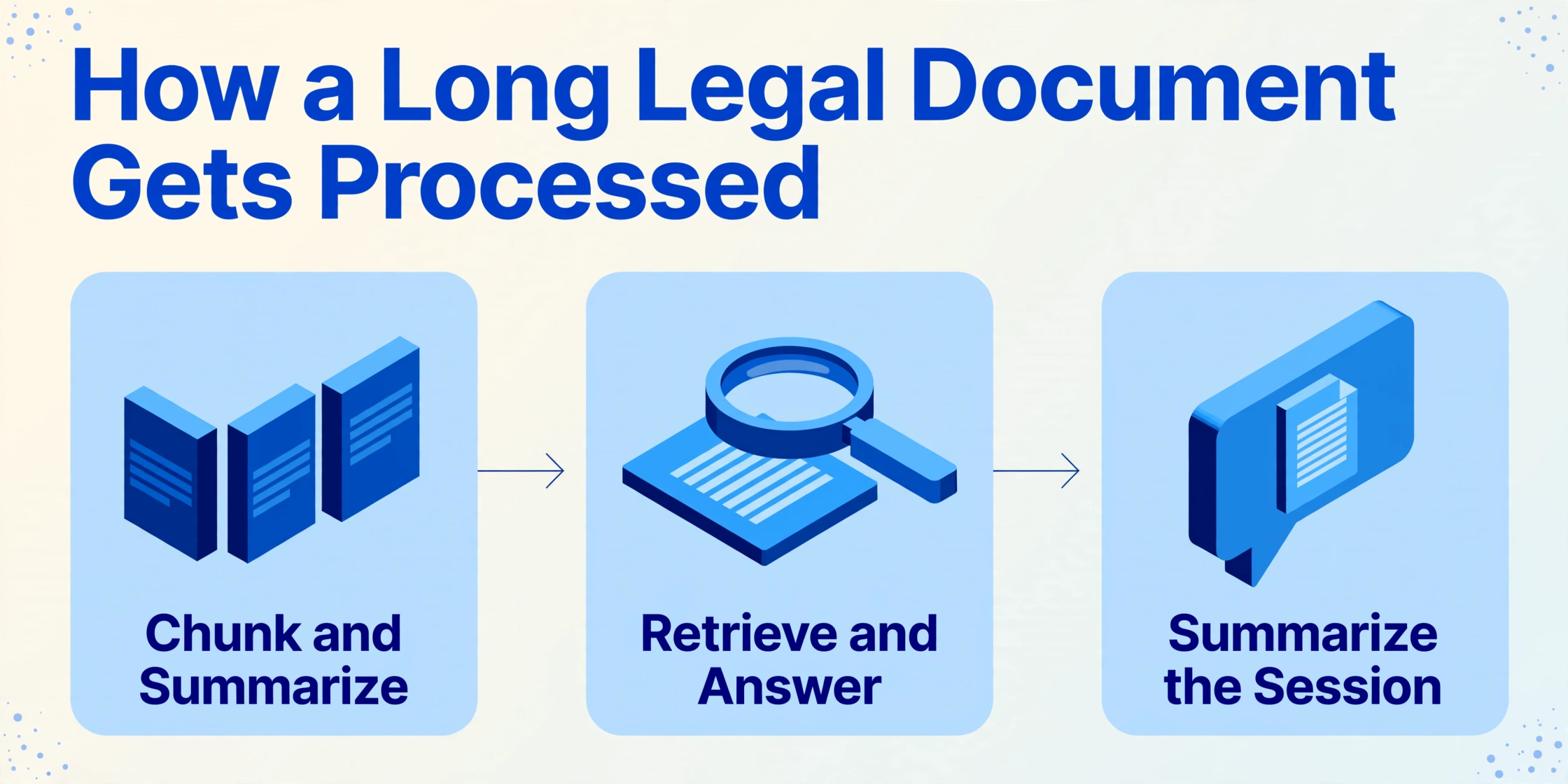
A tool that says it can read a 400-page document is usually describing a pipeline of smaller reads stitched back together, and the stitching is where values change. A model does not read the way you do. Text is split into tokens and placed in a context window, the fixed amount of text the model can hold and consider at once. When a document is longer than that window, the system reaches for one of three workarounds, and every one of them replaces the full document with a smaller stand-in.
Chunk and summarize
The document is split into pieces, each piece is summarized, and the summaries are combined. Field values are then pulled from the summaries, not from the pages they came from.
Retrieve and answer
The document is indexed, and only the passages that look relevant to each field are pulled back to build the answer. This is what retrieval-augmented generation, or RAG, means in practice. If the right passage is not retrieved, the model answers without it.
Summarize the session
Chat-style assistants add a path that is easy to miss. When a long session fills the context window, some tools summarize the earlier conversation and keep going. For a chat that is reasonable. For a document you have to stand behind, the summary is now what the tool reasons from.
None of these steps is a bug. They are how long documents get handled at all. The point is that once any of them is in play, the tool is no longer reading your contract. It is reading something smaller that stands in for it, and the gaps in that stand-in are where fabricated values enter. The limits of long-document reading are covered in more depth in our guide to what AI can and cannot do with multi-page PDFs. If you are new to the category, our explainer on what contract data extraction actually is sets the baseline before the failure modes.
Why Compression Produces Plausible Errors, Not Random Ones
When a value is missing from the compressed view, the model does not leave a blank. It fills the slot with the most likely value for that kind of document, which is exactly the kind of error a careful reader will not notice. Researchers call this pattern detail hallucination: the output stays broadly correct in structure while silently corrupting the parameters that decide outcomes, including threshold numbers, units, scope, the strength of an obligation ("shall" against "should"), and the conditions that trigger it. A study of long regulatory documents found this detail-level fidelity decays as context grows, with the error rate rising from 0.22 on short inputs to 0.36 on long ones, a 64% degradation (arXiv).
In legal work these are not cosmetic errors. "Shall" against "should" decides whether a duty is mandatory. A dropped qualifier such as "except as provided in Section 4.2" turns a narrow exception into a general rule. A substituted cap changes the client's exposure. Each one passes the read it gets, because each one reads like a real value. The Stanford evaluation draws a line that is worth borrowing here: an extracted value can be fabricated (it is not in the document at all) or misgrounded (the text exists, but it does not say what the tool claims). The second is harder to catch, because the source is real and the field looks grounded.
The Fields Compression Breaks First
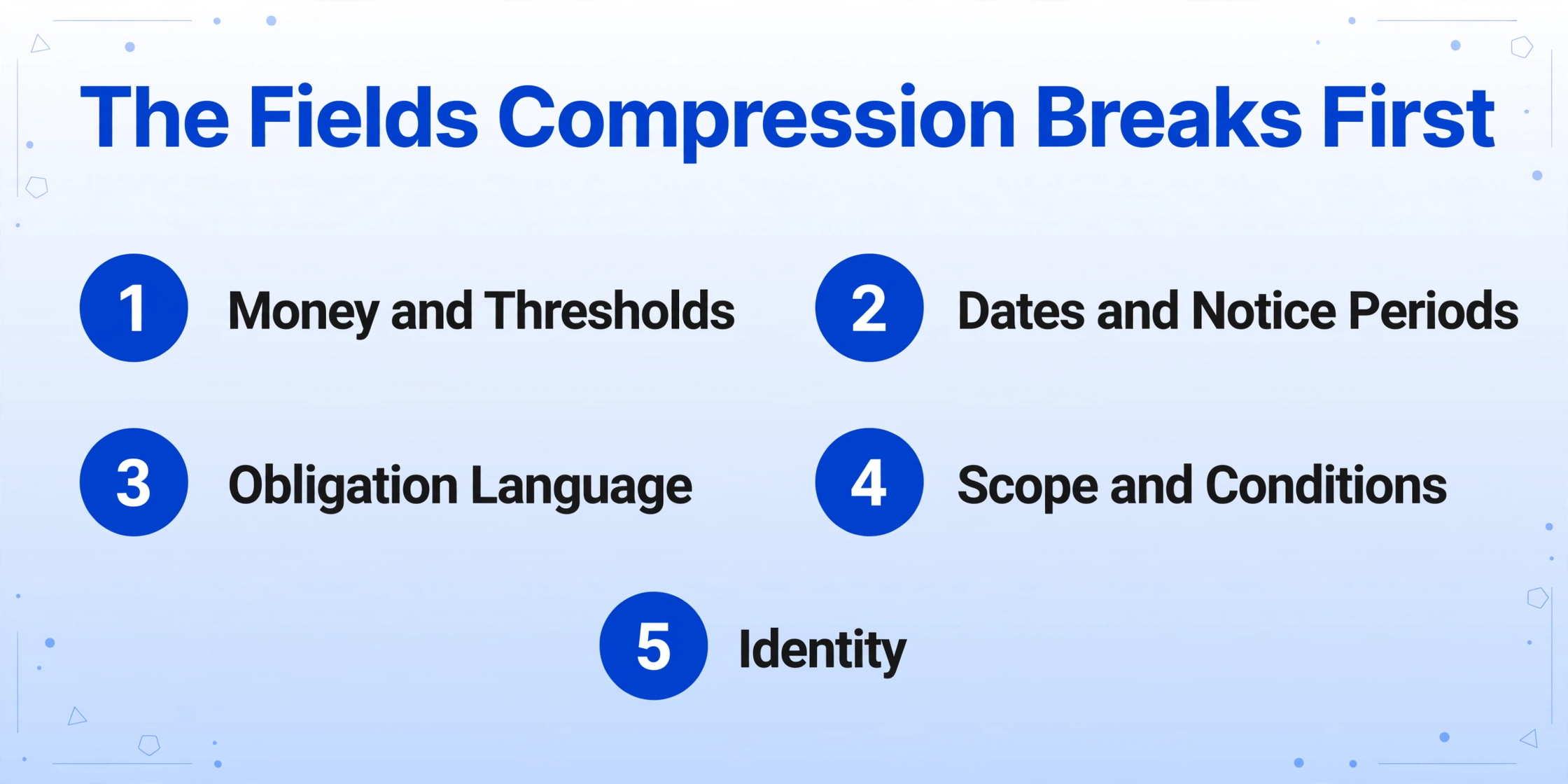
Compression does not damage every field equally. The ones most likely to come back wrong are the ones where a plausible substitute is easy to generate and hard to spot by eye. That is a small, predictable set in legal documents.
| Field type | What compression does to it | What to check against |
|---|---|---|
| Money and thresholds (liability cap, fee, percentage) | Fills with a common round value, or shifts a digit; the model's prior for the clause type can override the page | The exact clause and figure, character for character |
| Dates and notice periods | Collapses effective date, amendment date, and signature date into one | Which milestone the date marks, and whether a later document changed it |
| Obligation language | Loses "shall" against "should", and strips carve-outs | The full sentence, including the qualifier after the comma |
| Scope and conditions ("within 50 miles", "except as provided") | Removes the condition that limits the clause | The condition clause, not just the headline term |
| Identity (governing law, counterparty, party role) | Defaults to the jurisdiction or name the model has seen most | The preamble and the governing-law clause as written |
Notice what these fields have in common. Each one has a correct value that is boring, and a wrong value that is boring too. That is why they survive a quick skim. It is also why the order of your checks matters: start with the numeric and obligation fields, because those are the ones whose errors create exposure.
Amendments and redlines deserve their own pass. A superseded figure can stay highly legible on a scanned executed copy, and a model working from a partial view has no reliable way to know which version controls. In a legal document the same field legitimately appears several times, and repeated appearances with different values are precisely what compression handles worst.
What "Verify Every Field" Actually Requires
In a long document, verifying every field has to mean forcing each extracted value back to a specific location in the source, so a wrong one is caught by where it points rather than by whether it reads well. Reading the document again defeats the purpose of the tool, and reading it again is also how a misgrounded value slips through, because the value that replaced the text looks just as convincing as the text. Two things have to be true before this kind of verification is possible: you know exactly which fields you wanted, and the tool can show you where each one came from.
Name the fields before you process
Rather than letting the document decide your columns, you type the fields you need: "Liability Cap", "Notice Period", "Governing Law", "Effective Date". This is what Custom Column Extraction means: the AI reads the document and finds each value by what it means, not by a fixed position on the page, and the column names you enter become the headers of the output table. The verification value is that the check set is fixed up front. You are not auditing all 180 pages, only the fields you named.
Require a source location for every cell
Review Mode shows you where a value came from. Hover or click any extracted cell and the matching region is highlighted on the original page; click a region on the page and it jumps back to the matching cell. If you edit a field, the tool keeps the AI's original value so you can compare or revert. In a long document this turns "verify every field" from an aspiration into an action: you are not re-reading, you are confirming that the value sits where it claims to sit.
Turn the map on before you need it
Source locations can be generated on demand for a single file, or the account can be set to annotate every processed document automatically. Generating them after the fact means the review file is ready the moment extraction finishes, which matters when speed is the reason you automated the step in the first place.
Work in risk order
Clear the numeric, obligation, and version-sensitive fields first, using the table above. Once those hold, the remaining metadata is faster to sign off. A verification pass that starts with names and dates burns attention before it reaches the fields that carry the exposure.
Files are processed securely and not stored.
The wider verification routine, including column alignment, row counts, missing-field audits, numeric and date validation, and when to re-extract instead of fixing by hand, is laid out in our seven-point extraction QA checklist. Where a review gate belongs in a pipeline is covered in the human-in-the-loop workflow. And when the check spans several documents at once, the cross-document consistency walkthrough shows how to compare them on one sheet. What each of those assumes, and what compression makes urgent, is that every value can be pointed back to its source in the first place.
What This Verification Still Cannot Do
Grounding tells you where a value came from. It does not tell you whether the clause is enforceable, whether it survives a later amendment, or what the client should do about it, and no extraction tool changes that. A source location is evidence, not a legal conclusion. The tool can show that "90 days" appears in Section 12.3. It cannot tell you whether that notice period still applies after the side letter you did not upload.
Some failures sit outside the tool entirely. If the operative figure lives in an exhibit, a prior amendment, or a side letter that was never in the upload, no amount of grounding will find it, because it is not there to be found. Send the full package, and when the same agreement arrives as several files, fold the pieces back into one record before review. If the source itself is a poor scan, every layer above it inherits the problem, which is why a clean read starts with good OCR; legal documents have their own requirements, covered in our guide to OCR for legal documents. And a blank is not a failure. A field reported as "not present" is safer than a plausible value invented to fill the row, because it tells the next person to look at the document instead of trusting the table.
The duty does not transfer to the tool either. ABA Model Rule 1.1, Comment 8, places the benefits and risks of relevant technology inside a lawyer's duty of competence, and roughly 40 U.S. jurisdictions have adopted a version of that language (ABA). Practitioners read it the same way: "AI doesn't eliminate the responsibility of me being a lawyer. If a case is going into something with your name on it, find the citation. Read it." (r/legaltech). When you compare tools, the question that separates a review-grade extractor from a black box is whether it returns a source location for every field. A tool that only hands back a clean table gives you nothing to check against, which is worth remembering when you read e-discovery platforms against field extraction or weigh document extraction options for a small legal team.
Frequently Asked Questions
Why do AI tools hallucinate on long legal documents more than short ones?
Because a long document exceeds the amount of text a model can hold at once, so the system summarizes or retrieves instead of reading the whole thing. Any value missing from that compressed view gets reconstructed from what usually appears in that spot. Research on long-context documents found detail-level accuracy decays faster than overall accuracy as the input grows.
Does a bigger context window solve the problem?
It raises the threshold, it does not remove it. Documents can still exceed the window, chat-style assistants still summarize older text to keep going, and model behavior degrades as context grows even before the limit is reached. Treat a large window as headroom, not a guarantee.
Can I just verify the important fields and skip the rest?
Choose the fields by risk rather than verifying all or nothing. Numbers, obligation language, and version-sensitive fields such as effective date against amendment date deserve the close check; low-risk metadata is faster to clear. The decision about which fields are important should be made in advance and written down, not left to the tool.
How do I verify an extracted contract value without reading the whole contract?
Use source grounding. Have the tool show the location of each value on the original page, then confirm the value sits where it claims to rather than re-reading the document. On ImageToTable.ai, Review Mode highlights the source region for any extracted cell, and documents can be set to annotate automatically after processing.
Is AI contract extraction accurate enough to use without review?
No tool, ours included, removes the need to check field-level output on documents that carry legal or financial exposure. Our extraction reaches up to 99% accuracy on printed table data, and the responsible workflow still confirms the high-risk fields against the source. Treat any "hallucination-free" claim from any vendor with the same skepticism you would apply to an accuracy figure with no citation behind it.
What should I do when a field comes back empty?
Check whether the clause is genuinely absent, and if it is, leave it empty. A blank flagged as "not present" is more useful than a plausible value invented to fill the row, because it tells the next person in the workflow to look at the document rather than trust the table.
The Test That Matters
The useful measure of a legal AI workflow is not how good the table looks on the first run. It is whether you can take any cell in that table and show, in one step, exactly where on the page it came from. Compression is what makes that step necessary, since every long-document workaround replaces the contract with a smaller stand-in. Source grounding is what makes it possible. Start with the field you would least want to be wrong, and see whether the tool can take you to it.
Pick one contract you already know well, extract the four fields you would hate to get wrong, and check each one against its source location. That single pass tells you more about a tool than any accuracy claim on its marketing page.