What If Prescription Data Entry
Took 5 Seconds Instead of 50?
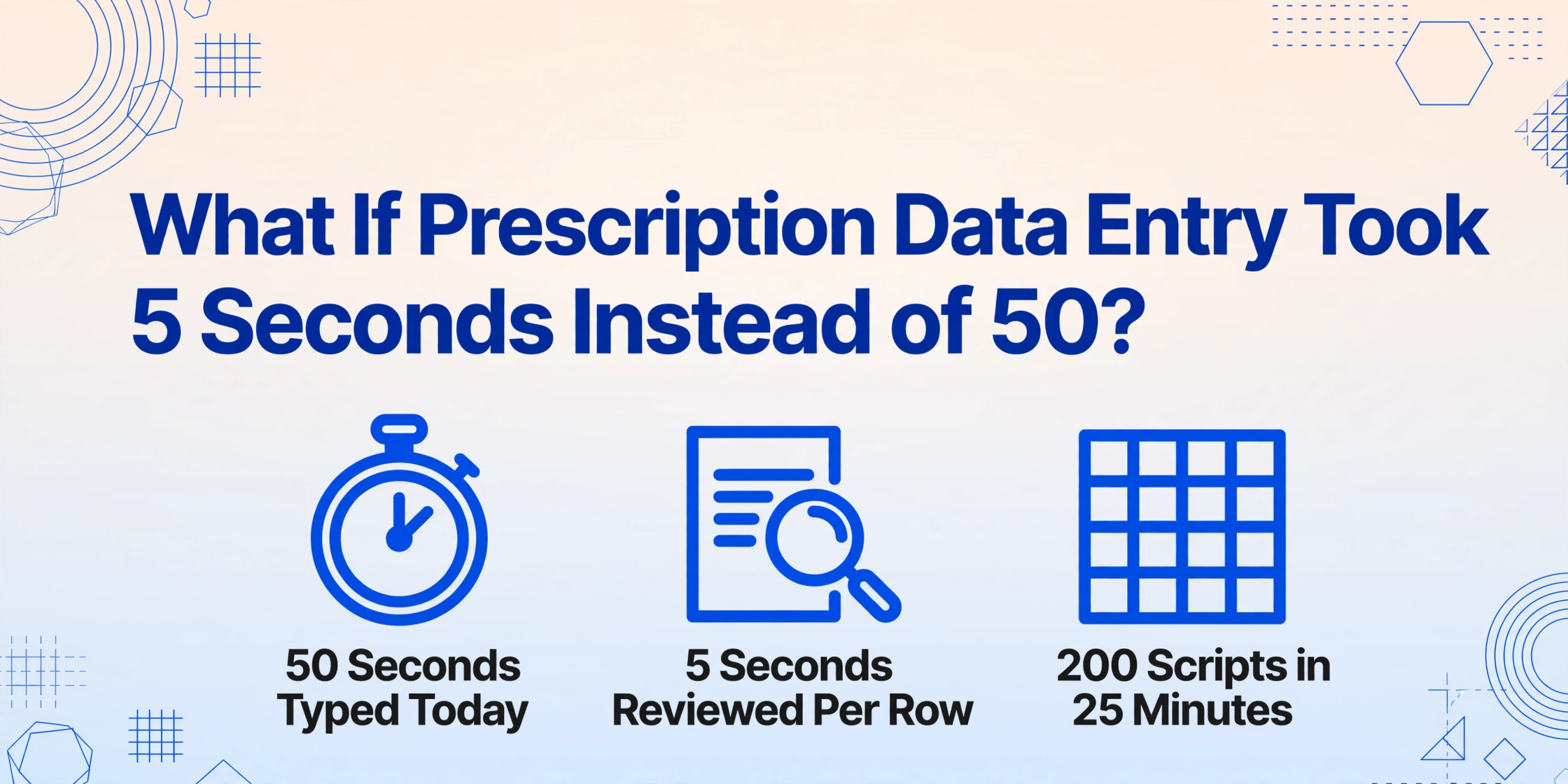
Fifty seconds. That's the standard data entry time per prescription at most chain pharmacies, according to pharmacy technicians tracking their own metrics. At 200 scripts a day — a modest volume for a busy independent — that's nearly three hours spent typing drug names, strengths, NDC digits, and SIG codes into a pharmacy management system. Not verifying. Not counseling. Just typing. And here's the part few people outside the pharmacy talk about: the American Pharmacists Association estimates that 1.5% of all dispensed prescriptions contain an error — roughly 67.5 million mistakes in a single year, many of them traceable to what happened at the keyboard during data entry.
Key Takeaways
- 43% data entry accuracy at two months isn't a pharmacy tech who's slow or careless — it's what happens when you ask a human to be a real-time format converter between every prescription layout and a single rigid database.
- A single NDC needs one of three different zero-padding rules to reach 11-digit HIPAA billing format, and one wrong digit rejects the claim — no amount of typing speed solves a format translation problem.
- When AI reads prescriptions by what the data means instead of where it sits on the page, the technician's three hours of transcription collapse into twenty minutes of verification.
The Hidden Cost of Every Keystroke
Medication errors harm at least 1.5 million Americans each year, at an estimated economic cost of $77 billion — and a significant share starts at the data entry screen, not the counting tray.
The Academy of Managed Care Pharmacy (AMCP) identifies three of the most common dispensing error types as: dispensing the wrong medication, getting the dosage strength wrong, and failing to catch drug interactions. All three can originate from a single mistyped digit in the pharmacy management system (PMS).
Pharmacy technicians are painfully aware of this. On Reddit's r/PharmacyTechnician, a Walmart tech two months into the job reported a 43% input accuracy rate. At major chains, the benchmark is 50 seconds per data entry task with a throughput target of 17 tasks per hour — and that's for experienced staff. A 2018 meta-analysis of 62 dispensing error studies published in Research in Social and Administrative Pharmacy found a global pooled dispensing error rate of 1.6%, with the highest rates reliably linked to settings with heavier manual data entry burdens.
This isn't a problem of pharmacy staff not caring enough. It's a structural mismatch: every prescription arrives in a different format, but every PMS expects the same structured fields.
What Pharmacy Data Entry Actually Looks Like
Before a single pill is counted, a technician must translate whatever form the prescription arrived in — paper, fax, phone-in, or e-script — into a series of structured fields inside the pharmacy management system.
The workflow is consistent across most pharmacy software — PioneerRx, QS/1, Computer-Rx, Rx30 — even if the button layouts differ. A prescription arrives through one of four channels:
- Paper prescription — Handed across the counter or faxed in. The tech reads handwritten drug names, strengths, and physician signatures.
- e-Script — Arrives digitally via Surescripts through the NCPDP SCRIPT Standard (1.9 billion such transactions per year). Already structured, but still often requires manual review for field mapping errors.
- Phone-in — Called in by a prescriber's office. A tech transcribes in real time, often while managing other tasks.
- Fax — Still accounts for a surprising share of prescription transmissions, especially from smaller practices and specialty providers.
Once the prescription arrives, the technician opens the PMS and begins data entry. In PioneerRx, this happens at the Intake Station or Data Entry queue. The fields that must be populated typically include:
| Field | Example | Why It Matters |
|---|---|---|
| Drug Name | Lisinopril | Must match formulary entry; generic vs. brand confusion is common |
| Strength | 10 mg | Wrong strength = one of the top three error types (AMCP) |
| Dosage Form | Tablet | Tablet vs. capsule substitutions require pharmacist judgment |
| NDC | 68180-0981-03 | Must be converted to 11-digit HIPAA format (5-4-2) for billing |
| SIG / Directions | 1T PO QD | SIG codes must be expanded correctly for patient labels |
| Quantity | 30 | Ties to days supply calculation for insurance adjudication |
| Refills | 3 | Schedule II drugs: 0 refills by law (21 CFR 1306.12) |
| Prescriber | NPI / DEA # | Required for claim submission; wrong NPI = rejection |
After entry, the prescription moves to a pharmacist for pre-verification. If the pharmacist catches a data entry error — wrong strength, wrong NDC, mistranslated SIG — it goes back to the tech for correction. Every correction is a rework cycle that adds minutes to a process already measured in seconds. As one Reddit commenter in r/pharmacy put it: "I've been doing it for a month and it's so boring. No dispensing, no compounding, just telephones and computers."
Why "Just Type Faster" Won't Fix It
The bottleneck isn't typing speed. It's format translation — and no amount of keyboard shortcuts solves the fact that every prescription arrives speaking a different data language.
Consider what a technician actually does during those 50 seconds. They're not just transcribing — they're interpreting and converting:
A handwritten prescription might say "Lisinopril 10mg 1 tab daily #30." The tech needs to parse this into discrete database fields, expand the SIG into patient-facing language, look up the correct NDC for the specific manufacturer and package size in stock, and verify that the 11-digit HIPAA billing format (5-4-2) is correctly padded with leading zeros. The FDA's NDC Directory lists three different 10-digit formats currently in use — 4-4-2, 5-3-2, and 5-4-1 — each requiring a different zero-padding rule to reach the 11-digit format required by CMS for all HIPAA-covered transactions.
| Package Label (10-Digit) | HIPAA 11-Digit (5-4-2) | Conversion Rule |
|---|---|---|
| 1234-5678-91 (4-4-2) | 01234-5678-91 | Leading zero to labeler segment |
| 12345-678-91 (5-3-2) | 12345-0678-91 | Leading zero to product segment |
| 12345-6789-1 (5-4-1) | 12345-6789-01 | Leading zero to package segment |
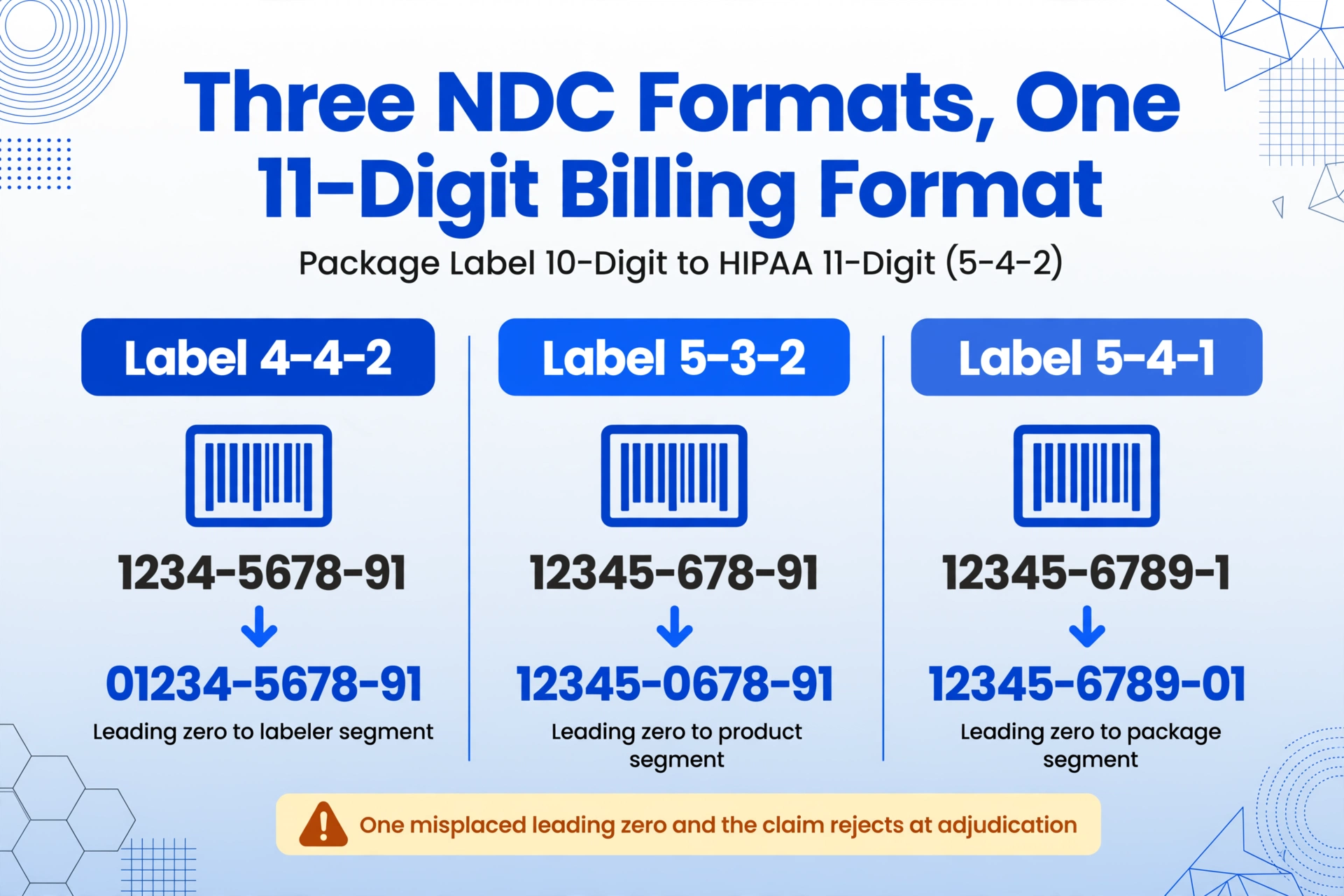
Get any digit wrong — a single leading zero misplaced — and the claim rejects at adjudication. The tech backtracks, re-reads the bottle, re-enters. Another 30 seconds. Multiply by every NDC on every script every day.
Then there's the RxNorm layer. When a pharmacy's PMS uses one drug vocabulary (say, First Databank) and a hospital's EHR uses another (say, Multum), RxNorm — maintained by the National Library of Medicine — provides the normalized clinical drug names that mediate between them. But a technician doing manual entry doesn't interact with RxNorm directly. They just need the data to be correct so the systems downstream can map it.
The real problem is that manual data entry asks a human to act as a format converter — a job computers were built for. The prescription isn't the problem. The keyboard is.
Teaching AI to Read Like a Pharmacy Technician
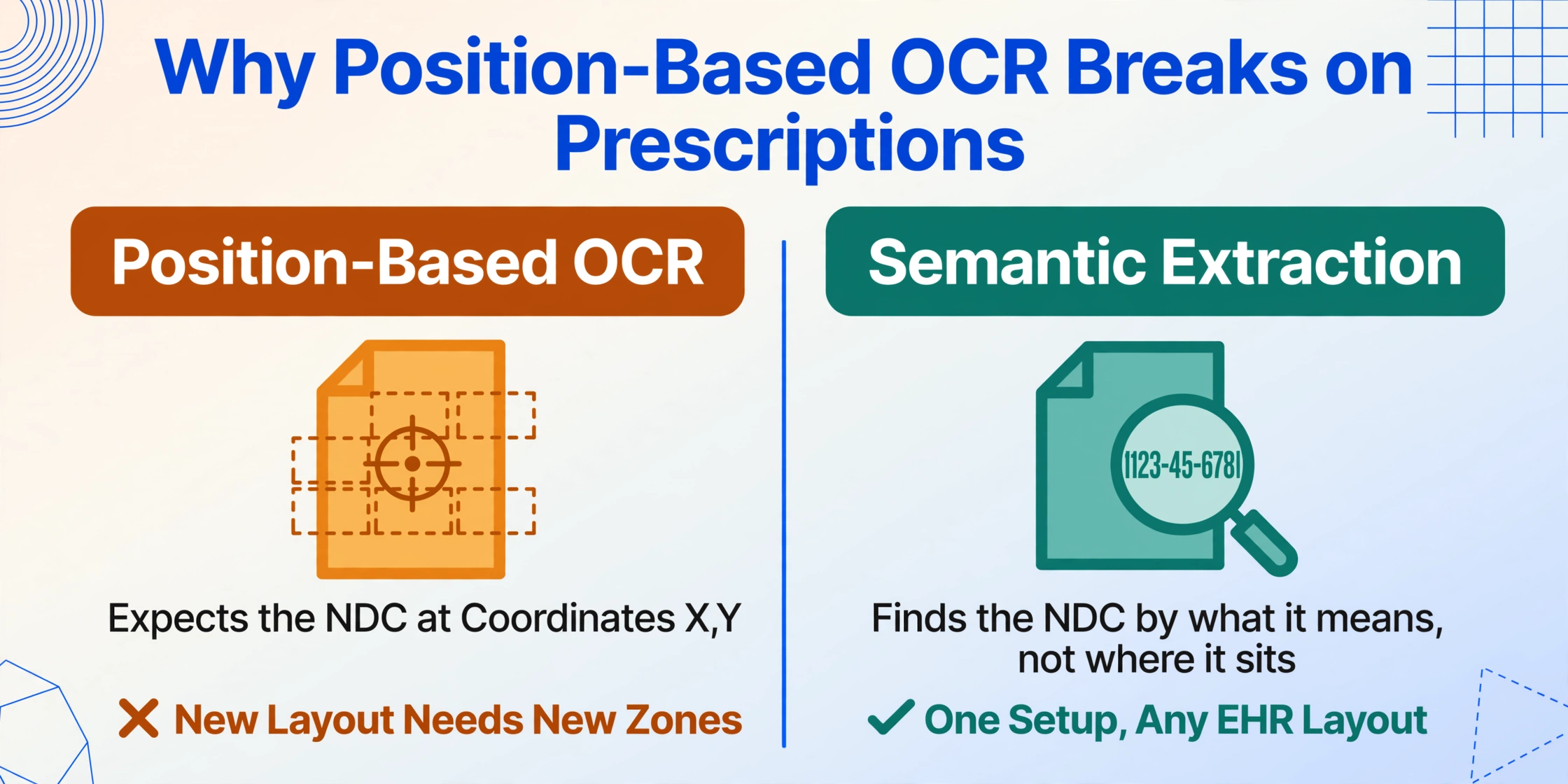
The shift that changes the math isn't faster typing. It's removing the translation step entirely — and letting AI read the prescription the way a technician does, except it never transposes a digit.
Most document extraction tools use a template-based approach: you define zones on a page where specific fields live, and the software OCRs those zones. That works great for standardized forms — but prescriptions are the opposite of standardized. A prescription from Dr. Chen's office in Houston looks nothing like one from a MinuteClinic in Chicago. Handwriting varies. E-script PDF layouts vary by EHR vendor. Fax quality varies by the sender's machine.
ImageToTable.ai takes a fundamentally different approach called Custom Column Extraction. Instead of telling the AI where data lives on the page, you tell it what you want to find — by the meaning of the field, not its position. You define column names like "Drug Name," "Strength," "NDC," and "SIG," and the AI reads the entire document, locates each value by understanding its semantic context, and returns a structured row. Format doesn't matter. Layout doesn't matter. The AI is looking for what the data means, not where it sits.
This is the difference between position-based extraction (traditional OCR: "I expect the NDC at coordinates X,Y") and semantic-based extraction (AI: "I recognize a 10-digit drug identifier with a labeler-product-package structure anywhere on this page"). The prescription can be a crisp e-script PDF or a fax so faded the pharmacy stamp is barely legible — the AI's approach is the same.
The system also supports inferred columns: fields the AI derives from context rather than finding printed on the page. For example, a column like "Schedule (II/III/IV/V)" prompts the AI to identify the drug, cross-reference its DEA controlled substance schedule, and fill in the classification — even though "Schedule II" appears nowhere on the prescription itself. The same approach works for therapeutic class, brand-vs-generic flagging, and formulary tier prediction.
Step by Step: From Prescription Image to Structured Spreadsheet
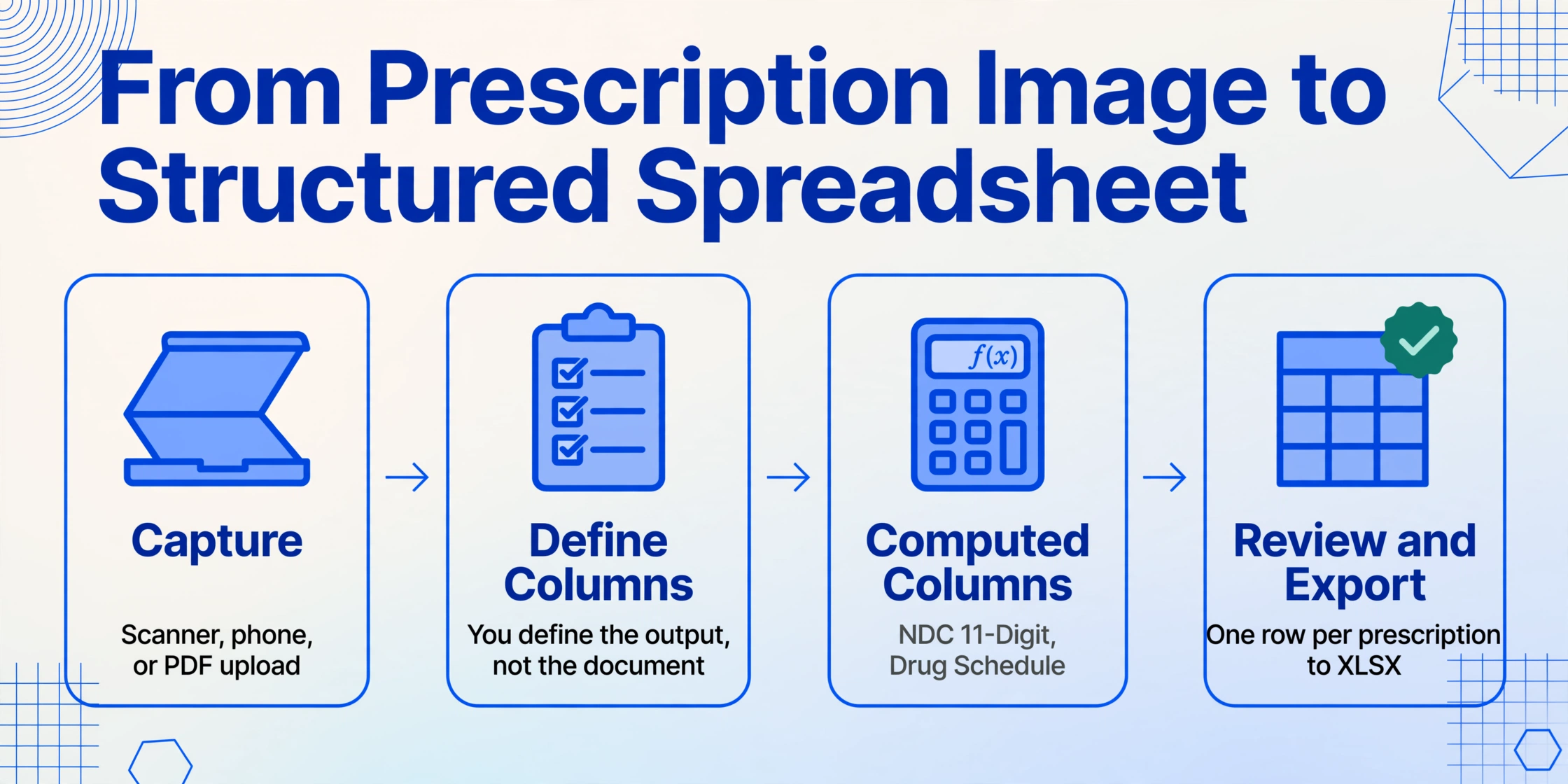
Here's the actual workflow — no theory, no demo smoke and mirrors. If you have a stack of paper prescriptions or a folder of e-script PDFs on your desktop right now, this is the path from image to Excel.
Capture the prescription
Scan paper prescriptions with any flatbed scanner, or photograph them with a phone camera. e-Script PDFs can be uploaded directly — no printing required. Batch upload works too: drop 50 prescriptions at once and they all queue for processing. And when the source is a patient's phone photo of the pharmacy bottle rather than the original slip — the usual case for refill tracking at home — the same columns read the prescription label photo just as cleanly.
Define your output columns
Type the field names you need. For prescriptions, a typical column set is: Drug Name, Dosage Strength, Dosage Form, NDC, SIG/Directions, Quantity, Days Supply, Refills, Prescriber Name, Prescriber NPI. These become the headers of your output spreadsheet — you define the output, not the document.
Add computed and inferred columns (optional)
Go beyond what's printed. Add a computed column like "NDC 11-Digit (convert from 10-digit if needed)" to auto-format NDCs for billing. Or add an inferred column like "Drug Schedule (options: II/III/IV/V/non-controlled)" to classify controlled substances automatically. The AI handles both extraction and computation in a single pass.
Review and export
The AI returns a structured table — one row per prescription, columns matching your definitions. Review the results in the web interface or export directly to Excel (XLSX). For Google Sheets users, the Sheets add-on writes results directly into your spreadsheet without leaving Sheets.
Files are processed securely and not stored.
What About HIPAA and Patient Data?
Any pharmacy evaluating an AI extraction tool needs to start with one question: does this create a HIPAA compliance issue? The answer depends on whether the tool is a Business Associate — and whether the right agreements are in place.
Pharmacies are Covered Entities under HIPAA (45 CFR § 160.103). When you share Protected Health Information (PHI) — and a prescription image containing a patient name and drug name is PHI — with a third-party service that processes it on your behalf, that service becomes a Business Associate. Under 45 CFR § 164.504(e), a Covered Entity must have a signed Business Associate Agreement (BAA) in place before disclosing PHI to any vendor.
This isn't optional paperwork — it's a legally required contract. A BAA stipulates what the Business Associate can and cannot do with PHI, requires breach notification within specified timeframes, and subjects the vendor to HIPAA's Security Rule and Breach Notification Rule. Pharmacies that use AI tools for document processing should confirm two things upfront: (1) the vendor will sign a BAA, and (2) the vendor's data handling — retention, encryption, server location — aligns with what the BAA requires.
ImageToTable.ai processes files transiently: the document is read, data is extracted, and the file is not stored on its servers after processing completes. For pharmacies that require formal HIPAA documentation, a BAA is available. The same framework applies to any document extraction tool used in a pharmacy context. (For a deeper dive into HIPAA considerations across medical document types, see our HIPAA medical document extraction guide.)
Where This Fits in Your Existing Pharmacy Workflow
This isn't a replacement for PioneerRx, QS/1, or any pharmacy management system. It's a preprocessing tool that lives upstream of your PMS — turning the data entry step from the slowest part of the workflow into the fastest.
Here are three concrete integration points where AI extraction slots into a working pharmacy's day:
1. Morning batch: clearing the fax and paper queue
Instead of a technician spending the first 90 minutes typing through a stack of faxed prescriptions, scan or photograph all of them, batch-upload, define columns once, and get a completed spreadsheet back in minutes. The tech then reviews each row against the original images — a verification step, not a transcription step — and copies data into the PMS. Even with manual copy-paste, review-and-verify is dramatically faster than read-and-type.
2. Inventory reconciliation with wholesaler data
The three major pharmaceutical wholesalers — McKesson, Cencora (formerly AmerisourceBergen), and Cardinal Health — collectively distribute over 90% of all prescription drugs in the United States, according to the Commonwealth Fund (2022). When reconciling inventory across multiple wholesaler price lists, extracting NDCs and drug names from supplier PDFs into a comparison spreadsheet eliminates hours of side-by-side manual cross-referencing.
3. Insurance claims support
When a claim requires submission of prescription documentation — for prior authorization through Surescripts, for Medicaid audit response, or for CMS-1500 claim forms with NDC line items — extracting the relevant fields into a clean spreadsheet accelerates what is otherwise a pull-the-paper-file-and-type exercise. (See our guide on extracting CMS-1500 claim form data for the billing-specific workflow.)
In each of these scenarios, the PMS remains the system of record. AI extraction handles the translation step — turning an image or PDF into structured fields — and the technician's role shifts from transcription to verification. That's the difference between spending three hours typing and spending 20 minutes checking.
Where AI Extraction Helps — and Where It Doesn't
Let's be direct about the limitations, because pharmacy is the wrong industry for overpromising.
What AI extraction handles well: printed e-script PDFs, typed fax prescriptions, clearly handwritten prescriptions with standard drug names, NDCs printed on packaging, standardized SIG codes (1T PO QD, 2 puffs QID PRN). The FDA NDC Directory is updated daily and contains active listings for all marketed drugs — the AI can use this as a reference frame for validating extracted NDCs.
Where you still need human judgment: severely illegible handwriting (the kind even an experienced pharmacist squints at), ambiguous drug name abbreviations (HCTZ vs. hydrochlorothiazide — context-dependent), non-standard compounding instructions, prescriptions with conflicting or contradictory directions. The AI will flag uncertainty rather than guess. A pharmacist's clinical judgment is not replaceable — the tool reduces the typing, not the thinking.
What this doesn't do: It does not adjudicate claims (that's your PMS and the PBM's job). It does not perform drug utilization review. It does not verify patient identity or insurance eligibility. It is a data extraction step — precise about what it does, honest about what it doesn't.
Frequently Asked Questions
Does this work with handwritten prescriptions?
Yes, for handwriting that's reasonably legible. The visual AI model is trained on diverse handwriting styles. But a prescription written in rushed cursive on a torn notepad corner — the kind that stumps an experienced pharmacist — will challenge any AI. If a human can read it, the AI usually can too. If a human can't, the AI likely can't either.
Can it handle e-script PDFs from different EHR systems?
Yes — this is where format-independent extraction shines. Whether the e-script came from Epic, Cerner, or a small practice's EHR, the layout varies but the data fields are semantically the same. The AI reads by meaning, not by position, so different EHR outputs don't require different configurations.
How does it handle NDC format conversion?
You can set up a computed column that automatically converts any 10-digit NDC format (4-4-2, 5-3-2, or 5-4-1) to the 11-digit HIPAA billing format (5-4-2) by applying the correct zero-padding rule. The AI reads the NDC as printed on the label and outputs the billing-ready 11-digit version as a separate column — no manual conversion required.
Does it integrate with my pharmacy management software?
ImageToTable.ai doesn't directly plug into PioneerRx, QS/1, Rx30, or other PMS platforms — it's a preprocessing tool. The output is an Excel spreadsheet (or Google Sheets via the add-on) that you then use as the source for data entry into your PMS. Some pharmacies use the spreadsheet as a verification checklist before PMS entry; others copy-paste rows. The workflow improvement isn't in the integration — it's in replacing three hours of typing with a review step.
Is this HIPAA compliant?
ImageToTable.ai processes files transiently and does not store them after extraction completes. A Business Associate Agreement (BAA) is available for pharmacies that require one under 45 CFR § 164.504(e). As with any third-party tool handling PHI, pharmacies should confirm the BAA is executed before uploading patient-identifiable prescription images. For a broader look at HIPAA in medical document extraction, read our HIPAA compliance guide for medical document extraction.
What's the accuracy rate for prescription data extraction?
For printed and clearly typed prescription data, accuracy reaches 99% — consistent with the tool's overall benchmark for printed table data. Handwritten prescriptions and low-quality faxes introduce variability. The key behavioral shift: even at 95% accuracy on difficult inputs, a technician verifying and correcting 5% of fields is significantly faster than manually typing 100% of them. The accuracy conversation isn't about perfection — it's about whether errors caught during verification cost less time than manual entry from scratch.
The Math That Changes Everything
At 50 seconds per prescription, 200 scripts a day equals 167 minutes of data entry — nearly three hours. If AI extraction turns those 50 seconds into a 5-second review per row, plus the initial batch processing time, the same 200 scripts might take 25 minutes total.
That's not a marginal improvement. It's the difference between a technician spending half their shift typing and spending almost all of it on tasks that actually require human judgment — verifying against original images, catching clinical flags, managing inventory, talking to patients.
And for the pharmacy owner looking at the numbers: three hours of technician time per day, at a conservative $18/hour, is about $14,000 per year in wages spent on nothing but manual data entry — for a single technician, at a modest script volume. Scale that to two techs at a busy independent, and the cost of keystrokes becomes a line item worth eliminating.
None of this means the pharmacy management system is going anywhere. It means the data entry step that feeds it — the typing, the NDC format conversion, the SIG translation — finally has a faster path. One that doesn't ask a technician to be a human API between a piece of paper and a database.