The Complete Guide to Construction Daily Report
Data Extraction
A construction daily report carries three distinct types of value: it is a contractual record, a progress document, and a data source for project controls. Most teams treat it as the first two and ignore the third — because extracting structured data from handwritten site reports has historically required either manual re-entry or forcing field crews onto mobile apps. This guide covers the full picture: what data a daily report carries, why extracting it matters, the unique challenges that make this document harder than an invoice or receipt, and how modern AI extraction turns paper reports into structured data without asking a single crew member to change how they work.

Key Takeaways
- 60-80 handwritten daily reports, 1,800-3,200 data points per month — every digit must be retyped by an office manager before it reaches payroll, billing, or compliance.
- For 15 years, every digitization attempt has asked the same impossible thing: that a superintendent finishing a 10-hour shift in the field open an app and type instead of filling out a paper form they've used their entire career.
- Vision AI reads crew counts, equipment hours, and material quantities from any handwritten form — so superintendents keep using paper, and the structured spreadsheet arrives without a single keystroke of manual retyping.
What Is a Construction Daily Report? (And What Data Does It Carry?)
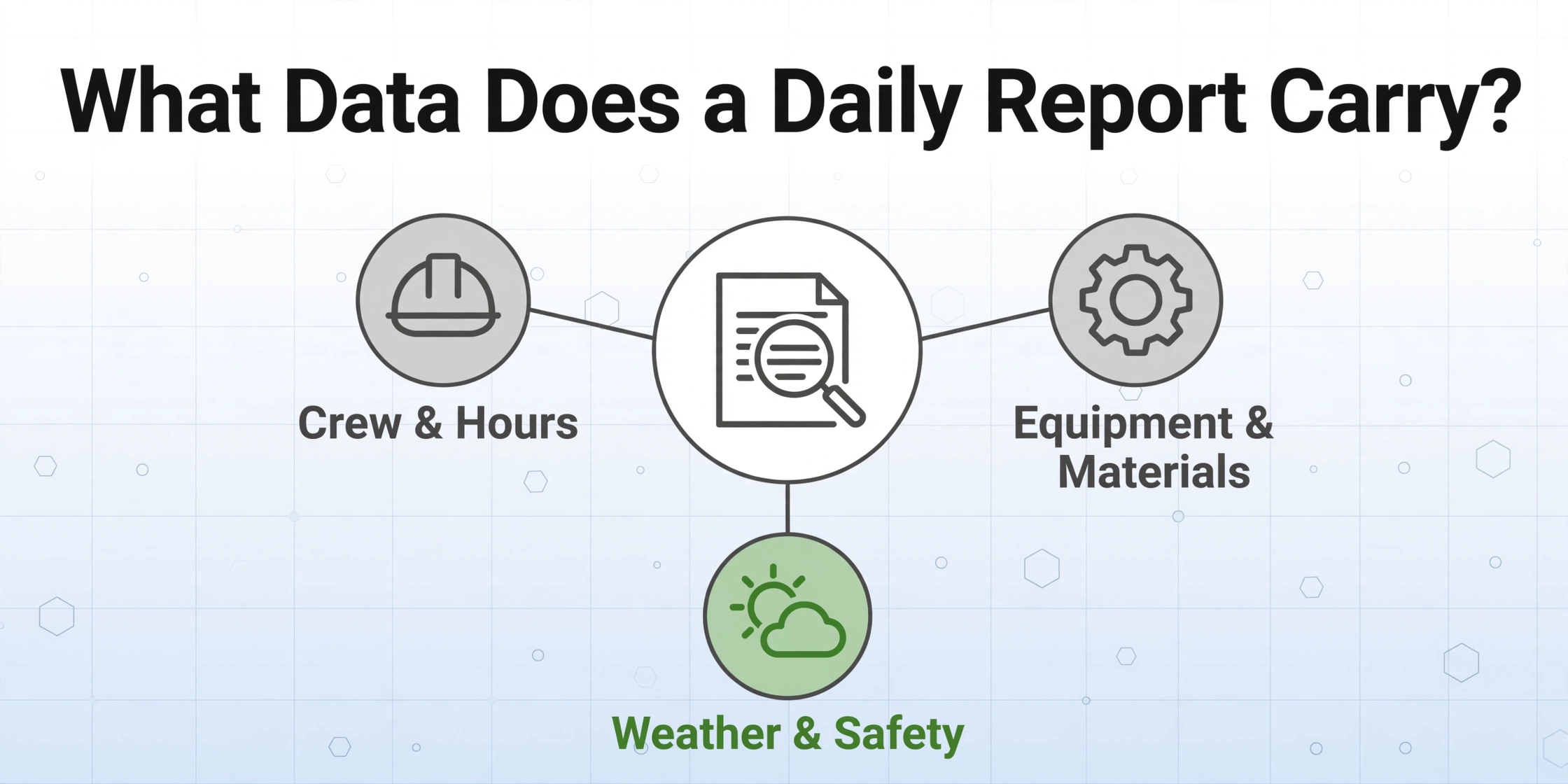
A construction daily report — also called a daily log, site report, or field report — is the written record of everything that happened on a job site during a single working day. Its contractual basis comes from AIA A201-2017 §3.3.3.4, which requires the contractor to maintain inspection records, test data, and other project records at the site. While A201 defines the obligation to keep records, the industry has converged on a standard set of information categories that appear across virtually every daily report form in use today.
A typical daily report carries 15 to 35 extractable data points across six categories: crew composition and hours, equipment deployed and run time, materials received and consumed, work completed by trade, weather conditions, and safety incidents.
Concretely, here is the field taxonomy that appears on most daily report forms:
Standard construction daily report field categories:
Header / Identity
Report Date | Project Name & Number | Location/Site Area | Report Number

Weather
AM Conditions | PM Conditions | Temperature (High/Low)

Crew & Labor
Crew Member Name | Trade/Role | Regular Hours | Overtime Hours
Subcontractor Company | Sub Crew Count | Work Performed by Sub

Equipment
Equipment Description | Equipment ID Number | Hours Run
Equipment Notes (idle, maintenance, downtime)

Materials
Material Description | Quantity Delivered | Unit of Measure
Quantity Consumed/Installed | Supplier Name

Work Completed
Area/Location | Trade/Scope | Description of Work
Percentage Complete (if applicable)

Safety & Incidents
Safety Incident (Y/N) | Incident Description
Near Miss Reported | Safety Walk Conducted

Delays & Issues
Delay Type (weather/equipment/material/labor) | Duration (hours)
Description of Delay | Impact on Schedule

Visitors & Signatures
Visitor Name | Visitor Company | Time In / Time Out
Superintendent Signature | Reviewer Signature
Not every form has every field — a small-site foreman's log may be a single page with a dozen lines, while a large-project superintendent's report for a general contractor can span three or four pages with continuation sheets. What matters for extraction is that the field categories are consistent even when the layout is not. A crew count field may be labeled "Workforce," "Personnel on Site,"or "Crew Members" depending on the form, but its meaning is the same across all versions.
Why Extract Data from Daily Reports?
If daily reports are already being filled out by superintendents and stored in project folders, why add an extraction step? The answer is that a stack of paper reports is information that exists but is not usable — it cannot be sorted, summed, trended, or fed into project management systems. Extraction is what turns a record into data.
Project controls and cost tracking. Crew hours from daily reports feed into labor cost tracking. Equipment hours trigger maintenance schedules and support rental cost allocation. Material quantities consumed are compared against budgeted quantities for variance analysis. Without extraction, each of these data transfers requires someone in the office to manually re-type the numbers from paper into a spreadsheet or ERP. A project with three active sites running five crews each generates roughly 60 to 80 reports per month — representing anywhere from 1,800 to 3,200 individually typed data points, depending on report complexity.
Billing and dispute documentation. On time-and-materials contracts, daily reports are the primary supporting documentation for invoices. If a dispute arises, the daily report is what a contractor points to as evidence of work performed. A Reddit discussion on daily log tracking methods captured the reality: "Paper forms and it's chaos. Stuff gets lost, handwriting is illegible, and my office manager is spending hours every day just trying to piece together what happened." When that office manager is also trying to produce a T&M invoice, the risk of missed billable hours is real.
Compliance and regulatory records. On federally funded projects in the United States, the Davis-Bacon Act requires certified payroll records that track hours worked by classification for every laborer on site. Daily report crew data is the foundational source for these certified reports. OSHA's recordkeeping requirements under 29 CFR Part 1926 also mandate maintenance of injury and illness records — safety incident data from daily reports feeds directly into OSHA 300 logs. When data is extracted and structured, producing these reports takes minutes instead of a full-day reconciliation exercise.
The common thread across all three use cases: extraction does not replace the daily report. It replaces the manual data bridge between the report and every downstream system that needs the information. The paper form stays in use. The extra work disappears.
The Unique Challenges of Daily Report Extraction
Construction daily reports present a extraction difficulty profile that differs meaningfully from invoices, receipts, and most other business documents. Understanding these challenges is essential for setting realistic expectations and choosing the right approach.
Near-100% handwriting rate. Most invoices and receipts are printed or typed. A daily report is filled out by hand — often in the last 20 minutes of a 10-hour shift by a superintendent whose primary skill is managing crews, not penmanship. Traditional OCR, which matches character shapes against font models, simply does not work at viable accuracy on handwriting because handwriting has infinite variation in stroke width, slant, and letter formation. Vision-based AI models handle handwritten text significantly better, but the handwriting factor alone makes daily reports harder to extract than the typical business document.
Embedded table structures with variable layouts. A single daily report page can contain a crew table, an equipment table, a materials log, and a visitor sign-in section — each with its own column structure. The AI must identify where each table begins and ends, and correctly associate handwritten values with their column headers. This is fundamentally more complex than extracting flat fields like a date or an invoice total. The detailed capability assessment for AI extraction of daily reports breaks down accuracy by field type and shows which table configurations are handled reliably.
Multi-dimensional mixed field types. Temperatures, crew names, equipment hours, material quantities, narrative descriptions of work, checkbox safety indicators — a daily report mixes numeric fields, short text, full paragraphs, and binary indicators on the same page. A good extraction setup handles each field type differently: numbers need to remain numeric (for summing), checkboxes need to become Y/N flags, and narrative text needs to preserve the full sentence without being squeezed into a short cell.
Variable form layouts across projects and contractors. Every general contractor uses a slightly different daily report template. Some use printed forms with labeled boxes. Others use carbon-copy notebooks with blank lines. Some superintendents draw their own table on a blank page. A template-based extraction tool would require per-form configuration for every variant — which is not operationally feasible when a single project coordinator may receive reports from ten different supers in a week. The extraction method must be format-independent: it reads content by meaning, not by position on the page.
Photo attachments and visual annotations. Many daily reports include attached or embedded photographs — progress photos, safety issues, material deliveries. These photos contain contextual information but cannot be "extracted" as structured data fields. The relationship between a text entry ("Cracked sidewalk section") and an attached photo of the crack is meaningful for a human reviewer but currently outside the scope of automated extraction. The practical approach: treat photos as attachments that accompany the extracted structured data.
The combination of these challenges — high handwriting rate, embedded tables, mixed field types, and variable form layouts — explains why daily reports have resisted digitization for 15 years while invoice processing has become routine.
Traditional Methods vs AI Extraction: What Changes
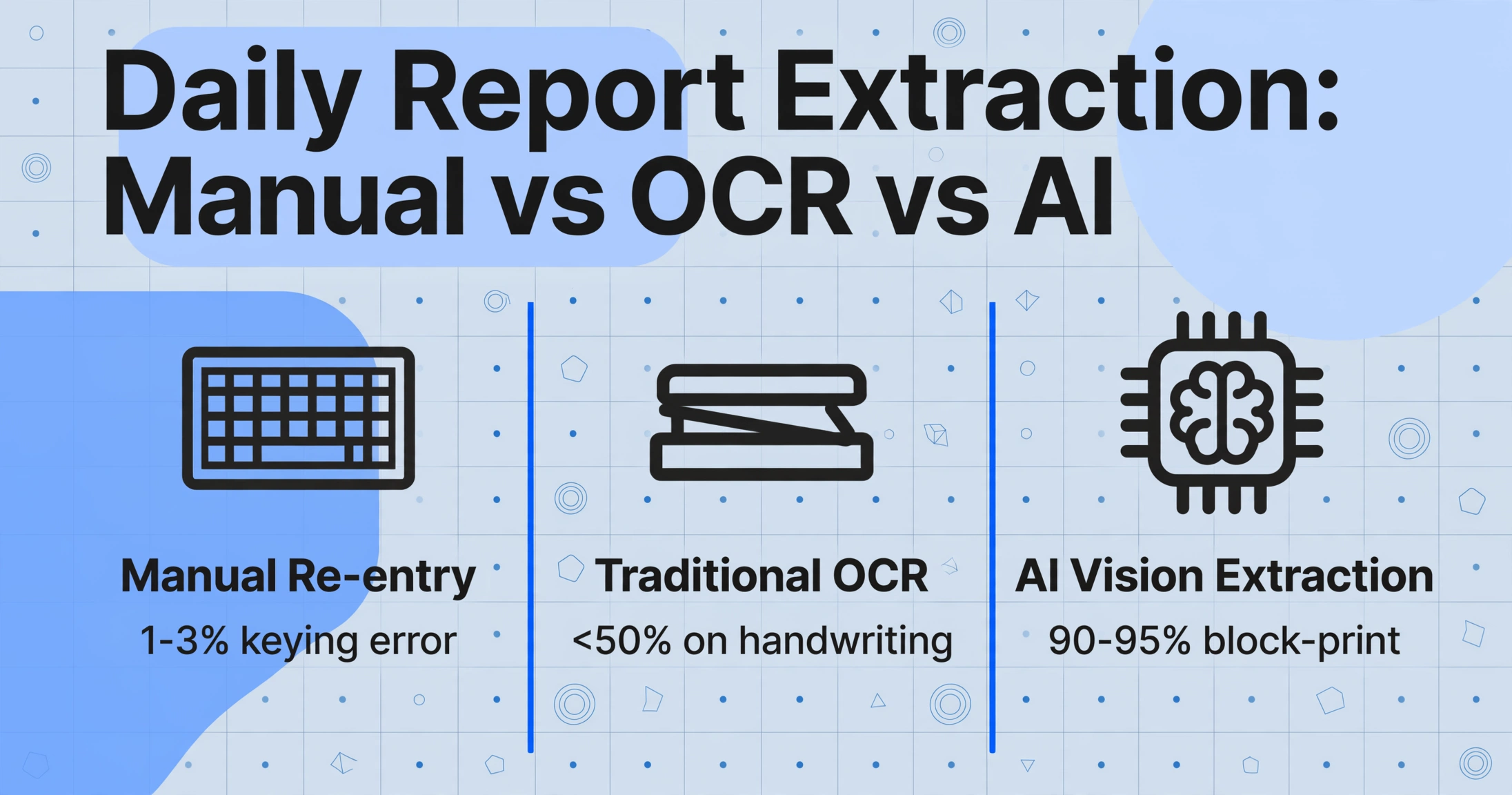
There are three approaches to getting data from paper daily reports into a digital format. Each has a different cost structure, accuracy profile, and operational impact on field crews and office staff.
| Method | How It Works | Accuracy | Time per Report | Field Crew Impact |
|---|---|---|---|---|
| Manual re-entry | Office staff reads handwritten report and types data into spreadsheet or ERP | Depends on typist — estimated 1-3% keying error rate on legible reports | 5-12 minutes per report (30-60 fields) | None — paper continues as-is |
| Traditional OCR + manual correction | Scanned reports run through OCR engine; print labels extract well, handwritten fields come out garbled and must be manually corrected | <50% on handwriting — requires full human re-entry of most fields | 8-15 minutes per report (scan + fix broken OCR output) | None — paper continues as-is |
| AI vision extraction + spot-check | Photo of report processed by vision AI; structured data exported to Excel or CSV; human verifies 2-5 fields per report | 90-95% on block-print handwriting in labeled boxes; 75-85% on cursive (per field, clear photo) | 3-5 minutes for 5 reports (batch), including verification | None — paper continues as-is; superintendents photograph and send |
The critical difference is not just speed — it is the nature of human effort involved. Manual re-entry requires transcription: converting a handwritten value into a typed value, a task that demands no judgment and is purely mechanical. AI extraction with spot-check requires verification: confirming that the extracted value matches the original, a task that a project manager can complete in seconds per field. The shift from transcription to verification reduces cognitive fatigue and error rates simultaneously, because verification uses pattern matching (does this number look right?) while transcription uses character-by-character reproduction.
Traditional OCR sits in an awkward middle ground. It extracts printed labels and headers reasonably well — typically at 95-99% accuracy for typed text — but it drops below 50% on handwriting. The result is a mixed output where some fields are right, some are wrong, and the human reviewer cannot trust any of them without checking every field. This is actually worse than no AI at all, because the reviewer must check every field but cannot simply re-type from scratch — they must read each OCR result, compare it to the original, and correct it. The time savings vanish. For daily reports where handwriting dominates, traditional OCR is the wrong tool.
The construction PM's guide to document data extraction covers how this comparison extends to other construction document types — invoices, change orders, AIA pay applications — providing a unified framework for thinking about extraction across a contractor's entire document set.
Key Fields to Extract from Daily Reports
Not every field on a daily report needs extraction. Some fields are meta-information for filing (report number, project name). Others are narrative content best kept as-is (work description paragraphs). The extraction target should be the fields that feed downstream processes: hours for payroll, equipment usage for billing, material quantities for cost tracking, and safety incidents for compliance reporting.
When setting up an extraction workflow, the column names you define become both the extraction instructions and the output headers. The AI uses semantic understanding to locate values by matching column names to document content — so the wording of each column matters. A column named "Crew Count" tells the AI to look for a numeric headcount value near crew or workforce labels. A column named "Worker Name" tells it to look for individual names in a personnel table.
Here is a recommended starting set of extraction columns for a standard daily report, organized by the downstream process they feed:
Recommended extraction columns for construction daily reports:
Identity (for filing and cross-reference):
Report Date | Project Name | Site / Location

Labor (feeds payroll and cost codes):
Worker Name | Trade | Regular Hours | Overtime Hours
Subcontractor Company | Sub Crew Count

Equipment (supports billing and maintenance):
Equipment ID | Equipment Hours Run

Materials (feeds cost tracking):
Material Name | Quantity Delivered | Quantity Consumed | Unit

Safety (OSHA recordkeeping):
Safety Incident (Y/N) | Incident Description

Delay / Issue (schedule impact):
Delay Type | Delay Hours | Delay Description

Weather (contextual data):
Weather Condition (AM) | Weather Condition (PM) | Temperature
The principle: design your extraction columns around the spreadsheets and systems the data feeds into, not around the fields on the form. If your cost tracking system uses "Trade Classification" instead of "Craft," name your column "Trade Classification" — the label that matches the destination system saves a mapping step later.
For guidance on the accuracy you can expect from each field type on a handwritten report, see the breakdown of extraction accuracy by field type. The patterns are consistent: numbers in labeled boxes extract most reliably, cursive narrative text carries the widest accuracy variance, and checkbox indicators approach 100% regardless of handwriting quality.
Batch Processing: Multiple Sites, Multiple Reports, One Spreadsheet
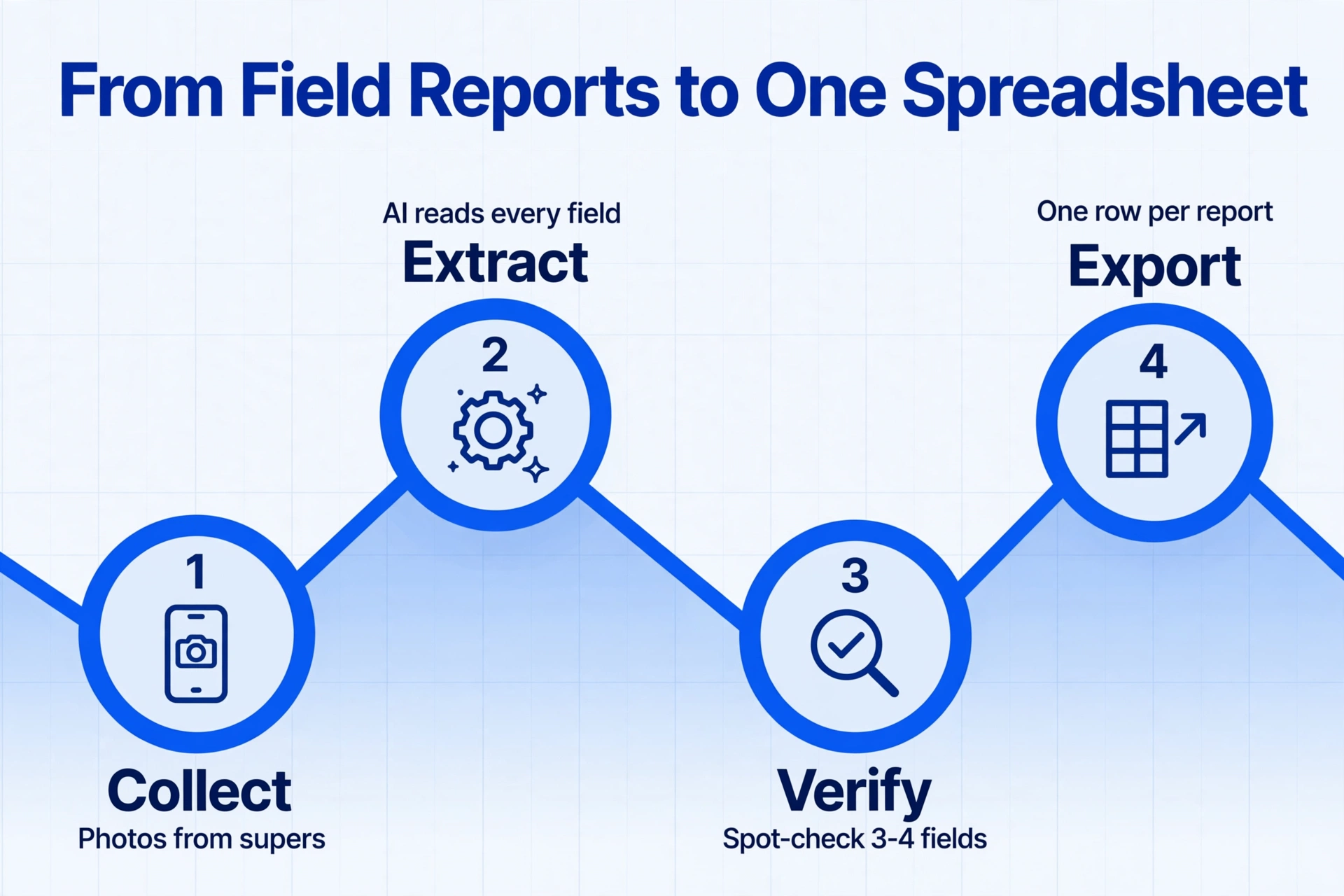
The real-world rhythm of construction reporting is batch by nature. A project coordinator does not process one report and stop — they collect reports from three supers across two job sites over a week, then need to consolidate everything into a single set of numbers. Batch processing is what makes extraction practical at project scale.
In a batch workflow, all reports uploaded together share the same column definitions and produce a single output table. The AI processes each document independently but outputs them as merged rows — so the result is one spreadsheet with one row per report, regardless of how many different forms or handwriting styles were in the batch.
The key operational decision in batch processing is how to identify each report in the consolidated output. Since the AI reads "Project Name" and "Report Date" as extractable fields, these become natural group-by columns in the output table — allowing the coordinator to sort, filter, and sum across sites without manually adding identifiers. A superintendent who sends multiple reports for the same project across different dates will have each date as a separate row, automatically grouped by project name.
The detailed guide to batch-converting handwritten site reports into weekly summaries walks through the setup, naming conventions, and verification workflow for processing 20 to 30 reports at a time. The practical time comparison: processing 20 reports from four sites manually takes roughly 2 to 3 hours of typing. Batch AI extraction with verification takes 15 to 25 minutes — and the output is already in a single spreadsheet, not a stack of separate files waiting to be merged.
Batch processing also solves a subtle but important problem: format inconsistency across reports. A project coordinator receiving reports from multiple supers knows that each super uses a slightly different layout. One uses a printed PDF form with labeled boxes. Another uses a carbon-copy notebook. A third sketches a table on blank paper. Template-based tools would need separate configurations for each format. Semantic-based extraction — where the AI reads by field meaning, not page position — processes all three format variants through the same column definitions. The output table has the same columns regardless of whether the source document was a professional printed form or a hand-drawn table on graph paper.
For teams managing five or more active sites with multiple superintendents submitting daily, a Collection Link workflow amplifies batch processing further: generate a shareable link that each superintendent opens from their phone, photographs their report, and submits directly. The link requires no app installation, no login, and no training — and files land auto-categorized in the project coordinator's processing queue, ready for a single batch extraction at the end of the week.
Exporting and Using Extracted Data
Extraction is the middle step, not the final one. The value of structured data depends on where it goes and how it is used. The output formats available for extracted daily report data are:
| Format | Best For | Downstream Use |
|---|---|---|
| Excel (XLSX) | Weekly labor summaries, equipment cost reports, material consumption tracking | Directly opens in Excel for filtering, pivot tables, charting; can be imported into Procore, Sage, Viewpoint |
| CSV | ERP and accounting system imports | Universal format for data import; compatible with virtually all construction accounting platforms |
| JSON | Custom integrations, API-driven workflows | Programmatic consumption; suitable for teams with internal data pipelines or custom PM tools |
A practical weekly workflow using extracted data looks like this:
Monday morning: Project coordinator opens the extraction tool, sees 15 reports submitted via Collection Links over the weekend. Each report was photographed by the superintendent at the end of their shift Friday and uploaded directly.
Extraction run (15 minutes): The coordinator selects all 15 reports, confirms the column definitions (unchanged from last week), and starts batch extraction. The system processes each report, the coordinator spot-checks 3-4 fields per report — about 10 minutes of verification.
Export and distribute (5 minutes): The coordinator exports to Excel, creates a pivot for weekly hours by trade, another for equipment utilization, and a third for material consumption. A one-page summary is distributed to the project team before lunch.
This workflow replaces a process that previously took 3-4 hours of typing on Monday morning — and the data was never structured enough for pivot tables without additional manual work.
How to Choose a Daily Report Extraction Tool
When evaluating extraction tools specifically for construction daily reports, standard document extraction criteria do not apply directly. Daily reports have characteristics — handwriting, embedded tables, variable layouts — that most invoice-focused tools were not designed to handle. Here are the specific criteria that matter for this document type:
1. Handwriting capability, not just OCR. Traditional OCR engines (Tesseract, ABBYY, Adobe Acrobat's built-in OCR) are designed for printed text. If a tool's documentation mentions "template zones" or "fixed coordinates," it is not designed for handwriting. Look for vision AI (large multimodal models) that process the page as an image and read content by visual understanding. The difference is not incremental — it determines whether handwriting is extracted at 40% or 90% accuracy.
2. Format independence, not template matching. Tools that require per-form template configuration (draw boxes around fields, train on sample documents) are not operationally viable for daily reports from multiple supers with different forms. The extraction method must be semantic — reading field content by meaning rather than location — so that changing the form layout does not require reconfiguration. This is the single most important operational requirement for multi-site contractors.
3. Batch processing with merged output. Individual document extraction is not useful at project scale. The tool must support batch processing — uploading multiple reports simultaneously and outputting a single consolidated table — not requiring the user to extract each report one at a time and merge manually.
4. Export to Excel and CSV. Construction project management runs on spreadsheets. The tool must export directly to XLSX and CSV formats that can be opened, pivoted, and imported into Procore, Sage, or Viewpoint. Proprietary export formats that cannot be read by standard office software add a conversion step that defeats the purpose of automation.
5. No training or setup cycle. Tools that require uploading 10-20 sample documents for training, or that need a "learning period" before they produce usable results, do not match the operational reality of construction projects. The extraction should work from the first report on day one — not after a two-week onboarding process.
These criteria align with the template-free, semantic extraction paradigm that the broader construction document extraction guide applies across all six major construction document types. For daily reports specifically, criteria 1 and 2 are non-negotiable — a tool that cannot handle handwriting and format variation will not deliver usable results regardless of its other capabilities.
FAQ
What is a construction daily report?
A construction daily report is a written record of all significant activities, resources, and conditions on a construction job site for a single calendar day. It documents crew composition, hours worked, equipment used, materials received, work completed, weather conditions, safety incidents, and any delays or issues encountered.
Can AI extract data from handwritten daily reports?
Yes. Modern vision AI extracts handwritten data from daily reports at 90-95% accuracy for block-print handwriting in labeled boxes, and 75-85% for cursive text. The detailed accuracy breakdown covers field-level expectations. Accuracy depends primarily on photo quality and handwriting legibility — not on the specific form layout.
Does extraction require changing the daily report form?
No. Semantic extraction reads content by meaning, not by form layout — so the same column definitions work across different forms from different superintendents. You do not need to redesign your daily report form for extraction to work.
How does this compare to using Raken, Fieldwire, or Procore daily reports?
Those tools replace paper at the point of creation — the foreman fills out a report in the app instead of on paper. AI extraction from photos digitizes existing paper reports without requiring foremen to change their process. The approaches are complementary: some crews prefer apps, others prefer paper, and extraction handles whatever comes in.
Can extracted data be imported into Sage, Viewpoint, or Procore?
Yes. Extraction output is available as Excel (XLSX) or CSV, both of which can be imported into systems that support file-based data import. The data is structured and verified, so the import step is a file upload rather than a manual re-entry session. Live API integrations are not currently available — this is a file-handoff workflow.
How many daily reports can be processed in a single batch?
Batch processing handles 20 to 50 reports per session comfortably. The practical constraint is verification time — at 15-30 seconds per report for spot-checking, a batch of 30 reports requires 10-15 minutes of human review. The actual AI processing time is a few seconds per report regardless of batch size.
What happens if a report has poor handwriting that the AI cannot read?
If the handwriting is genuinely illegible (unreadable even to another human), the AI will produce a low-confidence or partial extraction. The practical approach is to treat the problematic fields as manual-entry exceptions. In practice, 80-90% of daily reports from active job sites have handwriting clear enough for useful extraction — the remaining 10-20% require human intervention regardless of method used.
What is the single most impactful thing I can do to improve extraction results?
Photograph the report flat, straight-on, in good light, before it gets folded or damaged. The accuracy difference between a proper photo and an angled low-light snapshot is 15-25 percentage points — larger than any tool upgrade. Capture the top copy, not the carbon copy, and use a dark ballpoint pen for maximum contrast.
Does AI extraction work with reports that include attached photos?
Photos embedded in or attached to a daily report carry contextual information that a human reviewer needs to see, but they cannot be meaningfully "extracted" as structured data fields. The recommended approach is to extract the text fields (descriptions, locations, timestamps) from the report and keep the photos as file attachments that accompany the structured output.
Is this different from extraction for construction invoices?
Yes. Invoices are typically printed with consistent layouts and typed content. Daily reports are handwritten, use variable table structures, and mix narrative text with numeric fields. The guide to construction invoice extraction covers invoice-specific details. The extraction technology is the same — what changes is the column definitions and the verification focus areas.
Start with One Report — See the Difference
Take a photo of any handwritten construction daily report and upload it. In under 10 seconds, see what a vision AI model extracts — crew counts, hours, equipment IDs, material quantities. No sign-up, no configuration, no training.
Upload a Daily Report →