The Complete Guide to
Inspection Report Data Extraction (2026)
A single construction site generates roughly 40 inspection reports per month — safety walkthroughs, equipment pre-start checks, concrete pour inspections, welding quality records. Multiply that by five active sites and you are looking at 2,400 reports per year, every one of which carries checklist items with pass/fail statuses, handwritten corrective action notes, and embedded photo evidence that must eventually find its way into a compliance dashboard or a CMMS. This guide covers the full landscape of inspection report data extraction: what makes these forms different from invoices or purchase orders, why traditional OCR falls short, which fields matter across industries, and how to evaluate tools that claim to handle them.
What Is Inspection Report Data Extraction?
Inspection report data extraction is the automated process of converting completed inspection forms — whether printed checklists filled out by hand on a clipboard, PDF exports from a mobile inspection app, or scanned multi-page booklets — into structured rows and columns that can be analysed, archived, and fed into compliance or maintenance systems.
Unlike invoices or purchase orders, inspection reports are not primarily about financial figures. They are about status classification: a checklist item is either Pass or Fail, a finding is Open or Closed, a checkbox is checked or blank. The value of the data lies less in the individual numbers and more in the patterns — which assets fail most often, which inspectors flag the most findings, which sites have recurring safety issues across quarters.
Inspection reports span a wide range of industries and formats:
- Construction safety walkthroughs — daily hazard inspections (OSHA 1926), crane pre-use checks, scaffold inspections, confined space entry permits (see the construction safety inspection workflow)
- Manufacturing QC inspections — first-article inspections, in-process dimensional checks, final quality audits, ISO 9001-required inspection records
- Facility safety inspections — fire extinguisher monthly checks (NFPA 10), emergency lighting tests (NFPA 101), eyewash station weekly verifications (ANSI Z358.1)
- Fleet vehicle inspections — DOT driver vehicle inspection reports (DVIR), preventive maintenance inspections, lift truck daily checks (OSHA 1910.178)
- Restaurant health inspections — HACCP temperature logs, sanitation checklists, pest control inspection records, allergen cross-contact verification forms
- Equipment maintenance inspections — vibration analysis reports, thermographic inspection records, lubrication route checklists
The extraction challenge for all of these is the same: the information on the page is a mix of printed labels, handwritten values, hand-drawn check marks, ticked boxes or circled responses, and embedded photographs — all arranged in a layout that varies by form designer, by site, and sometimes by inspector. A system that reads only printed text will miss half the data.
Core insight: Inspection report extraction is not a character recognition problem. It is a structural classification problem — the AI must understand which items on a form belong together, whether a box is marked or empty, and how a handwritten note in the margin relates to the checklist item it annotates. That is a fundamentally different technical requirement from extracting a date or a dollar amount from an invoice.
Why Manual Inspection Report Processing Is Costly
The most visible cost of manual inspection report processing is the time it takes to transcribe data from paper into a spreadsheet or CMMS. A single page inspection form with 25 checklist items takes about five minutes to read and type — two minutes to locate each field on the page and three minutes to re-key. For a facility that processes 50 reports per week, that is roughly four hours of data entry labor. Over a year it becomes 200 hours, or the equivalent of five weeks of full-time work — for one facility.
But the typing time is the smallest part of the cost. The larger costs are hidden in three categories that compound when reports remain on paper or in scanned PDFs.
1. Missed Inspection Findings and Compliance Gaps
An inspection report is not a record of what was checked. It is a record of what was found. The value of the report lies in the findings — the items that failed, the deficiencies noted, the corrective actions assigned. When inspection results stay on paper, the pattern of findings across time and across locations is invisible until someone manually reads every page and tallies the results.
A safety manager with 20 weekly inspection reports from five sites cannot see that Site 3's lockout/tagout violations have increased by 300% over three months without spending an entire afternoon building the dataset first. By the time the pattern is spotted, the compliance gap has already grown for a quarter. And if OSHA arrives for an inspection — triggered by a complaint or a recordable incident — the ability to produce complete, organised inspection records in hours rather than days is a regulatory requirement, not a convenience.
OSHA 29 CFR 1910 and 1926 require employers to conduct "frequent and regular inspections of the job sites, materials, and equipment" (1926.20), performed by a competent person. The records of those inspections must be producible on demand. A stack of clipboard checklists in a filing cabinet meets the letter of the requirement but fails its intent: the data is not searchable, not analysable, and not actionable until someone transcribes it.
2. Audit Preparation Labor
Every organisation that is ISO 9001 certified, OSHA-compliant, or regulated by FDA, FAA, or DOT must retain inspection records for defined periods. An ISO 9001:2015 audit, for example, requires the organisation to demonstrate that inspection and testing records (Clause 8.5.1 and 8.6) exist, are complete, and are retrievable. An OSHA investigation can demand five years of inspection logs (OSHA 300) — or 30 years of employee exposure records.
When audit season arrives, a company with 5,000 paper inspection reports faces a simple arithmetic problem. Locating each report by date, site, and type, pulling it from storage, verifying completeness, and cross-referencing findings with corrective actions takes days. A manufacturing plant undergoing a recertification audit typically dedicates 40-80 person-hours to inspection record preparation alone. For a company running multiple sites, the cost scales linearly — and unlike production costs, audit preparation offers zero revenue offset.
3. Manual Checklist Re-Entry and Its Errors
The most insidious cost is the one that feels like progress: digitising reports by typing them into a spreadsheet. A study of manual data entry across industrial environments found error rates of 1-10% depending on document complexity and typist fatigue. For an inspection form with 30 checklist items where each item has a status (Pass/Fail/NA) and a comment, the error surface is enormous — a single misplaced tick in the wrong row cascades into incorrect trend data.
Consider a facility maintenance manager who enters 200 inspection records per month into a CMMS (Computerised Maintenance Management System) like SAP PM or IBM Maximo. A 3% error rate means six incorrect records per month — equipment flagged as failed when it passed, corrective actions assigned to the wrong asset, pass rates that appear lower than actual. Each error takes time to discover and correct, and some are never found, subtly degrading the quality of the maintenance dataset over months and years.
The arithmetic of manual processing: 5 minutes per report × 50 reports per week = 200 hours of data entry per year. Add audit prep at 60 hours per year, error resolution at 40 hours, and finding-specific analysis at 30 hours. The total is 330 hours — roughly two months of one person's working time — spent on tasks that automated extraction reduces to machine processing time, not human labour.
Key Challenges Unique to Inspection Report Extraction
Inspection reports differ from invoices, purchase orders, and other business documents in ways that make data extraction fundamentally harder. Understanding these differences is essential for choosing — or evaluating — the right approach.
1. Checkbox / Radio Button / Tick-Mark Recognition
This is the single most important technical challenge in inspection report extraction, and the one that most generic document extraction tools fail to solve.
An inspection form presents its checklist items as a list or table, each row containing a description of the item and a status indicator — typically a checkbox that the inspector marks to indicate Pass, Fail, or Not Applicable. The mark might be a checkmark (✓), an X (✗), a filled-in circle (●), a circled response, or a strike-through. It might be dark and clear, or faint, or overlapping the printed checkbox border, or scribbled in the margin beside the box rather than inside it.
Traditional OCR — which extracts characters by detecting text shapes — cannot read these marks. A checked box is not text. It is a spatial mark whose meaning depends on whether it is present or absent, not on what character it represents. An OCR engine scanning an inspection form will either ignore the checkbox region entirely or, at best, report it as noise — a stray line on the page — with no semantic interpretation.
Vision AI, by contrast, interprets checkboxes the same way a human does: it sees a box, determines whether a mark is present inside it, and classifies the status as checked (Pass), crossed (Fail), or empty (Not Checked / Not Applicable). The difference is not one of accuracy — it is one of capability. An OCR system cannot tell you whether a box was ticked, because it was never designed to. The implication for inspection report extraction is clear: any tool that relies solely on OCR will produce incorrect results for any form that uses checkboxes or radio buttons, which is virtually all inspection forms.
2. Handwritten Notes Mixed with Printed Checklists
Inspection forms almost never contain only printed data. The inspector writes in the findings, scribbles a corrective action in the margin, circles the "Deficient" label, signs and dates the bottom. The writing can range from neat block capitals to field-speed cursive, often in the limited white space surrounding the printed checklist table.
Extracting handwriting from an inspection form requires the AI to distinguish between the printed form text and the handwritten additions, then to associate each handwritten note with the correct checklist item. A note scribbled beside Item 17 must be linked to Item 17, not to Item 16 above it or to the general comments section at the bottom. This spatial association is something a human reader does unconsciously — but OCR-based extraction loses it entirely by treating all text on the page as a flat stream.
Handwriting recognition itself has improved significantly in recent years. Modern AI-based handwriting recognition (often called HTR — Handwritten Text Recognition) reads cursive with reasonable accuracy, particularly when the handwriting is consistent and the form provides clear boundaries for each response field. But the harder challenge for inspection reports is association: knowing which handwritten note belongs to which checklist row, using both proximity and layout cues.
3. Photos Embedded in PDF Reports
Many inspection reports — particularly construction site walkthroughs, property condition assessments, and equipment inspection records — include photographs as evidence. A safety inspection report might contain 10-30 photos documenting hazards, violations, corrected conditions, and equipment condition. These photos are embedded in the PDF report alongside the text checklist.
For data extraction, embedded photos present a two-sided problem. First, the photos themselves may contain information that needs to be recorded — a photo of a cracked weld, a corroded pipe, or an unguarded belt drive documents a specific failure that should appear in the findings summary. A text-only extraction system captures the written description of the finding but misses the visual evidence that the inspector considered the definitive record.
Second, and more practically, embedded photos can confuse extraction tools that are not trained to distinguish between "content to extract" and "visual evidence to preserve." A tool that tries to OCR text from within every image in the PDF may hallucinate readings from the photo contents — interpreting a pipe label in a photo as a checklist item, for example.
4. Multi-Section and Multi-Page Forms
Inspection reports are rarely single-page documents. A comprehensive facility inspection may run 5-15 pages covering distinct sections: general information (site, date, inspector), safety walkthrough checklist, equipment-specific checklists, findings summary, corrective action plan, and sign-off. Each section has its own layout, its own response format, and its own relationship to the overall report. Construction payment applications like the AIA G702/G703 forms share this same parent-child structure — a summary page fed by detailed continuation sheets — and the same extraction principles apply.
Data extraction from multi-section forms must reconstruct the document's structure — not just read the text on each page independently. A finding listed on page 7 under "Electrical Safety" must be linked to the same inspection session recorded on page 1, and the corrective action deadline written on page 9 must be linked to that finding. This structural understanding separates serious extraction tools from page-by-page OCR viewers.
5. Regulatory Compliance Complexity
Different industries, different regulatory bodies, and different inspection types have different requirements for what must be recorded and retained. An extraction tool that works for one compliance regime may miss mandatory fields for another.
The table below summarises the key compliance frameworks that inspection report extraction must accommodate:
| Framework | Applies To | Key Inspection Record Requirements | Retention Period |
|---|---|---|---|
| OSHA 29 CFR 1910 | General Industry (manufacturing, warehousing, facilities) | Lockout/tagout inspection (1910.147), forklift daily checks (1910.178), PPE assessment (1910.132), hazard communication program | 5 years (OSHA 300 log); 30 years (exposure/medical records) |
| OSHA 29 CFR 1926 | Construction | Competent person inspections (1926.20), crane inspections (1926.1412), scaffold inspections, excavation daily checks (1926.651) | 5 years (OSHA 300 log); duration of project + retention required by governing standard |
| NFPA 25 / NFPA 101 | Fire protection, life safety | Fire sprinkler inspections (NFPA 25), fire extinguisher monthly checks (NFPA 10), emergency lighting tests (NFPA 101), exit sign inspections | 1 year after next inspection of same type; life of system for acceptance records |
| ISO 9001:2015 | Quality management systems | Inspection and testing records (Clause 8.5.1, 8.6), nonconformity and corrective action records (Clause 10.2.2), calibration records (Clause 7.1.5) | As defined by the organisation's document retention policy (typically 3-7 years) |
| FDA 21 CFR Part 117 / HACCP | Food processing, food service | Sanitation monitoring records, temperature control logs, allergen cross-contact verification, corrective action records | 2 years (at least as long as shelf life of product) |
| DOT / FMCSA | Commercial vehicle fleet | Driver Vehicle Inspection Reports (DVIR), annual vehicle inspections, periodic maintenance records | 90 days (original DVIR); 14 months (annual inspection report) |
The implication for extraction is that the tool must respect field-level semantic distinctions. An "Inspector Name" field on a DOT DVIR has different regulatory weight than the same field on a QA first-article inspection. The data may be the same; the compliance framework that governs its retention and format is not.
Traditional Methods vs AI Extraction for Inspection Reports

Understanding why inspection report extraction requires a fundamentally different technical approach than, say, invoice processing starts with a direct comparison of what each method can and cannot handle.
Why Traditional OCR Fails on Inspection Forms
Optical Character Recognition (OCR) converts images of text into machine-readable characters. It works well for printed documents with clear, uniform text — think faxed purchase orders or typed contracts. On an inspection form, OCR hits three structural limits:
- No text in checkboxes. A checked box contains no characters for OCR to recognise. The system either ignores it or, in some implementations, returns an empty string — neither of which tells you the item status.
- No structure awareness. OCR extracts text in reading order (top to bottom, left to right). A checklist table where Item 4's status checkbox is to the left of the item description, and Item 5's checkbox is to the right, produces a text stream where the statuses and descriptions are interleaved without any connection. Reconstructing which status belongs to which item requires post-processing logic that most OCR tools do not include.
- No handwriting capability. Standard OCR engines are trained on printed characters. Cursive handwriting, even neat cursive, produces character-by-character recognition errors that make the output unusable. Specialised handwriting OCR exists but adds complexity and cost, and still struggles with field association.
How Vision AI Reads Inspection Reports Without Templates
Vision AI — specifically the vision large model (VLM) class of AI that understands images holistically — processes inspection forms differently. It does not search for text at pixel coordinates or try to OCR every character. Instead, it interprets the document as a whole visual scene: it identifies the form structure, locates each checklist item, detects the mark in the status indicator, reads any associated handwriting, and maps everything into a structured output row by row.
When the AI sees an inspection checklist with 25 items, it does the following implicitly: it identifies that there is a table or list structure, separates the item labels from the status fields from the comment columns, classifies each status indicator as checked or unchecked, reads the handwritten corrective action notes by associating them with the correct row, and produces a table where each row is one checklist item with its status and comment.
This is the difference between character recognition and document understanding. The AI is not trying to read every pixel — it is trying to understand the intent of the form: what information the inspector recorded, where they recorded it, and what it means.
For a deeper discussion of how vision AI differs from traditional document processing approaches, see our complete guide to meter reading extraction, which explains the same paradigm applied to metering and gauge forms — another document type where traditional OCR falls short.
Direct Comparison: Methods at a Glance
| Method | Reads Checkboxes (Checked/Unchecked) | Reads Handwriting | Handles Embedded Photos | Maintains Multi-Section Structure | Setup Per Form Type |
|---|---|---|---|---|---|
| Manual data entry | ✓ | ✓ | ✓ (manual review) | ✓ | None |
| Traditional OCR | ✗ (cannot detect marks) | ✗ | ✗ (ignores or confuses images) | ✗ (flat text stream) | Per form layout |
| Template / Zonal OCR | ✗ (fixed zones break with form variations) | ✗ (partial with add-on) | ✗ | Partial (zone-by-zone) | Per form template |
| Mobile inspection apps | ✓ (app-native digital forms) | ✓ (digital entry) | ✓ (app-native photo capture) | ✓ | App setup per form |
| Vision AI photo extraction | ✓ | ✓ | ✓ (preserves as evidence) | ✓ (understands form structure) | None (zero setup) |
Mobile inspection apps (SafetyCulture / iAuditor, Fulcrum, ProntoForms, GoCanvas) are a notable alternative — they replace paper forms entirely with digital checklists that capture data natively in structured format. They are the best option for organisations that are building an inspection programme from scratch. But they do not solve the existing-paper problem. If you have a filing cabinet of 5,000 completed inspection forms, or if your subcontractors submit paper checklists that you must digitise, mobile apps do not help. Vision AI extraction does: it reads the paper forms as-is and produces the same structured output that the mobile app would have generated at the point of capture.
The practical distinction: Mobile inspection apps prevent paper from being created. Vision AI extraction converts the paper that already exists. Most organisations need both — the app for new inspections, extraction for the backlog and for incoming third-party reports.
Critical Fields to Extract from an Inspection Report
Inspection reports vary widely by industry and purpose, but the fields that matter fall into a consistent pattern. The table below defines the standard set of data points that any complete inspection report extraction should capture:
| Field Group | Field | Description | Example |
|---|---|---|---|
| Header | Inspection Date | Date the inspection was performed | 2026-06-15 |
| Inspector Name / ID | Person who conducted the inspection | J. Rodriguez (Cert #8172) | |
| Site / Asset / Location | Where the inspection took place — building name, asset tag, vehicle VIN, equipment ID | Boiler Room B, Asset BR-0042 | |
| Checklist Items | Item Number | Row or checklist item identifier | 14 |
| Item Description | What was inspected — the checklist question or criterion | Emergency eyewash station — weekly flush test performed | |
| Status | Pass / Fail / NA / Not Checked — determined from the checkbox or radio button mark | Pass (✓) | |
| Finding / Observation | Inspector's written note — what was observed, any comments on the condition | Water pressure low — flush lasted only 12 seconds | |
| Corrective Action / Recommendation | What must be done to address the finding, and by when | Plumber to inspect line — complete by 06/22 | |
| Summary | Overall Result | Pass / Fail / Conditional Pass — the overall inspection outcome | Conditional Pass (3 findings, 2 critical) |
| Sign-off | Inspector Signature | Signed acknowledgment by the inspector and/or reviewer | Electronically captured or scanned signature image |
These fields can be defined as a column template in an extraction tool that supports Custom Column Extraction — you type the field names you want, and the AI locates each value on the form by understanding what each field means semantically, not by matching pixel coordinates. This approach works across different form layouts because the AI is looking for the meaning of a field (a checklist item description, a status marker, an observation note), not its position on the page.
The Finding Severity or Corrective Action Deadline fields are examples of inferred columns — the severity level (Critical / Major / Minor) may not be explicitly labelled on the form but can be inferred from the inspector's notes or the nature of the finding. An AI that reads the inspector's handwritten "URGENT — fix immediately" next to a finding can classify it as Critical without requiring a dedicated severity checkbox on the form. Similarly, a deadline mentioned in a corrective action note ("complete by 06/22") can be extracted and placed in a separate deadline column.
For organisations managing inspection data across multiple sites, the same column template applies to every report regardless of form layout. The Site/Asset column plus the Inspection Date column become the compound key for filtering, trending, and compliance reporting — as long as those fields are extracted consistently from every report.
Batch Processing: From Multi-Site Reports to a Compliance Dashboard
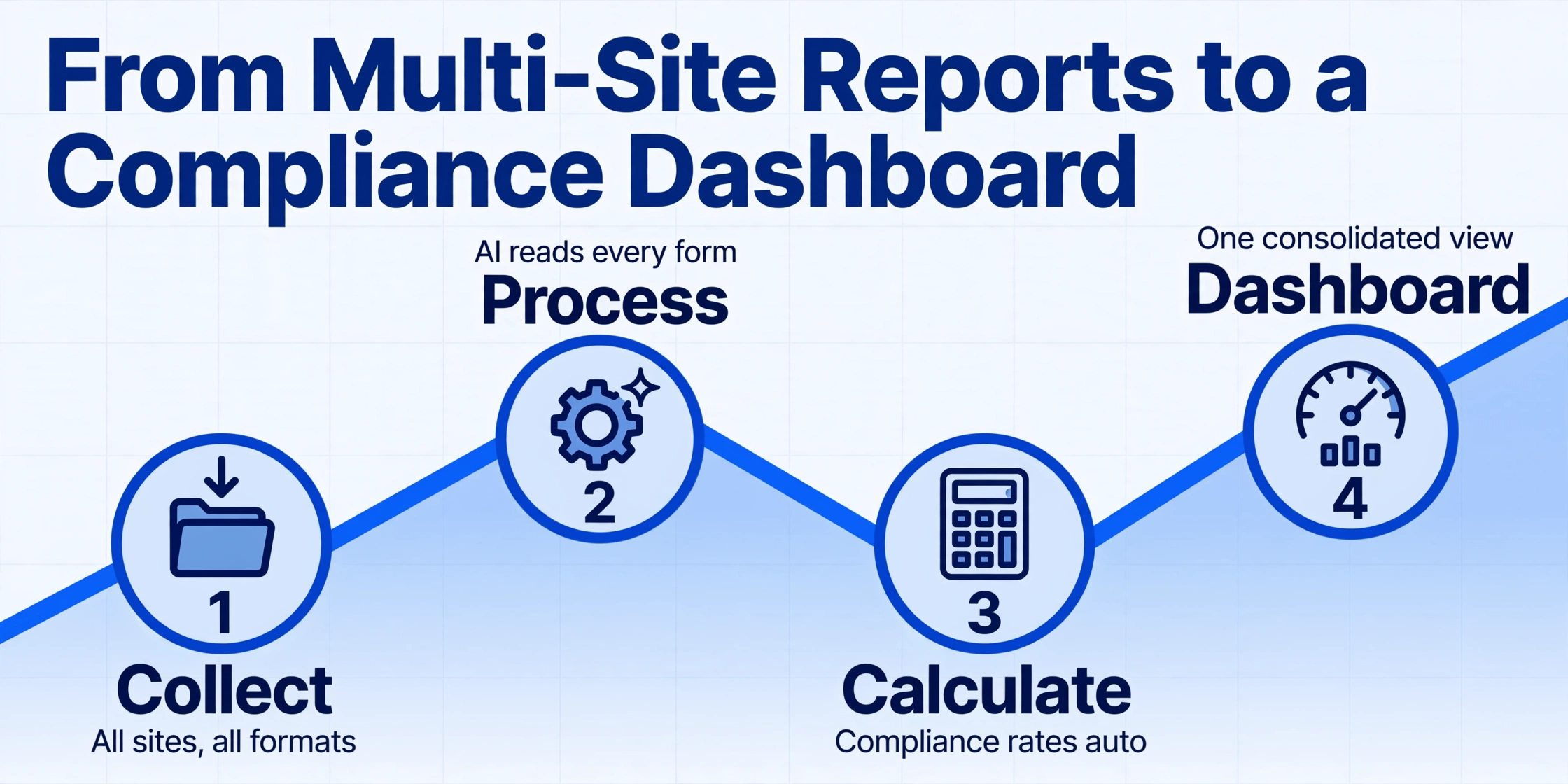
The difference between a tool that can extract inspection data and a tool that actually saves you time is batch processing. Reading one inspection form and getting a single output file is a demo. Reading 50 inspection forms from five different sites and getting one consolidated spreadsheet — that is a workflow.
Batch inspection report extraction works as follows:
- Report collection. Completed inspection forms are gathered from all sources — scanned paper checklists, PDF exports from mobile inspection apps, emailed photo attachments of completed forms. They accumulate in a single folder, inbox, or upload queue regardless of format or source.
- Batch upload. All reports are uploaded together — 20 to 200 files in a single drag-and-drop operation. The system groups them into a batch labelled with the inspection period or project name.
- Bulk AI processing. The same column template is applied to every report. The AI reads each form independently, identifies the form structure, extracts the checklist items and statuses, and produces one row per report (or multiple rows for multi-page reports). Form layout differences between sites do not matter because the AI is reading by understanding, not by template matching.
- Compliance score calculation via computed columns. If the template includes fields like "Pass Rate" or "Open Findings Count," these are calculated automatically during extraction using computed columns. For example, a "Compliance Rate" field defined as the percentage of Pass items divided by total items is calculated per report and aggregated across the batch — so the output includes both the per-report compliance score and the site-wide average.
- Export to one file. The entire batch is exported as a single Excel file with one row per inspection report (or one row per checklist item for granular analysis). Columns include all extracted data plus the computed compliance metrics.
The result is that a safety manager who previously spent a full day each week transcribing inspection reports and calculating compliance rates from paper now uploads the reports, waits 10-15 minutes for AI processing, and opens a spreadsheet that shows: which sites are below the 90% compliance threshold, which inspection items fail most frequently across all sites, which inspectors consistently flag the most findings, and which corrective actions are past their deadline. For a construction-specific walkthrough of this same batch workflow across multiple job sites — including OSHA 300/300A recordkeeping — see our guide to batch-processing construction job site inspection reports.
Our best field and industrial document extraction tools roundup covers the platforms that support this kind of batch workflow for inspection and field data, with real-world test results across form types and photo conditions.
Export & Integration: Getting Data into Systems That Act on It
Extracted inspection data creates value only when it reaches the systems where corrective actions are managed, compliance is tracked, and maintenance is scheduled. The integration path depends on the target system and the size of the operation.
Excel and CSV Export
For most small to mid-size operations, extracted inspection data is exported to Excel or CSV and imported into a CMMS or compliance tracker manually. This works for facilities processing up to a few hundred reports per month. The export includes one row per report with all extracted fields, plus computed columns for compliance rates and finding counts. The column headers are set up to match the target system's import format, so the import step becomes a direct mapping with no manual reformatting.
Google Sheets Add-on
For teams that manage inspection data in Google Sheets, ImageToTable.ai provides a Google Sheets sidebar add-on that lets users upload inspection reports directly from within their spreadsheet and append extracted results to the active sheet. This eliminates the export-import step entirely — the inspection data lands in the same sheet that feeds the compliance dashboard or the monthly safety review.
CMMS and EAM Integration
Larger industrial operations typically run a CMMS (Computerised Maintenance Management System) or EAM (Enterprise Asset Management) platform as their system of record for equipment inspections:
- SAP PM (Plant Maintenance) manages inspection plans, maintenance orders, and equipment histories. Inspection results extracted from paper forms can be uploaded via SAP's batch data migration tools (transaction
LSMWorCG3Z) or through the standard PM notification workflow. Extracted findings that require corrective action map directly to PM notifications or maintenance orders. - IBM Maximo manages asset inspections through its Inspection/Testing module. Extracted data — pass/fail status per checklist item, observation notes, corrective action assignments — maps to Maximo's inspection result records with minimal transformation.
- Fiix, UpKeep, and Maintenance Connection offer CSV import and REST API endpoints for inspection data ingestion. Extracted results from a batch of reports can be scheduled for automated import via API.
- Procore (construction) and Corrigo (facility management) accept inspection data through their respective API or file import capabilities, allowing punch-list items and findings from paper reports to feed into digital project management workflows.
The practical integration pattern for most organisations is: extract inspection reports via AI → export to CSV formatted for the target system → import via the system's batch upload interface. This avoids custom API development while still delivering structured data to the maintenance and compliance systems that act on it.
What to Look For in an Inspection Report Extraction Tool
Not all data extraction tools handle inspection reports effectively. The criteria that matter for inspection forms — checkboxes, handwriting, photo attachments, multi-section forms — are different from the criteria that matter for invoices or receipts. Here is a practical checklist for evaluation:
For a detailed comparison of tools that meet these criteria, see our best document extraction tools for manufacturing 2026 roundup, which evaluates platforms on their ability to handle QC inspection forms, checklists, and compliance documentation in production environments.
Inspection Report Data Extraction FAQ
Can AI distinguish between a checked and unchecked checkbox on an inspection form?
Yes — but only vision AI can, not traditional OCR. A vision model interprets the checkbox region visually and classifies it as marked (checked, crossed, circled) or empty. OCR-based systems cannot perform this distinction because checkboxes contain no text characters to recognise. When evaluating a tool, this is the single most important question to ask: does it understand checkboxes visually or does it rely on text recognition alone?
Does AI handle handwritten inspection notes as well as printed text?
Modern handwriting recognition (HTR) reads cursive with reasonable accuracy — generally 85-95% for neat handwriting and 70-85% for field-speed scribble. The harder challenge is associating the handwritten note with the correct checklist item, especially when notes are written in margins or between rows rather than in dedicated comment fields. A good inspection extraction tool handles both the recognition and the association as part of the extraction pass, not as separate steps. For critical findings, always verify the extracted text against the original form image.
Can the tool extract data from photos embedded inside a PDF inspection report?
It depends on the tool. Some extraction systems ignore embedded images entirely, losing the visual evidence. Others attempt to OCR text within images, which can produce false readings from equipment labels or signs visible in the photo. The ideal approach is to preserve the photos as attachments or references in the output file while extracting the text from the form itself — not trying to extract data from within the photos. Ask whether the tool can include photo references in the Excel export alongside the extracted checklist data.
How does inspection report extraction handle forms with different layouts from different sites?
Vision AI-based extraction handles layout variation naturally because it reads by understanding, not by position matching. A safety checklist from Site A that uses a two-column table and the same checklist from Site B that uses a vertical list are both processed correctly — the AI identifies the form structure on each page independently. Template-based OCR tools, by contrast, require a separate template for each layout. If your organisation receives inspection reports from multiple sites, subcontractors, or third-party inspectors, a template-free approach is the only practical option.
How many inspection reports can be processed in one batch?
Practical batch sizes depend on the tool and the complexity of the reports. ImageToTable.ai supports batches of 50-500 documents per upload with processing times of approximately 5-10 seconds per page. A batch of 100 single-page inspection reports completes in roughly 10-15 minutes. Multi-page reports (5-15 pages each) require more processing time but are handled in the same batch — the AI processes each page and reconstructs the multi-page form structure automatically.
Does inspection report extraction work with handwritten signatures?
Signatures can be extracted as images (the signature graphic) and as metadata (the signatory's name if also printed on the form). Extracting the signature as a usable image for compliance purposes is straightforward. Reading the signature as text — identifying "John Smith" from a cursive signature — is less reliable and should not be depended on for identity verification. For audit purposes, the signature image plus the printed name field provide sufficient evidence.
Can the same extraction tool handle safety inspections, QC checklists, and vehicle DVIR reports?
Yes, if the tool uses vision AI with Custom Column Extraction. The same "Item Description / Status / Finding / Corrective Action" template applies across all three form types because they share the same essential structure: a list of items, each with an evaluation outcome. The tool does not need a separate template for safety vs QC vs DVIR — you define the columns once and the AI adapts to each form's layout automatically. This is a key cost advantage: one column template serves your entire inspection programme, not one template per form type.
Is there a compliance risk in using AI extraction for regulated inspection records?
The compliance risk is not in the extraction itself but in what you do with the data afterward. If AI extraction feeds a compliance dashboard and the original inspection forms are discarded, that is a risk — regulators (OSHA, ISO auditors, FDA) may want to see the original signed documents. The correct approach is to use AI extraction for analysis and reporting while retaining the original PDF or paper forms as the legally binding records. The extraction output becomes the searchable, analysable layer on top of the auditable original documents. Most regulators accept this dual-record approach provided the originals are retained for the required retention period.
How does inspection report extraction differ from using a mobile inspection app?
Mobile inspection apps (SafetyCulture, Fulcrum, ProntoForms, GoCanvas, Device Magic) digitise the inspection process at the point of capture — the inspector fills out a digital form on a phone or tablet, and the data is stored in structured format immediately. This is the ideal approach for new inspections. Extraction, by contrast, processes existing paper or PDF reports that were completed before the organisation adopted digital forms, or reports submitted by third parties who use their own paper forms. The two approaches are complementary: use mobile apps for forward-looking digital capture, use AI extraction for backward-looking digitisation of existing records. Organisations going through a digital transformation typically do both for the first 12-24 months while the paper backlog is processed and the mobile programme is rolled out. For a broader look at extraction tools that serve this role, see our field and industrial extraction tools roundup.
Your inspection data is already collected. It just needs to be read.
A stack of paper checklists, a folder of PDF inspection reports, or a bundle of emailed forms from subcontractors — whatever form your inspection data takes, AI extraction can turn it into a structured, analysable, compliance-ready spreadsheet in minutes. No templates, no training, no manual typing.