The Complete Guide to
AIA G702 & G703 Data Extraction
Every G702 payment application tells the same story: a contractor has completed a certain percentage of work, earned a certain amount, and requests a specific payment. The story is standardised. The problem is that the same story gets typed into three different systems by three different people before anyone gets paid. A general contractor managing five active commercial projects receives somewhere between 10 and 50 G702/G703 packages every billing cycle — each containing a summary page, a continuation sheet with 20 to 50 line items, and roughly 300 individual numeric values that need to be verified, transcribed, and reconciled against the project budget. This guide covers everything it takes to extract that data in one pass: the form structure that matters, the fields every extraction must capture, the cross-form validation that prevents payment delays, and the tools that read G702/G703 packages by meaning rather than by pixel position.
Key Takeaways
- Every billing cycle, a general contractor manually transcribes roughly 12,000 pay application values into spreadsheets — and at typical construction industry error rates, 60 to 300 of them are wrong before a single review begins.
- The G702 and G703 are not two independent forms filed together — they are two views of the same data where every G703 column total must equal a specific G702 summary line, and template extraction tools that read each page in isolation cannot detect this arithmetic mismatch.
- When extraction reads both forms as a linked parent-child data structure, the cross-form validation that triggers 30-day payment resubmission cycles runs automatically before the reviewer opens the spreadsheet.
What Are AIA G702 and G703 Forms?
The AIA G702 — formally the Application and Certificate for Payment — is the standard progress billing form across virtually all commercial construction projects in the United States. Its companion, the G703 Continuation Sheet, provides the line-item breakdown that supports the summary figures. Together they form what the industry calls a pay application package. Developed and copyrighted by the American Institute of Architects (AIA), these forms create a uniform structure for requesting progress payments: the same format is used whether the project is a $200,000 tenant fit-out or a $200 million hospital.
The G702 is a single-page summary that captures the project-level financial picture. It records the original contract sum, adjustments from approved change orders, the total value of work completed and materials stored to date, retainage withheld, previous payments received, and the net amount currently due. The architect or owner certifies the form, and payment follows — in theory within 30 days, in practice often longer when errors trigger resubmission cycles.
The G703 Continuation Sheet is where the detail lives. Each row represents one line item from the project's Schedule of Values (SOV), and each column tracks a different dimension of that line item's financial progress: scheduled value, work completed in previous periods, work completed this period, materials stored, cumulative totals, percentage complete, balance to finish, and retainage. A G703 with 30 line items contains roughly 270 individual data points, and every one of those numbers feeds into the G702 summary. The two forms are not independent documents — they are a parent-child data structure where the G702 totals must equal the G703 grand totals. If they do not match, the application is returned unpaid.
G702/G703 data extraction has drawn increasing attention in recent years for three interconnected reasons. First, the volume of pay applications that a GC processes grows with each project, and the number of subcontractors on a typical commercial project has increased as specialisation has deepened. Second, construction accounting and project management platforms like Procore, Viewpoint, Sage 300 CRE, and CMiC expect structured data — they cannot ingest a filled PDF form and populate their job cost ledgers automatically. Third, the AI tools that can read these forms by understanding their semantics, rather than by matching template positions, have only reached reliable accuracy levels in the last 18 to 24 months. The forms have not changed. The ability to extract from them has.
Why G702/G703 Processing Costs More Than You Think
The visible cost of processing pay applications is the time it takes to open a PDF, read the numbers, and type them into a spreadsheet. For a single application with a 30-line-item G703, a competent project accountant completes that task in roughly 30 to 45 minutes. The hidden costs are what happen around that task: the monthly draw deadline compresses all applications into a three-day window, retainage errors force resubmission cycles that reset the 30-day payment clock, cross-form mismatches require reconciliation calls with subcontractors, and the AIA form itself costs money every time a new project starts. Individually these costs are small. Together they add up to the equivalent of a full-time salary for many mid-size GCs.
The monthly draw cycle. Commercial construction payment applications follow a fixed monthly rhythm. Subcontractors submit their pay apps by a cutoff date — typically the 20th or 25th of the month. The GC reviews, verifies, and consolidates them into an owner draw request by the end of the month. The owner's payment, if approved, arrives 30 to 45 days later. Missing the cutoff means the subcontractor's payment is delayed by an entire billing cycle — a 60-day rather than a 30-day wait. When a project accountant is manually processing 40 pay applications in four days, the risk of missing the deadline on one or two is not theoretical. We've broken down exactly how slow G702 data entry stretches payment cycles in a separate walkthrough of the re-entry chain. The Construction Financial Management Association's 2025 Financial Benchmarker, drawing on fiscal 2024 data from 1,558 firms, reports that the typical construction company operates on a net income before tax margin of 6.7 percent. Every delayed application, every correction cycle, every resubmission erodes that margin directly.
Retainage calculation errors. Retainage — the percentage of each payment withheld until project completion — is the single most common source of pay application disputes. Most contracts specify a fixed rate, typically 5 or 10 percent, applied to the total value of completed work and stored materials. But the calculation is rarely as simple as "take 10 percent of Line 4 on the G702." Many contracts use variable retainage: the rate reduces from 10 percent to 5 percent once work reaches 50 percent completion, or retainage on stored materials is calculated at a different rate than retainage on installed work. Some states impose statutory retainage limits — California caps retainage at 5 percent after 50 percent completion on private projects — that override the contract rate. A subcontractor who calculates retainage at 10 percent when the contract specifies 5 percent has submitted an overstated payment application, and the entire package comes back for correction. The error is usually small — a few thousand dollars — but the resubmission delay costs everyone on the project two to four weeks.
G702-G703 cross-form validation. The G702 summary draws its numbers from the G703 line-item totals. The "Total Completed and Stored to Date" on G702 Line 4 must equal the grand total of G703 Column G. The retainage on G702 Line 5 must equal the grand total of G703 Column I (or the fixed-rate calculation applied to the G703 totals). When a project accountant manually transcribes these numbers, the most common error is a cumulative total from the G703 being entered in the wrong G702 line — Total Completed typed into the Retainage field, or Previous Certificates entered as Current Payment Due. The forms themselves have built-in arithmetic: Line 6 minus Line 7 equals Line 8, and Line 3 minus Line 6 equals Line 9. A transcription error in any single field cascades through all the derived lines, producing a G702 where the arithmetic is internally inconsistent. An architect reviewing the application spots the inconsistency within seconds and rejects the entire package — a failure mode we examine in detail in common G702 extraction errors that trigger pay app disputes.
AIA form costs. Unlike standard purchase orders or delivery notes, AIA forms are copyrighted documents. A single G702/G703 combination purchased as a one-time use through AIA Contract Documents costs roughly $49.99 — or roughly $15 to $25 per set when bought in bulk via the AIA software subscription, which starts at approximately $500 per year for unlimited access. For a GC managing 50 active subcontractors across five projects, the annual form cost is between $750 and $2,500 — not a large number, but an ongoing operational expense that adds no value beyond standardising the format of the billing data the GC already needs to process.
The real cost of G702/G703 processing is not the typing time. It is the compounding delay from error cycles: a single miscalculated retainage percentage can stall a subcontractor's payment by 30 days, and when that happens across three or four applications per billing cycle, the total float loss exceeds what any automated extraction tool costs in a year.
The G702/G703 Parent-Child Structure: Summary Page vs. Continuation Sheet
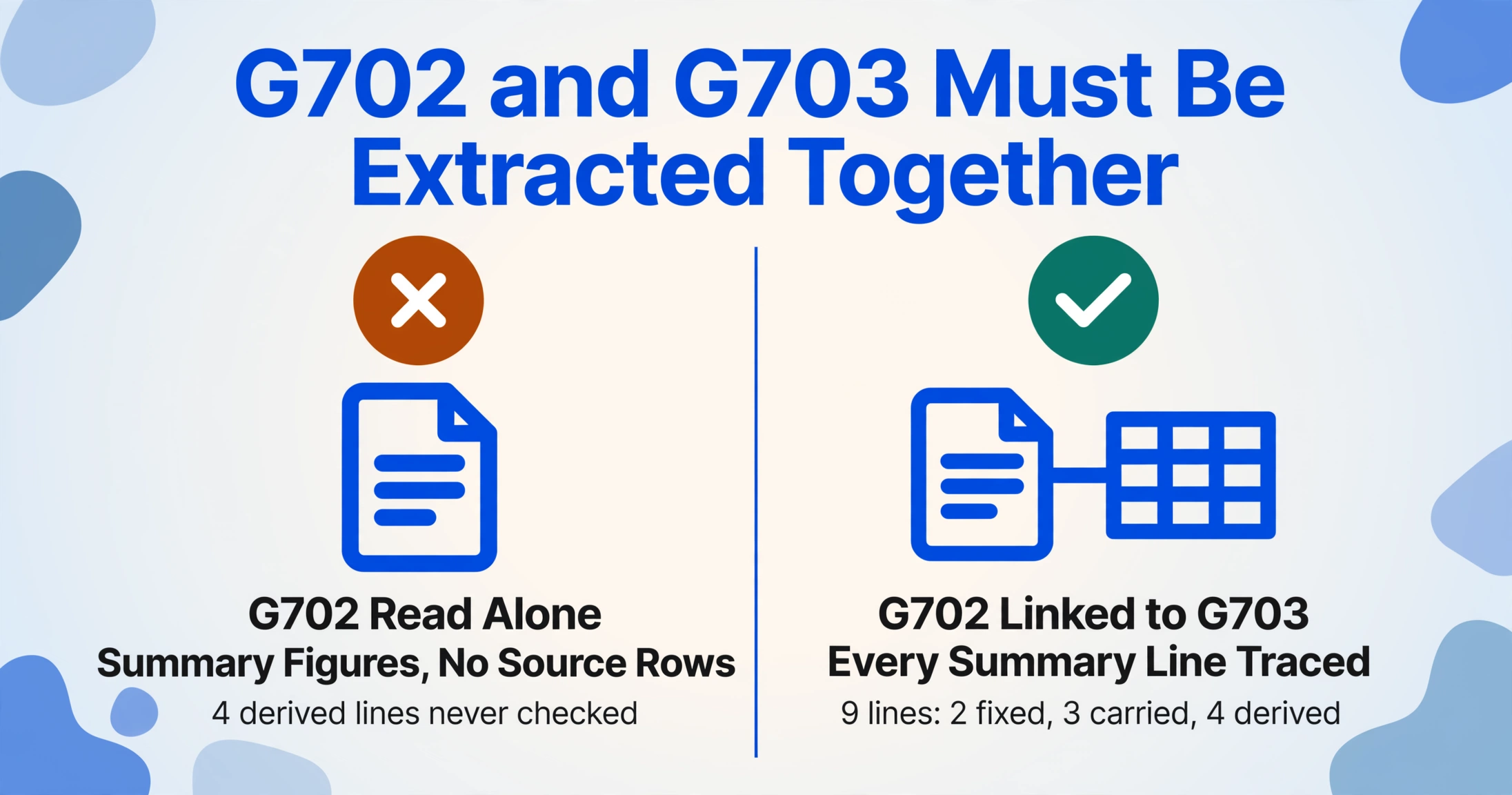
Understanding why data extraction from these forms requires more than reading each page independently starts with understanding their structural relationship. The G702 and G703 are not two forms filed together. They are two views of the same financial data, linked by a set of arithmetic constraints that a reliable extraction tool must both read and verify.
The G702 is the parent: nine lines of financial summary covering the entire contract. Its lines are:
Line 1: Original Contract Sum
Line 2: Net Change by Change Orders
Line 3: Contract Sum to Date (Line 1 + Line 2)
Line 4: Total Completed & Stored to Date (from G703 totals)
Line 5: Retainage (typically 5-10% of Line 4)
Line 6: Total Earned Less Retainage (Line 4 − Line 5)
Line 7: Less Previous Certificates for Payment
Line 8: Current Payment Due (Line 6 − Line 7)
Line 9: Balance to Finish, Including Retainage (Line 3 − Line 6)
Three of these nine lines are carried forward from the G703 (Line 4, and by extension Lines 5 through 9). Four are arithmetic derivations (Lines 3, 6, 8, 9). Two are fixed inputs from the contract (Lines 1 and 2). An extraction tool that reads only the G702 cover sheet captures the summary figures but cannot verify them against their source. It also misses the only place where the data can be disaggregated — the G703.
The G703 is the child: a variable-length table where each row is a schedule-of-values line item, and each column tracks the financial progression of that line item across billing periods. A standard G703 continuation sheet organises data into these columns:
A: Item Number
B: Description of Work
C: Scheduled Value
D: Work Completed from Previous Application
E: Work Completed This Period
F: Materials Presently Stored
G: Total Completed & Stored to Date (D + E + F)
G%: Percentage Complete (G ÷ C)
H: Balance to Finish (C − G)
I: Retainage (variable rate, or left blank for fixed-rate projects)
Each row in the G703 is a mini financial statement for that specific scope of work. The grand total of Column G must match Line 4 on the G702. The total of Column I must match Line 5. These cross-form constraints are what make pay application extraction different from invoice extraction: you are not just reading fields from a single document. You are reading a two-part data structure and validating arithmetic consistency between the two parts. For a step-by-step walkthrough of how this extraction works in practice, see the detailed guide on extracting AIA G702 payment application data to a spreadsheet.
The Hidden Challenges of Pay Application Data Extraction
Even when the forms are filled out correctly, extracting data from G702/G703 packages presents challenges that do not exist with other construction document types. These challenges are not immediately obvious to someone who has not processed pay applications at scale.
Handwritten change orders and quantities. Despite the widespread availability of digital AIA forms, a significant portion of subcontractor pay applications arrive with handwritten entries. Field-annotated G703s are common: a subcontractor's project manager prints the schedule of values, writes in the current period quantities by hand, calculates the percentage complete in the margin, and scans the annotated sheet to PDF. A subcontractor who works across multiple projects may prepare a single hand-annotated change order log and attach it to the pay application rather than using the AIA change order summary table. Traditional OCR and template-based extraction tools — which locate data fields by their pixel positions on the page — break on these documents because the handwritten values shift the layout. A handwritten "1,247" in the Quantity column pushes the adjacent dollar amount one cell to the right, and the template extraction returns the wrong value without any signal that something went wrong. Vision-based AI extraction, by contrast, reads each value in its semantic context: it identifies numbers in the "Work Completed This Period" column by understanding that they sit in a column whose header says "Work Completed This Period," not by measuring pixel offsets from the top of the page.
CSI MasterFormat codes. Most G703 continuation sheets organise line items using CSI MasterFormat division numbers — the standardised classification system maintained by the Construction Specifications Institute. A typical G703 might list line items as "03 30 00 — Cast-in-Place Concrete," "08 11 00 — Metal Doors and Frames," "23 31 00 — HVAC Ductwork," and "26 10 00 — Medium Voltage Electrical." These codes are meaningful for job costing — a project accountant needs to know that $47,000 in concrete work belongs to cost code 03 30 00, not to "Concrete" as a generic category. An extraction tool that captures line item descriptions as unstructured text loses the structured cost code. A tool that is aware of the MasterFormat hierarchy can output the division number in a separate column, preserving the mapping between line-item billing and job cost allocation. The current MasterFormat 2026 edition, released by CSI in coordination with Construction Specifications Canada, organises construction specifications into 50 divisions — from Division 00 (Procurement and Contracting Requirements) through Division 49 — with approximately 2,185 new listings added in the 2026 update.
Contract sum tracking across change orders. A construction project rarely completes at its original contract sum. Change orders add work, deduct work, or adjust pricing as the project progresses. The G702 tracks this through Lines 1, 2, and 3: the original sum, the net change, and the adjusted total. But the change order summary on the G702 is just a single number — it does not list individual change orders or their status (approved, pending, disputed). Subcontractors often attach separate change order logs or CO transmittal sheets to their pay application packages. An extraction workflow that captures only the G702 fields misses the supporting detail that the project accountant needs to verify that the net change number is correct. The broader lesson for contract data extraction applies here: structured extraction works best when it reads not just the summary document but the supporting documents that feed into it.
Cross-form validation complexity. The arithmetic constraints between G702 and G703 go beyond the simple match of column totals. G703 Column D (Work Completed from Previous Application) for the current pay app must equal G703 Column G (Total Completed and Stored to Date) from the previous pay app, minus the previous period's Column F (Materials Stored). If a subcontractor changes its schedule of values mid-project — splitting a line item into two, or reallocating value between scopes — this carry-forward breaks, and the GC must reconcile the discrepancy manually. An extraction tool that treats each pay application as an independent document will not flag this mismatch. A tool that reads sequential pay applications and compares their carry-forward values will.
Traditional vs. AI: Two Approaches to Pay Application Extraction
The difference between traditional pay application extraction and AI-based extraction is not a matter of speed — both can process a page in seconds. The difference is in how they handle variation, error, and cross-form relationships.
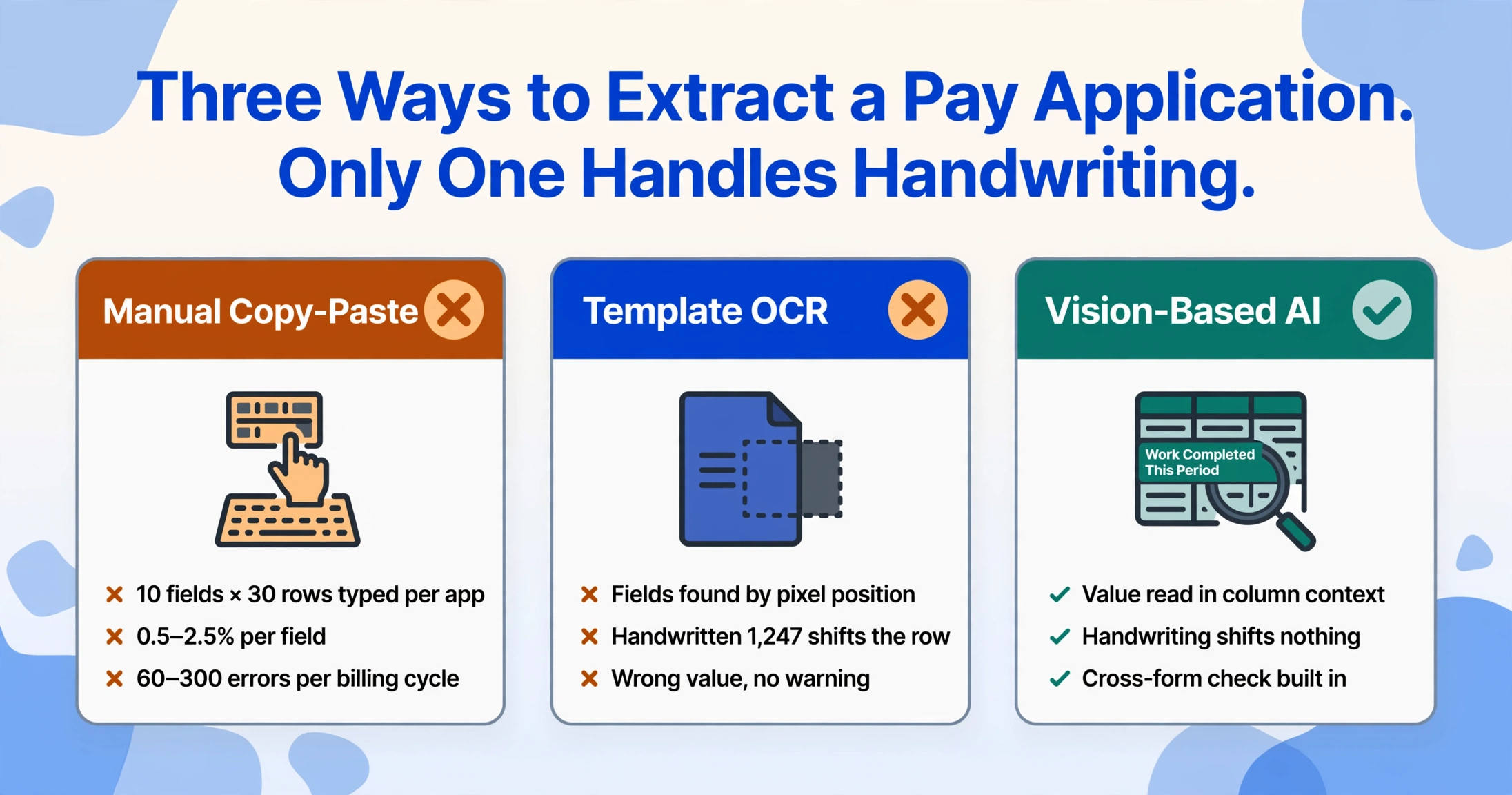
Manual copy-paste with spreadsheet lookup. The traditional approach: open the subcontractor's G702 PDF, read Line 4 (Total Completed and Stored), type it into the project tracking spreadsheet under that subcontractor's row. Open the G703, start at the first line item, type Item Number, Description, Scheduled Value, Previous Completed, This Period, Stored, Total, Percent, Balance, Retainage — 10 fields per row for 30 rows. Duplicate this process for each of the 40 subcontractors submitting pay applications this cycle. The process is straightforward and requires no software investment. It also guarantees at least a handful of transcription errors per billing cycle — a study of construction industry data entry accuracy published in the Journal of Construction Engineering and Management found that manual transcription of numeric construction data produces error rates of 0.5 to 2.5 percent per field. At 300 values per application and 40 applications, that is 60 to 300 errors per billing cycle. Most are small. A few are not.
Template-based OCR. Template-based extraction tools like Docparser and traditional OCR platforms solve the transcription problem but introduce a maintenance problem. You create a template for the G702 summary page: define a zone at position (x=200, y=150) that captures the Original Contract Sum, another zone at (x=200, y=180) for Net Change Orders, and so on for all nine lines. You create a second template for the G703 table: define column zones that capture the table cells by their pixel coordinates relative to the table borders. The templates work perfectly for the first subcontractor's digitally submitted form. They fail when the second subcontractor submits a scanned G703 where the table shifted 3 millimetres to the left during printing. They fail when the third subcontractor uses a different PDF editor that positions the form fields slightly differently. They fail completely when a handwritten G703 arrives and the table structure is irregular. Each failure requires a new template or an adjustment to the existing one — and the adjustment breaks coverage on the forms that were previously working.
Custom Column Extraction with semantic AI. Modern vision-based extraction reads G702/G703 forms by understanding what each field means, not where it sits on the page. This is Custom Column Extraction: you define the columns you want in your output spreadsheet — "Original Contract Sum," "Total Completed and Stored," "Retainage Percentage," "Item Number," "Description," "Scheduled Value," "Work Completed This Period," "Total Completed to Date," "Balance to Finish" — and the AI reads the entire document, identifies the values that correspond to each column by their semantic role in the form, and outputs them as a structured row. The first subcontractor's digital G702 and the second subcontractor's handwritten scan both produce the same output columns — because the AI knows what "Retainage" is, not where it usually appears.
For a practical comparison of how different extraction tools handle AIA G702 forms alongside other construction document types, the best document extraction software for construction in 2026 article tested eight platforms on a common test set of 35 construction documents and provides field-level accuracy benchmarks specific to pay applications.
The fundamental architectural difference: template-based extraction works when every form is identical to the template it was trained on. Semantic extraction works when every form contains the same information but presents it in a different layout, different print quality, or different state of completeness. Pay application packages are not identical — but the data they contain is.
Computed Columns: Closing the Arithmetic Loop
One of the most useful capabilities for G702/G703 extraction is the ability to define columns that calculate derived values during the extraction pass rather than requiring post-extraction spreadsheet formulas. This is the domain of computed columns — columns where the AI performs a specified calculation on other extracted values and outputs the result as part of the data row.
Three computed columns are particularly valuable for pay application extraction:
- Retainage verification — define a computed column that multiplies the extracted "Total Completed and Stored to Date" by the contractual retainage percentage. If the G702's stated retainage amount differs from this computed value by more than a small tolerance (say $1.00), the extraction flags a discrepancy that the reviewer can investigate before approving the application.
- Cross-form validation — define a computed column that sums G703 Column G (Total Completed and Stored to Date) across all line items and compares the result to G702 Line 4. This is the single most important arithmetic check in the pay application, and automating it eliminates the most common source of resubmission.
- Balance-to-finish roll-up — compute the total remaining contract value by subtracting cumulative earned amounts plus retainage held from the contract sum to date. This gives the project team a real-time view of how much budget remains on each scope of work without waiting for the subcontractor to submit its next pay application.
These computed columns do not require the user to enter formulas after extraction. They are specified in the extraction setup — either as part of the column name (e.g., "Retainage Check (Total Completed x 10%)") or as a JSON rule in the tool's Rule Format for multi-step logic — and the AI performs the calculation during the extraction pass. The result is an output spreadsheet where the columns that verify the pay application's accuracy are populated before the reviewer opens the file.
Batch Processing: From 30 Pay Apps to One Consolidated Spreadsheet
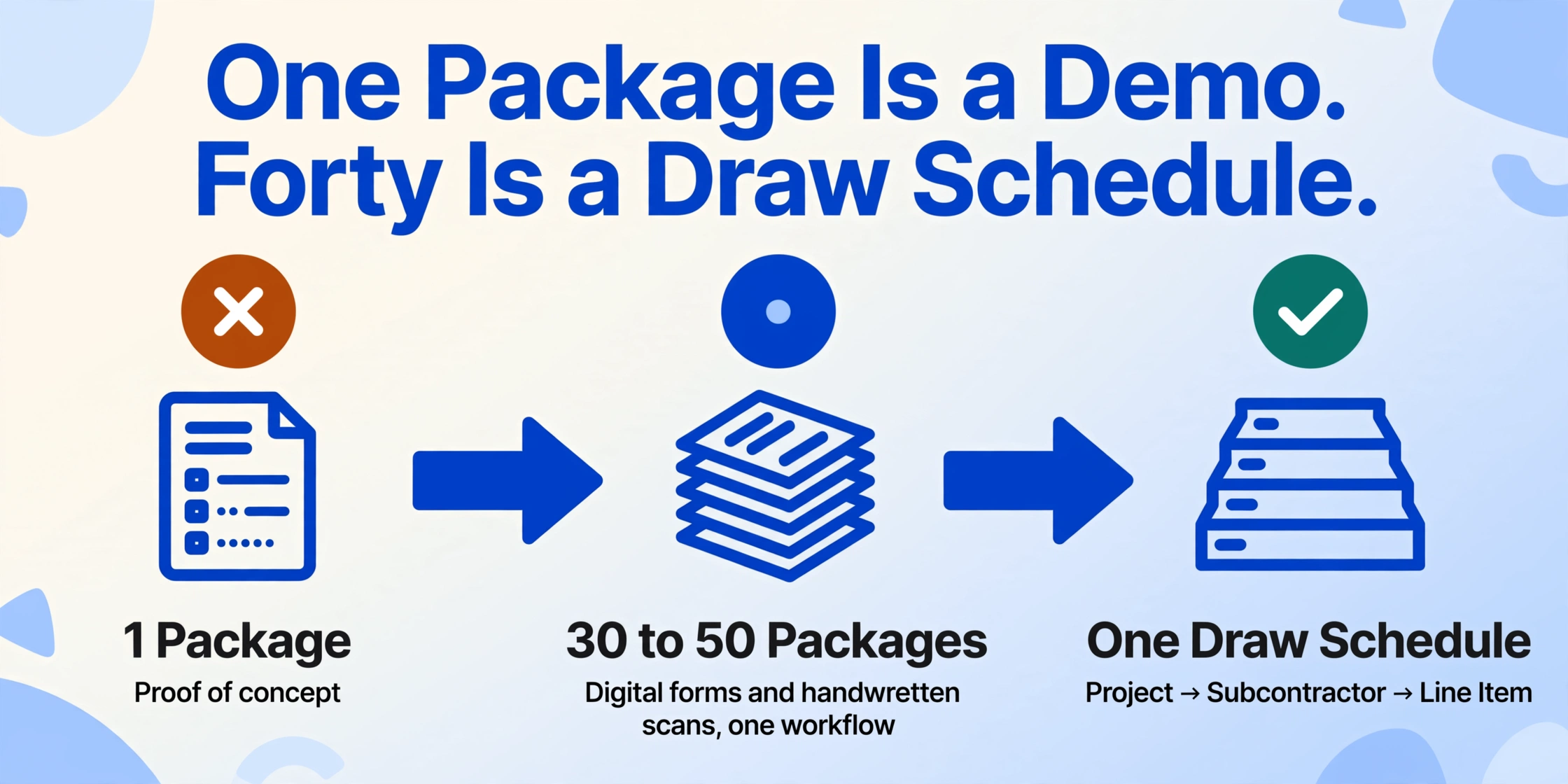
Extracting a single G702/G703 package is a proof of concept. Extracting 30 to 50 packages in a single pass is where the operational value appears. The batch workflow for pay applications follows a different logic than batch processing for invoices or receipts — because the output is not a flat list of line items but a structured consolidation that preserves the project-subcontractor-scope hierarchy.
A GC's consolidated draw schedule — the master spreadsheet that tracks payment status across all subcontractors on all active projects — typically organises data in three levels: project, subcontractor, and line item. A batch extraction of 40 G702/G703 packages from seven different projects needs to output a single spreadsheet where the first column identifies the project, the second column identifies the subcontractor, and the remaining columns capture the payment application data for each line item. If the 40 applications include a mix of digital forms and handwritten scans, the batch extraction must handle both through the same workflow without requiring separate configuration per file.
The batch approach also makes cross-form validation more powerful. Instead of verifying that Subcontractor A's G703 total matches its G702 total in isolation, the consolidated spreadsheet makes it possible to compare payment amounts across subcontractors performing similar scopes on the same project — flagging a situation where the drywall subcontractor is billing 80 percent complete while the paint subcontractor, who cannot start until the drywall is finished, is billing 90 percent complete. These pattern-level anomalies are invisible when each application is processed independently. For a detailed workflow on batch processing, see the dedicated guide on batch-processing AIA G702 payment applications across an entire project portfolio.
Export and Integration: Getting Data Where It Needs to Go
Extracting pay application data is not useful unless the extracted data reaches the system where payment processing happens. For most GCs, that system is one of three: a project management platform (Procore, Viewpoint, CMiC), a construction accounting system (Sage 300 CRE, Foundation), or a set of spreadsheets that feed into either.
Excel export. The most common output path, and the most flexible. A well-structured G702/G703 extraction produces an Excel file with separate sheets or clearly labelled columns for the G702 summary fields and the G703 line items. The G702 sheet contains one row per subcontractor per project, with columns for Original Contract Sum, Net Change Orders, Contract Sum to Date, Total Completed and Stored, Retainage, Previous Payments, Current Due, and Balance to Finish. The G703 sheet contains one row per line item, with columns for the project and subcontractor identifiers plus all ten line item columns. A project accountant can then use pivot tables, SUMIF formulas, or Power Query to roll the data up into the format required by their specific reporting and payment processing workflows.
Google Sheets integration. For teams that manage their draw schedules in Google Sheets, the extraction output can land directly into the active spreadsheet via a Google Sheets add-on. This eliminates the export-import step entirely: the uploaded pay application PDFs are processed, and the resulting structured data is appended to the designated sheet in real time, with the column headers matching the user's existing tracking template. For a deeper understanding of how semantic extraction fundamentally differs from template-based approaches, the complete guide to COI extraction covers the same paradigm shift applied to insurance certificate data.
Procore and Viewpoint integration. Procore's AI capabilities, powered by its Datagrid acquisition, focus on submittals, RFIs, and contract review — not on ingesting external document data into its payment processing module. Viewpoint (Trimble) offers AIA billing functionality within its Vista and Spectrum ERP platforms but requires the pay application to be generated inside the system rather than received from a subcontractor as a filled PDF. In practice, the most reliable integration path for externally received G702/G703 packages remains Excel or CSV export followed by import into the project management or accounting platform — and the quality of that integration depends entirely on how cleanly the extraction tool structures its output.
How to Evaluate a Pay Application Extraction Tool
Not every document extraction tool is suited to the specific demands of G702/G703 data. The following criteria separate tools that can handle pay applications from tools that will produce unusable output on anything but a perfectly formatted digital PDF.
Cross-form validation capability. The most important criterion: does the tool understand that the G702 and G703 are related documents? A tool that processes each page independently will extract the G702 summary figures and the G703 line items as separate, unrelated data rows. A tool that is pay-application-aware will output the G702 data linked to the G703 data, or better yet, will flag discrepancies between the two forms during the extraction pass. Without this capability, the extraction produces two data sets that the user must manually reconcile — which is precisely the work the extraction was supposed to eliminate.
Retainage calculation verification. The tool should either extract the retainage percentage and amount as structured fields or allow the user to define a computed column that calculates expected retainage from the extracted totals. A tool that returns "5%" as a text string in a Notes column has not really extracted the data — it has passed the responsibility of interpretation back to the user.
Handwriting tolerance. If the tool cannot read handwritten entries on a G703 continuation sheet, it will fail on roughly 30 to 50 percent of real-world subcontractor submissions, depending on the project type and the subcontractors involved. The only reliable way to test this is to submit a sample set that includes at least three handwritten or hand-annotated pay applications — not vendor-provided demo forms — and compare field-level accuracy between the digital and handwritten documents in the test set.
Table extraction for variable-length G703s. G703 tables vary in row count from 10 to 100 or more line items. A tool that handles fixed table layouts but breaks on tables where a line item wraps to two lines, or where the subcontractor has inserted a hand-drawn row between two printed rows, will produce incomplete output. Test with a G703 that contains at least 40 rows and includes at least one line item with a multi-line description.
CSI MasterFormat code preservation. If the project uses CSI division codes for job costing, the extraction tool should output the code and the description in separate columns or at minimum preserve the full line-item description without truncating or concatenating adjacent fields. A tool that truncates "03 30 00 — Cast-in-Place Concrete" to "03 30 00" has already lost information that the cost coding system needs.
No-template setup. The tool should extract a G702/G703 package without requiring the user to draw zones, train a model, or create a template. If the vendor asks for sample documents during the setup process, the tool is using a template-based or training-based architecture that will require maintenance when the forms change or when a new subcontractor submits pay applications in a different format.
Frequently Asked Questions
What is the difference between AIA G702 and G703?
The G702 is the Application and Certificate for Payment — a one-page summary that captures the contract-level financial picture: original contract sum, change orders, total completed to date, retainage, previous payments, and current amount due. The G703 Continuation Sheet provides the line-item breakdown from the Schedule of Values, tracking scheduled value, completed work by period, stored materials, and retainage per line item. The G703 totals feed directly into the G702 summary lines.
How is retainage calculated on AIA G702 and G703 forms?
Retainage on the G702 is typically calculated as a fixed percentage — usually 5 or 10 percent — of Line 4 (Total Completed and Stored to Date). On the G703, retainage can be calculated per line item (Column I) when a variable retainage rate applies, or left blank when a fixed project-wide rate is used. Computed columns in an extraction tool can automate this verification by calculating the expected retainage from extracted totals and flagging discrepancies.
Can AI extract handwritten entries from G703 continuation sheets?
Yes, but accuracy depends on the handwriting legibility and the extraction tool's architecture. Vision-based AI that reads characters in semantic context — understanding that a value in the "Work Completed This Period" column is a dollar amount, not a date or an item number — achieves substantially higher accuracy on handwritten G703s than template-based OCR. On legible handwritten entries, modern vision AI achieves field-level accuracy of roughly 85 to 92 percent; on poor handwriting or forms with heavy annotations, accuracy drops to the 70 to 80 percent range. The practical workaround is to design the extraction output with a Confidence Score column and review only the values flagged below a threshold.
Can I batch-process G702 packages from multiple subcontractors at once?
Yes. Batch processing is the scenario where AI extraction delivers the highest return for GCs. Upload all pay application PDFs — digital or handwritten, from any subcontractor, on any project — in a single batch. The AI reads each form independently, extracts the G702 and G703 data, and outputs one consolidated spreadsheet with a column identifying the source file. The batch workflow handles mixed formats automatically: some files may be digital AIA forms, others scanned paper, others Excel exports saved to PDF. For a complete walkthrough of this workflow, see batch-processing AIA G702 payment applications across a project portfolio.
Do AIA G702 forms cost money to use?
Yes. AIA Contract Documents holds the copyright on the official G702 and G703 forms. A single-use G702/G703 set costs approximately $49.99 through the AIA website. An annual subscription for unlimited access to all AIA documents costs approximately $500 per year. Many contractors create spreadsheet-based versions that replicate the G702/G703 layout without using the copyrighted form, but these require manual data entry and do not carry the same acceptance by architects and owners. Data extraction does not replace the need for the form itself — it automates the transfer of data from the completed form into your tracking systems.
Does Procore support G702/G703 data extraction?
Procore's AI features, introduced through its Datagrid acquisition, focus on analysing contract documents, submittals, and RFIs — not on extracting structured data from incoming pay application PDFs. Procore does offer AIA billing functionality for generating G702/G703 forms within the platform, but this is a document creation tool, not an extraction tool for forms received from subcontractors. The most common integration path is to extract G702/G703 data using a dedicated extraction tool and import the structured output into Procore via Excel or CSV upload.
How do CSI MasterFormat codes affect G702/G703 extraction?
Most G703 continuation sheets identify line items by their CSI MasterFormat division code — a standardised numbering system maintained by the Construction Specifications Institute. The system is structured as a six-digit number (e.g., 03 30 00 for Cast-in-Place Concrete, 08 11 00 for Metal Doors and Frames, 23 31 00 for HVAC Ductwork). For project accounting and job costing workflows that use these codes, the extraction tool must preserve the full code and description rather than truncating or merging adjacent fields. The current edition, MasterFormat 2026, adds approximately 2,185 new listings across the 50-division framework.
How does change order tracking work in G702/G703 extraction?
The G702 captures change orders as a single net figure on Line 2 — the total of all approved additions and deductions to the original contract sum. It does not list individual change orders, their status, or their supporting documentation. A comprehensive extraction workflow should capture not only the G702's net change figure but also any attached change order logs or CO transmittal sheets that the subcontractor includes in the pay application package. This gives the project accountant the detail needed to verify that the net figure is accurate against the project's change order register.
What accuracy can I expect from G702/G703 extraction?
On clean digital forms with printed text, field-level accuracy for vision-based AI extraction typically ranges from 92 to 98 percent across all G702 and G703 fields. On forms with handwritten entries, accuracy ranges from 80 to 92 percent depending on handwriting legibility and form condition. The most important operational metric is not raw accuracy but the error detection rate: a well-designed extraction workflow with computed columns and cross-form validation flags values that fall outside expected ranges, so the reviewer knows exactly which fields to inspect rather than re-checking every number manually.
What is the best way to integrate G702/G703 extraction with Viewpoint or Sage 300 CRE?
Both Viewpoint (Trimble's Vista and Spectrum) and Sage 300 CRE offer AIA billing generation modules for pay applications created inside the system, but neither directly ingests structured data from externally received G702/G703 PDFs. The standard integration path is to export the extraction output to Excel or CSV and import it into the platform's accounts receivable or job costing module using the platform's built-in import functions. Some GCs use middleware tools like Acumatica or RabbitMQ to automate the transfer, but for most firms, a well-structured Excel export with columns mapped to the platform's import template is the most practical solution.
The G702 and G703 are as standardised as construction documents get — designed by the AIA to create a consistent format for progress billing across the entire industry. But standardisation of the form does not standardise the data entry process that follows. Every pay application package is a snapshot of a project's financial status at a point in time, and that snapshot contains the information needed to track budgets, verify progress, and release payments. The extraction layer that connects the snapshot to the tracking system is not a luxury for GCs processing dozens of applications per month — it is the only reliable way to handle the volume without accepting the error rate that manual transcription guarantees.
Upload a single pay application to see how semantic extraction handles your subcontractors' forms — or run a full batch of 30 applications and watch the consolidated spreadsheet fill in seconds. The forms are standard. The extraction should be too.