Complete Guide to
Brazilian NF-e Extraction
Every Brazilian NF-e XML contains more than 500 structured data fields — including line-item tax breakdowns that determine your ICMS and PIS/COFINS credit recovery. Yet most AP teams extract fewer than 20. This guide is a complete reference for turning NF-e XML into spreadsheet data you can actually use: field mapping tables, ICMS rate validation by state pair, CST and CFOP code references, ICMS-ST handling, and the practical steps you need for the 2026 dual-schema transition.
Key Takeaways
- An NF-e XML carries over 500 structured data fields — but most AP teams extract fewer than 20, leaving ICMS credit recovery and PIS/COFINS input tracking completely invisible.
- The bottleneck is not data availability — the XML is government-validated — it's that each line item nests four separate tax trees (ICMS, IPI, PIS, COFINS), each with 10+ CST code variants that change what a zero value means for your credit position.
- One semantic extraction template that maps all four tax branches in a single pass turns every NF-e from an opaque XML file into a transparent credit recovery tool — a single incorrect regime assumption on a BRL 100,000 invoice costs BRL 9,250 in missed credits.
Extracting data from a Brazilian NF-e is fundamentally different from extracting data from a regular invoice. A standard invoice in PDF format requires OCR or AI-based document understanding to read fields from a visual layout. An NF-e arrives as an XML file — machine-readable by design — with a structure that has been validated against over 400 automated rules by SEFAZ, Brazil's state tax authority, before the goods it describes were even allowed to leave the warehouse.
The challenge is not data availability. It's data complexity. A European Peppol BIS invoice uses roughly 100 XML elements. An NF-e under layout version 4.0 carries more than 500 structured element groups spread across multiple nested levels, with four separate tax calculation branches per line item, each using its own tax situation code, taxable base calculation, rate, and credit rule. The data is complete — but extracting it correctly requires understanding what each field means and how it connects to the others.
This guide is designed as a working reference. If you are setting up an NF-e extraction workflow for the first time, start with the step-by-step workflow in section 2. If you already have an extraction pipeline running and need to validate a specific ICMS rate or look up a CFOP code, jump to the reference tables in sections 3 through 6. Each section is independently usable, but the full value is the complete picture: knowing which fields to extract, how to verify they are correct, and what to do when the NF-e arrives with a cancellation event or a contingency indicator.
If you are new to NF-e entirely, start with our beginner's guide to the Nota Fiscal Eletrônica before diving into extraction specifics. This guide assumes you understand the basic DANFE vs. XML distinction, the SEFAZ authorization process, and the four core taxes — and focuses on extracting that data correctly.
What Makes NF-e Extraction Different from Regular Invoice Extraction
Three structural differences define how NF-e extraction works and why a standard invoice extraction approach — upload a PDF, define columns, get data — only solves part of the problem.
1. The source is XML, not a visual document. Regular invoice extraction is a reading problem: the AI or OCR system must locate text on a page, recognize which string is the invoice number, and map it to the right column. NF-e extraction is a parsing and mapping problem: the data is already in machine-readable tags, but the XML structure uses Portuguese tag names (<emit> for issuer, <dest> for recipient, <imposto> for taxes) and deeply nested hierarchies that vary by tax regime. The extraction challenge shifts from "find the data" to "map the correct XML path to each output column."
2. The tax structure is multi-dimensional. A single NF-e line item carries up to four independent tax calculations — ICMS (state-level, with 10+ variants depending on CST code), IPI (federal excise, product-dependent), PIS, and COFINS (federal social contributions). Each tax has its own calculation base, rate, CST (tax situation code), and credit eligibility rules. Unlike an EU VAT invoice where one tax percentage applies to the whole line, an NF-e line item contains separate <ICMS>, <IPI>, <PIS>, and <COFINS> sub-groups, each potentially with different taxable bases. Extracting only the totals misses the detail that determines whether each tax credit was calculated correctly.
3. The extraction workflow must account for events after issuance. An NF-e can be cancelled within 24 hours. It can receive a Carta de Correção (CC-e) that amends specific fields. It can be issued under contingency modes if SEFAZ was unreachable. It triggers recipient-side events called manifestação do destinatário — a legal obligation for the buyer to confirm receipt, acknowledge the transaction, or reject it. A complete extraction pipeline must handle these event-driven changes, not just extract the initial XML and call it done. For a deeper look at how cancellation and contingency rules affect AP workflows, see our analysis of NF-e processing complexity.
These three differences mean that NF-e extraction is not "invoice extraction with Portuguese field names." It is a category of its own — closer to EDI parsing than to document OCR, but with a tax complexity that exceeds most EDI standards by an order of magnitude. For a look at the other major Latin American electronic invoice system with its own structural complexities, see our complete guide to Mexican CFDI extraction.
The Complete NF-e Extraction Workflow: Step by Step
An end-to-end NF-e extraction workflow, whether manual, script-based, or AI-driven, follows the same logical sequence. Each step produces a specific output that feeds into the next.
Collect the XML — Not Just the DANFE
Every NF-e transaction generates an XML file. If your supplier only sent the DANFE, use the 44-digit access key printed on the DANFE to download the full XML from the issuing state's SEFAZ portal. Brazilian law requires suppliers to provide the XML, and you need it for both extraction and your mandatory five-year archive. Store the original XMLs exactly as received — modifying them invalidates the digital signature and breaks your audit trail.
Verify the Access Key and SEFAZ Status
Before processing any data, confirm the NF-e is valid. Extract the 44-digit chave de acesso from the <chNFe> element and query the SEFAZ web service or portal. Check that the status is "Autorizada" (authorized) — not "Cancelada" (cancelled) or "Denegada" (denied). This step should be automated in any script or tool-based workflow because an NF-e can be cancelled within 24 hours of issuance. Verifying the access key at the point of extraction prevents you from processing a document that no longer has legal standing.
Parse the XML Structure into Groups
An NF-e XML has a predictable top-level structure. The major element groups are: <ide> (document identification), <emit> (issuer/supplier), <dest> (recipient/you), <det> (line items — repeated per product), <total> (invoice totals — one per tax type), <transp> (transport/freight), <cobr> (payment/billing), and <infAdic> (additional information). Your extraction script or tool should parse each group independently and then join the results at the line-item level.
Map Fields to Output Columns Using the Reference Table
For each field you need in your spreadsheet or ERP import file, identify the exact XML path, the expected data type, and the transformation required (dates to ISO format, amounts to decimals with two decimal places, CNPJ strings with zero-padding preserved). Use the field mapping reference in section 3 below. The critical distinction at this step: separate header-level fields (extracted once per NF-e) from line-item fields (extracted for every <det> element). Your output structure should mirror this: a header table with one row per invoice, and a line-item table with multiple rows per invoice.
Validate Tax Calculations Against Reference Data
NF-e XMLs contain the supplier's tax calculations, not yours. Your extraction workflow should include validation checks: does the ICMS rate match the correct rate for the origin-destination state pair? Does the IPI rate correspond to the product's NCM code range? Is the CST code consistent with the transaction type described by the CFOP? Section 4 of this guide provides the reference tables you need for these checks. Flag any discrepancies for review — do not silently import mismatched tax data into your ERP.
Export, Archive, and Monitor for Events
Export the structured data to your ERP or spreadsheet. Archive both the original XML (exactly as received, no modifications) and the extraction output. Then set up a monitoring process: revisit the SEFAZ status of extracted NF-e documents 48 hours after extraction to catch any cancellations or correction events. A supplier can cancel an NF-e within 24 hours without notifying you. If you extracted data from a now-cancelled NF-e and posted it to your ERP, you have a reversal record to create. Automated tools can handle this monitoring step — human teams often miss it.
NF-e XML Field Mapping Reference
The following tables map the essential NF-e XML paths to spreadsheet columns. Fields are rated by criticality: Critical (required for basic processing), Important (needed for tax validation and credit recovery), and Niche (needed for specific scenarios like customs or SPED filings). All paths are relative to the standard NF-e XML namespace.
Header Fields (One Row per Invoice)
| Output Column | XML Path (relative to <nfeProc>/<NFe>/<infNFe>) | Example Value | Criticality |
|---|---|---|---|
| Access Key (Chave de Acesso) | @Id (remove "NFe" prefix) or <ide>/<cNF> combined with prefix | 35200600012345000106550010000012341012345678 | Critical |
| NF-e Number | <ide>/<nNF> | 1234 | Critical |
| NF-e Series | <ide>/<serie> | 1 | Critical |
| Issue Date | <ide>/<dhEmi> | 2026-06-15T14:30:00-03:00 | Critical |
| SEFAZ Authorization Protocol | <ide>/<nProt> | 135260001234567 | Critical |
| Emission Type | <ide>/<tpEmis> | 1 (normal), 2-6 (contingency) | Important |
| Supplier CNPJ | <emit>/<CNPJ> | 00.000.000/0001-91 | Critical |
| Supplier Legal Name | <emit>/<xNome> | Fornecedor Exemplo Ltda | Critical |
| Supplier State Registration | <emit>/<IE> | 123.456.789.110 | Important |
| Supplier State (IBGE Code) | <emit>/<enderEmit>/<cUF> | 35 (São Paulo), 33 (Rio de Janeiro) | Critical |
| Buyer CNPJ | <dest>/<CNPJ> | 00.000.000/0002-82 | Critical |
| Buyer State (IBGE Code) | <dest>/<enderDest>/<cUF> | 31 (Minas Gerais) | Critical |
| Total NF-e Value | <total>/<ICMSTot>/<vNF> | 12500.00 | Critical |
| Total ICMS Amount | <total>/<ICMSTot>/<vICMS> | 1500.00 | Important |
| Total ICMS-ST Amount | <total>/<ICMSTot>/<vST> | 450.00 | Important |
| Total IPI Amount | <total>/<ICMSTot>/<vIPI> | 625.00 | Important |
| Total PIS Amount | <total>/<ICMSTot>/<vPIS> | 206.25 | Important |
| Total COFINS Amount | <total>/<ICMSTot>/<vCOFINS> | 950.00 | Important |
| Discount Amount | <total>/<ICMSTot>/<vDesc> | 250.00 | Niche |
| Freight Amount | <total>/<ICMSTot>/<vFrete> | 350.00 | Important |
| Insurance Amount | <total>/<ICMSTot>/<vSeg> | 50.00 | Niche |
| Payment/Billing Info | <cobr>/<dup>/<dVenc> (due date) and <vDup> (amount) | 2026-07-15 / 12500.00 | Important |
| CFOP (at header level — usually from first line item) | <det>[1]/<prod>/<CFOP> | 2101 | Important |
| Nature of Operation | <ide>/<natOp> | Venda de mercadoria adquirida de terceiros | Niche |
Line-Item Fields (One Row per Product Line)
Each <det> element inside <infNFe> represents one product line. The nItem attribute gives the line number (1-indexed). The following fields repeat for every <det>:
| Output Column | XML Path (per <det>) | Criticality |
|---|---|---|
| Line Number | @nItem | Critical |
| Product Code (Supplier's Internal Code) | <prod>/<cProd> | Important |
| Product Description | <prod>/<xProd> | Critical |
| NCM Code (8-digit product classification) | <prod>/<NCM> | Critical |
| CFOP Code (4-digit fiscal operation) | <prod>/<CFOP> | Critical |
| CST — ICMS Tax Situation Code | <imposto>/<ICMS>/<ICMS00>/<CST> (varies by sub-group) | Critical |
| Quantity | <prod>/<qCom> | Critical |
| Unit Price | <prod>/<vUnCom> | Critical |
| Line Total (Gross) | <prod>/<vProd> | Critical |
| ICMS Taxable Base (BC ICMS) | <imposto>/<ICMS>/<ICMS00>/<vBC> | Important |
| ICMS Rate (%) | <imposto>/<ICMS>/<ICMS00>/<pICMS> | Important |
| ICMS Amount | <imposto>/<ICMS>/<ICMS00>/<vICMS> | Critical |
| ICMS-ST Taxable Base (if applicable) | <imposto>/<ICMS>/<ICMSST>/<vBCST> | Important |
| ICMS-ST Amount (if applicable) | <imposto>/<ICMS>/<ICMSST>/<vICMSST> | Important |
| IPI Taxable Base | <imposto>/<IPI>/<IPITrib>/<vBC> | Important |
| IPI Rate (%) | <imposto>/<IPI>/<IPITrib>/<pIPI> | Important |
| IPI Amount | <imposto>/<IPI>/<IPITrib>/<vIPI> | Important |
| PIS Taxable Base | <imposto>/<PIS>/<PISAliq>/<vBC> | Important |
| PIS Rate (%) | <imposto>/<PIS>/<PISAliq>/<pPIS> | Important |
| PIS Amount | <imposto>/<PIS>/<PISAliq>/<vPIS> | Important |
| COFINS Taxable Base | <imposto>/<COFINS>/<COFINSAliq>/<vBC> | Important |
| COFINS Rate (%) | <imposto>/<COFINS>/<COFINSAliq>/<pCOFINS> | Important |
| COFINS Amount | <imposto>/<COFINS>/<COFINSAliq>/<vCOFINS> | Important |
| UOM (Unit of Measure) | <prod>/<uCom> | Niche |
| GTIN/EAN (Product Barcode) | <prod>/<cEAN> | Niche |
| EX TIPI (IPI exemption code) | <prod>/<EXTIPI> | Niche |
Important note about ICMS sub-groups: The ICMS XML path inside <imposto> varies depending on the CST code. An ICMS taxed normally uses the <ICMS00> sub-group. Other CST codes use <ICMS10> (taxed + ST), <ICMS20> (reduced base), <ICMS30> (ST exempt from regular ICMS), <ICMS40> (exempt), <ICMS51> (deferred), <ICMS60> (already collected), <ICMS90> (other), <ICMSPart> (DIFAL — interstate rate differential), and <ICMSST> (tax substitution). Your extraction mapping must handle all these variants, not just <ICMS00>.
Tax Validation: How to Verify Your Extracted Numbers
An NF-e XML carries the supplier's own tax calculations, which may be incorrect. SEFAZ validates that the XML structure is complete and that the basic arithmetic is consistent, but it does not verify that the correct ICMS rate was used for the origin-destination pair, or that the IPI rate matches the NCM code's official TIPI rate. Those are your responsibility as the buyer — and they are the most common source of recoverable overpayments in Brazilian AP.
ICMS Interstate Rate Validation by State Pair
The ICMS rate on an interstate transaction depends on the origin state (where the supplier ships from) and the destination state (where your entity is located). Use this table to validate that the ICMS rate on the NF-e matches the correct rate for the state pair:
| Origin State | Destination State | Standard ICMS Rate | Note |
|---|---|---|---|
| Any South/Southeast state (SP, RJ, MG, ES, PR, SC, RS) | Any South/Southeast state | 12% | Standard interstate rate within the South/Southeast region |
| Any South/Southeast state | Any North/Northeast/Midwest state | 7% | Reduced rate to less-developed regions (Art. 2, I, LC 87/96) |
| Any North/Northeast/Midwest state | Any state (including South/Southeast) | 12% | Standard outbound rate from developing regions |
| Any state | Any state (imported goods with >40% foreign content) | 4% | Resolução Senado 13/2012 — applies to products with more than 40% imported content |
| Supplying state = receiving state (intrastate) | Same state | 17%–22% | Varies by state: SP=18%, RJ=20%, MG=18%, PR=19%, RS=17%, etc. |
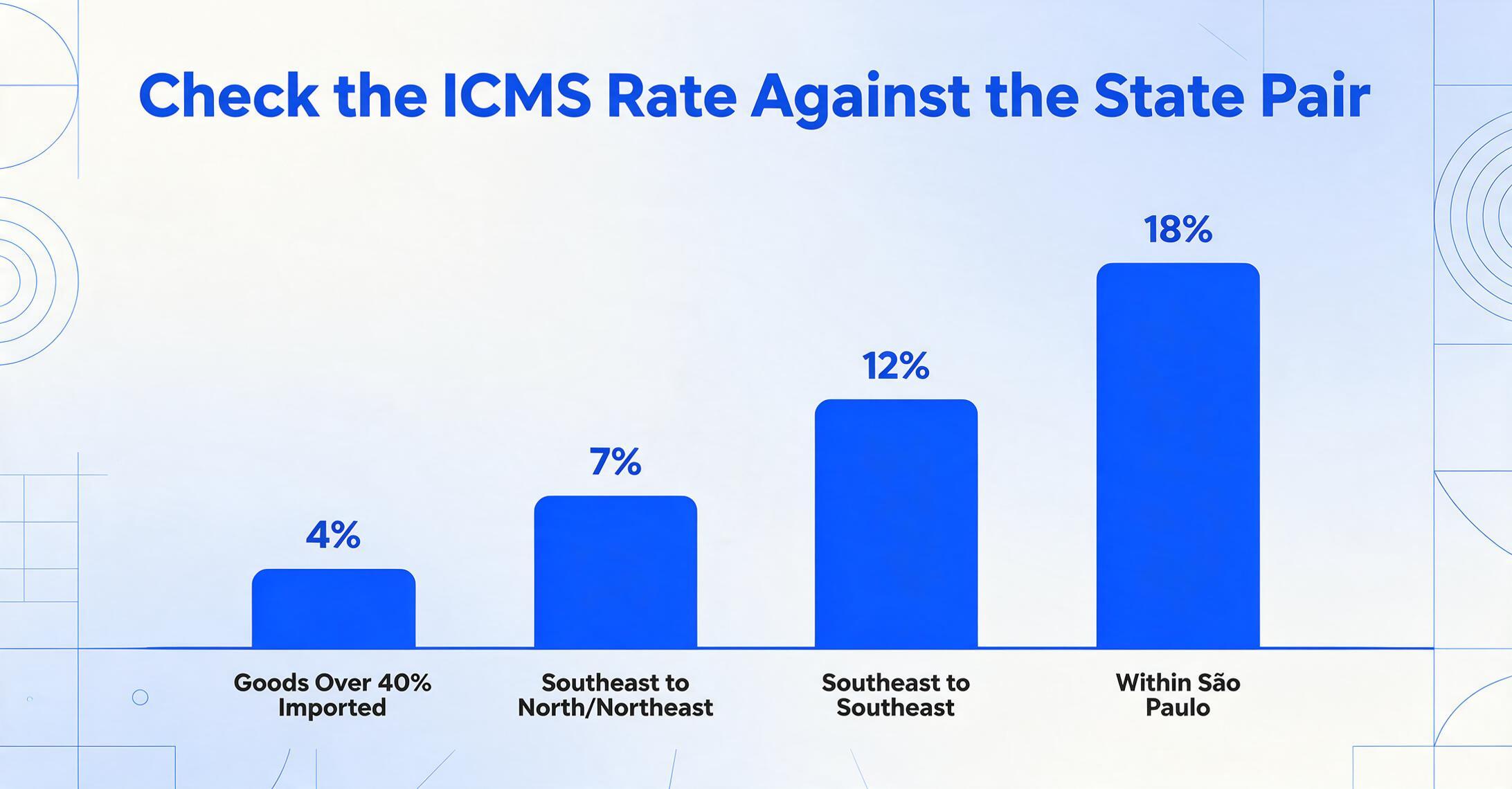
If the ICMS rate on the NF-e does not match the expected rate for the origin-destination pair (from <emit>/<enderEmit>/<cUF> to <dest>/<enderDest>/<cUF>), flag the document for review. Rate mismatches are one of the most common errors on Brazilian supplier invoices and can lead to incorrect tax credit calculations.
CST Codes: The Tax Situation Codes That Change Everything
The CST (Código da Situação Tributária) is a three-digit code that tells you how a tax was applied, not just the rate. Every ICMS, IPI, PIS, and COFINS calculation on an NF-e carries its own CST. The first digit of the CST indicates the tax regime origin (0=national, 1=foreign, 2=foreign with domestic content — varies by tax). For ICMS specifically, the CST determines whether the ICMS is taxable, exempt, deferred, substituted (ST), or collected through a special regime. The three-digit ICMS CST codes follow a specific logic:
| CST (ICMS) | Meaning | Credit Available? | AP Impact |
|---|---|---|---|
| 00 | Taxed — full ICMS rate applies | Yes | Standard purchase. Extract vBC, pICMS, vICMS normally. |
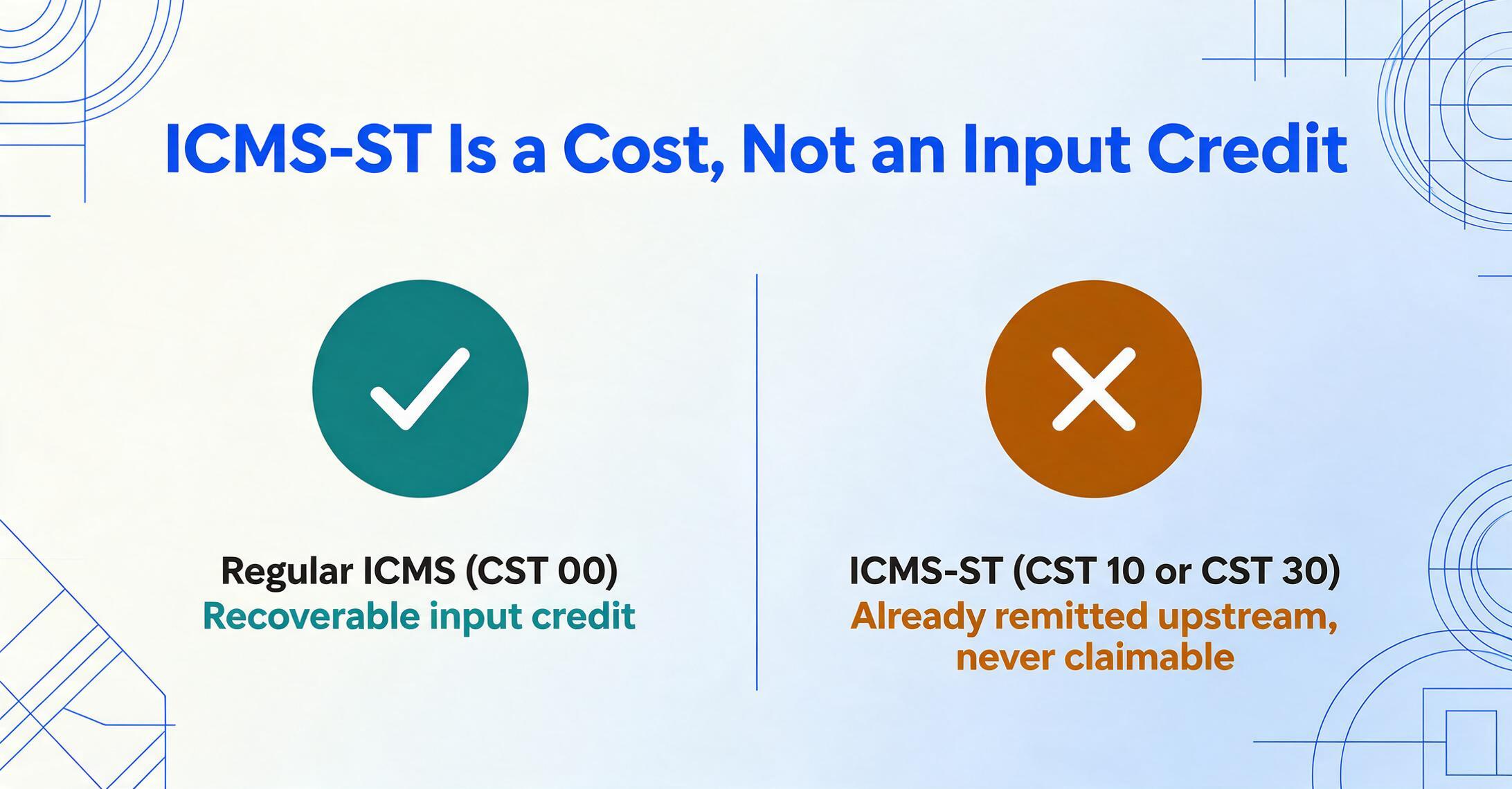
| 10 | Taxed + Tax Substitution (ICMS-ST) | Yes (regular ICMS only) | Two ICMS amounts: regular and ST. Extract both — the ST amount is not your credit. |
| 20 | Taxed with reduced calculation base | Yes (proportional) | The taxable base is reduced (e.g., by 1/3). The vBC fields reflects the reduced base. |
| 30 | Exempt from regular ICMS + ST applies | No | No regular ICMS to extract. Only ST fields exist. Your cost includes the ST amount. |
| 40 | Exempt — no ICMS charged | No | No ICMS value. The line total remains the same but no credit is generated. |
| 41 | Exempt — non-taxable | No | Similar to CST 40. No ICMS to extract or credit. |
| 51 | Deferred — ICMS payment postponed to later stage | Depends | Extract vBC and pICMS even if vICMS is zero — the deferral affects future events. |
| 60 | ICMS already collected by supplier (or previous link in chain) | No | Common in fuel, energy, telecom. The ICMS is not a line item — it was paid upstream. |
| 70 | Taxed with reduced base + ST | Yes (proportional) | Hybrid: reduced base on regular ICMS + separate ST amount. Both must be extracted. |
| 90 | Other — special regime not covered above | Depends | Review manually. The <infAdic> of the NF-e should explain the regime. |
Your extraction workflow should always capture the CST code alongside the tax amount — a "zero ICMS" with CST 40 (exempt) is a very different situation from a "zero ICMS" with CST 00 (error). The CST determines whether zero is a legitimate fiscal treatment or a data gap you need to investigate.
IPI, PIS, and COFINS Validation
IPI verification: The IPI rate is determined by the product's NCM code. Brazil publishes the TIPI (Tabela de Incidência do IPI), a comprehensive rate table that maps every NCM code to an IPI rate. While you cannot maintain the full TIPI spreadsheet internally (it contains thousands of entries and is updated periodically by the Receita Federal), you can spot-check high-value line items: extract the NCM, look up its TIPI rate range, and confirm the pIPI field falls within the expected range. The IPI CST code also matters — CST 50 means IPI is exempt, while 00 means it's taxable.
PIS and COFINS verification: These federal contributions apply at either the cumulative or non-cumulative regime. The regime is determined by the supplier's tax classification, and it governs both the rate and the availability of credits to you as the buyer:
| Regime | PIS Rate | COFINS Rate | Combined | Buyer Gets Credits? |
|---|---|---|---|---|
| Non-Cumulative (Lucro Real) | 1.65% | 7.6% | 9.25% | Yes — the buyer can credit PIS and COFINS against their own contributions |
| Cumulative (Lucro Presumido) | 0.65% | 3.0% | 3.65% | No — no input credits are generated under the cumulative regime |
If the PIS rate on the NF-e is 1.65% and COFINS is 7.6%, the supplier is under the non-cumulative regime and you can claim PIS/COFINS input credits. If the rates are 0.65% and 3.0%, no credits are available. The supplier's CST (typically 01 = non-cumulative or 02 = cumulative) confirms the regime. Extracting and validating these rates directly affects your recoverable tax position.
Practical validation rule: For every NF-e, extract the PIS rate and COFINS rate at line-item level. If the combined rate is 9.25%, flag it for credit tracking. If it's 3.65%, confirm the supplier regime and note that no PIS/COFINS credits apply. A single incorrect regime assumption on a BRL 100,000 invoice is BRL 9,250 of missed credits — or BRL 5,600 of incorrectly claimed ones.
ICMS Tax Substitution (ICMS-ST): The Mechanism You Can't Ignore
ICMS-ST (Substituição Tributária) is a mechanism where the tax authority assigns the responsibility for collecting ICMS on the entire supply chain to the first link — typically the manufacturer or importer. Instead of each buyer in the chain (manufacturer → distributor → retailer) paying ICMS on their own margin, the manufacturer collects ICMS on the presumed final selling price to the consumer at the start of the chain. This "substitution" of the taxpayer shifts the tax collection point upstream.
For AP teams processing NF-e documents, ICMS-ST appears in two scenarios:
Scenario 1 — Your company is the middle of the chain (purchasing from the substituted party). You buy goods from a distributor who has already purchased them under ST from the manufacturer. The NF-e carries the regular ICMS (CST 00, taxed normally) and a separate ICMS-ST amount (CST 10, under <ICMS10> or <ICMSST>). Your extraction must capture both: the regular ICMS is your input credit; the ICMS-ST is not a credit — it's a cost-inclusive charge that was already remitted to SEFAZ by the upstream supplier. You cannot claim it back.
Scenario 2 — Your company is the final link (retailer or direct consumer). You buy from a supplier who is the ST-substituted party. The NF-e carries a single ICMS-ST amount (CST 30 — exempt from regular ICMS, ST applies). The entire ICMS cost of the chain is embedded in this one amount. Your extraction captures only the ST fields, and no regular ICMS credit is available.
To distinguish between these two scenarios in your extraction workflow, check the CST code: CST 10 = regular ICMS + ST (you get partial credits), CST 30 = ST only (no regular ICMS credits). The ICMS-ST XML path uses a separate sub-group: <imposto>/<ICMS>/<ICMSST>/<vICMSST> for the ST amount and <vBCST> for the ST calculation base. Extract these as separate columns from regular ICMS — never sum them into a single "total ICMS" field. Some AP teams sum regular ICMS and ST together and post a combined amount, which overstates their ICMS credit position and triggers audit findings.
CFOP and NCM: Extracting the Classification Codes That Control Compliance
Every line item on an NF-e carries two codes that together determine the tax treatment of that product. They are not optional metadata — they are the inputs to your tax determination logic.
CFOP Code Reference (First-Digit Classification)
The CFOP (Código Fiscal de Operações e Prestações) is a four-digit code where the first digit tells you the direction and nature of the transaction. For inbound (buy-side) NF-e processing, the CFOP codes you will encounter most often fall in the 1xxx, 2xxx, and 3xxx ranges:
| First Digit | Classification | Common Inbound Codes |
|---|---|---|
| 1 | Inbound — within the same state (intrastate) | 1102 = purchase for resale, 1101 = purchase for industrialization, 1116 = purchase for use/consumption |
| 2 | Inbound — from another state (interstate) | 2101 = purchase for industrialization, 2102 = purchase for resale, 2116 = purchase for use/consumption |
| 3 | Inbound — from abroad (import) | 3101 = import for industrialization, 3102 = import for resale, 3126 = import for use/consumption |
| 5 | Outbound (sale) — rarely appears on buy-side NF-e | — |
| 6 | Outbound interstate — relevant only if you issue NF-e | — |
| 7 | Outbound abroad — export operations | — |
Why CFOP matters for extraction: the CFOP code determines which ICMS rules apply to the transaction. A CFOP starting with 1 (intrastate) means the ICMS rate should be the internal rate of the supplier's state (17-22%), not an interstate rate. A CFOP starting with 2 (interstate) means the rate should match the interstate rate table above. If the CFOP and the ICMS rate are inconsistent — for example, CFOP 1102 (intrastate) with ICMS rate 12% (which is an interstate rate) — the invoice has a structural mismatch that needs correction. Your extraction workflow should flag this automatically.
NCM Code: The Product Classification That Drives IPI and Import Duties
NCM (Nomenclatura Comum do Mercosul) is an eight-digit product classification code based on the Harmonized System (HS) with two additional Mercosur-specific digits. Format: NNNN.NN.NN (where the first 6 digits are the HS code). The NCM code determines:
- IPI rate: Mapped via the TIPI table. Products with NCM starting in specific chapters face higher or lower IPI rates.
- ICMS-ST applicability: Certain NCM chapters are subject to mandatory ICMS-ST protocols (convênios) across states.
- Import duty (II) for international purchases.
- Substitute tax rate (e.g., simplified ICMS-ST calculations per CONFAZ protocol).
For extraction, the NCM should always be captured as a text field preserving leading zeros. Never convert it to a number — NCM 8471.30.00 (computer equipment) would lose its leading structure if treated numerically. The NCM also serves as the primary key for looking up IPI rates if your workflow includes automated rate validation.
Handling NF-e Special Events in Your Extraction Workflow
An NF-e is not a static document. It can be modified, cancelled, or reissued through a series of legally defined events. A complete extraction workflow must account for these events, because they can change the data you already extracted.
Cancellation. The issuer can cancel an NF-e within 24 hours of receipt of the authorization protocol, provided the goods have not physically moved. The cancellation event is registered with SEFAZ and linked to the same access key. After 24 hours, cancellation is no longer possible — the issuer must request a special cancellation through the tax authority or issue a credit note (NF-e de devolução). For your extraction workflow: the key validation is to check the NF-e status at extraction time and again before payment. If you are processing NF-e documents programmatically, include a status check step that queries the SEFAZ ConsNFeDest web service for the buyer's received NF-e status list.
Carta de Correção (CC-e). If the supplier needs to correct a field on an already-authorized NF-e (e.g., fix the product description, correct the shipping address, update the payment due date), they issue a CC-e — an electronic correction letter linked to the NF-e's access key. The CC-e does not replace the XML; it amends specific fields. Your extraction workflow should, when processing NF-e documents, query whether any CC-e events exist for that access key. ImageToTable.ai's batch processing includes the option to check for correction events against extracted documents — because if the supplier corrected the due date via CC-e and your workflow used the original XML's due date, you are paying on the wrong schedule.
Contingency modes. If SEFAZ is unreachable, suppliers can issue NF-e in contingency mode. The emission type (<ide>/<tpEmis>) indicates the contingency method: 2 = FS-DA (typed DANFE), 3 = EPEC (pre-event contingency), 4 = DPEC (electronic contingency), 5 = FS-IA (form contingency), 6 = SVC (SEFAZ Virtual Contingency — a backup authorization server). In contingency mode, the NF-e may lack the full SEFAZ authorization protocol at extraction time. Your workflow should flag contingency-issued documents for follow-up: once the system recovers, the supplier will transmit the full NF-e, and you should retrieve the final XML and re-extract if any fields changed.
Manifestação do Destinatário. This is not a supplier event — it's a buyer obligation. Under Brazilian law, the buyer of goods must register their event response on the SEFAZ portal within specific timeframes: confirm receipt within 10 days of issuance, and accept or reject the transaction. This process is called the manifestação do destinatário and it is managed through SEFAZ's DF-e platform. While manifestação is a compliance step separate from extraction, your extraction workflow should record the access key of each processed NF-e in a manifestação tracking system so that compliance can file the required events on time. If you do not register the manifestação, SEFAZ assumes the transaction was unacknowledged, which can block future NF-e issuance from that supplier.
For a deeper look at these event types and how they affect AP operations, see our analysis of NF-e processing complexity.
Extraction Methods Compared: Which Approach Fits Your Volume
There are four common approaches to extracting NF-e data, and the right one depends on your volume, your technical resources, and whether you need line-item tax detail or just header totals.
| Method | How It Works | Fields Extracted | Volume Sweet Spot | Key Limitation |
|---|---|---|---|---|
| Manual DANFE Entry | Clerk reads the printed DANFE and types into Excel or ERP | ~20 header fields, no line-item tax detail | < 10 per month | Misses 90% of data including all tax breakdowns; high error rate |
| XML Scripting (Python, Power Query) | Custom script parses the NF-e XML and extracts fields to CSV/Excel | All header + line-item fields; requires pre-defined XPath mapping | 10–100 per month | Requires coding skills; breaks when schema updates (2026 dual-schema); no tax validation built in |
| ERP Localization Module (SAP/Oracle/Dynamics) | Brazil-specific ERP module that receives NF-e XML and auto-posts to GL | Full field set, tax account mapping, SPED integration | 100+ per month | High cost (licensing + implementation); only works if you have that ERP; rigid schema mapping |
| AI-Based Extraction | Upload DANFE PDFs or NF-e XMLs; AI parses and maps to user-defined columns | All DANFE-visible fields from PDFs; full fields from XML | 10–500+ per month | XML parsing requires that the tool supports structured data input (not just visual PDFs) |
The critical distinction for NF-e is whether the extraction method handles both the DANFE and the XML. If your suppliers send a mix — some transmit the XML directly, others only print and ship the DANFE — you need a method that handles both sources consistently. ImageToTable.ai supports both: you can upload raw NF-e XML files alongside DANFE PDFs in the same batch, define a single column template, and get a unified spreadsheet. The tool also handles the variable ICMS sub-group paths described above — a significant advantage when schema complexity forces scripting teams to maintain dozens of XPath variations. For a practical walkthrough of batch processing multiple NF-e documents, see our guide to batch NF-e processing.
Files are processed securely and not stored.
Preparing Your Extraction Workflow for the 2026 Tax Reform
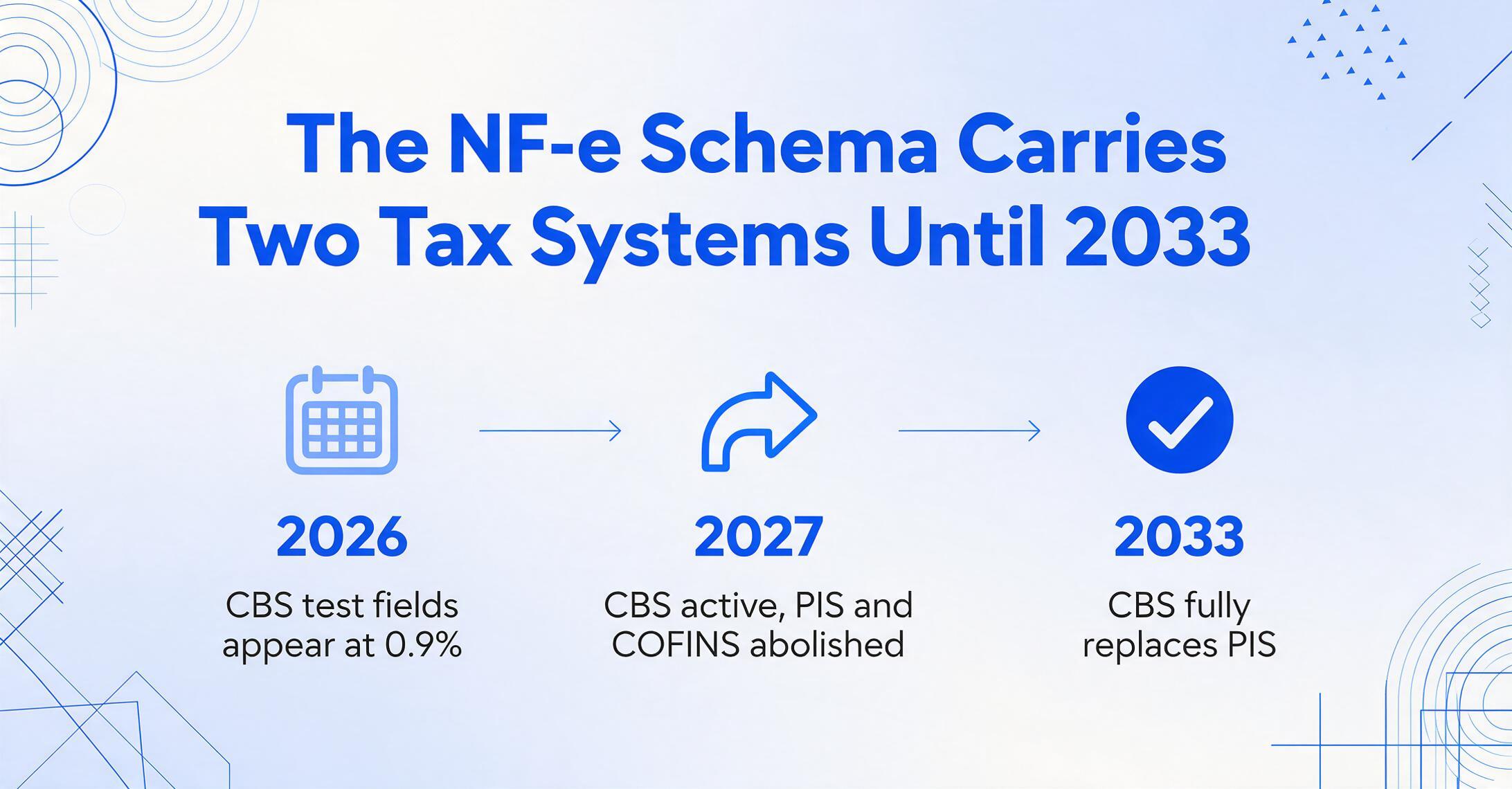
Brazil's Constitutional Amendment 132/2023 and Complementary Law 214/2025 introduced a dual VAT system that replaces five existing taxes with two new ones. For NF-e extraction, this means the XML schema you are parsing today will carry both old and new tax fields during a transition period that runs from August 2026 through 2033. Here is what changes at the extraction level and what you need to do about it.
What stays: The overall XML structure (<ide>, <emit>, <det>, <total>) remains the same. Header fields, line-item quantities, NCM codes, and CFOP codes are unaffected.
What changes: New XML element groups are added to the <imposto> section of each line item and to the <total> summary group. The new groups carry CBS (federal) and IBS (state/municipal) tax calculations alongside the existing ICMS, IPI, PIS, and COFINS fields. During the transition period, you must extract both sets of fields and have both available for downstream systems.
| Current Tax | Replaced By | Extraction Impact | Transition Timeline |
|---|---|---|---|
| PIS (1.65% / 0.65%) | CBS (federal, ~8.8%) | New <CBS> elements appear alongside <PIS>. Both must be extracted during transition. CBS replaces PIS entirely by 2033. | 2026: CBS test fields (0.9% rate). 2027: CBS active, PIS abolished. |
| COFINS (7.6% / 3.0%) | CBS (federal, ~8.8%) | Same as PIS — COFINS fields coexist with CBS fields. Combined PIS+COFINS extraction must account for the merged CBS rate. | 2027: COFINS abolished, CBS at full rate. |
| ICMS (state, 17-22% internal, 4-12% interstate) | IBS (state/municipal, ~17.7%) | New <IBS> element group with vBC, pIBS, vIBS. ICMS and IBS coexist per line item. Extraction must capture both tax bases — they may differ. | 2026: IBS test fields (0.1% rate). 2029-2032: IBS phases in state by state, replacing ICMS incrementally. |
| IPI (0-330% by NCM) | IS (Selective Tax, variable) | IS replaces IPI gradually. IPI and IS may coexist during transition. NCM remains the product classifier. | IPI rates begin zeroing out in 2027. Full replacement by 2033. |
Three practical steps to prepare your extraction workflow:
Audit your current field map
Go through your extraction template and identify every field that currently maps to ICMS, IPI, PIS, or COFINS. For each, add a parallel field for the corresponding new tax (CBS for PIS/COFINS, IBS for ICMS, IS for IPI). Even if you are not using the new fields yet, the schema space must be mapped so that your extraction output columns exist and are ready to receive data when the CBS/IBS fields become populated.
Test with dual-schema sample NF-e documents
Request sample NF-e XMLs from your suppliers that already include the new CBS and IBS fields (all NF-e issued from August 1, 2026 onward will carry both). Run these through your extraction pipeline and verify that the old and new tax fields extract correctly. If your extraction is script-based, confirm that the XPath queries for ICMS do not accidentally capture IBS values — the element groups share similar naming patterns.
Decide on your dual-field strategy
For the next 7-8 years, your extracted data will carry both legacy and new tax fields. Decide whether (a) you maintain parallel columns in your output spreadsheet and let downstream users choose which to use, or (b) you implement a migration timeline where certain columns are phased in and others phased out at specific dates. Most AP teams will prefer option (a) during the early transition years — it creates a longer output table but avoids the risk of dropping the only valid field during the mixed-regime period.
Frequently Asked Questions
Do I need to handle XML namespaces when extracting NF-e fields?
Yes. The NF-e XML uses a default namespace declared on the <nfeProc> element (typically xmlns="http://www.portalfiscal.inf.br/nfe"). Any XPath query must either register this namespace (in Python's lxml: ns = {'nfe': 'http://www.portalfiscal.inf.br/nfe'}) or use local-name() to bypass it. Power Query's XML connector handles namespaces automatically in most cases. If your extraction tool requires explicit namespace registration, make sure it uses the correct URI — a mismatch will silently produce empty result sets.
Should I sum the line-item tax amounts and compare against the header totals?
Yes — this is one of the most valuable validation checks you can implement. The NF-e XML carries tax totals in <total>/<ICMSTot> and the line-item detail in each <det>. These should reconcile. A mismatch between the line-item sum and the header total is a red flag: it may indicate that a line item was omitted in the XML generation, that a discount was applied inconsistently, or that the supplier's ERP has a configuration error. Reconcile line-item tax amounts to header totals as a standard step in every extraction batch.
Does NF-e extraction cover SPED reporting requirements?
No. SPED (Sistema Público de Escrituração Digital) is Brazil's system of digital bookkeeping filings — EFD-ICMS/IPI for state taxes and EFD-Contribuições for federal contributions — that require data to be formatted in specific SPED layouts and submitted through accredited software. NF-e extraction gets the invoice data into a spreadsheet; it does not generate SPED-compliant records. However, the data you extract from NF-e (line-item ICMS, PIS, COFINS, CFOP, NCM, CST) is the same data that feeds into SPED filings. If your extraction workflow correctly captures the tax detail at the line-item level, your Brazilian accounting team can use that data to populate the required SPED records rather than re-keying from source documents. The mapping from NF-e fields to SPED layout positions is a separate transformation step that some ERP localization modules handle automatically.
What if my company has multiple CNPJs in different Brazilian states?
This is common for larger organizations. Each CNPJ (or "estabelecimento" in Portuguese) is a separate legal entity for tax purposes, and the destination state in the NF-e corresponds to the CNPJ that received the goods. When extracting NF-e data for a multi-entity organization, filter your extraction output by the recipient CNPJ (<dest>/<CNPJ>) and maintain separate GL mappings per entity. The ICMS rate validation also differs per entity — goods shipped to your São Paulo CNPJ face different rates than goods shipped to your Bahia CNPJ, even from the same supplier. For more on handling Brazil's state-by-state complexity, see our guide to affordable NF-e extraction.
What happens if the NCM code changes while I have extracted data from a past period?
NCM codes are updated periodically by the Receita Federal (typically annually, but sometimes with mid-year adjustments through Notas Técnicas). If an NCM code changes, the IPI rate for that product classification may also change. For extraction purposes, you should capture the NCM code as it appears on the NF-e at the time of issuance — it is the code that was in effect on the invoice date, and it determines the taxes that were legally due. If you are doing retrospective analysis or SPED adjustments, use the NCM as recorded on the original document, not the current NCM list.
What if the supplier's NF-e XML has missing or malformed elements?
It happens. The most common issues are: missing <cobr> (billing) group, incomplete address in <enderEmit>, or ICMS sub-groups that do not follow the expected schema variant for the declared CST code. Your extraction workflow should handle these gracefully — return null or a placeholder for missing fields, and log a validation warning. Never hard-fail on non-critical missing elements. For critical fields (access key, CNPJ, line-item totals), a missing value should trigger a rejection of that NF-e from the batch with a clear error message. A validation summary report is essential: log every NF-e that had missing or anomalous fields so your team can investigate before posting to the GL.
How do I handle DIFAL (ICMS rate differential between states)?
DIFAL (Diferencial de Alíquota do ICMS) applies when goods are sold across state lines and the ICMS rate in the destination state is higher than the interstate rate paid at origin. The buyer must pay the rate difference to their own state. On the NF-e, DIFAL is represented by the <ICMSPart> sub-group under <imposto>/<ICMS>. This sub-group contains vBC (the calculation base), pICMS (the interstate rate already applied), pICMSUf (the destination state's internal rate), and vICMS (the DIFAL amount = difference between the two rates on the base). You must extract the DIFAL amount separately and handle it through your state-specific ICMS credit workflows — it is not part of the regular ICMS credit.
Should I extract freight and insurance separately from product values?
Yes. The NF-e XML breaks down the transaction into product value (vProd), freight (vFrete), insurance (vSeg), and other charges (vOutro). The ICMS taxable base often includes the sum of product value + freight + insurance + other charges — but not always. Some products have ICMS calculated only on the product value. Extracting each component separately lets you validate that the ICMS taxable base matches your understanding of the pricing structure. If freight is included in the ICMS base on the NF-e but your ERP model expects freight to be outside the ICMS base, you have a reconciliation item to resolve.
Can AI-based extraction tools handle the full NF-e XML, or only the DANFE PDF?
It depends on the tool. ImageToTable.ai's AI-based extraction can process both NF-e XML files (structured data) and DANFE PDFs (visual document) in the same batch. When you upload an XML, the tool reads the structured elements directly — no OCR needed — and maps them to your column template. When you upload a DANFE PDF, the AI reads the visual content and extracts the visible fields. The key advantage of a single platform for both is consistency: you define one column template for "NF-e Access Key," "ICMS Amount," "CFOP Code," and the tool populates them from whichever source document it receives. This eliminates the need to maintain separate workflows for XML-based vs. DANFE-based suppliers — a common fragmentation point in Brazilian AP operations.
Do I need to archive the extraction output along with the XML?
Brazilian law requires the original NF-e XML to be archived for five years from the end of the fiscal year in which the transaction occurred. The extraction output (your spreadsheet or ERP records) is not a replacement for the XML. However, maintaining a structured extraction output alongside the raw XML archive is best practice for internal reconciliation and audit response. During a SEFAZ audit, you will likely need to produce both: the original XMLs (to prove the documents exist and were properly authorized) and your accounting records (to show how the data was processed). An extraction workflow that automatically archives both the source XML and the extracted output in a linked structure — with the access key as the join key — will save significant time during audit preparation. For cost-effective compliance options, see our NF-e extraction guide for small businesses.
Test Extraction on Your Own NF-e Documents
NF-e extraction is not a theoretical exercise. Every XML you receive carries data that is fully structured, government-validated, and ready to use. The only question is whether your workflow extracts enough of it — and validates it correctly — before it reaches your ERP or financial records. This guide's field maps, tax validation tables, and code references give you the reference layer. The extraction engine processes the documents. The combination turns a Brazilian NF-e from an opaque XML file your team struggles to parse into a transparent source of financial data you can use confidently — for posting, for credit recovery, and for audit defense.