CFDI Data Extraction:
The Complete Guide to Mexican Electronic Invoices
A CFDI is not a document you read — it is a tax record you must unpack correctly. Mexico's mandatory electronic invoice system, enforced by SAT since 2014, produces invoices that arrive as XML files bearing a 36-character UUID, paired RFC tax IDs, fiscal regime codes, and — depending on the transaction type — one or more structured complementos that contain the actual payment, payroll, or customs data. Extracting this into a spreadsheet means understanding a document architecture designed for real-time government validation, not for human readability. This guide covers the entire landscape: the six CFDI document types, the complemento system, every extraction method available, and how to integrate the output with the accounting software your Mexican team already uses.
Key Takeaways
- Every AP team processing Mexican supplier invoices extracts data from the CFDI PDF — but under SAT rules, the PDF carries zero legal weight; the XML file is the only valid document.
- Stopping extraction at the invoice header and ignoring complementos captures about 60% of the data you actually need — Pago payment details, Nómina payroll breakdowns, and Comercio Exterior customs data live in XML addendums that most teams never extract.
- A semantic extraction tool that reads documents by field meaning rather than field position processes CFDI PDFs, XMLs, and complementos from any PAC in a single workflow — no 8-template setup, no per-PAC configuration.
What Makes CFDI Different from Any Other Invoice
Every invoice you have ever processed from a US, European, or Asian supplier follows the same basic pattern: the supplier issues a document, you receive it, and the data — invoice number, date, amount, tax — lives on the document itself. The document is the source of truth. CFDI inverts this model entirely.
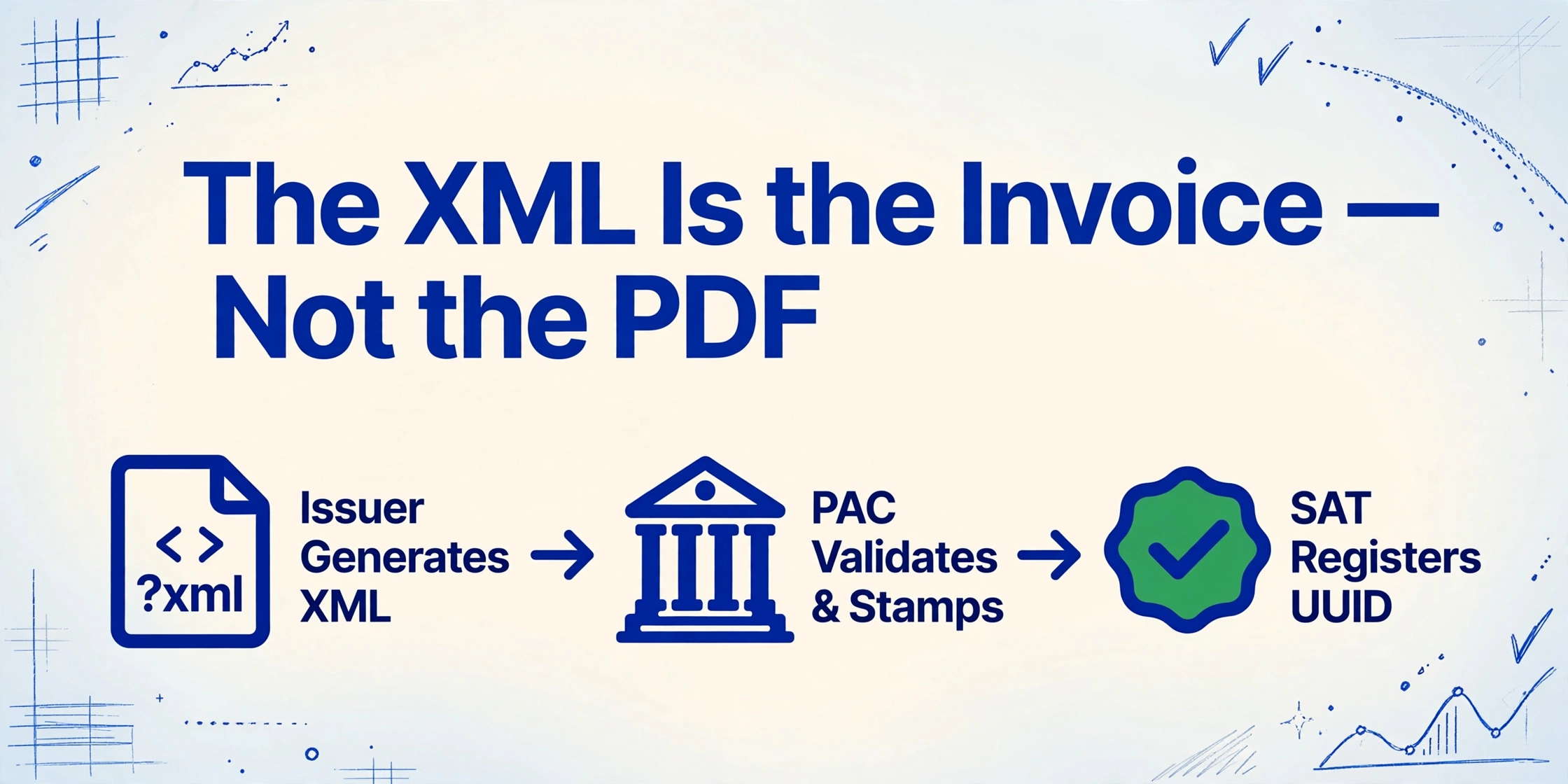
A CFDI (Comprobante Fiscal Digital por Internet) is an XML document that must be validated and stamped by a government-authorized PAC (Proveedor Autorizado de Certificación) before it becomes legally valid. This is called the clearance model: the issuer generates the XML, submits it to a PAC, the PAC verifies the structure and digital signature, applies a timbre fiscal (digital stamp), and forwards a copy to SAT — Mexico's tax authority — in real time. Only after this three-way handshake does the invoice exist as a legal document. The UUID (Folio Fiscal) assigned by SAT at that moment becomes the permanent identifier that ties that transaction to every subsequent audit, payment, and tax filing.
This has a practical consequence that surprises most AP teams handling Mexican suppliers for the first time: the XML file is the legally valid invoice. The PDF that arrives attached to the same email is a decorative printout — useful for human review, but carrying no legal weight. Under CFF Article 30, both issuer and recipient must retain the original CFDI XML for at least five years. Disposing of the XML while keeping only the PDF creates an audit exposure that many teams discover only when SAT requests records.
The current version, CFDI 4.0, has been mandatory since April 2023. It introduced stricter recipient validation: the receiver's RFC, legal name, and fiscal domicile postal code must match SAT's taxpayer registry exactly. Version 3.3 invoices are no longer accepted. For anyone building a CFDI extraction workflow, this means every document you handle follows the 4.0 schema — a consistent target for extraction, but one that carries more mandatory fields than previous versions.
The core problem in CFDI extraction is not that the data is missing. It is that the data lives in a format designed for government clearance, not for spreadsheet consumption — and the bridge between the two is what most teams struggle to build.
The Six CFDI Document Types — and When You'll Encounter Each
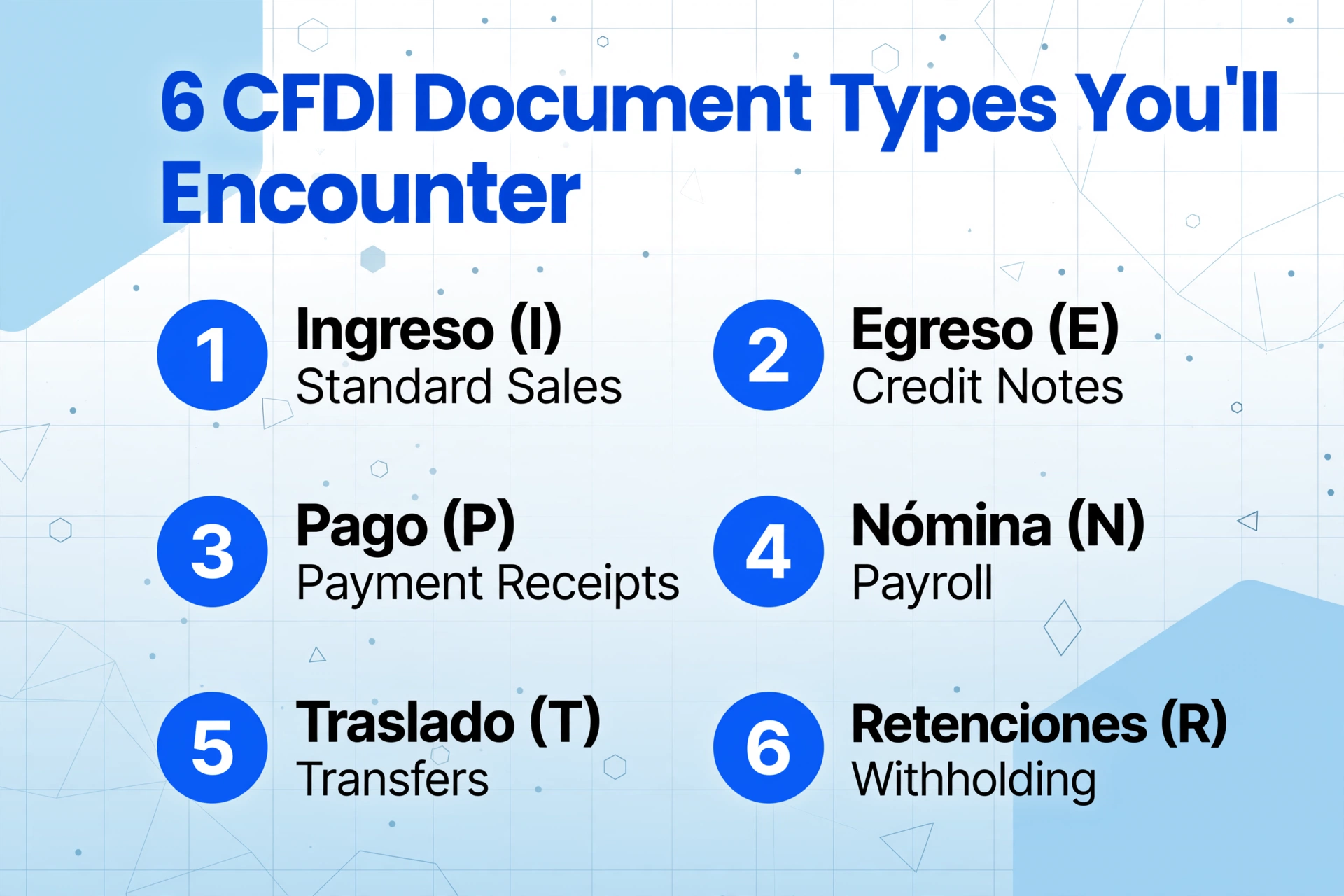
CFDI is not a single document type. SAT defines six distinct comprobante types, each with its own schema rules, mandatory fields, and extraction requirements. If you process invoices from more than a handful of Mexican suppliers, you will encounter most of them.
| Type | Code | When It Appears | Extraction Complexity |
|---|---|---|---|
| Ingreso | I | Standard sales invoice — revenue from goods or services. ~85% of all CFDIs you will receive. | Base schema. IVA breakdown, UsoCFDI required. |
| Egreso | E | Credit notes, refunds, discounts — reductions to previously issued Ingreso invoices. | Must reference the original UUID. Requires cross-document matching. |
| Pago | P | Payment receipt — issued when a PPD invoice is settled partially or in full. | High. Carries Complemento de Pago with per-payment UUID references. |
| Nómina | N | Payroll receipt — mandatory for every employee payment. SAT uses this to cross-check income tax and social security. | High. 50+ field complement with IMSS, INFONAVIT, SAR, and other deduction types. |
| Traslado | T | Transfer document — movement of goods without a sale (inventory transfers, consignment, Carta Porte). | Medium. Requires Carta Porte complement for freight movements. |
| Retenciones | R | Withholding document — reports taxes withheld (ISR, IVA) on payments to third parties. | Uses a separate XSD. Not part of base CFDI schema. |
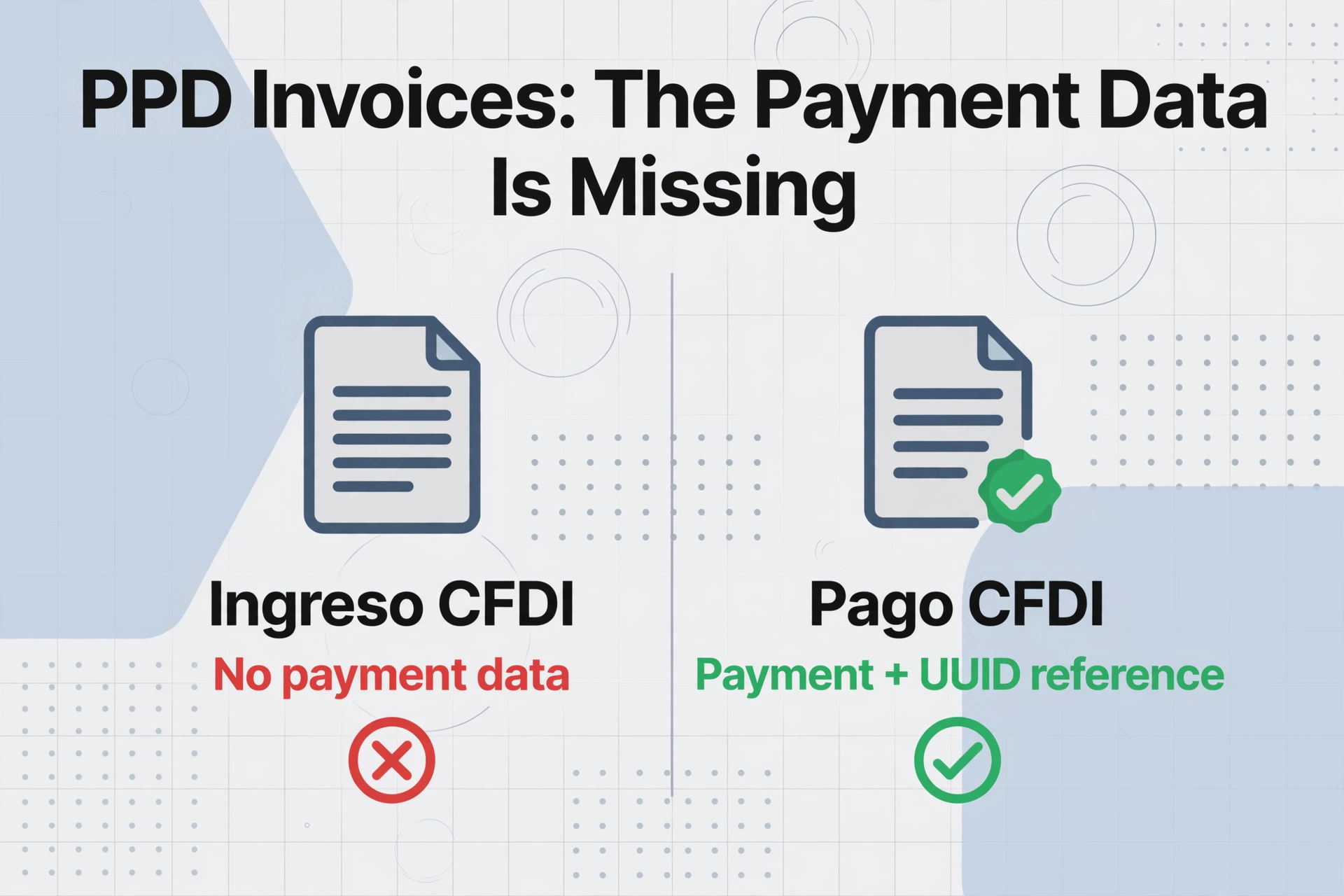
The type that creates the most extraction friction in practice is Pago. When a supplier issues an invoice under PPD payment terms, the invoice itself carries the line items and totals but not the payment details. Every time the buyer makes a payment, the supplier issues a separate Pago CFDI containing a Complemento de Pago that specifies which UUID is being paid, in what amount, on what date, and by what method. An AP team processing 40 PPD invoices may have 60–80 CFDIs to reconcile — each requiring a UUID cross-reference between the Ingreso and its payment complement(s). For a step-by-step month-end workflow that handles this reconciliation across 50+ invoices from multiple suppliers, see our guide on batch processing Mexican CFDI invoices in accounts payable.
Core Fields, SAT Catalogs, and What Each Means for Your Spreadsheet
Understanding which fields to extract is not just a technical question — it determines whether your output is usable for DIOT filing, IVA credit reconciliation, and audit response. Every field in a CFDI maps to a SAT catalog code, and the same field can carry different tax consequences depending on the code selected.
Header-Level Fields (Comprobante Node)
| Field | XPath (simplified) | Why It Matters |
|---|---|---|
| UUID (Folio Fiscal) | /cfdi:Comprobante/Complemento/TimbreFiscalDigital/UUID | Primary key for every transaction. Used for payment reconciliation, cancellation tracking, and audit trail. |
| RFC Emisor / Receptor | /cfdi:Comprobante/Emisor/@Rfc, /Receptor/@Rfc | Tax ID of both parties. A single wrong character invalidates the expense for tax deduction. |
| Régimen Fiscal (Emisor) | /cfdi:Comprobante/Emisor/@RegimenFiscal | Determines which tax rules apply to the supplier — person física vs moral, RESICO vs general regime. |
| Fecha | /cfdi:Comprobante/@Fecha | ISO 8601 timestamp of issuance. SAT uses this for fiscal period assignment. |
| Serie + Folio | /cfdi:Comprobante/@Serie, @Folio | Supplier's internal invoice numbering — useful for matching against supplier statements. |
| SubTotal / Total | /cfdi:Comprobante/@SubTotal, @Total | Pre-tax and final amounts. Total must equal subtotal + IVA trasladado − IVA retenido. |
| Moneda + TipoCambio | /cfdi:Comprobante/@Moneda, @TipoCambio | Currency code (MXN, USD, EUR) and exchange rate if not in Mexican pesos. |
| MétodoPago / FormaPago | /cfdi:Comprobante/@MetodoPago, @FormaPago | PUE (one-time) vs PPD (installments) — determines whether a Complemento de Pago is expected. |
| UsoCFDI | /cfdi:Comprobante/@UsoCFDI | Recipient's usage code — G01 (acquisitions), G03 (expenses), D01 (automotive), P01 (PPD). Drives IVA credit eligibility. |
| Exportación | /cfdi:Comprobante/@Exportacion | CFDI 4.0 mandatory field. 01=domestic, 02=definitive export. Segregates invoices for DIOT reporting. |
Tax Breakdown: IVA, Retenciones, and IEPS
The tax structure in a CFDI lives below the concept (line item) level, nested inside each Concepto. This means the IVA rate and amount are per-line-item, not invoice-level aggregates. Extraction must sum them if your output needs a single tax line per invoice, but the underlying data is granular:
- IVA 16% — standard rate applied to most goods and services. The border region (northern and southern frontier) qualifies for a reduced 8% IVA rate under certain conditions.
- IVA 0% — applies to exports (Exportación=02/03) and certain basic food items, medicines, and agricultural supplies.
- IVA Retenido — the recipient may be required to withhold two-thirds of the IVA and remit it directly to SAT. The CFDI shows both
ImpuestosTrasladados(IVA charged by the supplier) andImpuestosRetenidos(IVA withheld by the buyer). - ISR Retenido — 10% withholding on services provided by individuals, 1.67% on purchases from the general regime, 20% on interest payments. These must be reported in the monthly DIOT.
- IEPS — excise tax on specific goods: alcohol, tobacco, gasoline, sugary drinks. Each product category maps to a different IEPS rate (3%–160%).
For extraction, the critical point is that one CFDI can carry multiple tax combinations across different line items. A single invoice from a distributor that sells both standard goods (IVA 16%) and IEPS-liable products will have items at 16%, at 16%+IEPS, and potentially at 0%. Your extraction output must either preserve line-level tax detail or correctly aggregate per rate.
The Complemento Layer: Where Most Extraction Guides Stop
A complemento is a structured XML addendum that extends the base CFDI schema for specific transaction types. The base CFDI covers the invoice header and line items. Everything else — payment details, payroll breakdowns, customs data, transport information — lives in complementos. For AP teams processing Mexican invoices, three complementos matter most.
Complemento de Pago (Payment Complement)
Attached to every Pago CFDI, this complement is the single biggest source of extraction complexity in real-world Mexican AP. When a supplier issues an invoice under PPD terms (MétodoPago=PPD), the original Ingreso invoice does not contain payment data. Every time the buyer pays — whether in full, in partial amounts, or on deferred terms — the supplier issues a Pago CFDI whose Complemento de Pago records:
- The UUID of the original Ingreso invoice being paid
- The payment amount applied to that UUID
- The payment date and payment method (transfer, cheque, cash, card)
- The currency and exchange rate at payment time (critical when the original invoice was in USD)
- The outstanding balance after this payment (saldo insoluto)
One Ingreso invoice may be settled by multiple Pago CFDIs — each referencing the same UUID with a different payment amount. The extraction challenge is not technical (the UUID is always present) but procedural: most AP teams never extract the Complemento de Pago at all, leaving the payment data in a separate document that nothing in the workflow connects to the original invoice.
A CFDI line-item extraction that stops at the invoice header and leaves complementos untouched captures roughly 60% of the data your AP team actually needs.
Complemento de Nómina (Payroll Complement)
Employers in Mexico must issue a Nómina CFDI for every employee payment — salary, bonuses, commissions, vacation premiums, severance, and Christmas bonus (aguinaldo). The Complemento de Nómina is one of the most field-dense documents in the CFDI system, containing 50+ structured fields including:
- Employee CURP and IMSS social security number
- Base salary and daily salary (Salario Base de Cotización)
- Ordinary income (percepciones) broken down by type code — Sueldos, Aguinaldo, Prima Vacacional, PTU
- Deductions (deducciones) — ISR withheld, IMSS contributions, INFONAVIT loan payments, SAR/Afore, pension loans
- Overtime hours (Horas Extra) with time type and percentage
- Total net payment
For multi-entity employers, payroll extraction means processing hundreds of Nómina CFDIs per pay cycle. Each employee produces one CFDI per payment, and each requires the complemento fields to be flattened into a HR or payroll reporting spreadsheet.
Complemento de Comercio Exterior (Foreign Trade Complement)
Required when Exportación=02 (definitive export with A1 customs key) or Exportación=03 (definitive export with A2 key). This complement carries the customs-side data for cross-border transactions:
- Pedimento number (customs declaration ID)
- Exporter RFC and full address
- Foreign tax ID of the receiver
- INCOTERM code
- Per-line detail: tariff fraction (fracción arancelaria), customs unit of measure, USD value of goods
- Country of origin and destination
Version 2.0 of this complement has been integrated with CFDI 4.0 since January 2024. For companies that export goods from Mexico, extraction that captures both the base CFDI fields and the foreign trade complement data is essential for reconciling freight invoices against customs declarations.
Why Different PACs Mean Different PDF Layouts
Every CFDI starts from the same XML schema — Anexo 20 version 4.0, defined in SAT's published XSD. The XML is consistent regardless of which PAC stamps it. But the PDF representation, which is what most AP teams actually look at, depends entirely on how each PAC chooses to render the XML into a visual format.
In practice, a CFDI PDF stamped by Finkok will arrange fields in a different visual order than one stamped by SW sapien, Digifact, FacturAPI, or SAT's own free tool. The data is identical. The layout is not. For template-based OCR tools that rely on fixed-position extraction zones, each PAC layout requires a separate template. A business receiving invoices from 20 suppliers that collectively use 8 different PACs would need 8 extraction templates — and would miss invoices from the 9th PAC they had not yet configured.
This is where semantic extraction — AI that reads a document by understanding what each field means rather than where it sits — changes the economics of CFDI processing. A semantic extraction tool that knows the difference between a UUID and an RFC can find both fields anywhere on the page, whether the PAC positioned them at the top, left, right, bottom, or inside a bordered box. The PAC's layout becomes irrelevant, which means a single extraction configuration covers every supplier and every PAC in your portfolio.
Extraction Methods Compared: Which Approach Fits Your CFDI Workflow?
Different teams choose different approaches to CFDI extraction based on document volume, format mix, technical capability, and budget. The following table maps the four main methods against the dimensions that matter for Mexican invoice processing.
| Dimension | Manual Data Entry | XML Parsing (Script) | Template OCR | AI Semantic Extraction |
|---|---|---|---|---|
| Setup time | None | 1–3 days (write script, test) | 1–2 hours per PAC layout | ~15 minutes |
| Handles all PAC layouts | Yes (by eye) | N/A (works on XML) | No — each layout needs a template | Yes — layout-independent |
| Handles scanned/photos | Yes | No | Partial — degrades with quality | Yes |
| Handles complementos | If the user knows to look | Yes (if script is written for it) | No — complementos not on the PDF | Yes — if tool can handle both sources |
| Time per 50 CFDIs | ~3–4 hours | ~2 minutes (batch) | ~15 minutes + corrections | ~2–5 minutes |
| Error rate (field-level) | ~3–5% (typos, transposition) | ~1% (schema mismatch) | ~8–15% (layout mismatch) | ~1–3% |
| Technical skill required | None | Python/XPath/XML | Medium (zone configuration) | None |
| Scalability to 500+/month | ❌ | ✅ | ⚠️ | ✅ |
The choice between XML parsing and AI semantic extraction is not always straightforward. If every supplier sends the raw CFDI XML and your team has scripting capability, XML parsing using XPath or a library like lxml in Python produces clean, direct field extraction from the structured data. The limitation is that XML parsing cannot read scanned invoices, cannot interpret the visual PDF representation when the XML is not attached, and requires active maintenance when SAT updates the schema (as happened with the 3.3→4.0 migration).
AI semantic extraction, by contrast, works from any visual document — PDF, scanned image, phone photo — and does not require a structured XML input. Modern vision models trained on thousands of invoice layouts can locate the UUID, RFC, and IVA fields by understanding what those labels mean, regardless of where in the document they appear. For teams that receive a mix of PDF attachments (no XML) and scanned documents, this is the only scalable option.
Files are processed securely and not stored. Try it on a real CFDI PDF or XML.
How AI Extraction Handles CFDI Documents — Across All Three Formats
The most practical scenario for most AP teams is that you receive a mix of XML files, PDF attachments, and scanned documents from different suppliers using different PACs. Building a separate workflow for each format creates maintenance overhead and processing gaps. An AI extraction approach that treats all three as input sources with a single field definition simplifies this dramatically.
ImageToTable.ai handles CFDI extraction through its Custom Column Extraction paradigm — you define the columns you want in your output, and the AI locates each value by understanding what the field means, not where it sits on the page. For CFDI, the workflow is:
UUID (Folio Fiscal), RFC Emisor, RFC Receptor, SubTotal, IVA Tasa, IVA Monto, Total, UsoCFDI, MétodoPago, Moneda. For PPD invoices, add UUID Pagado and Monto del Pago to capture Complemento de Pago fields.This approach solves the PAC layout problem automatically: the AI does not depend on fields being in a fixed position, so a CFDI rendered by Finkok (with UUID in the top-right corner of the second page) and one rendered by FacturAPI (with UUID in the lower-left footer) both produce the same structured output.
For complemento extraction specifically, when processing XML files directly, the AI can navigate the hierarchical structure — traversing from the /Complemento/Pagos node of a Pago CFDI to extract the referenced UUID, payment amount, and date. For PDF representations of the same Pago CFDI, the AI reads the complemento fields from wherever the PAC chose to display them on the visual document.
Integrating CFDI Data with Mexican Accounting Software
Extracted CFDI data is only useful if it reaches the system your accounting team actually works in. The Mexican accounting software ecosystem differs significantly from the US or European landscape — the dominant players are local, and each has specific data import expectations.
CONTPAQi
CONTPAQi is the most widely used accounting and business management suite in Mexico, covering accounting (Contabilidad), electronic invoicing (Factura Electrónica), payroll (Nóminas), and commercial operations (Comercial). CONTPAQi natively imports CFDI XML for verification, but for bulk data analysis — reconciling 200 supplier invoices against budget codes, building spending reports by UsoCFDI category, or preparing DIOT inputs — the data needs to be in an Excel format that maps to CONTPAQi's chart of accounts. Extracted columns like RFC, UUID, and IVA amount directly populate CONTPAQi's auxiliar de cuentas when imported as a batch journal entry.
Aspel SAE / COI / NOI
Aspel is the second most common accounting platform in Mexican SMEs, with SAE (administrative), COI (accounting), and NOI (payroll) modules. Like CONTPAQi, Aspel can process CFDI XML for individual invoice verification, but its reporting layer works best when batch CFDI data is pre-compiled in an Excel table that matches Aspel's import templates. Common practice among Mexican controllers is to maintain an auxiliary CFDI register in Excel — one row per invoice, columns for RFC, UUID, folio, IVA rate, and retain — and reconcile it against Aspel's ledger monthly. Automated extraction turns that auxiliary register from a manual typing exercise into a direct export.
SAP and Oracle NetSuite
Larger enterprises operating in Mexico typically run SAP or Oracle NetSuite with localizations for CFDI compliance. These systems handle the XML validation and PAC submission automatically through their built-in CFDI modules. However, the challenge shifts from compliance to reconciliation: procurement and AP teams need to match extracted CFDI data against purchase orders, goods receipt notes, and supplier contract terms. An AI extraction workflow that outputs CFDI data as structured rows — with UUID, RFC, line-item product codes (c_ClaveProdServ), and tax breakdown — feeds directly into SAP's MIRO (Logistics Invoice Verification) or NetSuite's AP batch import processes.
Frequently Asked Questions
Can AI extract data from CFDI XML files?
Yes. Modern AI extraction tools can parse CFDI XML files directly, reading the structured fields from the Anexo 20 schema. Unlike pure XML parsing scripts that require XPath queries for every field, AI-based extraction can handle schema variations and output the data into the same column structure you define — whether the source is XML, PDF, or a scanned image. This is particularly useful for hybrid batches where some suppliers send XML attachments and others send PDFs.
What fields should I extract from a CFDI for DIOT filing?
For the monthly DIOT (Declaración Informativa de Operaciones con Terceros), you need at minimum: RFC del proveedor, UUID, SubTotal, IVA (desglosado por tasa — 16%, 8%, 0%), IVA retenido, ISR retenido, and UsoCFDI. The DIOT requires IVA to be reported at the rate level, so your extraction output must separate IVA by rate code rather than providing a single total. The Exportación field also determines whether a transaction is domestic or export — DIOT separates these categories.
How do I handle a PPD invoice when only the PDF is available?
If the original Ingreso CFDI was issued under PPD and you only have the PDF, the invoice data (line items, totals, IVA) is readable from the PDF, but the payment details are not — those live in the separately issued Pago CFDI. You need either the original XML files or the Pago CFDI PDFs to complete the payment reconciliation. An AI extraction tool that processes both PDF invoices and Pago CFDI documents can output the payment UUID cross-references in a single step if you include columns for Complemento de Pago fields.
Does CFDI extraction handle the different PAC PDF layouts automatically?
Template-based OCR tools require a separate template for each PAC layout — Finkok, SW sapien, Digifact, FacturAPI, and SAT's free tool each produce visually different PDFs from the same XML data. AI semantic extraction tools that read documents by understanding field meaning rather than field position automatically handle all PAC layouts without per-PAC configuration. The same extraction configuration that works for a Finkok-stamped CFDI works for one stamped by any other PAC.
Is the PDF representation legally valid for extraction purposes?
For AP workflow and reconciliation purposes, extracting data from the PDF is operationally sufficient — the PDF contains the same invoice data as the XML. However, under Mexican tax law (CFF Article 30), the XML is the only legally valid document. For audit retention, you must preserve the original XML file regardless of what format you use for day-to-day data extraction. A practical workflow is to extract from whatever format you receive (PDF is most common), but archive the XML in a structured repository for the mandatory five-year retention period under NOM-151-SCFI-2016.
Can I extract data from Nómina (payroll) CFDIs with the same tool?
Yes, if the extraction tool supports field-level column naming that matches what appears on the payroll document. The Complemento de Nómina contains 50+ fields — total percepciones, total deducciones, ISR retenido, IMSS, INFONAVIT, and individual income and deduction type codes. An AI tool that reads documents semantically can extract these fields if you name the columns after the payroll data points you need. However, the accuracy is higher on printed Nómina PDFs than on handwritten payroll records, and the hierarchical structure of Nómina complementos means the XML version typically yields more reliable results than the visual PDF version for deeply nested fields like Percepciones/Percepcion/TipoPercepcion.
What happens when a CFDI is cancelled — do I need to re-extract?
CFDI cancellation follows a receiver-consent model. When a supplier cancels an invoice (reason codes 01–04), the recipient must accept or reject the cancellation within 72 hours. If accepted, the original CFDI is voided, and if a replacement is issued (reason code 01), a new UUID is assigned. Your extraction workflow needs to handle this lifecycle: either by flagging cancelled UUIDs in your database and importing the replacement, or by maintaining a "CFDI status" column (active/cancelled) that gets updated when SAT's cancellation feed is checked. Automated extraction tools that maintain a processing history can re-ingest the replacement CFDI and flag the original as superseded, but this requires either the original XML or a persistent database of previously extracted UUIDs.
What do I do with the Complemento de Pago fields in my output?
The Complemento de Pago fields — specifically the referenced UUID, payment amount, payment date, and outstanding balance — should be extracted into the same spreadsheet that contains your Ingreso invoice data. The recommended approach is to include them as additional columns in the batch output: for PPD invoices, the extraction returns both the base invoice data and the payment fields from the Pago CFDI. You can then use a VLOOKUP (or equivalent) to match the Pago UUID reference against the original Ingreso UUID, confirming which invoices have been fully settled and which remain open. This eliminates the manual cross-reference step that consumes the most time in monthly CFDI reconciliation.
The gap between "I have CFDI documents" and "my accounting system has the data" is not a technology gap — it is a format translation gap. The right extraction workflow closes that gap in minutes, not hours.
CFDI data extraction is not fundamentally difficult. The XML is structured. The PDF carries the same data. The complementos are documented in SAT's published XSDs. What makes it hard in practice is the diversity of formats, the variability of PAC layouts, the hierarchical nesting of tax and complemento data, and the fact that most extraction workflows were designed for flat, position-based documents that look the same every time. A semantic approach — one that reads documents by understanding what each field is, not where it sits — handles all of these complexities from a single field definition. You define the columns. The AI finds the data. The format becomes irrelevant.
If you are processing Mexican supplier invoices today and spending more time moving data between documents than using it, the next step is straightforward: take a sample batch — 10 to 20 CFDI files in whatever format you have — and run them through an AI extraction workflow. The gap between "I have the documents" and "my spreadsheet has the data" is smaller than the manual process makes it feel.
This article is part of the ImageToTable.ai guide series on invoice data extraction. For a broader overview, see What Is Invoice Data Extraction? and What Is OCR?. For the beginner's introduction to CFDI, read What Is a CFDI?. For a practical step-by-step extraction tutorial covering each CFDI format, see Mexican CFDI Invoice Data Extraction to Excel. For a deeper look at why CFDI processing confounds traditional AP workflows, read Why Mexican CFDI Invoice Processing Is Harder Than Most Teams Expect.