Mexican CFDI Invoice Data Extraction
to Excel: How-to Guide (2026)
A Mexican CFDI invoice is not a PDF with a VAT number. It is an XML document validated in real time by SAT, carrying a 36-character UUID, paired RFCs for both parties, a fiscal regime code, and — in the case of PPD payments — a separate Complemento de Pago that references the original invoice. Extracting this data into Excel means handling a structure designed for tax compliance, not for human-readable reporting. The format that matters legally is the XML, even if the document that lands in your inbox is a PDF. New to CFDI entirely? Start with our What Is a CFDI? beginner's guide, then return here for the step-by-step CFDI to Excel workflow. For a comparison of every extraction method and the full complemento landscape, see the complete CFDI extraction guide.
Key Takeaways
- The CFDI PDF in your inbox is a decorative printout, not the legally valid document. Discarding the XML while keeping only the PDF carries audit fines of 5–10% of the invoice value per occurrence.
- For PPD invoices, the payment dates and settlement amounts live in separate Complemento de Pago documents linked only by UUID, and most AP teams never extract them, leaving invoices floating in the ledger with no payment reference.
- ImageToTable.ai extracts CFDI data from the PDF or scanned copy, including complemento fields, using the same column names across every supplier regardless of which invoicing software they use.
What a CFDI Invoice Actually Is — and Why Extracting Data from It Is Different
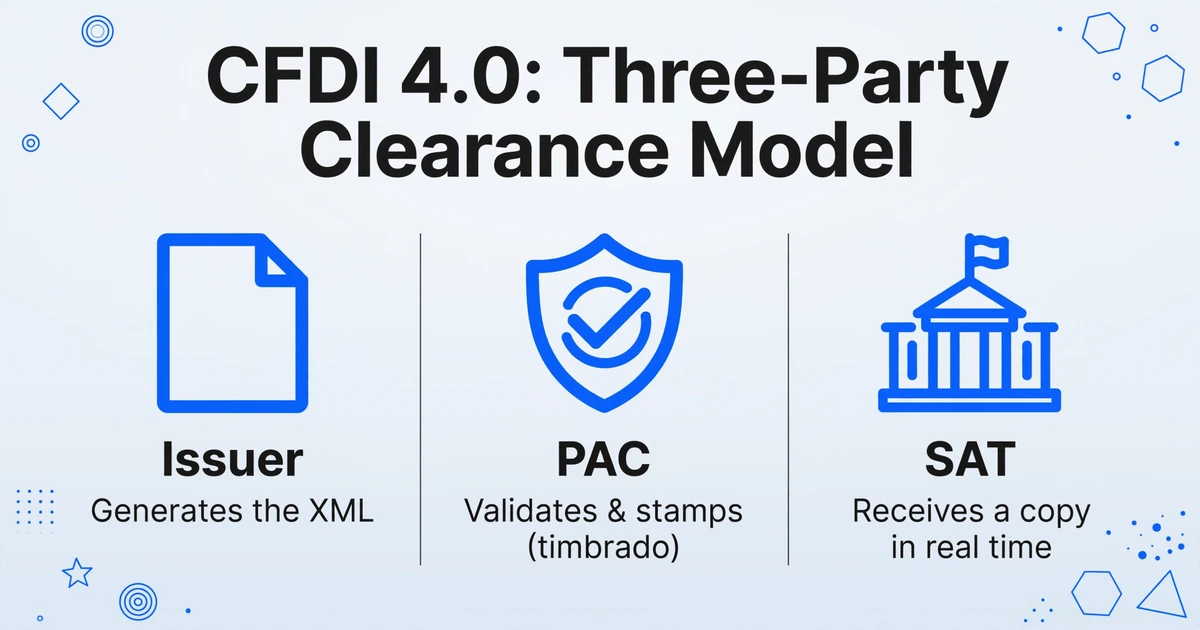
A CFDI (Comprobante Fiscal Digital por Internet) is Mexico's mandatory electronic invoice format, enforced by SAT (Servicio de Administración Tributaria) since 2014. It is not a document you can treat like a PDF from a US or European supplier. Every CFDI passes through a three-party clearance model: the issuer generates the XML, a PAC (Proveedor Autorizado de Certificación) validates and digitally stamps it — a process called timbrado — and SAT receives a copy in real time. Only after the PAC applies the digital stamp does the invoice become legally valid.
The current version, CFDI 4.0, became mandatory for all taxpayers on April 1, 2023, and introduced stricter receiver validation: the recipient's RFC, legal name, and fiscal domicile postal code must match SAT's taxpayer registry exactly. Version 3.3 invoices are no longer accepted by SAT systems. For anyone receiving Mexican supplier invoices, this means every document you handle is version 4.0, whether you knew it or not.
A CFDI contains fields that have no equivalent in a standard invoice: Uso CFDI (a code declaring how the recipient will use the invoice for tax purposes — G01 for acquisitions, G03 for expenses, P01 for pending payments), Régimen Fiscal (the issuer's tax regime code), and the UUID (Folio Fiscal), a 36-character unique identifier assigned by SAT that becomes the permanent reference for that transaction across every system in Mexico's tax infrastructure. If you are reconciling payments, filing DIOT (Declaración Informativa de Operaciones con Terceros), or preparing for an audit, the UUID is the field that ties everything together.
And then there is the XML. Under Mexican tax law, the XML file is the legally valid document — the PDF representation is secondary and informational. Both issuer and receiver must retain the XML for at least five years under CFF Article 30. Failure to archive CFDIs properly carries fines of 5–10% of the invoice value per occurrence. Companies that treat the PDF as "the invoice" and discard the XML are carrying an audit risk they may not discover until the SAT requests records.
Most Mexico-facing AP teams are not lacking invoice data. They are lacking it in a format their accounting system can ingest. The XML is structured but hierarchical. The PDF is readable but unstructured. The data is the same — getting it into Excel columns is the step that breaks the process.
The Three CFDI Formats You'll Actually Receive — and What Each Means for Extraction
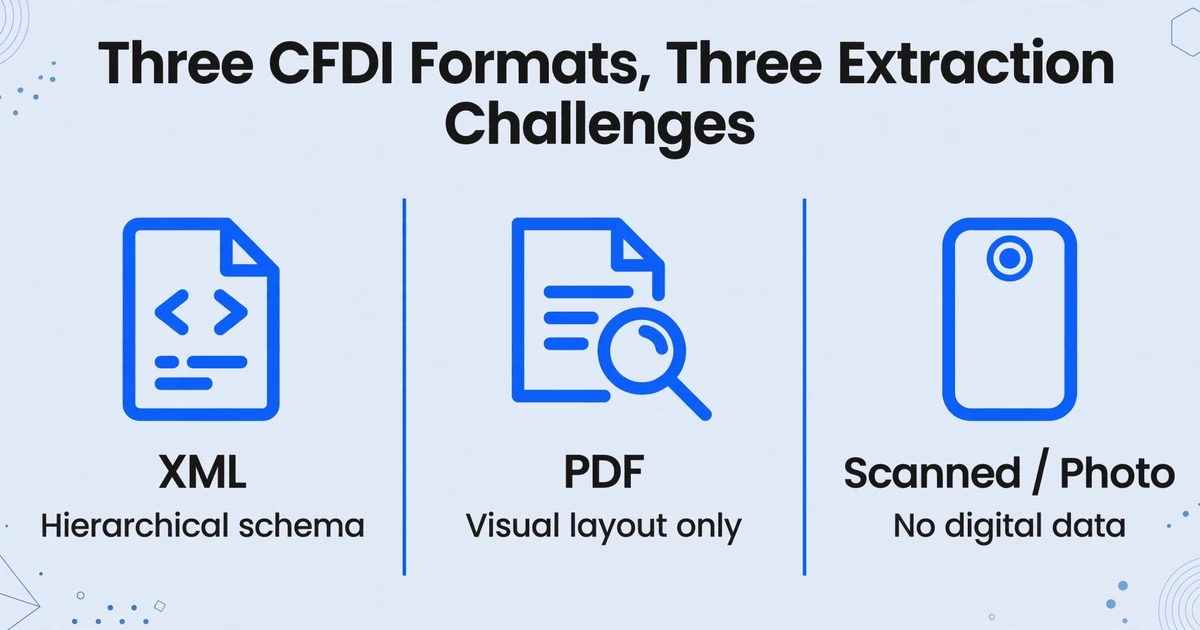
In practice, a Mexican supplier invoice reaches your AP team in one of three forms. Each carries the same CFDI data but requires a fundamentally different extraction approach.
| Format | How it arrives | Extraction challenge | Legal weight |
|---|---|---|---|
| XML | Email attachment, SAT portal download, PAC download | Hierarchical schema (Anexo 20); nested complementos require XPath or schema-aware parsing | Legally definitive |
| Email attachment, supplier portal | Visual layout only; no embedded structured data; QR code contains UUID but requires external lookup | Informational representation of the XML | |
| Scanned / photo | Physical suppliers, field receipts, WhatsApp | No digital data at all; depends entirely on visual recognition of printed CFDI layout | None — must be matched to XML record |
XML extraction sounds straightforward — it is a structured format with a published schema (SAT's Anexo 20 version 4.0, defined in XSD). But the CFDI XML is deeply hierarchical: the root node contains issuer and receiver data, each line item (Concepto) nests quantity, unit code, product/service code (from SAT's c_ClaveProdServ catalog), unit price, and tax breakdown. A Complemento de Pago — required when the original invoice was issued under PPD (Pago en Parcialidades o Diferido) — is a separate XML document that references the original CFDI's UUID and details which payments settled which invoices, when, and in what amounts. Extracting this into flat Excel rows means traversing a tree structure and resolving cross-document references.
PDF extraction is the most common real-world scenario because Mexican suppliers typically email the PDF representation, not the raw XML. The PDF is a human-readable rendering — the same data, but without structured tags. Every field must be identified by its visual position or by semantic understanding of the text. This is where template-based OCR tools break: a CFDI PDF from Grupo Bimbo looks nothing like one from a small proveedor de servicios using CONTPAQi Factura Electrónica.
Scanned or photographed CFDIs add image quality degradation: skewed angles, shadows, low-resolution phone cameras. These arrive from smaller suppliers who print invoices and hand them to delivery drivers, or from field personnel who photograph receipts with WhatsApp. The data is still CFDI data — UUID, RFC, IVA breakdown — but extracting it means working with pixels that no XML parser will ever see.
Understanding the format variety is step one. Step two is knowing exactly which fields matter for your accounting — and which SAT catalog codes they map to.
The CFDI Fields You Need in Your Excel Output — and Why Each One Matters
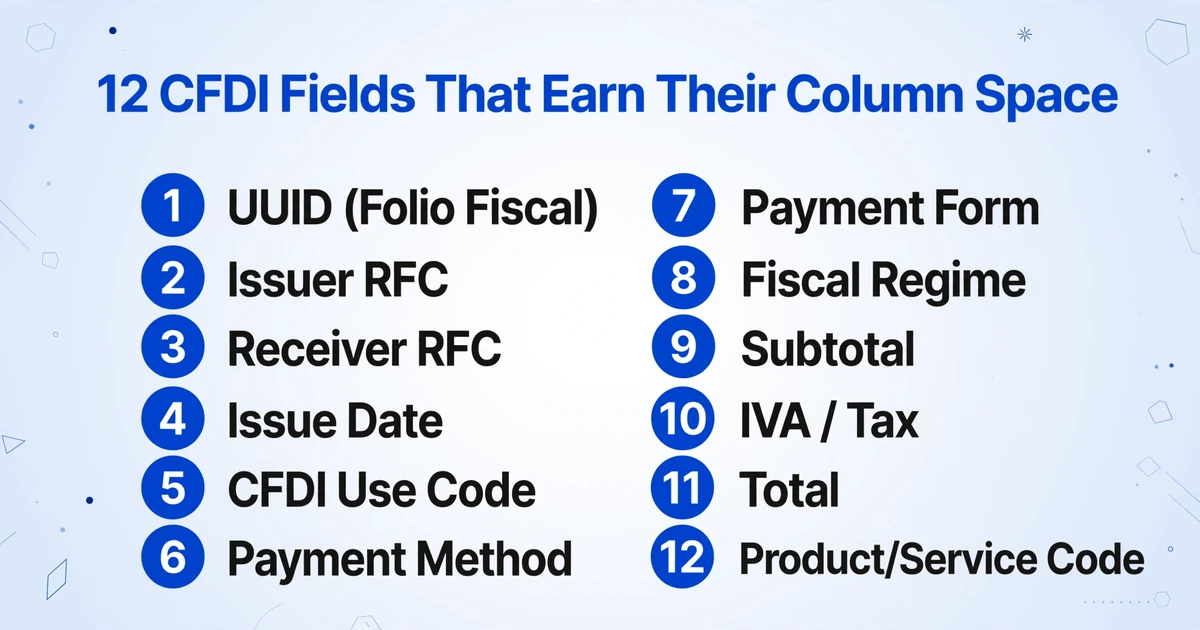
Not every field in a CFDI belongs in your Excel. A full Anexo 20-compliant XML can contain over 60 distinct data points. For AP reconciliation, accounting entry, and tax filing, these are the fields that justify the column space:
| Field | Spanish name | What it is | Why you need it |
|---|---|---|---|
| UUID | Folio Fiscal | 36-character unique identifier assigned by SAT at timbrado | Definitive reference for audits, DIOT filing, payment reconciliation, and cancellation tracking |
| Issuer RFC | RFC Emisor | 13-character tax ID of the supplier (4 letters + 6 digits + 3 alphanumeric for personas morales) | Vendor identification in your ERP; required for DIOT reporting of VAT on purchases |
| Receiver RFC | RFC Receptor | Your company's tax ID as registered with SAT | Under CFDI 4.0, must match SAT registry exactly; mismatch invalidates the CFDI for deduction |
| Issue Date | Fecha | ISO 8601 timestamp of issuance and PAC certification | Determines which tax period the IVA belongs to; drives accrual timing in accounting |
| CFDI Use Code | Uso CFDI | SAT catalog code: G01 (acquisitions), G02 (returns), G03 (expenses), P01 (pending payment), and others | Determines deductibility category; SAT cross-checks use code against receiver's tax regime |
| Payment Method | Método de Pago | PUE (Pago en una sola Exhibición — single payment) or PPD (Pago en Parcialidades o Diferido) | PPD triggers Complemento de Pago requirement; determines whether you need to match to a separate payment XML |
| Payment Form | Forma de Pago | SAT catalog 01–99: 01 (cash), 02 (check), 03 (bank transfer), 04 (credit card), etc. | Required for bank reconciliation and SAT payment traceability |
| Fiscal Regime | Régimen Fiscal | SAT code for the issuer's tax regime (601: general legal entity, 612: individual with business activity, 626: simplified trust regime, etc.) | Determines withholding obligations; SAT validates regime against activity type |
| Subtotal | SubTotal | Pre-tax amount before IVA | Accounting entry base amount; must reconcile with line-item sum |
| IVA / Tax | Impuestos / IVA | VAT amount (typically 16%) with breakdown by rate (16%, 8% border zone, 0% exports/basic goods) | Input VAT creditable in monthly IVA return; separate tracking for each rate |
| Total | Total | Subtotal + IVA + any withholdings (ISR, IVA retenido) | Payment amount; the figure that goes into your AP aging |
| Product/Service Code | ClaveProdServ | SAT catalog code classifying each line item (e.g., 84111506 for accounting services) | Required for DIOT detail reporting; SAT reconciles product codes against declared activity |
These twelve fields form the minimum viable dataset for any AP workflow involving Mexican invoices. Missing the UUID means you cannot verify the invoice on SAT's portal or track its cancellation status. Missing the Uso CFDI means you may book an expense to the wrong deductibility category. Missing the Régimen Fiscal means you cannot determine whether the supplier's IVA is subject to withholding (retención de IVA, two-thirds of the IVA amount, or 10.6667% of the subtotal, under LIVA Article 1-A when a persona moral pays a persona física for services, leasing, or commissions).
Beyond the header-level fields, line items carry their own structured data: quantity, unit of measure (from SAT's c_ClaveUnidad catalog), description, unit price, and per-item tax breakdown. For companies performing three-way matching (PO → goods receipt → CFDI), line-item extraction is what makes the CFDI comparable to the purchase order line by line.
The fields are well-defined. The challenge is getting them out of the document and into your spreadsheet — and that process depends heavily on the format you start with.
How to Extract CFDI Data into Excel: A Step-by-Step Workflow
There are four paths to CFDI data in Excel, ranked from most to least common in real-world AP operations. The path you choose depends on whether you have the XML, the PDF, or just an image — and whether you're processing one invoice or a hundred.
Path 1: XML Parsing (when you have the raw CFDI file)
If your supplier provides the XML — or you download it from the SAT portal — you can extract structured data programmatically. Tools like Python with lxml or dedicated CFDI libraries (cfdipython, PyCFDI) can traverse the Anexo 20 schema and pull fields by XPath. The catch: this path assumes you can write code, handle namespace-qualified XML (every CFDI element sits in a SAT-defined namespace), and maintain parsing logic across catalog updates. SAT updates its catalogs periodically — the c_RegimenFiscal and c_UsoCFDI codes change, and a hardcoded mapping will go stale.
For Complemento de Pago reconciliation — matching payments to original invoices — XML parsing becomes significantly harder because you are working across two XML documents linked only by UUID reference. A single PPD invoice may be settled by multiple payments over months, each generating its own Complemento de Pago. The reconciliation logic (which payment covered which invoice, what was the outstanding balance at each point) is not a simple field extraction — it is a financial calculation across related documents.
Path 2: PDF Extraction with Template-Based Tools
Template-based OCR tools — where you draw bounding boxes around each field on a sample document and the tool re-applies those coordinates to future invoices — break on CFDI PDFs for a simple reason: every supplier uses different invoicing software. A CFDI generated by CONTPAQi Factura Electrónica renders differently from one generated by Aspel FACTURAe, Alegra, or a custom ERP integration. The UUID, RFCs, and IVA breakdown appear in different positions, at different font sizes, with different surrounding text. A template built on a Walmart addenda-compliant CFDI will fail on a small supplier's CFDI and vice versa.
This is a fundamental limitation of coordinate-based extraction applied to a document type where the data structure is standardized (Anexo 20) but the visual layout is not.
Path 3: AI-Powered Semantic Extraction (works on any format)
Semantic extraction — the approach ImageToTable.ai uses — does not look at coordinates. It reads the document as a human would: by understanding what each piece of text means, not where it sits on the page. You tell the tool what fields you want — "UUID," "RFC Emisor," "SubTotal," "IVA 16%" — and the AI locates each value anywhere on the document by recognizing the concept it represents, regardless of layout.
This mechanism is called Custom Column Extraction: you type the column names you want in your output spreadsheet, and the AI uses visual language understanding to find the corresponding data on each page. You do not draw rectangles, you do not build templates, and you do not need to know where on the page a field appears. The same set of column names works across CFDI PDFs from different suppliers and scanned copies, because the AI recognizes "IVA 16% is the tax amount at the 16% rate" rather than "the number in the box at coordinates (430, 210)."
Here is the step-by-step workflow:
Upload your CFDI files
Drag and drop CFDI PDFs or image files, single invoice or batch. The tool reads the visual document, so it handles both without requiring you to pre-sort by type. (A raw XML file is structured data, not a visual document; parse it directly, as in Path 1.) For batch processing, upload all supplier CFDIs at once; the AI will process each file independently and merge results into one Excel.
Define your column names
Enter the fields you need as column names — "UUID," "RFC Emisor," "RFC Receptor," "Fecha," "Uso CFDI," "Método de Pago," "Régimen Fiscal," "SubTotal," "IVA," "Total." The column names you type become the exact headers of your output spreadsheet. For line-item extraction, specify "Cantidad," "ClaveProdServ," "Descripción," "Precio Unitario," "Importe."
Add computed and inferred columns (optional)
Need the IVA at 8% (border zone rate) separated from the 16% rate? Define a Computed Column — the AI performs the calculation during extraction and outputs the result directly. Want the AI to classify each CFDI by category based on the supplier's Régimen Fiscal? Use an Inferred Column — specify "Tipo Proveedor (options: Gran Contribuyente/ PYME / Persona Física)" and the AI reads the CFDI data and assigns the correct category, even though the document itself has no "Tipo Proveedor" field. This lets you complete extraction and classification in a single pass.
Download the CFDI invoice Excel file
Export as XLSX, CSV, or JSON. Dates are normalized to a consistent format, amounts are numeric (no currency symbol strings), and UUIDs are preserved without Excel's auto-formatting stripping characters. The output is ready for import into CONTPAQi Contabilidad, Aspel COI, Alegra, SAP, or any ERP that accepts structured data.
Files are processed securely and not stored.
For teams processing CFDI invoices in volume, batch processing changes the economics. Upload all received CFDIs at once — whether 20 or 200 — and the tool processes them in parallel, merging all extracted data into a single Excel file with one row per invoice. The 18× speed difference between manual entry (roughly 3 minutes per invoice) and AI extraction (5–10 seconds per page) compounds with volume: 100 CFDIs that would take 5 hours of manual keying complete in under 10 minutes. For a monthly AP close cycle, that gap is the difference between finishing reconciliation on time and carrying it into the next period. For a full month-end workflow that handles 50+ invoices across multiple suppliers — including PUE/PPD sorting, UUID deduplication, and DIOT preparation — see our guide on batch processing Mexican CFDI invoices in accounts payable.
Once the columns are populated, the next question is whether the values are right. Review Mode answers it without a side-by-side read: hover or click any extracted cell and the tool highlights the exact region of the original CFDI the value came from, and clicking a region on the document jumps back to its cell. If you edited a field, one click shows the AI's original value so you can revert it. Turn on auto-annotate and the locator map is generated when processing finishes, so the first invoice you open is already reviewable. On a document where a wrong RFC or a misread IVA rate has deductibility consequences, that check takes seconds instead of a full re-read of the invoice.
The header-level fields are the foundation. But a significant percentage of CFDI invoices — particularly those issued under PPD — carry a layer of complexity that most extraction guides ignore entirely.
Handling Complementos: Payments, Payroll, and Foreign Trade
A complemento is a structured XML addendum embedded within or linked to a CFDI. It contains data required for specific transaction types that the base CFDI schema does not cover. For AP teams, three complementos are particularly important:
Complemento de Pago (Payment Complement)
When a CFDI is issued under the PPD (Pago en Parcialidades o Diferido) payment method, the invoice itself acknowledges that payment will happen later — in installments or as a lump sum after delivery. The Complemento de Pago is a separate CFDI (TipoDeComprobante = "P") that documents the actual payment event. It references the original invoice's UUID and specifies: the payment date, the amount paid, the exchange rate if payment was in a different currency, and which original invoices (potentially multiple) this payment settled.
For extraction into Excel, this creates a one-to-many relationship: one PPD invoice → multiple payment complementos over time. Reconciling this manually means opening each payment complemento XML, reading which UUIDs it references, and updating a tracking spreadsheet. The extraction tool has to read the payment date, amount paid, and related UUID off the complemento's PDF representation, then pair that row to the original invoice by UUID in your spreadsheet.
Complemento de Nómina (Payroll Complement)
Payroll CFDIs carry employee-level detail: the worker's RFC, CURP (Clave Única de Registro de Población), social security number (NSS), job risk category, worked days, and detailed breakdown of perceptions (salary, bonuses) and deductions (ISR, IMSS, INFONAVIT). Companies with Mexican employees receive these as part of outsourcing or PEO (Professional Employer Organization) relationships. Extracting payroll complement data into Excel allows consolidation of employee-level costs across periods for accounting entry and labor cost analysis.
Complemento Carta Porte (Transport Complement)
Since January 2024, the Carta Porte complement version 2.0 made previously optional fields mandatory: customs declaration code, exporter details, and origin/destination data. For logistics and supply chain teams receiving freight-related CFDIs, extraction must capture the transport-specific fields — vehicle plate, transport type, route origin and destination — alongside the standard invoice data. These fields are required for SAT validation and customs clearance.
The most common CFDI extraction gap we see is complemento data left behind. AP teams extract the header fields — UUID, RFC, Total — but never pull the payment complement data, meaning PPD invoices float in the reconciliation spreadsheet with no payment date or settlement reference. The data exists in the complemento XML. It simply never made it into the Excel.
Cross-Border CFDI: When the Buyer Isn't in Mexico
Foreign companies purchasing from Mexican suppliers face an additional layer of complexity. Under CFDI 4.0, the receiver's RFC and fiscal domicile postal code must match SAT's taxpayer registry. A US or European buyer without Mexican tax registration cannot provide an RFC — but the CFDI system still requires one.
In practice, this is resolved by using the generic foreign RFC (XEXX010101000 for legal entities, XAXX010101000 for individuals) and specifying the receiver's tax ID in the destination country in a separate field. The CFDI will be issued with Uso CFDI code S01 (Sin efectos fiscales — no tax effects), meaning the invoice exists for commercial record-keeping but does not generate IVA credit or deductibility for the buyer.
For foreign AP teams, the extraction goal shifts: you are not extracting data for SAT filing, but for internal accounting, payment approval, and cost tracking. The fields that matter are the commercial ones — supplier name, invoice amount, line items, payment method — rather than the tax-specific codes. A well-structured extraction should still capture the UUID; even if you do not file with SAT, the UUID is the only globally unique identifier that definitively proves this invoice exists and was validated.
Export operations add another dimension. A CFDI with the Exportacion field set to "01" (definitiva) or "02" (temporal) carries a Complemento de Comercio Exterior with customs data: the pedimento (customs declaration) number, exporter RFC, and INCOTERM. For cross-border logistics teams reconciling freight invoices against customs declarations, extraction needs to capture both the CFDI data and the foreign trade complement fields in a single output.
How Extraction Methods Compare: Manual Entry, XML Parsing, Templates, and AI
Different teams choose different paths based on volume, technical resources, and the formats they receive. Here is how the main options compare across the dimensions that matter for CFDI data extraction:
| Method | Handles XML | Handles PDF | Handles scans | Handles complementos | Speed (100 invoices) |
|---|---|---|---|---|---|
| Manual entry | ✓ (reading values) | ✓ (reading values) | ✓ (reading values) | ✓ (manual cross-ref) | ~5 hours |
| XML parsing (Python) | ✓ (native) | ✗ | ✗ | Partial (requires custom logic) | ~seconds (XML only) |
| Template-based OCR | ✗ | Partial (one layout per template) | ✗ | ✗ | Varies (template setup per supplier) |
| AI semantic extraction | ✗ (visual documents only) | ✓ | ✓ | ✓ (reads the complemento PDF) | ~10 minutes |
XML parsing is the right choice for teams that exclusively receive XML and have in-house development capacity to maintain the parsing code across catalog updates. But a typical AP team in Mexico receives a mix: some suppliers send XML, some send PDF, and a handful — usually smaller suppliers or field personnel — send photos. Relying on XML parsing alone means manually entering the data from every non-XML CFDI, or maintaining a second extraction path for those formats.
Template-based OCR creates a maintenance burden proportional to the number of suppliers. Every new supplier with a different CFDI layout requires a new template. CFDI 4.0 standardized the data fields but not the visual rendering, and the cost of template management grows linearly with supplier count.
AI semantic extraction removes the format problem because it reads what a value means rather than where it sits. A column named "RFC Emisor" returns the issuer's RFC whether the layout comes from CONTPAQi, Aspel FACTURAe, or a custom ERP export, and the same column definitions (UUID, RFC Emisor, IVA, Total) work on any CFDI, from any supplier, in any format. This is particularly valuable for CFDI batch reconciliation during month-end close, when AP teams need to process inbound invoices from 50–200 suppliers, each with their own invoicing system, before the accounting period closes.
FAQ: CFDI Data Extraction to Excel
Can I extract CFDI data if I only have the PDF — without the XML?
Yes. AI-powered extraction reads the visual content of the PDF the same way a person would — by recognizing text and understanding what it means. It does not need the XML structure. If the raw XML is all you have, parse it directly as in Path 1 above; the tool works from the visual document, so what it needs is the PDF or a scan. The extracted fields (UUID, RFC, IVA, etc.) are identical to what you would get from XML parsing. The practical limitation is that you cannot independently verify the digital signature (sello) from a PDF — only the XML contains the cryptographic seal — but for AP reconciliation and accounting entry, the extracted commercial data is sufficient.
What happens if the CFDI uses PPD (Pago en Parcialidades o Diferido)?
A PPD CFDI means payment happens later, documented by a separate Complemento de Pago. The original invoice's Método de Pago field will read "PPD" and the Total is the full invoice amount. To reconcile, you need to process the payment complemento(s) — which reference the original invoice's UUID — and extract the payment date, amount paid, and currency. The payment may settle multiple original invoices, and one original invoice may be settled by multiple payments. This reconciliation requires pairing data across documents linked by UUID. AI extraction can read the payment complemento's PDF representation and pull the payment date, amount paid, currency, and related UUID into your spreadsheet, where you match it to the original invoice by UUID. For a step-by-step batch workflow that handles PPD reconciliation across dozens of invoices, see our guide on batch processing Mexican CFDI invoices in accounts payable.
Does the extraction handle IVA at different rates (16%, 8%, 0%)?
Yes. A CFDI can carry multiple IVA rates on different line items — 16% for most goods and services, 8% for border zone transactions (franja fronteriza), and 0% for exports and basic food items. The tax breakdown (Impuestos) in the CFDI separates each rate with its corresponding base and tax amount. When you define columns for each rate ("IVA 16%," "IVA 8%," "IVA 0%"), the extraction tool reads the tax breakdown and populates each column with the correct amount. Computed Columns can also automate verification: define "Diferencia IVA (Total - SubTotal + IVA 16% + IVA 8%)" to flag mismatches during extraction.
My company is foreign, not registered with SAT. Can I still extract CFDI data to Excel?
Yes. The extraction process is identical regardless of whether your company has an RFC. The tool reads the data fields as they appear — supplier name, RFC Emisor, UUID, amounts, line items — and outputs structured Excel. The only difference is that your CFDI will carry a generic foreign RFC (XEXX010101000 or XAXX010101000) and Uso CFDI S01 (sin efectos fiscales). For your internal accounting, this has no impact: the commercial data is the same. You just will not use the CFDI for IVA credit or SAT filing.
Can the tool extract line items, or only header-level fields?
Both. When you specify line-item fields (Cantidad, ClaveProdServ, Descripción, Precio Unitario, Importe), the tool extracts every line item from the CFDI and outputs one row per line item in the Excel. Each row also carries the header fields (UUID, RFC Emisor, Fecha) so every line is traceable to its parent invoice. For three-way matching (PO vs. goods receipt vs. CFDI), this gives you line-level detail comparable to the purchase order.
What about CFDI cancellation — how do I know if an invoice I extracted is still valid?
CFDI cancellation uses a receiver-consent model: the issuer submits a cancellation request with a reason code (Motivo de Cancelacion), and the receiver has 72 hours to accept or reject through the Buzón Tributario (SAT's electronic tax mailbox). If the receiver takes no action, the cancellation is automatically approved after 72 hours. CFDIs under MXN 1,000 can be cancelled without receiver approval. The extraction tool does not check cancellation status — that requires querying the SAT portal by UUID — but having the UUID in your Excel means you can batch-verify validity when needed. For 2026 onward, under the new tax reform, the cancellation window has been extended to the month of annual ISR return filing, provided the receiver approves.
Can I use this for DIOT (Declaración Informativa de Operaciones con Terceros)?
Yes. The DIOT is SAT's monthly report of transactions with third parties, due by the 17th of the following month. It requires: supplier RFC, invoice UUID, invoice date, IVA amount, and the IVA rate. These are all standard CFDI fields that the extraction tool captures. With all CFDIs extracted to one Excel file, generating the DIOT report becomes a matter of formatting the columns to match SAT's submission template rather than re-entering data from each invoice.
Do I still need to keep the XML if I've extracted the data to Excel?
Yes. Under CFF Article 30, both issuers and receivers must retain CFDI XML files for at least five years. The extracted Excel is your working data — it does not replace the legal archiving obligation. The XML is what SAT will request during an audit. The Excel is what makes that audit preparation faster because you can search, filter, and reconcile without opening individual XML files.
Why Extraction Is Only Half the Problem
The commonly cited bottleneck in CFDI processing is data entry. But data entry is the visible bottleneck. The hidden one — the one that eats more hours across a month — is the reconciliation that comes after: matching PPD payments to original invoices, verifying that the IVA on the CFDI matches the amount in your accounting system, identifying which CFDIs have been cancelled since you last checked, and confirming that every RFC in your vendor master matches what SAT has on file.
Extraction gets the data out of the document and into a structure you can work with. The value compounds when that structured data feeds directly into your downstream processes — DIOT preparation, CONTPAQi import, vendor reconciliation, month-end accruals — without a manual re-entry step between extraction and action.
A CFDI carries more data than a standard invoice, and it serves a compliance purpose beyond commercial record-keeping. A misread Uso CFDI code books an expense to the wrong deductibility category, and a dropped UUID makes the invoice impossible to verify on SAT's portal. Getting the data into Excel is the first step. Keeping your AP, DIOT filing, and audit trail consistent with it is the ongoing result.