What Is a CFDI?
A Beginner's Guide to Mexico's Electronic Invoice System
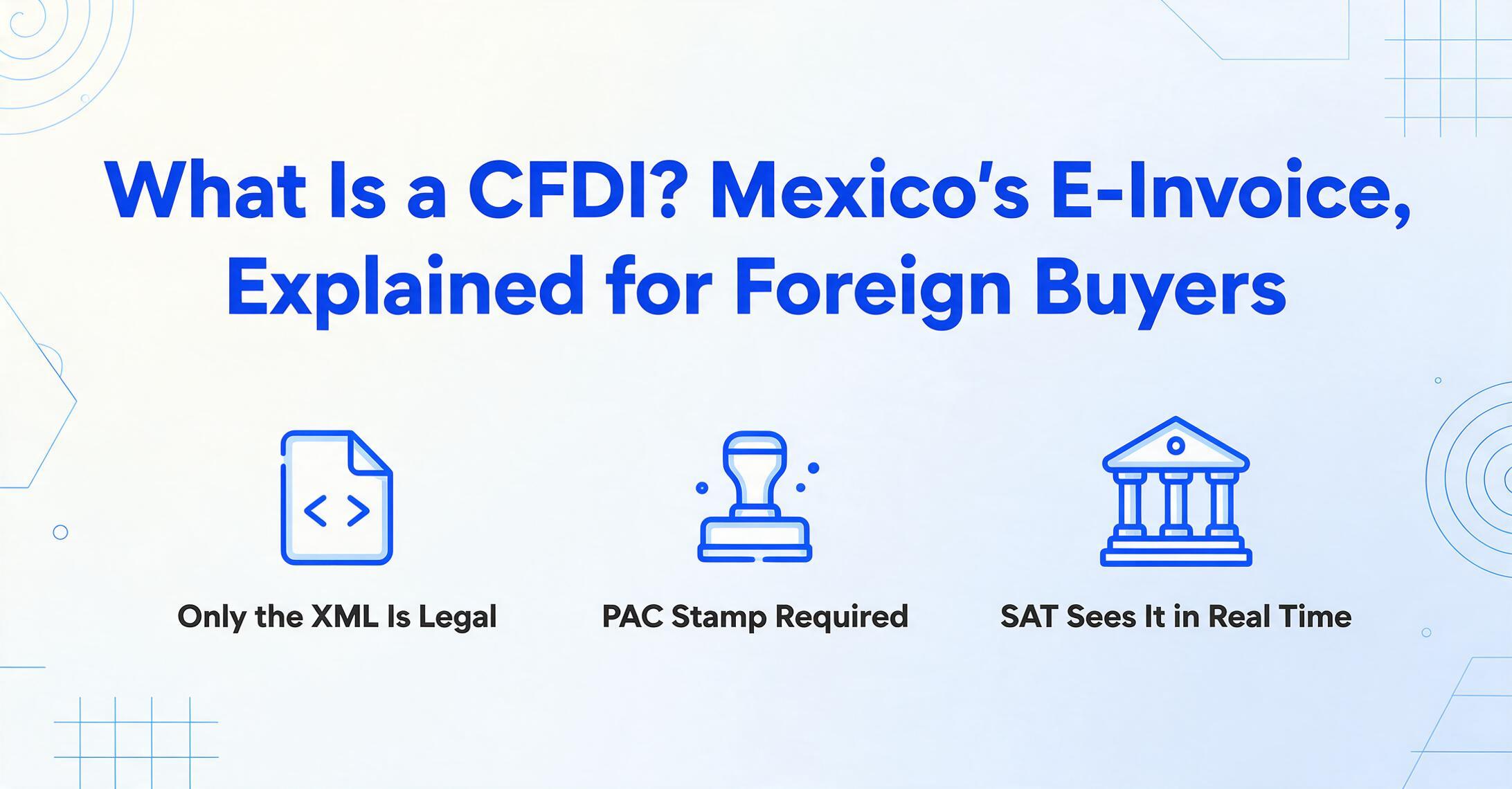
The first time a Mexican supplier sends you an invoice, you'll receive two files: a PDF that looks like any other invoice, and an XML file whose contents look like computer code. You might be tempted to ignore the XML, process the PDF, and move on. But in Mexico, the XML is the real invoice — the PDF is just a printout. Everything about how you handle this document flows from that single fact.
Key Takeaways
- A CFDI is not a PDF with extra fields — the XML is the legally valid document, digitally signed and validated by a government-certified PAC before it ever reaches your inbox.
- One Método de Pago code — PPD instead of PUE — means the one invoice you received will spawn a separate Pago CFDI for every payment installment, tripling the documents you must track across months.
- ImageToTable.ai extracts every CFDI field from XML and PDF alike without template building, so a single column setup works across every supplier format because it reads content rather than page coordinates.
You Just Received a CFDI. What Are You Looking At?
The term CFDI stands for Comprobante Fiscal Digital por Internet — Digital Tax Receipt via Internet. It is Mexico's mandatory electronic invoice format, used for every commercial transaction in the country since 2014, when the government made e-invoicing compulsory for all taxpayers. But calling it an "electronic invoice" undersells what's happening. In most countries, an electronic invoice means a PDF generated by accounting software and emailed to the customer. In Mexico, a CFDI is an XML document that passes through a government validation checkpoint before it becomes legally valid — and the government receives a copy of every validated invoice in real time.
Here is the simplest way to understand the difference. In the United States or Europe, the invoicing sequence is: issue → send → report later (at month-end or during tax filing). In Mexico, the sequence is: generate → validate → stamp → report now (in real time). The Mexican government sees the transaction before your company does. The invoice does not legally exist until the government's system has approved it.
The two files attached to your supplier's email represent two views of the same transaction. The XML (eXtensible Markup Language) file is the legally definitive document — it contains the structured data, the digital signatures of both the issuer and the government certification authority, and the unique identifier that permanently links this transaction to Mexico's tax infrastructure. The PDF is a human-readable visual representation, regulated by SAT to include a QR code that links back to the government's verification portal, but carrying no independent legal weight. When the two conflict, the XML wins. When you need to prove a transaction to SAT, you show the XML. When you archive records for the required five-year retention period, the XML is what you keep.
The one concept to take away: In Mexico, the legal invoice is not the piece of paper — or the PDF — that you can read with your eyes. It is the structured data file that a machine can read, bearing cryptographic proof that the government has validated it. Everything else about the system flows from this principle.
Why Mexico Built This System — From Paper to Real-Time Clearance
Mexico was one of the first countries in the world to make electronic invoicing mandatory, and it did so for a specific set of problems that paper invoices created. Before CFDI, companies issued physical tax receipts — printed, multi-copy forms — and SAT (Servicio de Administración Tributaria, Mexico's federal tax authority) had no real-time visibility into who was selling what to whom. Companies could issue invoices for amounts different from the actual transaction. They could issue invoices for transactions that never happened — a practice known as facturación falsa (false invoicing) that cost the Mexican treasury billions of pesos annually. Audit capacity was limited to sampling. The gap between what was declared and what actually occurred was large enough to be a structural problem for tax collection.
The CFDI system was introduced in phases. In 2004, electronic invoicing became available as an optional alternative to paper. In 2010, the government made it mandatory for large businesses. In 2014, the mandate was extended to every taxpayer in Mexico — from multinational corporations to independent professionals and small business owners. In 2022, the system was upgraded to its current version, CFDI 4.0, which added stricter receiver validation requirements and formalized the cancellation reason code system.
The system's design solves a tax enforcement problem by inverting the traditional sequence of invoice, shipment, and reporting. In the old model, tax authorities saw transactions weeks or months after they happened — long enough for discrepancies to be buried. In the CFDI model, every invoice is validated and registered in a central database at the moment of creation. SAT can query this database in real time. It can cross-reference invoices from different taxpayers to detect inconsistencies. It can flag cancellation patterns that suggest a company is issuing and canceling invoices to manipulate reported income. The system was built for visibility — and that visibility extends to your company as a buyer. Every CFDI your suppliers issue to you is recorded against your RFC in SAT's database, creating a permanent, auditable trail of every B2B transaction your company conducts in Mexico.
The Three Players: SAT, PAC, and the Taxpayer
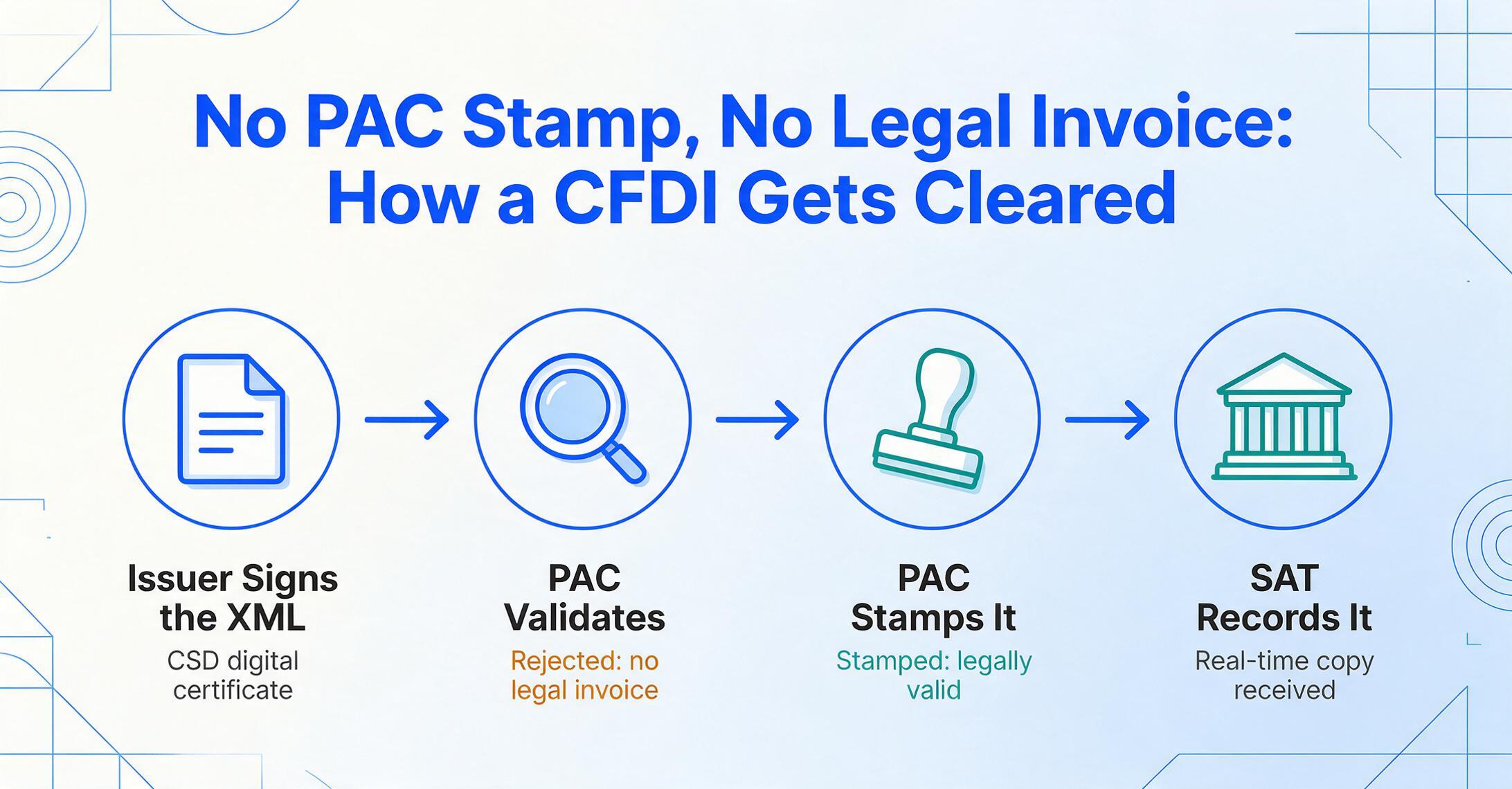
A CFDI does not move directly from supplier to buyer. It passes through an intermediary that most countries' invoicing systems do not have. Understanding the roles of the three participants — and the sequence in which they interact — is the foundation for understanding everything else about the system.
The Taxpayer (Contribuyente) — The Issuer
Your Mexican supplier. They generate the CFDI XML from their ERP or invoicing system, digitally sign it with their CSD (Certificado de Sello Digital — a cryptographic certificate issued by SAT that proves their identity), and transmit it to their chosen PAC for validation. The taxpayer is legally responsible for the accuracy of the data on the CFDI.
The PAC (Proveedor Autorizado de Certificación) — The Validator
An SAT-certified private company that acts as the intermediary between taxpayers and the tax authority. The PAC validates the XML structure against the Anexo 20 technical standard, verifies that both issuer and receiver RFCs exist and are active in SAT's registry, checks the digital signature, and — if everything passes — applies the timbre fiscal digital (digital tax stamp). This process is called timbrado (stamping). The PAC then transmits the stamped CFDI to SAT and returns it to the issuer. Without a PAC's stamp, the CFDI has no legal validity. PACs charge per-invoice fees, typically a few Mexican pesos per document.
The SAT (Servicio de Administración Tributaria) — The Tax Authority
Mexico's federal tax authority, equivalent to the IRS in the United States or HMRC in the United Kingdom. SAT receives every validated CFDI in real time from the PAC network and stores it in a central database. It assigns each CFDI a UUID (a 36-character universally unique identifier also called the Folio Fiscal) that becomes the permanent reference for that transaction. SAT makes each CFDI available to both issuer and receiver through their respective tax portals (Buzón Tributario), and provides a public verification portal where anyone can validate a CFDI's authenticity by entering its UUID and the issuer's RFC.
The sequence — taxpayer generates → PAC validates → SAT receives — happens in seconds for a well-formed CFDI. The result is that when your supplier emails you the invoice, the document has already been through a government approval process. If the PAC had rejected it — because of an invalid RFC, a structural error, a revoked CSD certificate — the supplier would not have been able to send it to you as a valid CFDI.
The Anatomy of a CFDI: What's Inside That XML
When you open a CFDI XML file, you see a hierarchy of tagged elements — something that looks like a cross between a data export and a tax form. That is essentially what it is. The CFDI 4.0 schema, defined by Anexo 20 of the Resolución Miscelánea Fiscal, specifies exactly which elements must be present, in what order, with what allowable values. Here are the fields that matter most when you are processing CFDI invoices from the receiving side:
| Field | What it is | Why you need it |
|---|---|---|
| RFC Emisor | The supplier's 12- or 13-character tax ID (Registro Federal de Contribuyentes) | Identifies the supplier in your vendor master and in SAT's database |
| RFC Receptor | Your company's RFC (or the generic XEXX010101000 if you have no Mexican tax registration) | Routes the invoice to the correct entity; links the CFDI to you in SAT's records |
| Nombre / Razón Social | The legal name of both issuer and receiver, exactly as registered with SAT | Must match SAT's registry exactly — a single character difference causes PAC rejection |
| Régimen Fiscal | The issuer's tax regime code (e.g., 601 for corporations, 612 for individuals with business activities) | Determines the tax treatment of the transaction; mismatch with actual activities triggers audit flags |
| UUID (Folio Fiscal) | The 36-character universally unique identifier assigned by SAT via the PAC during timbrado | The permanent key that links this CFDI to payment complements, cancellation requests, and SAT's verification portal |
| Fecha y Hora | The date and time of issuance and PAC certification | Determines the tax period for the transaction, the cancellation eligibility window |
| Conceptos | Line-item detail: description, quantity, unit of measure, unit price, product/service classification code (ClaveProdServ) | The goods or services being invoiced — classified using SAT's catalog codes for cross-referencing |
| Impuestos | Tax breakdown: IVA (VAT) transferred at 16%, potentially IVA withheld, ISR withheld, IEPS (special tax on production and services) | Tax amounts by type and rate — needed for tax credit claims and expense deductibility calculations |
| Forma de Pago | The payment method: e.g., 01 for cash, 02 for check, 03 for electronic transfer, 04 for credit/debit card | Required for SAT tax classification; verifies payment channel against your records |
| Método de Pago | PUE (single payment) or PPD (deferred/installment payments) | PPD means you must track a separate Pago CFDI for each payment — this one code triples the documents you need to manage |
| Uso CFDI | Code declaring how the recipient will use the invoice: G01 for acquisition of goods, G03 for general expenses, P01 for pending definition | Must match the actual use of the purchase — SAT cross-references this against your tax filings |
Some of these fields — Uso CFDI, Régimen Fiscal, Método de Pago — have no equivalent in a standard US or European invoice. They exist because the CFDI doubles as a tax filing document. The issuer is not just telling you what they sold. They are telling SAT the exact tax treatment of the transaction, your intended use of the purchase, and the payment structure that will follow. The fields you ignore because they do not map to your ERP's standard invoice form are the fields SAT uses to verify that your tax position is consistent with your economic activity.
The Six Types of CFDI — And Why There Isn't Just One
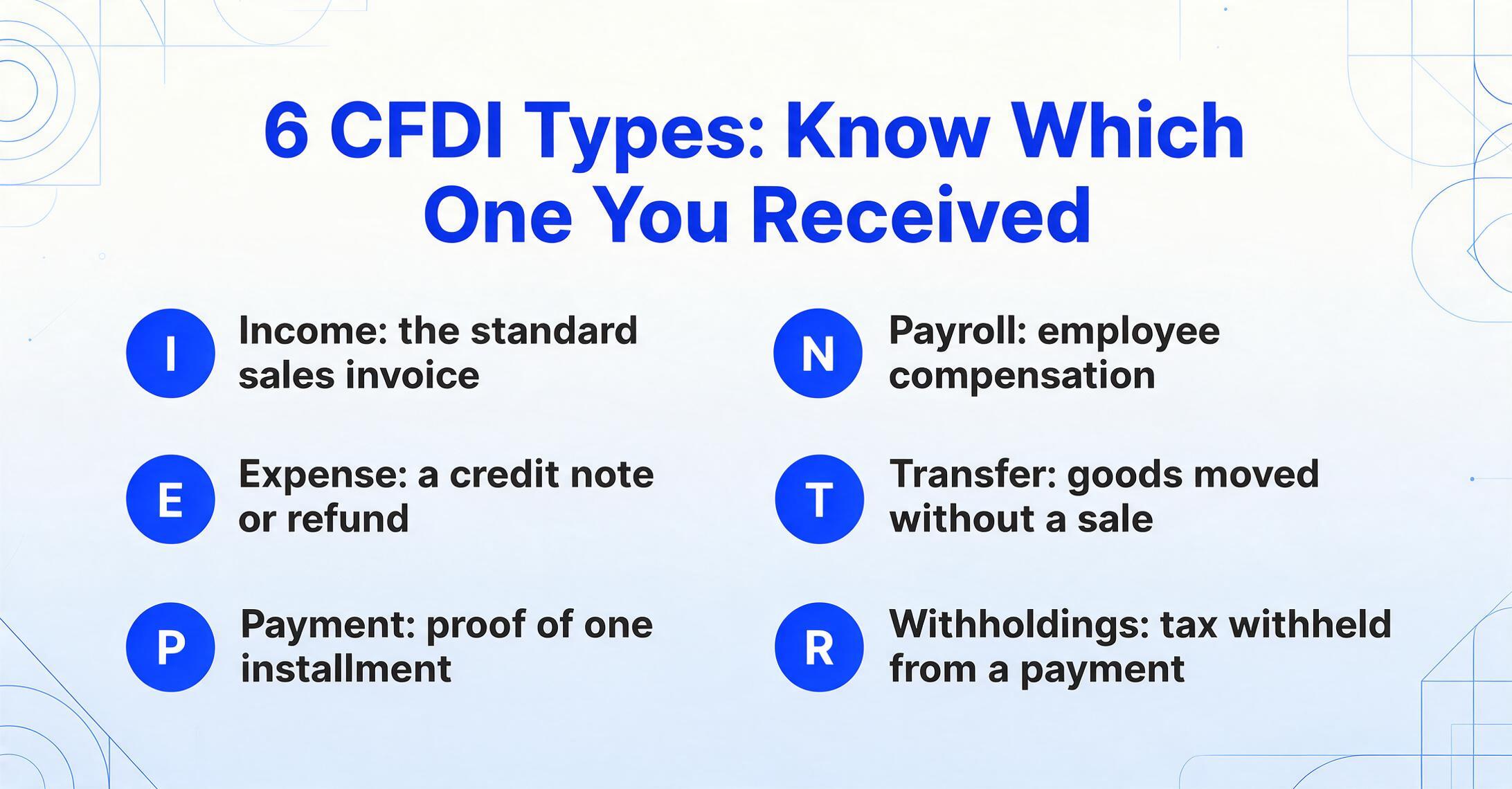
A CFDI is not a single document type with variations. The campo Tipo de Comprobante (receipt type field) designates six distinct document categories, each with its own purpose, legal effect, and processing implications:
| Code | Name | What it records | When you'll see it |
|---|---|---|---|
| I | Ingreso (Income) | Sales of goods, provision of services, rental income, fees — records the issuer's revenue | Every purchase you make from a Mexican supplier — this is the standard invoice you receive |
| E | Egreso (Expense/Outflow) | Returns, discounts, rebates, or cancellations of previously issued invoices — essentially a credit note | When a supplier corrects an overcharge or accepts a return; when a previous invoice is canceled |
| P | Pago (Payment) | A payment received against a PPD Ingreso — carries the Complemento de Pago referencing the original invoice's UUID | Every time you pay a PPD invoice — you receive a separate Pago CFDI for each payment installment |
| N | Nómina (Payroll) | Employee compensation — salaries, wages, benefits, deductions, withholdings | If your company employs staff in Mexico — this is the payroll receipt, not a supplier invoice |
| T | Traslado (Transfer) | Transportation of goods without a commercial sale — internal transfers, logistics movements | When goods move between warehouses or to a customer site accompanied by a Carta Porte (waybill) complement |
| — | Retenciones (Withholdings) | Tax withholdings and payments made — ISR and IVA withheld on payments to third parties, including foreign suppliers | When your Mexican entity withholds tax on a payment to a foreign party or declares dividends, interest, or lease payments |
For most AP teams dealing with Mexican suppliers, the types that matter day to day are Ingreso (the invoice you pay) and Pago (the receipt proving you paid it). The key operational insight: an Ingreso marked PPD and a Pago for that same transaction are two separate XML files with two separate UUIDs, but they describe one business event — and your accounting system needs to connect them. For a practical guide to handling this, see our CFDI extraction how-to guide.
XML vs PDF: The Document You See Is Not the Real Invoice
This concept deserves its own section because it is the single most common misunderstanding among teams new to Mexican invoices — and the one with the highest compliance cost when gotten wrong.
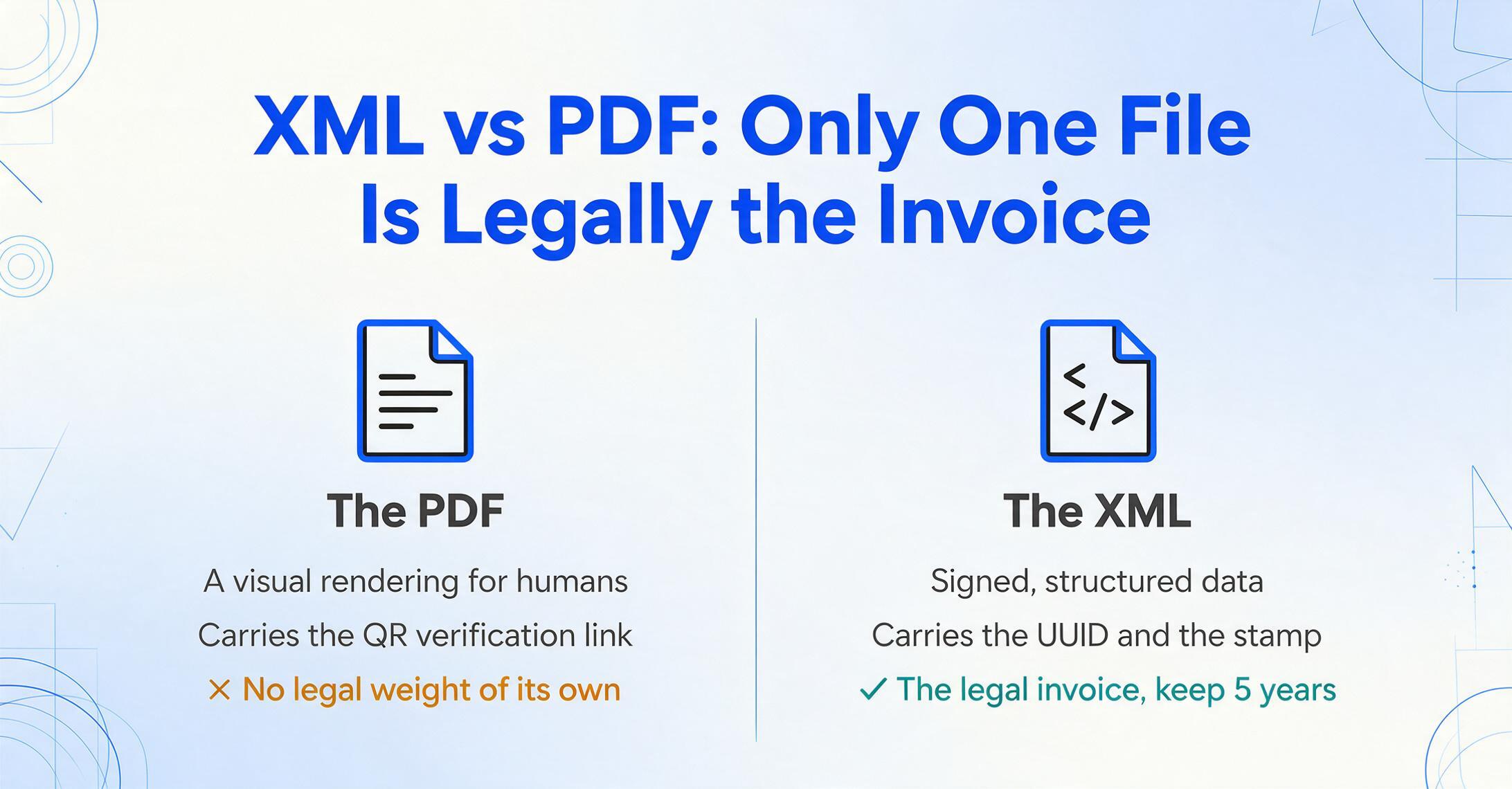
When your supplier issues a CFDI, two representations of the transaction are created. The XML file is generated by the supplier's system, digitally signed by the supplier's CSD certificate, validated and stamped by the PAC, and transmitted to SAT. It contains the complete structured data: every field listed in the table above, in a hierarchy that SAT's systems can parse automatically. This file has legal force. Under CFF Article 30, both the issuer and the receiver must retain it for at least five years.
The PDF is generated by the supplier's system as a visual rendering of a subset of the XML data. It is regulated — it must include a two-dimensional QR barcode that encodes a link to SAT's CFDI verification page, and it must display at minimum the fields specified in SAT's Resolución Miscelánea Fiscal — but it is not the document that Mexican law recognizes as the invoice. The PDF's purpose is to give humans something readable to look at and to provide a physical document that accompanies goods during transport. It was never designed to be the data source for your accounting system.
Practical consequence: If your AP team enters data from the PDF into your ERP — typing the supplier name, line items, totals, and tax amounts by hand — they are re-keying a subset of information that already exists in structured, machine-readable format in the XML. And they are missing the fields — UUID, Método de Pago, Régimen Fiscal, Uso CFDI — that matter for reconciliation, compliance, and audit. The PDF is a viewer. The XML is the data. Process the XML, use the PDF for visual verification.
You can verify any CFDI's authenticity yourself. Visit SAT's verification portal (verificacfdi.facturaelectronica.sat.gob.mx), enter the UUID from the XML, the issuer's RFC, and the receiver's RFC. SAT returns the current status of the CFDI — valid, canceled, or not found — along with the certification date. This lets you confirm that a CFDI you received is genuine and has not been canceled, without relying on the supplier's word or the PDF's appearance.
How Foreign Companies Encounter CFDI
If your company does not have a legal entity in Mexico, you encounter the CFDI system in one primary scenario: your company buys goods or services from a Mexican supplier, and the supplier must issue a CFDI to document the transaction. This is mandatory regardless of where the buyer is located — a Mexican supplier selling to a US company must still issue a CFDI, have it PAC-stamped, and transmit it to SAT.
In this scenario, your company likely does not have an RFC — Mexico's 12- or 13-character tax identification number. Your supplier will use the generic foreign recipient RFC: XEXX010101000. This RFC tells SAT that the recipient is a foreign entity without Mexican tax registration. It works, but it has limitations: because thousands of unrelated foreign companies share this same RFC, there is no way for SAT or your internal systems to route invoices to the correct entity based on the RFC alone. If your organization has multiple subsidiaries or departments receiving CFDI invoices from Mexican suppliers, you need an internal routing mechanism — based on the supplier name, the purchase order reference, or the recipient email address — to direct each invoice to the right processing queue.
If your company does have a legal entity in Mexico, that entity has its own RFC and must receive CFDI invoices under that RFC rather than the generic one. This is essential for claiming IVA (VAT) input tax credits and deducting business expenses on Mexican tax filings — using XEXX010101000 when you have a valid RFC forfeits those tax benefits.
The CFDI 4.0 version introduced a change that affects foreign buyers directly: the receiver's RFC, legal name (razón social), and fiscal domicile postal code must match SAT's taxpayer registry exactly. For the generic foreign RFC XEXX010101000, this validation is automatically satisfied because the RFC itself declares "this is a foreign recipient." But if your company has obtained a Mexican RFC, your name as registered with SAT — down to the exact capitalization, spacing, and accent marks — is what the supplier must enter. A mismatch of a single character causes the PAC to reject the CFDI. This is why Mexican suppliers, since 2022, have become more insistent about requesting your Constancia de Situación Fiscal (Tax Status Certificate) before issuing an invoice: they need to enter your data exactly as SAT records it, or the PAC will not stamp the document.
What You Actually Need to Do with CFDI Invoices
Now that you understand the system, here is the practical checklist for handling CFDI invoices your company receives from Mexican suppliers:
1. Save the XML, not just the PDF. When a supplier emails you both files, archive the XML in your document management system. The PDF is useful for visual review, but the XML is what SAT considers the invoice. Both must be retained for five years. If you only save the PDF, you are missing the legally authoritative document.
2. Extract the UUID and key fields from the XML. The UUID is the permanent reference for this transaction — it is how you will reconcile payments, verify the CFDI's status, and respond to audit requests. RFC (both issuer and receiver), total amount, IVA breakdown, Método de Pago (PUE or PPD), and fecha are the fields you need at minimum in your AP system. For detailed extraction guidance, see our CFDI data extraction guide. For a complete walkthrough of every extraction method — XML parsing, template OCR, and AI extraction — see our complete guide to CFDI data extraction.
2b. Expect processing to be slower than a standard invoice. If your team is new to CFDI, plan for the learning curve: the dual-document PPD structure, the cancellation window, and the RFC-matching rules all add work that a US or European invoice does not. For a detailed breakdown of why this happens and how to build a workflow around it, see our guide on why Mexican CFDI invoice processing is harder than most teams expect.
3. Check Método de Pago immediately. If the value is PPD, flag this invoice for payment tracking. You will receive one or more Pago CFDIs when the supplier records your payments — each with its own UUID and a Complemento de Pago node referencing the original Ingreso UUID. Create a tracking mechanism (a simple spreadsheet or your ERP's invoice-payment link) to match each Pago to its Ingreso as they arrive.
4. Verify the CFDI on SAT's portal. Enter the UUID, issuer RFC, and receiver RFC at SAT's verification page. Confirm the CFDI is marked "Vigente" (active/valid). Do this at least once when you first receive an invoice from a new supplier, and periodically for high-value invoices.
5. Monitor for cancellation requests. If your company has a Mexican RFC and access to the SAT Tax Mailbox (Buzón Tributario), check periodically for pending cancellation requests. If a supplier cancels a CFDI you have already booked, you have 72 hours to accept or reject. If you do nothing, the cancellation is approved, and your accounting entry is backed by a voided document.
6. Use the UUID for payment reconciliation. When you pay the supplier, include the CFDI UUID in the payment reference. When the supplier issues the corresponding Pago CFDI, match it back to the original Ingreso by UUID. This simple discipline — UUID on every payment, UUID on every reconciliation — eliminates the most common source of Mexican AP reconciliation errors.
For AP teams handling more than a handful of Mexican invoices per month, manual processing at this level of detail becomes unsustainable — especially the PPD tracking across multiple Pago complements. For a data-driven look at where manual entry stops being viable, see our comparison of manual CFDI data entry vs AI extraction. For an overview of batch processing approaches, see our guides on batch CFDI processing and affordable CFDI extraction for small businesses.
For broader context on how document extraction works across Spanish-speaking markets, see our Spanish markets overview. For pricing context when evaluating extraction tools, see our 2026 AI document extraction pricing comparison.
Frequently Asked Questions
Do I need a Mexican RFC to receive a CFDI?
No. If your company has no Mexican tax presence, your supplier can use the generic foreign recipient RFC XEXX010101000. However, this RFC does not support IVA credit claims or expense deductions in Mexico, and it provides no entity-level traceability (thousands of companies share it). If your company has a Mexican subsidiary with its own RFC, you should use that RFC to preserve tax benefits and create clean audit trails.
Is the PDF valid for tax purposes, or do I need the XML?
The XML is the legally valid document. The PDF is a visual representation with no independent legal weight. Both issuer and receiver must retain the XML for at least five years under CFF Article 30. In a SAT audit, you will be asked to produce the XML, not the PDF.
What is the difference between a CFDI and a regular electronic invoice?
A regular electronic invoice (as understood in most countries) is a PDF generated by the seller's system and sent to the buyer — no government involvement. A CFDI is a structured XML document that passes through a government-certified PAC for validation and receives a digital tax stamp before it becomes legally valid. The government receives a copy of every CFDI in real time. The difference is government pre-clearance versus post-hoc reporting.
Why does my supplier keep asking for my Constancia de Situación Fiscal?
Because CFDI 4.0 requires the receiver's data (RFC, legal name, fiscal domicile postal code, and tax regime) to match SAT's taxpayer registry exactly. A single character mismatch causes PAC rejection. The Constancia de Situación Fiscal is the official SAT document showing your exact registered data. Note that as of the 2026 reform, conditioning CFDI issuance on presenting personal ID (Cédula) or a Constancia de Situación Fiscal is classified as an infraction under CFF Article 83 — but in practice, suppliers may still request it to ensure data accuracy.
What happens if I receive a CFDI with an error in my company's data?
The supplier must cancel the erroneous CFDI (using reason code 01 for error with related document or 02 for unrelated error) and issue a corrected one with a new UUID. Cancellation requires your acceptance within 72 hours if the CFDI is above MXN 1,000 and not within the initial 72-hour grace period. The supplier cannot simply edit and resend the same CFDI — the original UUID becomes permanently void.
Can I convert CFDI XML directly to Excel?
Yes. CFDI XML files are structured data — every field is tagged and parseable. However, the schema is hierarchical (the Complemento de Pago node nests within the main CFDI structure, for example), and extracting data into flat rows requires understanding the schema's nesting. For a step-by-step approach to CFDI-to-Excel extraction, see our CFDI extraction guide.
Mexico's CFDI system is not a bureaucratic burden imposed on suppliers and buyers. It is a designed infrastructure for real-time tax visibility — and once you understand the logic of it, the fields that looked like noise (Uso CFDI, Método de Pago, Régimen Fiscal) become the signals that tell you exactly how this transaction fits into your company's Mexican tax picture. The learning curve is real. But the system is consistent, and the data it provides is more authoritative than any invoice format most AP teams will ever encounter.