Nota Fiscal Eletrônica (NF-e)
A Beginner's Guide for AP Teams
The first time your team receives a payment request from a Brazilian supplier, the document won't look like any invoice you've seen before. It has a 44-digit number in the corner, a barcode, and tax abbreviations — ICMS, IPI, PIS, COFINS — that don't appear on invoices from any other country. The document is called a Nota Fiscal Eletrônica, or NF-e, and it's not just an invoice with a different name. It's the output of a government-run electronic authorization system that processes the invoice before the goods leave the supplier's warehouse — a model fundamentally different from the "issue first, report later" approach used in most of the world.
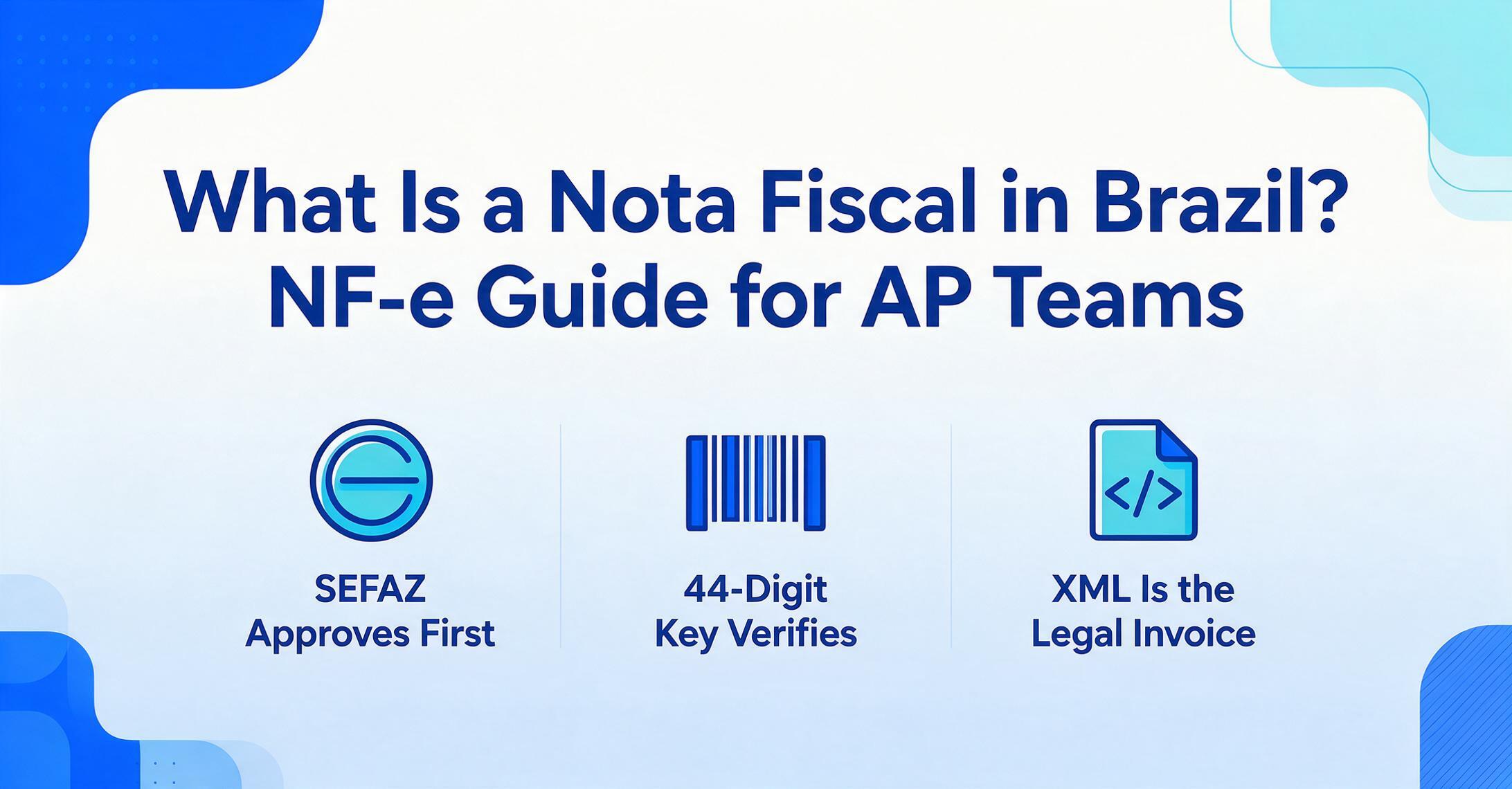
What Is a Nota Fiscal Eletrônica, and Why Should You Care?
A Nota Fiscal Eletrônica — NF-e for short — is Brazil's mandatory electronic invoice for goods transactions. That sounds straightforward enough, but the word "electronic" in its name undersells what's happening. In most countries, an electronic invoice means a PDF generated by an accounting system and emailed to the buyer. In Brazil, an NF-e is an XML file that must be digitally signed and approved by the state tax authority before the goods it describes can legally leave the seller's premises.
Think of the difference this way: in a typical country, a company issues an invoice, ships the goods, and reports the transaction to the tax authority later — at month-end, quarter-end, or during an audit. Brazil reversed that sequence. The tax authority, known as SEFAZ (Secretaria da Fazenda Estadual, or State Treasury Department), sees and approves the transaction before it happens. Goods that leave a warehouse without an SEFAZ-authorized NF-e are, in legal terms, being transported illegally — with penalties that can reach 100% of the invoice value.
For an English-speaking accounts payable team, this matters because a Brazilian supplier cannot issue a valid invoice on their terms. Every NF-e you receive carries a government-issued authorization code and a unique 44-digit identifier. That identifier lets you — or anyone — verify the invoice's authenticity directly against SEFAZ records. You don't need to trust the supplier's PDF. You can check the government's register yourself.
Core insight: An NF-e is not a document your supplier creates and sends you. It's a document your supplier creates, the government authorizes, and you then receive. Understanding that three-party flow is the foundation for everything else about Brazilian invoice processing.
Why Did Brazil Build This Entire System?
Brazil launched the NF-e in 2006 for one overriding reason: paper invoices were making tax enforcement nearly impossible. Before NF-e, companies issued physical Nota Fiscal documents — printed, multi-copy forms known as Models 1 and 1A — and the tax authority had no real-time visibility into transactions. Goods moved across state borders with paper documents that might or might not match what was later reported. Audit capacity was limited to sampling, and the gap between what was declared and what actually happened was large enough to be measured in billions of reais.
The NF-e solved this by moving the entire system onto a digital infrastructure with a single rule at its center: no NF-e authorized = no legal shipment. When you require pre-authorization, you eliminate the most common form of tax evasion — issuing an invoice for a lower amount than the actual transaction, or not issuing one at all. You also create a complete, searchable database of every B2B goods transaction in the country. SEFAZ can query this database in real time. So can highway patrol officers who stop trucks at checkpoints, scan the barcode on the printed documentation, and verify that the goods match the authorized NF-e.
The scale of this system is worth understanding. Brazil processes billions of NF-e documents through a federated network of state-level SEFAZ systems coordinated under a national agreement called the ENCAT (Encontro Nacional de Coordenadores e Administradores Tributários Estaduais). The technical specification — the XML schema that defines every field a valid NF-e must contain — is maintained as a public standard called the Manual de Integração do Contribuinte, currently at layout version 4.0.
How SEFAZ Authorizes an NF-e: The Step-by-Step Flow
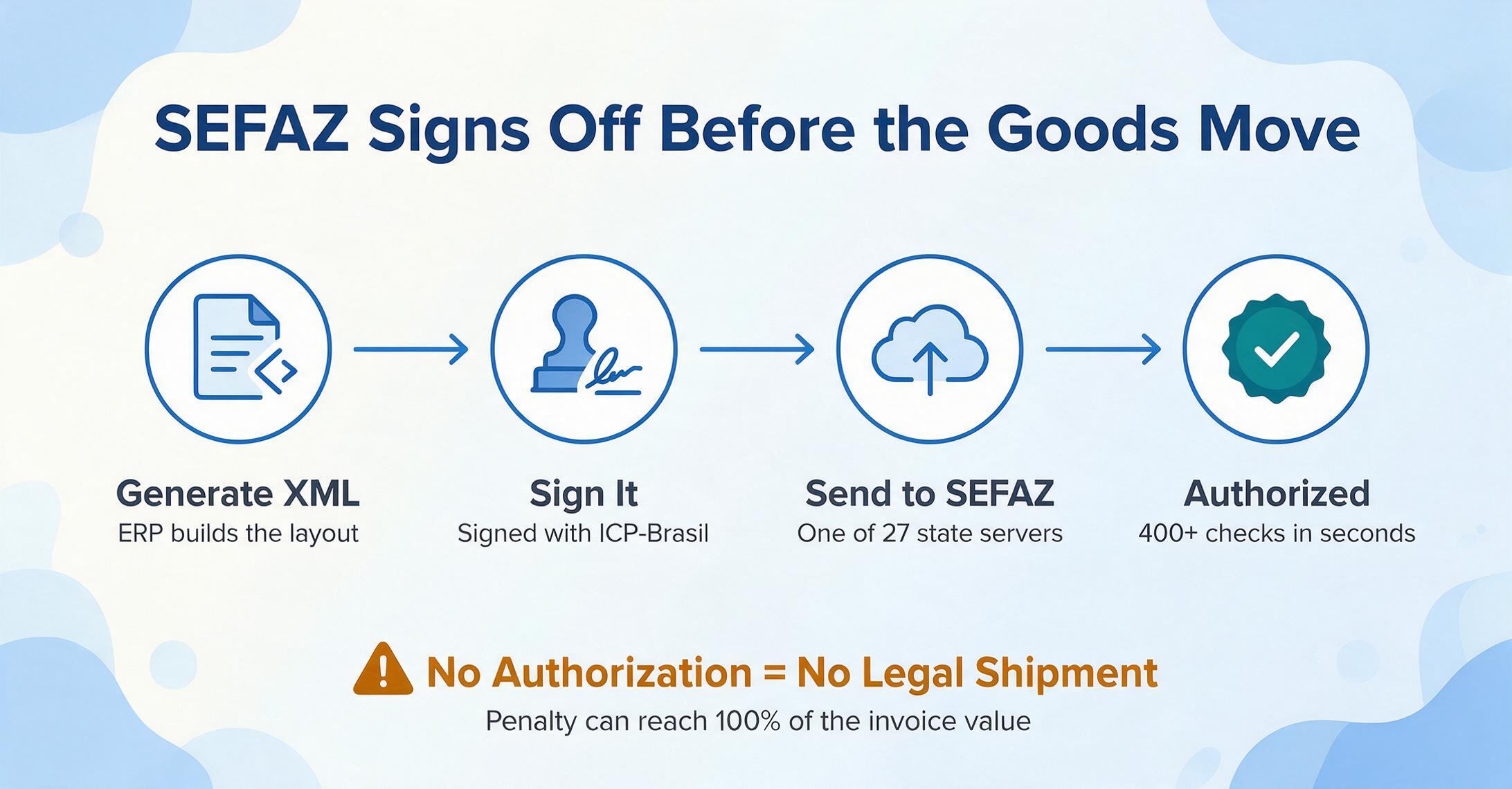
When your Brazilian supplier issues an NF-e, here is what happens behind the scenes, in the order it happens:
Step 1: Generate the XML. The supplier's ERP or invoicing system produces an XML file structured according to the NF-e layout specification. This XML contains everything about the transaction — buyer and seller details, line items with quantities and prices, and a complete tax calculation for every applicable tax at the line-item level.
Step 2: Sign the XML. Before sending the XML anywhere, the supplier digitally signs it using an ICP-Brasil digital certificate. ICP-Brasil is Brazil's national public key infrastructure, and the certificate is tied to the supplier's CNPJ (their 14-digit corporate tax ID). The signature serves two purposes simultaneously: it proves the XML came from the supplier claiming to send it, and it guarantees that the XML hasn't been altered since the moment of signing.
Step 3: Transmit to SEFAZ. The signed XML is sent to the supplier's state SEFAZ via a web service. Each of Brazil's 27 states (26 states plus the Federal District) runs its own SEFAZ authorization server.
Step 4: SEFAZ validation. SEFAZ runs the XML through more than 400 automated validation checks. These cover structural compliance (are all required XML tags present?), tax calculation accuracy (does the ICMS rate match the origin-destination state pair?), and the supplier's fiscal standing (is their registration active? do they have outstanding issues?). This happens in seconds.
Step 5: Authorization or rejection. If all checks pass, SEFAZ returns an authorization protocol — a unique code confirming the NF-e is now legally valid — and the supplier may proceed to ship goods. If any check fails, the XML is rejected. The supplier must fix the issue and resubmit. There's no "ship now, fix later" option. The goods cannot legally move until the NF-e is authorized.
Step 6: Generate the DANFE. Once authorized, the supplier prints the DANFE — Documento Auxiliar da Nota Fiscal Eletrônica — a human-readable paper document that accompanies the goods during transport. This is the document your receiving dock will see and the one most international AP teams end up processing.
What happens when SEFAZ is down? The NF-e system accounts for this through contingency processes. If the primary SEFAZ server is unreachable, the supplier can route through an alternate authorization server or use a pre-registration contingency called EPEC (Evento Prévio de Emissão em Contingência) that creates a temporary authorization valid for 24 hours. The full NF-e must be transmitted within that window once the system recovers.
The DANFE vs. The XML: Two Documents, One Invoice
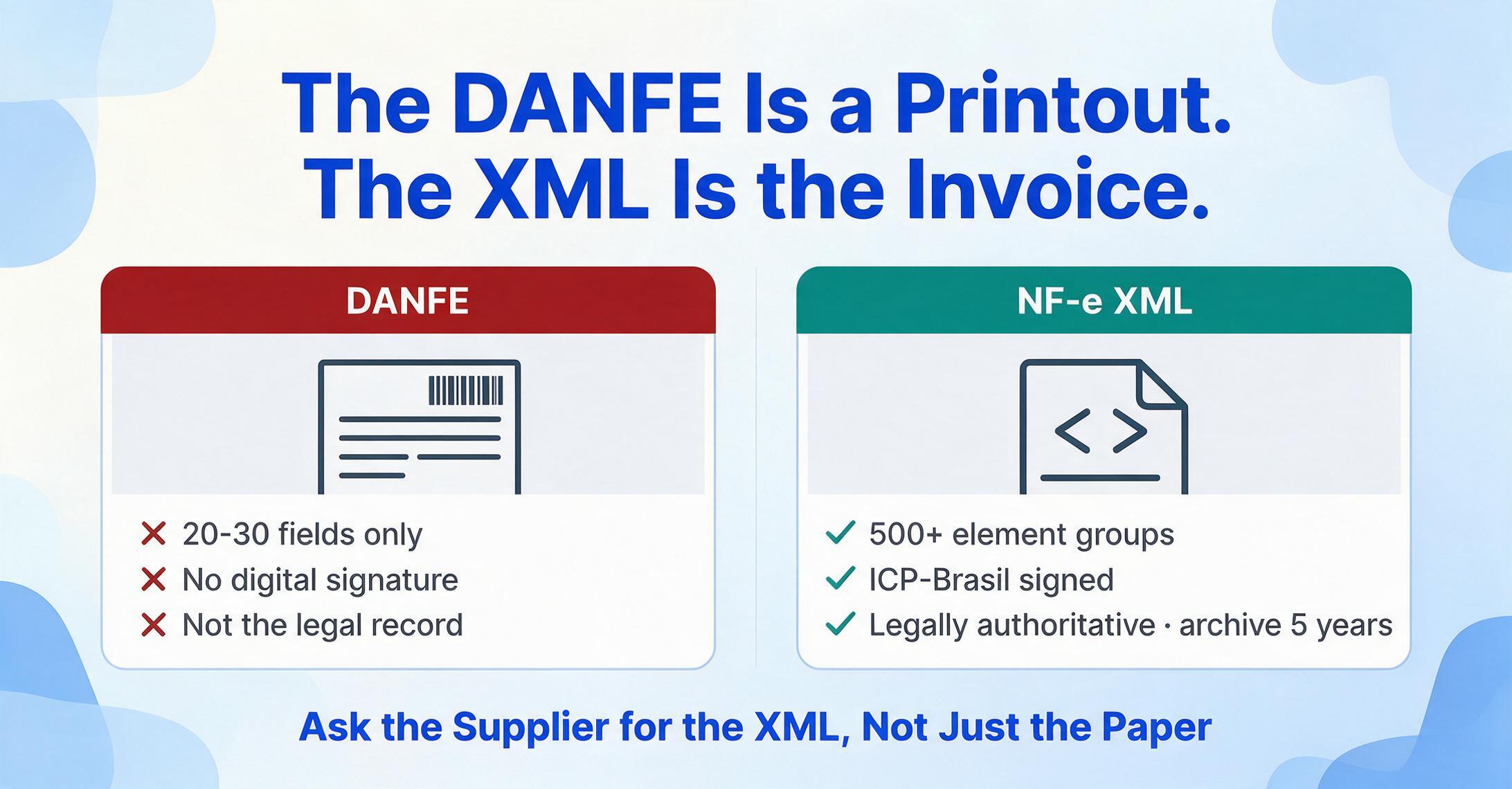
If you take away one concept from this guide, make it this one: the printed document your team is probably processing is not the real invoice.
The DANFE — the paper document with the barcode and the 44-digit key — is a simplified, printed representation of the NF-e. Its only purpose is to accompany physical goods during transport so that any fiscal checkpoint can scan the barcode, query SEFAZ, and verify that the shipment matches an authorized invoice. The DANFE was never designed to be a complete financial record. It contains a condensed summary — seller name, buyer name, date, line items, and a grand total — but it omits the full tax detail that determines your input tax credits, your audit trail, and your reconciliation accuracy.
The XML is the actual fiscal document. It is the legally authoritative record of the transaction, carrying the supplier's digital signature and the SEFAZ authorization protocol. Under Brazilian tax law, both the supplier and the buyer are required to archive the NF-e XML for a minimum of five years. The DANFE — printed on ordinary paper, carrying no signature — is not the document Brazilian law considers the invoice.
The data gap between these two documents is not marginal — it's an order of magnitude. The DANFE shows roughly 20-30 data fields. The NF-e XML, under layout version 4.0 defined by Nota Técnica 2016/002, contains more than 500 structured element groups. For every line item on the DANFE, the XML carries the NCM product classification code, the CFOP fiscal operation code, the CST tax situation code, and a complete ICMS/IPI/PIS/COFINS tax breakdown — none of which appears on the printed page.
Practical rule: If your AP team is entering data from the DANFE, you are manually re-keying a fraction of information that already exists in structured, machine-readable format — and you are missing the tax detail that determines whether your company is recovering the right amount of credits on every Brazilian transaction.
The 44-Digit Access Key: Your Universal Invoice Passport
Every NF-e carries a 44-digit number in the top-right corner: the chave de acesso, or access key. This is the NF-e's universal identifier — unique across all of Brazil, across all time — and it is the only piece of information you need to verify an NF-e's authenticity, check whether it has been cancelled, or retrieve the full XML from SEFAZ.
The 44 digits are not random. They encode specific information about the document, structured as defined by SEFAZ's Nota Técnica 2011/004:
| Position | Length | What It Encodes | Example |
|---|---|---|---|
| 1–2 | 2 digits | Issuer's state (IBGE code) | 35 = São Paulo, 33 = Rio de Janeiro |
| 3–6 | 4 digits | Year and month of issue | 2606 = June 2026 |
| 7–20 | 14 digits | Issuer's CNPJ (corporate tax ID) | The supplier's 14-digit identifier |
| 21–22 | 2 digits | Document model | 55 = NF-e, 65 = NFC-e (consumer invoice) |
| 23–25 | 3 digits | Invoice series | Typically 001 |
| 26–34 | 9 digits | Sequential invoice number | The supplier's invoice counter |
| 35 | 1 digit | Emission type | 1 = normal, others = contingency modes |
| 36–43 | 8 digits | Random collision-avoidance code | Prevents key duplication |
| 44 | 1 digit | Mod-11 check digit | Validates the preceding 43 digits |
What can you do with this key? Three things that matter for AP: (1) go to any SEFAZ portal, enter the key, and confirm whether the NF-e is valid and authorized — this verifies you're dealing with a real invoice, not a fabricated PDF; (2) check whether the NF-e has been cancelled — a supplier can cancel an NF-e within 24 hours of authorization; (3) download the full XML if your supplier only sent the DANFE — the key is all you need to retrieve the complete fiscal document from SEFAZ.
The Four Taxes on Every NF-e (Explained Without Jargon)
Brazil's tax system operates across three levels of government — federal, state, and municipal — and an NF-e typically carries four different taxes. Each has a different rate, a different taxing authority, and a different set of rules for when you (the buyer) can claim a credit. Here they are, one by one:
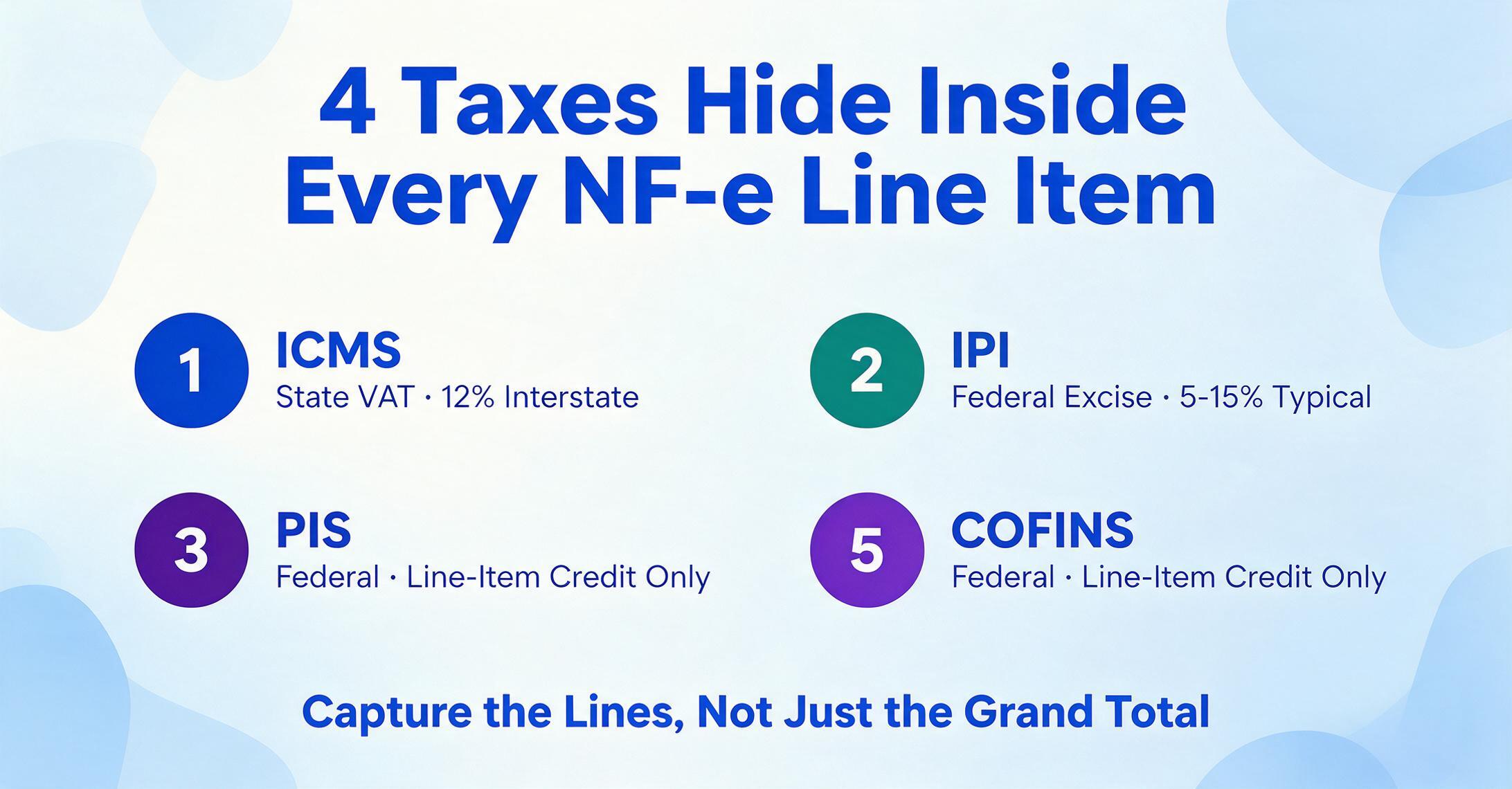
ICMS (Imposto sobre Circulação de Mercadorias e Serviços). This is the state-level value-added tax on the movement of goods. Think of it as Brazil's version of a sales tax, but applied at every step of the supply chain — not just at the final sale. The rate depends on which two states the goods are moving between: interstate sales from São Paulo to Rio de Janeiro carry 12%, from São Paulo to a state in the North or Northeast carry 7%, and sales within the same state range from 17% to 22% depending on the state. For imported goods with more than 40% foreign content, the rate drops to 4% regardless of the state pair.
IPI (Imposto sobre Produtos Industrializados). This is a federal excise tax on manufactured goods, similar in concept to excise duties in other countries. The rate is product-specific — determined by an enormous table called the TIPI (Tabela de Incidência do IPI) that assigns a rate to every product classification code. Rates range from 0% (most essential goods) to over 300% (tobacco, certain beverages). For most industrial goods, the IPI rate falls between 5% and 15%. Industrial buyers — companies that use the purchased goods in their own manufacturing — can typically recover IPI as a tax credit.
PIS (Programa de Integração Social). A federal social contribution tax, charged at 1.65% under the non-cumulative regime (the one that applies to most B2B transactions). Despite its small individual rate, PIS matters because it interacts with the larger COFINS tax — the two are almost always calculated on the same taxable base and use the same credit rules. Under the cumulative regime (for smaller companies), PIS is 0.65% but does not generate usable tax credits.
COFINS (Contribuição para o Financiamento da Seguridade Social). The larger federal social contribution, at 7.6% under the non-cumulative regime. Combined with PIS at 1.65%, the total federal contribution on most B2B transactions is 9.25% — a significant add-on to the purchase price that a foreign AP team might otherwise overlook when comparing Brazilian supplier pricing to alternatives.
These four taxes appear on the NF-e at two levels: totals in the invoice summary, and line-item detail in the XML. The line-item detail is where the real information lives — it shows, for each product on the invoice, exactly how much ICMS, IPI, PIS, and COFINS was calculated. If your team only uses the DANFE, you are seeing the summary totals but losing the line-item breakdown that lets you verify each calculation individually.
NCM and CFOP: The Two Codes That Control Everything
Two classification codes appear on every NF-e line item, and together they determine the entire tax treatment of that item. They are not Brazil-specific equivalents of anything in the Anglophone accounting world — most countries have nothing comparable — which is why they deserve their own section.
NCM (Nomenclatura Comum do Mercosul). An 8-digit product classification code based on the international Harmonized System with two additional Mercosur-specific digits. Every product sold in Brazil has an NCM code, and that code determines the IPI rate, any applicable import duty, and whether the product qualifies for special tax treatment (reduced rates, exemptions, or presumed credits). Two nearly identical products assigned different NCM codes can face materially different tax rates — a difference that flows directly to the bottom line.
CFOP (Código Fiscal de Operações e Prestações). A 4-digit code that classifies the fiscal nature of the transaction. Unlike NCM, which describes the product, CFOP describes the operation — is this an in-state purchase for resale (code 1102)? An interstate purchase for industrial use (2101)? A return (1202)? A sample shipment (1912)? The first digit of a CFOP tells you the direction and origin: 1xxx = inbound within state, 2xxx = inbound from another state, 3xxx = inbound from abroad, 5xxx/6xxx/7xxx = outbound. The CFOP determines which ICMS rules apply and whether you, as the buyer, can claim the ICMS as a credit.
For a foreign AP team, you don't need to memorize these codes. But you do need to understand that they exist, that they control the tax treatment, and that if you are extracting NF-e data to feed into your ERP, these codes should be among the fields you capture. A Brazilian supplier recording the wrong CFOP on an invoice is not a formatting issue — it's a tax compliance issue that can surface in a SEFAZ audit.
NF-e vs. NFS-e: What Happens When You Buy Services Instead of Goods
The NF-e covers goods. If you are buying services from a Brazilian company — consulting, software development, logistics, marketing — you will encounter a different document: the NFS-e (Nota Fiscal de Serviços Eletrônica).
The critical difference is which level of government controls it. NF-e is regulated by state-level SEFAZ authorities under a unified national standard. NFS-e is controlled by individual municipalities (prefeituras), of which Brazil has 5,570. Each municipality historically ran its own NFS-e system with its own format and validation rules — a fragmentation problem described by the IMF as one of the world's most complex municipal tax compliance environments. The federal government has been rolling out a national standardization system (Sistema Nacional da NFS-e) since 2023, but adoption across municipalities remains uneven.
For AP, the practical consequence is that a service invoice from São Paulo may look entirely different from a service invoice from Belo Horizonte — different layout, different field names, different access key format. If your company buys both goods and services from Brazil, you are operating in two separate electronic invoicing systems with different authorities, different rules, and different formats. The concepts covered in this guide (authorization before shipment, DANFE vs. XML, access key verification) apply primarily to NF-e for goods.
If your company buys services from Brazilian providers — or is considering it — see our guide to extracting NFS-e service invoice data and our analysis of why NFS-e processing costs more than most finance teams budget for. This beginner's guide covers the NF-e goods invoice; those pages cover the NFS-e services side of Brazilian e-invoicing.
The 2026 Tax Reform: What It Means for the NF-e You'll See Going Forward
Brazil launched the most significant restructuring of its tax system since the 1988 constitution with Constitutional Amendment 132/2023, regulated by Complementary Law 214/2025. The reform replaces five existing taxes (PIS, COFINS, ICMS, ISS, and IPI) with a dual VAT system: CBS (Contribuição sobre Bens e Serviços) at the federal level and IBS (Imposto sobre Bens e Serviços) at the state and municipal level.
The transition is gradual, running from 2026 through 2033:
| Year | What Changes | What You'll See on the NF-e |
|---|---|---|
| 2026 | Test phase. CBS (0.9%) and IBS (0.1%) appear for testing but are not collected. | Both old tax fields (ICMS, IPI, PIS, COFINS) AND new tax fields (CBS, IBS) appear on the same NF-e. Dual schema. |
| 2027 | CBS collection begins. PIS and COFINS are abolished. IPI rates begin to zero out. | PIS/COFINS fields disappear from NF-e. CBS becomes the active federal tax field. |
| 2029–2032 | IBS phases in state by state, replacing ICMS and ISS incrementally. | Mixed regime: some NF-e carry ICMS (legacy states), others carry IBS (transitioned states). |
| 2033 | Full implementation. ICMS, ISS, PIS, COFINS, and IPI abolished. | NF-e carries only CBS, IBS, and the Selective Tax (IS). Schema stabilizes. |
The immediate operational concern for 2026 is the dual-schema period. Starting August 1, 2026, NF-e XML files that don't include the CBS and IBS fields will be rejected by SEFAZ. If your extraction workflow or ERP mapping was built to read only the pre-reform tax fields, it will silently ignore the new fields — or, if the mapping was hard-coded, it will break entirely when the old fields are eventually removed. This is not a future concern. The schema change is mandatory and the deadline is fixed.
What an English-Speaking AP Team Actually Needs to Do
This guide has covered a lot of ground. Let's reduce it to a practical checklist for a finance team encountering Brazilian NF-e documents for the first time:
- Get the XML, not just the DANFE. Ask your Brazilian supplier for the XML file alongside the printed DANFE. They are legally required to provide it — the XML is part of the mandatory document set. If they only sent the DANFE, use the 44-digit access key on the DANFE to download the XML from SEFAZ.
- Verify every access key. Before booking an NF-e, enter its 44-digit key into the SEFAZ portal for the issuing state. Confirm the NF-e is authorized, not cancelled. This is a 30-second check that prevents you from booking a cancelled invoice — a surprisingly common situation because suppliers can cancel NF-e documents within 24 hours.
- Extract the four tax amounts at the line-item level. If you are doing anything beyond basic header-data entry, capture ICMS, IPI, PIS, and COFINS amounts per line item, not just the invoice totals. These determine your input tax credits. If you only capture the grand total, you're leaving recoverable tax on the table.
- Capture NCM and CFOP codes. These two codes on each line item determine the tax treatment. Book them into your ERP even if your non-Brazilian accounting system doesn't automatically process them — your Brazilian accounting team or external tax advisor will need them for SPED filings and tax credit reconciliation.
- Archive the XML for five years. Brazilian law requires both buyer and seller to retain NF-e XML files for a minimum of five years. A folder of DANFE PDFs does not satisfy this requirement.
- Prepare for the dual-schema period. If you have any automated NF-e data processing — scripts extracting XML to Excel, ERP mappings, or third-party e-invoicing integrations — verify that they can handle the new CBS and IBS fields that became mandatory in August 2026.
If the volume of Brazilian NF-e documents your team handles is more than a handful per month, and manual data entry from either the DANFE or the XML is consuming significant time, see our complete extraction guide covering the three methods available — ERP import modules, XML-to-Excel scripting, and AI-based document extraction — with field-level mapping and tax validation rules. Wondering whether AI can actually read these XML files? See our breakdown of what AI gets right and where it struggles on NF-e XML. For the technical reference — full XML field mapping tables, CST/CFOP/NCM code references, and ICMS-ST handling — see our complete NF-e extraction field mapping guide. To put a real number on what that manual entry is costing you, see our NF-e manual data entry cost framework.
Frequently Asked Questions
Is the DANFE enough for my AP records?
For basic record-keeping — having a reference document showing what was purchased, from whom, and for how much — the DANFE serves that purpose. But for tax purposes, audit defense, and compliance with Brazilian law, the DANFE is inadequate. It does not contain the tax breakdown, the SEFAZ authorization protocol, or the digital signature that gives the NF-e its legal standing. Under Brazilian law, the XML is the legally authoritative record, and both buyer and seller must archive it for five years. If your audit trail for Brazilian transactions is built on DANFE documents, it is built on supplementary documentation that Brazilian tax law does not consider the invoice.
What if my supplier only sent the DANFE and not the XML?
The 44-digit access key printed on the DANFE is all you need to retrieve the XML. Go to the SEFAZ portal for the issuing state (which state you need is determined by the first two digits of the access key), enter the key and the captcha, and download the full XML. Your supplier is also legally obligated to provide it — requesting the XML alongside the DANFE should become a standard step in your Brazilian vendor onboarding process.
Can I get an NF-e in English?
No. NF-e documents are issued in Portuguese, and the XML schema uses Portuguese-language tag names (e.g., <dest> for recipient, <emit> for issuer, <imposto> for taxes). There is no official English translation of the NF-e layout. The good news is that the XML tags are standardized across all Brazilian suppliers — once you learn the mapping once, it applies to every NF-e you receive. The key fields you need (CNPJ, NCM, CFOP, ICMS, IPI, PIS, COFINS) use the same tag names on every document.
How do I check if an NF-e has been cancelled?
Enter the 44-digit access key at any SEFAZ portal and check the document status. An NF-e can be cancelled by the issuer within 24 hours of authorization if the goods have not yet been shipped — this creates a cancellation event in SEFAZ tied to the same access key. Any query against that key will return the cancelled status. For invoices near payment dates, verifying the access key before authorizing payment is a recommended control. A cancelled NF-e is not a valid invoice, and payment made against it is a recoverable error — but one that's easier to prevent than fix.
As a foreign buyer, can I claim ICMS or IPI credits?
If your company has a registered entity (CNPJ) in Brazil, and the purchased goods are used in your Brazilian operations (manufacturing inputs, goods for resale, or certain service inputs), you can typically claim ICMS and IPI credits. PIS and COFINS credits follow their own rules under the non-cumulative regime. If your company does not have a Brazilian entity and is importing goods, these taxes are paid at customs and the recovery process is handled through the import declaration, not the NF-e. This is a question for your Brazilian tax advisor or local accounting firm — the rules are product-specific and state-specific, and a general answer doesn't substitute for professional advice on your specific situation.
How do I know which ICMS rate should apply?
The ICMS rate on an NF-e is determined by three factors: the origin state (where the supplier is), the destination state (where the goods are going — your entity's state), and whether the goods contain more than 40% imported content. The rate should be shown on the NF-e XML in the pICMS field. You can validate it against the interstate rate table: 12% for transactions within the South/Southeast region, 7% from South/Southeast to North/Northeast/Midwest, 12% from North/Northeast/Midwest to anywhere, and 4% for goods with more than 40% foreign content. Internal (in-state) rates range from 17% to 22%. A mismatch between the rate on the invoice and the correct rate for the origin-destination pair is a common audit finding — proactive validation is worth the effort.
Our team receives dozens of NF-e documents per month. Is there a way to batch-process them?
Yes, and the approach depends on whether you have access to the XML files. If you have the XML files, a script or an extraction tool can process a folder of XMLs and produce a consolidated spreadsheet with fields extracted from each one. If you only have the DANFE PDFs, document extraction tools can read the printed data from multiple DANFE files and merge the results into a single spreadsheet — this approach defines the column names once (e.g., "CNPJ," "Invoice Total," "ICMS Amount," "Access Key") and the tool locates the corresponding values on each document. The key distinction is that XML-based extraction gives you 100% of the data; DANFE-based extraction gives you what was printed on the page, which is roughly 10% of what's in the XML. For a deep dive into the extraction methods, see our NF-e extraction guide.
Know What You're Looking At
The most expensive mistake an AP team makes with Brazilian NF-e documents is not a data entry error — it's processing the DANFE as if it were the invoice, missing the tax detail that determines recoverable credits, and building an audit trail on a document the government considers supplementary. Getting the XML, verifying the access key, and extracting the line-item tax data turns a mysterious foreign document into a machine-readable source of structured financial data. The information is already there — it's paid for, it's verified, and it's yours to use.