50 Brazilian NF-e XMLs, One Spreadsheet
How Multi-Supplier Batch Processing Eliminates Manual Tax Reconciliation
Processing one NF-e from a São Paulo supplier takes 3 minutes. The XML is clean, the fields are unambiguous, and the ICMS rate — 18% internal — is what you expect. The problem begins when you have 50 NF-e XMLs from 14 suppliers spread across 7 Brazilian states. Supplier #3 in Paraná applies 19.5% ICMS on intrastate shipments but 12% when shipping to you in São Paulo. Supplier #8 in Pernambuco charges 20.5% — except on the items classified under NCM 8471.30, which get a reduced rate. Supplier #11 sent the DANFE PDF but not the XML. And somewhere in the batch, two different NF-e documents share the same invoice number because supplier #2 restarted their numbering sequence at the beginning of the fiscal year. Extracting one NF-e is straightforward. Extracting 50 and producing a clean, auditable AP spreadsheet where every row's tax treatment is verifiable — that's a different problem entirely.
When 50 NF-e XMLs Arrive — Why Batch Isn't "Single, Repeated 50 Times"
Brazilian NF-e processing is unusual in one respect: the source data is already structured. Unlike paper invoices from US or European vendors that require OCR to digitize, every NF-e arrives as an XML file that has already been validated against over 400 SEFAZ rules and digitally signed with an ICP-Brasil certificate. The data quality of a single NF-e XML is near-perfect. The batch problem in Brazilian AP isn't data capture accuracy — it's data consistency across suppliers.
When you process 50 NF-e XMLs from 14 suppliers in a single batch, four structural problems emerge that single-invoice processing never exposes:
ICMS rate fragmentation. Brazil's ICMS is a state-level VAT with rates that differ by the supplier's state, your state, the transaction direction (intrastate vs interstate), and — in some cases — the NCM product classification. A batch of 50 NF-e XMLs from suppliers in 7 states can contain intrastate rates of 17%, 18%, 19%, 19.5%, 20%, and 20.5%, plus interstate rates of 4%, 7%, or 12% depending on origin and destination pairings. One "ICMS Amount" column in your spreadsheet is meaningless unless you also know the rate, the applicable state, and whether the transaction is internal or interstate — because the same R$1,000 ICMS charge can mean a 17% rate on a R$5,882 base or a 12% rate on a R$8,333 base. Your ERP's tax module needs the distinction.
CFOP consistency gaps. Every NF-e line item carries a 4-digit CFOP (Código Fiscal de Operações e Prestações) code that classifies the fiscal nature of the transaction — 1.101 for purchase for industrialization within the same state, 2.102 for interstate purchase for resale, 3.101 for import. The first digit encodes whether the transaction is intrastate (1), interstate (2), or international import (3). When supplier A uses CFOP 1.101 for a shipment from São Paulo to your São Paulo warehouse, and supplier B uses CFOP 2.102 for an interstate shipment from Minas Gerais, that's correct and deliberate. But if supplier C uses CFOP 1.101 on a shipment that originated in Rio de Janeiro — an interstate transaction — the CFOP disagrees with the state data in the XML's <ide> and <emit> blocks. That mismatch will create an audit flag in SPED EFD (Escrituração Fiscal Digital), the federal digital bookkeeping system that cross-references CFOP codes across the entire supply chain. In a batch of 50 invoices, 3–5 mismatches are common — and finding them manually means checking each XML's CFOP against its origin-destination state pair.
Duplicate detection failure from invoice number alone. In most AP systems, duplicate detection relies on vendor + invoice number. This logic fails with Brazilian NF-e because the invoice number (número da nota) is only unique within a single supplier's series. Supplier A might issue NF-e #1523 in series 001, while supplier B also issues NF-e #1523 in their series 001. Even the same supplier can issue identical invoice numbers in different series. The globally unique identifier is the 44-digit chave de acesso — but most batch extraction tools don't extract it, or extract it without understanding its role as a deduplication key. Without the chave de acesso, two different invoices from two different suppliers with the same invoice number will be flagged as duplicates and one will be suppressed — or worse, a resubmitted invoice with a corrected chave de acesso (indicating a CCe correction letter event) won't be recognized as a replacement.
Mixed format sources. In a batch of 50 Brazilian vendor invoices, you rarely get 50 clean XMLs. Some suppliers — typically smaller manufacturers or agricultural producers — send only the printed DANFE as a PDF or scan. A few send the XML but attach a scanned DANFE with handwritten annotations. A medium-sized industrial supplier might send the XML for the main NF-e but the freight CT-e (Conhecimento de Transporte Eletrônico) as a PDF. The batch processing workflow needs to handle all of these in one pass — extracting structured data from XML where available and reading the visual document where the XML is missing — and merging everything into consistent columns.
These four problems do not exist at one invoice. At 50, all four fire simultaneously — and solving them is what separates a batch processing workflow from "single extraction, repeated 50 times."
The ICMS Rate Matrix Across 7 States — Why One "Tax" Column Breaks
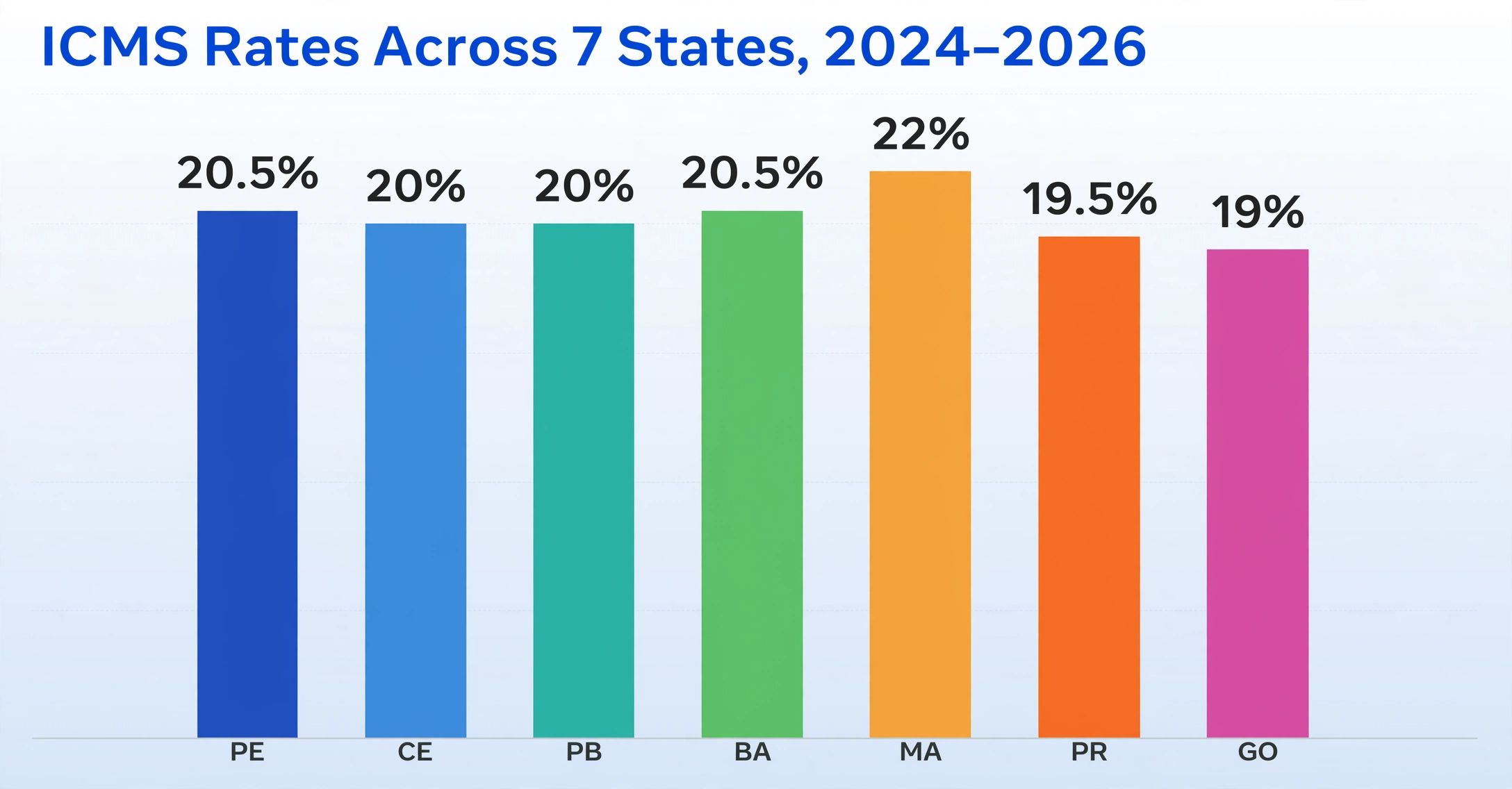
ICMS internal rates in Brazil shifted significantly in 2024, partly in anticipation of the tax reform that will eventually replace ICMS with the new IBS (Imposto sobre Bens e Serviços) between 2029 and 2033. Eleven Brazilian states changed their standard ICMS rates last year:
| State (UF) | Previous Rate | 2024–2026 Rate | Effective Date |
|---|---|---|---|
| Pernambuco | 18% | 20.5% | Jan 2024 |
| Ceará | 18% | 20% | Jan 2024 |
| Paraíba | 18% | 20% | Jan 2024 |
| Bahia | 19% | 20.5% | Feb 2024 |
| Maranhão | 20% | 22% | Feb 2024 |
| Paraná | 19% | 19.5% | Mar 2024 |
| Goiás | 17% | 19% | Apr 2024 |
| Rondônia | 17.5% | 19.5% | Jan 2024 |
| Distrito Federal | 18% | 20% | Jan 2024 |
| Espírito Santo | 17% | 19.5% | Apr 2024 |
| Rio Grande do Norte | 20% | 18% | Jan 2024 |
Sources: Vertex Inc., state legislative acts (Leis Estaduais). São Paulo remained at 18%, Minas Gerais at 18%, Rio de Janeiro at 20% (as of the same period, with a proposed increase to 22% still under legislative debate).
The practical consequence for batch processing: if your supplier base spans more than two Brazilian states, your batch spreadsheet needs to track ICMS at the rate × state × transaction type level — not in a single column that sums all ICMS values. An NF-e from a supplier in Pernambuco (20.5% intrastate) and an NF-e from a supplier in São Paulo (18% intrastate) will have different ICMS treatment in your ERP, even if the ICMS amount column shows the same figure.
Interstate rates add a second dimension, codified under Brazilian tax law:
| Origin Region | Destination Region | Interstate Rate |
|---|---|---|
| South & Southeast (SP, RJ, MG, PR, SC, RS, ES) | South & Southeast | 12% |
| North, Northeast & Midwest | Any Brazilian state | 12% |
| South & Southeast | North, Northeast & Midwest (incl. ES) | 7% |
| Any state — imported goods with >40% foreign content | Any state | 4% |
Combine these interstate rate tiers with the 11 state-level rate changes above, and a batch of NF-e XMLs from suppliers in 7 states can easily contain 5 different ICMS rates — each of which must be identified, separated by type, and posted to the correct tax account in your ERP. Tools that extract ICMS as a single number without capturing the rate, the origin state, and the transaction type from the XML are producing a spreadsheet that creates more reconciliation work than it saves.
This is where extracting directly from the structure of the NF-e XML — not OCR'ing the DANFE — pays off in bulk. The XML's <imposto> block contains separate element groups for ICMS, IPI, PIS, and COFINS, each with the taxable base (vBC), rate (pICMS, pIPI, etc.), and amount (vICMS, vIPI, etc.) at the line-item level. A column-name-based extraction that maps these structured fields — "ICMS Base", "ICMS Rate (%)", "ICMS Amount", "IPI Amount", "PIS Amount", "COFINS Amount" — into separate spreadsheet columns produces a table where every tax amount is traceable back to its rate and base, without manual recalculation. For a detailed breakdown of NF-e XML structure and field mapping, see the complete NF-e XML extraction guide.
CFOP Code Consistency Across Suppliers — The Audit Flag No One Checks in Batch
CFOP codes are 4-digit fiscal operation classifications embedded in every NF-e line item. There are over 500 CFOP codes defined by Brazilian tax authorities, organized by the first digit:
| First Digit | Meaning | Example (Purchase) |
|---|---|---|
| 1 | Intrastate entry (same state) | 1.101 – Purchase for industrialization |
| 2 | Interstate entry (different states) | 2.102 – Interstate purchase for resale |
| 3 | International import | 3.101 – Import for industrialization |
| 5 | Intrastate exit (sales) | 5.101 – Sale of own production |
| 6 | Interstate exit (sales) | 6.102 – Interstate sale of third-party goods |
| 7 | Export | 7.101 – Export of own production |
In a single NF-e, a CFOP mismatch is easy to spot: if the supplier's state is Minas Gerais and your company is in São Paulo, every CFOP code should start with 2 (interstate entry). If a line item shows CFOP 1.101 — intrastate — there's a data error. At scale, across 50 invoices from multiple suppliers, this kind of validation becomes essential and non-trivial. A supplier might correctly use CFOP 1.101 for their local shipments (to their own customers) but should use 2.101 when shipping to you across state lines. If their ERP auto-populated the wrong CFOP, you inherit an audit exposure that SPED EFD will detect — because the digital bookkeeping system cross-references buyer-side and seller-side CFOP records for every transaction. A mismatch between your inbound CFOP record and the supplier's corresponding outbound record generates an automatic audit flag.
Batch CFOP validation means checking three relationships for every line item in the batch:
- First digit vs state pair. The CFOP's first digit must match whether the supplier and buyer are in the same state (1/5) or different states (2/6). Extract the IBGE state code from both the
<emit>and<dest>blocks — codes 35 (SP), 33 (RJ), 31 (MG), 41 (PR), etc. — and validate the CFOP prefix against the same-state/different-state determination. - CFOP suffix consistency across similar operations. If supplier A uses CFOP 2.102 (interstate purchase for resale) and supplier B uses CFOP 2.101 (interstate purchase for industrialization) for the same product type, at least one of them is wrong — the CFOP suffix must reflect the actual business purpose of the transaction.
- No CFOP-to-NCM contradiction. The CFOP encodes the nature of the operation, the NCM encodes the product classification. A CFOP suggesting an industrial input paired with an NCM for a finished consumer product is a red flag — it means either the CFOP or the NCM is incorrect, and both affect tax treatment.
Manual CFOP validation on 50 NF-e line items — each with 2–15 line items, each carrying its own CFOP — is a half-day exercise with a high error rate. Batch extraction that captures CFOP, NCM, supplier state, and buyer state into separate columns lets you run a simple conditional check: if state(emit) ≠ state(dest) AND CFOP_prefix ≠ 2, flag the row. This one rule catches 80% of CFOP errors in a multi-supplier batch.
The 44-Digit Chave de Acesso — Brazil's Built-in Deduplication Key That Most Batch Tools Ignore
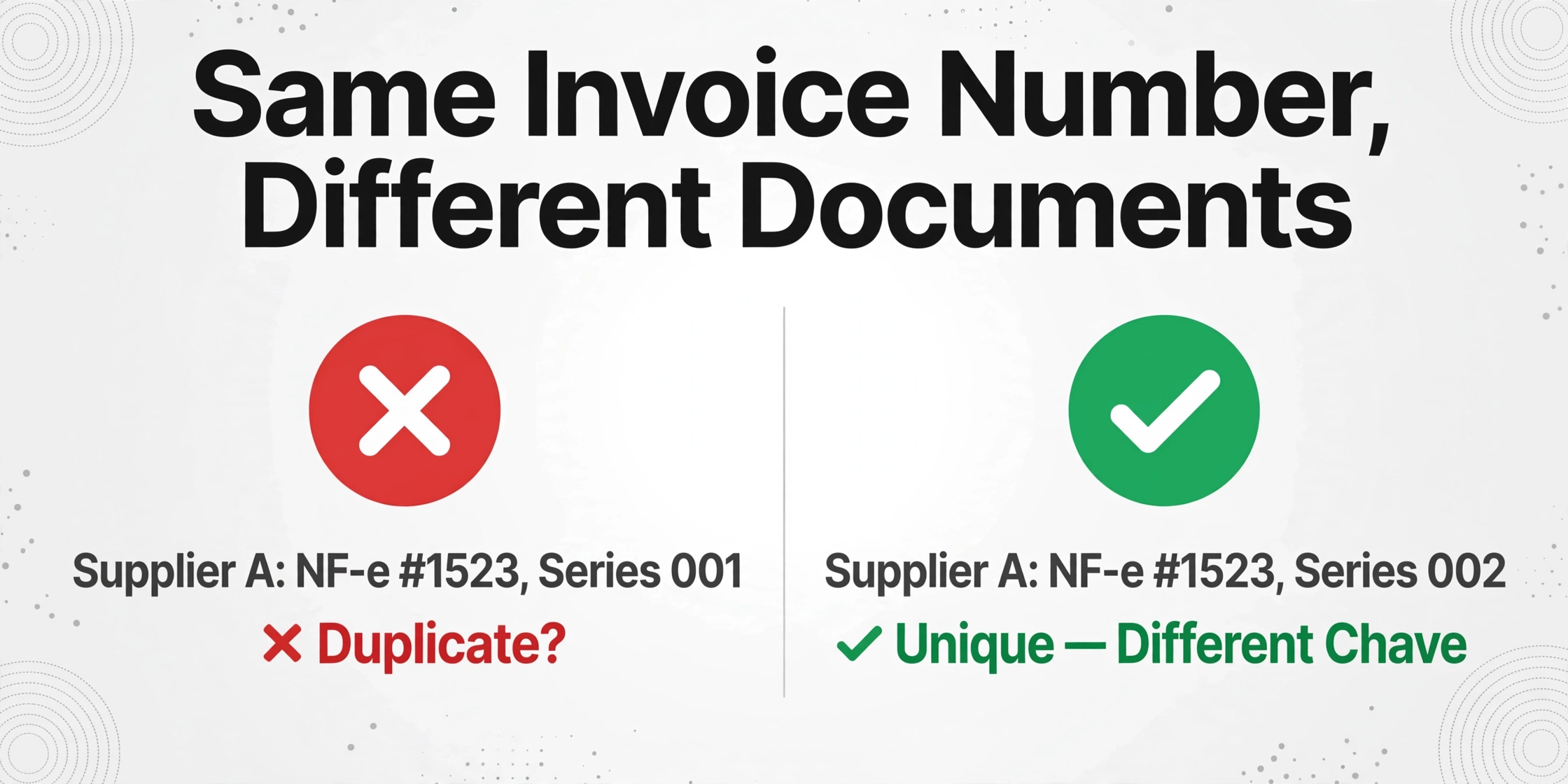
The chave de acesso is a 44-digit string that uniquely identifies every NF-e issued in Brazil, forever. It is not merely a reference number — it is a structured identifier that encodes the issuer's state (first 2 digits, per IBGE code), year-month of issuance (next 4), issuer's CNPJ (next 14), document model (2), series (3), sequential number (9), emission type (1), a random collision code (8), and a modulo-11 check digit (1). Every NF-e XML carries this key in its <infNFe Id="NFe[chave]"> attribute and in the <chNFe> element. It is the closest thing to a globally unique invoice identifier that any tax system in the world provides.
Yet most AP batch tools extract an "Invoice Number" column and call it done. In Brazil, that column is not enough:
- Supplier A can issue NF-e #1523 in series 001 and NF-e #1523 in series 002 — same invoice number, two completely different fiscal documents, only distinguishable by series and chave de acesso.
- Supplier B can issue NF-e #1523 in their own series 001 — same invoice number as supplier A, different supplier, different transaction — and a simple vendor+invoice_number duplicate check will suppress one as a duplicate.
- The SEFAZ cancellation and correction system relies on the chave de acesso. When a supplier issues a Carta de Correção (CCe) to fix a typo in the original NF-e, the original chave de acesso remains valid — but the event history attached to that chave records the correction. A batch tool that doesn't track the chave can't distinguish between the original and corrected version.
In a batch of 50 NF-e XMLs, extract the chave de acesso as its own column. Then implement three checks:
- Uniqueness across the batch. No two rows should share the same chave de acesso. If they do, the same NF-e was uploaded twice — suppress the duplicate row and flag the occurrence.
- Invoice number uniqueness within supplier × series. Group by CNPJ + series + invoice number. If the same combination appears twice with different chave de acessos, one is likely a correction — the chave with the later issuance timestamp supersedes.
- SEFAZ verification for high-value invoices. For invoices above a materiality threshold, use the chave de acesso to query SEFAZ's public consultation portal or a third-party API like TF Fiscal's NF-e lookup to verify authorization status (Autorizada/Cancelada/Denegada). A cancelled NF-e in your batch means the supplier reissued it — and you need the replacement chave.
The 44 digits feel intimidating to non-Brazilian AP staff. But they are the single most reliable deduplication key available in any e-invoicing regime globally. Not using them in batch processing is like having a social security number and identifying people by their first name instead.
The XML + DANFE Mixed Batch — When Some Suppliers Send the Full Invoice and Others Only Send Paper
Larger Brazilian suppliers — especially industrial manufacturers and distributors running SAP, TOTVS Protheus, or Oracle — send the NF-e XML as a matter of routine. It is generated by their ERP, signed by their ICP-Brasil certificate, and transmitted to SEFAZ automatically. Sending it to the buyer alongside the DANFE is a one-click operation.
Smaller suppliers — agricultural cooperatives, local service providers, some construction material suppliers — may not have the ERP infrastructure to manage XML transmission. They print the DANFE, hand it to the truck driver, and that's the only document the buyer sees. The invoice is real, it has been authorized by SEFAZ (the authorization protocol is printed on the DANFE), but the receiving AP department only has a scanned PDF or a photograph of the paper document.
A batch AP workflow that handles only XML or only PDF forces the AP team to split their monthly invoice intake into two separate processing pipelines — one for structured XML, one for scanned DANFEs — and then manually merge the outputs into one general ledger entry. The fragmentation cost is real: separate upload sessions, separate review passes, and a reconciliation step at the end to ensure all invoices from the same supplier (some XML, some PDF) land in the same AP batch.
Custom Column Extraction — ImageToTable.ai's approach of extracting data by field meaning rather than by template coordinates — handles both sources in one batch upload. You define your column names once: "Chave de Acesso", "Supplier CNPJ", "Supplier Name", "NF-e Number", "Series", "Issue Date", "CFOP", "NCM", "Line Item Description", "Quantity", "Unit Price", "Line Total", "ICMS Base", "ICMS Rate", "ICMS Amount", "IPI Amount", "PIS Amount", "COFINS Amount", "Total NF-e Value". The AI reads structured data from XML files where the fields are machine-readable, and extracts the same fields from scanned DANFE PDFs by understanding what each label means visually — regardless of layout. Both sources merge into the same spreadsheet, with the same columns, in one batch.
The practical advantage is not just speed — it's consistency. The chave de acesso column from XML files is extracted directly from the <chNFe> element. The same column from a DANFE scan is read from the 44-digit barcode area in the top-right corner of the printed document. Both entries land in the same column, enabling the same deduplication logic described above. Without a unified batch workflow, the chave de acesso from the XML batch and the chave de acesso from the scanned DANFE batch live in separate spreadsheets — and duplicate detection between them is manual.
The 2026–2033 Tax Reform Transition — Dual Compliance in a Single Batch
Brazil's consumption tax reform — enacted through Constitutional Amendment 132 of December 2023 and regulated by Complementary Law 214 of January 2025 — is restructuring the country's entire indirect tax system over an eight-year transition. By 2033, five legacy taxes (PIS, COFINS, IPI, ICMS, and ISS) will be replaced by a dual VAT system: the federal CBS (Contribuição sobre Bens e Serviços) and the state-municipal IBS (Imposto sobre Bens e Serviços), plus a Selective Tax (IS) on health- and environment-harmful goods. The transition began on January 1, 2026.
For AP teams processing Brazilian NF-e batches, the immediate operational concern is dual compliance in the XML schema. During the transition years, NF-e XMLs will carry both legacy tax fields (ICMS, IPI, PIS, COFINS) and new tax fields (CBS, IBS) simultaneously — meaning the already complex 500+ field NF-e XML is about to become larger. Here is the timeline that affects batch extraction design:
| Year | Legacy Taxes Status | New Taxes Status | Batch Extraction Impact |
|---|---|---|---|
| 2026 | ICMS, PIS, COFINS, IPI fully active | CBS 0.9% + IBS 0.1% test rates (deductible from PIS/COFINS, no net additional burden) | NF-e XML schema now includes CBS/IBS fields alongside legacy fields. Extraction must parse both — even if the test rates don't change net tax liability. |
| 2027 | PIS, COFINS abolished. ICMS, IPI remain. | CBS fully enforced at full rates | NF-e XML drops PIS/COFINS groups, keeps ICMS/IPI, adds CBS. Column definitions change mid-year for some suppliers. |
| 2029–2032 | ICMS rates fall by 10%/year (90% in 2029 → 60% in 2032). ISS and IPI phase down. | IBS rates rise proportionally (10% in 2029 → 40% in 2032) | ICMS rate column values decrease year over year. IBS column values increase. Cross-year comparisons require rate-year tagging. |
| 2033 | ICMS, ISS, IPI abolished | CBS + IBS fully operational | NF-e XML contains only CBS + IBS tax groups. Clean break — but historical data for audits retains legacy structure. |
The practical implication for batch extraction in 2026: if you're building column definitions now, include CBS and IBS columns alongside your ICMS and PIS/COFINS columns — even at the test rates. The data is in the XML today. Extracting it costs nothing. Having it in your spreadsheet when the transition accelerates in 2027 means your historical batch data already contains the foundation for CBS-based reporting, without retroactive re-extraction of archived NF-e XMLs from 2026.
A batch extraction system that reads field names semantically — "ICMS Base", "ICMS Rate", "CBS Base", "CBS Rate", etc. — handles this transition without per-supplier reconfiguration. The column definitions remain the same; the AI finds whichever tax fields are present in the current XML schema version. As the Nota Técnica updates add new fields and deprecate old ones over the next seven years, the extraction logic adapts to the XML that arrives — not to a template that must be rebuilt every time SEFAZ publishes a new layout version.
A Batch NF-e Processing Workflow That Survives Month-End
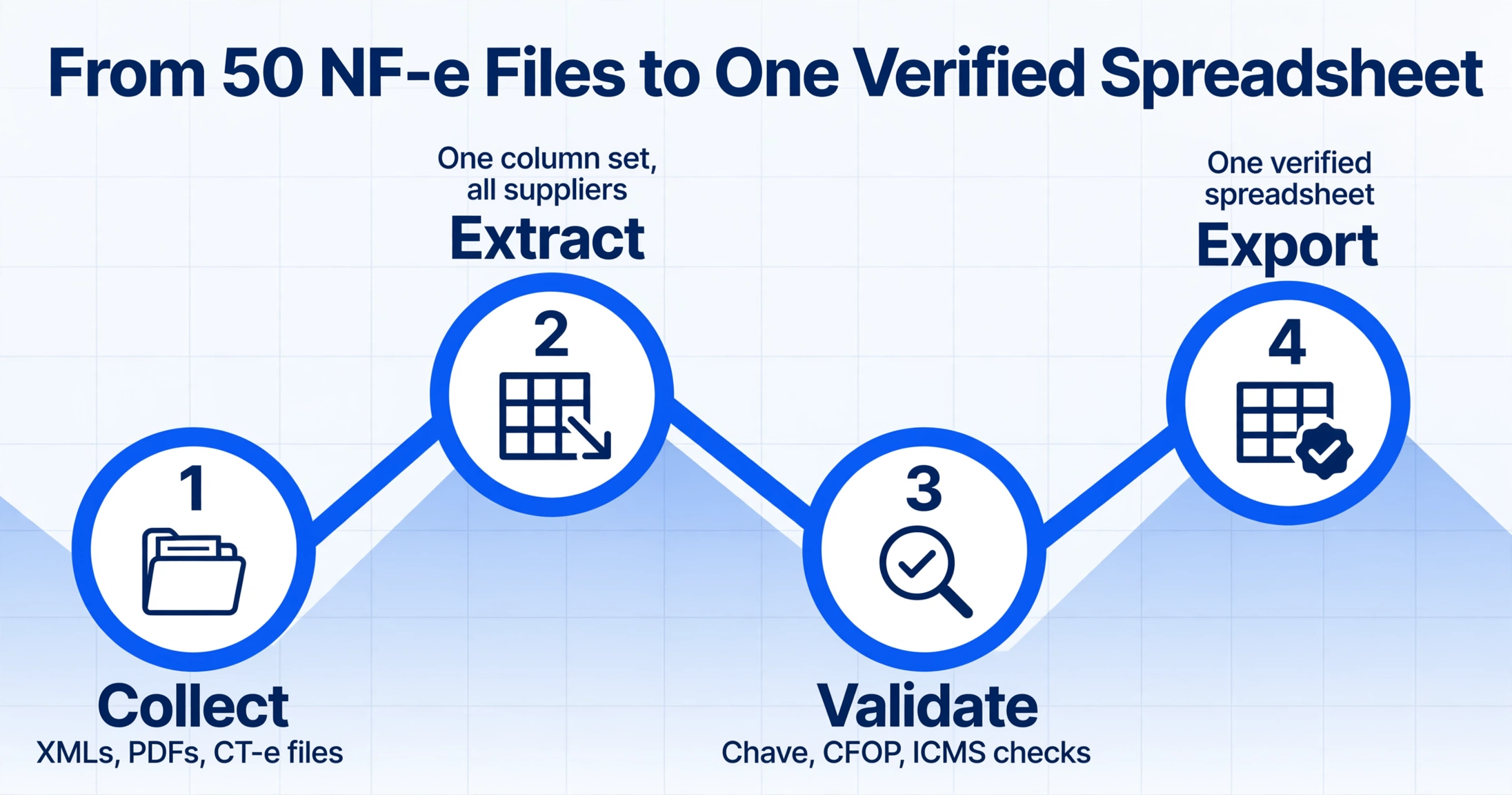
With the structural problems mapped, here is a batch processing sequence designed for the reality of multi-supplier, multi-state Brazilian AP:
- 1Collect and normalize source files. Gather all NF-e XMLs, DANFE PDFs, and CT-e freight documents for the batch period (typically monthly). Rename files to a consistent convention —
{CNPJ}_{NF-eNumber}_{Series}_{IssueDate}.xml— so source traceability is built into the filename. Do not discard the original filenames; append them as metadata. - 2Define extraction columns once, for all suppliers. Set up column names that cover all NF-e data you need: supplier identifiers (CNPJ, Razão Social, Inscrição Estadual), document identifiers (Chave de Acesso, Número, Série, Data de Emissão), line items (NCM, CFOP, Descrição, Quantidade, Preço Unitário, Total da Linha), and taxes (Base ICMS, Alíquota ICMS, Valor ICMS, Valor IPI, Base PIS, Valor PIS, Base COFINS, Valor COFINS, Valor Total da NF-e). Include CBS and IBS columns for the 2026 transition. These column names work across all suppliers because the extraction reads field meaning, not field position — the same approach used when you batch extract invoice data to Excel across mixed supplier formats.
- 3Upload the entire batch in one session. Drag all 50 files — XMLs, PDFs, scans — into the upload area. The system processes them together and merges output into one spreadsheet. Each row is tagged with its source filename for traceability.
- 4Run the three batch-specific validations. (a) Chave de acesso uniqueness check — no duplicates. (b) CFOP first-digit vs state pair — flag mismatches where intrastate CFOP (1xxx) appears on interstate transactions. (c) ICMS rate reasonableness — compare extracted rates against expected state rates. A 20.5% ICMS on a supplier in São Paulo (18% intrastate, 7–12% interstate) is either a Pernambuco supplier misclassified or a data error. Flag for review.
- 5Separate by tax treatment for ERP posting. Use the extracted ICMS Rate and Origin State columns to group rows into posting batches: intrastate entries (rate = 17–22%), interstate entries at 12%, interstate entries at 7%, and 4% entries (imported goods). Each group posts to different tax accounts in your ERP. The same grouping logic applies to IPI, PIS, and COFINS columns.
This workflow assumes that your batch extraction tool can handle XML and visual documents in the same upload session — because Brazilian AP rarely receives one format exclusively. If your current process requires a separate workflow for XML parsing and a separate workflow for PDF OCR, the merge step in step 5 doubles your processing time and introduces the risk of inconsistent column mappings between the two pipelines.
Frequently Asked Questions
Can batch processing handle NF-e XMLs and DANFE PDFs in the same upload?
Yes — if the extraction tool reads semantics rather than relying on XML parsing alone. Semantic extraction reads the NF-e XML's structured tags for data that exists in both formats (CNPJ, NF-e number, totals, tax amounts) and visually reads the DANFE for cases where only the printed document is available. The output merges into one spreadsheet with consistent columns. If your tool only parses XML or only does OCR, you'll need two separate workflows and a manual merge step.
What happens when two NF-e XMLs have the same invoice number but different chave de acessos?
This is a legitimate scenario — typically a corrected NF-e reissued after a CCe event, or two NF-e documents from different series with the same sequential number. The chave de acesso is unique in both cases. Your batch validation should group by chave de acesso (not invoice number) for deduplication, and preserve the relationship between invoice number, series, and chave for audit purposes. If the same CNPJ + series + invoice number appears with two different chave de acessos, review the issuance timestamps — the later chave supersedes the earlier one.
How do I handle ICMS-ST (tax substitution) in a batch?
ICMS-ST appears in the NF-e XML as a separate tax group (<ICMSTot> in the totals block) with its own base, rate, and amount. It should be extracted into separate columns ("ICMS-ST Base", "ICMS-ST Amount") — not merged with regular ICMS. ICMS-ST represents tax already paid upstream by a substitute taxpayer, and your ERP treats it differently than regular ICMS for credit purposes. Mixing them in one "ICMS" column will overstate your available credits.
Can I extract only specific line items from an NF-e instead of all line items?
Yes. When defining your extraction columns, include the fields you need at the line-item level (NCM, CFOP, description, quantity, unit price, line total, and per-line taxes). The AI extracts every line item from every NF-e that matches your column definition. If you only need certain columns — say, NCM + quantity + CFOP, without unit price — leave the unwanted columns out of your definition. The extraction produces only what you ask for.
Does the 2026 tax reform change what I need to extract from NF-e XMLs?
In 2026, the NF-e XML schema now includes CBS and IBS fields at test rates (0.9% and 0.1%, respectively) alongside existing ICMS, PIS, and COFINS fields. These test rates are fully deductible from PIS/COFINS, so net tax liability does not change. However, the fields exist in the XML and should be extracted now — when CBS replaces PIS/COFINS at full rates in 2027, your batch extraction column definitions will already be in place. The tax reform timeline is codified in Complementary Law 214/2025 and the OECD's 2025 analysis of the reform.
How long do I need to keep NF-e XMLs and extraction records?
Brazilian tax law requires NF-e XMLs and related fiscal documents to be archived for a minimum of five years from the end of the fiscal year in which the transaction occurred. This applies to both the original XMLs received from suppliers and your extraction records. The DANFE is not a legally sufficient substitute for the XML during an audit — if you only kept the scanned DANFE and discarded the XML, you cannot reconstruct the full fiscal record that SEFAZ will request. Best practice: archive the XMLs as-is and maintain the extraction spreadsheet as a separate, searchable record for internal reconciliation.