500 Boletos, One Spreadsheet:
How to Batch Boleto Payments Into an AR Worksheet
A mid-size Brazilian retailer issuing 3,000 Boletos per month typically receives payments spread across ten different bank settlement cycles, three weekly PDF reports from their bank, and a stack of paid slips forwarded by customers who paid at lottery agencies. Getting from those outputs to a single "who paid, who hasn't" AR view is supposed to be a reconciliation task. In practice, it is a data entry task — each Boleto's barcode, due date, amount, and beneficiary must be read from the PDF and re-typed into a spreadsheet row before any matching can begin.
Key Takeaways
- Every Boleto follows a rigid FEBRABAN standard designed for machine reading — yet most teams still open each PDF and type the same data by hand.
- That 44-digit barcode already encodes the amount, due date, and bank ID in fixed positions — the data is structured before you touch a key.
- Batch-extracting 200 Boletos takes 5 minutes of hands-on work. The same 200 typed manually consumes over 10 hours.
The Monthly Boleto Pile: Why Opening PDFs One at a Time Doesn't Scale
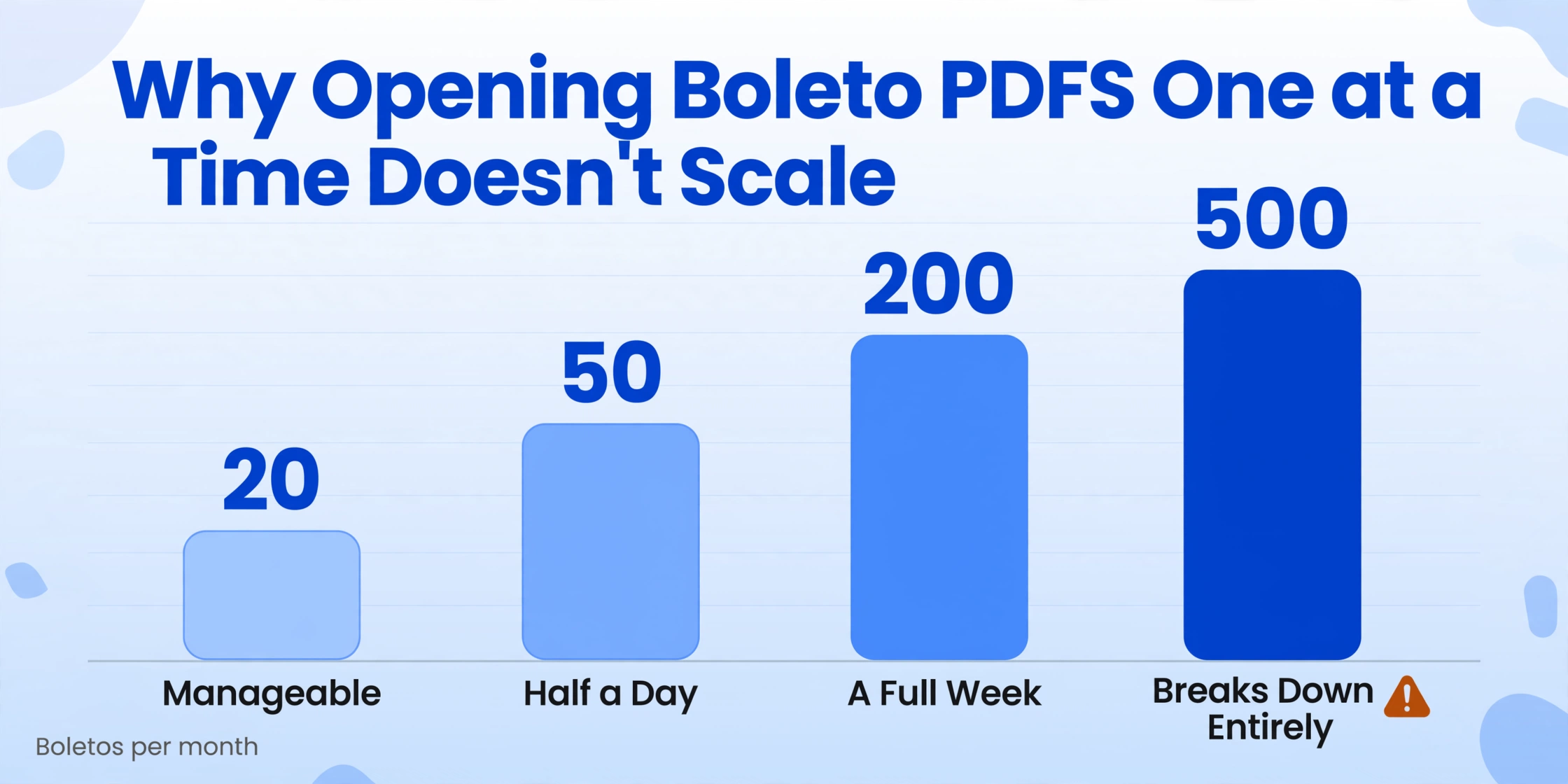
If you process fewer than 20 Boletos per month, opening each PDF and typing its values into a spreadsheet is tedious but manageable. At 50 per month it becomes a half-day task. At 200 it consumes a full week. At 500 — which is routine for mid-market retailers, property managers, and B2B service companies in Brazil — the manual approach breaks down entirely, not because the work is hard but because the structure of the work fights against batch thinking being applied to a batch problem.
The paradox is that every single Boleto arriving in your inbox is built on precisely the same FEBRABAN standard. The 44-digit barcode always positions the bank ID in digits 01–03, the maturity factor in 06–09, the amount in 10–19. The linha digitável (readable line) always groups the same data into 47 digits with check digits at predictable positions. The document is screaming "I am machine-readable" — yet most teams still read each one with human eyes.
The operational insight: A Boleto is a standardized structured document disguised as a visual PDF. The standard that lets any bank scanner in Brazil validate a payment in milliseconds can also let you extract 500 lines of AR data in one pass — if you stop treating each Boleto as a separate typing task and start treating them as a batch.
What a Batch Boleto Workflow Actually Looks Like
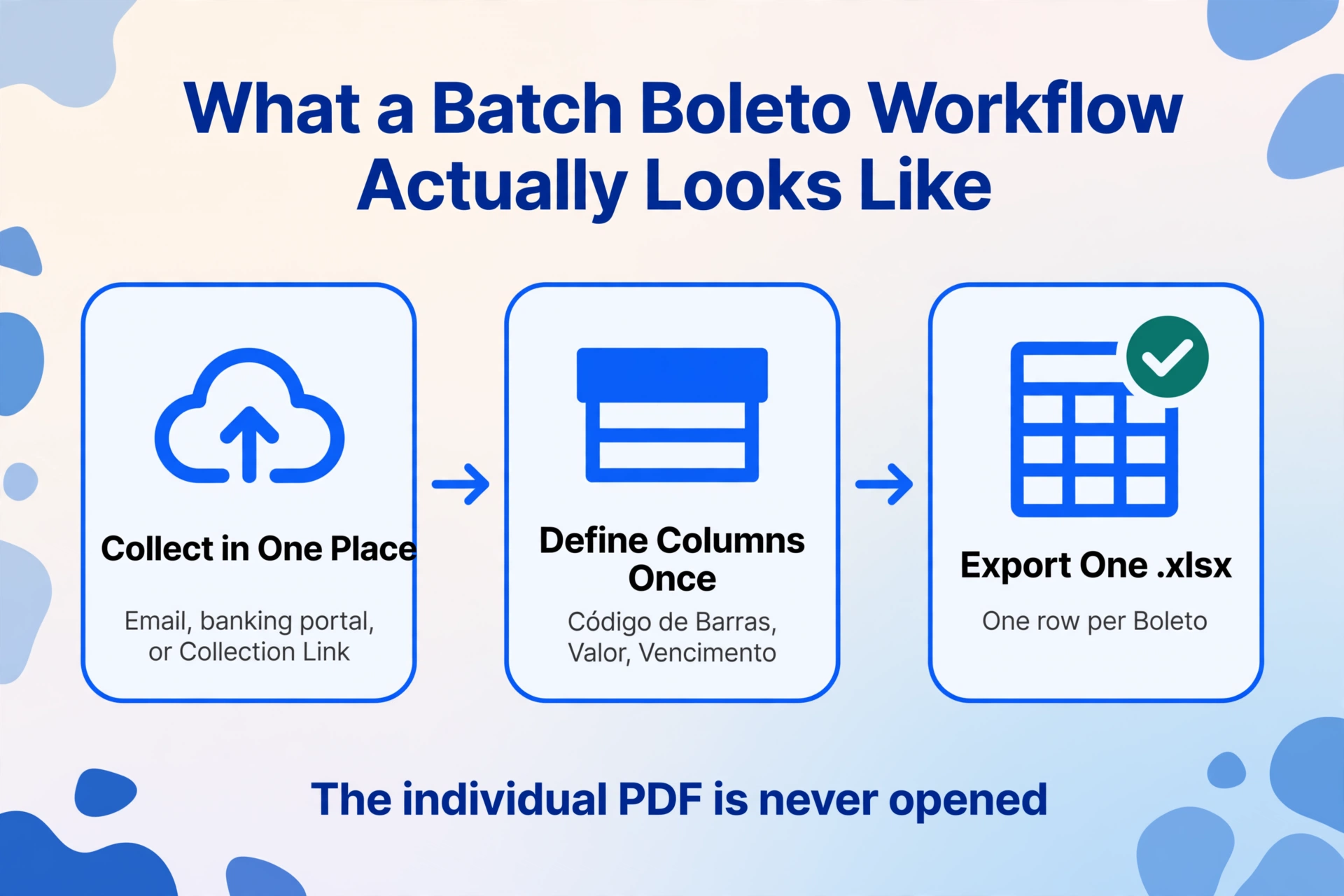
A batch-first workflow has three stages: collect all Boletos in one place, define what data you need, and export everything at once. The individual PDF never needs to be opened.
Whether they arrive by email, are downloaded from a banking portal, or come through a Collection Link that lets customers upload their paid slips directly, the goal is the same: all files in one place before extraction starts. No per-file processing, no "upload, wait, download, repeat" cycle.
Type your column names once: Código de Barras (barcode), Vencimento (due date), Valor (amount in BRL), Beneficiário (beneficiary name), Pagador (payer), Nosso Número, Data de Pagamento (payment date for paid slips). These column names become the headers of your output table. The AI reads every Boleto and fills each row by understanding what each field means — not by matching a template position.
AI processes every Boleto in the batch. Each file becomes one row in the output. When extraction completes, download a single .xlsx file with every Boleto's data — ready for your AR aging report, ERP import, or reconciliation worksheet.
The total hands-on time for a 200-Boleto batch, using this workflow, is roughly 5 minutes: upload, define columns, click process, download. The remaining work is the AI's. Compare that to the 3 minutes per document that manual data entry requires — the same 200 Boletos would take over 10 hours of focused typing.
The Five Fields Every AR Team Needs From Each Boleto
Not every field on a Boleto matters for accounts receivable. The FEBRABAN standard defines dozens of data points across the barcode, the readable line, and the visual slip. But from an AR perspective, five fields carry 90% of the reconciliation value.
| Field | Where It Lives on the Boleto | Why AR Needs It |
|---|---|---|
| Código de Barras (barcode, 44 digits) | Top section, below the bank logo | Unique identifier for the payment. Use it to match against the bank's daily settlement file. |
| Valor (amount) | Below the barcode, in BRL (R$) | The expected payment amount. Compare against actual settled amount for discrepancy detection. |
| Vencimento (due date) | Alongside or below the amount | Aging calculation, overdue flags, protesto risk assessment. |
| Beneficiário (payee) | Upper-left section with bank details | Confirms the payment destination. Critical for multi-entity AR. |
| Nosso Número (bank reference) | Below barcode, near "Nosso Número" label | The bank's internal reference — used in bank settlement reports to uniquely identify each Boleto. |
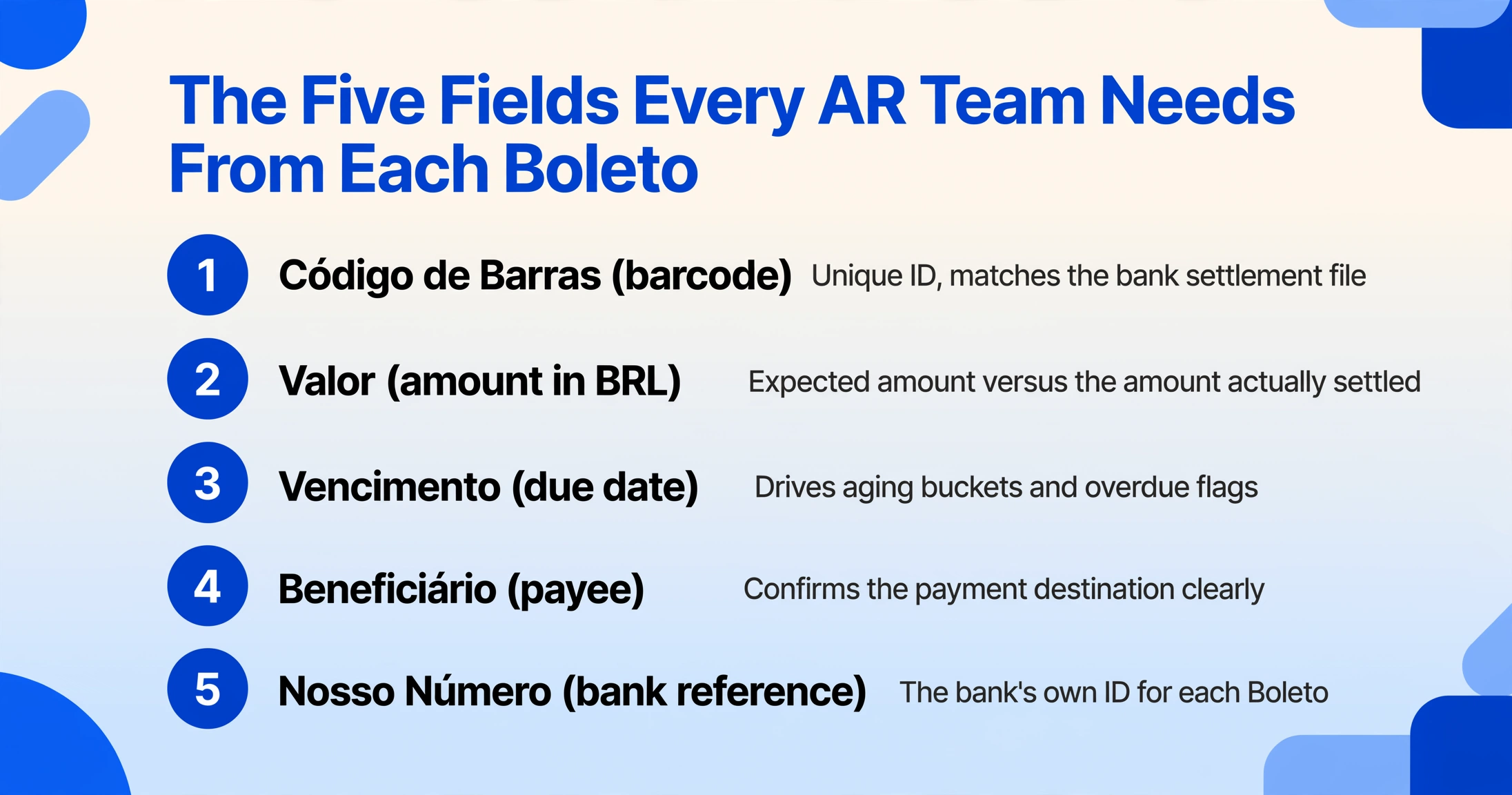
Most teams also extract Pagador (payer name/CNPJ) and Data de Vencimento for aging reports. The batch approach handles these as additional columns — you define them once and every Boleto in the batch is scanned for the same fields.
Why Boleto's Standard Structure Makes Batch Extraction Possible
Not all financial documents batch well. A handwritten receipt from a small shop varies so wildly in layout that extraction tools need per-vendor training. A supplier invoice from a multinational follows that company's own template. But a Boleto Bancário follows a national standard maintained by FEBRABAN, enforced by every issuing bank, and designed specifically so that machines can read it.
The 44-digit barcode is the cleanest example. It encodes, in order:
- Positions 01–03: Bank code (e.g., 001 = Banco do Brasil, 237 = Bradesco, 341 = Itaú)
- Position 04: Currency code (9 = BRL)
- Position 05: Check digit for the barcode
- Positions 06–09: Maturity factor (days since the FEBRABAN epoch base date — used to compute the due date)
- Positions 10–19: Amount in centavos (e.g., 0000015000 = R$ 150.00)
- Positions 20–44: Free field (bank-dependent: contains Nosso Número, Agência/Código do Beneficiário, Carteira, etc.)
Every bank, every Boleto type, every payment value — the barcode always follows this layout. That means a batch extraction tool reading a hundred Boleto barcodes can locate the amount field in exactly the same position (digits 10–19) across all of them. The same principle applies to the visual fields on the slip: the beneficiário is always at the top, the vencimento is always near the value, the pagador is always below the beneficiary section. The layout is not pixel-identical across banks — Itaú prints it slightly differently from Bradesco — but the semantic structure is consistent, which is precisely what semantic extraction is designed to handle.
Files are processed securely and not stored.
Handling Edge Cases in a Boleto Batch
Every batch has outliers. A 200-Boleto batch might include ten overdue slips with handwritten late fees, five that were partially paid, and three where the PDF is a low-quality scan from a lottery agency receipt. A batch workflow needs to handle these without breaking the row-per-document output structure.
Overdue Boletos with interest and multa (late fee). Brazilian law allows up to 1% monthly interest plus approximately 2% multa on late payments. The AI can extract both the original valor (amount) and the calculated late payment total if it appears on the document. A good practice is to define two columns: Valor Original and Valor com Juros/Multa (amount with interest/penalty).
Registered vs unregistered Boletos. Since the FEBRABAN mandate requiring registered Boletos took full effect in 2017, the vast majority of Boletos in circulation are registered (boleto registrado). Registered Boletos carry additional fields — the Central Bank registration number, extra payer validation data — that unregistered ones lack. If your batch contains a mix, the extraction tool should handle both without requiring you to pre-sort them. The output simply has empty cells for fields that weren't present on a given document.
Partial payments and installment plans. Some customers pay in installments, generating multiple Boletos per invoice. Each installment Boleto has its own barcode, its own due date, and its own amount. Batch extraction treats each as a separate row — you can later group them by the invoice reference field (documento field) to maintain the link back to the original transaction.
From Spreadsheet to ERP: Closing the Reconciliation Loop
Extraction gets the data into a spreadsheet. Reconciliation is what happens next. The extracted Boleto data — barcode, amount, due date, Nosso Número — serves as the structured input for matching against your bank's daily settlement report.
Brazilian banks provide settlement reports in their own formats (usually CNAB 240 or CNAB 400 formats, the standard file layouts used for interbank clearing). These reports list each paid Boleto by its barcode or Nosso Número. Your job is to match each line in the bank report to the corresponding line in your issued-Boletos spreadsheet.
When both sides are structured — your extracted Boleto data on one side, the bank's CNAB file on the other — the match can be automated. The CNAB file's field for "Nosso Número" or "código de barras" maps directly to the column you extracted from the Boleto. A VLOOKUP or Power Query step in Excel, or an ERP import rule, closes the loop. The alternative — matching PDF-based data against a CNAB report — is the definition of manual reconciliation.
For teams using Brazilian ERP systems like Totvs (Protheus), SAP, or Oracle, the extracted spreadsheet can be formatted to match the import template. Many ERPs accept a CSV with columns for boleto barcode, payment date, amount, and bank code. The batch extraction output already contains these fields; you simply map them to the ERP's expected column names.
Frequently Asked Questions
Can I batch-extract Boletos from scanned paper versions, or do they need to be digital PDFs?
Both work. The AI reads the visual content of the document — whether it originated as a digital PDF from a banking portal or as a photo of a printed slip. Scanned or photographed Boleto PDFs are processed the same way. The only requirement is that the fields are legible.
How does the tool handle Boleto PDFs sent by email with the data embedded as an image?
Image-based PDFs — common when a customer forwards a screenshot of their paid Boleto — are handled by the same visual extraction engine. The AI reads the image content directly, so no OCR preprocessing of the PDF is needed. The same batch upload accepts both text-based and image-based PDFs mixed together.
What about Boletos encrypted with a password by the bank?
Some Brazilian banks send Boleto PDFs with a password, typically the beneficiary's CNPJ. The tool supports password-protected PDFs — you can store commonly used passwords in your account settings, and they will be tried automatically against incoming encrypted Boletos during extraction.
Does the extraction work for both B2B and B2C Boletos?
Yes. B2B Boletos (issued between companies, typically with full CNPJ details on both sides) and B2C Boletos (issued to consumers, with CPF) follow the same FEBRABAN standard. The barcode structure is identical. The visual fields differ mainly in which identifiers appear — CNPJ for companies, CPF for individuals. The AI extracts whichever is present.
How does batch extraction compare to the per-Boleto manual process for reconciling against bank statements?
For a detailed comparison of manual vs. automated Boleto reconciliation, read our guide on extracting Boleto Bancário data to Excel, which walks through the full reconciliation workflow step by step.
Batch Processing Changes the Boleto Workflow Fundamentally
The difference between processing 50 Boletos manually and processing them as a batch is not just speed — it's whether the AR team spends its time typing or analyzing. When each Boleto must be opened, read, and typed individually, the bottleneck is human attention. When all 50 are uploaded at once and extracted to a single spreadsheet, the bottleneck shifts to the reconciliation logic — which is where a finance team's judgment actually adds value.
Every Boleto in that batch was built from the same FEBRABAN standard. The standard exists precisely to make machine reading possible. The question is whether your workflow takes advantage of it.
Try it on your own Boleto PDFs.
Upload a batch of Boleto files — see what a single-spreadsheet AR workflow feels like.
Upload a Batch