How to Extract Boleto Bancário Data
to Excel for Payment Reconciliation
The Brazilian Boleto Bancário system processes nearly 37 billion transactions per year, each one governed by a precise FEBRABAN standard that defines where every digit of the 44-character barcode belongs. Yet the majority of finance teams handling cross-border payments still extract this data the same way they did before the standard existed: by hand. Between the PDF that arrives from a Brazilian supplier and the final reconciliation entry in your spreadsheet sits a gap of manual typing, copy-pasting, and eyeball matching that the document's own structure was designed to eliminate.
Key Takeaways
- 37 billion Boleto transactions per year — every one built on a FEBRABAN standard that puts each of the 44 barcode digits in a predictable position.
- The same structured standard that lets any bank scanner verify a payment in milliseconds still requires a human to read and type each field into a spreadsheet row.
- Define your columns once — Barcode, Due Date, Amount, Beneficiary — and batch-extract dozens of Boletos into a single Excel row per document.
What Is a Boleto Bancário, and Why Does It Have Two Sets of Numbers?
A Boleto Bancário — often shortened to just Boleto — is a regulated payment instrument issued through Brazilian banks. Think of it as a hybrid between an invoice and a payment slip: the beneficiary (beneficiário) issues it through their bank, and the payer (pagador) uses it to make a payment at any of over 40,000 locations across Brazil — banks, lottery agents, supermarkets, post offices, or through online banking.
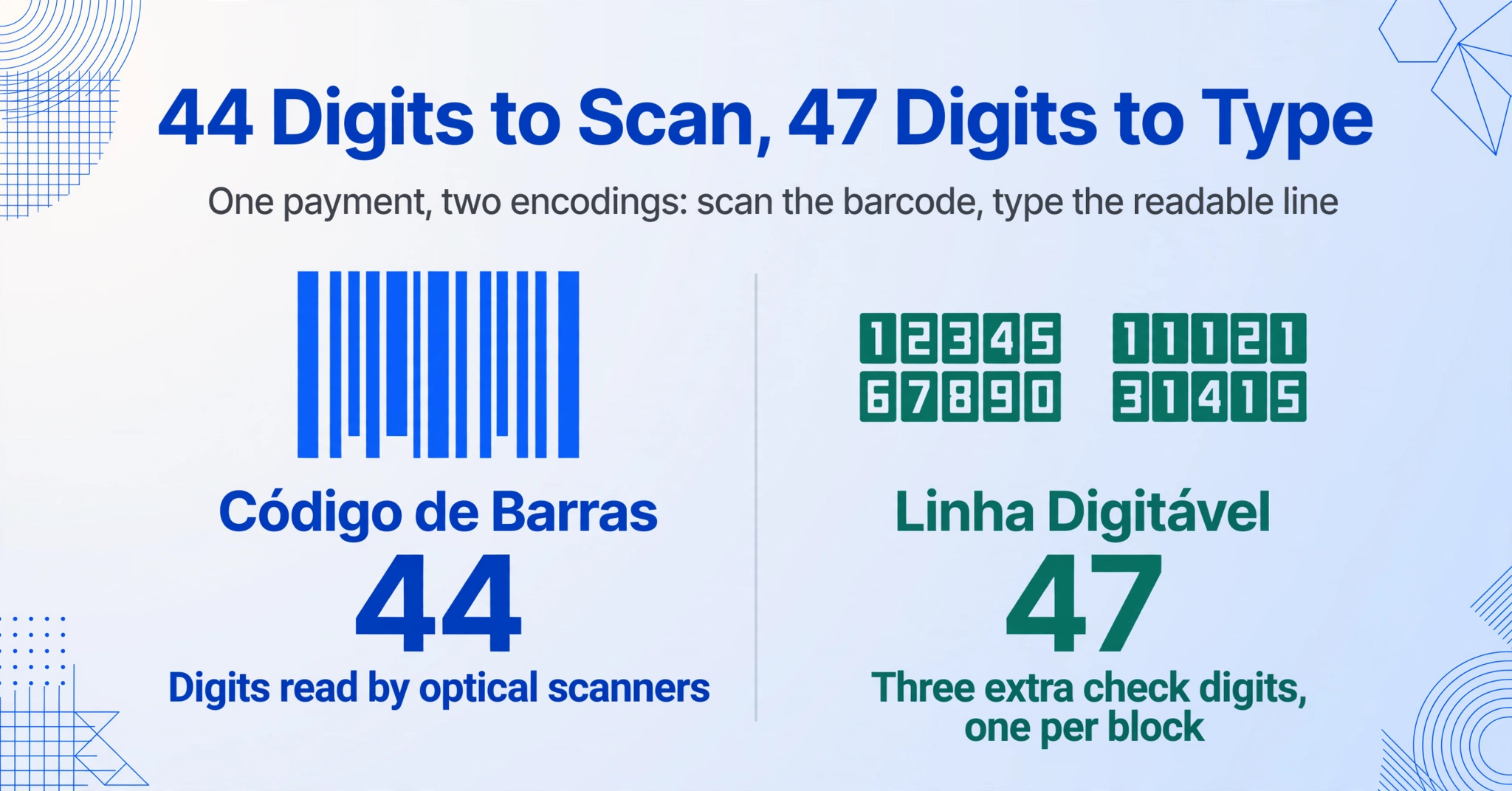
Every Boleto carries a 44-digit bar code (código de barras) optimized for optical scanning and a 47-digit readable line (linha digitável) designed for manual entry at ATMs and banking apps. Both represent the same payment — they just encode it differently.
The 44 digits of the barcode break down into five sections defined by the FEBRABAN barcode layout standard (Layout - Código de Barras - Versão 7):
| Positions | Field | Example | Purpose |
|---|---|---|---|
| 1–3 | Bank code (código do banco) | 001 | Identifies the issuing bank (001 = Banco do Brasil, 237 = Bradesco, 341 = Itaú) |
| 4 | Currency code (código da moeda) | 9 | 9 = Brazilian Real (R$) |
| 5 | Check digit (dígito verificador geral) | 3 | Verifies the entire barcode integrity using modulo-11 |
| 6–9 | Due date factor (fator de vencimento) | 3737 | Days since base date (07/10/1997) — translates to the due date |
| 10–19 | Value (valor) | 0000000100 | Amount in centavos (R$1.00 in this example) |
| 20–44 | Free field (campo livre) | 0500940144816060680935031 | Bank-defined: our number, agency, account, portfolio — varies by bank |
Since 2018, following a FEBRABAN mandate, all Boletos must be registered (boletos registrados) — the issuing bank is notified of every Boleto at the moment of creation, not only when it is paid. The older unregistered Boleto (boleto sem registro) system, where banks only learned of a Boleto when it was presented for payment, was phased out to reduce fraud and improve traceability. Today, every Boleto you receive carries the same standardized structure with full bank-side registration.
For a broader look at the Brazilian document landscape — including Nota Fiscal Eletrônica (NF-e), the country's mandatory electronic invoice system — see our complete guide to Brazilian tax and financial documents.
The Boleto Processing Bottleneck That Reconciliation Teams Know Too Well
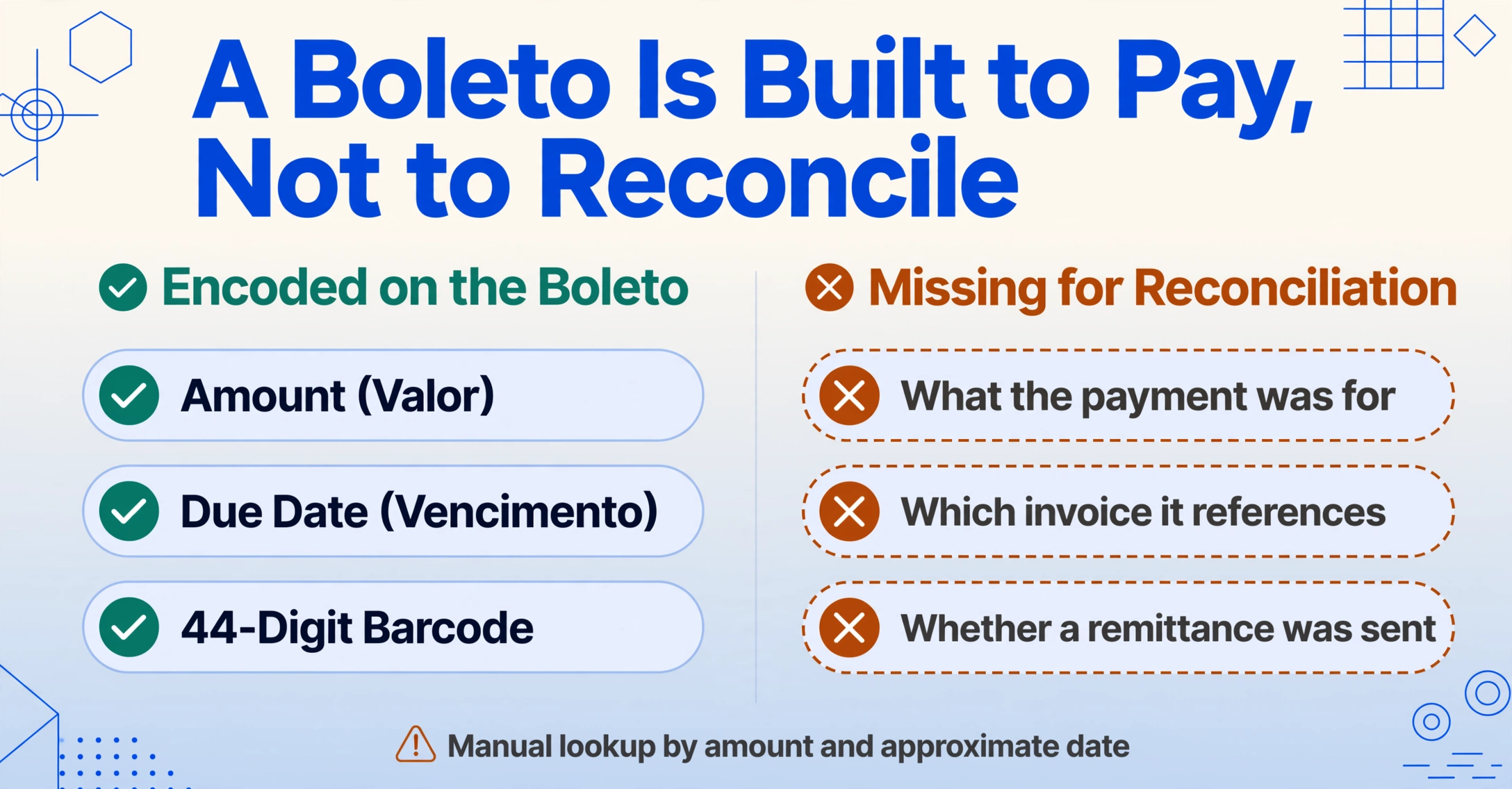
A single Boleto carries roughly a dozen data points that matter for payment reconciliation. But unlike an invoice where data is conceptually connected (line items → subtotal → tax → total), a Boleto's data is designed for payment execution, not for record-keeping. The barcode encodes the payment amount and due date, but it doesn't tell you what the payment was for, which invoice it references, or whether the payer has already sent a corresponding remittance.
This design mismatch creates a specific workflow problem for finance teams:
The real cost isn't the typing speed. It's the reconciliation cycle: manual extract → manual match → manual status check. Each step introduces a delay and a potential error, and at 37 billion transactions per year, those delays compound into a structural inefficiency across the entire B2B payment system.
How to Extract Boleto Data to Excel — Step by Step
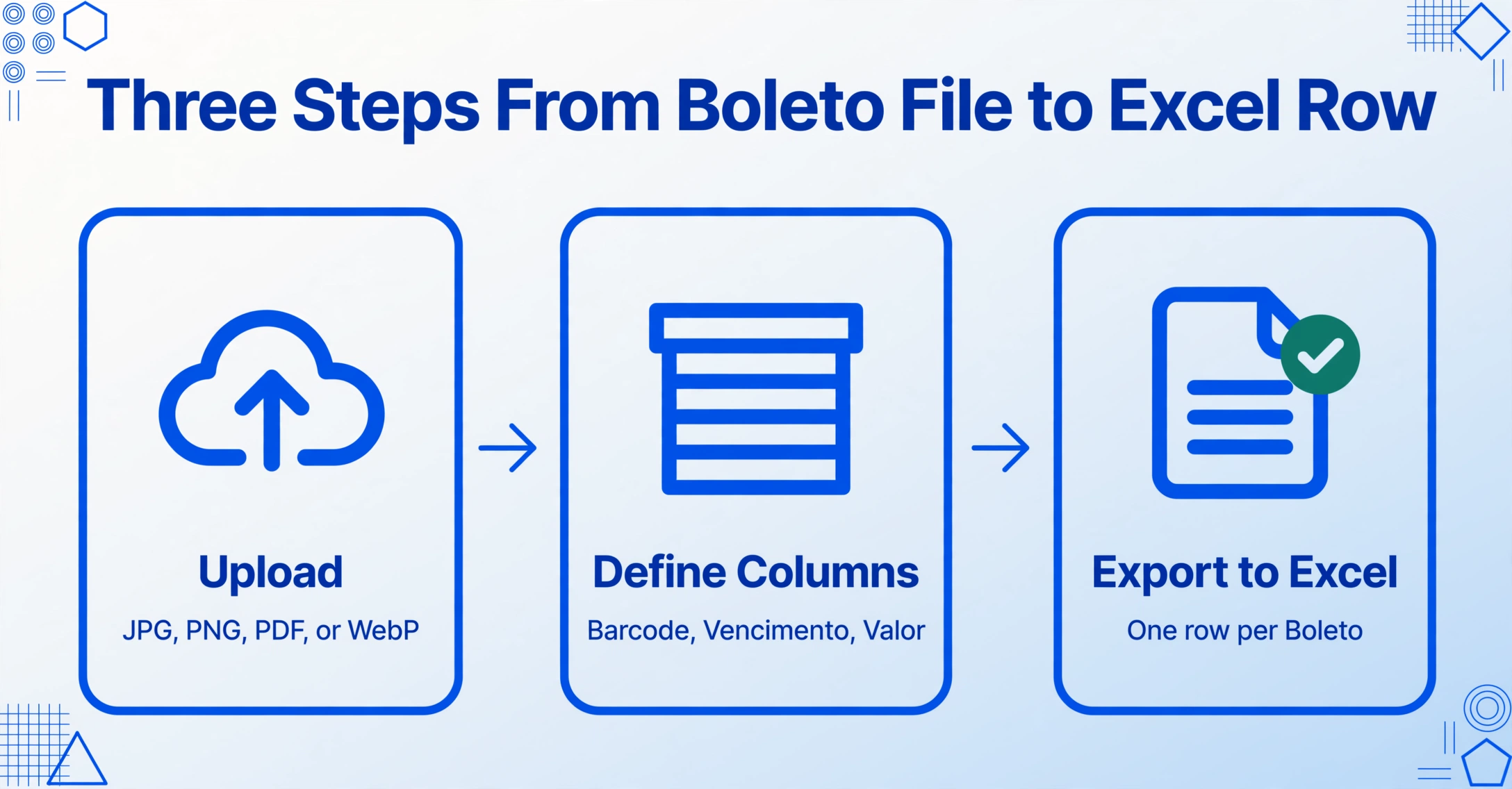
Boleto extraction doesn't require a complex workflow. The document's structure is standardized, and the fields you need for reconciliation are clearly defined. The only missing piece is a tool that can read them from any format — whether the Boleto arrives as a PDF from a banking portal, a screenshot from a mobile app, or a scanned printed slip.
The process works in three steps:
Try it on a Boleto screenshot or PDF below — no sign-up required:
Files are processed securely and not stored.
Which Boleto Fields Matter Most for Payment Reconciliation
Not every field on a Boleto is equally useful for reconciliation. The following table maps the fields that actually drive payment matching, status tracking, and reporting — organized by how they're used in practice, not by where they appear on the document.
| Field (English) | Portuguese Term | Reconciliation Use |
|---|---|---|
| Bar Code (44 digits) | Código de barras | Primary identifier — matches the barcode reference on bank statement line items. Use this to link payments to receivables. |
| Readable Line (47 digits) | Linha digitável | Human-readable version of the barcode. Useful when a Boleto screenshot doesn't include the barcode graphic. |
| Due Date | Vencimento | Determines payment deadline and protesto risk. Track overdue vs. pending status per aging bucket. |
| Amount | Valor | Primary amount for payment matching. Cross-reference with bank statement credits. |
| Our Number | Nosso número | Bank-assigned internal reference — often the closest thing to a unique transaction ID for reconciliation. |
| Beneficiary | Beneficiário / Cedente | Identifies the receiving entity. Critical when reconciling payments across multiple subsidiaries or business units. |
| Payer | Pagador / Sacado | Identifies who made the payment. Use for AR aging reports and customer follow-up. |
| Portfolio | Carteira | Collection agreement type between beneficiary and bank. Useful for fee calculation and reconciliation category mapping. |
| Your Number | Número do documento / Seu número | Optional field where the beneficiary inserts their internal invoice or contract reference — the most direct link between a Boleto payment and your own records. |
The bar code is the most reliable reconciliation key because it appears on both the Boleto and the bank statement. If you can extract only one field, extract the barcode. Our Number is the second-best anchor when the barcode isn't available.
What About Batch Processing Dozens of Boletos?
The extraction workflow above works the same way whether you're processing one Boleto or one hundred. The batch-first processing model is designed for the volume that B2B reconciliation actually generates: upload all Boletos from a given period, define your columns once, and let the AI extract every file against the same field definitions. The output is a single Excel file with one row per Boleto — ready to import into your ERP or reconciliation tool.
If you need to match Boletos against bank statements regularly, consider setting up a monthly extraction routine: collect all Boletos issued and received during the month, extract them as a batch, and reconcile the resulting spreadsheet against your bank's monthly statement. The entire process takes minutes instead of hours, and because every field is extracted against the same column definitions, you eliminate the most common reconciliation error — mismatched field formats between Boletos from different banks.
For example, a batch of 50 Boletos from a mix of issuers — Banco do Brasil, Bradesco, Itaú, Santander — would previously require a staff member to open each PDF, locate the barcode digits, the due date (vencimento), and the amount (valor), type them into a spreadsheet, then manually verify that the totals match the bank statement. With batch extraction, those 50 PDFs upload in under a minute, the extraction runs in parallel, and the output arrives as a single structured file with all 50 rows ready for reconciliation — no per-document handling required.
Frequently Asked Questions About Boleto Data Extraction
Does the extraction work for both registered and unregistered Boletos?
Since 2018, all Boletos issued in Brazil are registered (boletos registrados). The unregistered (sem registro) format was phased out by FEBRABAN. If you're processing current Boletos, they follow the standard 44-digit barcode structure described above. Older unregistered Boletos may have slightly different field layouts, but the core identification fields — bank code, amount, due date — follow the same FEBRABAN encoding.
What's the difference between the 44-digit and 47-digit numbers?
The 44-digit bar code (código de barras) is the machine-readable version used by barcode scanners. The 47-digit readable line (linha digitável) is the human-readable version that includes three extra check digits — one inserted into each of the first three blocks — so that a bank teller or ATM can validate the number as it's typed digit by digit. Both encode the same payment information. Some Boleto PDFs show only one format; the extraction tool can read either.
Can Boletos arrive as encrypted PDFs?
Yes — some banks and payment platforms send Boleto PDFs with password protection. The extraction tool supports password-protected PDFs if you provide the password. For recurring Boletos from the same source, you can pre-save the password so encrypted attachments are unlocked automatically when they arrive.
What if the Boleto is handwritten or damaged?
Boleto Bancário documents are always computer-generated and printed, so handwriting and document damage are rare. However, if a Boleto has been physically handled — folded, torn, or stained — the AI can still read partially obscured fields as long as the barcode or readable line is intact. Faded or low-contrast prints are the most common quality issue, and the extraction handles these at the same accuracy as clean documents.
Can I extract data from the Boleto XML instead of the PDF?
Some banks provide Boleto data as XML or JSON through their APIs. If you have programmatic access to these files, structured data extraction is a different process than visual extraction from PDFs/images. The method described in this article is for when you receive Boletos as visual documents — PDFs, screenshots, or printed scans — which is still the dominant pattern in cross-border B2B transactions where the recipient doesn't have a direct integration with every Brazilian bank.
Are Boletos ever issued in currencies other than BRL?
Virtually all Boletos are denominated in Brazilian Real (BRL). The currency code position (position 4 of the 44-digit barcode) is always 9 for BRL. While FEBRABAN standards technically support other currency codes (2 for USD commercial, 14 for EUR), these are extremely rare in practice and almost never encountered in standard B2B Boleto processing.
The recurring pattern across every Boleto you will process is standardization — a 44-digit barcode, a fixed field structure, and a regulated banking system that defines exactly where every piece of data lives. The gap is not missing data. It's the translation from that standardized format into the rows of your reconciliation spreadsheet. Semantic extraction removes that translation step entirely — not by predicting where a field might appear, but by understanding what each field means, regardless of whether the Boleto comes from Banco do Brasil, Bradesco, or a payment platform screenshot.