SPED ECD/ECF → Excel:
Extract Brazilian Accounting Data for Tax Filing
The ECD file sitting in your PVA export folder contains every accounting record your company generated all year — every journal entry, every account balance, every cost center allocation. It is the single most complete financial record of your fiscal year, and it is the foundation for the ECF tax filing that determines your IRPJ and CSLL liability. But when you open the file in a text editor, you see something that looks like line noise: hundreds of thousands of rows starting with |C155|, |I200|, |M300|, each packed with fixed-width fields separated by pipe characters — account codes, opening balances, debit and credit movements — all mixed together in a single file. The data is all there, more complete than any PDF or spreadsheet your ERP exports. It's just not usable in its raw form.
Key Takeaways
- Your ECD file contains every accounting record your company generated all year — 80,000 to 150,000 lines of pipe-delimited Registro codes that only a parser can decode.
- The standard "open in Excel" method dumps every Registro type into a single spreadsheet where "opening balance" and "journal entry date" share the same column position.
- Name the columns you need — Account Code, Opening Balance, Closing Balance, Tax Adjustment — and extract only the data you want into a clean table.
This mismatch — complete data trapped in an impractical format — is the core problem this article solves. You will learn what each ECD and ECF block contains, why the standard "open in Excel" method falls short, and how to extract the specific data you need for cross-year comparison, ECD↔ECF cross-validation, and cost center profitability analysis — without writing a parser for every Registro type in the SPED layout specification.
Why SPED ECD/ECF Files Are Hard to Work With
The SPED (Sistema Público de Escrituração Digital) system was designed for one purpose: to let the Receita Federal receive, validate, and store digital accounting records in a machine-verifiable format. Ease of human analysis was never a design goal. The resulting format has three structural features that make direct analysis painful.
Fixed-width text layout. Every line in an ECD or ECF file is a fixed-width record identified by a Registro code. Fields occupy specific character positions within each line, delimited by pipe characters. The same file contains dozens of different Registro types — some holding chart-of-account definitions (C050), others holding periodic trial balances (C155), journal entries (I200), or daily balance summaries (I300). A human reading the file sees a wall of uniform-looking lines with no visual distinction between record types.
Mixed record types. An ECD file does not separate its content into tabs or sections. Registro C050 entries (your chart of accounts) sit in the same file as Registro C155 entries (your trial balances), which sit next to Registro I200 entries (your general journal). To get, say, just the trial balance, you must filter for a specific Registro code — and then parse the fixed-width fields within each matching line, each of which has a different layout depending on the Registro type.
Annual scope with no built-in comparison. Each fiscal year produces its own ECD and ECF files. Comparing this year's account balances against last year's — a routine analytical need — requires opening two files, extracting the same Registro from each, aligning account codes, and building the comparison table manually. There is no "year-over-year" view in the SPED ecosystem. The PVA validates and submits. It does not analyze.
The practical consequence: a file that took your accounting system weeks to prepare and your contador hours to validate becomes, in the hands of an analyst, a data source that is paradoxically both comprehensive and inaccessible.
What the ECD and ECF Files Actually Contain
Before you can extract data from a SPED file, you need to know what is inside it. The ECD (Escrituração Contábil Digital) and ECF (Escrituração Contábil Fiscal) serve different but interconnected roles, and their internal structures reflect that difference.
ECD — Digital Accounting Bookkeeping is governed by IN RFB nº 2.003/2021, currently at Leiaute 9 (stable since the 2020 tax year). It replaces the physical Livro Diário, Livro Razão, and balance sheets with a single digital file containing:
| Bloco | Registros | Content |
|---|---|---|
| Bloco 0 | 0000–0990 | Company identification, accounting book type, digital certificate info |
| Bloco C | C001–C990 | Core accounting data: chart of accounts (C050), cost centers (C100), period identification (C150), trial balance details (C155 — account code, opening balance, debit/credit movements, closing balance), prior-period transfer (C157), pre-closing P&L balances (C350/C355) |
| Bloco I | I001–I990 | Journal entries: journal entry batches (I200) and individual line items (I250), daily balance summaries (I300/I310) |
| Bloco J | J001–J990 | Auxiliary books: secondary ledger with its own chart of accounts (J050/J051) and cost centers (J100) |
| Bloco K | K001–K990 | Departmental breakdowns (if applicable) |
ECF — Digital Tax Bookkeeping is governed by IN RFB nº 2.004/2021, currently at Leiaute 12. It replaces the old DIPJ (Declaração de Informações Econômico-Fiscais da Pessoa Jurídica) and calculates IRPJ and CSLL from the accounting basis established in the ECD:
| Bloco | Registros | Content |
|---|---|---|
| Bloco 0 | 0000–0990 | Company identification, tax regime (Lucro Real / Presumido / Arbitrado), accounting method |
| Bloco E | E001–E990 | ECD recovery data: final balances carried over from the prior ECD (E010), mapped accounts (E015), e-Lalur/e-Lacs Part B balances from prior ECF (E020) |
| Bloco M | M001–M990 | IRPJ/CSLL calculation: e-Lalur Part A adjustments (M300), e-Lacs Part A adjustments (M350), Part B control accounts (M305/M355), process reference numbers for judicial/administrative proceedings (M315) |
| Bloco U | U001–U990 | Unified tax information (if applicable) |
The critical relationship between the two files: the ECF takes the accounting balances from the ECD (via Bloco E recovery) and adjusts them for tax purposes in Bloco M. The ECD says "this is what we booked." The ECF says "this is what we owe." The gap between them is where tax planning, permanent differences, and temporary differences live — and it is precisely the gap that a manual, file-by-file review is meant to catch.
The Manual Approach — Opening a SPED File in Excel
The official ECD manual published by the Receita Federal actually includes instructions for opening the file in Excel. The procedure is buried in the technical appendices — steps 1 through 5 of section 1.31 — and it works as follows: export the validated .txt from the PVA (Programa Validador e Assinador), open Excel, use the text import wizard with pipe delimiter, and click through. What lands in your spreadsheet is every line of the ECD, one row per Registro, with the pipe character as your column separator.
This works, technically. But what you get is a spreadsheet with tens of thousands of rows where the first column is the Registro code (C155, I200, M300, etc.) and the remaining columns hold every field for every Registro type — a structure that only makes sense if you can mentally map each code to its field layout. To isolate the trial balance, you filter for Registro C155. To get the journal entries, you filter for I200 and I250. Each filtered subset has a different column layout because each Registro type has a different field definition. The same spreadsheet column that holds "opening balance" for C155 holds "journal entry date" for I200.
The time cost adds up. A mid-sized company's ECD can run 80,000 to 150,000 lines. Extracting a clean trial balance for a single period — accounts, opening balances, movements, closing balances — takes 20 to 40 minutes after you account for filtering, column relabeling, and structural cleanup. Running the same extraction for two consecutive years to build a year-over-year comparison doubles the time, because you are working with two independent files. Cross-referencing ECD data against the ECF's tax adjustments requires yet another pass, this time matching account codes between the ECD's C050 chart of accounts and the ECF's E015 mapped accounts.
This is not a skill problem. It is a format problem — one that the RFB's validation tools were never designed to solve.
What Brazilian Accountants Actually Need from SPED Data
When a contabilidade team sits down with the year's SPED files, they are typically looking for answers to three types of questions. None of them are answered by the raw .txt export.
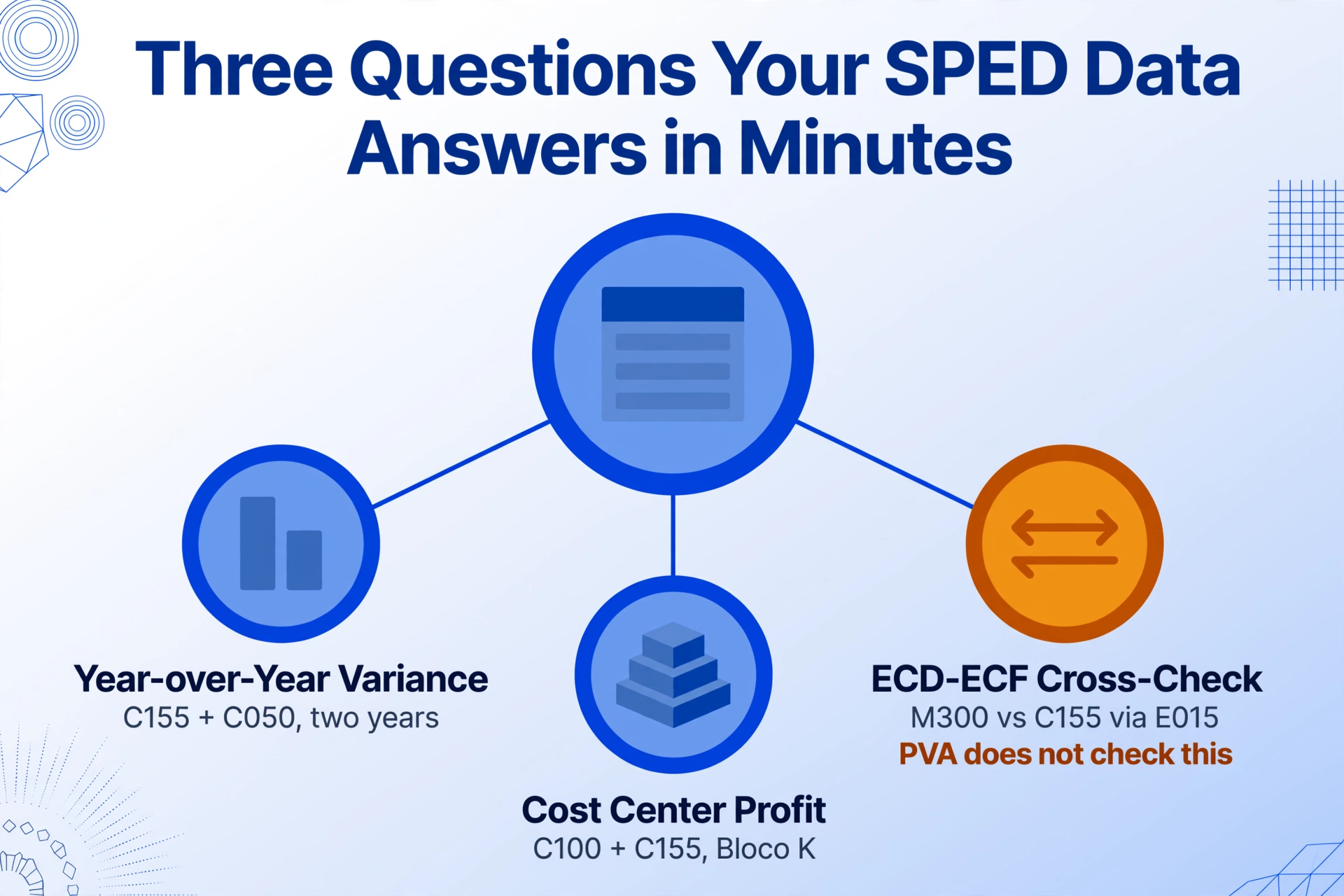
1. Year-over-year account comparison. "Did our administrative expenses increase more than revenue this year? Which accounts drove the biggest variance?" These questions require extracting the trial balance (C155 records) from the current and prior year's ECD, aligning account codes from the C050 chart of accounts, and building a variance table. In a purely manual workflow, this means opening two .txt files, filtering two datasets, and stitching them together in a third spreadsheet — with each step introducing transcription risk.
2. ECD–ECF cross-validation. "Do the tax adjustments recorded in the ECF's e-Lalur match the accounting provisions we made in the ECD?" The ECF Bloco M records (M300 for IRPJ adjustments, M350 for CSLL adjustments) reference specific accounting accounts from the ECD. Verifying consistency between the two files means extracting the ECD's closing balances (C155), mapping them through the E015 cross-reference table in the ECF, and comparing against the M300 adjustment values. This is the single most important compliance check in the annual SPED cycle, and the PVA performs no cross-file consistency analysis.
3. Cost center profitability. "Which business unit or department generated the most profit? How did each cost center's overhead change compared to budget?" Companies that tag their accounting records by cost center in Registro C100 can extract profit-and-loss data per center. In a raw ECD file, this requires cross-referencing C100 cost center definitions with C155 account balances — two different Registro types with different field layouts — and building a pivot table manually.
These three scenarios share a common pattern: the data exists, in complete detail, across one or two SPED files. The work is not in collecting the data — it is in restructuring it from its Registro-oriented layout into an analysis-oriented layout.
How AI Extraction Changes the SPED Data Workflow
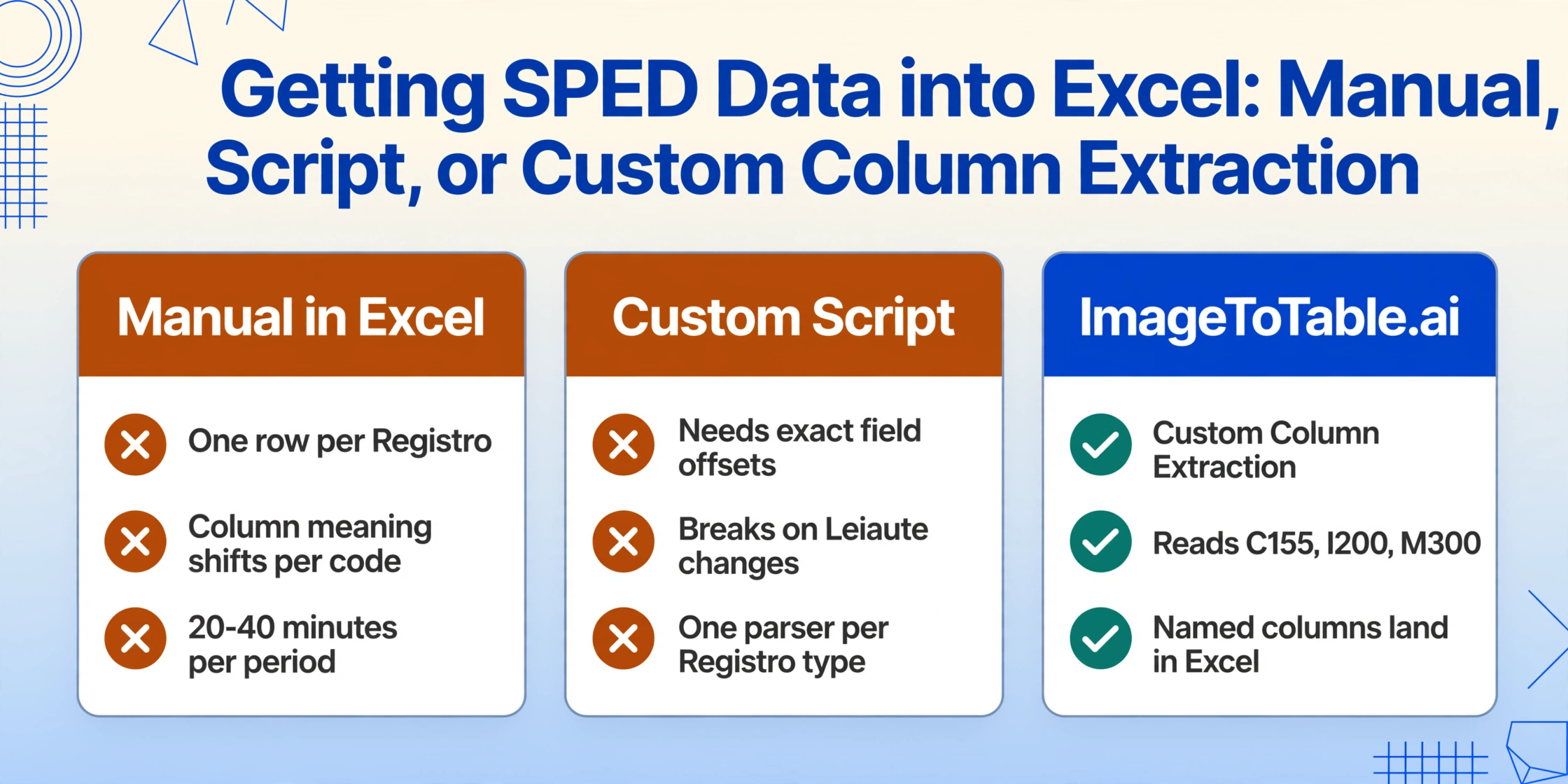
Traditional approaches to SPED data extraction fall into two camps: custom scripts that parse specific Registro types, or manual text-to-columns in Excel. Both require someone who understands the layout specification — the exact field positions of C155 versus I200 versus M300 — and both break when the layout changes (from Leiaute 8 to 9, for instance, or when a company adopts departmental books in Bloco K).
Custom Column Extraction — the paradigm that ImageToTable.ai uses — takes a fundamentally different approach. Instead of parsing by format specification, it reads the visual structure of the document by understanding what each column header means semantically. You define the output you want by naming the columns: "Account Code," "Account Name," "Opening Balance," "Debit Movement," "Credit Movement," "Closing Balance." The AI locates these values in the ECD's C155 records by understanding that "|C155|" introduces a trial balance line and that the fixed-width fields within it correspond to these accounting concepts — not because it was programmed with the exact byte offsets of Leiaute 9, but because it reads the structure the way an experienced contador would.
This has three practical advantages for SPED data:
It works across Registro types. The same tool that extracts trial balances from C155 records can extract journal entry lines from I200/I250 or tax adjustments from M300/M350 — you just change the column names to match what you need from that Registro. You do not write a separate parser for each Bloco.
It handles layout changes. When the Receita Federal updates the layout specification (as happened with the transition to Leiaute 9 in 2020), a script-based parser needs code changes. Semantic extraction adapts because it reads the content, not the byte offset. The same column definition that worked for last year's file works for this year's.
It isolates what you need. You are not importing the entire 100,000-line ECD into Excel and filtering manually. You tell the AI which data you want — "extract the trial balance with account code, name, opening balance, and closing balance from C155 records" — and you get only those rows, in a clean table with your column names as headers.
Step-by-Step — Extracting SPED Data into Excel with ImageToTable.ai
Here is the workflow for turning an ECD or ECF file into an analysis-ready spreadsheet:
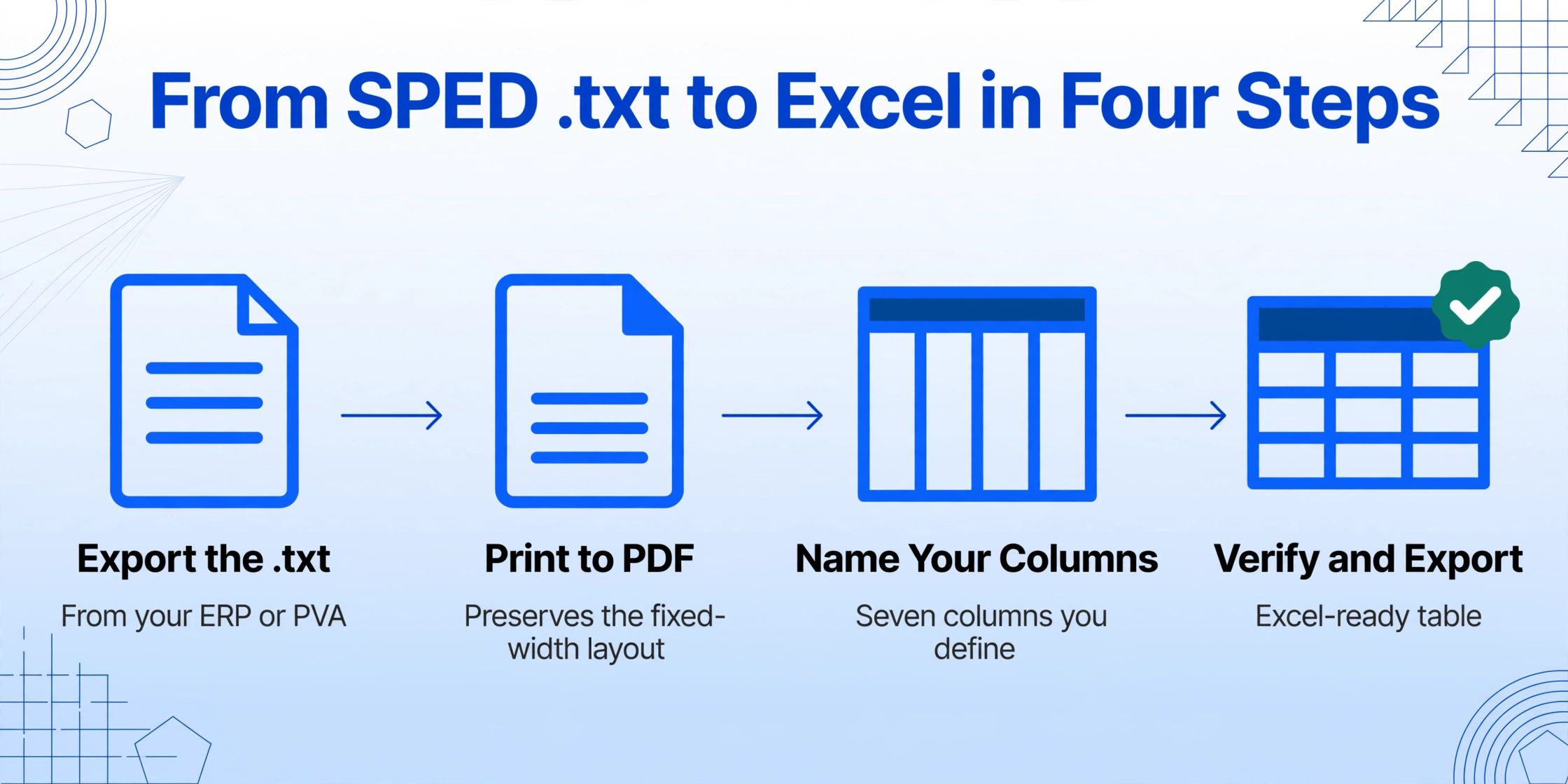
Your ERP (Omie, Conta Azul, Senior, Domínio, or SAP TDF) can generate the ECD/ECF .txt file through its SPED export module. Alternatively, use the PVA to export the validated file. The file is a plain .txt with pipe-delimited fixed-width fields — no encryption, no special encoding, just UTF-8 text with Registro-prefixed lines.
ImageToTable.ai accepts PDFs, JPGs, PNGs, and WebP inputs. Since the ECD/ECF is a .txt file, the practical approach is to open it in a viewer that prints or renders it as PDF (most accounting systems and the PVA support "Print to PDF"), or take screenshots of the relevant sections. For a full ECD analysis, a PDF conversion of the entire file preserves the fixed-width layout that the AI reads.
Tell the tool what you want to extract. For a trial balance extraction from the ECD, your columns would be: Registro Type, Account Code, Account Name, Opening Balance, Debit Movement, Credit Movement, Closing Balance. For an ECF e-Lalur extraction from Bloco M: Registro Type, Account Code, e-Lalur Part A Adjustment, Adjustment Type, Reference Process Number. The column names you enter become the headers of your final table.
The AI processes the file and returns data matching your defined columns. Review the output to verify accuracy — the Bbox review mode lets you hover any extracted cell and see exactly which line in the SPED file the value came from. If a column didn't return the data you expected, adjust the column name and re-run; semantic extraction improves with more precise column descriptions.
Download the result as a .xlsx file. Each Registro type you extracted becomes a clean table with your column headers. Run your year-over-year variance analysis, ECD↔ECF cross-check, or cost center profitability breakdown directly in Excel. Repeat the process for the prior year's ECD to build your comparison dataset — the column definition you used this year works identically on last year's file.
The full cycle — from opening the .txt to having a structured Excel table — takes under two minutes once the column definitions are set. For recurring analyses (each year's ECD produces the same Registro structure), you save the column definitions as a template and reuse them next year without re-entering anything.
Real Analysis Questions You Can Answer with Extracted SPED Data
Once your ECD and ECF data is in structured Excel tables, the analytical possibilities open up beyond what the raw .txt file supports. Here are common questions that become answerable in minutes rather than hours:
"Did our gross margin change year over year, and if so, which accounts drove the change?"
Extract C155 trial balances from two consecutive ECD files. Filter revenue accounts (nature 01) and cost-of-sales accounts (nature 03) by the Plano de Contas Referencial classification from C050. Build a year-over-year variance table in Excel showing each account's opening and closing balance, movement, and the percentage change.
"Do the e-Lalur adjustments in our ECF match the accounting provisions in our ECD?"
Extract M300 records from the ECF (e-Lalur Part A adjustments) and C155 records from the ECD (trial balance). Use the E015 mapped accounts table in the ECF to cross-reference account codes between the two files. Each M300 adjustment should trace back to a corresponding accounting entry in the ECD. Flag any adjustment that exceeds 5% of the accounting provision without supporting documentation.
"Which cost center had the highest expense growth, and is it within budget?"
Extract C100 (cost center definitions) and C155 (trial balance with cost center dimension) from the ECD. Pivot by cost center code, aggregate expense accounts, and compare against the prior year's extracted data. Companies with departmental P&L tracking in Bloco K can pull additional granularity from K-specific records.
"What is our effective IRPJ and CSLL rate, and how did tax adjustments affect it?"
Extract ECF Bloco E (recovered ECD data) to get the accounting profit basis. Extract Bloco M (e-Lalur/e-Lacs adjustments) to see which permanent and temporary differences were applied. Calculate the effective rate as (IRPJ + CSLL due) / (accounting profit before tax ± permanent adjustments). Compare against the statutory rate (25% IRPJ + 9% CSLL = 34%) to quantify the impact of tax planning and incentives.
Key insight: The difference between "we filed the SPED" and "we understand what the SPED tells us about our business" is the ability to restructure the data from the Registro-oriented layout of the PVA into a question-oriented layout. Once the data is in Excel, you can ask the questions that matter for management, not just compliance.
Frequently Asked Questions
Q: Can ImageToTable.ai process the ECD/ECF .txt file directly?
The tool accepts PDF, JPG, PNG, and WebP inputs. For .txt files, open the SPED file in a viewer or the PVA and print to PDF — or take screenshots of the sections you need. The fixed-width layout of the SPED format is visually consistent, so a PDF conversion preserves the structure that the AI reads. If your accounting system can render the ECD as a report, that PDF works well too.
Q: Is the ECD layout the same every year?
Leiaute 9 has been the active layout since the 2020 tax year, with periodic field-level updates published through ADE Cofis rulings (most recently ADE Cofis nº 1/2026 in May 2026). The Registro structure (C050, C155, I200, etc.) has been stable. Leiaute 9 applies to all tax years from 2020 onward — the Receita Federal confirmed no layout change for 2025. ECF Leiaute 12 is the current version, updated May 2026.
Q: Can I extract ECF data without the ECD?
Yes, the ECF is a standalone file that contains its own recovered accounting data in Bloco E. But the most valuable analysis comes from cross-referencing the two — comparing the ECD's accounting balances against the ECF's tax adjustments. The ECF's Bloco M (e-Lalur/e-Lacs) is where tax planning decisions appear, and those decisions only make sense in the context of the underlying accounting data from the ECD.
Q: Does this work for companies on Lucro Presumido?
Yes, with a smaller scope. Lucro Presumido companies still file ECD and ECF, but the ECF's Bloco M covers only the presumed profit calculation — there is no e-Lalur with permanent and temporary differences. The ECD extraction (trial balance, journal entries) works identically regardless of tax regime, since ECD is accounting-focused, not tax-optimization-focused.
Q: What about Simples Nacional companies — do they need to extract SPED data?
Simples Nacional companies are exempt from ECD and ECF filing under IN RFB 2.003/2021 and 2.004/2021. If they maintain optional digital bookkeeping, the same extraction approach applies, but there is no mandated SPED submission to drive the workflow. Most Simples companies work with simpler record-keeping requirements.
Q: What are the penalties for missing the ECD or ECF deadline?
ECD late filing carries a penalty of R$5,000 per month. ECF late filing is R$500 per month (minimum R$1,500) for Lucro Real entities. These penalties are assessed automatically by the Receita Federal's validation system and escalate quickly for companies with higher revenue. The 2025 ECD deadline was June 30; ECF is July 31. Companies should confirm deadlines annually, as extensions (like the May-to-June shift in 2025) are not guaranteed.
Beyond Compliance — Making SPED Data Work for Your Business
A completed SPED submission means your company is compliant with the Receita Federal. It does not mean you have extracted maximum value from the data your accounting system produced all year. The ECD and ECF files together represent the most complete, most detailed financial record of your company's fiscal year — more granular than the annual financial statements, more structured than the ERP's ad-hoc exports.
The gap between "data exists" and "data is usable" is not a technology gap. The extraction technology exists — the same semantic AI that extracts invoice line items from a PDF can extract trial balances from an ECD file, because both problems reduce to the same fundamental operation: you define the columns you need, and the AI reads the document to find and extract them. The gap is a workflow gap: the expectation that if a file is machine-readable, it must be analysis-ready. For SPED files, that assumption is wrong — and fixing it is a matter of minutes per file, not hours.
The next time your contador asks for a year-over-year account comparison or an ECD–ECF variance explanation, the answer is not "I'll open the .txt and start filtering." The answer is already structured, extracted, and sitting in an Excel table — produced in the time it takes to define your columns once.