The Complete Guide to
Brazilian Boleto Bancário Data Extraction
If your finance team receives payments from Brazil, you will encounter the Boleto Bancário — a regulated payment slip that is simultaneously one of the most structured financial documents in the world (every 44-digit barcode follows an unbreakable standard) and one of the most tedious to process manually (someone still has to open each PDF and type its data into a row). This guide covers everything an AR or finance operations team needs to know about extracting data from Boletos: the document structure, the key fields, the difference between registered and unregistered slips, and how modern extraction tools eliminate the manual step.
Key Takeaways
- The Boleto Bancário follows a single national standard — every 44-digit barcode positions the amount in digits 10–19 — yet most teams still read each one with human eyes.
- That same standard lets any bank scanner validate a payment in milliseconds. It can also let you extract 500 lines of AR data in one pass.
- The tool to read the barcode already exists — it is the document itself. The missing piece is a workflow that treats it as a structured data carrier instead of a PDF to type from.
What Is a Boleto Bancário?
A Boleto Bancário — commonly called a Boleto — is a regulated Brazilian payment instrument created in 1993 and administered by the Central Bank of Brazil (Banco Central do Brasil) under the FEBRABAN (Federação Brasileira de Bancos, or Brazilian Federation of Banks) standard. It functions as both an invoice and a payment slip: the beneficiary (beneficiário) issues it through their bank, and the payer (pagador) uses the printed or digital slip to make a payment at any of over 200,000 locations across Brazil — bank branches, ATMs, lottery agencies, supermarkets, post offices, and online banking portals.
With approximately 3.7 billion Boleto transactions processed annually, this is not a niche payment method. It accounts for a significant share of Brazilian e-commerce and B2B payments, and it remains essential for the estimated 50 million unbanked Brazilian adults who rely on Boletos as their primary online payment method. In cross-border e-commerce, according to Statista data, 68% of Brazilian consumers use Boleto Bancário when purchasing from international merchants.
The Boleto's most important characteristic, from a data extraction perspective, is that it is highly standardized. Every Boleto — regardless of the issuing bank, the amount, or the payer — follows the same structural rules defined by FEBRABAN. This is the feature that makes automated extraction feasible, and it is also the feature that most manual processing workflows fail to exploit.
Key distinction for AP teams: A Boleto is different from a Nota Fiscal Eletrônica (NF-e), which is Brazil's electronic invoice for goods transactions. The NF-e is a government-authorized XML document issued before goods leave the supplier; the Boleto is a payment slip that may (or may not) be linked to an NF-e. If you are new to Brazilian financial documents, see our beginner's guide to NF-e for the full picture.
Anatomy of a Boleto: Every Field You Need to Extract
A typical Boleto contains the following data fields. Some are encoded in the barcode, some appear in the visual text, and some appear in both places. For reconciliation and AR tracking, these are the fields that matter.
| Field | Portuguese Label | Location on Boleto | Format / Notes |
|---|---|---|---|
| Barcode | Código de Barras | Top center, 44 digits | FEBRABAN standard. Contains bank code, currency, maturity factor, amount, and free field. |
| Readable line | Linha Digitável | Below barcode, 47 digits | Same data as barcode, formatted for manual entry at ATMs and banking apps. |
| Beneficiary | Beneficiário / Cedente | Upper-left section | Name + CNPJ (CNPJ/CPF do Beneficiário) of the payment recipient. |
| Agency / Beneficiary code | Agência / Código do Beneficiário | Below beneficiary name | Bank branch and account. Format: 9999-D/9999999-D. |
| Due date | Data de Vencimento / Vencimento | Central area, near amount | DD/MM/YYYY format. Key field for aging and protesto tracking. |
| Amount | Valor / Valor do Documento | Alongside due date | In BRL (R$). Uses Brazilian decimal notation: R$ 1.234,56. |
| Payer | Pagador / Sacado | Lower section, below beneficiary | Name + CPF (individual) or CNPJ (company). |
| Bank reference | Nosso Número | Below barcode area | Bank's internal identification number. Varies in length by bank. |
| Document number | Número do Documento | Near Nosso Número | Invoice or contract reference — the link back to the original transaction. |
| Portfolio | Carteira | Near bank details | Identifies the Boleto collection type (e.g., "17" for simple register). |
| Issue date | Data de Emissão | Top or bottom margin | When the Boleto was generated. |
| Payment date | Data do Pagamento | Filled by bank after payment | Only appears on paid Boletos or settlement reports. |
Most AR teams focus on a subset: barcode (unique identifier), due date (aging), amount (expected value), beneficiary (destination), payer (source), and Nosso Número (bank reference). These six fields provide the data needed to match against bank settlement reports and populate aging schedules.
Understanding the 44-Digit Barcode vs. the 47-Digit Linha Digitável
Every Boleto carries two machine-readable representations of the same payment data. They look different, contain different check digits, and are used in different contexts — but they encode the same core information.
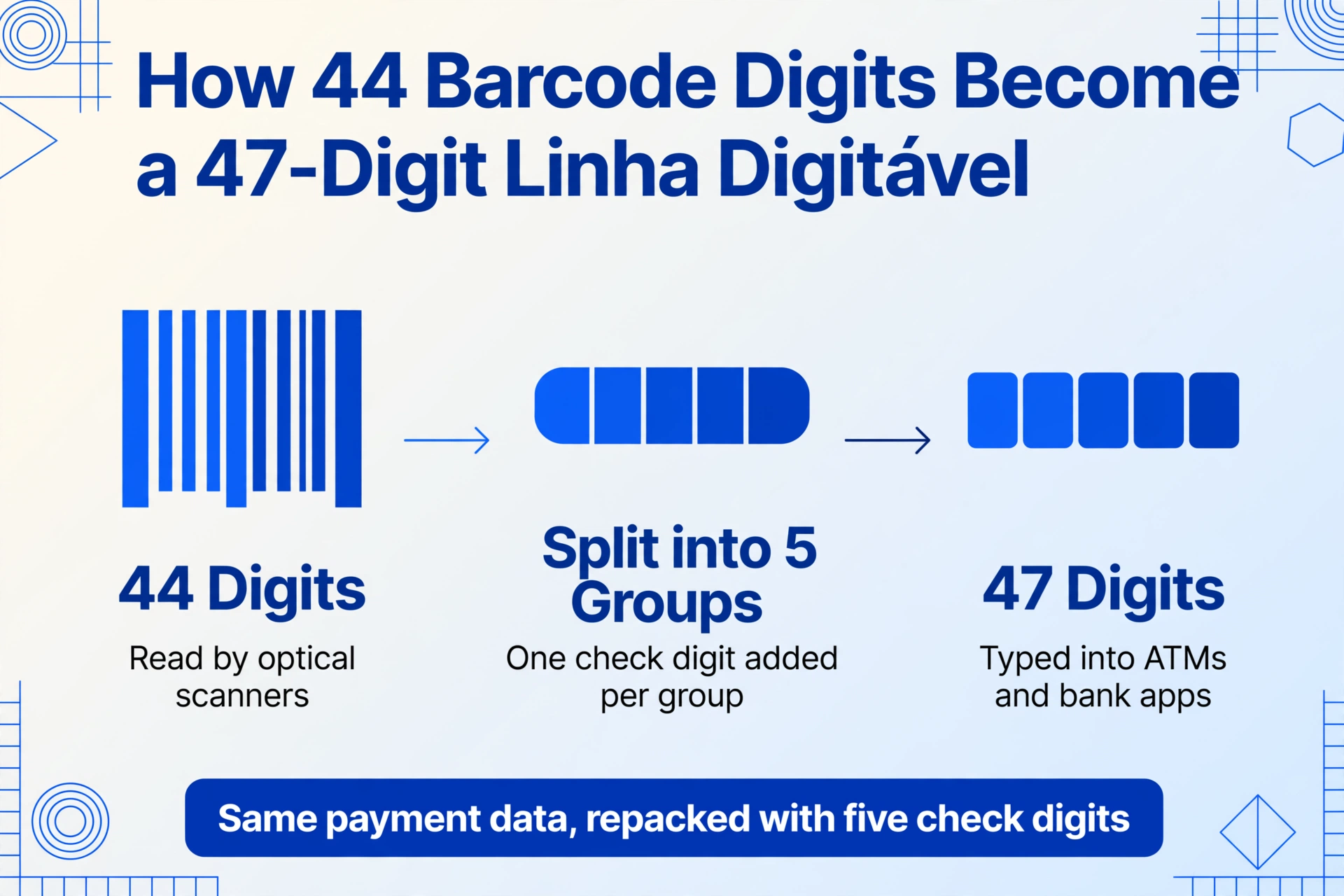
The 44-digit barcode (código de barras) is the primary machine-readable code, designed for optical scanning. Its structure is defined by the FEBRABAN barcode layout standard (Layout - Código de Barras - Versão 7):
- Positions 01–03: Bank identification code (e.g., 001 = Banco do Brasil, 104 = Caixa, 237 = Bradesco, 341 = Itaú, 033 = Santander)
- Position 04: Currency code (9 = Brazilian Real)
- Position 05: General check digit (DAC — Dígito de Auto-Conferência, or self-check digit)
- Positions 06–09: Maturity factor — a count of days since the FEBRABAN epoch base date. Used to calculate the due date. (Note: this field reset in February 2025 after reaching 9999, so systems must handle the "Boleto Y2K" correctly.)
- Positions 10–19: Amount in centavos (e.g., 0000050000 = R$ 500.00). If no amount is specified, this field is zero, and the value is written on the visual slip.
- Positions 20–44: Free field (campo livre) — bank-dependent. Contains the Nosso Número, Agência/Código do Beneficiário, Carteira, and other data the issuing bank needs to route the payment.
The 47-digit readable line (linha digitável) is the human-readable format printed below the barcode. It takes the same 44 barcode digits, splits them into five groups, and inserts check digits for each group after positions 09, 20, and 31 (for bank Boletos). For utility payments (concessionárias), the format uses 48 digits instead and follows a slightly different structure.
For extraction purposes, the barcode is usually the most reliable source of truth. It contains the standardized data without the visual layout variations that different banks introduce in the printed slip. A well-designed extraction tool reads the barcode when it is legible and falls back to the visual text for fields that only appear in the printed area (such as beneficiary name payer data).
The Key Differences: Registered vs. Unregistered Boletos
Since FEBRABAN's mandate took effect in 2017 (with phased implementation across banks throughout that year), all newly issued Boletos must be registered with the Central Bank at the point of creation. This change was driven by fraud: fraudsters would alter the barcode on unregistered Boletos, diverting payments to their own accounts, and the lack of registration made it difficult for merchants to contest the misdirected payment.
Boleto Registrado (registered): The issuer registers each Boleto with the Central Bank at creation. The bank validates the Boleto data (beneficiary, amount, barcode) against the registration before accepting payment. This eliminates the barcode-tampering fraud vector. Registered Boletos give merchants the ability to file an official objection if payment goes astray.
Boleto sem Registro (unregistered): No Central Bank registration at issuance. The bank processes payment based purely on the barcode data, with no pre-validation against a registered record. Unregistered Boletos are less common now but remain in circulation for certain legacy arrangements.
From a data extraction perspective, the practical difference is small. The visual layout and barcode structure are the same. The key operational difference is that registered Boletos carry a Central Bank registration number that can be recorded for audit purposes, and the bank's settlement report may include a confirmation that the payment was validated against the registered record.
Manual Extraction: The Old Way (And Its Hidden Costs)
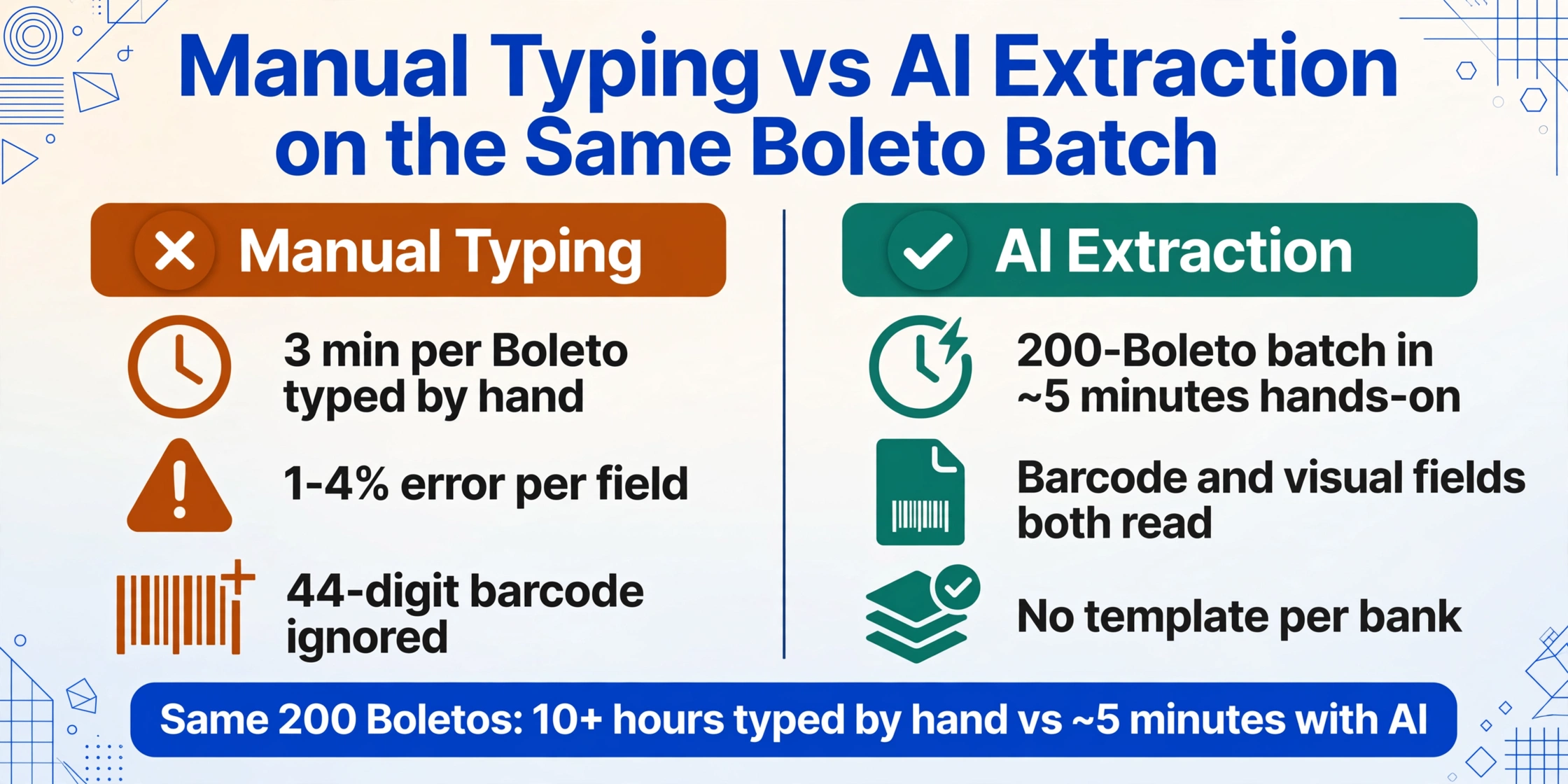
Despite the Boleto's highly standardized structure, the most common extraction method in use today is manual: open the PDF, read the six key fields, type them into a spreadsheet row. This process takes approximately 3 minutes per Boleto for a trained AR analyst — locating the PDF, finding each field, typing it into the correct column, and moving to the next document.
At 500 Boletos per month, that is 25 hours of data entry. The direct labor cost — at roughly R$ 20 per hour fully loaded — is R$ 500 per month. But the hidden costs are larger: the error rate (1-4% per field, industry benchmark), the reconciliation time spent investigating those errors, and the delayed month-end close when data entry competes with other priorities.
The manual method also fails to exploit the Boleto's most valuable feature: the 44-digit barcode contains the same data in a machine-readable format. The information typed from the visual slip is already encoded in the barcode at the top of the same page. The manual method reads the visual fields, ignores the barcode, and re-types data that the document itself provides in a structured form.
For a detailed cost analysis, see our article on what manual Boleto processing actually costs per transaction.
AI-Based Extraction: What Changes When the Tool Reads the Document
AI-based extraction — specifically, visual large model (VLM) extraction — approaches the Boleto differently than either manual reading or traditional OCR. Instead of trying to "read" each character (OCR) or match a template position (zonal OCR), a VLM-based tool understands the document semantically: it sees the barcode and recognizes it as "this is a barcode," reads the digits, and maps them to the correct fields. It sees the text "R$ 1.500,00" near "Valor" and knows that this is the amount.
This semantic approach matters for Boleto extraction because different banks print the same FEBRABAN fields in slightly different visual positions. Bradesco's Boleto layout is not identical to Itaú's, even though both carry the same data. A traditional template-based tool would require a separate template configuration for each bank. A VLM-based tool reads the fields by their meaning and relationship to labels, not by their pixel coordinates — so the same tool works across all issuing banks without configuration.
Custom Column Extraction is the mechanism: you define the output columns you want — Barcode, Due Date, Amount, Beneficiary, Payer, Nosso Número — and the AI locates the corresponding data in each Boleto, regardless of bank, layout, or resolution. The column names you enter become the headers of your output table. This means you define the data structure once, and it applies to every Boleto in every batch.
Files are processed securely and not stored.
Building Your Boleto Extraction Workflow
Implementing automated Boleto extraction does not require overhauling your existing AR process. The workflow fits into the gap between "Boleto PDF received" and "data in spreadsheet" — a gap that currently requires manual typing.
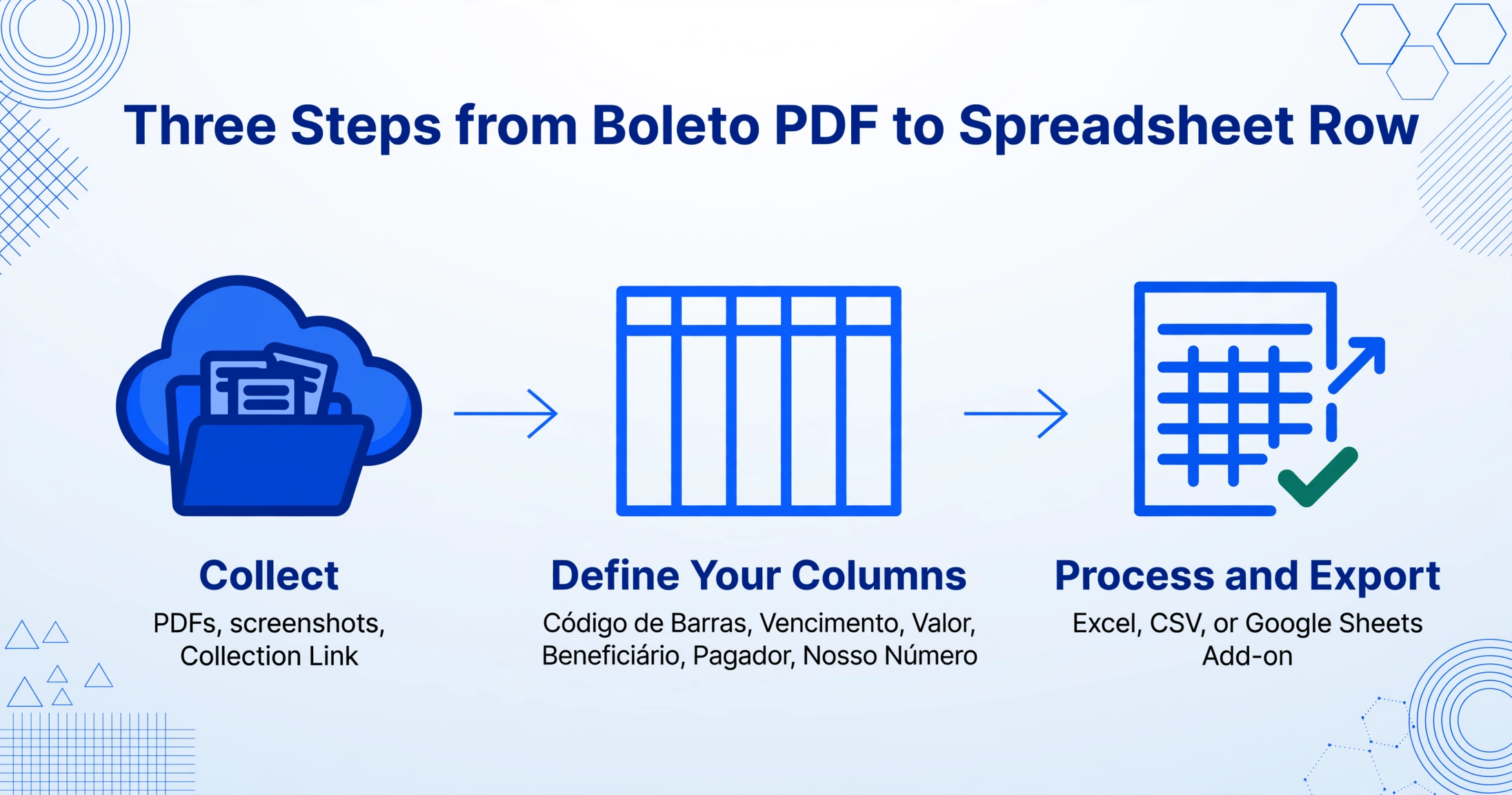
Whether they arrive by email, are downloaded from a banking portal, or come through a Collection Link that lets payers upload their paid slips, gather all PDFs or screenshots into one place. No pre-processing needed — the extraction tool handles PDFs, images, and their various resolutions.
Specify the data points your AR workflow needs — typically Código de Barras, Vencimento, Valor, Beneficiário, Pagador, and Nosso Número. These become your spreadsheet headers. The AI reads every Boleto in the batch and fills in the values.
The AI processes all files concurrently. Each Boleto becomes one row in the output. When the batch completes, export a single Excel (.xlsx) or CSV file with every Boleto's data. For Google Sheets users, the Google Sheets add-on writes results directly into the active sheet, skipping the export step.
The hands-on time for a 200-Boleto batch is roughly 5 minutes — upload, define columns, click process, download. The remaining work is automated. Compared to 10+ hours of manual data entry for the same volume, the time difference is not incremental; it is categorical.
For a step-by-step walkthrough of the process, see how to extract Boleto Bancário data to Excel.
Frequently Asked Questions
Can AI extraction read both the barcode and the visual fields on a Boleto?
Yes. A visual AI model reads the entire document — the barcode digits are recognized as text, and the visual fields (beneficiary name, payer, etc.) are extracted from the printed areas. The tool does not rely solely on barcode parsing; it reads what is on the page, wherever it appears. This dual approach means that even if the barcode is partially obscured or damaged, the visual fields can still be extracted.
Does extraction work for Boletos that have been paid and carry bank stamps or annotations?
Yes. Paid Boletos often carry a "PAGO" stamp, a payment date stamped by the bank, and sometimes handwritten annotations. The AI handles these as additional visual elements. The payment date stamp can be extracted as a separate field if your workflow tracks when payment actually occurred. Handwritten annotations are recognized if legible.
What about Boletos encrypted with a bank password?
Some banks send Boleto PDFs with a password for security. The extraction tool supports password-protected PDFs. You can pre-save commonly used passwords (such as the beneficiary's CNPJ) in your account settings, and the tool will try them automatically when processing encrypted files. This is covered by the Email Inbox feature — just forward the encrypted PDF and the password is tried automatically.
How does Boleto extraction handle amounts in Brazilian decimal format (R$ 1.234,56)?
The AI reads the amount as it appears on the document (R$ 1.234,56) and normalizes it to a standard decimal format in the output. You can choose the output format — either retain the Brazilian convention (1.234,56) or convert to the international convention (1234.56) for ERP import. The same normalization applies to dates (DD/MM/YYYY).
Can I use extraction for both incoming payment reconciliation (AR) and outgoing payment processing (AP)?
Yes, the extraction workflow is the same regardless of direction. For AR, you extract data from Boletos your company has issued to track incoming payments. For AP, you extract data from Boletos received from suppliers to record the amounts and due dates for payment scheduling. The column definitions differ — AR needs payer information, AP needs beneficiary information — but the tool handles both. If you are new to Brazilian financial documents overall, our NF-e guide covers the companion document to Boletos in the AP context.
The Standard Is Already There. The Question Is Whether Your Workflow Uses It.
The Boleto Bancário was designed to be machine-readable. Every 44-digit barcode, every 47-digit readable line, every structured field on the visual slip follows a national standard that has been maintained and updated for over three decades. The data is there, waiting to be extracted. The only missing piece has been a tool that treats the Boleto as what it is — a structured data carrier — rather than as a PDF that must be opened and typed by hand.
AI-based extraction bridges that gap. It does not change the Boleto. It changes what happens between receiving the PDF and entering the data into your AR system — turning a 3-minute typing task into a sub-second operation that scales across 10 or 10,000 Boletos with the same effort.
Test extraction on your own Boleto files.
Upload any Boleto Bancário PDF or screenshot and get structured data back in seconds — no sign-up required.
Upload a Boleto