Can AI Extract Shipping Label
& Manifest Data? What Works, What Doesn't
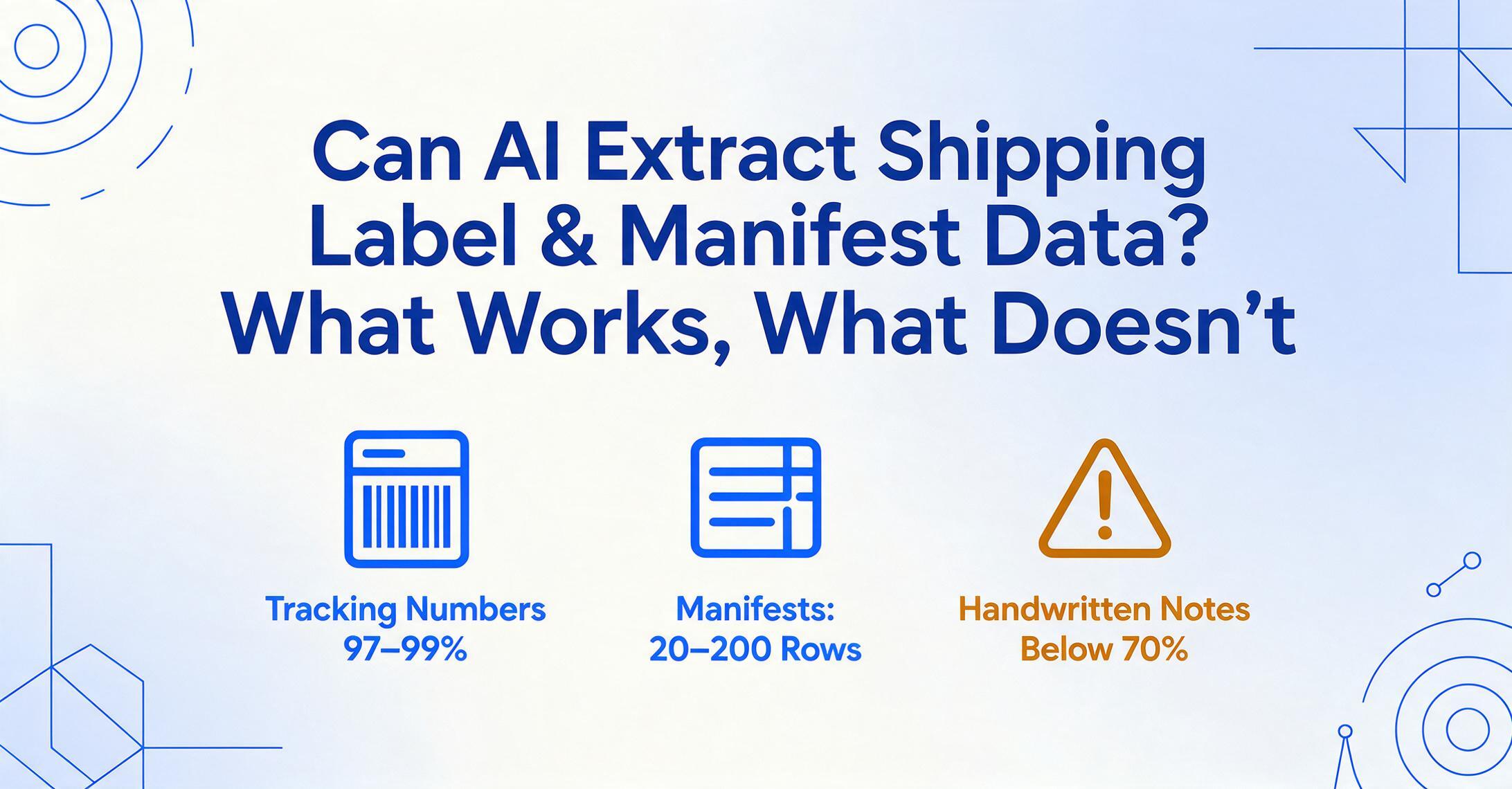
Yes — modern vision AI extracts shipping label data with high accuracy on printed fields, and handles multi-row manifest tables without per-carrier template setup. But the confidence range is wide: tracking numbers and barcode-decoded strings run above 97%, while handwritten weight annotations, service-level abbreviations, and fragmented manifest cells drop to 70–85%. The real question is not "can AI do it" but "which fields can you trust without manual verification."
Key Takeaways
- Tracking numbers on printed labels hit 97-99% extraction accuracy — higher than a tired human at hour six of manual entry.
- On a batch of 50 labels and 3 manifests, 88-94% of fields extract correctly with zero human intervention. Fixing the remaining 6-12% takes 5-15 minutes instead of 60-120.
- The real challenge with manifests is not reading text but maintaining column alignment — 200 rows across 12 pages where a single field shift cascades through the entire document.
Before we split the answer into labels versus manifests, one distinction matters: traditional OCR and semantic AI extraction handle these documents very differently. A template-based OCR tool that works on FedEx Ground labels will fail on a UPS Air label or a DHL eCommerce label, because each carrier positions fields in different quadrants. Semantic extraction — the approach where the AI reads a field by what it means, not where it sits — handles multiple carrier formats without per-vendor configuration. That difference is the foundation for everything below, and it's covered in depth in our comprehensive OCR for logistics guide.
Shipping Labels: Field-by-Field Accuracy Breakdown
A standard shipping label — whether from UPS, FedEx, USPS, or DHL — carries 8–12 extractable data points compressed into a space smaller than an A5 page. The density is the challenge: a 4″ × 6″ thermal label might contain a tracking number, a barcode, two address blocks, a service-level indicator, package weight, ship date, and reference fields, all separated by visual guides rather than labeled boxes.
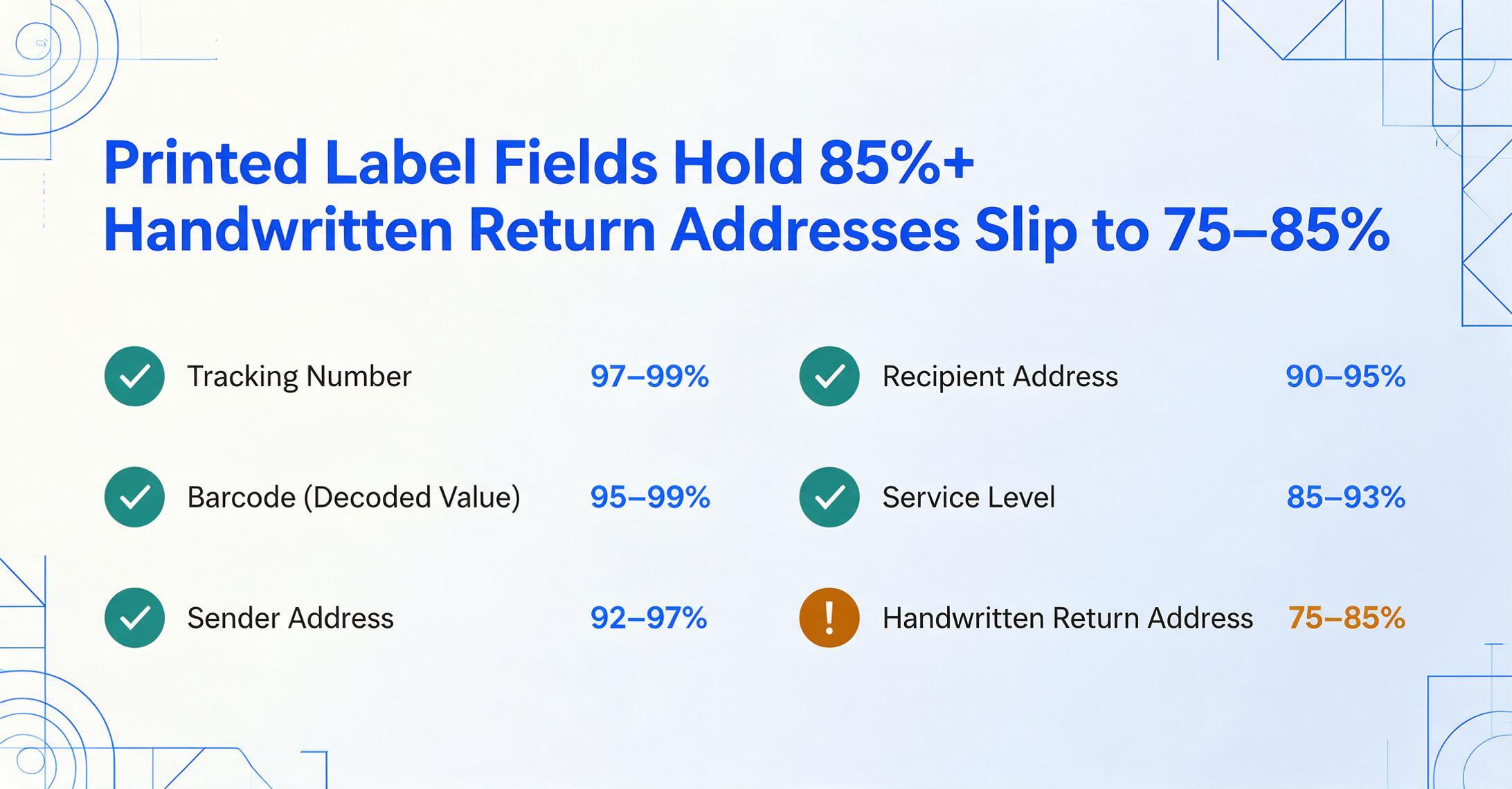
Here is the field-level accuracy profile for semantic AI extraction on typical carrier-printed shipping labels (printed text, good image quality):
| Field | AI Accuracy Range | Why This Range |
|---|---|---|
| Tracking number | 97–99% | Alphanumeric with check digits; carrier prefixes (1Z, 9361, GM) are predictable patterns. AI models recognize these as structured codes, not free text. |
| Barcode (decoded value) | 95–99% | Vision models detect barcode regions and pass them to decoding. The text value inside the barcode often matches the printed tracking number — a useful cross-validation signal. |
| Sender address | 92–97% | Typically printed in consistent typeface. Printed return addresses on thermal labels are among the most reliable fields. Handwritten return addresses drop to 75–85%. |
| Recipient address | 90–95% | Same as sender for printed text, but sometimes the destination label is applied over a previous label, creating a shadow or partial occlusion that degrades accuracy. |
| Service level (Ground, 2-Day, Express, etc.) | 85–93% | Service indicators vary wildly — UPS uses a checkbox grid, FedEx uses a colored bar with text, USPS uses a class description. AI must interpret both the label and its visual context. Carrier abbreviations ("PRI" vs "Priority") add ambiguity. |
| Package weight | 85–95% | Printed weight fields are reliable. Handwritten weight corrections (common at dispatch counters) are the main failure point — a "2.5" scribbled over a "2.0" is hard for any AI to parse confidently. |
| Ship date | 90–96% | Dates appear in multiple formats (06/30/2026, 30-JUN-2026, 2026-06-30). Semantic AI normalizes these well, but some carriers print the ship date in the same format as the tracking number, in close proximity — the AI must distinguish them by label context, not format. |
| Reference fields (PO#, Dept#, Customer Ref) | 80–90% | Reference numbers are carrier-specific and often merged into a generic "Reference" field. When the label says "Ref: 54829-12" the AI extracts the string correctly, but whether that string maps to a PO number, a customer reference, or an internal invoice number depends on the context. |
The headline number — printed fields at 90%+ — is consistent with the general accuracy benchmarks for modern vision AI vs traditional OCR. The key insight for logistics teams is that tracking numbers and addresses are essentially solved problems for printed labels, while service-level indicators and reference fields still require spot-checking.
The Barcode Question: Does AI Get Confused?

This is the concern logistics professionals raise most often: a shipping label is a dense field of mixed visual elements — text, barcodes, QR codes, checkboxes, carrier logos — all packed into a small space. Won't the AI try to "read" the barcode as text and produce garbage output that pollutes the rest of the extraction?
The short answer is that vision AI does not confuse barcode regions with text regions — because the visual features of a barcode (alternating bars of variable width with a white quiet zone border) are fundamentally different from the visual features of text characters (strokes, serifs, letter spacing). The AI's visual backbone distinguishes these at the feature-detection layer, not the post-processing layer. The barcode area is identified as "not text" and routed to a separate decoding pathway rather than being fed into the same OCR pipeline.
This distinction matters because it avoids a classic problem with legacy OCR: when a traditional OCR engine encounters a dense Code 128 barcode or a QR code, it often tries to read the bars as characters — producing a line of gibberish symbols that then pollutes any downstream field extraction. The operator then has to edit the gibberish out of the output. Semantic vision AI avoids this entirely by not routing barcode regions to the text decoder in the first place.
The practical result is that you can extract data from a label without worrying that the barcode will cause cascading errors in adjacent fields. The challenge shifts from "barcode pollution" to a different question: whether the AI correctly associates the decoded barcode value with the printed tracking number on the same label. In most cases, they match — the barcode encodes the same tracking number printed above it in human-readable text. When they don't match (a misapplied label or a warehouse repack), the discrepancy is itself a useful flag that human review should investigate.
Where Barcode-Adjacent Text Can Still Trip the AI
While barcode regions are handled correctly, the text printed inside or immediately adjacent to barcode area labels can cause confusion. For example, USPS labels print the tracking number both in human-readable text above the barcode and as the encoded barcode value. Some carriers print a secondary reference number directly beneath the barcode in a smaller font that bleeds into what the AI perceives as the barcode's quiet zone. In these cases, the AI might either:
- Miss the secondary text entirely because it was cropped out of the text-detection region;
- Or, if the distance between the barcode and the text is large enough, identify it correctly but with lower confidence due to proximity to a non-text region.
These edge cases affect roughly 3–5% of labels and are easily caught in a human review pass. The important point is that they are missed data, not wrong data — the AI accurately extracts what it does identify, and flags low-confidence regions for review.
Shipping Manifests: Tabular Data at Scale
Shipping manifests present a fundamentally different extraction challenge than labels. A manifest — whether a carrier's end-of-day pickup manifest, an ocean cargo manifest, or a customs inward manifest — is a multi-row document listing every shipment in a batch, often spanning multiple pages. Where a label is dense but small, a manifest is structured but large: 20 to 200 rows of shipment data, each row containing some or all of the same fields that appear on individual labels.
The field set for a manifest row typically includes: tracking number or PRO number, BOL number, shipper name, consignee name, package count, weight, service class, commodity description, and often HS code and declared value. Inbound cargo manifests governed by 19 CFR § 4.7a additionally require SCAC codes, container numbers, seal IDs, and port of lading — the same data elements customs and AP teams need for freight invoice reconciliation.
The extraction challenge for manifests is tabular row delineation:
- Bordered vs. borderless tables. FedEx daily pickup manifests use explicit grid lines. DHL export manifests often omit borders entirely, relying on vertical whitespace alignment. USPS SCAN manifests (Shipping Container and Marking) use fixed-width columns with header abbreviations. The AI must recognize the table structure in each format before it can extract individual rows.
- Multi-page continuation. A single manifest run can span 8–12 pages. The AI must identify which rows belong to which shipment across page breaks, and whether column headers repeat on each page (they usually do, but not always at the exact same vertical position).
- Aggregate rows. Manifests often include subtotal rows ("Page Total: 15 packages, 28.5 lbs"), grand total rows at the end, and carrier-use-only fields. The AI must distinguish data rows from metadata rows — a classification step that template OCR handles with fixed rules and that semantic AI handles by reading the row label.
- Mixed data density. Some manifest rows carry 5 fields, others carry 15. The AI sees each row's populated cells independently — a row with a package count but no commodity description should result in a null cell, not a shifted-column error that pushes subsequent fields into the wrong column.
On well-structured manifests with explicit grid lines, semantic AI extraction achieves 90–95% row-level accuracy — meaning 9 to 9.5 out of every 10 rows are fully extracted with correctly aligned fields. On borderless or poorly structured manifests, row-level accuracy drops to 75–85%, with column misalignment being the most common failure mode. For the practical workflow that turns a week's worth of labels and a multi-page manifest into one tracking spreadsheet, see our guide on extracting shipping label and manifest data to Excel.
Where AI Still Needs Human Backup
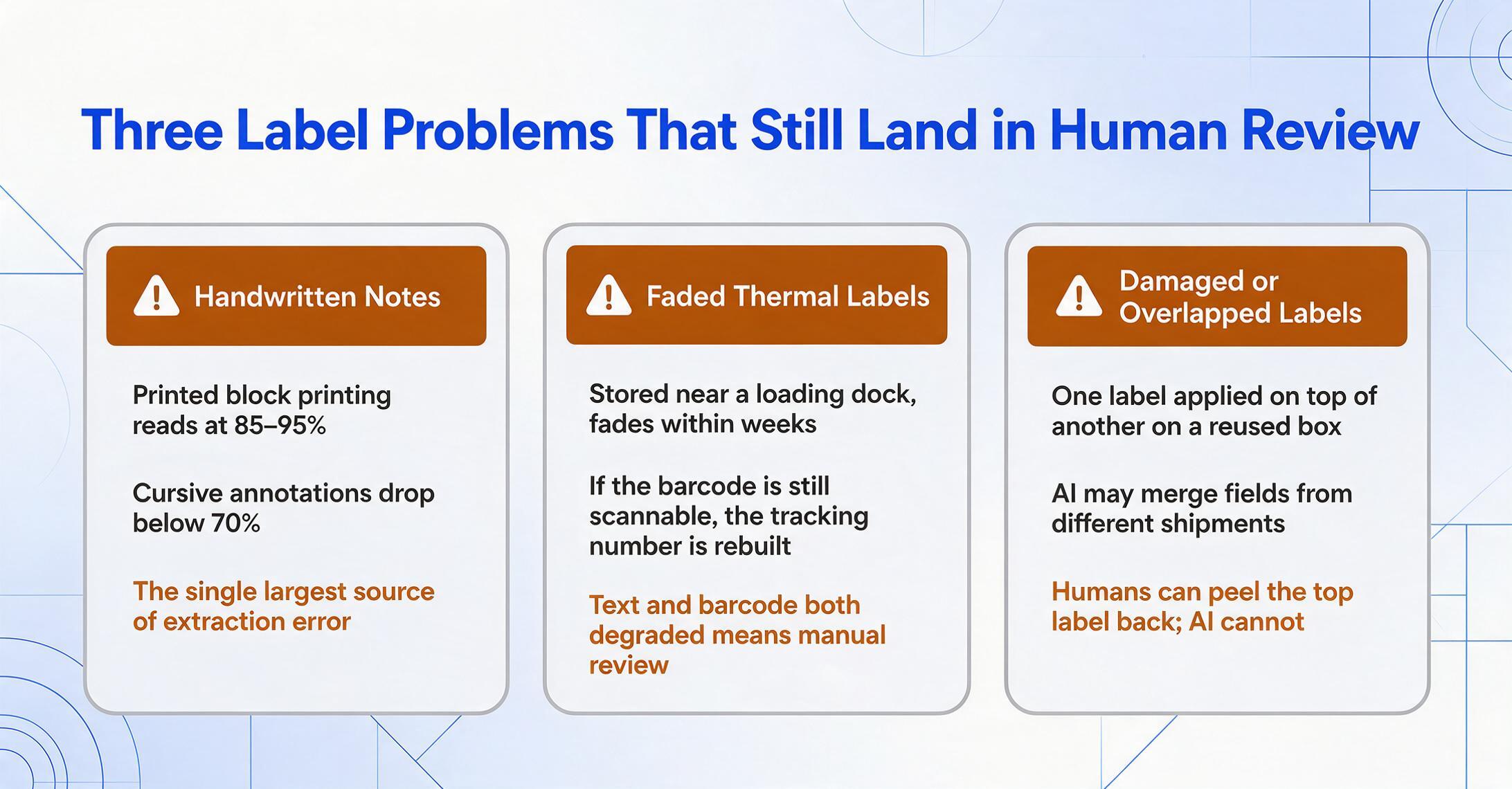
Unsurprisingly, the failure points cluster around the same scenarios that trip up human data entry operators — just at different error margins.
Handwritten annotations. A dispatcher scribbles "RUSH" across a manifest row. A warehouse clerk corrects a weight figure by hand on a thermal label. A driver writes "REFUSED" next to a delivery address. Handwritten text overlaid on printed documents is the single largest source of extraction error, regardless of the AI model. As covered in our AI vs traditional OCR accuracy comparison, handwriting accuracy on clean block printing reaches 85–95%, but cursive annotations scrawled in margins or across existing printed text drop below 70%.
Thermal transfer labels with low contrast. Direct thermal labels fade over time, especially in warehouse environments. A label on a pallet stored near a loading dock in direct sunlight can become unreadable within weeks. If the barcode is still scannable, the AI can reconstruct the tracking number from the decoded value — but if both the printed text and the barcode have degraded, the entire label becomes a manual-review case.
Damaged or overlapped labels. A reused shipping box with two labels — one partially torn off, one applied on top — is the hardest scenario for any extraction tool. The AI may try to read text from both labels, merge fields from different shipments, or miss the valid label entirely. Human operators handle this better because they can physically peel back the top label. AI has no equivalent operation.
Manifest column-header drift. Some carriers generate manifests where the column header appears on page 1 but not on subsequent pages. A semantic AI that learned the column positions from page 1 must track the same positions through pagination. If the PDF rendering shifts column positions between pages (a known issue with some carrier-printing software), the AI's alignment can drift by one field per page, cascading across the entire manifest.
The practical takeaway: On a typical batch of 50 shipping labels and 3 manifests, expect 88–94% of fields to extract correctly with zero human intervention. The remaining 6–12% require between 5 and 15 minutes of review and correction — compared to 60–120 minutes of manual data entry for the same volume. The time saving is real, but the confidence threshold matters: for tracking and routing data (95–99% accuracy), automation can run unchecked. For billing and compliance data (manifest totals, HS codes, declared values), a human review layer is still the safe operating procedure.
Getting the Best Results from Shipping Label and Manifest Extraction
Extraction accuracy on shipping labels and manifests is not a fixed property of the AI model — it is influenced by image quality, how you define your columns, and whether you batch related documents together. A few practical adjustments make the difference between "mostly works" and "reliable enough to deploy."
1. Capture the full label, not a crop. When taking photos of shipping labels at the receiving dock or dispatch counter, include the entire label area plus a small margin. A cropped image that cuts off the quiet zone around a barcode can prevent barcode decoding, and a missing corner might lose the sender address or service indicator. The AI can handle some occlusion, but the margin of error is small on a 4″ × 6″ label.
2. Name your columns semantically. When using Custom Column Extraction — where you type the field names you want and the AI locates matching data by meaning — column names that match how carriers label fields produce better results. "Tracking Number" works on every carrier label because the AI understands the concept. "Sender Name" is more reliable than "From" (which might match the sender address block or the "From" field in a customs declaration). "Service Level" covers both "Service:" and "Class" labels. The AI maps column names to document concepts semantically, not by exact string match.
3. Batch labels and manifests separately. A batch of 30 shipping labels produces a clean spreadsheet with one row per label — each row containing the tracking number, weight, address, and service level for that shipment. A manifest batch produces rows that are already structured as shipment-level data. If you mix the two in one batch, the AI processes each document independently but the output rows will have different field densities (labels have fewer manifest-specific fields like HS codes and container numbers). For cleaner results, run labels and manifests as separate batches. Batch-First Processing — designed to handle multiple documents in parallel and merge them into a single table — works best when the documents in a batch share the same structure.
4. Use the barcode as a cross-validation signal. The tracking number printed on the label should match the decoded value from the barcode. When you define both as extraction columns, you get two independent readings of the same data point. If they differ, that label needs human review — the package may have been relabeled, or the barcode may belong to a different shipment. This automated cross-check catches errors that would otherwise go unnoticed until the package is scanned at the next hub.
5. Run manifests with row-level review. For manifests exported from carrier systems (FedEx Ship Manager, UPS WorldShip, or DHL Express), the PDF is typically machine-generated and highly structured — extraction accuracy on these is 95%+. For hand-compiled manifests, or manifests from smaller carriers where formatting is inconsistent, configure a confidence threshold: any row where the AI's per-field confidence drops below 80% should be flagged for manual verification before the data enters your TMS or freight reconciliation spreadsheet.
Frequently Asked Questions
Can AI extract data from thermal-printed shipping labels with smudged or faded text?
Partially. If the printed text is still legible to a human, most vision AI models can read it at 80–90% accuracy. If the thermal label has faded to the point where text is barely visible, the barcode — if still scannable — is the most reliable fallback path. If both text and barcode are degraded, the label requires human data entry. Use high-quality thermal transfer ribbons and avoid prolonged exposure to direct sunlight or heat sources to maximize label readability.
Does AI extraction work on international shipping labels with non-English sender/recipient addresses?
Yes, though accuracy varies by script. Latin-script addresses (English, French, German, Spanish) are recognized at 90–95% on printed labels. Asian-script addresses (Chinese, Japanese, Korean) drop to 80–88% on the same conditions. The AI extracts the characters correctly but may have lower confidence on character boundaries for CJK scripts because the visual segmentation model was trained predominantly on Latin-character datasets. Multi-script labels — where the sender address is in English and the recipient address is in Japanese — are handled as separate visual regions, not as conflicting language detection, so one side does not interfere with the other.
Can AI handle multi-page manifests where the table continues across pages?
Yes — semantic AI extraction reads each page independently and then merges the results by column structure. The key requirement is that column headers are consistent from page to page. If headers appear on page 1 but not on subsequent pages, the AI infers the column positions from the page 1 layout. If the carrier software shifts column positions between pages (a known issue with some logistics printing systems), row-level misalignment can occur. For critical manifests, verify the last row of each page against the first row of the next page to catch alignment drift.
How is manifest extraction different from shipping label extraction?
Fundamentally different. A shipping label is a single-shipment document where the challenge is density — extracting text from a small, crowded space without interference between fields. A manifest is a multi-shipment document where the challenge is structure — correctly identifying table boundaries, row delineation, and column alignment across multiple pages. The same AI model handles both, but the extraction strategy differs: labels prioritize field-level accuracy, while manifests prioritize row-level integrity.
Does AI extract barcode data from shipping labels, or do I need a separate barcode scanner?
Vision AI can decode barcodes from label images, including Code 128, Code 39, EAN-13, UPC-A, PDF417, and QR codes. The decoded value is returned as a regular text field in the extraction output. This means you do not need a separate barcode scanner if your workflow can process images. However, a dedicated barcode scanner on the receiving dock is still faster and more reliable than photographing every label — AI extraction for barcodes is best used when you are already capturing the label image for other purposes (such as address or weight extraction) and want the barcode value as a free byproduct.
What is the minimum image quality needed for reliable extraction?
For printed shipping labels: at least 150 DPI equivalent on the label area, with even lighting and minimal shadow. For manifests: 200 DPI minimum on the tabular area, with the page flat and not curved at the binding. Most smartphones in standard photo mode meet these requirements automatically. The most common quality failure is not resolution — it is motion blur from a handheld photo taken in low light. A well-lit, steady photo taken at arm's length produces better extraction results than a high-resolution scan with inconsistent lighting.
Shipping labels and manifests are two of the most common — and most format-variable — documents in logistics operations. The AI handles both, but knowing where it works reliably and where it still needs backup is the difference between a deployed workflow and a proof of concept that never leaves the demo stage.
Try It on Your Own Documents