How to Batch-Process Documents
Without Writing Code
You don't need to write Python scripts to batch-process documents. The assumption that automating document extraction requires coding — writing for-loops through a directory of PDFs, wrestling with PyPDF2 or pdfplumber, setting up Tesseract OCR, then stitching the output into a pandas DataFrame — is a learned one, rooted in the era when document processing tools only exposed APIs and SDKs. That era is ending. Drag-and-drop platforms with AI extraction now handle the core batch workflow: upload multiple files, name your output columns, and get one merged spreadsheet — no import statement required.
Key Takeaways
- 78 hours per year — that's what one person spends copy-pasting 30 weekly invoices into a spreadsheet, assuming batch processing requires Python they don't know.
- A single vendor changing their invoice layout silently breaks your homemade extraction script — and maintenance, not coding skill, is where most DIY automation dies.
- Change the question, not the language: stop telling code how to find fields on a page, and start naming the columns you want — the batch merge and concurrent processing take care of themselves.
Why Batch Processing Doesn't Require Code
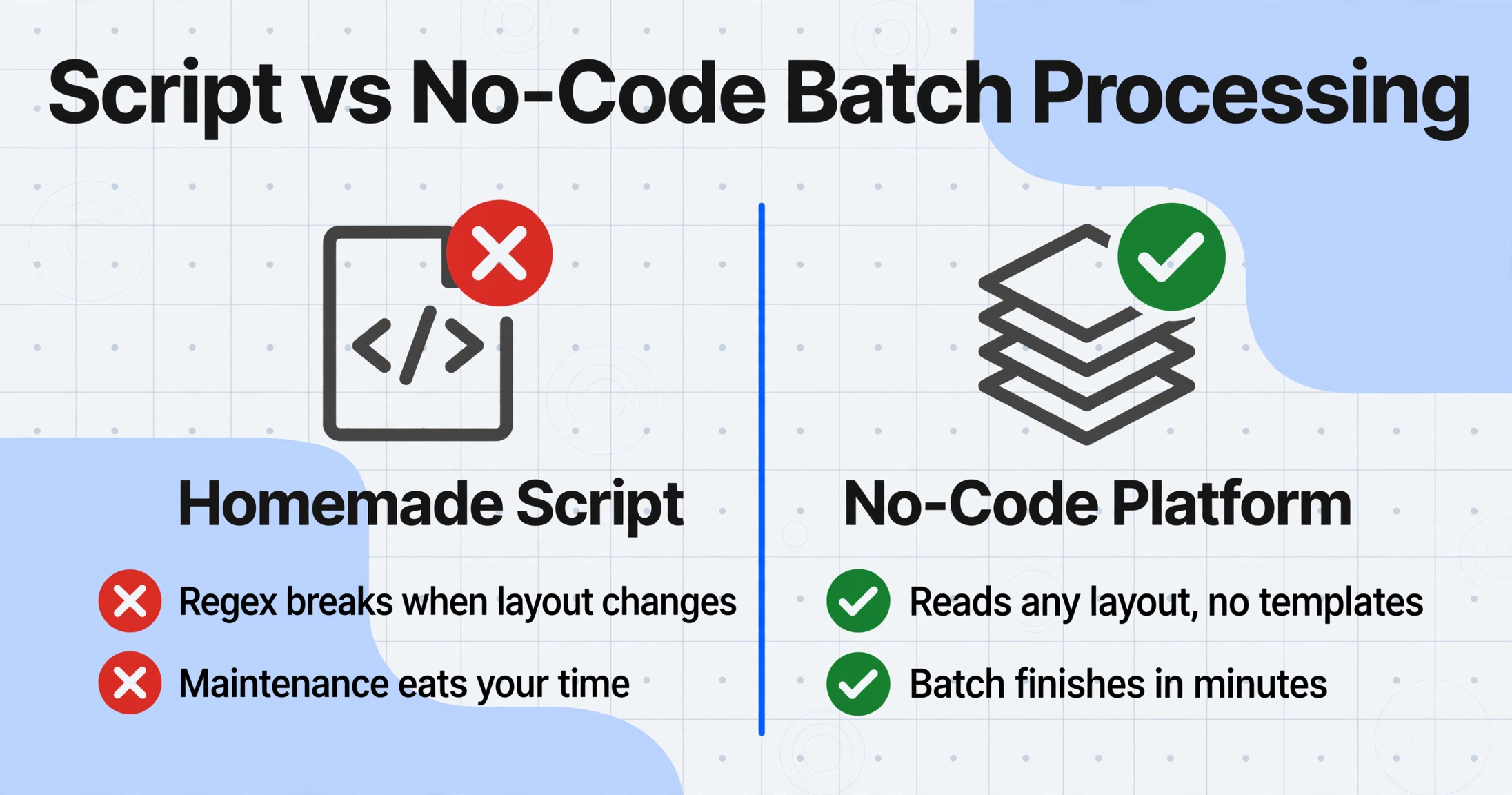
The association between batch processing and programming is not accidental. For years, the only way to process multiple documents in one pass was to write a script. That script would open each file, extract text using an OCR library like Tesseract or a PDF parser like PyPDF2 or pdfplumber, parse the raw text into fields using regex or positional logic, and write the results to a CSV or Excel file using pandas or openpyxl.
That pipeline works — but it demands a skillset most small teams don't have. According to the SBA Office of Advocacy's 2025 Small Business Profile, 99.9% of U.S. businesses are small businesses, and 82% of them operate without any employees, let alone a dedicated developer. Even among employer firms, 61.6% have fewer than 5 employees (Census Bureau, 2019). The BLS counts roughly 1.7 million software developers in the U.S. — concentrated overwhelmingly in technology firms and large enterprises, not in the 36 million small businesses that make up 99.9% of the country's businesses.
"I wrote a script that converted all the PDFs into images, used pytesseract to read them, used regex to search the string for the data I needed, and wrote the data to a CSV," one user described on r/learnpython, explaining their approach to extracting data from two PDFs. The setup works. Then a vendor changes their invoice layout, and the regex breaks. The Tesseract output on a new scan is garbled. The script needs maintenance — and maintenance is where most homemade automation dies.
No-code batch processing breaks this cycle not by replacing the script with a simpler script, but by changing the paradigm entirely: instead of telling a computer how to find data on a page (coordinates, regex patterns, tag names), you tell it what data you want, and the AI locates it by understanding the document's content. The batch logic — "process all files in this group and merge the output" — is built into the platform, not written by the user. The result is functionally equivalent to a semi-automated Python pipeline for 80% of common document processing scenarios, with zero code written.
What You Actually Need
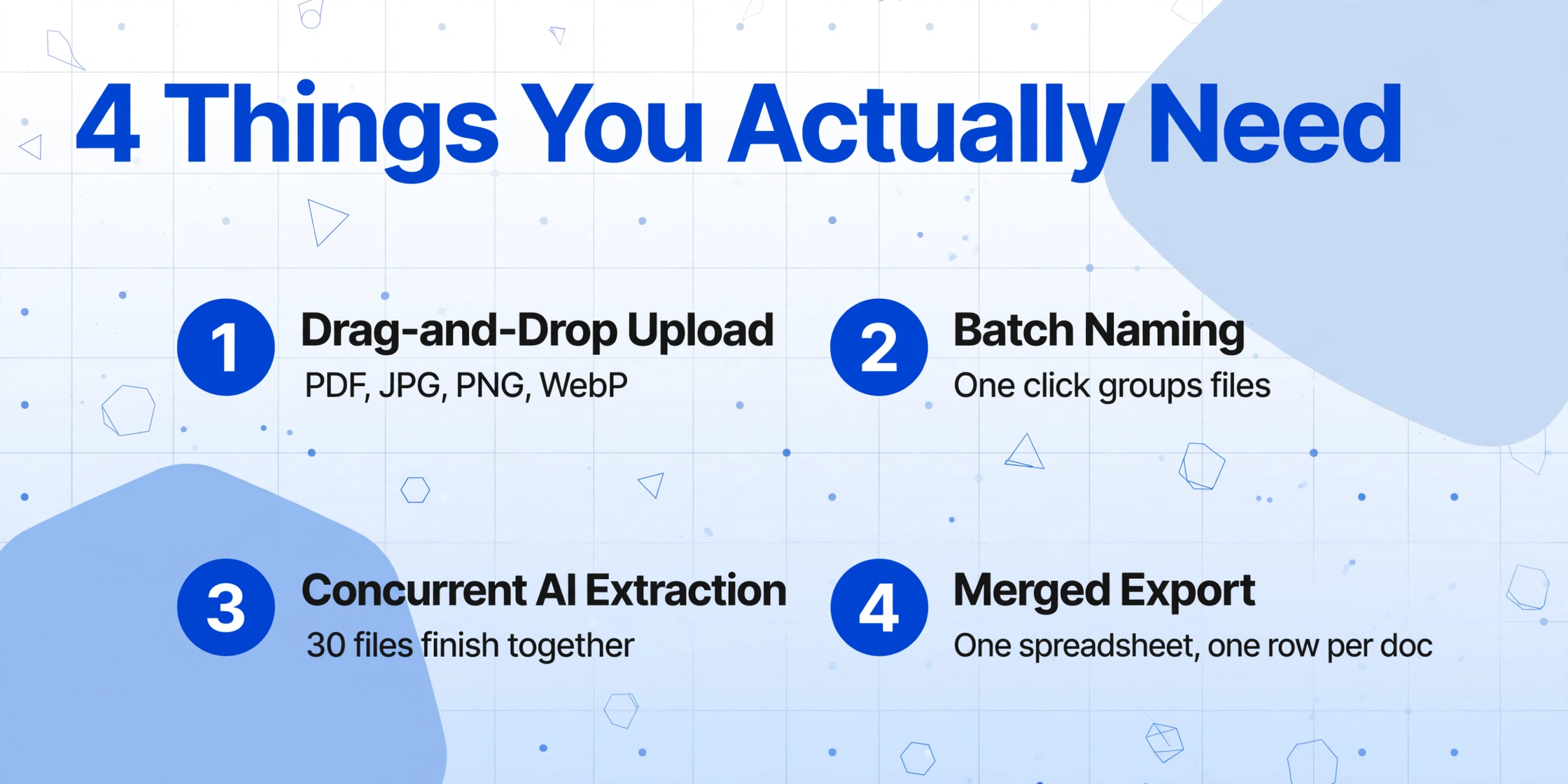
The minimum viable setup for no-code batch document processing is shorter than most people expect. You need four things:
- A drag-and-drop upload interface that accepts the file formats you're working with — PDF, JPG, PNG, WebP. Most no-code extraction tools provide a browser-based or Google Sheets–embedded upload surface. No local software installation required.
- A batch naming mechanism that groups related files together. In a no-code platform, this typically means a single click to assign a batch name — the equivalent of naming a folder — rather than writing a directory-walking script.
- Concurrent AI extraction that processes all files in the batch simultaneously. This is the hidden engine: while a human can only open and read one document at a time, a batch-aware platform fans out processing across all files in the group, so 30 invoices finish at roughly the same time as one.
- A merged export that consolidates every document's extracted data into one file — one Excel spreadsheet, one CSV, one Google Sheet tab — where each row represents one document and each column represents one field you defined.
That's it. No Python for-loops. No API endpoints to configure. No training samples to label. The column names you type become the headers of your output spreadsheet. The AI handles the rest.
This is the core paradigm shift that underlies modern no-code document extraction, as distinct from template-based tools or machine-learning platforms that still require upfront configuration. Platforms built on Custom Column Extraction — where you type field names like "Invoice Number, Vendor, Total, Due Date" and the AI locates each value by semantic understanding — eliminate the setup tax that quietly eats the time no-code is supposed to save.
The No-Code Batch Processing Workflow
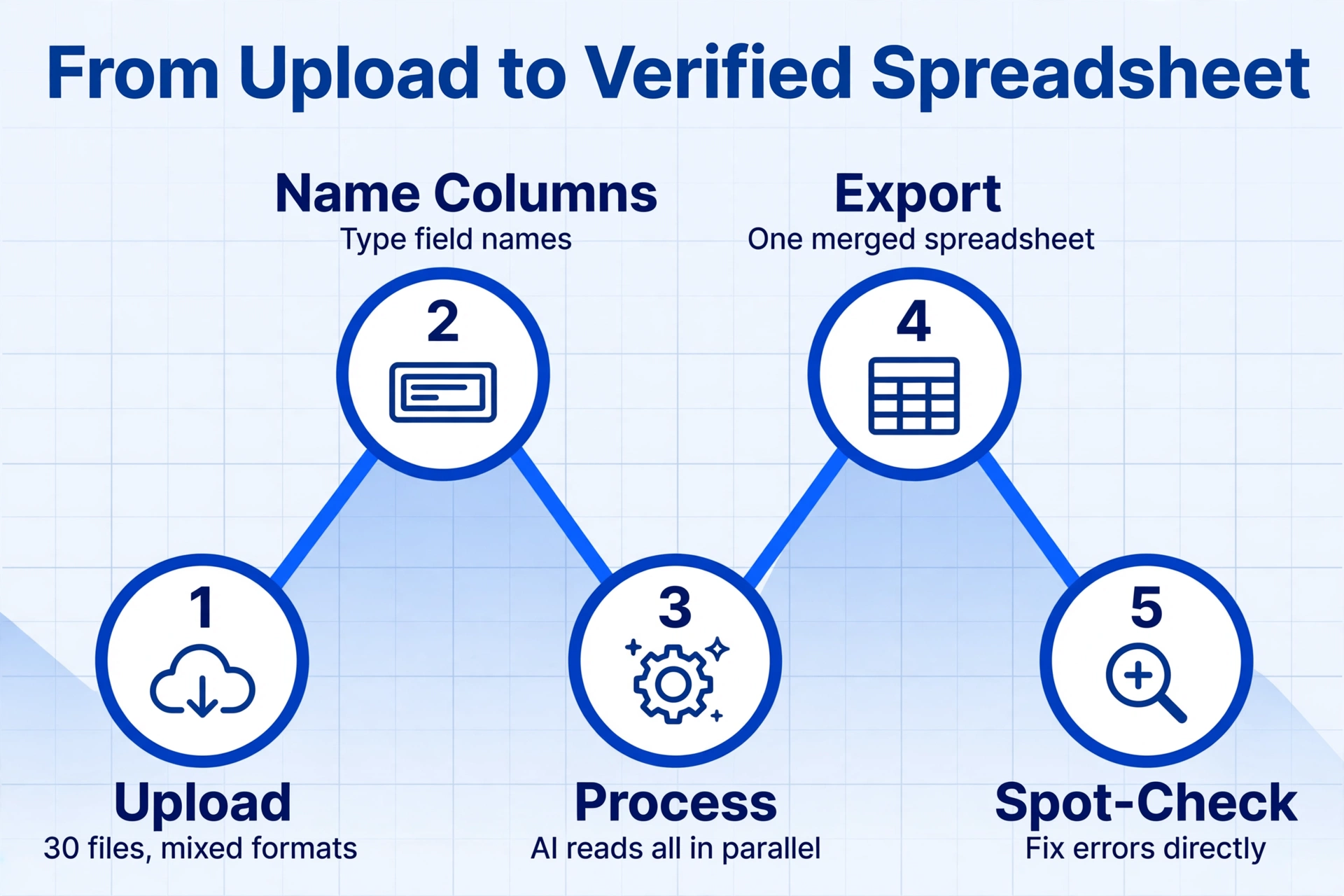
Here is the end-to-end workflow for a real scenario: an accounts payable clerk who processes 30 vendor invoices every Wednesday. The invoices arrive as PDFs and JPEG scans from 12 different suppliers, each with a different layout — some itemized, some lump-sum, some with line-item tables, some without.
Invoice Number, Vendor Name, Invoice Date, Due Date, Total Amount, Subtotal, Tax. These names become the column headers of your output. If you're unsure which fields a document contains, let the AI auto-detect and suggest columns based on what it reads across all 30 files.2026-06-Wednesday-Vendors. Click start. The AI begins extracting data from all 30 files concurrently. Each file takes roughly 5–10 seconds regardless of invoice complexity.Total time for the clerk: roughly 5 minutes of upload-and-configure, then the processing runs in the background. The manual alternative — opening each PDF, copying fields into an Excel template, verifying accuracy — would take 30–90 minutes depending on invoice complexity. That's an efficiency gain of 6–18x, consistent with the 18x speed improvement documented in benchmark comparisons of AI extraction versus manual entry.
The same workflow applies across document types. Replace "vendor invoices" with "delivery notes from five warehouses," "expense receipts from 40 employees," or "bank statements from multiple accounts." The only thing that changes is the column names you type. For step-by-step tutorials on specific document types, see how to batch extract invoice data to Excel or how to batch business receipts into a tax spreadsheet.
What You Give Up Without Code
Honesty about trade-offs is what separates a useful comparison from a sales pitch. No-code batch processing handles the core extraction-and-merge loop reliably, but the following capabilities require a coding approach:
Custom processing pipelines. A script can chain extraction with downstream actions — "extract invoice data → validate against GL code list → post to QuickBooks via API → email the CFO if total exceeds $10,000." In a no-code platform, extraction and export are the end of the automated path. Anything after that requires manual intervention or a separate tool like Zapier or Make (formerly Integromat), which add their own complexity and cost.
Custom error handling. When a script encounters a document it can't parse, the developer decides what happens: retry with different parameters, log the failure to a database, skip the file and move on, or flag it for human review. No-code platforms typically surface per-document status indicators — success, processing, error — but you don't control the error-handling logic. If confidence is borderline, you won't know until the spot-check.
API automation and scheduling. A Python script can run on a cron job, triggered by a new file landing in an S3 bucket, or called from a webhook. It integrates directly with your infrastructure. No-code platforms provide API access on higher-tier plans, but the trigger-and-respond automation that developers take for granted — "when a PDF arrives in this folder, extract it and append to this database table" — requires a separate automation layer (Zapier, Power Automate, n8n) that adds cost and maintenance.
These are real limitations. If your team's workflow involves multi-step validation, conditional routing, or event-driven triggers, no-code batch processing alone won't cover the full loop. But for the large majority of small-to-mid-volume document processing — the kind that happens in accounting firms, small logistics teams, property management offices, and freelance bookkeeping practices — these are edge cases, not showstoppers.
When Writing Code Actually Makes Sense
No-code batch processing is not a universal replacement for scripting. There are three situations where writing code is the better choice:
Volume above 500 documents per day. At this scale, the economics shift. A script running on a server costs pennies per thousand documents, while no-code platforms charge per document or page. More importantly, at high volume the failure modes change: a 1% error rate on 500 documents means 5 files need re-processing. Scripts can be tuned to handle edge cases programmatically; no-code platforms expose the same extraction engine to every document, limiting your ability to optimize.
Custom validation rules tied to your data. If your process requires checking extracted values against your own database — "is this vendor tax ID in our approved list?" or "does the total on this PO match the sum of line items?" — code gives you total control over the validation logic. No-code platforms offer computed columns and post-processing, but the validation depth is shallower than what a script with full database access can achieve.
Deep API integration with existing systems. A script can extract data from a document, transform it, and POST it directly into your ERP, CRM, or accounting software in a single atomic operation. No-code platforms typically export to intermediate formats (Excel, CSV, JSON) that require a second step to import into your system. For teams that need extraction → integration → trigger in one automated flow, an API-based approach — either a purpose-built extraction API or a script wrapping an AI extraction service — is the right fit.
For a detailed comparison of when to use API-based vs no-code approaches, see API vs no-code document extraction: which architecture fits your team.
The honest middle ground is a hybrid approach: use no-code extraction for the document-reading step (the part that benefits from visual AI and doesn't need custom logic) and a lightweight script or automation platform for the routing and validation steps that follow. This is the architecture that many growing teams adopt — no-code for the heavy AI lift, and a thin layer of code or connectors for the business logic.
Frequently Asked Questions
Can I batch-process documents that are in different formats — some PDF, some scanned images, some photos?
Yes. Modern no-code AI extraction tools accept mixed file types in a single batch. PDF, JPG, PNG, WebP, and even screenshots can be uploaded together and processed with the same set of extraction rules. The AI reads the document visually, not from the file's metadata, so format variation does not affect the extraction logic.
How does no-code batch processing handle documents with different layouts from different vendors?
This is the core advantage of template-free AI extraction over traditional OCR or zonal parsing. Instead of memorizing where fields sit on the page — which breaks when layouts change — the AI reads field semantics: it understands what an "invoice number" looks like by context, not by position. So 30 invoices from 30 different vendors all extract correctly in one batch, without per-vendor templates or training samples.
What happens if the AI gets some fields wrong on a few documents?
No extraction system — coded or not — achieves 100% accuracy on every document. The difference is in recovery speed. When you manually spot-check a no-code batch (step 5 in the workflow above), you can fix errors directly in the downloaded spreadsheet, re-process individual files that failed, or adjust column definitions for tricky fields. The time saved is still orders of magnitude greater than manual extraction, even accounting for corrections. For a detailed guide on what can go wrong and how to catch it, see why batch extraction misses files — and what to do about it.
Do I need to install anything on my computer?
No. No-code batch processing runs entirely in the browser or through a Google Sheets add-on sidebar. There is no software to install, no local server to run, no Python environment to set up. The only requirement is an internet connection and a modern web browser.
Is no-code batch processing cheaper than writing a script?
It depends on volume. For teams processing up to a few hundred documents per month, no-code platforms are cheaper than the developer time required to build and maintain a custom script — especially when you factor in the maintenance cost of scripts that break when document formats change. At very high volume (thousands of documents daily), a script running on your own infrastructure will have lower per-document costs, though the developer salary and maintenance time should be factored into that comparison.
Start Your First No-Code Batch
The assumption that batch processing requires programming has kept many small teams doing manual data entry longer than necessary. The tools to extract data from 30, 50, or 200 documents in one pass — without writing a single line of code — already exist and are accessible from any browser. The workflow is upload, name, process, export, spot-check. The hardest part is knowing what data you want to extract. The AI handles the rest.
If you're processing documents regularly and have been put off by the idea that you need to learn Python or hire a developer, the practical test is straightforward: take your next batch of documents — even 5 or 10 files — upload them to a no-code extraction platform, and see what the output looks like. The first batch costs nothing but the time you've already been spending on manual entry.