Field Data Form Extraction Accuracy:
Weather, Handwriting, and Form Design
Field data form extraction accuracy is decided long before the file reaches an extraction tool — it's decided on the clipboard, in the rain, by the person holding the pen. An environmental technician in a r/Environmental_Careers thread put it in terms anyone who has walked a wetland knows: "If there isn't mud on your data forms, did you really delineate the wetland?" That mud isn't just authenticity — it's the single biggest predictor of whether a pest count, a pH reading, or a safety finding will come out right on the other end. This article maps every factor that sits between a form in the field and a reliable row in your database, and marks which of them you can actually control.
Key Takeaways
- Accuracy problems on field forms are almost never the extraction tool's fault — they're decided on the clipboard, in the rain, by the person holding the pen, long before the file reaches any software.
- The same conditions that make a form hard for AI to read make it hard for humans too: documented manual transcription (typing what's on a form into a database by hand) error rates run 1–10%, and capture quality alone swings extraction results by 10–20 percentage points.
- Stop looking for a better extraction tool — your real lever is the chain: design forms with codes instead of free text, photograph them the day of collection, and verify only the 10% of cells the AI flags as uncertain instead of retyping everything.
Even Perfect Transcription Starts Behind
Before any software is involved, the act of copying field data by hand already loses a measurable percentage of it — and field data, collected in gloves and wind, loses more than office data.
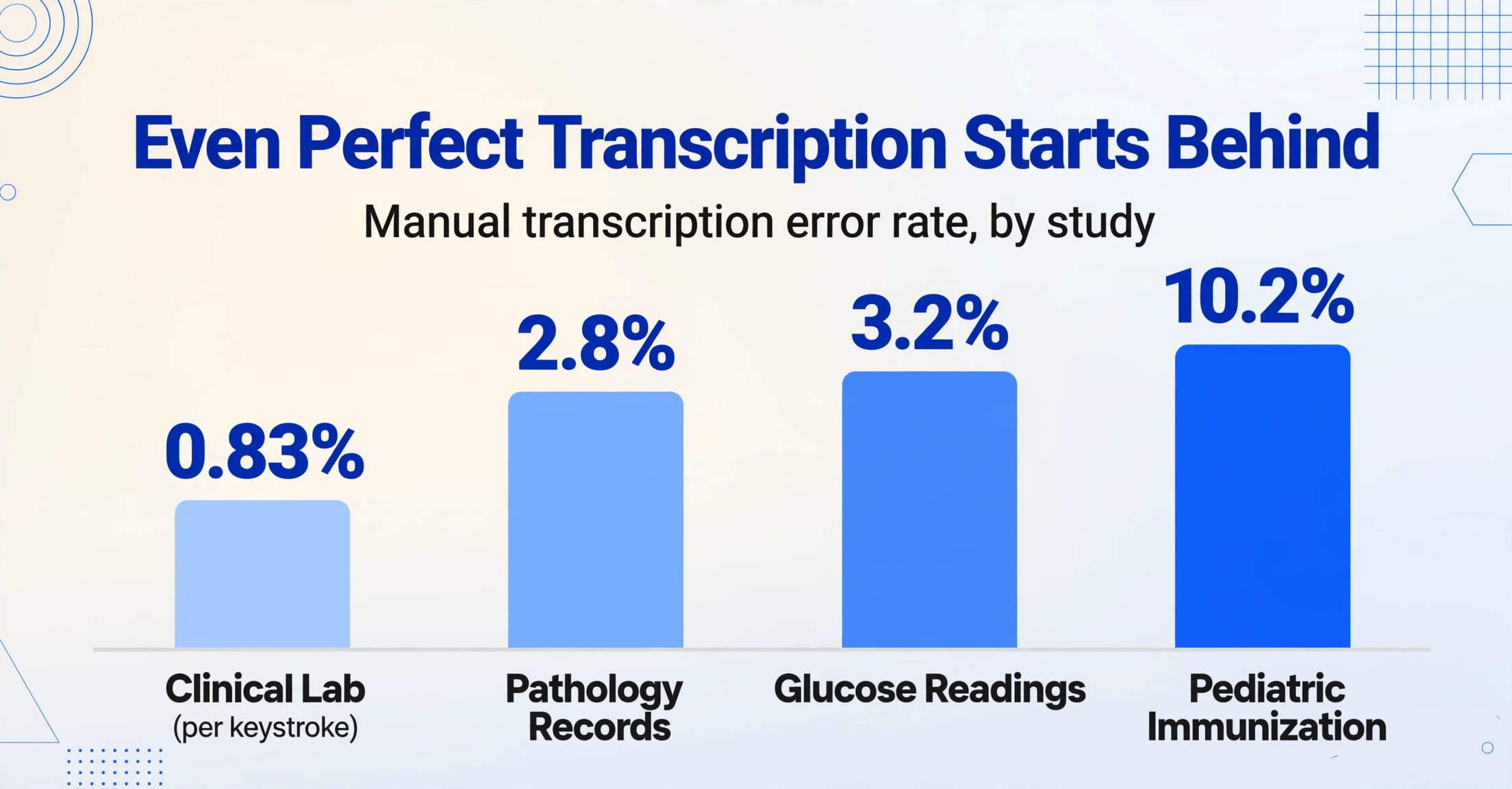
Studies of manual transcription error in medical and records settings, summarized in a peer-reviewed review published on NCBI's PMC archive, found error rates spanning an order of magnitude: 0.83% per keystroke in one clinical lab, 2.8% overall in a pathology records study (ranging 0.5–6.4% depending on the field), 3.2% for point-of-care glucose readings, and 10.2% in one pediatric immunization dataset. The common thread is that even motivated, trained people make low-single-digit errors when moving values between media — and the errors concentrate in exactly the numeric fields field work depends on: transposed digits in pH, the wrong sample ID on a composite, a water level that lands in the neighbor's column.
That's the baseline. Extraction software competes not against perfect transcription but against this flawed, human-speed baseline — which is why "is the AI accurate?" is the wrong question. The right question is "accurate compared to what, on what inputs?" The field-type-by-field-type accuracy spectrum we mapped separately shows the same phenomenon from the tool's side: printed text near 99%, cursive near 70%, checkboxes somewhere between — a 25-point spread on one form. The spread is where field forms live, because everything that makes a form hard to read also makes it hard to transcribe, whether the hands doing the reading are human or machine.
Rain, Mud, and Sunlight: The Field Rewrites the Form
Physical damage to the paper is the first accuracy factor, and it's also the one field crews least expect to matter because they stop seeing it. A technician who has carried a logbook all season no longer notices the water stain across the conductivity column, the crease where the sheet was folded into a hip pocket, or the ink that sun-bleached to a faint gray. Each of these degrades the visual signal the extraction model reads — the same way it degrades the signal a supervisor reading the form in the office would read.
Field crews have their own workarounds that reveal how real the problem is. In the same r/Environmental_Careers thread, one commenter shared the classic fix: "Field hack: buy the loose leaf write-in-the-rain paper and print forms out on it. It's worth the cost!" Weatherproof paper, indelible-ink pens, and clipboards with lids exist because water, mud, and sun reliably destroy field records. When those records survive, they arrive at the office with the weather still written on them — and that's the input an extraction pipeline receives.
What you control here: photograph or scan the form while it's still legible — the day it's filled, not the day it reaches the office. Forms photographed at the time of recording capture the writing before a week in the truck cab fades it. When that's not possible, treat visibly damaged forms as a separate, smaller batch and expect to verify them more heavily (more on verification below).
Carbon copies and duplicate forms add a second layer of damage: the impression quality on the second and third copies degrades sharply, and if crew members fill both copies at once, the pressure can make the top sheet's writing shallow. Extraction treats a faint carbon copy the way a person does — it reads it, hesitates, and can misread. The same logic applies to pencil: erasable and legible to the writer, faint and smudge-prone to anyone reading it later.
Handwriting Written by a Tired Person in Gloves
Handwriting quality varies more across one afternoon than across any two extraction tools — a field worker's eleventh form of the day is measurably less legible than their first. Research on handwriting recognition treats legibility as a property of the writer, but in field work it's a property of the conditions: cold fingers, wet gloves, a clipboard balanced on a truck hood, the pressure of moving to the next station. Reddit field technicians describe the tradeoff precisely — "In the field, it is just so much faster to write a number on a paper form than to unlock the iPad, open the app, type the number" — which is why paper survives in a digital age, and why the paper it produces is exactly what extraction must handle.
The good news is that most field writing is block-letter or print-style, which extraction handles at high accuracy; the accuracy cliff sits at rushed cursive and at digits written quickly enough that 3 and 8, or 1 and 7, blur together. A mixed form — printed labels, handwritten block values, a circled option, a signature — is a normal case, and modern vision models read the mix holistically rather than requiring one consistent style per page.
There's an institutional answer to this that predates AI, and it's worth stealing. The USDA NRCS Field Book for Describing and Sampling Soils (Version 4.0, 2024) instructs soil scientists to record plant species as standardized symbol codes — big bluestem becomes "ANGE," a four-character code from the official plant list — rather than writing out names that vary in spelling and length. The design insight transfers directly: the less free-form handwriting the form demands, the less room there is for the writing itself to become an error source. Codes, checkboxes, and numbers are more legible to machines for the same reason they're more legible to tired humans. Our handwriting accuracy improvement guide goes deeper into what makes one form's handwriting extractable and another's not.
Form Design Is the Accuracy Lever Nobody Talks About
Form design determines extraction accuracy more than any capture trick, because it decides what the extraction model has to interpret in the first place. The environmental data management guidance published by the Interstate Technology & Regulatory Council (ITRC) makes the point from the recordkeeping side: "Design a field form response with the knowledge of the expected data type and length of the database field it will call home." A form designed with its destination database in mind — one value per box, units printed beside the box, no multi-line free text where a code will do — produces rows that land in the right columns with minimal interpretation. A form designed for convenience produces ambiguity that no extraction model can fully resolve.
Four design choices show up over and over in field forms, and each maps to a known accuracy behavior:
| Design choice | Why it's a problem | The accuracy-friendly version |
|---|---|---|
| Open blanks for everything | Free-form fields invite shorthand, abbreviations, and unit confusion — the writer assumes context the reader won't have | Checkboxes for known options; units printed in the label ("pH (units)"), codes for recurring values |
| Ruled lines running through value areas | Grid lines crossing text create visual noise that competes with the characters | Spaced blanks or light rule lines that stop short of the writing zone |
| High density — everything on one page | Cramped fields push writing against labels and edges; values bleed together | One value per box with clear separation; a second page beats a crowded first |
| Mixed orientation across a batch | Landscape and portrait pages in the same batch each need their own reading path | One orientation per batch where possible; if mixed, the tool should still locate fields by meaning, not position |
The last row matters because it's where extraction approaches diverge. Template-based OCR locks each field to a coordinate on a reference form — rotate the form, change the layout, add a station's different logbook template, and the boxes stop matching. The semantic approach ImageToTable.ai uses, Custom Column Extraction, reverses that: you type the column names you want ("pH," "Pest Count," "Station ID"), and the AI locates the value that answers each name anywhere on the page, by meaning rather than position. A batch of field forms with different layouts, different handwriting, and different levels of damage still returns the same named columns, because the model reads the document the way a person would — it doesn't require the field to sit at a memorized coordinate.
Capture: A Photo Is Half the Accuracy
Between two photos of the same form, capture quality alone accounts for a 10–20 percentage point accuracy swing — a figure our own form accuracy testing consistently reproduces. Most of that swing comes from four cheap habits: laying the form flat on a solid surface, avoiding glare and backlight, keeping the phone parallel to the page, and getting the whole page including the header identifiers in frame. Phone camera document scan modes automate most of this — perspective correction, flattening, and shadow removal are built into every modern phone — but they only help if the field tech opens them.

Outdoor capture has its own failure modes. Direct sunlight washing out the page and the photographer's own shadow falling across the writing are the two most common, and both are fixed by the same move: turning so the sun is behind the photographer, or using your own shadow to shade the page. The technician in the Reddit thread who described digital forms as "hard to read in bright sunlight" was describing the same physics that underexposes a paper form held up against a bright sky — except a paper form can be shaded, angled, or moved, and a photo captures only what the camera saw.
Resolution matters less than people assume, past a modest threshold — a phone photo of a letter-size form is typically 2,000–3,000 pixels across, more than enough — but the type of capture matters: a flat, well-lit scan of a clean form is the best case; a photo of the same form taken in the truck at dusk is the worst case, and both can be in the same batch. If your crew photos live on the truck for a week, the Collection Link pattern we described in our field form to Excel workflow guide — a shareable link that lets the crew upload photos straight into your processing queue — shortens that gap and limits how much the forms degrade before capture.
Why Semantic Extraction Holds Up Where Template OCR Fails
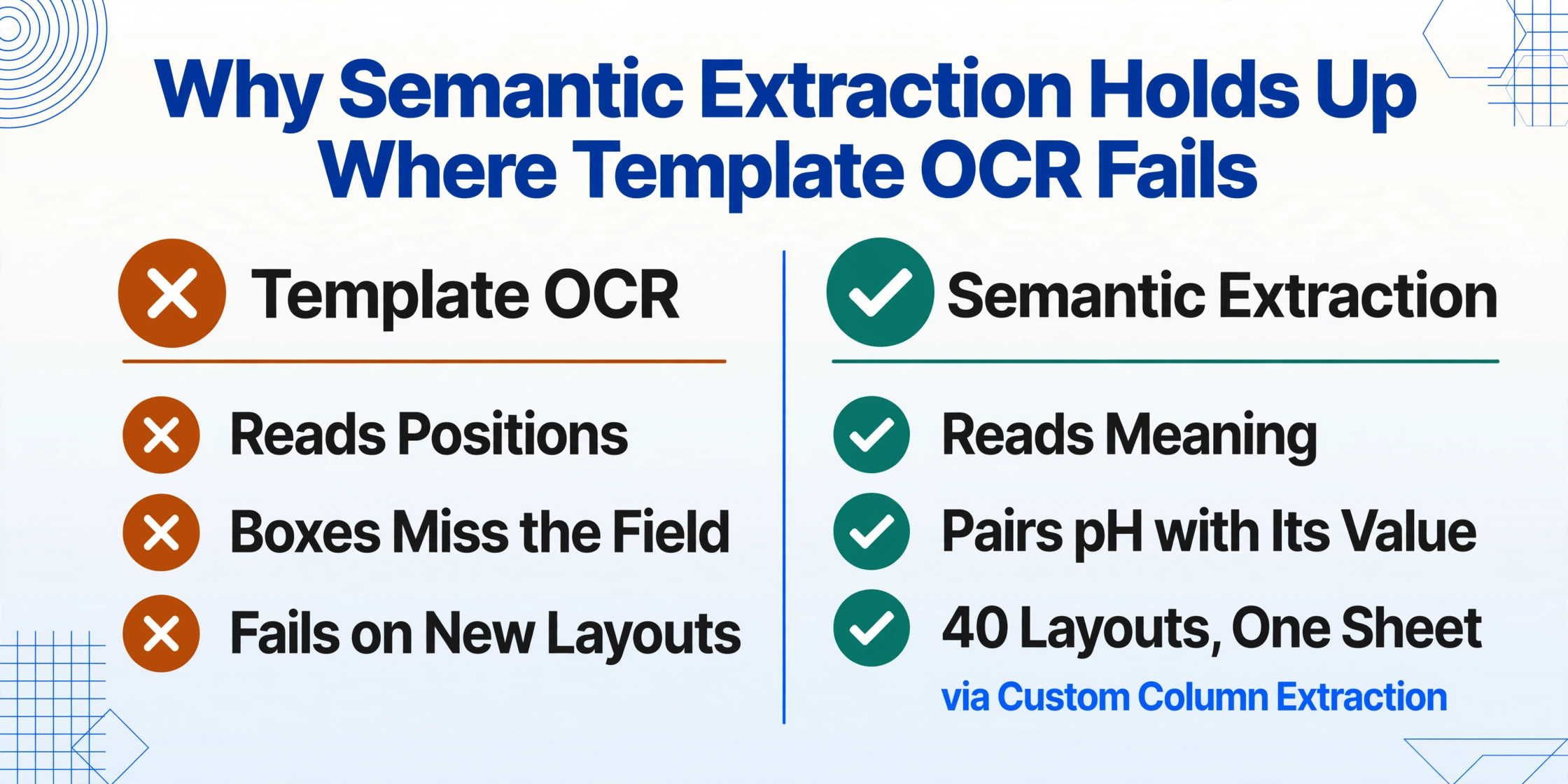
Template OCR reads positions; semantic extraction reads meaning — and on field forms, positions lie.
Template OCR earned its reputation on invoices and forms that arrive from the same source in the same layout every time: draw a box on a reference document, extract whatever lands in the box, repeat. Field data forms violate that assumption at every turn — different crews use different layouts, stations have different logbook templates, a form can be scanned in landscape one round and photographed in portrait the next. When the layout shifts, the boxes no longer align with the fields, and accuracy collapses even though the writing is perfectly legible.
Vision-model extraction sidesteps the positional failure entirely. The model reads the full page, understands that "pH" is a measurement and the value beside it answers it, and returns the pairing regardless of where the pair sits. That's the mechanism behind Custom Column Extraction described above, and it's also why a batch of 40 forms with 40 different layouts still produces one clean spreadsheet. The ITRC guidance recognizes the same principle from the data side — field data "often deserve extra scrutiny due to increased likelihood of errors, such as transcription or in situ instrument drift" — because the errors in field data are semantic (wrong value for wrong context) more often than positional. A tool that understands context is answering the right question.
This is the honest place to state what semantic extraction can't fix: unreadable handwriting, a value struck through with a pen swipe that the model misreads as part of the number, or a page where rain has turned the ink into a watercolor. No tool — human or machine — recovers data the source document no longer contains. What extraction changes is the error profile: it moves the failure from thousands of keystrokes where errors hide invisibly, to a handful of flagged cells where a human can check them. For a deeper look at the remaining handwriting failure modes, our handwriting extraction failure modes analysis catalogs them in detail.
Verify What Matters, Not Everything
Because no extraction is 100%, the question that decides whether field data extraction works is where you aim your verification — and the answer is the same fields your compliance framework already cares about. The EPA's Quality Assurance Handbook for Air Pollution Measurement Systems (EPA-600/R-94/038a) and the environmental programs that follow it define data verification to include checking that "data have been accurately transcribed and recorded" and that electronic and hard-copy records show one-to-one correspondence. OSHA's 29 CFR 1904 recordkeeping rule requires the OSHA Form 301 incident report within seven days of a recordable injury — a deadline that makes extraction's speed a compliance feature, and makes the accuracy of the transcribed details a compliance requirement. The USDA's NRCS Nutrient Management Standard 590 conditions cost-share eligibility on soil sampling and testing procedures that follow the standard — including the records that prove the samples were handled correctly.
All three frameworks converge on the same operational need: a way to confirm the values in the database match the values on the source forms, without re-reading every row by eye. That's the gap bbox-assisted verification fills. In ImageToTable.ai's review screen, hovering over any extracted cell highlights the exact region of the original image where that value came from — and clicking a region on the image jumps back to the matching cell. Instead of re-typing to check, a reviewer confirms the handful of cells the AI flagged as uncertain, and the rest are trusted. It turns "verify everything" (which is why manual transcription is slow) into "verify the risky 10%" (which takes seconds per form).
The realistic workflow is: batch-process the round, scan the extracted rows against the originals with bbox highlighting, correct the flagged cells, and export. The same pattern applies to the maintenance logbooks and inspection records from other field operations — the maintenance log to Excel workflow shows the identical capture-review-export loop in an industrial context, and our analysis of where field-data pipelines break explains why the verification step is where most manual systems quietly fail.
FAQ
Can extraction read rain-damaged or water-stained forms?
It depends on how much of the writing survived the rain. Faint stains around legible text are usually handled fine; ink that has run or faded into illegibility is not recoverable by any tool, human or machine. The practical fix is capture timing: photograph forms the day they're filled, while the writing is still intact, rather than after a week in the field. For forms that must be stored in the field, weatherproof paper and indelible ink (the write-in-the-rain hack field crews share) preserve the record.
What if my crew's handwriting is rushed or messy?
Most field writing is block-letter and extracts well. The accuracy cliff is rushed cursive and ambiguous digits (3 vs 8, 1 vs 7). Two things help: design forms that minimize free-form handwriting (codes, checkboxes, one value per box — the NRCS plant-symbol approach), and use the verification step to check exactly the cells the AI flags as uncertain, using bbox highlighting against the original image.
Does extraction handle checkboxes, circled options, and signatures?
Yes. Vision models read checked boxes, circled options, and handwritten signatures as visual elements, not just text. For fields where crew members circle or tick an option rather than write a value, define the column with the options spelled out — Pest Pressure (options: Low / Medium / High) — so the model maps the mark to the right label.
Is a phone photo enough, or do I need a scanner?
A flat, well-lit phone photo is enough for most field forms — modern phone document scan mode corrects perspective and shadows automatically. Capture quality swings accuracy by 10–20 percentage points, so the habits matter more than the hardware: flat surface, parallel camera, whole page in frame, no glare. A scanner wins only when the form is already clean and you have one nearby.
Our stations use different form layouts. Will extraction still work?
Yes — this is the case that breaks template OCR specifically. Because ImageToTable.ai locates values by meaning rather than by position on the page, a batch that mixes different layouts, orientations, and handwriting styles still returns the same named columns. You don't maintain a template per layout; you name the columns once and the model finds the values.
What accuracy should I actually expect?
Printed form text extracts near 99%; legible block-letter handwriting extracts well; rushed cursive drops into the 70s — the same spread humans show when transcribing by hand, where documented error rates run 1–10% across studies. Expect the best result on clean, well-captured, well-designed forms, and expect to verify the worst 10% of cells on damaged or messy ones. Any tool that promises 100% on field data is not being honest about your inputs.
Accuracy on field forms isn't a property of the AI model — it's a property of the whole chain: the paper, the pen, the design, the photo, and the verification step. Every link is one you can control.
Work the chain in order and the outcome becomes predictable: design forms that demand less handwriting, capture them while they're legible, batch-process with a tool that reads meaning rather than position, and verify the risky cells instead of re-typing everything. That's how a water-quality logbook written in the rain becomes a compliance-ready dataset — and how a soil sample form filled at the end of a long day keeps its numbers intact on the way to the database. The mud was always part of the job. Making it stop costing you data is the part extraction handles — test it on a form that has actually been in the field.