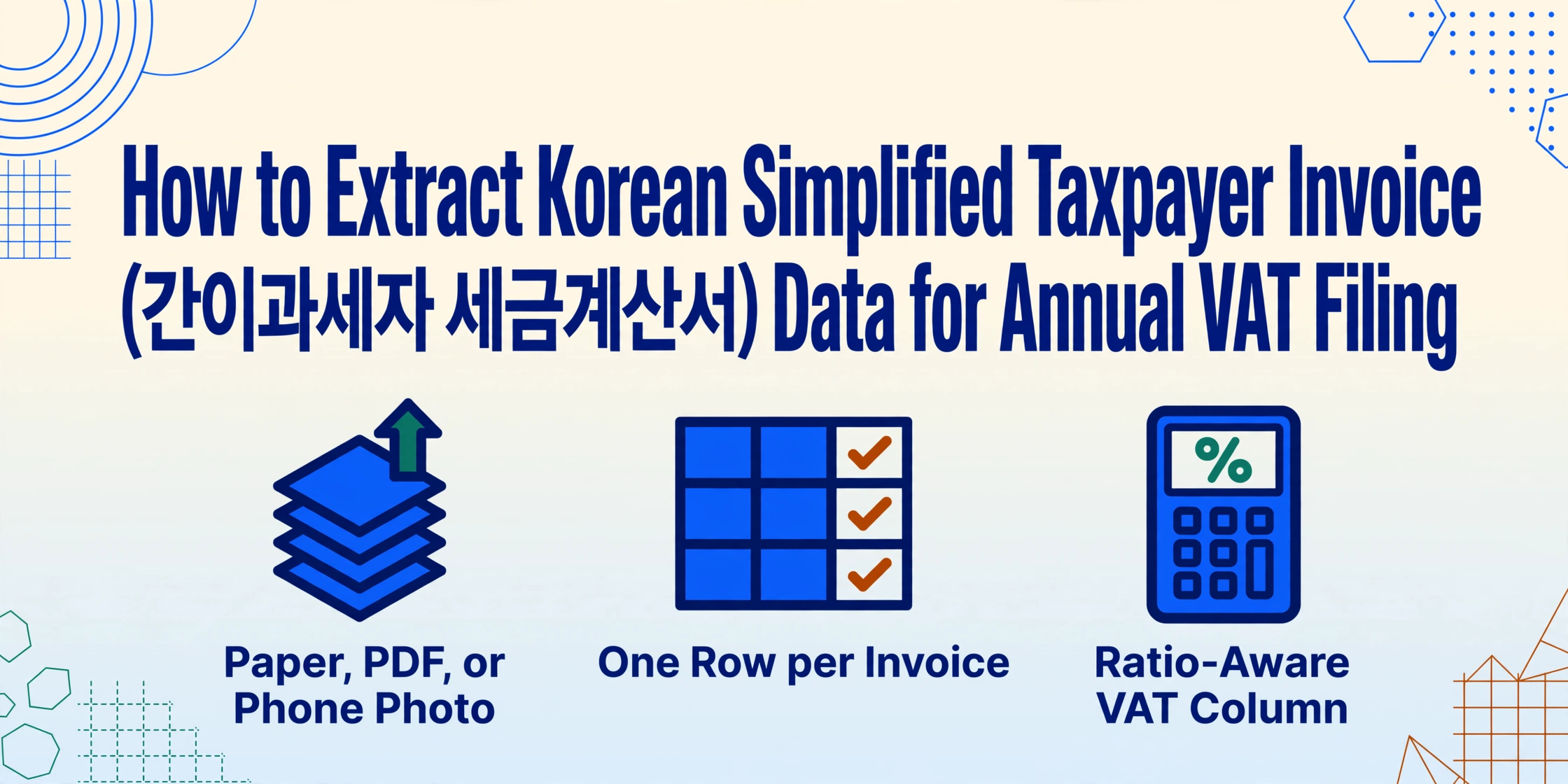
How to Extract Korean Simplified Taxpayer Invoice Data
for Annual VAT Filing
South Korea's National Tax Service processes over 600 million electronic tax invoices a year. But if you run a small business under the simplified taxpayer (간이과세자) system — with annual revenue below 104 million won — a significant portion of your incoming invoices arrive outside that electronic pipeline: paper slips from local suppliers, PDFs attached to email, photos forwarded from a phone. When January's annual VAT filing deadline approaches, those invoices need to become organized data in your spreadsheet or accounting software, and the gap between what you have and what you need is still measured in hours of manual typing.
Key Takeaways
- Most Korean invoice guides treat all tax invoices the same — but 3+ million 간이과세자 businesses file VAT once a year with a fundamentally different rate structure.
- The 부가세액 printed on a simplified taxpayer invoice assumes 10% VAT, but your actual liability uses an industry ratio between 15% and 40% — the number on the paper and what you owe are different numbers.
- Add 업종코드 as an extraction column alongside supply value and registration number — one batch pass produces a spreadsheet that already accounts for the industry ratio before filing day.
What Is a Korean Simplified Taxpayer Invoice (간이과세자 세금계산서)?
South Korea's VAT system divides businesses into two categories. General taxpayers (일반과세자) — businesses with annual revenue above 104 million won (₩104M) as of 2026 — issue electronic tax invoices (전자세금계산서) through HomeTax (홈택스) for every transaction, charge 10% VAT, and claim full input VAT deductions on their purchases. Simplified taxpayers (간이과세자) — over 3 million microbusinesses and self-employed individuals in Korea with annual revenue below ₩104M — operate under a different set of rules governed by Articles 32–36 of the Value-Added Tax Act (부가가치세법).
The tax invoice (세금계산서) a simplified taxpayer issues or receives looks structurally similar to a general taxpayer's invoice at first glance: it contains a business registration number (사업자등록번호), supply value (공급가액), VAT amount (부가세액), and total (합계금액). But the underlying tax calculation is fundamentally different. A general taxpayer's VAT liability is straightforward: output VAT (10% of sales) minus input VAT (10% of purchases). A simplified taxpayer's liability is calculated as: supply consideration (공급대가) × industry-specific value-added ratio (업종별 부가가치율) × 10%, minus a limited input tax credit (공제세액). The industry ratio ranges from 15% to 40% depending on business type, which means the effective VAT rate on a 간이과세자's transactions lands between 1.5% and 4%.
This distinction matters for data extraction because the numbers on a 간이과세자 invoice carry different compliance implications than those on a 일반과세자 invoice. When you are collecting invoices from multiple small suppliers — a neighborhood wholesaler, a freelance designer, a small manufacturer — you are likely dealing with a mix of general and simplified taxpayer documents. Each needs to be identified and processed correctly for your annual VAT return.
Most Korean tax invoice guides focus on the general taxpayer system. The 간이과세자 experience — with its different filing rhythm, rate structure, and document sources — is a different problem altogether.
Why Simplified Taxpayer Invoices Are a Different Extraction Problem
The gap between receiving a tax invoice and having its data in your spreadsheet is wider for 간이과세자 businesses than for general taxpayers — for three specific reasons that compound during filing season.
1. More invoices arrive outside the electronic system. HomeTax (홈택스) tracks every electronic tax invoice issued through its platform or certified ASP providers. But many small suppliers using the simplified taxpayer system — especially sole proprietors (개인사업자) and microbusinesses below the electronic issuance threshold — issue paper invoices, send PDFs by email, or provide a photo of a handwritten receipt. These documents are invisible to HomeTax. A small retail shop in Seoul with 30–50 active suppliers might find that a quarter to a third of incoming invoices are non-electronic.
2. The annual filing rhythm creates a data consolidation crunch. General taxpayers file VAT returns four times a year (quarterly, by April 25, July 25, October 25, and January 25). Simplified taxpayers file once a year, by January 25, covering the entire previous calendar year. This means 12 months of invoices — potentially 200–500 individual documents for an active small business — need to be organized into a single dataset at the same time. The manual approach involves collecting paper slips, opening email attachments, and typing each invoice's key fields into a spreadsheet. And because the filing window is compressed into the first few weeks of January, there is limited time to catch and fix data-entry errors.
3. The industry-specific value-added ratio changes what you do with the data. When you extract a 간이과세자 invoice's 부가세액 (VAT amount), the number printed on the document is calculated at the standard 10% rate. But the 간이과세자's actual tax liability for their VAT return is computed using the industry ratio — which can be as low as 15% of the standard rate for retail businesses. You cannot sum the 부가세액 column from your extracted data and call it your VAT liability. The calculation requires applying the correct ratio for each invoice based on 업종 (industry type), a nuance that general extraction guides almost never discuss.
Over 3 million Korean small businesses operate under the simplified taxpayer system. Each one faces the same January data scramble — yet almost no extraction content addresses their specific document workflow.
If you also process general Korean tax invoices alongside simplified ones, our guide to Korean tax invoice data extraction covers the field structure for 일반과세자 invoices and their integration with Douzone (더존) and ECOUNT (이카운트) ERP systems.
The Key Fields You Need for Annual VAT Filing
A Korean 간이과세자 세금계산서 contains several mandatory fields, but not all of them are needed for your annual return preparation. The following set covers the essentials — the data points that map directly to the information required by the NTS for the simplified taxpayer filing process:
| # | Field (EN) | Field (KO) | Why it matters for extraction |
|---|---|---|---|
| 1 | Supplier business registration number | 공급자 사업자등록번호 | 10-digit ID (XXX-XX-XXXXX format). Primary key for matching suppliers in your accounting software. |
| 2 | Buyer business registration number | 공급받는자 등록번호 | Your own registration number — verify it matches your 사업자등록증 (business registration certificate). |
| 3 | Supply value | 공급가액 | Net amount before VAT. The basis for calculating your deductible input tax (공제세액). |
| 4 | VAT amount | 부가세액 | 10% of supply value on the invoice face. Not directly used for your liability calculation — that uses the industry ratio. |
| 5 | Total amount | 합계금액 | Supply value + VAT amount. Quick reconciliation check: confirm 공급가액 + 부가세액 = 합계금액. |
| 6 | Issue date | 작성일자 | Determines which tax year the invoice belongs to — critical when consolidating a full calendar year in January. |
| 7 | Industry type / business code | 업종 / 업종코드 | Determines which value-added ratio to apply. May not be printed on every invoice — sometimes cross-referenced from your supplier records. |
Even for 간이과세자 who cannot claim the full input VAT credit that general taxpayers enjoy, tracking the 공급가액 and supplier registration number for each invoice is essential. Under the simplified taxpayer system, the deductible input tax is calculated as 0.5% of your purchase amounts (매입세액 × 0.5%) — so every invoice you enter into your records reduces your final tax bill, even indirectly.
If you hand your extracted data to a 세무사 (tax accountant), having clean columns for 공급가액, 부가세액, and the supplier's 사업자등록번호 makes their preparation work significantly faster — no need to re-read paper slips or decipher handwritten numbers.
Step-by-Step: How to Extract 간이과세자 세금계산서 Data into Excel
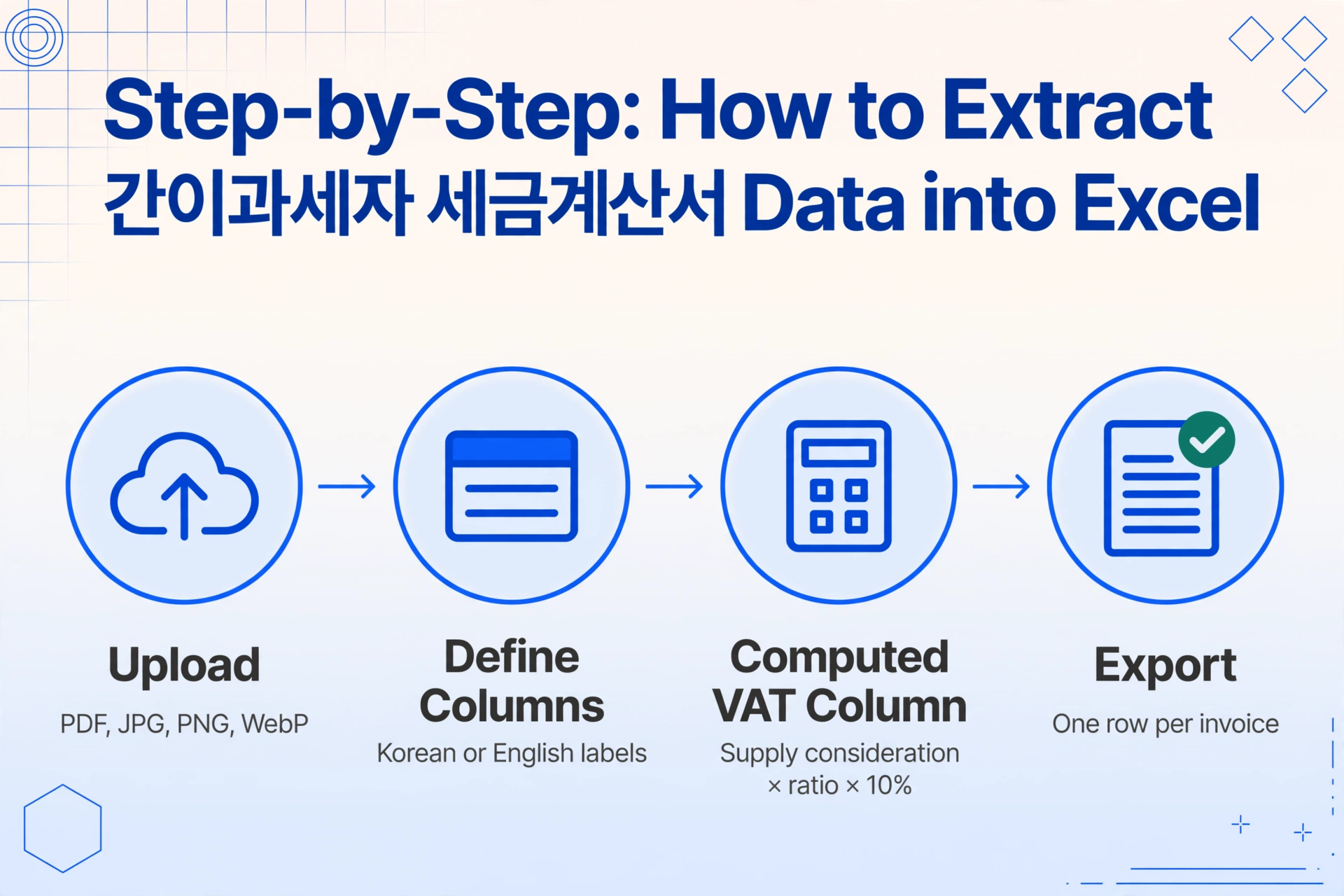
The extraction process with ImageToTable.ai uses Custom Column Extraction — you define the columns you want in your output spreadsheet, and the AI locates the corresponding values on each document by understanding what each field label means, not where it sits on the page. This semantic approach works across different invoice layouts without templates or per-vendor configuration. If you are new to semantic extraction, our invoice data extraction walkthrough explains how it differs from template-based OCR and why it matters for mixed-format document sets.
Upload your invoice files
Gather all your 간이과세자 invoices — paper slips scanned as JPG or PNG, PDFs saved from email, photos taken with your phone. Upload them all at once. The tool accepts PDF, JPG, PNG, and WebP. Invoices that were issued electronically through HomeTax can be downloaded as PDF and uploaded the same way. For batch processing, upload everything together; the output merges into a single spreadsheet with one row per invoice.
Define your extraction columns
Enter the field names that match what your spreadsheet needs. You can use Korean labels, English labels, or a mix — the AI reads both. For a standard 간이과세자 invoice extraction, enter these column names:
작성일자— Issue date공급자 사업자등록번호— Supplier registration number공급자 상호— Supplier company name공급받는자 사업자등록번호— Your registration number공급가액— Supply value부가세액— VAT amount합계금액— Total amount
Add a computed column for ratio-aware VAT calculation
This is where the 간이과세자 workflow differs from general taxpayer extraction. Add an inferred column named 업종코드 (options: 소매/제조/건설/서비스) so the AI reads the document context and assigns an industry category. Then add a computed column like 예상 VAT (공급가액 × 해당업종 부가가치율 × 10%) to estimate the actual tax liability behind the face value. This step is optional for basic data collection but essential if you use the extracted numbers to prepare your own VAT return without a tax accountant.
Generate and download your spreadsheet
Click process. Each invoice produces one row in the output, with your column names as headers — the column names you entered become the exact headers of your final table. A single page typically processes in 5–10 seconds. The output downloads as XLSX — ready for import into ECOUNT ERP (which supports CSV/Excel import for AP transactions), Douzone Smart A, or your 세무사's spreadsheet template. For a detailed walkthrough of field-level extraction that applies to both general and simplified taxpayer invoices, see how to extract invoice fields to a spreadsheet.
Try it on your own tax invoice below — no login required:
Files are processed securely and not stored.
Industry Value-Add Ratios at a Glance (2026 기준)
The single most important difference between processing a 일반과세자 invoice and a 간이과세자 invoice is the industry-specific value-added ratio (업종별 부가가치율). This ratio determines the simplified taxpayer's actual tax burden, and it changed significantly in 2026 — rising from a 5–30% range to 15–40% depending on the industry, under the amended VAT rate schedule published by the NTS. If you process invoices across multiple 업종 categories, you need to apply the correct ratio to each transaction to get an accurate tax estimate.
| Industry Category | Value-Add Ratio (2026+) | Effective VAT Rate | Examples |
|---|---|---|---|
| Retail, Food service, Scrap collection | 15% | 1.5% | Convenience stores, restaurants, recyclers |
| Manufacturing, Agriculture, Fisheries, Parcel delivery | 20% | 2.0% | Small manufacturers, farms, courier services |
| Construction, Transport (excl. parcel), IT/Telecom | 30% | 3.0% | Contractors, logistics companies, software developers |
| Finance/Insurance, Professional services, Facilities management, Real estate rental | 40% | 4.0% | Consultants, cleaning services, property lessors |
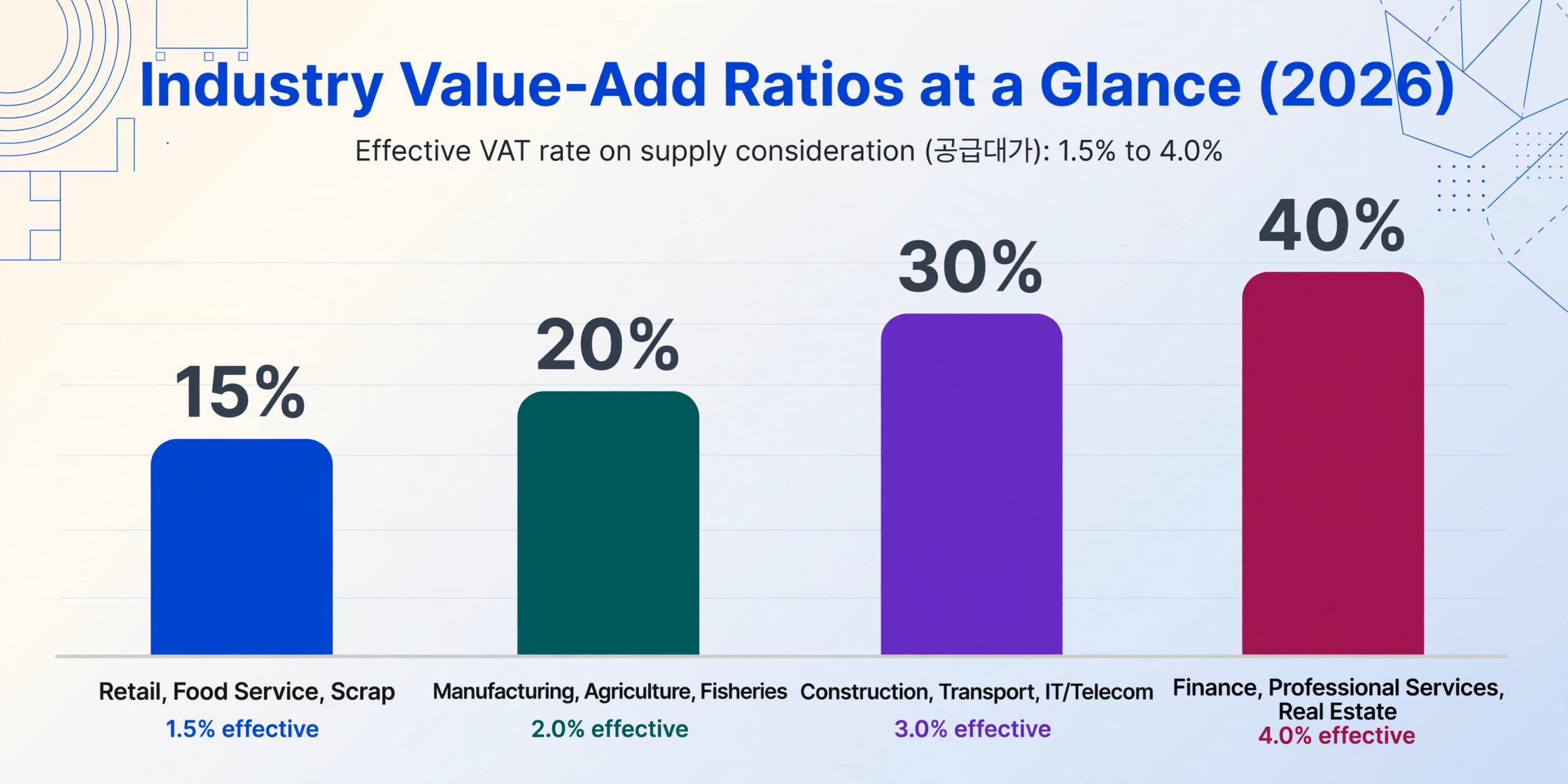
Your actual tax payable for a given transaction is: supply consideration (공급대가) × value-add ratio × 10%. A small manufacturer (20% ratio) with ₩50,000,000 in annual supply consideration owes approximately ₩1,000,000 in VAT — compared to ₩5,000,000 if calculated at the standard 10% rate. The industry ratio is the mechanism that keeps the simplified taxpayer system affordable for microbusinesses.
When extracting data from your invoices, include a column for 업종 (industry type) so you can apply the correct ratio in your final calculation. This is especially important if you operate across multiple 업종 categories — a retail shop that also does light manufacturing, for instance — because different invoices from different suppliers may fall under different ratios.
Batch Processing for the January VAT Deadline
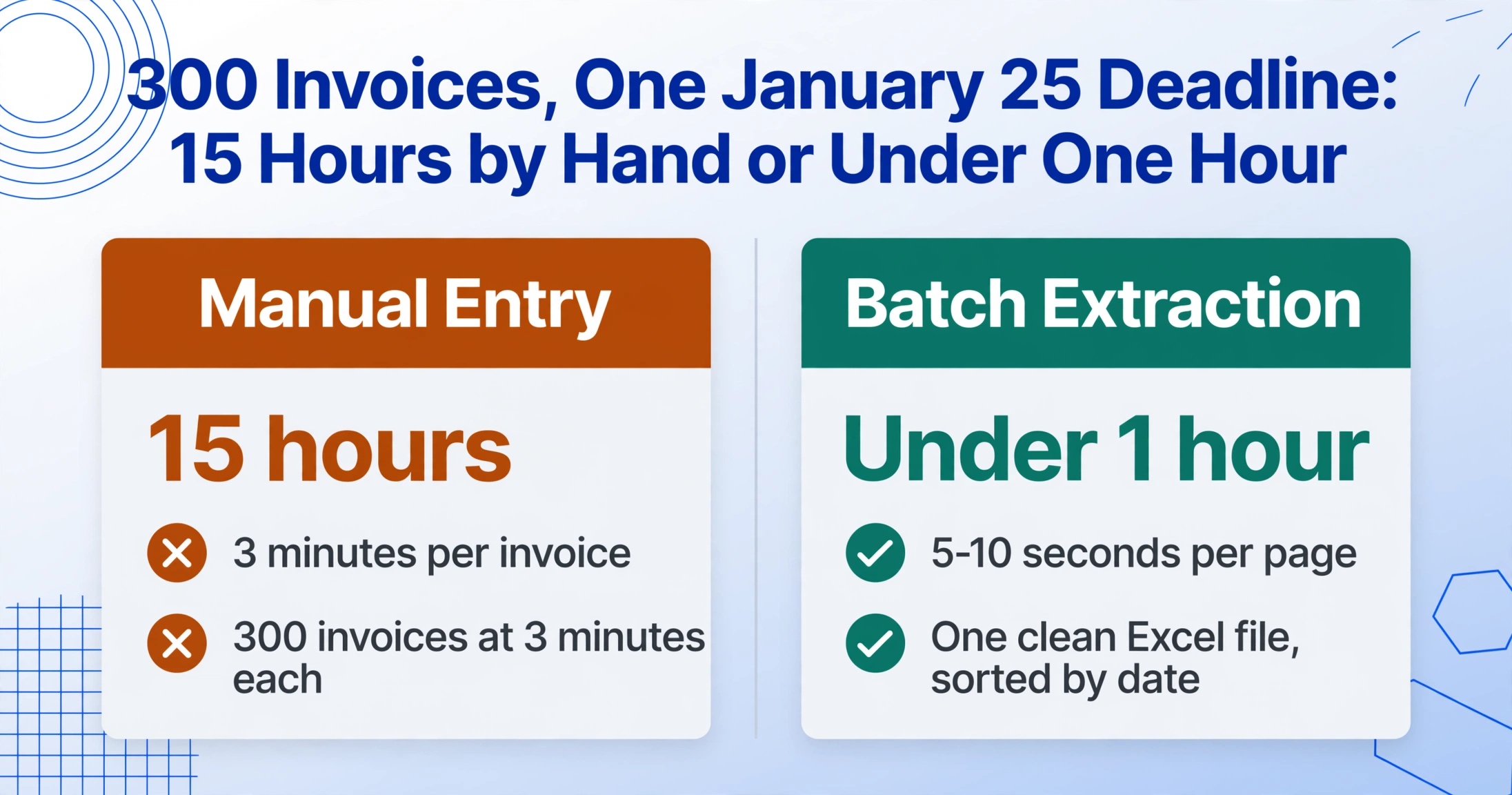
The annual VAT filing deadline for simplified taxpayers is January 25, covering all transactions from January 1 to December 31 of the previous year. For a small business with 30–50 active suppliers, that means organizing anywhere from 100 to 400 invoices into a single dataset — all within the first few weeks of the new year, when many shops and service businesses are already busy with end-of-year operations.
The cost of manual entry at this scale is not trivial. At 3 minutes per invoice — the average time to locate the key fields on a document and type them into a spreadsheet — 300 invoices consume 15 hours of concentrated data-entry work. For a business owner who also manages inventory, customer service, and payroll, finding 15 consecutive hours in January is a serious imposition. And with a single typo in a 사업자등록번호 or a transposed 공급가액 digit, the effort of reconciling the error later can exceed the time saved by doing it manually in the first place.
Batch processing changes this arithmetic. Upload all your invoices at once — PDFs, scanned paper slips, phone photos — and the same column definition applies across every document. Processing at 5–10 seconds per page means 300 invoices complete in under an hour. The output is a single Excel file with each row representing one invoice, sorted by date — directly usable for your VAT filing preparation or for sharing with your 세무사. When your stack also includes cash receipts or delivery notes, the Korean tax document extraction framework shows how one column set spans the full range of document types.
One practical tip for batch runs: add a File Name column. The AI populates it with the source filename for each row, so if a number looks off during review, you can trace it back to the original document instantly. And because the output is a standard Excel file, you can import it directly into ECOUNT ERP (which supports CSV/Excel import for AP transactions), Douzone Smart A (더존), or simply hand it to your tax accountant without reformatting.
Frequently Asked Questions
Can I use the extracted data directly for my annual VAT return filing?
The extracted Excel provides the raw transaction data — supplier registration numbers, supply values, VAT amounts, and dates — that feeds into your VAT return preparation. The actual return filing for 간이과세자 in Korea is done through HomeTax (홈택스) or through your 세무사 (tax accountant). The extraction output serves as the structured input for that filing process. Most tax accountants will accept an Excel file with columns for 공급가액, 부가세액, and 사업자등록번호 as their working dataset — which is exactly what the extraction produces.
Does it work on paper invoices scanned with a phone camera?
Yes. Scans and photos of paper invoices are supported as JPG or PNG uploads. The AI processes printed text with up to 99% accuracy under normal lighting and focus conditions. For handwritten documents or low-quality scans where text is unclear, accuracy may be lower — the tool performs best on clearly printed documents scanned at a reasonable resolution.
How does the tool handle the business registration number format (XXX-XX-XXXXX)?
The 10-digit 사업자등록번호 is extracted as printed on the invoice, preserving the hyphen-separated format. If your ERP or accounting software requires the number without separators, you can add a computed column with a rule to strip formatting — or use Excel's SUBSTITUTE function on the output to remove dashes in one step.
Can I process both 간이과세자 and 일반과세자 invoices in the same batch?
Yes. If your business receives invoices from both general and simplified taxpayer suppliers — which is common — include them in the same upload. The AI identifies and extracts the same field names (공급가액, 부가세액, 합계금액) regardless of invoice type. The key difference is in how you interpret the data afterward: 일반과세자 invoices use the standard 10% VAT (fully deductible by the buyer), while 간이과세자 invoices involve the industry ratio calculation.
What if the invoice doesn't have an industry code printed on it?
Many 간이과세자 paper invoices do not explicitly print the 업종코드 (industry code). In this case, look up the supplier's registration on the NTS website to determine their 업종 category, or simply group invoices by known supplier and apply the ratio you have on file. For batch processing, you can add a manual column in Excel after extraction and assign ratios supplier by supplier — a task that takes 10 minutes and saves you from recalculating every invoice individually.
Is there a minimum or maximum number of invoices I can process at once?
There is no minimum. For a single invoice, the tool works the same way as for a batch of 500. The practical maximum depends on your plan's credit allowance — each page processed consumes one credit. Monthly plans for small businesses start at $9/month and scale by volume, making this accessible even for very small operations.
Your January Filing Data Starts Here
The difference between a stressful January and a prepared January is often just a clean dataset. When every 간이과세자 invoice you have received across the year is already extracted into a structured spreadsheet — 사업자등록번호 in one column, 공급가액 in the next, 작성일자 in the third — the filing process becomes a data review and submission task instead of a data-entry project. Upload one of your invoices and see the fields land in the right columns on the first pass.