How to Extract Japanese Invoice (請求書) Data to Excel
for Accounts Payable and Tax Filing
A Japanese invoice (請求書, seikyūsho) is not the same document as its Western counterpart — and the differences are not cosmetic. Where a US or EU invoice ends with a total and a due date, a Japanese supplier invoice continues through the bank transfer details for payment (振込先, furikomisaki), the settlement-day payment terms convention (締日, shimebi), a withholding tax classification (源泉徴収区分, gensen chōshū kubun) that determines whether the payer must deduct income tax before remitting, and since October 2023, a Qualified Invoice registration number (インボイス登録番号) starting with "T" that is the only way the buyer can claim input tax credit. When a mid-sized Japanese company receives sixty of these from thirty suppliers at month-end — every one in a different PDF layout, every one requiring its bank details to be typed into the internet banking screen and its tax breakdown checked against the consumption tax return — the accounts payable workflow spends more time retyping than verifying.
Key Takeaways
- Sixty invoices a month means 240 individual bank-field retypes — data that already lives in the supplier master — because extraction tools trained on US and EU invoices have no column definition for 振込先.
- A tool that outputs "20日締翌月末払い" as a flat text string discards the two computable values hidden inside it — the settlement day that determines fiscal-year classification and the payment lag that determines cash-outflow month.
- The same twenty-five column names — defined once by what each field means, not where it appears on any one supplier's layout — produce one payment-ready spreadsheet regardless of whether the sixty invoices came from thirty different billing systems.
What a Japanese Invoice Contains — Field by Field
Japanese invoices operate under a legal framework that makes their field structure both more standardized and more detailed than a typical Western invoice. Since October 2023, the Qualified Invoice System (インボイス制度, officially the 適格請求書等保存方式) requires that every invoice used for input tax credit claims carry a Qualified Invoice registration number — a "T" followed by 13 digits — and separately state the consumption tax amounts by rate category (10% standard and 8% reduced). Below the legal requirements, decades of domestic business convention add payment-terms syntax and bank-transfer routing that no international extraction tool was trained to parse.
Here is the full field structure an AP department actually works with when processing a seikyūsho:
Header & Identification
- 請求書番号 (Invoice Number) — the unique identifier. Often formatted as a date-serial compound like "2026-07-001." This is the primary key for AP lookup and payment tracking. Without it, matching a payment confirmation from the bank against the original invoice is guesswork.
- 発行日 (Issue Date) — the date the invoice was issued. Used as the starting point for calculating payment due dates when terms are expressed relative to billing close.
- 取引年月日 (Transaction Date) — the date of the underlying transaction, which may differ from the issue date. For invoices covering a monthly billing period, this is often the last day of the period.
- 発行元 (Issuer / Supplier) — the seller's company name, address, and contact information. Usually accompanied by the company seal (社判, shahan) or digital equivalent.
- 宛名 (Recipient / Buyer) — the company and department being billed. Often followed by 御中 (onchū, a formal honorific suffix applied to the addressee organization).
Line Items & Pricing
- 品名 (Item Name) — product or service description. May include part numbers (品番) and specification codes. A supplier's billing system may describe the same product differently than the original purchase order (発注書, hatchūsho), creating the VLOOKUP #N/A problem when matching.
- 数量 (Quantity) — with unit (単位): 個 (pieces), 式 (lot/set), kg, m, 時間 (hours). Unit mismatches between PO and invoice (PO in 式, invoice in 個) require normalization before comparison is possible.
- 単価 (Unit Price) — typically tax-exclusive (税抜, zeinuki). An invoice that switches to tax-inclusive prices without clear labeling requires AP to reverse the tax calculation to verify against the PO.
- 金額 (Amount) — line total, tax-exclusive. Often shown alongside the subtotal (小計, shōkei) before tax is added.
Tax & Legal Compliance
- インボイス登録番号 (Qualified Invoice Registration Number) — "T" + 13 digits. Mandatory since October 2023. Without this number, the buyer cannot claim input tax credit on purchases from this supplier. The National Tax Agency's Qualified Invoice guidelines specify that the registration number must appear alongside the issuer's name. A missing or incorrect number means the AP department must either request a corrected invoice or accept reduced input tax credit (80% deductible through September 2026, 50% through September 2029, then zero under current transitional rules).
- 消費税額 (Consumption Tax) — separately stated by rate category: 10% standard rate and 8% reduced rate (food, non-alcoholic beverages, subscription newspapers). The invoice must show the taxable base and tax amount for each rate. The buyer's consumption tax return (消費税申告) requires these rate-grouped totals as input data.
- 源泉徴収区分 (Withholding Tax Classification) — present on invoices from certain professional service providers (tax accountants, lawyers, designers, writers) where the payer is legally required to withhold income tax at source. The amount — typically 10.21% of the payment — is deducted by the buyer before remitting the balance and paid directly to the tax office on the seller's behalf. An invoice that carries 源泉徴収 changes the AP calculation: the payment amount is the invoice total minus the withholding, and a separate tax deposit entry must be booked.
Payment & Banking
- 振込先 (Bank Transfer Details) — the supplier's receiving bank account, typically expressed as four separate fields: 銀行名 (Bank Name), 支店名 (Branch Name), 口座種別 (Account Type — 普通/ordinary or 当座/current), and 口座番号 (Account Number). For ゆうちょ銀行 (Japan Post Bank), the account number format differs from commercial banks: it uses a 記号-番号 (symbol-number) pair that must be converted to a 7-digit transfer account number. These four fields are what the AP staff types into the internet banking screen — often the same data typed into the bank system that was already typed into the accounting software, because the two systems do not share a data pipe.
- 支払条件 (Payment Terms) — expressed in a compact Japanese syntax that encodes two values. "20日締翌月末払い" means the billing period closes on the 20th of the month and payment is due by the end of the following month. "月末締翌々月末払い" (end-of-month close, payment by end of month after next) is common in manufacturing and construction. These text strings contain the settlement day (締日) — the day that determines which monthly billing period a transaction belongs to — plus a payment lag that determines the cash outflow month.
- 振込手数料 (Transfer Fee) — who bears the bank transfer fee. The convention varies: some suppliers absorb it, others specify 「振込手数料は貴社ご負担にてお願い致します」 (transfer fees to be borne by your company). When the fee burden is on the buyer, AP must add the fee amount to the transfer total.
The field structure is not guesswork — the Cabinet Office's official overview of the Qualified Invoice system lists the six mandatory items that every invoice (インボイス) must contain. But the extraction task goes beyond the six mandatory items. The fields that consume the most manual AP time — bank transfer details, payment terms parsing, withholding tax — are not legally required on the invoice at all. They are included by convention, and they are the fields that make a Japanese invoice processing workflow different from an American or European one.
Why Generic Invoice Extraction Breaks on Japanese Invoices
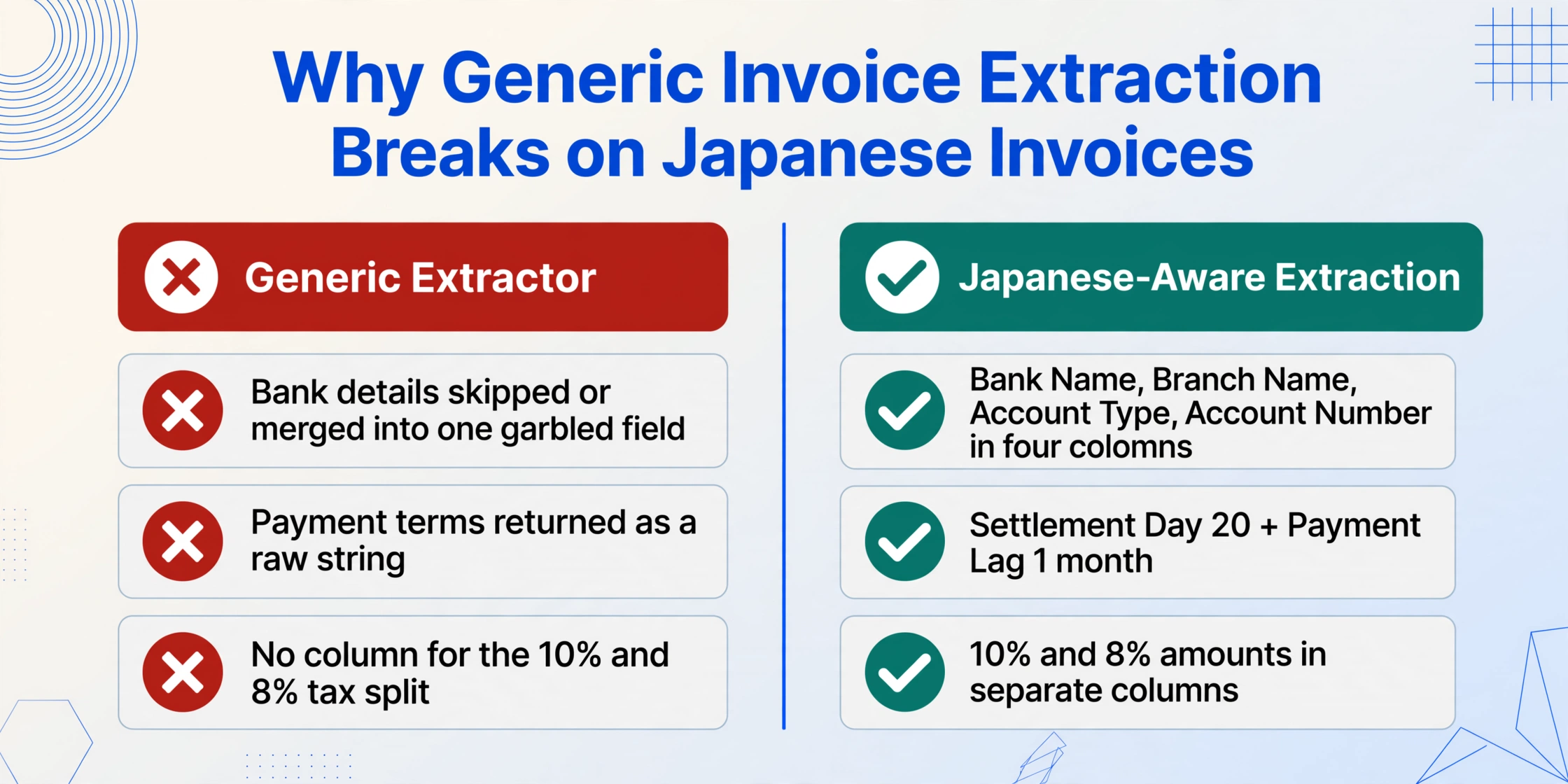
Most AI invoice extraction tools were trained on English-language invoice datasets — US and EU formats where the fields are "Invoice Number," "Due Date," "Total," and "Vendor." Drop a Japanese invoice into one of these tools and three things happen.
First, the supplier's bank transfer details (振込先) are ignored or misread. A Japanese invoice lists the bank name (e.g., 三菱UFJ銀行), branch (e.g., 新宿支店), account type (普通), and account number as separate labeled fields — but a generic extraction engine sees four text strings near the bottom of the page and has no column definition for "bank transfer details," so it either skips them or concatenates them into one garbled field. The AP team still has to open each PDF and type the bank details into the payment system.
Second, the payment terms (支払条件) are read as an opaque text string when they encode two calculable values. "20日締翌月末払い" is not decorative text. It tells the AP team that the billing period closes on the 20th — transactions before that date are this month's obligation, transactions after it belong to next month — and that payment is due by the end of the following month. A generic extractor outputs the string unchanged. An extraction that understands Japanese payment conventions splits it into Settlement Day: 20 and Payment Lag: 1 month — two structured values that a payment calendar formula can consume.
Third, the consumption tax breakdown and withholding tax classification have no equivalent in Western extraction schemas. A tax field on a US invoice is a single sales tax line. On a Japanese invoice, there are potentially three tax-relevant fields: the 10% consumption tax subtotal, the 8% reduced-rate consumption tax subtotal (for mixed-item invoices), and — if the supplier is a qualifying professional — a withholding tax amount or classification mark. A generic extraction that flattens all tax fields into one number makes the AP team undo the flattening during verification.
The structural issue: Japanese invoice extraction is not a language problem solved by adding Japanese OCR. It is a schema mismatch — the fields that matter for Japanese AP workflows (振込先 bank details, 締日 settlement day, 源泉徴収 withholding classification, インボイス登録番号) do not exist in the field vocabulary of a Western-trained extraction engine. The extraction tool must be told what these fields are — by defining them as column names — and the AI must understand the Japanese business conventions behind each one.
How to Extract Invoice Data to Excel — Step by Step
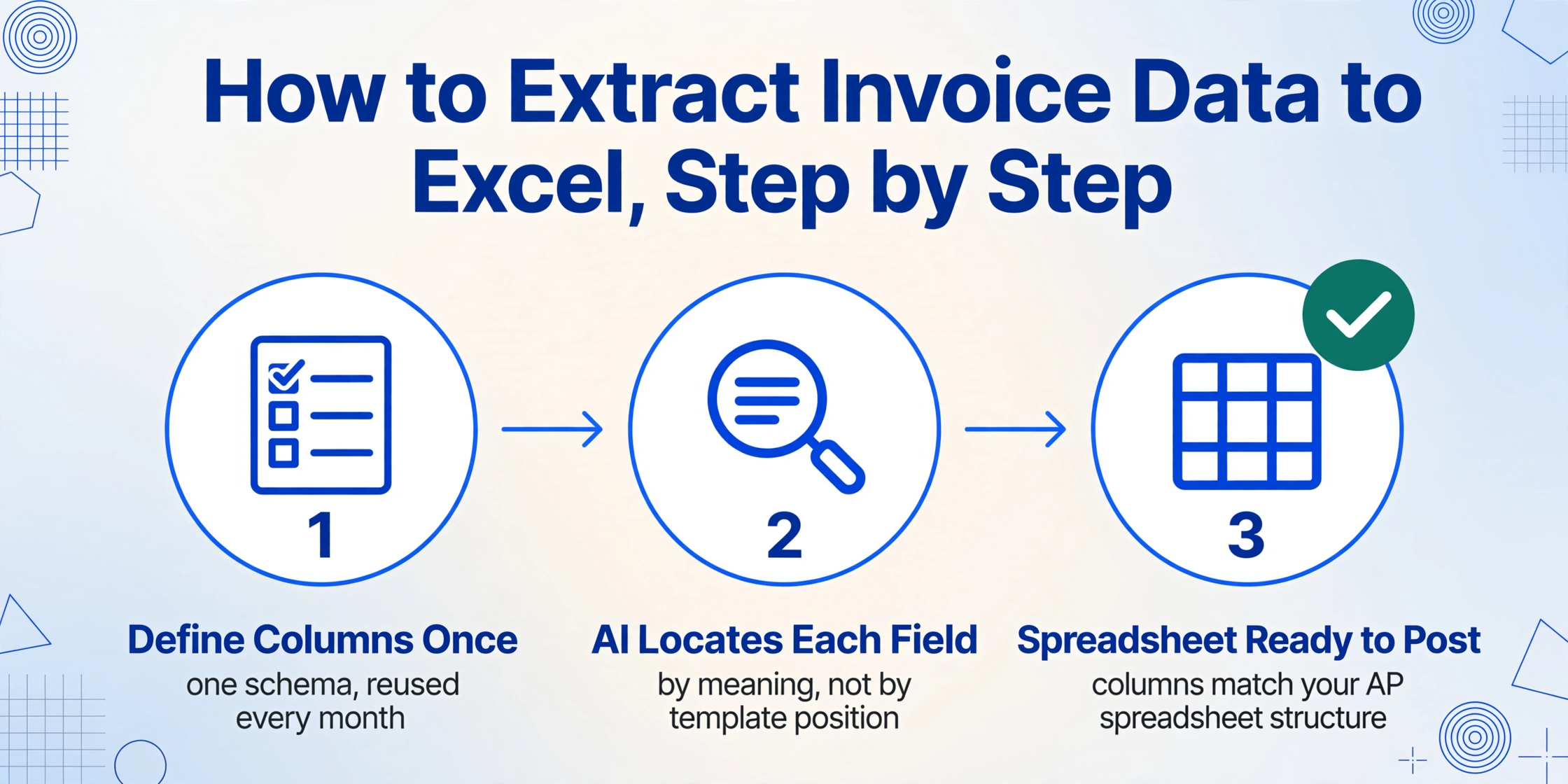
The workflow that replaces manual invoice-to-AP-spreadsheet transcription mirrors the approach used for purchase orders but with a different column schema — the fields unique to invoices — and a different downstream pipeline into the bank payment process rather than the PO-matching process. The three-stage workflow is defined once and applies to every supplier, every invoice format, and every subsequent month-end batch.
Define your invoice extraction columns once — reuse across every supplier
Type the field names you want as column headers. For Japanese invoice extraction, the practical set is: Invoice Number (請求書番号), Issue Date (発行日), Transaction Date (取引年月日), Supplier (発行元), Qualified Invoice Registration Number (インボイス登録番号), Item Name (品名), Quantity (数量), Unit (単位), Unit Price (単価), Line Amount (金額), Subtotal (小計), 10% Taxable Amount (10%対象額), 10% Tax (10%消費税), 8% Taxable Amount (8%対象額), 8% Tax (8%消費税), Total (合計金額), Withholding Tax Classification (源泉徴収区分), Bank Name (振込先銀行名), Branch Name (支店名), Account Type (口座種別), Account Number (口座番号), Account Holder (口座名義), Payment Terms (支払条件), Transfer Fee Responsibility (振込手数料負担). This uses Custom Column Extraction: you define the output schema with the column names that match your AP spreadsheet structure, and the AI locates each field by understanding what it means — not by where it sits on a particular supplier's invoice template. The same column names work whether the invoice comes from a major trading company's ERP-generated PDF or a local service provider's handwritten form, because the AI reads field identity, not field position.
Upload all month-end invoices in one batch
Drop all supplier invoices — email PDFs, downloaded billing statements, scans of paper invoices received by post — into a single upload. Batch processing handles them as one job: each invoice is processed independently with your column schema applied, and all results are merged into a single spreadsheet with one row per invoice. Sixty invoices from thirty suppliers, each with a different layout, process in one run. The AI identifies the document as an invoice by recognizing the structural pattern — supplier block, recipient block, date fields, line-item table, subtotal/tax/total footer, bank transfer details block — and then populates each defined column by locating the relevant data within the document. No template per supplier is needed. The batch produces one output file even though the input is sixty different documents from thirty different billing systems.
Export to Excel and feed into AP and payment workflows
Download the merged results as an Excel file (XLSX). You now have one spreadsheet with every invoice's data in structured columns — ready to import into your accounting software (弥生会計, freee, マネーフォワード クラウド会計, 勘定奉行) for purchase journal entries, and into your bank's internet banking system for payment batch creation. The bank transfer details — bank name, branch, account type, account number, account holder — are in separate columns, not buried in a single text block, so the data can be formatted into a payment batch file (総合振込 or 全銀フォーマット) that the bank's upload screen accepts. The consumption tax amounts by rate category are already split, so the input tax credit calculation on the consumption tax return uses extracted data rather than manually computed data.
Files are processed securely and not stored.
The Fields Where Generic Invoice Extraction Breaks — and How to Handle Them
Four data points on a Japanese invoice resist automatic extraction more than the rest — not because the OCR cannot read the characters, but because each field carries embedded business logic that must be preserved as structured data rather than flattened into a text string.
Bank Transfer Details (振込先) — four fields that become a payment batch
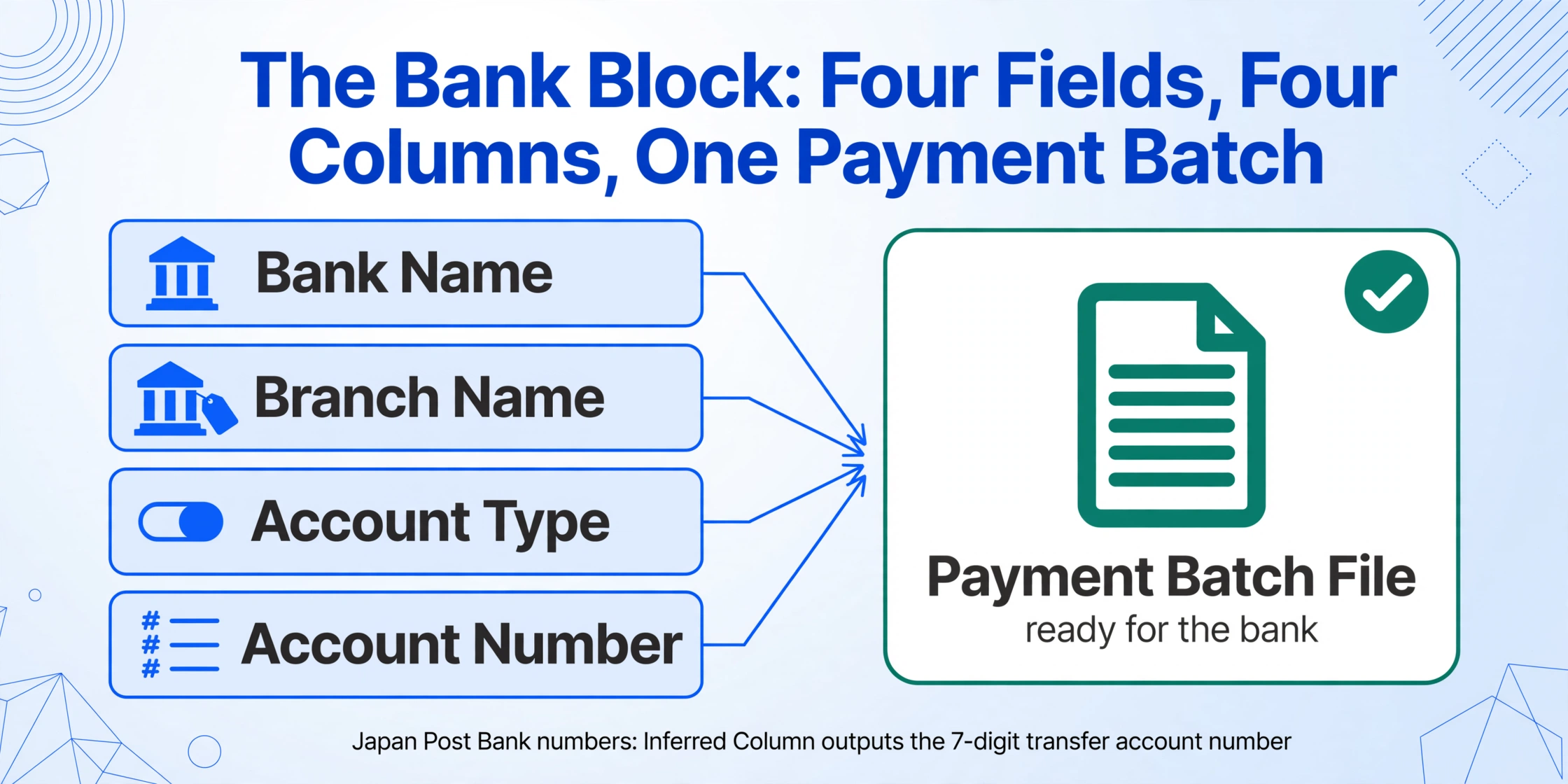
The bank transfer details block is the single most repetitive data entry task in Japanese AP. An AP clerk takes the invoice, opens the internet banking screen, and types four values: bank name, branch name, account type, and account number — the same four values already recorded in the accounting software's supplier master. When sixty invoices arrive at month-end, that is sixty rounds of retyping four fields per invoice — 240 individual data entries that add no new information, only duplicate information from one system to another.
The extraction approach captures each of the four fields into its own column: Bank Name (振込先銀行名), Branch Name (支店名), Account Type (口座種別 — 普通 or 当座), and Account Number (口座番号). For ゆうちょ銀行 transfers, where the account reference uses a 記号-番号 format (e.g., 記号12345 番号6789012) that differs from the 7-digit transfer account number required by commercial bank systems, an Inferred Column can convert the Japan Post format during extraction: define a column like Transfer Account Number (if ゆうちょ, convert 記号-番号 to 7-digit format per Japan Post Bank conversion rule). The AI applies the conversion during extraction so the AP team receives the account number in transfer-ready format.
With bank details in structured columns, the next step — creating a payment batch file for the bank — becomes a spreadsheet operation rather than a re-typing exercise. The Bank Name, Branch Name, Account Type, Account Number, and Account Holder columns from the extraction form the input to a CSV-formatted batch payment file that the bank's internet banking system accepts as an upload.
Payment Terms (支払条件) — from compound text to settlement day and payment lag
Japanese payment terms are a compact syntax that the AP team reads in one glance but that resists formulaic extraction. "20日締翌月末払い" encodes two decisions: the billing period closes on the 20th of each month, and payment is due by the end of the following month. A Computed Column — a column whose value the AI calculates during extraction — splits this into two structured fields: Settlement Day (from Payment Terms: if "20日締" then 20, if "月末締" then 31, if "10日締" then 10) and Payment Lag Months (from Payment Terms: if "翌月末払い" then 1, if "翌々月末払い" then 2).
The settlement day is operational, not cosmetic. An invoice dated March 18 under 20日締 terms falls into the March billing period — payment is due by the end of April, and the expense belongs to the current fiscal year if the company closes books on March 31. An invoice dated March 22 under the same 20日締 terms falls into the April billing period — payment is due by the end of May, and the expense belongs to the next fiscal year. The settlement day, not the invoice date or the calendar month boundary, determines fiscal-year classification. The same payment terms logic is covered in detail in the guide to extracting Japanese purchase order data, which carries the same payment terms fields from the procurement side.
Consumption Tax (消費税) — dual-rate split that the tax return needs as structured input
Japan's consumption tax system uses two rates — 10% standard and 8% reduced — and the qualified invoice must state the taxable base and tax amount for each rate category separately. The AP team verifying an invoice before payment needs to confirm that the rate-grouped totals on the invoice match what the accounting system expects. The tax team filing the consumption tax return needs the 10% and 8% totals as input data for the return calculation.
An Inferred Column handles the classification during extraction: Tax Rate (from Item Description: food/beverage items → 8% Reduced, standard goods/services → 10% Standard, explicitly export-related → Tax-Exempt). The AI reads each line item description, applies Japan's dual-rate rules, and populates the Tax Rate column. The output spreadsheet arrives with every line pre-classified — 10% Standard subtotal and 8% Reduced subtotal are computable from the extracted data rather than requiring a separate classification pass. For mixed-item invoices — office supplies (10%) shipped alongside packaged beverages (8%) — the classification per line is the only way to verify that the invoice's rate-grouped totals are correct without reopening each invoice PDF.
Withholding Tax (源泉徴収) — when the payer must deduct before remitting
Japan's withholding tax system requires the payer to deduct income tax at source when making payments to certain professional service providers — tax accountants (税理士), certified public accountants (公認会計士), lawyers (弁護士), judicial scriveners (司法書士), designers (デザイナー), writers (著作家), and several other categories defined under Article 204 of the Income Tax Act (所得税法). The withholding rate is generally 10.21% of the payment amount. The payer remits the withheld amount to the tax office and pays the supplier the remaining 89.79%.
An invoice that carries a withholding tax classification — often marked as 源泉徴収あり or by showing a separate 「源泉徴収額」 line — changes the payment calculation. The AP team must subtract the withholding from the invoice total, pay the net amount to the supplier, and book the withheld amount as a separate tax deposit liability. If the withholding is not captured during extraction, the AP team must re-examine each qualifying invoice, calculate the withholding manually, and adjust the payment — a per-invoice arithmetic step that, across sixty invoices, consumes measurable AP time.
A column defined as Withholding Tax Classification (check if invoice mentions 源泉徴収; output "Applicable" if the supplier is a qualifying professional and withholding is indicated, otherwise "Not Applicable") flags which invoices require the deduction. A Computed Column like Net Payment Amount (if withholding applicable: Total × 0.8979; otherwise: Total) calculates the actual transfer amount directly.
Getting Extracted Invoice Data Into Japanese Accounting Software
The output of an extraction job is a structured spreadsheet. The destinations are the accounting software where purchase journal entries are recorded and the bank system where payments are executed. Every major Japanese accounting platform accepts structured data imports — the bottleneck has always been the step upstream of the import: getting invoice data out of supplier PDFs and into structured form.
Yayoi (弥生会計) — the market leader in Japanese SME accounting — imports purchase ledger data via CSV. Extracted invoice columns map directly: Invoice Number → 伝票番号, Supplier → 仕入先, Date → 日付, Total → 金額. The consumption tax amounts by rate category feed into Yayoi's tax reporting module. For companies also using Yayoi Sales (弥生販売), the companion purchasing module, invoice data links to the corresponding PO records — creating the document chain that the three-way match (三点照合) requires.
freee — the cloud accounting platform used by over 70,000 SMEs — supports automatic journal entry generation (自動仕訳) from CSV import. The Qualified Invoice registration number extracted alongside each invoice line flows into freee's invoice compliance check, and the rate-grouped consumption tax amounts populate the consumption tax return calculation that freee generates automatically. The bank transfer details — already in separate columns from extraction — feed into freee's payment module for bank batch file creation.
MoneyForward Cloud Accounting (マネーフォワード クラウド会計) — with the largest number of financial institution API connections in Japan (2,451+) — imports purchase invoice data into its purchase management module. The platform's automatic bank reconciliation matches payment records against bank feeds, and extracted invoice data with consumption tax breakdown supports MoneyForward's dual-rate tax reporting.
Kanjo Bugyo (勘定奉行) — OBC's suite for mid-size companies (annual revenue ¥500M–5B) — supports batch CSV import of purchase invoice data with department-level cost allocation (部門別原価管理). If invoices carry department codes or cost center references, those fields flow into Kanjo Bugyo's segmented P&L reporting automatically.
The common thread: once invoice data is in structured columns, the import into any of these platforms is a file upload. The step that currently takes hours — typing sixty invoices' worth of bank details, tax amounts, and payment terms into the accounting system — becomes a verification exercise: check the extracted data, confirm the outliers, and import. For the same extraction approach applied to the procurement side of the matching workflow, see the step-by-step guide to extracting Japanese purchase order data to Excel. For the banking counterpart — extracting transaction records that appear alongside invoice payments — the Japanese bank passbook extraction guide covers the complete passbook-to-spreadsheet workflow.
FAQ
Can the extraction read handwritten invoices from small suppliers?
Yes. Many smaller Japanese suppliers — local service providers, individual contractors, rural manufacturers — still issue handwritten invoices (手書き請求書) on pre-printed stationery, with amounts written in ballpoint pen and stamped with the company seal. The AI model reads handwritten kanji and numerals, including the abbreviated notation common on manual invoices (㈱ for 株式会社, 〒 as the postal mark prefix, No. for number). For heavily degraded scans or fax copies, scanning at 300 dpi or higher is recommended. Spot-checking difficult characters — particularly handwritten bank account numbers where a misread digit means a failed transfer — is prudent for handwritten documents.
How does extraction handle the ゆうちょ銀行 account number format?
Japan Post Bank (ゆうちょ銀行) uses a 記号-番号 format (e.g., 記号12345 番号6789012) that differs from the 7-digit account numbers used by commercial banks. When transferring from a commercial bank to a Japan Post account, the 記号-番号 must be converted to a 7-digit transfer account number. An Inferred Column can perform this conversion during extraction: define the column logic to detect ゆうちょ銀行 as the bank name, parse the 記号-番号 fields, and output the converted 7-digit number. The Japan Post Bank website publishes the conversion rule — essentially, the 記号 digits map to the first portion of the transfer account number and the 番号 digits (minus the final check digit for 8-digit numbers) map to the remainder.
What happens if the Qualified Invoice registration number (インボイス登録番号) is missing?
If the supplier is not registered as a Qualified Invoice Issuer (適格請求書発行事業者), their invoice will not carry a registration number. In this case, the buyer cannot claim full input tax credit on the purchase — but transitional measures allow partial deduction. From October 2023 through September 2026, 80% of the input tax is creditable. From October 2026 through September 2029, 50% is creditable. After September 2029 or 2031 (depending on the 2026 tax reform extension), zero. During the transitional period, the AP team must flag non-qualified invoices separately because the reduced credit must be calculated on a different basis from qualified invoices. An extraction column that captures the registration number — or notes its absence — provides the data needed to route each invoice to the correct tax treatment.
Can the same extraction handle both tax-inclusive (税込) and tax-exclusive (税抜) invoices?
Yes, but the column definition should specify the desired output format. If some suppliers issue tax-inclusive invoices (内税) and others issue tax-exclusive invoices (外税), adding a Computed Column resolves the normalization during extraction. For example: Line Amount Tax-Exclusive (if unit prices are tax-inclusive, divide by 1.1 for 10% items or 1.08 for 8% items; otherwise use as-is). The AI reads the document context — including any notation like 税込 or 税抜 on the invoice — to determine the tax treatment and normalize the output. All line amounts in the spreadsheet arrive on a consistent tax-exclusive basis, ready for comparison against the PO.
How does the withholding tax (源泉徴収) column interact with the payment amount calculation?
The withholding tax is a deduction the payer makes before remitting to the supplier. The invoice total is the gross billing amount; the amount the supplier receives is the total minus the withholding. A Computed Column configured as Net Payment Amount (if Withholding Tax Classification = "Applicable": Total × 0.8979; otherwise: Total) outputs the actual transfer amount for each invoice. The withheld amount — the difference between Total and Net Payment — is owed to the tax office (税務署) as a separate deposit. The AP ledger should carry three columns per withholding-eligible invoice: Gross Amount (the invoice total), Withholding Amount (the tax deduction), and Net Payment (the transfer amount). The extraction produces all three, so the payment batch file and the tax deposit schedule are built from the same source data.
Does this work for invoices with mixed consumption tax rates on the same document?
Yes. A single Japanese invoice can carry items at 10% standard rate, 8% reduced rate, and tax-exempt. The Qualified Invoice system requires the invoice to separately state the taxable base and tax amount per rate category. During extraction, an Inferred Column classifies each line item by rate based on the item description — food and beverage items at 8%, standard goods and services at 10%, explicitly exempt items as tax-exempt. The output spreadsheet groups items by tax rate, and the rate-grouped totals can be verified against the invoice's stated tax breakdown. If the two do not match — if the extraction's computed 8% total differs from the invoice's stated 8% total — the discrepancy is flagged for review, which is the same check the AP team would perform manually, but performed automatically on sixty invoices simultaneously.
From Sixty PDFs to One Payment-Ready Spreadsheet
The Japanese invoice is not simply a bill. It is a payment instruction — the bank details tell the AP team where to send the money. It is a tax document — the consumption tax breakdown feeds the national tax return, and the Qualified Invoice registration number is the prerequisite for input tax credit. It is a compliance record — the withholding tax classification triggers a separate tax deposit obligation on the buyer's side. And it is a matching artifact — the invoice number, line items, and amounts must be verified against the corresponding purchase order and delivery note before payment can be approved.
An extraction workflow that captures all of these fields — not just the total and the date — turns the month-end invoice stack from a data entry queue into a verification checklist. The bank transfer details are in columns, ready to become a payment batch file. The consumption tax is split by rate, ready to feed the tax return. The withholding classification is flagged, so no qualifying invoice is paid at full gross amount by mistake. The payment terms are parsed into settlement day and lag, so the payment calendar populates automatically. The spreadsheet arrives structured, and the AP team's time shifts from typing to verifying — from data entry to financial control.