How to Extract German ELSTER Tax Data to Excel
Without Manual Re-Typing (2026 Guide)
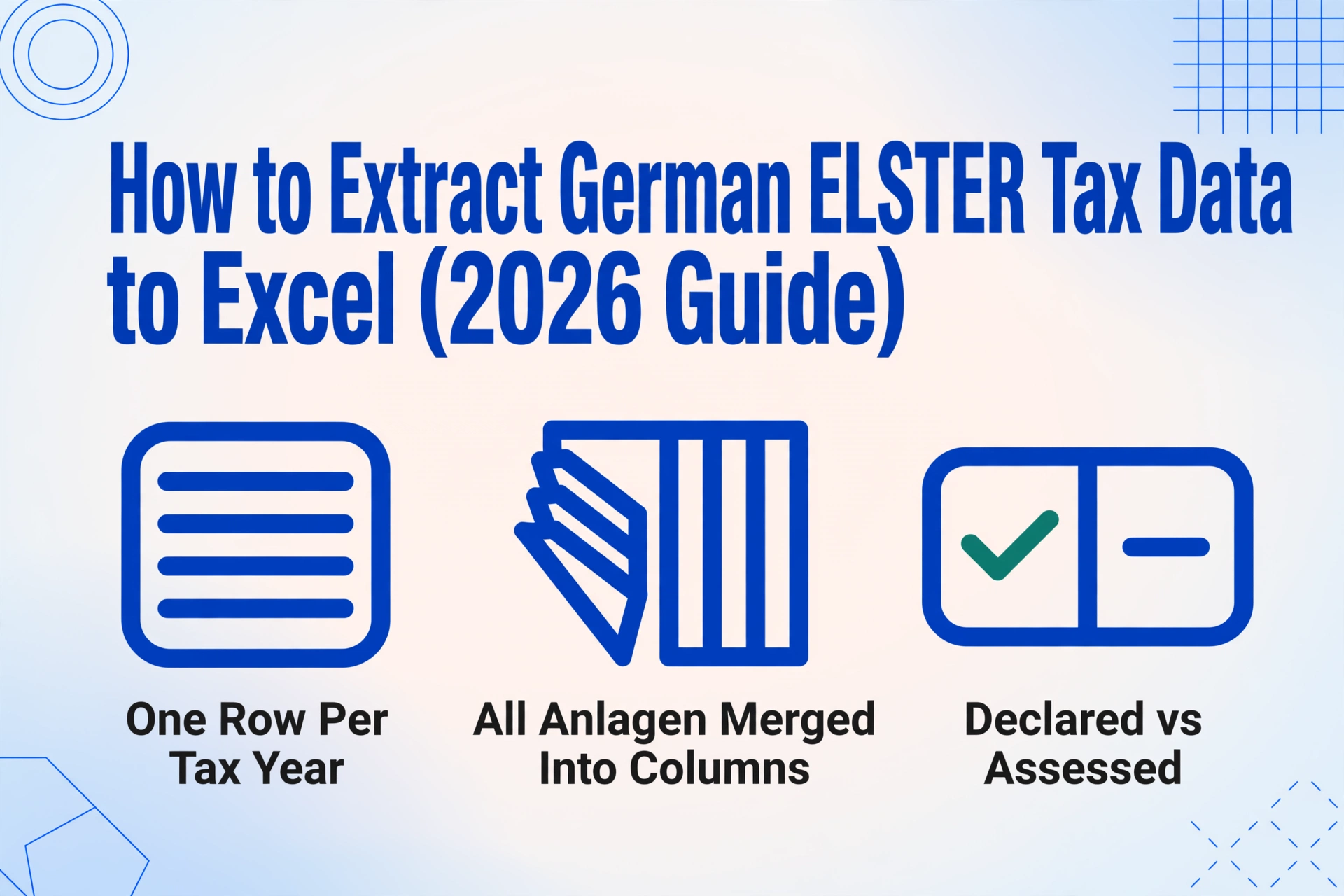
Germany's ELSTER (ELektronische STeuerERklärung) platform processes over 30 million electronic tax declarations every year — covering individual income tax returns (Einkommensteuererklärung), VAT annual returns (Umsatzsteuererklärung), trade tax declarations (Gewerbesteuererklärung), and monthly wage tax filings (Lohnsteuer-Anmeldung) — see also how monthly Lohnsteuer declarations get batched into one payroll dashboard. A complete income tax return spans the main form (Hauptvordruck) and five to eight separate annexes (Anlagen) — Anlage N for employment income, Anlage Vorsorgeaufwand for insurance, Anlage Sonderausgaben for special expenses, Anlage Außergewöhnliche Belastungen for extraordinary burdens, and others depending on income sources. Each annex is a separate page with its own field structure. ELSTER submits them. What it does not produce is a single Excel row containing every field from every annex for one tax year — the format your tax advisor (Steuerberater) actually needs to run a cross-year comparison. Getting there by retyping every field from every Anlage takes roughly 90 minutes per tax year. With extraction, the same data lands in Excel in under 10 minutes — and the column definition you set up once works every year.
Key Takeaways
- 30 million tax returns hit Germany's ELSTER system each year, but the only way to line up last year's deductions next to this year's is to open two PDFs and start retyping.
- The Finanzamt pre-fills employer wage data automatically, yet 60–70% of your deduction fields — Werbungskosten, Spenden, Krankheitskosten — still make it into ELSTER through your keyboard, one number at a time, 90 minutes per return.
- Name your tax columns once and every future year's return arrives as a single Excel row with arithmetic verification, catching deduction errors before your Steuerberater catches them.
What ELSTER Is — and What It Doesn't Produce
ELSTER has been Germany's official electronic tax platform since 2005, operated by the Bayerisches Landesamt für Steuern on behalf of all German tax authorities. The original desktop software, ElsterFormular, was retired in 2021 and replaced by Mein ELSTER — a browser-based portal that handles everything from individual income tax (Einkommensteuererklärung) to business VAT returns and wage tax filings.
The portal gives you two things when you file: a PDF confirmation (the Übertragungsprotokoll with your submitted data) and an XML submission package transmitted to the Finanzamt under § 87c Abgabenordnung (AO). The PDF contains every field you entered — across all Anlagen — as a read-only document. The XML is for the Finanzamt, not you.
What ELSTER does not produce is a structured spreadsheet where each row is a tax year and each column is a field from your return — income totals, deduction amounts, tax due. The platform is optimized for submission, not analysis. If you want to compare your 2025 effective tax rate against your 2024 rate, or check whether your Werbungskosten utilization improved year-over-year, you are opening two PDFs — or five, if you count the individual Anlagen — and retyping numbers into Excel.
This gap affects three groups in particular. Freelancers and sole traders (Freiberufler / Gewerbetreibende) who file their own returns need the comparison to understand tax trajectory and verify that each year's deductions are being applied consistently. Tax advisors (Steuerberater) receiving PDF returns from clients retype field values into DATEV, Lexware, or Addison — the three dominant German tax software platforms — before any analysis can begin. And expats filing in Germany, already navigating a German-only platform, face the additional friction of translating form field labels into English for their own records or for a cross-border accountant. For all three, the bottleneck is the same: the data exists in digital form, but not in the format that enables comparison.
The Forms That Make Up a German Tax Declaration
A German income tax return (Einkommensteuererklärung) is not a single form — it is a main form plus a stack of annexes, each governed by specific sections of the Einkommensteuergesetz (EStG). Which annexes you file depends on your income sources and deductions, but a typical freelancer or employee with investment income will submit six to eight separate form pages. Every page has its own field layout, and the fields are not always in a consistent column structure across pages.
Core Forms — Every Filer
- Hauptvordruck (Main Form) — personal data, Steuernummer (Finanzamt-assigned, changes with relocation), Steuer-ID (lifetime, § 139b AO, 11 digits), bank details, religious affiliation for Kirchensteuer (church tax, 8–9% of income tax depending on state). Contains the calculation summary: Gesamtbetrag der Einkünfte (total income) → zu versteuerndes Einkommen (taxable income) → festgesetzte Steuer (assessed tax).
- Anlage N — employment income (Einkünfte aus nichtselbstständiger Arbeit) under § 9 EStG. Contains: Bruttolohn (gross salary), Lohnsteuer/Soli/Kirchensteuer withheld, and Werbungskosten — commuting (Entfernungspauschale at €0.30/km one-way, capped), home office (Tagespauschale €6/day, max €1,260/year), work equipment, professional training, and the Arbeitnehmer-Pauschbetrag (€1,230 automatic deduction if actual expenses are lower).
Deduction-Specific Annexes
- Anlage Vorsorgeaufwand — compulsory insurance contributions: pension (gesetzliche Rentenversicherung), health (Krankenversicherung), long-term care (Pflegeversicherung), unemployment (Arbeitslosenversicherung). These are partially deductible with a cap under § 10 EStG.
- Anlage Sonderausgaben — special expenses under § 10 EStG: church tax, charitable donations (Spenden, up to 20% of Gesamtbetrag), education costs (Ausbildungskosten, up to €6,000/year), child care (Kinderbetreuungskosten, two-thirds of costs, max €4,000/child), and alimony payments to divorced spouse.
- Anlage Außergewöhnliche Belastungen — extraordinary burdens under § 33 EStG: medical costs (Krankheitskosten), care costs (Pflegekosten), disability-related expenses, and catastrophe damages. Crucially, these are deductible only above the zumutbare Belastung — a reasonable-burden threshold ranging from 1% to 7% of total income, depending on income level, marital status, and number of children.
- Anlage KAP, V, R, Kind — capital gains, rental income, pension income, and child benefits. Each has its own field structure. Anlage EÜR (Einnahmenüberschussrechnung) applies to self-employed filers — a profit-and-loss statement with revenue, operating expenses, and net profit feeding into the main form.
The core extraction challenge: Fields that belong together in analysis are spread across separate forms. Your total income is the sum of fields on Anlage N, Anlage KAP, Anlage V, Anlage R, and Anlage EÜR. Your total deductions are the sum of fields on Anlage Vorsorgeaufwand, Anlage Sonderausgaben, and Anlage Außergewöhnliche Belastungen. The main form (Hauptvordruck) shows the aggregated results — but not the individual values behind them. Manual transcription from 5–8 pages to 50+ Excel cells is where errors concentrate — and where a single misread value cascades into an incorrect tax comparison.
Why the Pre-Filled Return (VaSt) Doesn't Replace Extraction
One of ELSTER's most useful features is the vorausgefüllte Steuererklärung (VaSt) — the pre-filled tax return. After you register for Belegabruf (document retrieval), ELSTER automatically populates your return with data already on file at the Finanzamt: Lohnsteuerbescheinigung from your employer, Kranken- und Pflegeversicherungsbeiträge from your health insurer, Rentenbezugsmitteilungen from the pension authority, and Lohnersatzleistungen like unemployment or parental leave benefits.
This reduces manual entry — but it does not eliminate it, and it does not solve the cross-year problem. Three categories of data still require manual input in ELSTER:
| Data Category | VaSt Auto-Fill? | Why It Still Needs Manual Entry |
|---|---|---|
| Lohnsteuerbescheinigung (employer wage statement) | ✅ Yes | Pre-filled — but errors in employer-submitted data are common. The Finanzamt states: "Bei fehlerhaften oder unvollständigen Daten wenden Sie sich bitte direkt an den jeweiligen Datenübermittler." You must verify every field. |
| Kranken-/Pflegeversicherung (health/long-term care insurance) | ✅ Yes | Pre-filled — but only for compulsory insurance. Supplementary policies, private insurance top-ups, and foreign insurance contributions are not captured. |
| Werbungskosten (income-related expenses, Anlage N) | ❌ No | Commuting distance, home office days, work equipment purchases, professional training — all manual. The Arbeitnehmer-Pauschbetrag (€1,230) is applied automatically only if you enter nothing; any amount above it requires line-by-line listing. |
| Sonderausgaben (special expenses) | ❌ No | Charitable donations (Spenden), church tax paid, education costs (Ausbildungskosten), child care — all manual. A freelancer who donated €2,000 to charity and paid €800 in church tax has €2,800 in deductions that must be entered manually. |
| Außergewöhnliche Belastungen (extraordinary burdens) | ❌ No | Medical costs, disability expenses, care costs — all manual, each subject to the zumutbare Belastung threshold. The calculation of what is actually deductible requires comparing actual costs against the income-based threshold, which ELSTER does not do automatically for manual entries. |
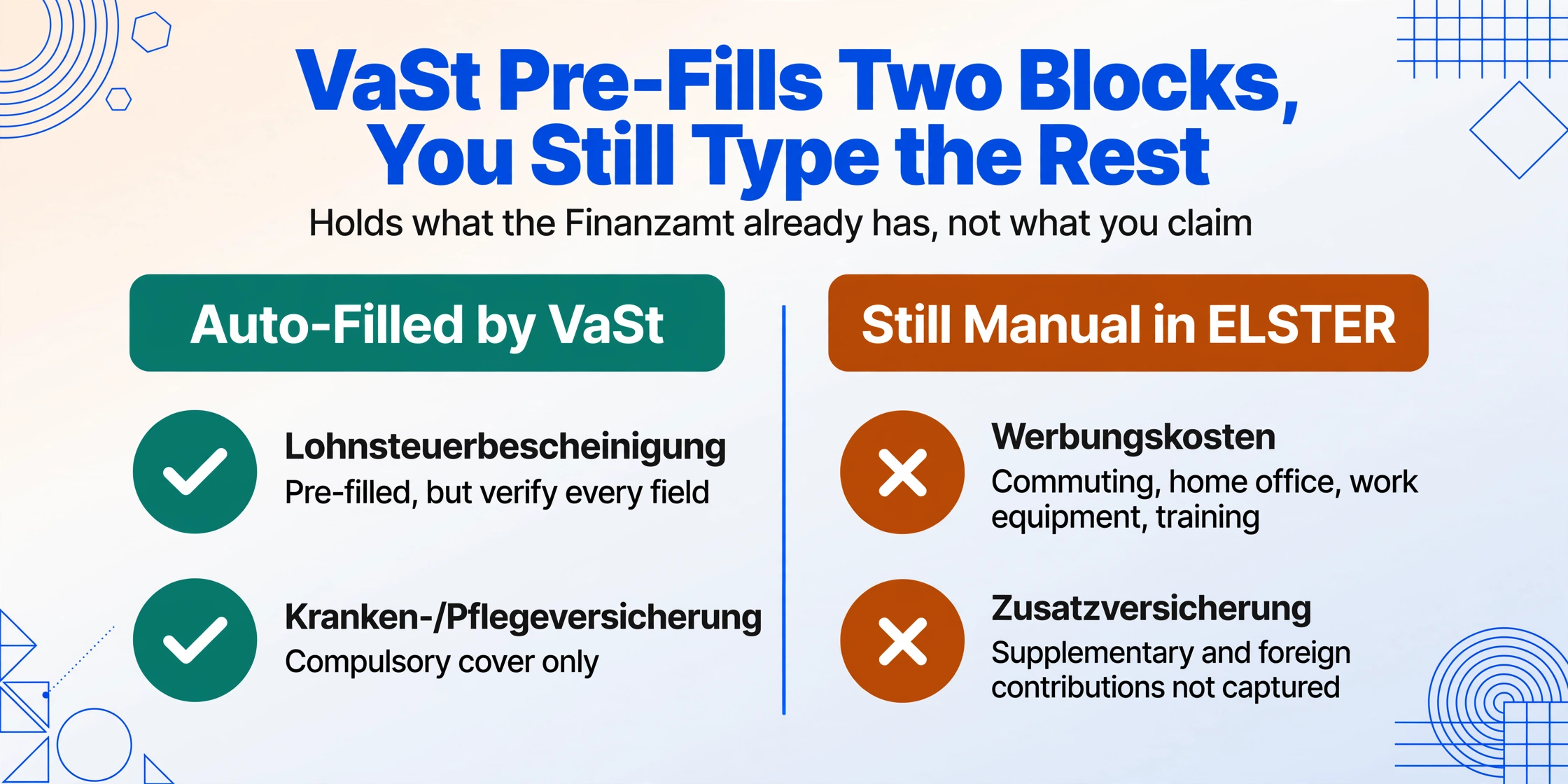
For a freelancer with home office expenses, commuting, professional insurance, charitable donations, and dental costs not covered by insurance, roughly 60–70% of the deduction-relevant fields still require manual entry in ELSTER — even with VaSt active. And none of this data, whether auto-filled or manually entered, is exportable from Mein ELSTER as a structured Excel table. The platform lets you download a PDF or XML — period.
There is a second structural gap. A tax advisor reviewing three years of returns needs to see the same field across all three years in adjacent columns — "did the Werbungskosten claim increase? Did the Sonderausgaben total stay consistent? Is the zumutbare Belastung threshold correctly applied each year?" ELSTER's VaSt fills one year at a time, in the Mein ELSTER interface, with no cross-year view. The advisor's solution is universal across German tax offices: open the client's PDFs, retype each field into DATEV, and let DATEV's analysis module do the comparison. The retyping step is what extraction removes.
Setting Up Your ELSTER Extraction Workflow
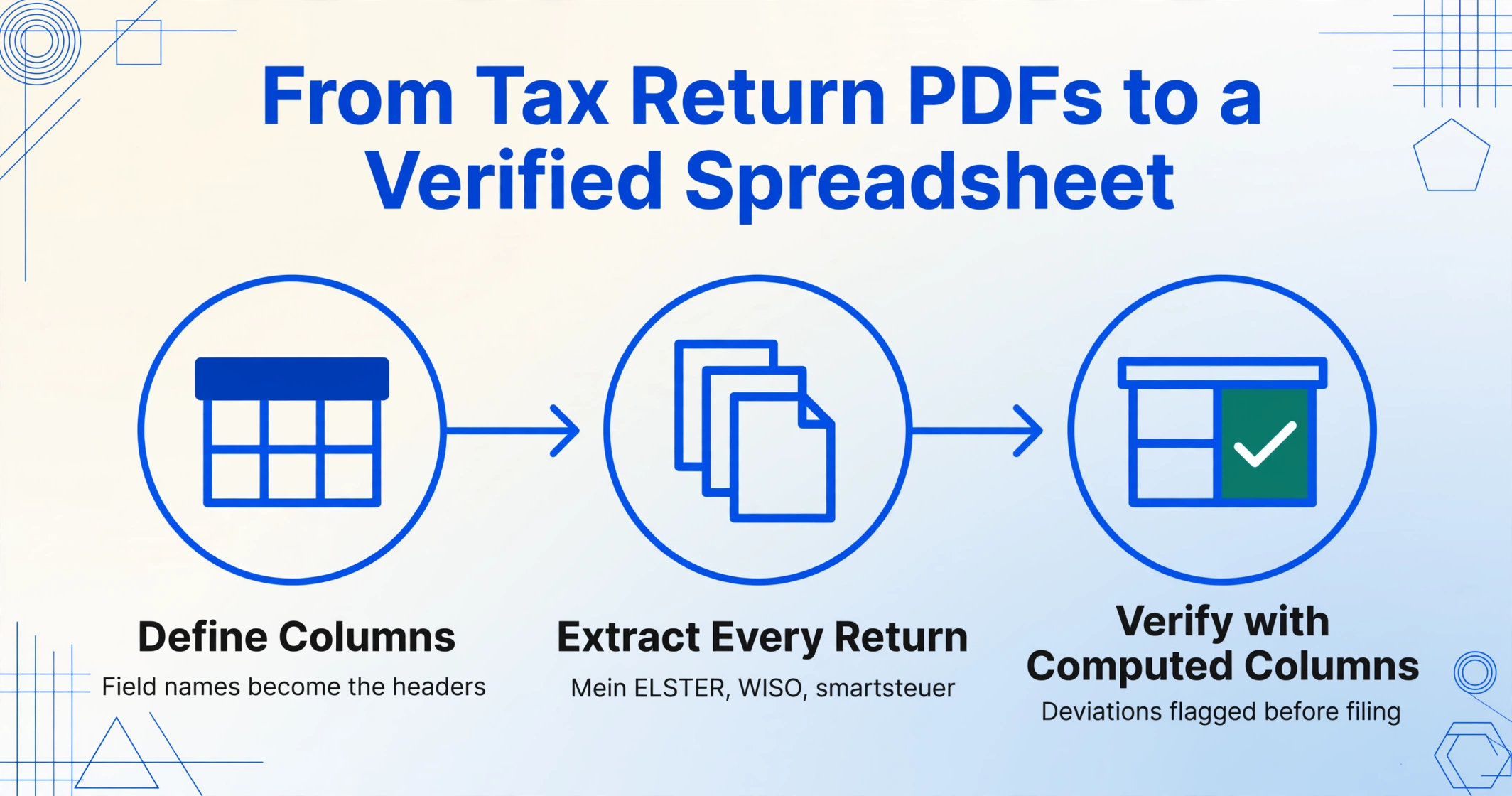
The workflow that replaces retyping a tax return has three steps. The first — defining your columns — is the one-time setup. Once done, the same column schema extracts every year's return, across every Anlage, regardless of whether the form was generated by Mein ELSTER, WISO Steuer, smartsteuer, or a scanned paper Bescheid.
Define your columns — once, for every filing year and every Anlage
Type the field names exactly as you want them to appear as column headers. The standard set for a German income tax return covers four groups: Personal identifiers — Steuernummer (tax number), Steuer-ID (tax ID), Tax Year (Veranlagungszeitraum); Income fields — Employment Income (Einkünfte aus nichtselbstständiger Arbeit, from Anlage N), Self-Employed Income (Einkünfte aus selbstständiger Arbeit, from Anlage EÜR), Capital Gains (Einkünfte aus Kapitalvermögen, from Anlage KAP), Rental Income (Einkünfte aus Vermietung und Verpachtung, from Anlage V), Pension Income (from Anlage R); Deduction fields — Vorsorgeaufwand Total (from Anlage Vorsorgeaufwand), Sonderausgaben Total (from Anlage Sonderausgaben), Außergewöhnliche Belastungen (from Anlage agB), Werbungskosten claimed on Anlage N, Spenden donations, Kirchensteuer church tax, Ausbildungskosten education costs, Kinderbetreuungskosten child care costs; Tax calculation fields — Gesamtbetrag der Einkünfte (total income), zu versteuerndes Einkommen (taxable income), festgesetzte Einkommensteuer (assessed income tax), Solidaritätszuschlag (solidarity surcharge), Kirchensteuer assessed, and final Nachzahlung or Erstattung (amount due or refund). This is Custom Column Extraction: you define the output schema, and the AI maps each field on your forms to your columns by semantic meaning — regardless of whether the form was generated by Mein ELSTER (which uses a serif typeface), WISO Steuer (which compresses the layout differently), or smartsteuer (which has its own field arrangement).
Capture and upload all Anlagen in one batch
If you filed through Mein ELSTER, download the Übertragungsprotokoll PDF — it contains every field across every Anlage, typically 5–8 pages. If you filed through WISO Steuer or SteuerSparErklärung, use the software's PDF export. For paper returns or Steuerbescheide (assessment notices) received by mail, scan or photograph each page. Upload all pages as one batch. Batch processing handles the entire return as a single job: each page is processed independently, the AI locates each field across all pages, and all results merge into one row in the spreadsheet — income from Anlage N, deductions from Anlage Vorsorgeaufwand and Anlage Sonderausgaben, and the final tax calculation from the Hauptvordruck, all in adjacent columns. Upload multiple years in one batch and the output is one row per year, every column aligned — the exact dataset your Steuerberater has been retyping by hand.
Export to Excel and run the verification check
Download the extracted data as an Excel file. You now have one row per tax year with every form field in its own column. Before sending to your Steuerberater, add a Computed Column — "Cross-Check (Income Sum: Anlage N + KAP + V + R + Self-Employed = Gesamtbetrag on Hauptvordruck? 'OK' : 'DIFFERENCE')" — that compares the sum of individual income fields against the printed total on the main form. A second verification column: "Deduction Sum (Vorsorgeaufwand + Sonderausgaben + agB + Werbungskosten = Total on Hauptvordruck? 'OK' : 'CHECK')". Any CHECK flag tells you exactly which row to re-examine, instead of the advisor discovering a discrepancy during their reconciliation and calling you back. At a 30% marginal tax rate, a single missed €1,000 deduction is €300 in unnecessary tax — and the verification column catches it before the return is finalized.
Files are processed securely and not stored.
The same column schema works next year — and for returns generated by any software. The field names and their meanings do not change between WISO, smartsteuer, SteuerSparErklärung, or Mein ELSTER. What changes is the layout: WISO compresses the deduction block into a denser table with less whitespace; smartsteuer uses question-driven sections that reorder fields compared to ELSTER's form template; and the ELSTER-generated PDF follows the official form layout as published by the Formular-Management-System (FMS) der Bundesfinanzverwaltung. A template-based OCR tool calibrated to one software's output fails on the others. Semantic extraction reads "the value labeled Spenden (charitable donations)" — its position on the page is irrelevant.
Handling Cross-Anlage Deductions: Where Manual Work Breaks
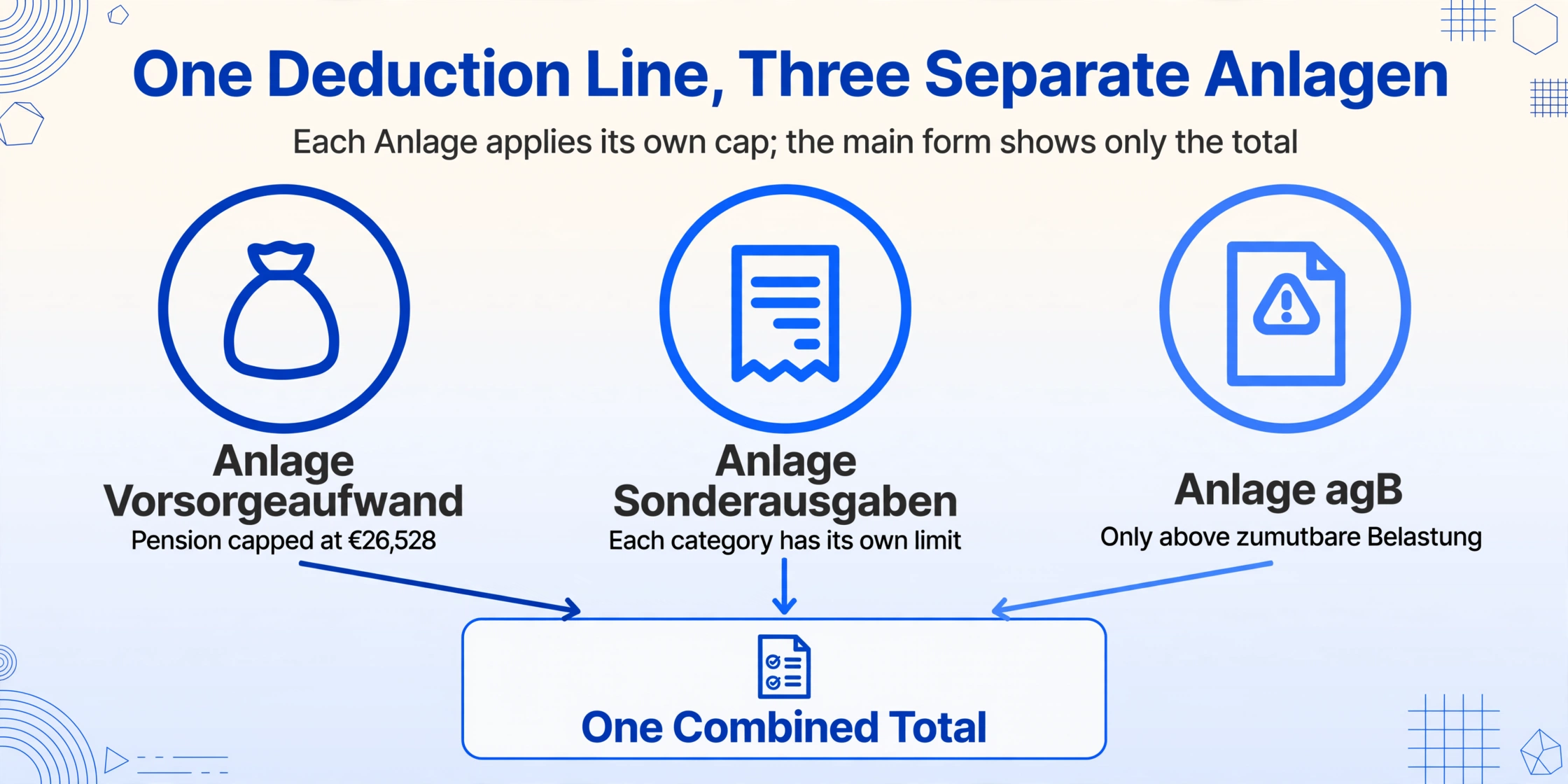
The single most error-prone step in manually transcribing a German tax return is the deduction block — because deductions are split across three separate forms, each with its own aggregation logic, and the main form only shows the combined total. Vorsorgeaufwendungen (insurance contributions) appear on Anlage Vorsorgeaufwand and are subject to a complex cap: pension contributions are deductible up to €26,528 (2025, single), with the deductible portion phasing up annually under the Alterseinkünftegesetz. Sonderausgaben appear on Anlage Sonderausgaben — donations, church tax, education costs — with each sub-category having its own limit. Außergewöhnliche Belastungen appear on the eponymous Anlage agB and are deductible only above the zumutbare Belastung threshold, which itself depends on income, family status, and number of children.
| Deduction Category | Anlage (Form) | Statutory Basis | Extraction Note |
|---|---|---|---|
| Pension Insurance (Rentenversicherung) | Vorsorgeaufwand | § 10 Abs. 1 Nr. 2 EStG | Deductible portion is 100% of contributions starting from 2025 — but capped at €26,528 (single). The form shows both the total contribution and the deductible amount. Extraction must capture both. |
| Health/Long-Term Care Insurance | Vorsorgeaufwand | § 10 Abs. 1 Nr. 3 EStG | Base-level coverage is fully deductible. Supplementary insurance (Zusatzversicherung, e.g. dental/vision top-ups) and contributions exceeding the base tariff are partially deductible or not deductible. The form splits these into separate fields. |
| Charitable Donations (Spenden) | Sonderausgaben | § 10b EStG | Deductible up to 20% of Gesamtbetrag der Einkünfte. Excess carries forward. The form requires itemizing donations above €300 individually. The extraction column should capture the total. |
| Church Tax (Kirchensteuer) | Sonderausgaben | § 10 Abs. 1 Nr. 4 EStG | Fully deductible as Sonderausgaben. Calculated as 8% (Baden-Württemberg, Bayern) or 9% (other states) of income tax. Extraction captures the paid amount — which may differ from the assessed amount if prepayments were made. |
| Medical Costs (Krankheitskosten) | Außergewöhnliche Belastungen | § 33 EStG | Only deductible above zumutbare Belastung — which ranges from 1% to 7% of Gesamtbetrag der Einkünfte. A single earner with €50,000 income and no children has a 6% threshold (€3,000). Medical costs below €3,000 are not deductible. The form shows total costs, insurance reimbursements, and the resulting deductible amount. Extraction must capture all three to verify the calculation. |
The extraction workflow resolves the cross-Anlage problem structurally. Define your columns once: "Vorsorgeaufwand Total," "Sonderausgaben Total," "agB Deductible," "Werbungskosten Anlage N." Upload all Anlagen in one batch. The AI locates each field across all pages and merges them into one row — Vorsorgeaufwand from page 4, Sonderausgaben from page 5, Werbungskosten from page 3, all in adjacent columns on the same Excel row. The main form's Gesamtbetrag der Einkünfte and zu versteuerndes Einkommen appear in their own columns, and the Computed Column verification catches any mismatch between the sum of individual deductions and the printed total.
The Computed Column that catches deduction errors before your Steuerberater does: "Deduction Verification (Sum Vorsorgeaufwand + Sonderausgaben + agB Deductible + Werbungskosten above Pauschbetrag = Total Deductions on Hauptvordruck? 'OK' : 'MISMATCH — need manual check')". A single MISMATCH in a row of OKs tells you which field on which year's return was misread. At a 30% marginal rate, a single missed €2,000 special expense deduction is €600 in unnecessary tax — and the verification column catches it before the data goes to your advisor.
Moving Extracted Data Into Your Steuerberater's Workflow
Germany's tax advisor ecosystem runs on DATEV — the cooperative data-processing platform used by over 80% of German tax advisory firms. DATEV's tax module (DATEV Steuern) handles client data management, return preparation, and electronic submission via ELSTER. The standard handoff from client to advisor looks like this: the client emails PDFs of their tax documents → a Steuerfachangestellter (tax clerk) opens each PDF and retypes the field values into DATEV's digital forms → the Steuerberater reviews and submits. Every retyped field is a potential error — and the Bundesfinanzhof (BFH) has ruled that data-entry errors by taxpayers during the filing process are not correctable after the objection deadline (Einspruchsfrist, one month after Bescheid receipt), as established in BFH ruling IX R 17/22 (18.7.2023). A misclicked data import from the wrong year resulted in a higher tax assessment that stood because the error was the taxpayer's, not the Finanzamt's.
With an extracted Excel file, the handoff changes. Instead of PDFs, the client sends a spreadsheet — one row per year, all fields in columns. The Steuerfachangestellter opens the CSV, maps the columns to DATEV's internal fields via the "Datenimport" function, and the data flows directly into the client file. No retyping, no misclicked fields, and the Computed Column verification from Step 3 provides a second layer of validation before the data enters DATEV. For an advisor handling 100-plus client returns per season, the time recovery is significant: 15 minutes of retyping saved per return across 100 clients is 25 hours recovered during the shortest filing month of the year.
DATEV. The dominant platform. DATEV Unternehmen online accepts CSV imports for Buchungsdaten (booking data) and Stammdaten (master data). For tax return data, the Steuerberater imports via the DATEV Arbeitsplatz interface — select "Datenimport," choose "CSV mit Spaltenüberschriften," map the columns to DATEV's Einkommensteuer form fields, and confirm. The extraction's column names map directly to DATEV's field labels without renaming.
Lexware. The second-largest platform, particularly strong among small-to-mid-sized tax offices and in-house accounting departments. Lexware's "Schnittstelle DATEV-Format" accepts CSV imports in the DATEV format. The extracted Excel exports to CSV and imports directly — the column structure is identical.
Addison. Used by mid-sized and large tax advisory firms, particularly in southern Germany. The Addison Plattform accepts structured Excel imports with field mapping for client tax data. Add the columns in the order Addison expects — the extraction follows your column definition — and the import is a one-click operation after the initial mapping.
The extraction pipeline also connects back to supporting documents that feed into the tax return. The same extraction logic applies across tax jurisdictions with similar forms — UK SA100 self-assessment extraction, Japanese kakutei shinkoku (確定申告) extraction, and Australian BAS data extraction all follow an identical workflow: define columns for the return's fields, upload the form pages, and get an Excel row per tax year. The form's language, the deduction names, and the statute numbers change — but the principle of semantic extraction over manual transcription does not.
Frequently Asked Questions
Can extraction handle tax returns generated by different software — WISO, smartsteuer, SteuerSparErklärung, or Mein ELSTER?
Yes — and this is the structural advantage of semantic extraction over template-based OCR. A return generated by WISO Steuer compresses the deduction block into a compact table with reduced line spacing. A return from smartsteuer uses question-driven sections that reorder fields compared to ELSTER's official form template. A return downloaded from Mein ELSTER follows the FMS layout exactly. A template calibrated to WISO's layout misaligns every field on a smartsteuer output. Semantic extraction reads "the value labeled Spenden" regardless of its font, row position, or alignment on the page — so the same column "Spenden (Charitable Donations)" captures the correct value from WISO, smartsteuer, and Mein ELSTER alike.
What about the Steuerbescheid — can I extract data from the official tax assessment notice?
Yes. The Steuerbescheid (tax assessment notice) is the Finanzamt's official response — a multi-page document that itemizes every field the Finanzamt accepted, adjusted, or rejected from your submitted return. It contains the final assessed values for income, deductions, and tax amount, plus explanatory notes for any deviations. Extracting the Steuerbescheid alongside your original return creates the most valuable comparison dataset: one column for what you declared, one column for what the Finanzamt accepted, and a Computed Column — "Deviation (Declared − Assessed) — flags any non-zero value for review. This is particularly useful for identifying which deductions the Finanzamt consistently reduces or rejects, so you can adjust your filing strategy for the following year.
Can I extract multiple years of returns in one batch?
Yes. Upload all years' tax returns — 2023, 2024, and 2025 — in one batch. The extraction processes each year's Anlagen pages independently and outputs one row per tax year. For a three-year comparison, this means roughly 20–25 pages (6–8 per year), a single batch upload, and an Excel output with three rows — all columns aligned. A tax advisor retyping three years of returns into DATEV manually spends about 90 minutes per year, or roughly 4.5 hours total. Extraction cuts that to roughly 30 minutes of scanning plus processing time — and the verification column ensures no field was missed during page capture.
Does the extraction handle the Anlage EÜR (profit-and-loss statement) for self-employed filers?
Yes. The Anlage EÜR (Einnahmenüberschussrechnung) is the core form for self-employed filers — a detailed profit-and-loss statement with revenue by category (Betriebseinnahmen), operating expenses by type (Betriebsausgaben: rent, supplies, travel, insurance, professional fees, depreciation, interest), and the resulting net profit or loss (Gewinn/Verlust) that flows into the Hauptvordruck. Under § 4 Abs. 3 EStG, self-employed individuals with revenue under €600,000 (or €60,000 profit) can use the simplified EÜR method. The EÜR has 75+ line items — define them as columns in your schema, upload the EÜR alongside the rest of the return in the same batch, and the extracted profit/loss appears in the merged row alongside employment income, deductions, and tax calculations. For Freiberufler (freelancers: doctors, lawyers, architects, artists, consultants — defined under § 18 EStG) and Gewerbetreibende (trade business owners under § 15 EStG), the EÜR is the starting point of every tax return — and extracting it is the difference between a partial dataset and a complete one.
Do I still need to keep the original tax documents after extraction?
Under German tax law, the statutory retention period (Aufbewahrungsfrist) for tax documents is 10 years for Buchungsbelege (accounting records) under § 147 AO, and 6 years for Handels- und Geschäftsbriefe (business correspondence) and other tax-relevant documents. The Finanzamt may request original documents during a Betriebsprüfung (tax audit) — particularly for deduction-related Belege (receipts, donation confirmations, medical bills). The extraction replaces the manual data entry step. It does not replace the legal obligation to retain originals for the applicable Aufbewahrungsfrist. Best practice: extract the return data to Excel for analysis, retain the original PDFs and scanned Belege in a dated folder structure per tax year, and maintain both for the full retention period. If you use MeinELSTER+ for Belegsammlung (receipt collection), the Finanzamt's servers serve as your Beleg repository — but you remain responsible for ensuring completeness.
What about expats filing in Germany — can extraction handle forms in German when I need the data in English?
Yes — and this is a scenario where custom column naming becomes particularly valuable. When you define your extraction columns in English — "Employment Income (Anlage N)," "Charitable Donations (Spenden)," "Medical Costs (Krankheitskosten)," "Taxable Income (zu versteuerndes Einkommen)" — the AI reads the German form labels, extracts the values, and populates your English-named columns. The output is an English-language spreadsheet built from German-language forms, no translation step required. This matters for expats who need to share tax data with a cross-border accountant, or for anyone filing in Germany while maintaining records for a home-country tax declaration (common for US citizens with FATCA obligations, UK residents with split-year treatment, or individuals navigating a Doppelbesteuerungsabkommen between Germany and their home country).
Making Tax Season About Review, Not Data Entry
The German tax filing deadline — July 31 for self-filers (or February 28/29 of the second following year for those using a Steuerberater, per § 149 AO) — is a fixed point on the calendar. Every year, the same sequence repeats: gather Lohnsteuerbescheinigungen, insurance confirmations, donation receipts, and medical bills; transcribe them into ELSTER or your chosen tax software; file; receive the Steuerbescheid; file the documents away. And every following year, when the question comes — "how does this year compare to last year?" — you open two PDFs, or five, and start typing.
The extraction workflow described here removes the retyping step from both sides. For the freelancer, an evening of scanning replaces 90 minutes of field-by-field transcription. For the Steuerberater, a CSV import replaces per-client data entry into DATEV. The verification column catches deduction arithmetic errors before they reach the advisor's desk. The column schema, defined once, works for every subsequent tax year — regardless of whether you switch from Mein ELSTER to WISO, from SteuerSparErklärung to smartsteuer, or from self-filing to advisor-managed filing. And the spreadsheet output — one row per year, every field aligned, every Anlage merged into adjacent columns — becomes the dataset that makes a tax return an analyzable financial record, not just an annual compliance exercise.
What changes each year is not the form structure — the FMS-published official forms preserve the same field layout, Anlage order, and calculation logic, with only minor updates for tax reform adjustments (the Grundfreibetrag adjustment, the Rentenversicherung deduction phase-in, the cold progression correction). What changes is how many hours of July you spend typing numbers that are already printed on paper — and whether your cross-year tax comparison lives in a spreadsheet or in two open PDF windows.