5 German ELSTER Tax Data Mistakes That
Cost You Deductions the Finanzamt Won't Recover
Most "tax filing mistakes" checklists warn you about things you already know — file before the deadline, don't forget your Werbungskosten (income-related expenses), claim your home-office days. Those are blank boxes you can still see on the form. The dangerous mistakes are the ones that look correct after you type them: a figure assigned to the wrong Anlage (tax schedule), a deduction that lands just below a threshold (Pauschbetrag) and silently disappears, an insurance premium entered into a line that has a different cap (Höchstbetrag) than the one the premium actually qualifies for. You submit the return. Mein ELSTER accepts it — no red error pop-up, no plausibility warning. But the Finanzamt's internal check (Plausibilitätsprüfung) flags the discrepancy weeks later, and by the time the Rückfrage (formal inquiry) lands on your desk or your Steuerberater's, the correction window is closing. These are the five ELSTER data mistakes that slip past the green "Prüfung" button — each with what it costs, why it happens, and how to catch it before the Finanzamt does.
Key Takeaways
- The green Prüfung button validates arithmetic only — a capital gain filed on the wrong Anlage passes the check but can't trigger the €1,000 Sparer-Pauschbetrag that only lives inside Anlage KAP.
- The Finanzamt catches what the green button missed — but only after you submit, when the Einspruchsfrist one-month clock has already started.
- Every one of these mistakes happens between reading a figure and classifying it into the right tax line — separate the two tasks and the errors that survive the green button don't reach the Finanzamt.
The Pattern Common to All Five
A tax form error you can see is not a problem. A blank field on Anlage Sonderausgaben (special expenses annex) catches your eye before you click submit. The errors in this article share a different trait: the return looks complete and the ELSTER Plausibilitätsprüfung (plausibility check, the green "Prüfung" button that verifies arithmetic and cross-form consistency) passes. But the Finanzamt's internal review — a separate, deeper check that runs after submission — catches a semantic inconsistency the green button does not test for: a deduction that should be €0 because the Pauschbetrag already covers it, an insurance premium assigned to a line whose cap does not match the premium type, an employee's Steuer-ID (tax identification number, an 11-digit permanent personal identifier issued at birth registration) typed where the form expects a Steuernummer (tax number, a 10–13 digit office-specific number issued by the local Finanzamt — not the same thing).
An error the green "Prüfung" button catches costs you the time to fix it before submission. An error it does not catch — but the Finanzamt does — costs you weeks of processing delay, a Rückfrage letter, and in some cases a deduction you never get back because the Einspruchsfrist (one-month objection window after the Steuerbescheid is issued) closes before you understand what went wrong.
Under BFH ruling IX R 17/22 (18 July 2023), the Bundesfinanzhof — Germany's highest tax court — confirmed that data-entry errors made by the taxpayer during filing are not correctable after the Einspruchsfrist expires. The case involved a taxpayer who inadvertently imported data from the wrong tax year into their ELSTER return. The BFH ruled the error was the taxpayer's own, not the Finanzamt's, and the overpayment stood. The five errors below are all versions of the same mechanism: a data-entry mistake that produces a facially valid return the green button accepts, but whose semantic inconsistency triggers a correction process — or, worse, simply reduces your refund without a notification.
Error 1: Capital Gains on the Hauptvordruck Instead of Anlage KAP — Losing the Sparer-Pauschbetrag
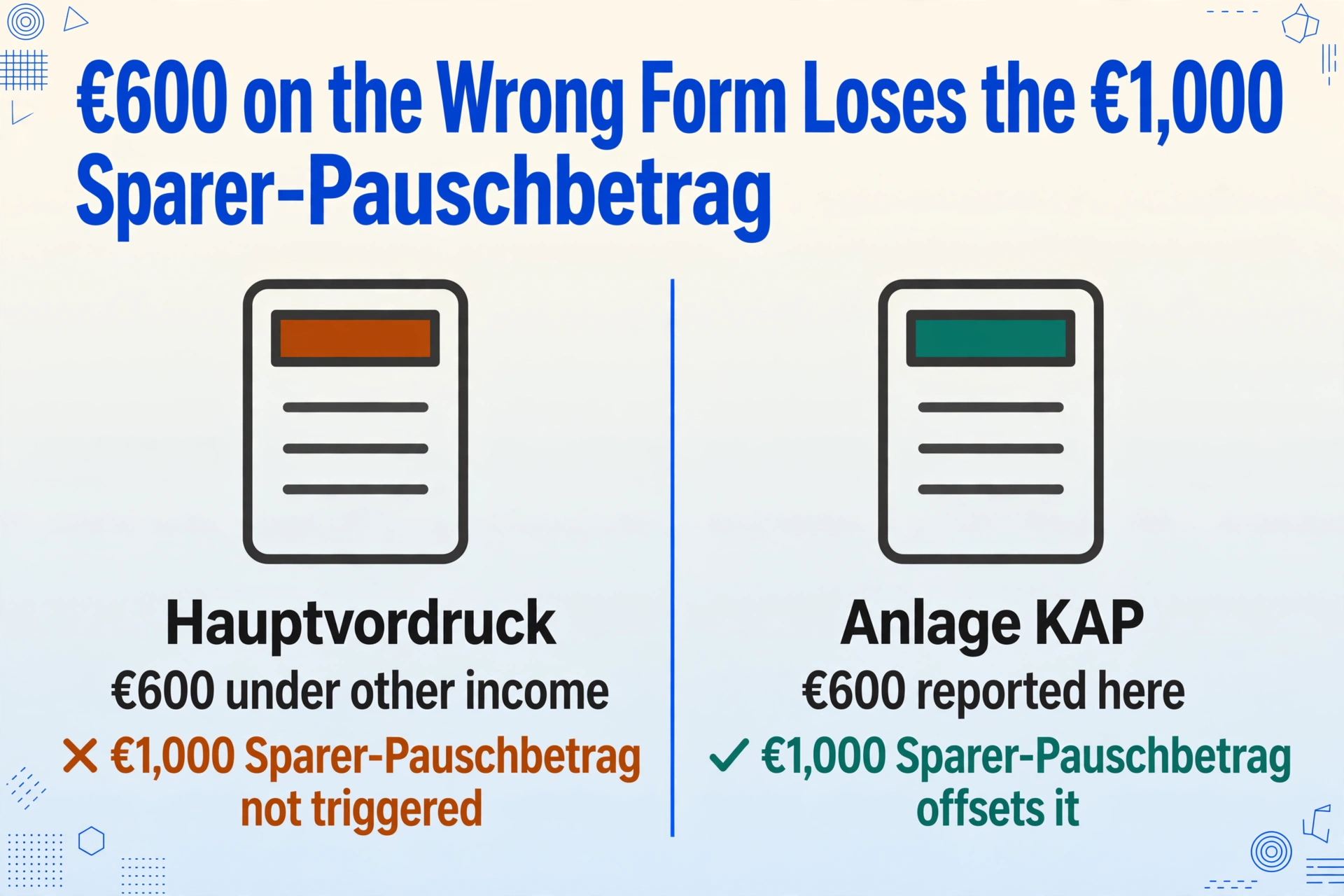
The mistake looks like this. You sold some ETFs in 2025 and realized €600 in capital gains (Kapitalerträge). Your bank withheld Kapitalertragsteuer (capital gains tax, 25% plus Solidaritätszuschlag) on those gains, but you forgot to set a Freistellungsauftrag (exemption order) at that bank, so the €1,000 Sparer-Pauschbetrag (saver's allowance) under § 20 Abs. 9 EStG was not applied. You know you can reclaim the over-withheld tax through your tax return — and you enter the €600 gain somewhere on the Hauptvordruck (the main tax form covering pages 2–4) under "other income."
What the Finanzamt does. Capital gains must be declared on Anlage KAP (the capital gains annex), not on the Hauptvordruck. The Finanzamt's Plausibilitätsprüfung may catch the mismatch — or it may not, because the Hauptvordruck does have a line for "other income" and the figure is not obviously wrong out of context. If the Finanzamt does catch it, the response is a Rückfrage asking you to explain where the income belongs and to file a corrected Anlage KAP. If it does not catch it, the return is processed as-is. But the Sparer-Pauschbetrag of €1,000 per person under § 20 Abs. 9 EStG lives inside Anlage KAP — and a capital gain declared on the Hauptvordruck never triggers the Pauschbetrag offset. You overpaid tax on €600 that should have been covered by the allowance. And if your total capital income across all banks was under €1,000, you paid tax on income that was tax-free — and the Einspruchsfrist deadline may close before the discrepancy becomes visible.
What it costs. On €600 of gains taxed at 25% Kapitalertragsteuer plus 5.5% Soli (Solidaritätszuschlag = solidarity surcharge), you overpaid roughly €158.25. If the error is caught by the Finanzamt, a Rückfrage costs one to two hours of document retrieval and recalculation — or €120 to €350 per hour if the Steuerberater handles it. If the error is not caught and the Einspruchsfrist expires, the overpayment is permanent. This same error also corrupts the Günstigerprüfung (the "more favourable test" the Finanzamt runs to check whether taxing your capital gains at your personal income tax rate would produce a lower result than the flat 25% Kapitalertragsteuer) — because the Günstigerprüfung only considers figures declared in Anlage KAP, not the Hauptvordruck. A gain declared on the wrong form is invisible to the test that might have reduced your tax rate.
Anlage KAP is not optional if you have capital gains. And the Sparer-Pauschbetrag — €1,000 per person, €2,000 for jointly assessed couples — only applies inside that Anlage. A capital gain typed into any other form field is taxed as if the allowance does not exist.
Error 2: Vorsorgeaufwand Miscalculation — Base vs. Additional Pension Contributions Under Günstigerprüfung
This error happens most often to freelancers and self-employed filers who pay their own pension and health insurance contributions. The Anlage Vorsorgeaufwand (pension and insurance contributions annex) splits contributions into two buckets: Basisvorsorge (base pension contributions — statutory pension insurance, certain Rürup-Rente plans, statutory health and long-term care insurance) under § 10 Abs. 1 Nr. 2 and 3 EStG, and sonstige Vorsorgeaufwendungen (other pension expenses — private health top-ups, occupational disability, liability, accident, term life) under § 10 Abs. 1 Nr. 3a EStG.
The base contributions are deductible up to a limit that rises each year — for 2025, 100% of qualifying contributions up to €26,528 for single filers (€53,056 for joint filers) for the pension component, and health + long-term care contributions are fully deductible for the base coverage. The "other" bucket has a separate cap (Höchstbetrag) of €1,900 for employees and €2,800 for self-employed individuals. The Günstigerprüfung complicates the picture: for pension contributions, the Finanzamt automatically compares your 2025 deduction against a minimum based on prior-year rules — whichever gives you the larger deduction wins. But the Günstigerprüfung only works on figures that are in the correct lines.
The specific mistake. A freelancer pays €4,200 in statutory health insurance (Krankenversicherung der Krankenkasse, the state-regulated health insurance fund) and €3,100 in statutory pension (Rentenversicherung). Both belong in the Basisvorsorge lines. But she also pays €1,800 in private occupational disability insurance (Berufsunfähigkeitsversicherung) and €400 in private liability insurance (Privathaftpflichtversicherung) — these belong in the sonstige Vorsorgeaufwendungen lines, subject to the €2,800 cap for self-employed filers (her total "other" premiums are €2,200, so they fit under the cap). The error: she enters the €1,800 occupational disability premium into a Basisvorsorge line instead of the sonstige line, because the form's field labels — "Beiträge zur Basiskrankenversicherung, gesetzlichen Pflegeversicherung" (contributions to basic health insurance and statutory long-term care insurance) in one section versus "Beiträge zu sonstigen Versicherungen" (contributions to other insurances) in another — use insurance-type terminology that does not clearly map to which insurance counts as "basic" and which as "other."
What the Finanzamt does. The green Plausibilitätsprüfung checks that the Basisvorsorge total does not exceed the statutory cap — €1,800 is well under €26,528, so it passes. But the Finanzamt's internal review cross-references the contribution type against the reported insurance provider. A Berufsunfähigkeitsversicherung premium reported as a Basisvorsorge contribution flags a mismatch because the provider is not a statutory pension or health insurer. The response is a Rückfrage: the Finanzamt asks you to clarify which insurance the €1,800 belongs to and to correct the Anlage assignment. In the meantime, the deduction is not processed — your assessed tax is calculated without the €1,800 deduction in either bucket until you respond.
What it costs. A Rückfrage on Anlage Vorsorgeaufwand costs the same one to two hours as any formal Finanzamt inquiry — €120 to €350 per hour at Steuerberater rates. But the hidden cost is the cash-flow delay: your refund, if one is due, is held until you resolve the inquiry. And if the Steuerbescheid is issued without the correction — because you responded late or the Finanzamt proceeded without your reply — the deduction is lost unless you file an Einspruch within one month. A €1,800 deduction at a 30% marginal tax rate is worth roughly €540 in refund. That is the amount at stake from a premium entered into the wrong line of one Anlage.
The Günstigerprüfung adds another layer: for pension contributions, the Finanzamt auto-compares your 2025 (100% deductible) calculation against a minimum based on 2005 rules. But that comparison runs on the correct lines. If your pension contributions are scattered across the wrong lines, the Günstigerprüfung operates on incomplete data — and you never see the "more favourable" calculation the system was supposed to give you.
Error 3: Typing €800 of Werbungskosten When the €1,230 Pauschbetrag Already Covers You — Wasted Effort, No Benefit
This error is not a penalty trigger. It is a tax-preparation efficiency trap — one that costs time, not money, but costs it reliably every year.
Under § 9a Satz 1 Nr. 1 Buchstabe a EStG, every employee receives an automatic Arbeitnehmer-Pauschbetrag (employee lump-sum deduction) of €1,230 — applied without any proof, without any entry on the form. The Pauschbetrag is already factored into your monthly Lohnsteuer (wage tax) withholding by your employer. If your actual Werbungskosten — commuting (Entfernungspauschale, the per-kilometre commuting allowance at €0.38/km for 2026, up from €0.30 in 2025), home-office days (Homeoffice-Pauschale, the home office flat rate at €6/day capped at €1,260/year), work equipment, professional training, union dues — total less than €1,230, the Finanzamt uses the Pauschbetrag automatically. Your entries on Anlage N (employment income annex) are ignored.
The mistake looks like this. An employee carefully tracks her expenses all year: €320 in work-related books and software, €200 in professional association fees (Berufsverband, the professional body membership), €280 in office supplies. She totals €800 and enters every line into Anlage N — spending 20 minutes locating receipts, typing figures, and verifying subtotals. She submits. The Finanzamt processes the return and applies the €1,230 Pauschbetrag because it is higher. The €800 of Werbungskosten entries produce no additional tax benefit — zero. The 20 minutes of data entry produced nothing.
The Finanzamt does not tell you when your Werbungskosten fall below the Pauschbetrag. It simply applies the higher of your actual costs and the €1,230 Pauschbetrag — silently. Your 20 minutes of transcription vanish into the same tax result you would have gotten by leaving Anlage N blank.
What it costs. Nothing in money — and that is the trap. It costs time that repeats every year, and the time is priced at however much an hour of your working time is worth. For a freelancer billing €95/hour, those 20 minutes are roughly €32 in lost billable time. Across five years, €160. Small enough to dismiss — unless you realize the same time is spent across all the Werbungskosten, Sonderausgaben, and Vorsorgeaufwand rows that also fall below their respective thresholds. The real cost of this error is not financial: it is the cognitive budget you spend on data entry that produces no result, while the entries that do produce a result — the ones above the Pauschbetrag — get less attention because you are already fatigued from entering the ones that don't.
The practical rule: before you type a single Werbungskosten figure into Anlage N, do a rough mental tally of your major expenses — commuting + home office + equipment. If the commuting alone at 220 workdays × 25 km × €0.38/km produces €2,090, you are already well above €1,230 and every additional line you enter produces a real tax benefit. If your total is under €1,230, skip Anlage N entirely — the Pauschbetrag covers you, and the time you save goes to the Anlagen where your entries actually change the result.
Error 4: Claiming Material Costs Under §35a — When Only Labour Is Deductible
The Handwerkerrechnungen (craftsman invoices) deduction under § 35a Abs. 3 EStG is one of the most valuable deductions available to German homeowners and tenants — 20% of the labour portion directly reduces your income tax liability, up to €1,200 per year. The input side maximum is €6,000 in labour costs per year to hit the €1,200 deduction cap. But the rule is rigid in a way most filers discover only after a rejection: only labour costs (Arbeitskosten) count. Material costs (Materialkosten) do not.
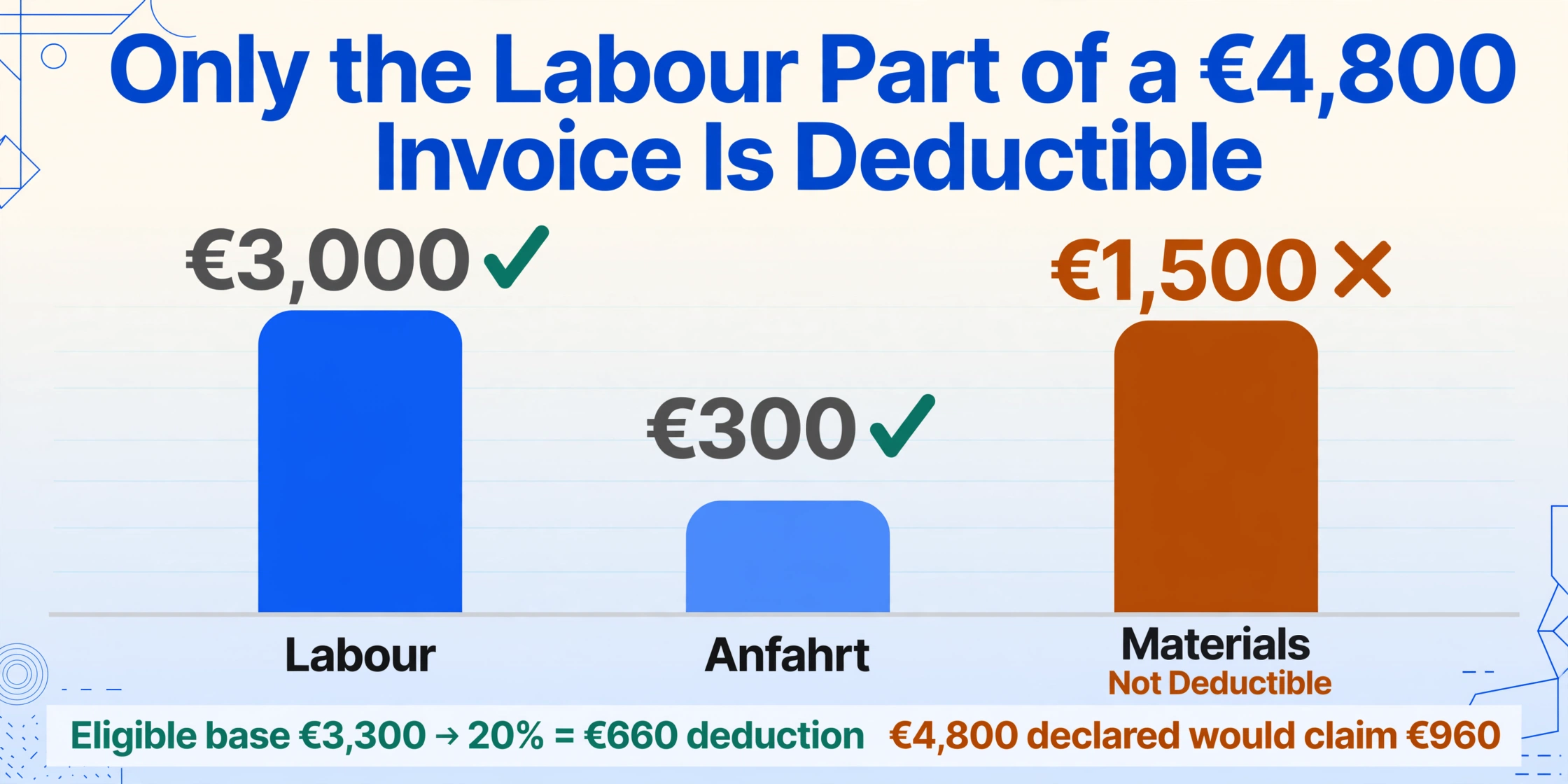
The specific mistake. A homeowner renovates a bathroom. The Handwerker (craftsman) invoice reads: €4,800 total — roughly €3,000 in labour (installation, plumbing, tiling), €1,500 in materials (tiles, fittings, sealant), and €300 in Anfahrt (travel to the site). The homeowner enters the full €4,800 into the Anlage Haushaltsnahe Aufwendungen (household-related expenses annex) under the Handwerkerleistungen (craftsman services) section. But the labour component — the only part eligible for the 20% deduction — is €3,300 (labour + travel, since An- und Abfahrtskosten, travel costs to and from the worksite, are considered part of the labour for §35a purposes under the BMF guidance of 9 November 2016, BStBl I 2016 S. 1213). The correct entry is €3,300, producing a deduction of €660 (20% × €3,300). The erroneous entry of €4,800 would claim €960 — a €300 over-claim.
What the Finanzamt does. The Finanzamt's internal review cross-references the Handwerker invoice against the declared amount. If the invoice does not separate labour from materials, the Finanzamt estimates the split — almost always to the taxpayer's disadvantage, because an estimated split defaults to conservative assumptions. But more commonly, the Finanzamt simply rejects the material portion: it processes the deduction at 20% of the labour-only figure, adjusting the refund downward without necessarily issuing a Rückfrage. The taxpayer sees a lower refund than expected and must trace the discrepancy back to the §35a line to understand why.
Three additional §35a traps compound this error:
- Barzahlung (cash payment) disqualifies the entire deduction. Under § 35a Abs. 5 EStG, payment must be made by bank transfer — the Bundesfinanzhof confirmed this in multiple rulings. A correct invoice with a proper labour/material split, paid in cash, produces a zero deduction. The Finanzamt checks the Zahlungsweg (payment method) and rejects cash-paid claims.
- Neubaumaßnahmen (new construction work) are excluded. §35a covers renovation, maintenance, and modernization (Renovierungs-, Erhaltungs- und Modernisierungsmaßnahmen) — not the construction of a new building. Installing a bathroom in a newly built extension is not deductible.
- Double-dipping with KfW/BAFA subsidies is prohibited. The same Handwerkerleistung (craftsman service) cannot be claimed under both §35a and a public subsidy program like KfW or BAFA (Bundesamt für Wirtschaft und Ausfuhrkontrolle, the Federal Office for Economic Affairs and Export Control).
What it costs. A €1,500 material-cost over-claim produces no penalty — the Finanzamt simply rejects the material portion. But the time spent locating the invoice, reading the labour and material lines, and typing the figure into Anlage Haushaltsnahe Aufwendungen was wasted if the entry was wrong. And if the Finanzamt does issue a Rückfrage asking you to resubmit the invoice with a corrected labour split, the correction costs one to two hours of document retrieval — at Steuerberater rates, €120 to €350. The error is avoidable entirely: when you receive the Handwerker invoice, ask the tradesperson to split labour and material into separate lines before you pay. A two-minute request at the time of the job saves the Rückfrage.
Error 5: Steuer-ID vs Steuernummer — Confusing the Two Numbers Adds Months to Your Processing
Germany issues two tax identification numbers, and they serve completely different purposes. The Steuer-ID (steuerliche Identifikationsnummer, also abbreviated IdNr) is an 11-digit permanent personal number assigned at birth or first registration in Germany — it never changes and follows you for life. It appears on your Lohnsteuerbescheinigung (wage tax certificate) as "Identifikationsnummer" and on your Steuerbescheid (tax assessment notice) as "IdNr." The Steuernummer is a 10–13 digit office-specific number assigned by your local Finanzamt — it changes if you move to an area covered by a different tax office. The Steuernummer is what the Finanzamt uses to file your tax return into their system and match it to your account.
The specific mistake. A first-time self-filer — an employee who previously never filed because their employer handled everything — creates a Mein ELSTER account, starts a new Einkommensteuererklärung (income tax return), and encounters the field labelled "Steuernummer." They do not have a Steuernummer yet because the Finanzamt assigns one after the first tax return is filed. They type in their Steuer-ID instead — the 11-digit number from their Lohnsteuerbescheinigung — thinking it is the same thing. ELSTER accepts the entry because an 11-digit number in the Steuernummer field is not a format error. But when the Finanzamt receives the return, the Steuer-ID does not match any existing account in their Steuernummer-indexed filing system. The return lands in a manual matching queue — a Sachbearbeiter (case officer) must locate the taxpayer by name and Steuer-ID, cross-reference it against the ZfA (Zentrale Zulagenstelle für Altersvermögen, the central agency that administers the Steuer-ID database), create a new Steuernummer, and link the return to it.
What the Finanzamt does. The return is not rejected — there is no formal Rückfrage because the Finanzamt can resolve the mismatch internally. But the matching process is manual and slow. Instead of the standard 8–12 weeks for a straightforward return, processing stretches to 3–6 months. The Steuerbescheid arrives in October instead of May. And the Verspätungszuschlag clock — which runs from the date the return is actually received, not resolved — does not apply as long as you filed on time. But the refund delay alone is a cash-flow cost: if you were expecting €1,200 in refund by May, waiting until October means five extra months of that capital sitting in the Finanzamt's account instead of yours.
The inverse error happens too: a freelancer who has had a Steuernummer for years enters it in the Steuer-ID field on a new Mein ELSTER registration form, confusing the two numbers. The registration is rejected because the Steuer-ID database does not contain a matching entry for that number — but by the time the rejection letter arrives, several weeks have passed, and the Steuerberater's calendar has filled up further.
The field labelled "Steuernummer" expects the 10–13 digit office-specific number from your last Steuerbescheid. If you have never filed a tax return before, leave it blank — the Finanzamt assigns one after processing your first return. The field labelled "Steuer-ID" or "Identifikationsnummer" expects the permanent 11-digit number from your Lohnsteuerbescheinigung or Meldebescheinigung (registration certificate). The two numbers are not interchangeable — and confusing them does not produce an error message. It produces a delay.
What All Five Errors Share: They Happen Between Reading and Typing
Step back and the five errors trace to the same mechanism. A person reads a figure off a document — a bank Jahressteuerbescheinigung (annual tax certificate), an insurance contribution notice, an employer's Lohnsteuerbescheinigung, a craftsman's invoice, a registration certificate — and types it into a form field. The error happens in the gap between reading and typing: the figure is right, but the classification decision — which Anlage it belongs on, which line within that Anlage, whether it qualifies for a Pauschbetrag offset, whether it is Steuer-ID or Steuernummer — goes wrong. And because ELSTER's Plausibilitätsprüfung checks arithmetic and cross-form consistency but not semantic classification, the form accepts the entry. The Finanzamt's internal review catches it, but only after submission — by which point the correction costs time, money, or the deduction itself.
The structural reason this happens — regardless of jurisdiction — is the same bottleneck described in the analysis of the German ELSTER manual data entry problem: the digital filing endpoint is a highway, but the data assembly that feeds it is still a staircase. Every figure must be read by a human from a document layout — often a PDF or paper letter — classified into a tax category, and transcribed by hand. The UK equivalent of these same transcription errors — income declared on the wrong SA100 supplement, Gift Aid amounts miscategorised — follows the identical pattern, as explored in the SA100 data entry mistakes guide. The Japanese 確定申告 (kakuteishinkoku, the annual income tax return) data entry mistakes guide covers the same five-class error pattern in a different tax system — all converging on the same structural gap between document and form.
How Extraction Prevents All Five — Not by Filing for You, but by Separating Recognition from Classification
Each of the five errors happens because one person performs two tasks simultaneously: reading a number off a document (a perceptual task — is this a 3 or an 8 on a faded insurance certificate?) and classifying that number into the correct tax category (a cognitive task — does this premium belong in Basisvorsorge line 24 or sonstige Vorsorgeaufwendungen line 48?). The human brain is bad at doing both at once, and worse after 20 minutes of doing it — the fourth insurance certificate of the session gets classified less accurately than the first, not because the certificate is harder, but because classification accuracy degrades with repetition.
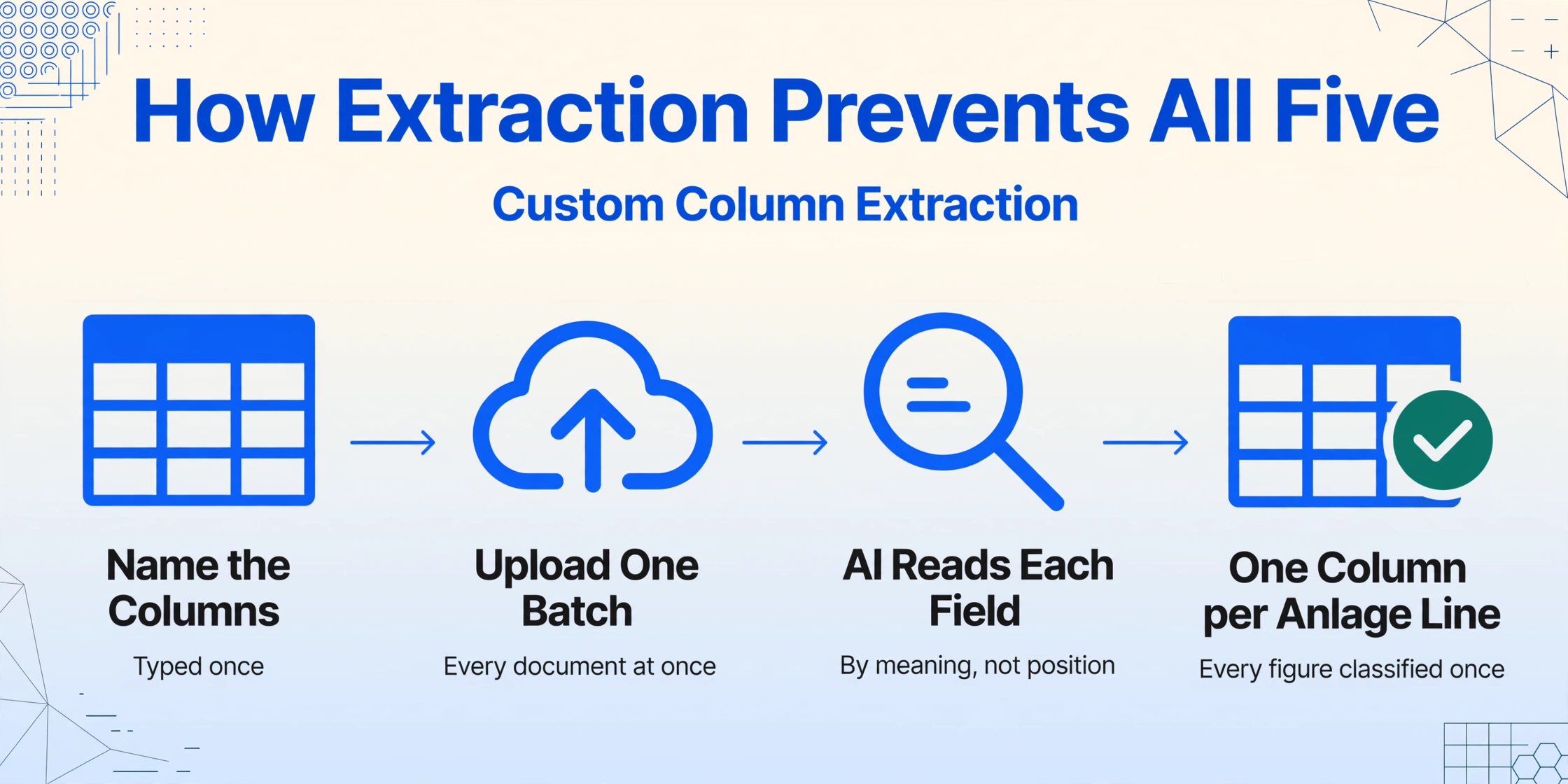
Document data extraction separates the two. The perception task — reading the figures off the Kontoauszug (bank statement), the Versicherungsbescheinigung, the Handwerkerrechnung — is handed to the AI, which reads each document by understanding what a field means ("Beitrag zur Krankenversicherung," "Arbeitskosten," "einbehaltene Kapitalertragsteuer") rather than where it sits on the page. The output is one spreadsheet where every figure from every document sits in the same column structure — each column named after the Anlage line it feeds. This is Custom Column Extraction: you type the column names you want once, upload all the documents in one batch, and the AI fills the rows by locating each value semantically — not by pixel coordinates, not by template matching. The procedure is covered step by step in the ELSTER tax form data extraction guide.
The classification task — deciding which insurance premium goes on which Anlage line, whether your total Werbungskosten exceed the €1,230 Pauschbetrag, whether a Handwerker invoice splits labour and material correctly — remains yours. But you perform it on a single spreadsheet where every figure is already in columns, rather than on five scattered document stacks where you are reading and classifying simultaneously. Three specific extraction features attack the five errors directly:
- Inferred columns categorise figures the document itself does not label. A column named
Insurance Type (options: Basis-KV/Pflege/Rente/BU/Haftpflicht/Unfall)has the AI read each insurance certificate and classify the policy type — the same classification decision a human would make, but performed by the AI across the entire batch before you sit down to verify. - Computed columns cross-check Anlage-to-Anlage totals. A column that sums all declared income and compares it against the EÜR total — outputting "OK" or "CHECK" — catches Error 1 (capital gains on the wrong Anlage) before the return reaches the Finanzamt. A column that sums all Werbungskosten and compares against the €1,230 threshold catches Error 3.
- Batch processing means all five document stacks — the bank statements, the insurance certificates, the Lohnsteuerbescheinigung, the donation receipts, the Handwerkerrechnungen — go into one upload. The output merges into one spreadsheet, one column per Anlage field. The cost breakdown of manual ELSTER assembly quantifies the hours this saves, and the batch principle scales from one return to a monthly payroll — covered in the Lohnsteuer-Anmeldung batch processing guide.
The honest limit of extraction: it reads the documents and outputs the figures. It does not submit your Einkommensteuererklärung, apply the Günstigerprüfung, compute the zumutbare Belastung (reasonable burden threshold for extraordinary expenses under § 33 EStG), or tell you which deductions you qualify for. Those decisions need a human who understands the tax code — or a Steuerberater. What extraction does is remove the reading-and-typing step that creates the five errors in the first place. And when the reading and typing are removed, the classification decisions you still need to make are made on a clean, verified spreadsheet — not on five scattered stacks of paper with fatigue setting in at document four.
Files are processed securely and not stored.
FAQ — German ELSTER Tax Form Data Mistakes and Corrections
What is the difference between the green ELSTER "Prüfung" and the Finanzamt's Plausibilitätsprüfung?
The green "Prüfung" button in Mein ELSTER checks arithmetic consistency — whether the totals on one Anlage match the corresponding fields on the Hauptvordruck, whether mandatory fields are filled, whether format rules are observed (dates, Steuer-ID length). It does not check semantic correctness — whether a figure belongs on Anlage KAP rather than the Hauptvordruck, whether a Versicherungsbeitrag (insurance contribution) classified as Basisvorsorge is actually from a private insurer rather than a statutory one, whether the Werbungskosten total is under the Pauschbetrag and therefore irrelevant. The Finanzamt's internal Plausibilitätsprüfung — which runs after submission, during the Bearbeitung (processing) phase — performs these deeper semantic checks. The green button tells you the form is internally consistent. It does not tell you the data is correct.
How do I correct an error after submitting my ELSTER return but before receiving the Steuerbescheid?
As long as the Finanzamt has not issued the Steuerbescheid (tax assessment notice), you can simply resubmit the return with the corrected data through Mein ELSTER. No formal procedure is required — the new submission replaces the previous one. If only a single field or Anlage needs correction, you can also send a short message through ELSTER's internal messaging system (Nachricht an das Finanzamt), stating exactly which field is wrong and the correct value. This is the easiest correction window — open from the moment you submit until the moment the Steuerbescheid is issued, typically 4 to 12 weeks later.
What if I discover the error after the Steuerbescheid arrives?
You have one month from the date the Steuerbescheid is issued to file an Einspruch (formal objection under §§ 347–367 AO). The Einspruch must be in writing — by letter, fax, or electronically through ELSTER — and must state which part of the assessment you disagree with and why. For a simple data correction (Schlichte Änderung under § 172 AO), you can request an adjustment of a specific item without triggering a full reassessment of the entire return. This is faster and carries no risk of the Finanzamt discovering other errors that work against you. After the Einspruchsfrist closes, corrections are only possible under narrow exceptions — the BFH ruling IX R 17/22 confirmed that taxpayer data-entry errors are not correctable after the deadline. If the error is in your favour (you paid too much tax), you effectively lose the overpayment.
Why does the Finanzamt ignore my Werbungskosten entries when they are below the €1,230 Pauschbetrag?
Because the Arbeitnehmer-Pauschbetrag under § 9a EStG is a compulsory legal provision — the Finanzamt must apply the higher of your actual Werbungskosten and the €1,230 Pauschbetrag. It is not choosing to ignore your entries; the law requires it to use the number that gives you the larger deduction. If you enter €800 in actual costs, the Finanzamt legally must apply €1,230. Your €800 entry changed nothing. The Pauschbetrag operates as a floor, not a ceiling — you always get at least €1,230. Your entries only matter when they exceed that floor.
Can I claim the full invoice amount for a Handwerkerrechnung under §35a?
No. Only the labour, travel, and machine costs (Arbeits-, Fahrt-, and Maschinenkosten) are deductible. Material costs (Materialkosten) — tiles, paint, fittings, sealant, flooring — are explicitly excluded under § 35a Abs. 3 EStG and the BMF guidance (BMF-Schreiben vom 9. November 2016, BStBl I 2016 S. 1213). The invoice must separate labour from materials. If it does not, ask the Handwerker to reissue an itemised invoice before you pay. Payment must be by bank transfer; cash payments disqualify the entire deduction even if the invoice is correct. New construction (Neubau) is excluded; only renovation, maintenance, and modernisation of an existing home qualify. The maximum deduction is 20% of qualifying labour costs up to €1,200 per year — reached at €6,000 of labour costs.
What is the difference between the Steuer-ID and the Steuernummer, and which one goes where on the ELSTER form?
The Steuer-ID (steuerliche Identifikationsnummer, 11 digits) is your permanent personal tax ID — assigned at birth or first registration in Germany, never changes, used on the Lohnsteuerbescheinigung and for Mein ELSTER account registration. The Steuernummer (10–13 digits, format like 12/345/67890) is assigned by your local Finanzamt and used to file tax returns — it changes if you move to a different tax office's jurisdiction. On the ELSTER form: the "Steuer-ID" or "Identifikationsnummer" field expects your 11-digit permanent ID. The "Steuernummer" field expects your office-specific number from your last Steuerbescheid. If you have never filed before and don't have a Steuernummer, leave it blank — the Finanzamt assigns one after processing your first return. The two numbers serve different functions in the Finanzamt's system and cannot be substituted for each other.
The five mistakes share one root cause: a person reading a figure from a document and typing it into a form field, performing recognition and classification simultaneously under fatigue. Separate the two — let extraction handle the reading, keep the classification for yourself — and the errors that survive the green "Prüfung" button don't make it to the Finanzamt.
Extract Your ELSTER Data Before Submitting