50 Lohnsteuer Declarations, One Payroll Dashboard
Without Retyping a Single Tax Figure
A mid-size German manufacturing company with 52 employees sits down each month to file the Lohnsteuer-Anmeldung (wage tax declaration) — a mandatory electronic submission to the Finanzamt due by the 10th of the following month under § 41a Einkommensteuergesetz (EStG). The submission itself is one aggregated form. But the data behind it — 52 individual wage tax breakdowns, each carrying Lohnsteuer (wage tax), Solidaritätszuschlag (solidarity surcharge, 5.5% of wage tax), and Kirchensteuer (church tax, 8% or 9% depending on state) — originates from 52 individual employee records that the employer must reconcile before a single aggregate figure can be submitted. At 15 minutes per employee to locate each tax figure in the payroll system's output and retype it into the employer's tracking spreadsheet, the pre-submission reconciliation alone consumes over 13 hours — every month. What should be a quick aggregate read turns into a day and a half of transcription, and the Finanzamt does not extend the 10th-of-the-month deadline because your spreadsheet wasn't ready.
Key Takeaways
- 13 hours a month retyping 156 Lohnsteuer, Solidaritätszuschlag, and Kirchensteuer figures from 52 employee payslips — and the aggregate you submit to the Finanzamt is a number whose per-employee provenance you have never independently verified.
- The bottleneck is not extraction speed — any payroll system already produces the aggregate — but the structural gap between 52 individual tax breakdowns and the one number they must produce, which neither DATEV, Lexware, nor SAP HCM closes.
- Three Computed Columns that check every employee's Soli rate, KiSt rate, and month-over-month trend turn HR's monthly task from retyping 156 values into reviewing the 3 flagged rows that actually need attention, and the 12 monthly spreadsheets become the audit trail the year-end Lohnsteuerbescheinigung demands.
What the Monthly Lohnsteuer-Anmeldung Actually Demands — Beyond the Aggregate
The employer's obligation is deceptively simple. Under § 38 EStG, every employer must deduct Lohnsteuer from employee wages and remit it to the Finanzamt. The Lohnsteuer-Anmeldung — the monthly wage tax declaration submitted electronically through ELSTER — reports four aggregate figures: total wage tax withheld across all employees, total Solidaritätszuschlag, total Kirchensteuer for employees in each religious group (evangelisch and katholisch, since church tax rates differ by denomination and state), and the sum due.
The aggregate is the easy part — it is the one number the payroll system (Lohnabrechnungsprogramm) already produces. The hard part is what the aggregate hides: 52 individual tax breakdowns that the employer's internal reporting — whether DATEV Lohn und Gehalt, Lexware lohn+gehalt, Sage, or SAP HCM — generates as individual payslips or wage tax summary pages. Before the aggregate can be trusted, the employer must verify that the sum of 52 individual Lohnsteuer amounts equals the payroll system's reported total. That verification is the bottleneck, and at 50-plus employees, it is a bottleneck every single month.
The monthly reconciliation trap: the Finanzamt receives one aggregate. The employer's payroll system produces one aggregate. But the truth lives in the 52 individual tax breakdowns — and until someone verifies that the sum of the 52 matches the aggregate, the employer is submitting a number they have not independently confirmed. At a medium-sized company where one employee changed tax class mid-month (Steuerklassenwechsel, common after marriage), another enrolled in church for the first time, and a third received a one-time bonus that triggers the annual Lohnsteuertabelle differently — the aggregate can be wrong for three different reasons, and only per-employee verification catches them.
What Batch Processing Means for Monthly Wage Tax — Not "Processing Multiple Files," but Eliminating the Merge
Batch processing, applied to monthly Lohnsteuer-Anmeldung, is not simply running 52 files through extraction at the same time. It is the structural difference between receiving 52 individual spreadsheets and manually merging them — and receiving one consolidated spreadsheet where every row is an employee, every column is a tax field you defined once, and the column totals are your aggregate submission figures.
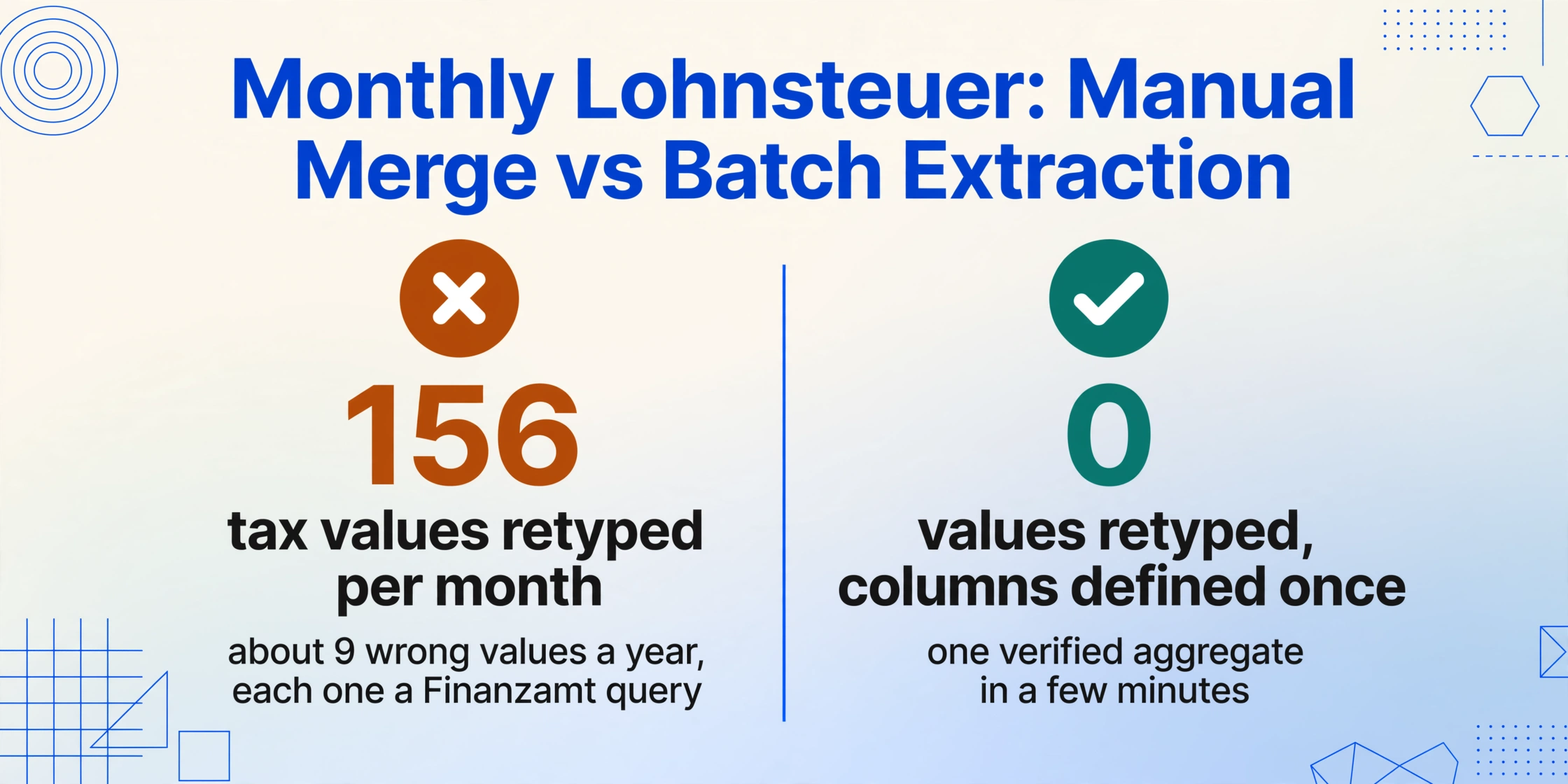
The manual merge is where errors compound across months. An HR administrator retyping 52 individual Lohnsteuer amounts each month performs roughly 156 transcription operations (52 employees × 3 tax fields: Lohnsteuer, Solidaritätszuschlag, Kirchensteuer). At a conservative 0.5% per-field error rate — optimistic for a task performed on the 8th of the month with the 10th deadline approaching — that is roughly 0.8 miskeyed values per month. Over a calendar year, that accumulates to about 9 transcription errors across the employer's tax records. Each error that produces a discrepancy between the submitted aggregate and the Finanzamt's received data triggers a query — and a Finanzamt query about wage tax is resolved not in minutes but in the time it takes to re-extract the individual employee records, locate the miskeyed field, and file a corrected Lohnsteuer-Anmeldung (berichtigte Anmeldung).
Batch extraction eliminates the manual merge by making it happen inside the processing step. Define your columns once — "Employee Name," "Steuer-ID," "Lohnsteuer," "Solidaritätszuschlag," "Kirchensteuer," "Kirchensteuer-Konfession" (ev/kath for church tax denomination, since the rate and the tax office differ) — upload all 52 declarations in one batch, and the output is one spreadsheet with 52 rows and column totals that are already computed. The aggregate submission figures for the Lohnsteuer-Anmeldung are the SUM of each tax column — read directly from the spreadsheet, not typed into the ELSTER form from memory or from a separate payroll system report whose provenance you have not verified.
Why Three Different Payroll Output Formats Create the Merge Problem Before Extraction Begins
The Lohnsteuer-Anmeldung aggregation gets harder — not easier — when an employer runs multiple payroll arrangements. An engineering firm with 35 salaried employees on DATEV Lohn und Gehalt, 12 part-time student workers (Werkstudenten) processed through Lexware, and 5 managing directors whose compensation runs through a Steuerberater-kanzlei's own system faces the same data fragmentation that makes batch extraction necessary across all tax jurisdictions — for Australian PAYG payment summaries across Xero, MYOB, and Employment Hero, and for Canadian T4 slips split between Ceridian, ADP, and QuickBooks.
Each German payroll software renders the employee-level tax breakdown in its own format. DATEV Lohn und Gehalt prints per-employee Lohnsteuer data in the standard Lohnabrechnung layout — a structured payslip with Bruttolohn at the top, tax deductions in the middle block, and net pay at the bottom. Lexware lohn+gehalt organizes the same data differently, with tax figures in a separate summary table. A Steuerberater's internal system may output a completely different arrangement — perhaps a PDF table listing all clients' employees, or individual Bescheinigungen per employee in the format the Kanzlei has used for decades. The payroll administrator staring at three different document layouts on the 8th of the month does not have time to reorient visually for each format before retyping. Template-based extraction — where you draw rectangles around fields on a sample document — fails across providers because a template calibrated to DATEV's layout silently misreads Lexware's.
Semantic extraction resolves this by reading fields for what they mean, not where they sit. The column "Lohnsteuer" locates the wage tax figure on a DATEV payslip, a Lexware summary table, and a Steuerberater's Bescheinigung alike — because the AI understands the concept "Lohnsteuer" and finds the corresponding figure by semantic association, not by pixel coordinates. That means the same upload batch can contain payslips from three different payroll sources, and the output merges them into consistent columns without a separate template for each source.
Setting Up a Monthly Batch Lohnsteuer Extraction in Three Steps
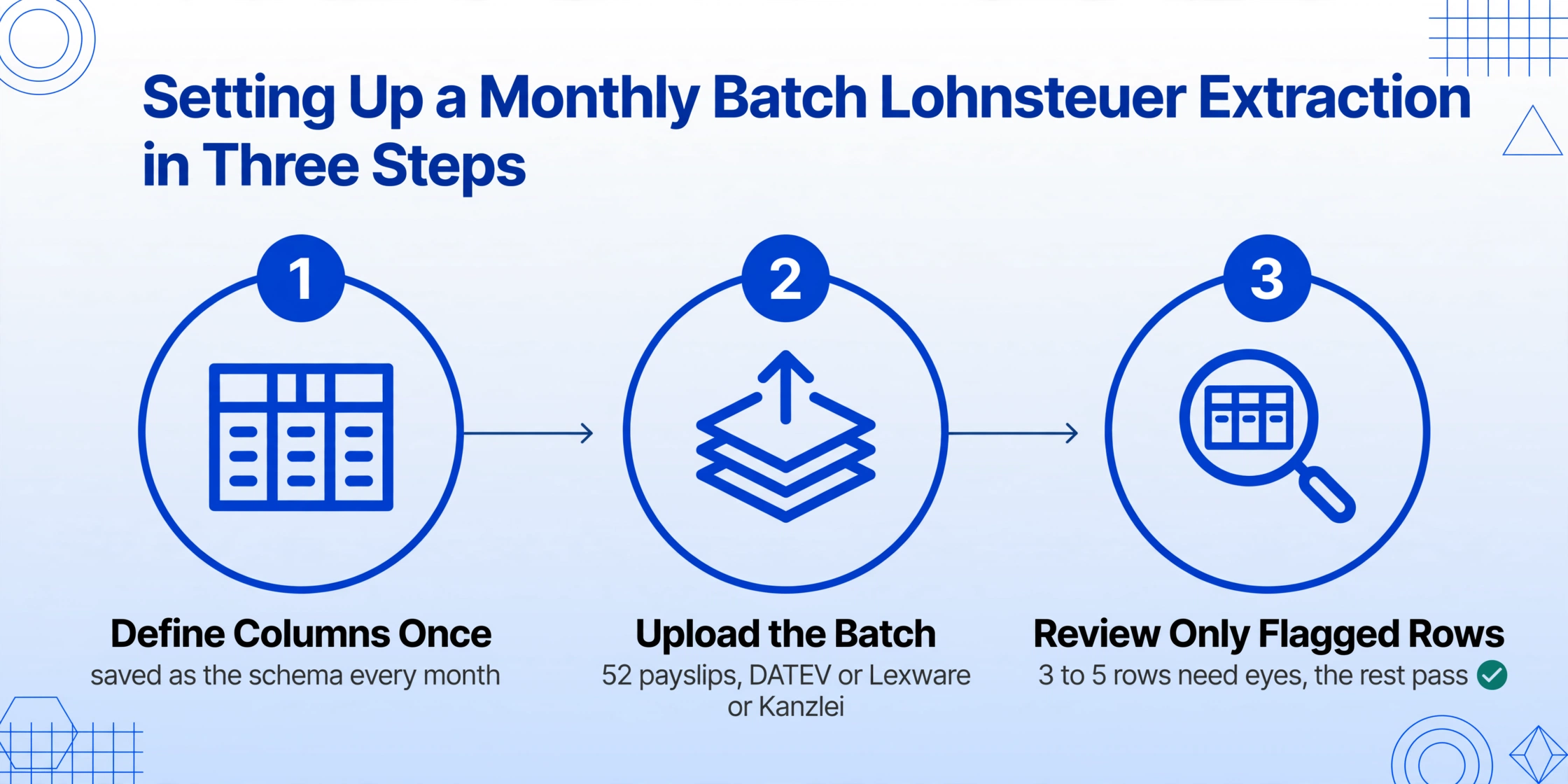
The workflow that batch-processes 52 monthly wage tax declarations into one dashboard is the same whether you are processing 10, 50, or 500 employees. The column schema — defined once — works every month, because the field names on a German payslip do not change between January and December.
Define your column schema — once, for every month and every employee
Type the field names exactly as they should appear as column headers. The standard schema for a monthly Lohnsteuer-Anmeldung reconciliation covers three groups: Identity columns — Employee Name, Steuer-ID (tax identification number, the 11-digit permanent identifier under § 139b Abgabenordnung), Steuerklasse (tax class, I through VI), Konfession (religious affiliation for Kirchensteuer: ev/rk/none), and Bundesland (state, since Kirchensteuer rates are 8% in Bayern and Baden-Württemberg vs. 9% in other states via Kirchensteuergesetz); Tax columns — Bruttolohn (gross wage), Lohnsteuer (wage tax withheld), Solidaritätszuschlag (5.5% surcharge), Kirchensteuer (church tax withheld), and the resulting Netto-Auszahlung (net pay); Verification columns (Computed) — "Soli-Check (SolZ ÷ LSt: expected 5.5%, actual X.X%)" to catch any deviation from the mandated 5.5% Solidaritätszuschlag rate on Lohnsteuer, and "KiSt-Check (KiSt ÷ LSt: expected 8%/9% per Bundesland, actual X.X%)" to flag employees whose church tax rate does not match their registered confession and state. This schema is saved as a template — next month's extraction uses exactly the same columns, and the verification columns catch anomalies before the aggregate is submitted.
Upload the full batch — all 52 employee declarations, from every payroll source, in one upload
Drop in the entire month's declarations: 35 DATEV payslips, 12 Lexware summaries, and 5 Steuerberater-issued Bescheinigungen. The extraction engine processes each file independently with the same column schema and merges all 52 results into one spreadsheet. Files can be digitally generated PDFs from the payroll system, scanned paper payslips, or even screenshots of the Lohnsteuer-Anmeldung preview screen. The same schema that locates "Lohnsteuer" on a crisp DATEV PDF also finds it on a scanned Lexware summary with uneven lighting — because semantic extraction reads field meaning, not document layout. Upload December's batch exactly like you uploaded January's — the only thing that changes month to month are the figures.
Verify the aggregate, submit the Lohnsteuer-Anmeldung, and save the spreadsheet for audit
The output spreadsheet has 52 rows — one per employee — with column totals at the bottom. The aggregate Lohnsteuer is the SUM of the Lohnsteuer column. The aggregate Solidaritätszuschlag is the SUM of the SolZ column. The Kirchensteuer total, split by confession (ev and rk, since the Finanzamt requires separate reporting for each religious group under § 51a EStG), is the SUM of the KiSt column filtered by the Konfession column. If a Computed Column flagged a Soli rate deviation — an employee whose Solidaritätszuschlag does not equal exactly 5.5% of their Lohnsteuer — investigate that row before including it in the aggregate. Submit the verified figures through ELSTER by the 10th. Retain the extraction spreadsheet for the duration of the Aufbewahrungsfrist (retention period) under § 147 AO — it is your audit trail showing that the submitted aggregate was independently verified, not copied from an unverified payroll system report.
Files are processed securely and not stored.
Verification Columns: Catching Rate Discrepancies Before the Finanzamt Does
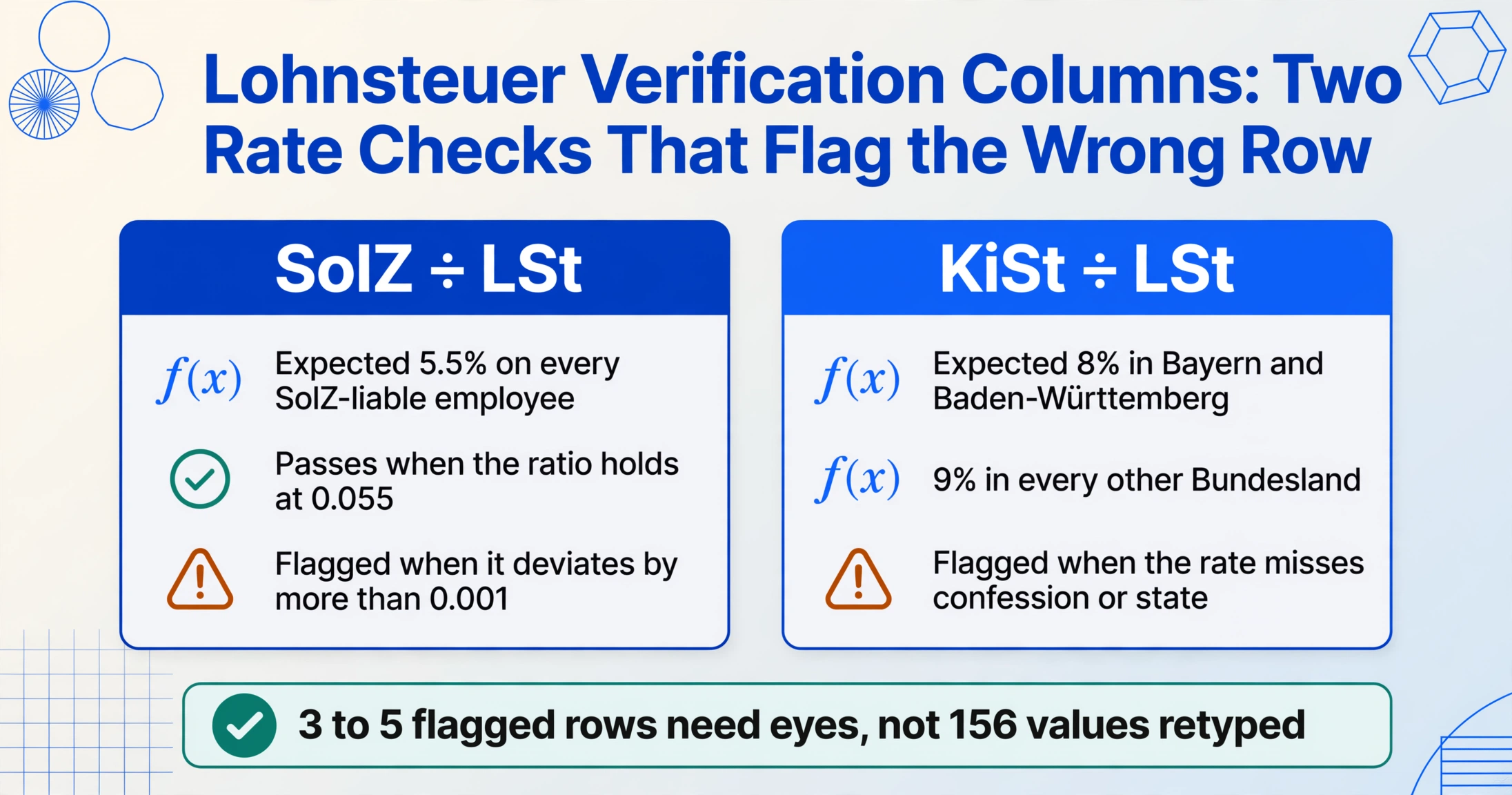
The most valuable part of batch processing 52 monthly wage tax declarations is not the extraction speed — the extraction itself typically completes in a few minutes. It is the Computed Columns that execute verification while each employee's declaration is being read, flagging the handful of rows where a tax rate, a confession code, or a Steuerklasse assignment does not align with the expected calculation. The HR administrator's role shifts from transcribing 156 tax values to reviewing the 3 flagged rows that Computed Columns identify as anomalous.
Three verification columns that turn batch extraction into a pre-submission audit:
Solidaritätszuschlag Rate Verification. The Solidaritätszuschlag (SolZ) is a fixed 5.5% surcharge on Lohnsteuer — no caps, no exemptions, no sliding scale since 2021, when the Freigrenze (exemption threshold) was raised to €16,956 of annual Lohnsteuer for single filers, effectively exempting roughly 90% of taxpayers. For a monthly payroll, every remaining SolZ-liable employee should show SolZ = Lohnsteuer × 5.5%, exactly. A Computed Column that divides SolZ by Lohnsteuer and flags any row where the ratio deviates from 0.055 by more than 0.001 catches a payroll system misconfiguration — an employee whose Steuerklasse or Kinderfreibetrag (child allowance) was entered incorrectly, shifting the Lohnsteuer base on which the SolZ rate is calculated, or a manual correction that was applied to the Lohnsteuer amount but not carried through to the SolZ calculation.
Kirchensteuer Rate and Confession Verification. Kirchensteuer is 8% of Lohnsteuer in Bayern and Baden-Württemberg, and 9% in all other states. A Computed Column that divides Kirchensteuer by Lohnsteuer and compares against the expected rate for the employee's registered Bundesland catches two common payroll errors: an employee who moved from Bayern (8%) to Hessen (9%) mid-month and whose Kirchensteuer rate was not updated in the payroll system, or a new hire who registered their confession incorrectly — producing a Kirchensteuer deduction on a payslip where the employee's declared Konfession should produce none. A second Computed Column can flag employees whose Konfession column shows "none" but whose Kirchensteuer column contains a non-zero amount — a payroll processing error that, if submitted, the Finanzamt will query.
Monthly Trend Outlier Detection. A Computed Column that compares each employee's current-month Lohnsteuer against their previous month's figure — perhaps from the prior month's batch extraction spreadsheet — and flags any row where the month-over-month change exceeds 20%. A single employee whose Lohnsteuer jumped from €480 to €1,200 is explainable: a bonus payment, a tax class change, or a one-time retroactive adjustment. A single employee whose Lohnsteuer dropped from €480 to €380 for no known reason is a data entry error in the payroll system that, unflagged, would produce an incorrect Lohnsteuer-Anmeldung aggregate for that month. The trend column does not diagnose the cause — it surfaces the anomaly so the HR administrator investigates, not the Finanzamt.
The Computed Column approach shifts the HR administrator's monthly workflow from retyping to reviewing. Instead of spending 13 hours per month transcribing 156 tax values from 52 payslips, the administrator spends 20 minutes uploading the batch, 30 minutes reviewing the flagged rows — typically three to five anomalies out of 52 — and 10 minutes submitting the verified aggregate through ELSTER. The remaining 12 hours of the pre-submission window are available for the part of payroll that actually requires human judgment: investigating why the flagged employee's SolZ rate is off, not typing a number into a spreadsheet.
Cross-Month Reconciliation: What the Annual Lohnsteuerbescheinigung Demands That Monthly Filing Obscures
Monthly Lohnsteuer-Anmeldung is not the end of the employer's wage tax obligation. At year-end, the employer must issue a Lohnsteuerbescheinigung (wage tax certificate) to every employee — the electronic record, transmitted to the Finanzamt under § 41b EStG, that summarizes annual gross pay, withheld Lohnsteuer, Solidaritätszuschlag, and Kirchensteuer for each employee. The Lohnsteuerbescheinigung must reconcile to the sum of the 12 monthly Lohnsteuer-Anmeldung filings — and for any employee whose figure does not match, the Finanzamt's electronic cross-check system (ElStAM — Elektronische SteuerAbzugsMerkmale) flags a discrepancy.
With 12 monthly batch extraction spreadsheets — January through December, each with 52 rows and column totals — the year-end reconciliation becomes a simple verification: SUM the "Lohnsteuer" column totals across all 12 monthly spreadsheets. Compare against the payroll system's annual Lohnsteuerbescheinigung report. If they match, the year is closed. If they diverge, the month-by-month and employee-by-employee extraction records identify exactly which month and which employee produced the discrepancy — not a needle-in-haystack search across 624 monthly employee-totals (52 employees × 12 months).
This cross-month traceability is what manual transcription cannot provide. An HR administrator who types the monthly aggregate manually records only the final totals — not the per-employee breakdown behind each total. When the year-end reconciliation fails — and it fails somewhere in roughly 10–15% of mid-size payrolls, typically because of a mid-year correction filing (berichtigte Lohnsteuer-Anmeldung) whose per-employee impact was not tracked — the administrator has no intermediate record to consult. The only option is to re-extract every month's employee-level data retroactively, a process that takes longer in December than it would have in monthly increments. Monthly batch extraction, with the spreadsheet saved per period, provides the granular audit trail that makes year-end reconciliation a verification exercise, not a forensic reconstruction.
Edge Cases That Break the Aggregate: When 52 Employees Produce One Wrong Number
Tax Class Changes Mid-Month — Steuerklassenwechsel
A single employee who marries on the 15th of the month switches from Steuerklasse I (single) to Steuerklasse III (married, primary earner, lower withholding) effective from the date of marriage. Their Lohnsteuer for that month splits: the first half at the Steuerklasse I rate, the second half at Steuerklasse III. The payroll system handles the split internally, but the payslip shows only the blended result. If the HR administrator expects the Steuerklasse III monthly rate and sees a higher-than-expected Lohnsteuer figure, they may incorrectly adjust the aggregate — or worse, submit the aggregate without verifying the per-employee figure, trusting the blended output. The batch extraction captures the actual Lohnsteuer figure from the payslip regardless of the class change, and the Computed Column verifying month-over-month consistency flags the deviation for human review — correctly identifying it as a known class change, not an error.
Kirchensteuer Cap (Kappung) for High Earners
Kirchensteuer is subject to a cap in most states — the Kappungsgrenze limits Kirchensteuer to a percentage of taxable income (typically 2.75% to 4% depending on state law). For a high-earning employee whose Kirchensteuer hits the cap, the effective rate drops below the statutory 8% or 9%. A Computed Column that flags all deviations from the 8%/9% expected rate would flag this employee — but the flag is a false positive created by the cap, which the payroll system already applied correctly. The Computed Column is a signal, not a verdict. The HR administrator sees the flag, recognizes the cap scenario (known for this employee based on income level), and marks it as reviewed. This is the distinction between an error-checking tool and an error-deciding tool: the extraction surfaces outliers; the human applies context.
Employees with Zero Lohnsteuer — Minijob and Gleitzone
Employees in a Minijob (€556 monthly earnings threshold in 2026, under § 8 SGB IV) have no employee Lohnsteuer deduction — the employer pays a flat 2% lump-sum tax (Pauschalsteuer) instead. Employees in the Übergangsbereich (Gleitzone, monthly earnings between €556.01 and €2,000 in 2026) have reduced social insurance contributions but full Lohnsteuer liability. A batch extraction that includes both Minijob and regular employees in the same upload will show rows with Lohnsteuer = €0 for Minijob employees — not an error, but a structural feature of the two-tier German employment system. The Computed Column that checks for "Lohnsteuer = 0 and Bruttolohn > 0" surfaces these rows so the administrator can confirm that each zero-Lohnsteuer row corresponds to a documented Minijob arrangement, not a payroll processing oversight that excluded a regular employee from wage tax withholding.
From Spreadsheet to ELSTER Submission: The Last Mile
The batch-extracted spreadsheet produces the verified aggregate figures. The last step is entering those figures into ELSTER's Lohnsteuer-Anmeldung online form. This is not a batch operation — ELSTER accepts one employer-level aggregate per submission — but the verified spreadsheet eliminates the uncertainty that plagues manual aggregation. The HR administrator opens the ELSTER form, reads the SUM of each column from the spreadsheet, and enters the figure once. No cross-checking against the payroll system report, no mental arithmetic to verify that 52 individual entries add up, no doubt about whether the aggregate covers all employees or missed one.
For employers who file through a Steuerberater (tax advisor), the extracted spreadsheet replaces the stack of payslips and payroll reports that the Steuerberater's Steuerfachangestellter (tax clerk) would otherwise retype into DATEV or Addison. The spreadsheet arrives as a CSV — employee rows, tax columns, verification checks — and the Steuerberater's office imports it directly into their DATEV Lohn module. The two hours the clerk would have spent retyping becomes time spent reviewing the flagged verification rows. For an employer paying €150–€250 per hour in Steuerberater fees for payroll services, that is €300–€500 in billable time recovered per month — €3,600–€6,000 per year across the 12 monthly filings.
Beyond the Monthly Deadline: What the Batch Extraction Spreadsheet Becomes Over Time
The 12 monthly batch extraction spreadsheets — saved per filing period — accumulate into a year-long payroll tax dataset that answers questions the Lohnsteuer-Anmeldung alone cannot. Which months did total Lohnsteuer spike, and which employees drove the spike? Which employees changed Steuerklasse during the year, and did their effective tax rate change accordingly? Is the year-end Lohnsteuerbescheinigung total consistent with the sum of the 12 monthly submissions — and if not, which month's filing carried the error?
None of these questions are answerable from the ELSTER Lohnsteuer-Anmeldung form, which shows only the submitted aggregate per filing period with no per-employee breakdown. They are answerable from the batch extraction dataset — because the dataset preserves the per-employee row behind every monthly aggregate. For the HR director preparing the annual payroll budget, the dataset shows the month-over-month wage tax trend for each cost center. For the finance team reconciling payroll expense to the general ledger, the per-employee columns provide the granularity that a single aggregate figure obscures. The batch extraction workflow that starts as a monthly filing efficiency tool becomes, over a calendar year, the employer's payroll tax analytics infrastructure — built one month and one spreadsheet at a time.
The same batch processing logic applies across other German wage-tax-related forms that share the same employee-level data structure. The full workflow for extracting individual employee tax data into a year-over-year comparison is covered in our ELSTER tax form extraction guide, and the structural challenge of assembling the underlying documents — bank statements, insurance certificates, donation receipts — is examined in the ELSTER manual data entry problem analysis. For employers operating across borders, the same batch principle applies to Australian PAYG payment summary consolidation and Canadian T4 batch processing — the document type and tax jurisdiction change, but the batch principle of one column schema across all employees and all sources remains constant.
Frequently Asked Questions
How long does batch processing take for 50 monthly Lohnsteuer declarations?
The upload and extraction for 50 employee-level declarations typically completes in a few minutes — the exact time depends on whether the files are digitally generated PDFs from DATEV or Lexware (fastest) or scanned paper payslips (slightly slower per page). The time savings accumulate in the post-extraction phase: instead of roughly 13 hours per month retyping 156 tax values (52 employees × 3 tax fields), the HR administrator spends 20 minutes uploading, 30 minutes reviewing the 3 to 5 rows flagged by Computed Columns, and 10 minutes submitting the verified aggregate. The remaining 12 hours are recovered for payroll tasks that require human judgment — investigating flagged anomalies, processing tax class change requests, and responding to employee questions about their payslips.
Can the batch handle both employee-level payslips and the employer's aggregate summary in the same upload?
Yes, but with a column schema consideration. The employee-level payslip contains per-person tax fields (Lohnsteuer, SolZ, KiSt per employee) with identity columns (Name, Steuer-ID). The employer's aggregate summary from the payroll system shows only the total Lohnsteuer, total SolZ, and total KiSt across all employees — with no per-employee breakdown. Include both document types in the same batch with columns that cover both: the employee rows will populate the identity and individual tax columns, and the aggregate summary row will populate the total columns with blank identity fields. The SUM of the per-employee Lohnsteuer column should equal the aggregate summary row's Lohnsteuer total — if it does not, the Computed Column verification flags the discrepancy, and the administrator knows before submitting which source is wrong.
What if some employees change confessional status (Kirchenaustritt) mid-year?
An employee who formally leaves the church (Kirchenaustritt) through the Standesamt or Amtsgericht ceases Kirchensteuer liability from the month following the declaration. The payroll system should stop deducting Kirchensteuer from the next month's pay — but if the Kirchenaustritt was recorded late (common during December, when Standesamt processing slows due to holiday workload), the employee may see Kirchensteuer on one extra month's payslip they expected to be free of it. The monthly batch extraction catches this: the Computed Column flagging "Konfession = none and KiSt > 0" surfaces the row for the HR administrator. The employee requests a correction to the payslip and the employer files a berichtigte Lohnsteuer-Anmeldung for the affected month — all before the year-end Lohnsteuerbescheinigung locks the annual figure.
Can the batch handle scanned paper payslips and digital PDFs in the same upload?
Yes. A DATEV-generated digital PDF payslip, a Lexware-printed scan, and a screenshot of the Lohnabrechnungsprogramm preview screen all process in the same batch with the same column schema. The extraction engine reads the visual content of each page — whether born-digital or scanned — and locates each tax field by its label and semantic meaning. Moderate skew, varying scan quality, and different font rendering across payroll software packages do not prevent extraction because the AI is not aligned to a fixed template. A severely degraded scan — a faxed copy of a payslip — may produce lower confidence on individual fields, and the Computed Column verification values will flag the row for manual review while the rest of the batch processes normally.
Does batch extraction work when employees are split across multiple Betriebsstätten (business locations) with different Betriebsstättennummern?
Yes. A company with two Betriebsstätten — one in Hamburg (Finanzamt Hamburg) and one in München (Finanzamt München) — files separate Lohnsteuer-Anmeldung forms for each location under the Betriebsstätten-Finanzamt principle. Include "Betriebsstätte" as an extraction column, and the output spreadsheet can be filtered by location to produce the aggregate for each Finanzamt's Lohnsteuer-Anmeldung separately. The accumulated monthly spreadsheets also make it straightforward to produce the annual Lohnsteuerbescheinigung totals per Betriebsstätte — a reconciliation that a single aggregate per company cannot provide.
What happens if a file in the batch is corrupted or unreadable?
Files that cannot be read — password-protected PDFs, corrupted downloads, or empty files — are flagged during processing without blocking the rest of the batch. The remaining valid employee declarations extract normally. The flagged files appear in the output with an error status rather than extracted data, identifying exactly which employee's payslip needs re-uploading or manual handling. For a batch of 52 files submitted on the 8th of the month, one unreadable file means locating and re-uploading one payslip — not restarting the entire extraction.