The Irony of ELSTER: Germany's Digital Tax
Platform Still Runs on Manual Data Entry
ELSTER (ELektronische STeuerERklärung) has been Germany's official electronic tax filing platform since 2005, processing over 31 million electronic tax returns annually through the Finanzamt network. The submission is fully digital — encrypted XML packages travel from taxpayer to tax authority without a single sheet of paper. But the data that fills those XML packages originates from a process that has not changed since the pre-ELSTER era of paper forms: a person sitting at a desk, surrounded by five to seven separate documents — bank statements (Kontoauszüge), insurance certificates (Versicherungsbescheinigungen), donation receipts (Spendenbescheinigungen), the employer's wage tax statement (Lohnsteuerbescheinigung), last year's tax assessment (Steuerbescheid) — reading numbers from paper and PDF and typing them, one at a time, into ELSTER's web forms. The submission is electronic. But the data assembly — the hours spent locating, reading, and transcribing figures from source documents into the right form fields — is still manual. And that is the labor nobody budgets for.
Key Takeaways
- The submission is electronic, but the hours spent locating five separate documents and deciding which figure goes into which Anlage — a cognitive act of classification and threshold-checking, not clerical data entry — still falls entirely on the taxpayer every single year.
- Even meticulously organized freelancers face the same translation layer between a Versicherungsbescheinigung and the Anlage Vorsorgeaufwand, because the system digitized the filing endpoint but not the data assembly that precedes it.
- When five source documents become one spreadsheet with every figure extracted into its own column, your role collapses from transcriber to verifier — confirming extracted fields instead of reading and retyping numbers from paper that was never designed to feed a tax form.
The Structural Irony: Electronic Submission Built on a Manual Foundation
Germany's tax administration has invested heavily in digital filing infrastructure. Mein ELSTER — the browser-based portal that replaced the desktop ElsterFormular software in 2021 — provides a complete online filing environment for individual income tax (Einkommensteuererklärung), VAT returns (Umsatzsteuererklärung), trade tax (Gewerbesteuererklärung), and monthly wage tax filings (Lohnsteuer-Anmeldung). The Bundesfinanzministerium (Federal Ministry of Finance) promotes ELSTER as the centerpiece of Germany's eGovernment strategy in tax administration — and by the measure of submission volume, it is an operational success.
The irony is not that ELSTER fails. It is that ELSTER solves the wrong half of the problem. The platform digitizes the filing endpoint — the moment the taxpayer clicks "Senden" (send) and the XML package transmits to the Finanzamt. It does not digitize the hours that precede that click: the assembly of data from source documents that were never designed to feed a tax form. Every freelancer, sole trader, and employee filing a tax return in Germany performs the same upstream labor every year — locating documents, reading fields, deciding which figure goes into which Anlage, and typing. The submission is a single action. The assembly is a multi-hour manual process. And ELSTER helps with exactly the part that was never the problem.
The digital filing pipeline is a highway — but the on-ramp is a staircase. ELSTER accepts electronic submissions. It does not read your bank statements. It does not extract your insurance premiums. It does not classify your receipts. The taxpayer is the integration layer between the documents and the form, and for roughly 31 million filers each year, that integration work is still performed by hand.
The Five Documents That Feed Into One Income Tax Return
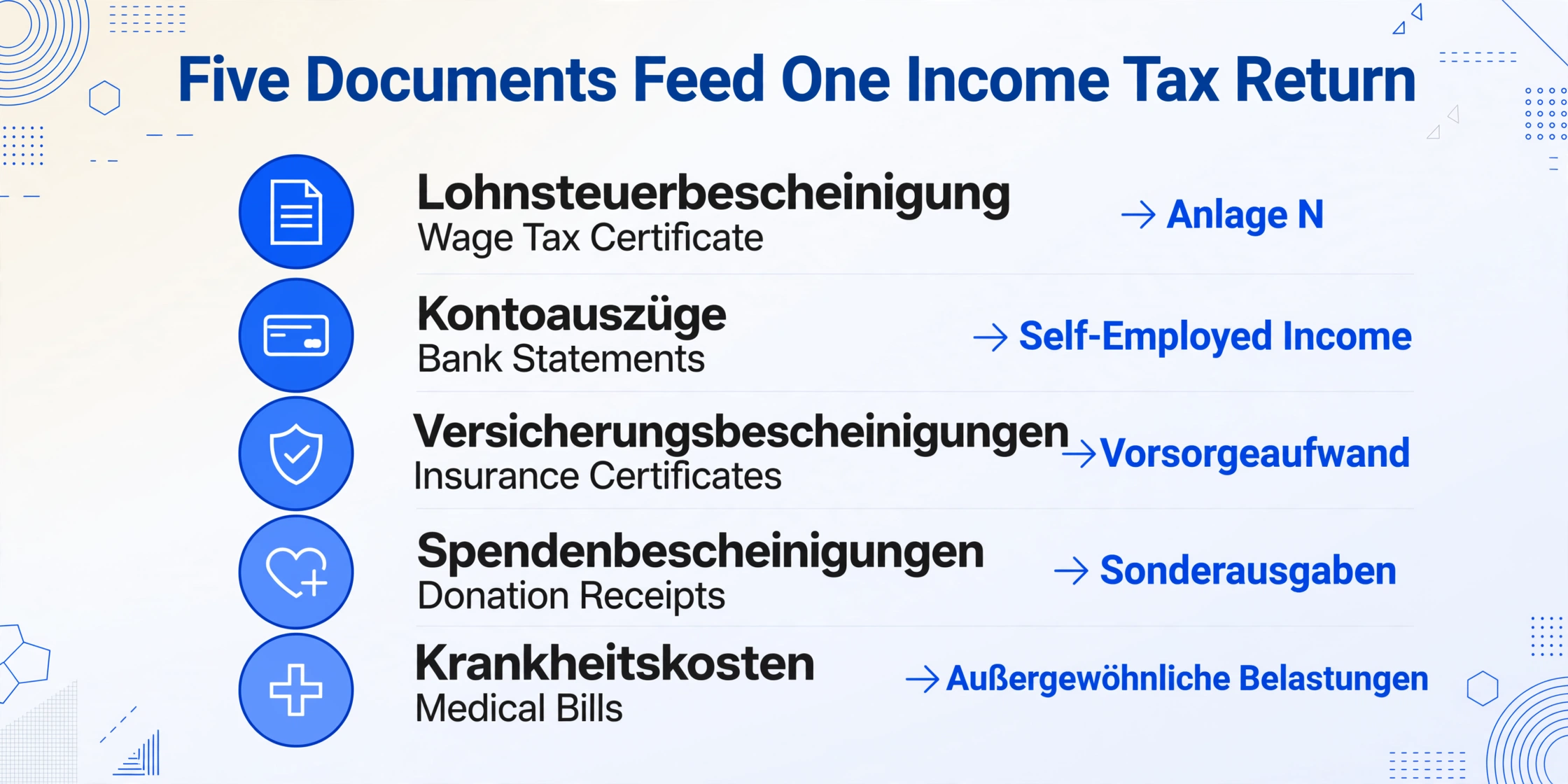
A typical German income tax return (Einkommensteuererklärung) is not a single form — it is a main form (Hauptvordruck) plus a stack of annexes (Anlagen) covering different income types and deduction categories. Which documents feed into which Anlage fields is not guessable — it is governed by specific sections of the Einkommensteuergesetz (EStG). The taxpayer must know where each figure belongs, and the source of each figure is a different document that arrives at a different time, in a different format, from a different institution.
Income Sources
- Lohnsteuerbescheinigung (Wage Tax Certificate). Issued by the employer, transmitted electronically to the Finanzamt, and available for download in Mein ELSTER. Contains: Bruttolohn (gross salary), einbehaltene Lohnsteuer (wage tax withheld), Solidaritätszuschlag, Kirchensteuer, and social insurance contributions. This feeds into Anlage N (employment income, Einkünfte aus nichtselbstständiger Arbeit) under § 9 EStG. It is the one document ELSTER can pre-fill automatically through the VaSt (vorausgefüllte Steuererklärung) system — but the pre-fill must still be verified against the employer's certificate.
- Bank Statements (Kontoauszüge). For freelancers and self-employed individuals (Freiberufler / Gewerbetreibende), bank statements are the income ledger. Business deposits (Betriebseinnahmen) must be separated from personal transfers, tax refunds, and private income. A freelancer with 150-plus transactions per year across two bank accounts performs this separation manually before a single income figure can be entered on Anlage EÜR (Einnahmenüberschussrechnung, the profit-and-loss statement for self-employed filers under § 4 Abs. 3 EStG).
Deduction Sources
- Versicherungsbescheinigungen (Insurance Certificates). Health insurance (Krankenversicherung), long-term care insurance (Pflegeversicherung), pension contributions (Rentenversicherung), unemployment insurance (Arbeitslosenversicherung), and supplementary insurance policies. Each issuer sends a separate annual certificate, typically arriving by mail in January and February. The premium amounts feed into Anlage Vorsorgeaufwand under § 10 EStG, where they are subject to caps and partial deductibility limits that differ by insurance type. Transcribing the wrong premium amount from the wrong certificate into the wrong line of Anlage Vorsorgeaufwand is a single-digit error with a four-digit tax consequence.
- Spendenbescheinigungen (Donation Receipts). Charitable donations to registered organizations (gemeinnützige Organisationen) are deductible up to 20% of total income (Gesamtbetrag der Einkünfte) under § 10b EStG. Each donation above €300 requires an individual receipt. A taxpayer who donated €200 to one charity, €350 to a second, and €500 to a third has three receipts and three numbers to enter into Anlage Sonderausgaben — in the correct donation field, not the church tax field, not the education field, not the childcare field, each of which sits adjacent on the same form page.
- Krankheitskostenbelege (Medical Expense Records). Receipts for medical costs not covered by insurance — dental treatments, prescription co-pays, physiotherapy — plus insurance reimbursement statements showing what was paid. Total medical costs minus reimbursements, compared against the zumutbare Belastung (reasonable burden threshold: 1% to 7% of income depending on income level and family status, under § 33 EStG), determines the deductible amount on Anlage Außergewöhnliche Belastungen. A single earner with €50,000 income and no children has a 6% threshold — meaning the first €3,000 of medical costs are not deductible. The taxpayer must compute this threshold themselves; ELSTER does not calculate it for manual entries.
The five documents are independent. They arrive at different times, in different formats — a PDF wage tax certificate downloaded from Mein ELSTER, a paper insurance statement that arrived by mail in January, a bank statement exported as CSV from the online banking portal, donation receipts saved as email attachments, and medical bills collected in a physical folder all year. None of them were designed to feed the Anlage fields of an ELSTER return. And the taxpayer is the mechanism that converts all five into one coherent set of form entries.
The Human Translation Layer: Why the Work Is Cognitive, Not Clerical
It is tempting to describe the manual assembly of a tax return as "data entry" — a clerical task of copying numbers from one place to another. That description is wrong, and it is wrong in a way that obscures why the task is so draining. The taxpayer is not copying data. They are translating it. Each source document speaks its own organizational language — a bank statement lists transactions by date, a donation receipt specifies the recipient and amount, a medical bill itemizes treatments and reimbursements — and ELSTER's Anlage fields ask none of those questions. They ask: "Total income from employment." "Total special expenses." "Deductible portion of extraordinary burdens."
Getting from one to the other is a cognitive act. The taxpayer reads a number — €480 paid to the Techniker Krankenkasse in monthly premiums — and must decide: is this the base rate (Basisbeitrag, fully deductible) or a supplementary premium (Zusatzbeitrag, subject to different treatment)? Which line of Anlage Vorsorgeaufwand does it belong on? Does the year's total exceed the Höchstbetrag (maximum deductible amount)? This is not data entry. It is a series of classification and threshold decisions that must be made before a single keystroke reaches the form. The typing itself is fast. The deciding — what each figure means for the tax return — is what consumes the hours. And every year, 31 million people perform this cognitive translation work in a compressed window between late January (when the last of the year's certificates arrive by mail) and the filing deadline.
The filing takes an evening. The data assembly — locating five documents, reading every field, deciding which Anlage each figure belongs in, computing thresholds, transcribing — takes several evenings spread across weeks. This is the invisible second job of tax season in Germany. ELSTER automates the submission, not the assembly — and the assembly is where nearly all the time goes.
The VaSt Illusion: Pre-Filling Is Helpful — and Nowhere Near Complete
One of ELSTER's most useful features is the vorausgefüllte Steuererklärung (VaSt) — the pre-filled tax return. After registering for Belegabruf (document retrieval), ELSTER automatically populates the return with data already on file at the Finanzamt: the employer's Lohnsteuerbescheinigung, health and long-term care insurance contributions, pension payment notices, and wage replacement benefits like unemployment or parental leave benefits.
VaSt reduces the transcription burden. It does not eliminate it. Three categories of data still require manual input after VaSt has done everything it can:
| Data Category | VaSt Pre-Fills? | Manual Input Required |
|---|---|---|
| Lohnsteuerbescheinigung (wage tax certificate) | Yes | Verification only — but employer-submitted errors are common, and the Finanzamt states the taxpayer is responsible for verifying every pre-filled field. |
| Kranken-/Pflegeversicherung (health/long-term care) | Yes (compulsory only) | Supplementary insurance (Zusatzversicherung), private insurance top-ups, and foreign insurance — none captured by VaSt. The taxpayer must locate these certificates and transcribe the amounts manually. |
| Werbungskosten (income-related expenses, Anlage N) | No | Commuting distance (Entfernungspauschale, €0.30/km one-way), home office days (Tagespauschale €6/day, max €1,260/year), work equipment purchases, professional training — all manual. The Arbeitnehmer-Pauschbetrag (€1,230 automatic deduction) applies only if you enter nothing; every amount above it requires line-by-line listing. |
| Sonderausgaben (special expenses) | No | Charitable donations (Spenden), church tax paid, education costs (Ausbildungskosten, up to €6,000/year), child care (Kinderbetreuungskosten, two-thirds of costs, max €4,000/child) — all manual. A taxpayer who donated €2,000 and paid €800 in church tax has two separate numbers to enter into adjacent but distinct form lines. |
| Außergewöhnliche Belastungen (extraordinary burdens) | No | Medical costs, disability expenses, care costs — all manual, each subject to the income-based zumutbare Belastung threshold. The calculation of what is actually deductible requires comparing actual costs against the income-based threshold. ELSTER does not compute this threshold for manual entries; the taxpayer must apply it themselves. |
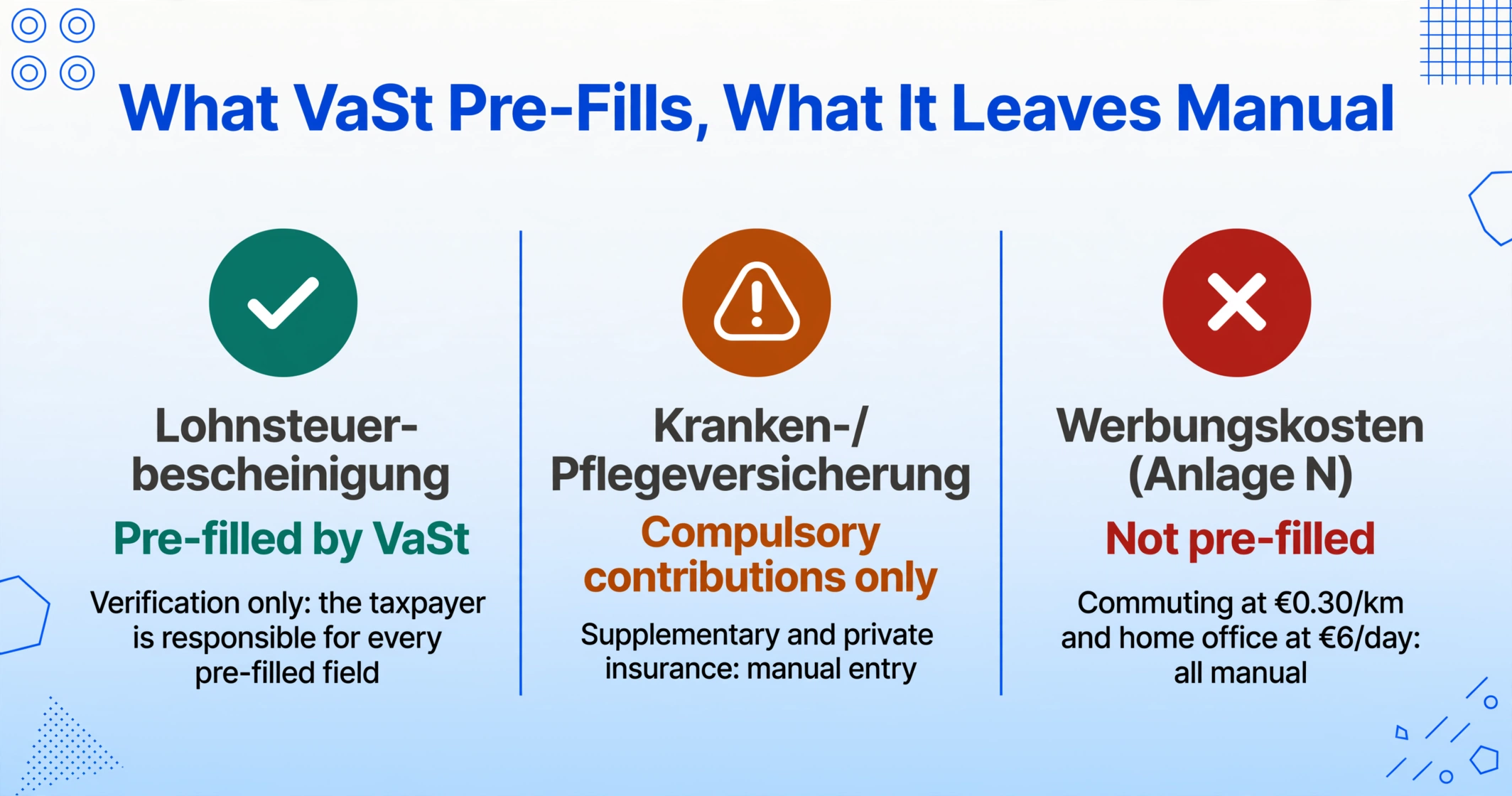
For a freelancer with home office expenses, commuting, professional insurance, charitable donations, and dental costs not covered by insurance, approximately 60–70% of the deduction-relevant fields in their ELSTER return still require manual data entry — even with VaSt fully active. The pre-filled return automates the easiest data. The data that requires the most cross-document assembly — deductions — remains fully manual.
The 31 July Deadline and Why the Assembly Window Is Shorter Than It Looks
The German tax filing deadline for self-filers is 31 July of the year following the tax year, as prescribed by § 149 Abgabenordnung (AO). For those using a Steuerberater, the deadline extends to 28 February of the second following year — a seven-month extension that reflects the reality of the tax advisor industry's workload distribution. In practice, the effective assembly window for a self-filer is not from January to July. It is from late January — when the last of the previous year's Versicherungsbescheinigungen, Spendenbescheinigungen, and bank statements arrive — to early July, with most filers compressing the work into a handful of evenings and weekend sessions across that span.
The deadline should be generous. But the assembly work — locating five documents, making classification decisions for every figure, computing thresholds, transcribing — is not easily parallelized across evenings. It requires focused concentration, and the cognitive load of switching between a bank statement, an insurance certificate, and the Anlage Vorsorgeaufwand form repeatedly across several hours means the effective hourly productivity of a tax assembly session declines the longer it runs. The fourth insurance certificate of the evening takes longer to transcribe correctly than the first one did — not because the certificate is harder, but because the taxpayer's classification accuracy degrades with repetition. This is the same mental fatigue that makes UK Self Assessment data assembly draining rather than routine, and why Japanese 確定申告 filers describe the February assembly phase as the real tax season, not the March filing deadline. The form is uniform. The assembler is not — and the assembler's fatigue is the single largest uncontrolled variable in tax return accuracy.
The BFH Ruling That Made Manual Data Entry Errors Permanent
The consequence of a transcription error in a tax return is not a polite correction. Under German tax procedure law, the Einspruchsfrist (objection period) is one month from the date the Steuerbescheid (tax assessment notice) is issued. After that window closes, the assessment becomes final (bestandskräftig) — even if it contains errors that the taxpayer themselves caused.
The Bundesfinanzhof ruling IX R 17/22 (18 July 2023) established that data-entry errors made by the taxpayer during the filing process are not correctable after the Einspruchsfrist expires. The case involved a taxpayer who inadvertently imported data from the wrong tax year into their return, resulting in a higher tax assessment. The taxpayer discovered the error after the one-month objection window had passed and applied for a correction. The BFH denied it — ruling that the error was the taxpayer's own, not the Finanzamt's, and the assessment stood. A misclicked data import from a prior year produced a permanent tax liability that could have been avoided entirely if the data had been extracted directly from the correct year's source documents rather than manually assembled across two years by a tired filer.
The BFH ruling crystallizes the structural risk of manual tax assembly: the taxpayer bears the liability for transcription errors, the Finanzamt does not verify the accuracy of the underlying source data against the submitted figures, and the correction window is one month from assessment issuance. Transcription is not a cost-free step whose errors can be rectified later. It is a step whose errors can become permanent — and the permanence is a legal fact, not an administrative oversight.
This Is Not a Problem of Personal Organization
The dominant narrative around tax season — repeated every year in the financial pages of FAZ and Handelsblatt and every Steuerberater's client newsletter — is that the pain is the taxpayer's fault: you should have kept better records, you shouldn't have left it so late, you need a system (Ordnungssystem). There is truth to it. Good record-keeping reduces the time spent searching for documents. But it does not reduce the time spent translating documents into form fields. Even the meticulously organized freelancer who files receipts monthly and tags bank transactions quarterly still faces the same translation layer at year-end. The five documents still produce five streams of data that must be classified, threshold-checked, and entered into specific Anlage lines. Organization reduces the search cost. It does not touch the assembly cost — and the assembly cost is the dominant cost.
The evidence that this is structural, not personal, is in what German taxpayers actually fear. A search of the gutefrage.net forum — Germany's largest Q&A platform, where taxpayers discuss real filing problems in German — reveals a recurring pattern: questions are not primarily about the deadline. They are about correct field assignment ("In welche Zeile der Anlage N gehört die Entfernungspauschale?" — which line of Anlage N does the commuting allowance go in?), and about reconciling figures across documents ("Meine Lohnsteuerbescheinigung zeigt einen anderen Betrag als die Vorausberechnung — was stimmt jetzt?" — my wage tax certificate shows a different amount than the pre-calculation, which one is right?). These are not questions of discipline. They are questions of translation — and they arise because the system requires every taxpayer to act as their own tax data translator, without providing the tools to automate the translation.
What Changes When the Assembly Becomes Automated
The solution is not a better form, a longer deadline, or a more comprehensive VaSt. The solution is removing the human transcription step from the assembly pipeline entirely — replacing the hours spent reading numbers from five documents and typing them into ELSTER with a single batch extraction that reads every field from every source document and assembles the return in a spreadsheet.
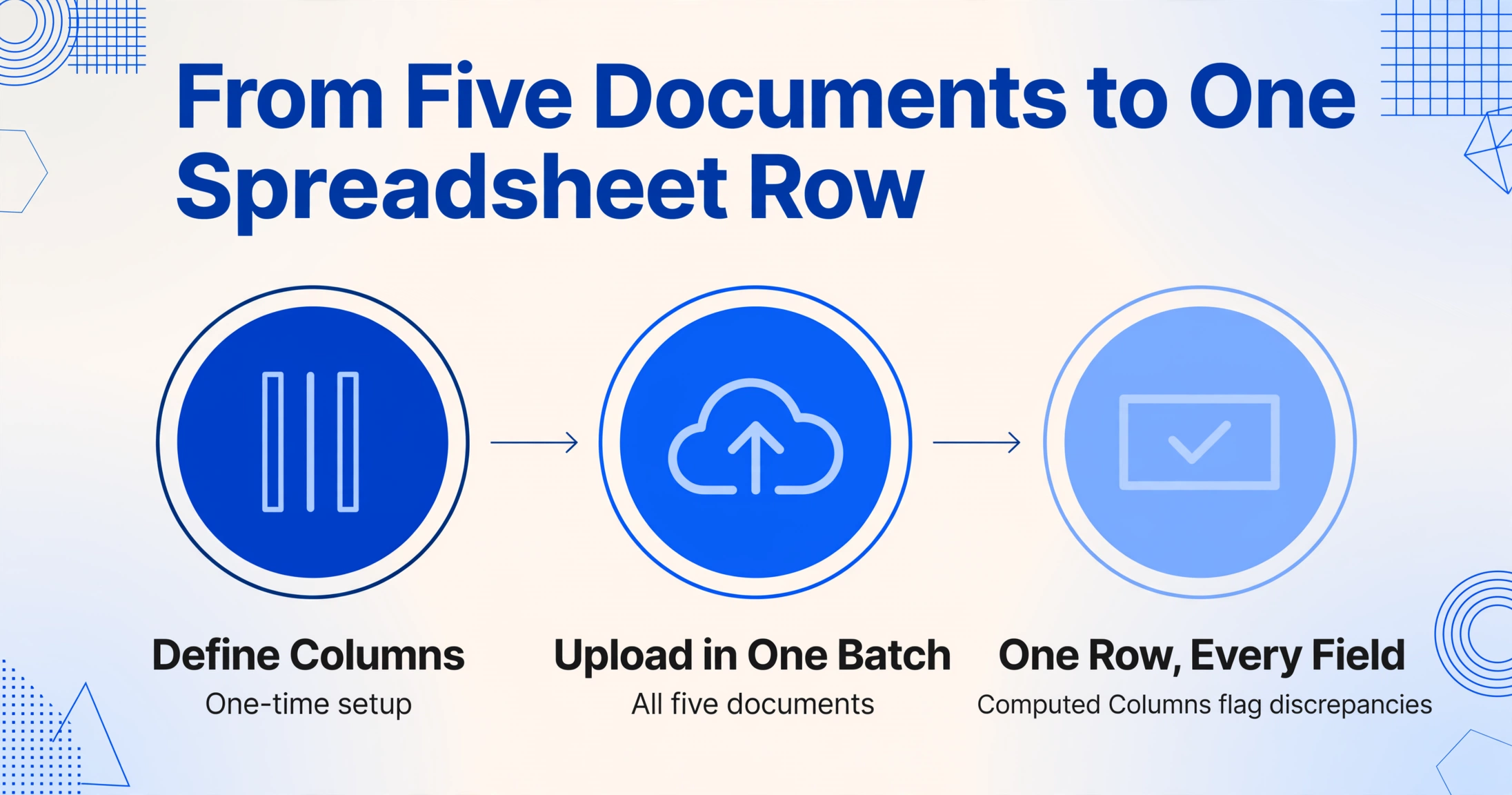
The workflow that replaces manual assembly has three parts, and the first part is one-time: define the columns you want — "Bruttolohn," "Einbehaltene Lohnsteuer," "Solidaritätszuschlag," "Kirchensteuer," "Krankenversicherungsbeiträge," "Pflegeversicherungsbeiträge," "Spenden," "Krankheitskosten," "Erstattungen," "Zumutbare Belastung," and every other field that appears across all five source documents. Upload all five documents — the Lohnsteuerbescheinigung PDF, the scanned Versicherungsbescheinigungen, the bank statements, the Spendenbescheinigungen, the medical bills — in one batch. The tool that powers the German ELSTER tax form extraction workflow reads each document, locates each field by its semantic meaning rather than its page position, and populates the columns. The output is one spreadsheet row — every figure from every source document in its own column, ready for the classification decisions that only a human can make: which insurance premiums are deductible at which rate, whether medical costs exceed the zumutbare Belastung threshold, which donations qualify under § 10b EStG.
The taxpayer's role shifts from transcriber to verifier. Instead of spending hours reading documents and typing numbers, they spend 15 minutes scanning, receive a completed spreadsheet, and review the output — verifying that each extracted field maps to the correct source document and the correct Anlage. A Computed Column that cross-checks income totals against the Lohnsteuerbescheinigung's declared figures catches discrepancies immediately. Another Computed Column that sums all special expenses and compares against the Sonderausgaben total on the Hauptvordruck flags arithmetic errors before the return reaches the Finanzamt. The cognitive work remains — classification, threshold-checking, tax strategy decisions — but the mechanical work of locating and transcribing numbers across five documents is eliminated. And for the employer who must also process monthly Lohnsteuer-Anmeldung declarations for an entire payroll, the same batch extraction logic applies at scale — 50 employees, one column schema, one consolidated dashboard every month.
The same structural gap — digital filing endpoint, manual data assembly — exists across tax jurisdictions because it is built into the architecture of tax administration. The UK freelancer assembling SA100 Self Assessment data from bank statements, invoices, and receipts faces the identical translation layer. The Japanese freelancer assembling 確定申告 from passbooks, receipts, and insurance certificates faces it every February. The form language, the deduction names, the statute numbers, and the deadline pressure differ — but the structural bottleneck is identical. The tax authority provides the digital filing endpoint. It does not provide the tools to digitize the data assembly that precedes it. And every year, millions of capable people fill that gap by hand.
Frequently Asked Questions
Doesn't using a Steuerberater solve the data assembly problem?
No — it moves the assembly from your desk to the Steuerberater's desk, and you pay for the move. A Steuerberater receiving a stack of your bank statements, insurance certificates, donation receipts, and medical bills in February assigns a Steuerfachangestellter (tax clerk) to retype every field into DATEV or Addison before the Steuerberater can begin the tax analysis. This retyping consumes roughly 90 minutes of billable time per client return — and at typical Steuerberater hourly rates, the client pays for data entry at professional-service prices. If you instead provide the Steuerberater with an extracted spreadsheet where every field is already in columns and the Computed Columns have already flagged arithmetic discrepancies, the clerk's time shifts from data entry to data verification — and the Steuerberater's time shifts from finding errors to analyzing tax strategy. The assembly problem does not disappear when you hire a Steuerberater. It moves, and you pay the moving cost.
Doesn't VaSt eliminate the need to retype Lohnsteuerbescheinigung data?
VaSt pre-fills the employer's wage tax data automatically — and that is genuinely useful for that one document. But the Lohnsteuerbescheinigung is one of five documents. The other four — bank statements for self-employed income, insurance certificates for Vorsorgeaufwand, donation receipts for Sonderausgaben, medical bills for außergewöhnliche Belastungen — are not pre-filled. And for freelancers, where self-employment income and business expenses constitute the majority of the return's data, the pre-filled portion (employment income) is often the smaller half. VaSt is a partial solution to the easiest part of the assembly problem. The harder part — the deduction data scattered across multiple documents — remains fully manual.
Why can't I just export my bank transactions as CSV and import them into ELSTER?
ELSTER does not accept CSV imports for individual tax return data. The Mein ELSTER portal provides web-based form fields for each Anlage line — it has no transaction import interface. A CSV of bank transactions contains dated lines with amounts and descriptions, but ELSTER's Anlage EÜR asks for annual totals by income category, not individual transactions. Converting 150 bank transactions into one EÜR income figure requires classification (which transactions are business income vs. personal transfers?), aggregation (sum of classified income), and then manual entry of the aggregate into the form. The CSV export reduces the calculator work — it does not eliminate the classification, the aggregation, or the transcription into ELSTER's web forms.
What if my documents are in paper format rather than digital — scanned insurance certificates, photographed receipts?
Semantic extraction reads scanned documents and photographed receipts the same way it reads born-digital PDFs — by understanding the meaning of each field rather than relying on a clean template alignment. A scanned Versicherungsbescheinigung with a 3-degree skew, a photographed Spendenbescheinigung with uneven lighting from a desk lamp, and a downloaded Lohnsteuerbescheinigung PDF from Mein ELSTER all process in the same extraction batch with the same column schema. The extraction is not performing OCR based on document layout — it is reading fields by their semantic meaning. "The value of the health insurance premium for 2025" is recognizable whether it appears in a crisp PDF, a slightly skewed scan, or a phone photograph of a paper document. Severely degraded documents — a fax copy of a fax copy — may produce lower confidence on individual fields, and the Computed Column verification will flag the row for manual review. The remaining valid documents extract normally.
Can I extract data from multiple tax years in one batch for a cross-year comparison?
Yes — and this is where the extraction workflow provides value that manual assembly cannot. Upload all years' source documents — 2023, 2024, and 2025 — in one batch. The extraction processes each year's documents independently and outputs one row per tax year, with all columns aligned. This is the exact dataset a Steuerberater needs to run a cross-year comparison: Werbungskosten claimed each year, Sonderausgaben totals per year, whether the zumutbare Belastung threshold was correctly applied each year. Manual assembly produces one year's return at a time, in ELSTER's single-year interface, with no cross-year view. The extraction produces one spreadsheet — three rows, three years, every field aligned. The comparison that would otherwise require opening three PDFs and retyping is already complete.
Do I still need to keep my original documents after extracting the data?
Under German tax law, yes — the statutory retention period (Aufbewahrungsfrist) for tax-relevant documents is 10 years for accounting records (Buchungsbelege) under § 147 AO, and 6 years for business correspondence and other tax documents. The Finanzamt may request original documents during a Betriebsprüfung (tax audit), particularly for deduction-related receipts (Spendenbescheinigungen, medical bills, insurance certificates). The extraction replaces the manual data entry step — the hours spent reading and typing. It does not replace the legal obligation to retain original documents for the applicable Aufbewahrungsfrist. Best practice: extract the data to a spreadsheet for analysis and filing, retain the original documents in a dated folder structure per tax year, and maintain both for the full retention period.
The Cost Is Not the Hours. It Is What the Hours Displace.
The quantifiable cost of manual tax data assembly in Germany is large: an estimated 90 minutes per tax return spent locating, reading, classifying, and transcribing data from five source documents into ELSTER's form fields. Across 31 million annual filers, that is roughly 46.5 million hours of manual tax assembly — the equivalent of 23,250 full-time work years devoted to a task that the digital filing infrastructure already rendered unnecessary on the submission side but left intact on the assembly side.
But the aggregate number obscures the personal cost. The real cost of manual tax assembly is not the hours. It is what those hours displace: the client work a freelancer could have invoiced in the evenings spent reconciling a bank statement against an EÜR form. The tax strategy discussion a Steuerberater could have had with a client if the meeting were not consumed by data entry. The evening a family could have spent not arguing over which Anlage line the Kirchensteuer figure belongs on. The filing deadline is a fixed point on the calendar. The assembly labor that precedes it is not — it is an artifact of a system where the submission pipeline is digital but the data sources are not. Closing that gap does not eliminate the obligation to file. It eliminates the part of the obligation that nobody pays you for: the hours you spend being the integration layer between paper and pixels.