The German Import Data Entry Problem
Why ATLAS Creates the Gap It Was Designed to Close
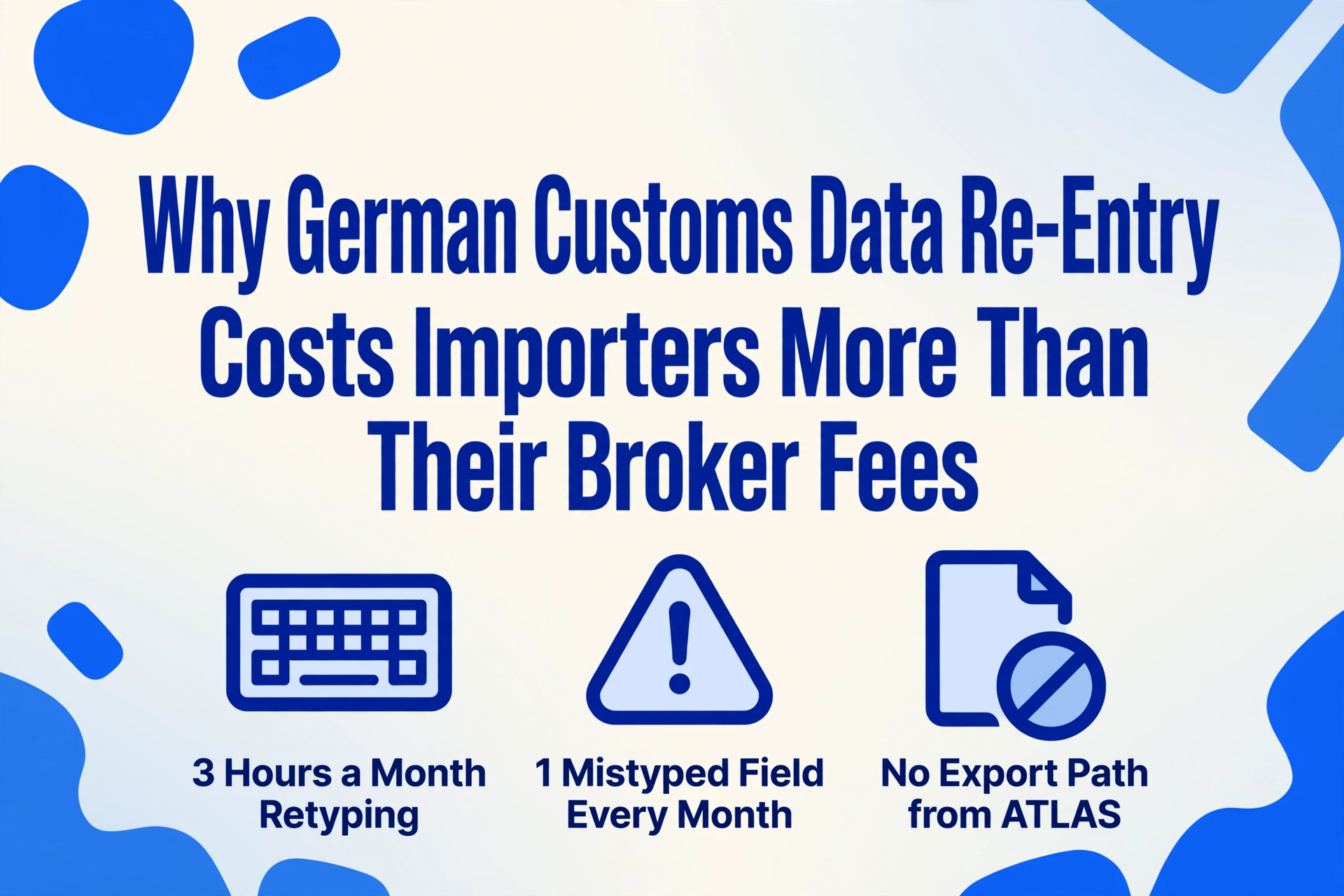
Submitting a customs declaration through Germany's ATLAS (Automated Tariff and Local Customs Clearance System) takes a customs broker roughly three minutes per declaration — the data goes in electronically, ATLAS validates it, the system returns an acceptance message with an 18-digit MRN, and the goods clear. What the importer receives afterwards is a PDF of that same Zollanmeldung — a flat document formatted for archiving. The 11-digit customs tariff number (Zolltarifnummer), the declared customs value (Zollwert), the country of origin (Ursprungsland), the EORI number of the declarant, the net mass (Eigenmasse), and the customs procedure code (Zollverfahrenscode) are all present and correct on the page. They are also locked there. Getting each field back into a sortable format — a spreadsheet for monthly reporting, an ERP screen for invoice reconciliation, a compliance dashboard for duty planning — requires opening the PDF and retyping every value. For a mid-sized German importer processing 40 shipments a month, that retyping step consumes roughly 3 hours per month. And it exists because the system that digitized customs declarations was designed to validate them, not to return them as structured data to the importer who pays for them.
Key Takeaways
- Your broker submits the Zollanmeldung through ATLAS in 3 minutes — getting the same 11-digit tariff codes, customs values, and EORI numbers from the resulting PDF into your spreadsheet takes another 3 hours a month, and that retyping gap is not in any contract or budget line.
- The visible cost is roughly €100 in monthly staff time — the invisible costs are the tariff code transposition error that shifts goods into the wrong duty heading, the reconciliation delay that lets duty discrepancies sit undetected for three weeks, and the analytical questions nobody asks because the data is scattered across 40 disconnected PDFs.
- Close the gap at its source: define your extraction columns once using German customs terminology, feed every Zollanmeldung PDF from every broker and filing channel into the same spreadsheet, and turn the person who retypes 400 fields a month into the person who verifies them.
The Visible Three Minutes — and the Invisible Three Hours
Everyone involved in a German import transaction can see the broker's fee. The Zollvertreter (customs agent, also called Zollspediteur when combined with freight forwarding) submits the electronic Zollanmeldung through ATLAS, the automated customs IT platform operated by the ITZBund under the Union Customs Code (Regulation EU No 952/2013, UZK). ATLAS validates the tariff classification against the EZT-online database, verifies the EORI number against the EU registry, calculates duty and import VAT (Einfuhrumsatzsteuer, 19% standard / 7% reduced), and — if accepted — issues a Steuerbescheid (tax assessment notice) and an 18-character MRN (Master Reference Number). The broker's invoice arrives: a line item for customs clearance, a line item for the ATLAS filing. The importer pays it. The transaction appears complete.
What the broker's invoice does not cover — and what no line item on any logistics invoice captures — is what happens after the ATLAS acceptance. The importer receives the Zollanmeldung PDF. Inside that PDF are the fields that the importer needs for its own operations: the 11-digit Zolltarifnummer for the monthly import-volume report by tariff heading, the Zollwert in euros for the supplier invoice reconciliation (comparing the declared CIF customs value against the supplier's FOB commercial invoice), the Ursprungsland for the quarterly origin-documentation audit, the Zollverfahrenscode for the working-capital cash-flow forecast distinguishing free-circulation duty from bonded-warehouse suspended duty. Every one of these fields was entered into ATLAS as structured data. Every one of them is returned to the importer as a flat PDF. The step that re-extracts them from the PDF into a spreadsheet is not a customs compliance activity. It is format translation — and it is not in anyone's job description, not in any budget, and not visible on any invoice.
ATLAS was designed to eliminate paper customs declarations. It succeeded. What it was not designed to do — and what the importer discovers at month-end — is return data to the importer in a format their internal systems can read. The paper declaration has been replaced by a PDF declaration. The retyping step has not gone away; it has moved from the broker's desk to the importer's screen.
Anatomy of the Data Gap: How Structured Input Becomes Unstructured Output
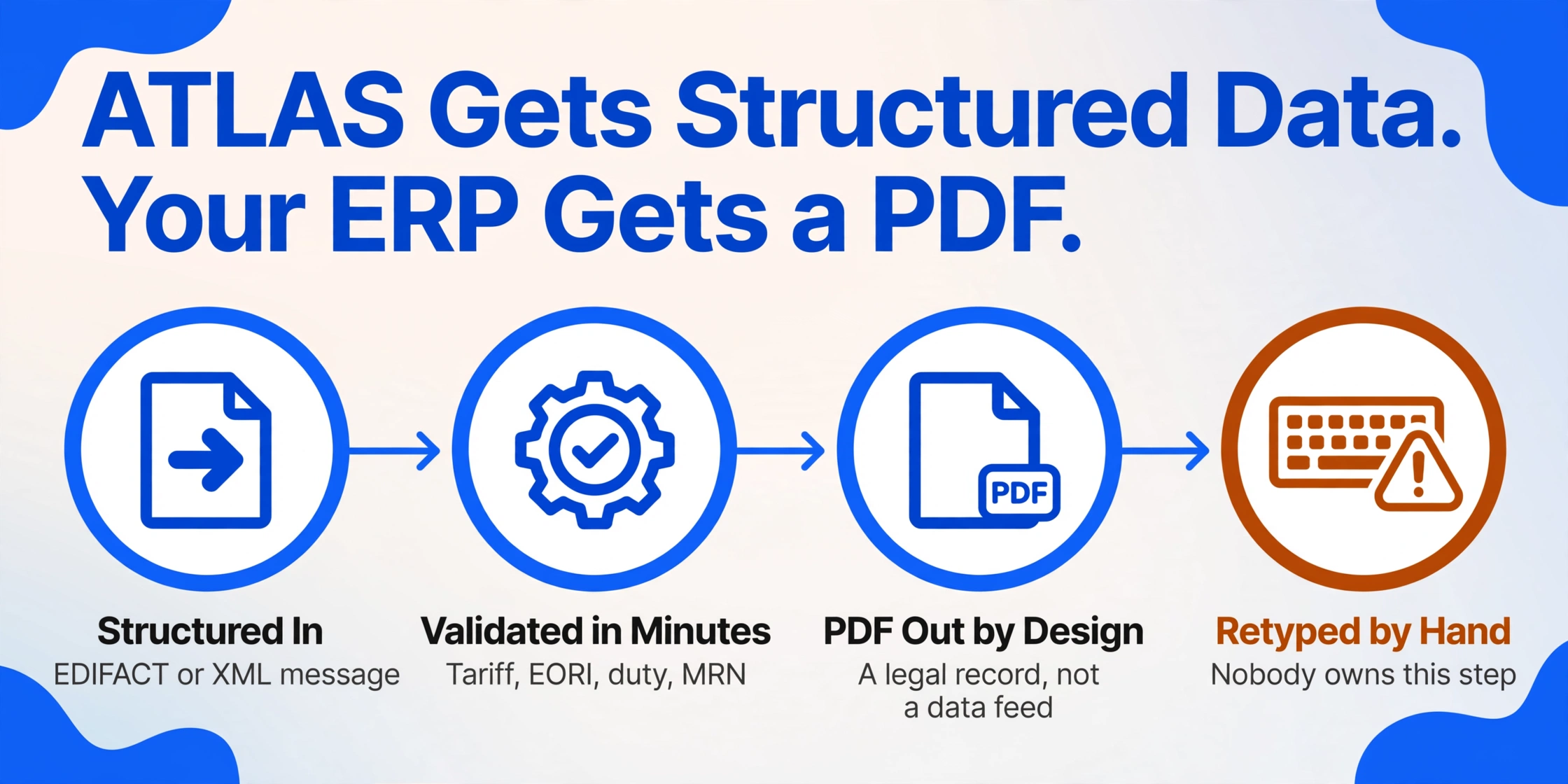
To understand why the gap exists, you have to follow the data through its entire journey. This is not a story about technology failing. It is a story about two systems — ATLAS and the importer's ERP — that were never designed to connect, with a human bridging the gap using a keyboard.
The customs broker (or the importer, if they file directly through ATLAS internet declaration IZA or via software like DAKOSY, AEB Import Filing, or MIC-CUST) enters the shipment data into an ATLAS-compatible form: the 11-digit Zolltarifnummer per commodity line, the Zollwert in euros, the Ursprungsland as an ISO 2-letter code, the EORI number for the declarant and consignee, the Zollverfahrenscode indicating the customs procedure, the net mass (Eigenmasse) and gross mass (Rohmasse) in kilograms, the number of packages, and — for preference claims — the Präferenzursprungsland and preference code. This data is transmitted as an EDIFACT or XML message to ATLAS. It is validated, cross-referenced against the electronic customs tariff (EZT-online), and either accepted or rejected within minutes. The data enters ATLAS as structured data. ATLAS processes it as structured data. It returns an acceptance message as structured data — an MRN, a Steuerbescheid with the calculated duty, and a status code.
The Zollanmeldung PDF that the broker sends to the importer is a legal record of the declaration. Under Article 51 of the UCC, the declarant must keep copies of customs declarations and supporting documents for at least three years for potential customs audits (Zollprüfung). The PDF serves as this legal record. It is formatted for human reading, not machine parsing. The fields that were entered as discrete data points — the 11-digit tariff code, the customs value, the country of origin — are rendered as text on a page, with no metadata marking them as extractable fields. The structured data that entered ATLAS has become an image of text on a PDF.
For the importer, the Zollanmeldung is not an archival document. It is an input document for at least four internal processes: the monthly import-volume report sorted by tariff heading, the supplier invoice reconciliation (comparing the declared Zollwert against the Handelsrechnung's FOB value plus freight and insurance), the quarterly duty-forecast cash-flow model, and the annual origin-documentation audit required under EU free trade agreements. An ERP system — whether SAP, DATEV, Lexware, or a custom Excel-based import ledger — requires structured data to perform any of these functions. The importer has a PDF. The ERP requires rows and columns. The gap between them is filled by a person typing each field from one screen to another. For 40 declarations a month with 10 fields each, that is 400 manual transcriptions — roughly three hours of work that does not appear on any process map, any cost estimate, or any broker contract.
This gap is structurally identical to the one described in the analysis of why BAS lodgement costs Australian small businesses more than the form shows — the form accepts structured numbers, but the documents that contain those numbers arrive as PDFs, and the manual step of extracting data from documents into the form is the bottleneck nobody budgets for. The customs declaration and the tax return are the same problem wearing different government forms: the data-assembly step dwarfs the filing step, and most of the tools aimed at "making it easier" address the filing side while leaving the assembly side manual.
What the Retyping Gap Actually Costs — Beyond the Three Hours
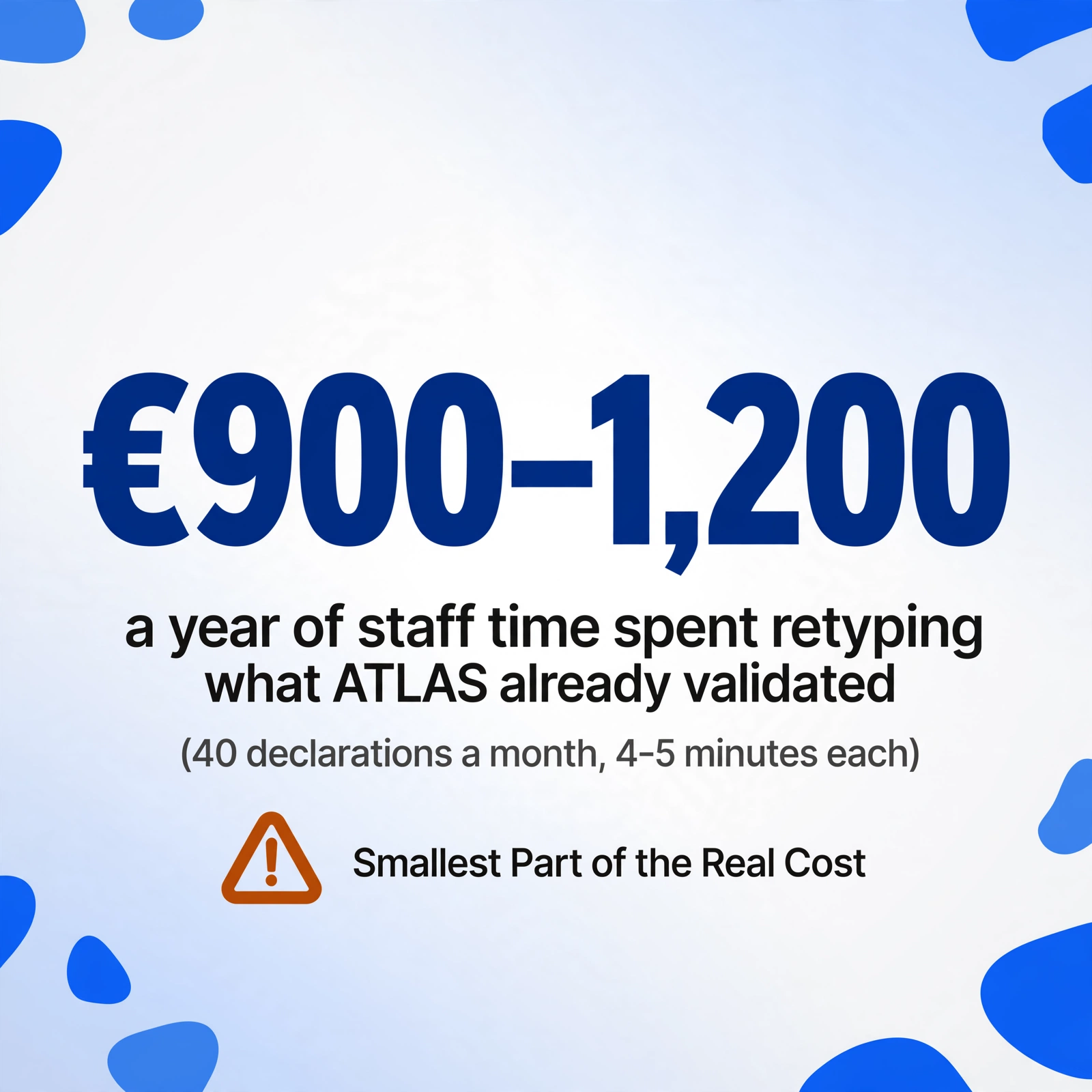
The visible cost of manual data re-entry is easy to calculate: 40 declarations per month at 4–5 minutes each equals roughly 3 hours of staff time. At a mid-range import-coordinator salary in a German logistics hub like Hamburg or Bremerhaven, that is approximately €75–100 per month in direct labour. Multiplied across 12 months, roughly €900–1,200 per year in personnel cost for format translation. This is the number most importers see, if they see a number at all. It is also the smallest part of the real cost.
The transposition cost. An 11-digit Zolltarifnummer — say 6204.62.31.00.9 for women's cotton trousers — is 11 keystrokes. A data-entry transposition error rate of roughly 1 per 500 keystrokes means that across 400 field transcriptions (40 declarations × 10 fields, with roughly half being numeric codes), one field per month will be mistyped. One wrong digit in the Zolltarifnummer — a "3" where a "2" should be — can shift the goods into an entirely different tariff heading with a different duty rate. If ATLAS validated the correct code at the time of clearance, the error exists only in the importer's internal spreadsheet. But two things make it dangerous: it feeds the monthly import-volume report, which feeds the quarterly duty forecast, which feeds the cash-flow projection; and it may be cross-checked against the broker's data during a Zollprüfung (customs audit), where a mismatch between the importer's records and the customs-filed data raises questions about the importer's internal controls — even if the error is purely clerical.
The reconciliation delay cost. The purpose of extracting Zollanmeldung data into a spreadsheet is not the spreadsheet. It is reconciliation against the supplier's Handelsrechnung. The supplier's commercial invoice states the FOB Shenzhen value — €12,000. The Zollanmeldung declares a Zollwert of €13,200 — the CIF Hamburg value with freight and insurance added. The difference of €1,200 is correct. But if the import coordinator only extracts the Zollwert at month-end — because the data-entry backlog has been accumulating for three weeks — the reconciliation confirming that €1,200 gap is legitimate happens three weeks after the goods cleared. If the Zollwert had been entered incorrectly — say the freight was double-counted and the value was declared at €13,800 instead of €13,200 — that discrepancy sits undiscovered for three weeks, during which customs may issue a Nacherhebungsbescheid (retroactive duty assessment) with interest.
The cross-declaration analysis cost that is never incurred. When Zollanmeldung data lives in 40 separate PDFs, nobody asks analytical questions of it. "What was the average declared customs value per kilogram for our textile imports last quarter?" requires extracting the Zollwert and Eigenmasse from 120 PDFs (3 months × 40 declarations) and dividing. Nobody does this, because the extraction itself consumes the time that the analysis would use. The cost here is not a line item — it is lost intelligence. The importer pays duty every month and knows the total paid from the Aufschubkonto (deferment account) statement. What the importer does not know — because the data is scattered across PDFs — is which tariff headings, which countries of origin, and which customs procedures are driving that total. This is the same insight a batch process unlocks, detailed in the analysis of building a tariff summary from 50 batched Zollanmeldungen — but only if the data reaches a spreadsheet first.
Why ATLAS Filing Software Does Not Close the Gap
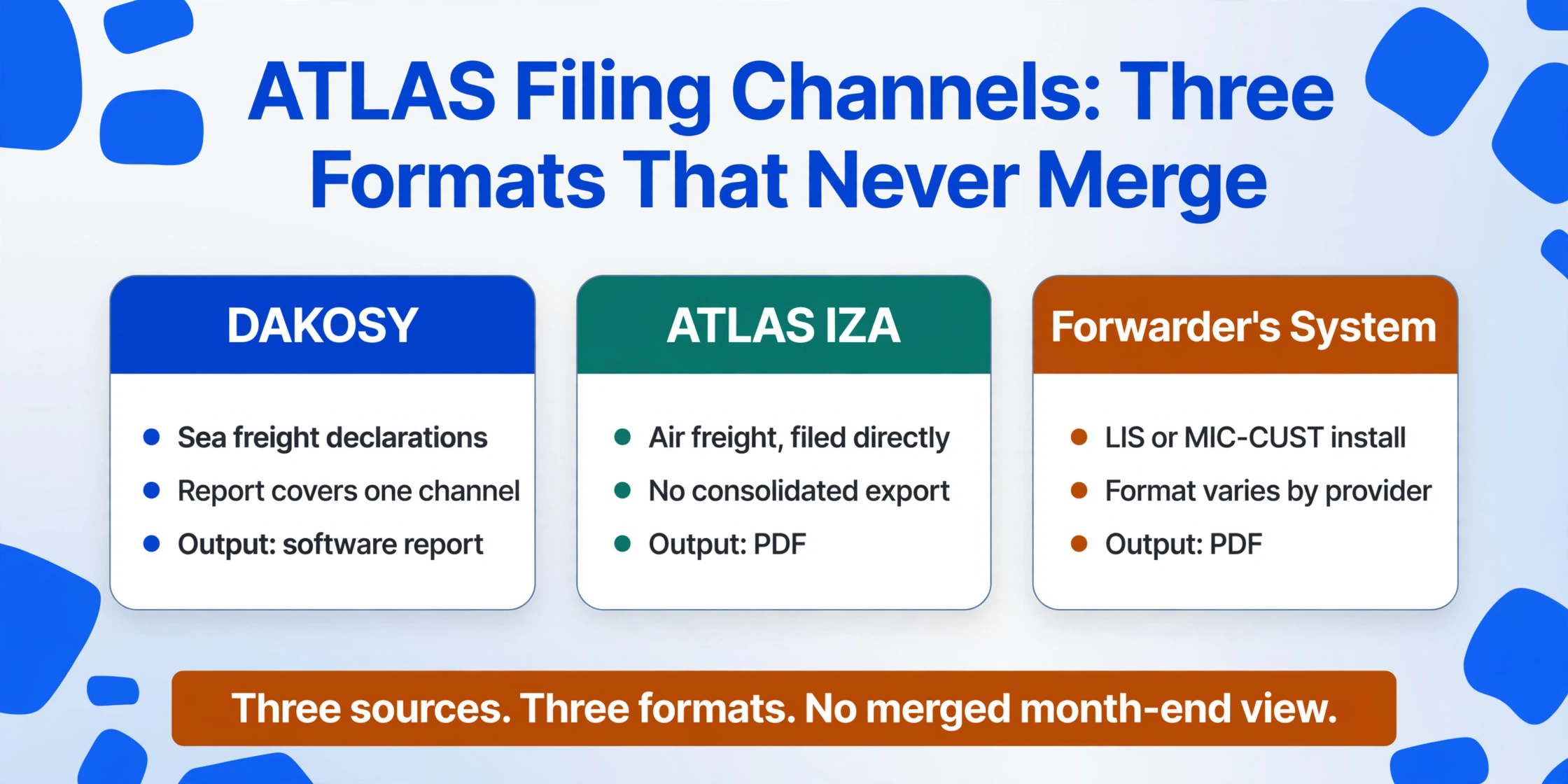
A natural question at this point: if the importer uses ATLAS-compatible filing software like DAKOSY, AEB Import Filing, MIC-CUST, or Declarium, doesn't that software already capture the declaration data? It does — for the declarations filed through that specific software. The limitation is scope, not capability.
A German importer using DAKOSY for sea-freight imports from Asia may file air-freight declarations through ATLAS Internet-Zollanmeldung (IZA) directly, and certain shipments through a freight forwarder who uses their own LIS or MIC-CUST installation. Each filing channel generates its own set of declaration records. The DAKOSY report covers the sea-freight declarations. The IZA declarations produce PDFs. The forwarder's declarations arrive as PDFs from the forwarder's system. The importer who needs a consolidated month-end view of all declarations has three data sources — two of them PDF, one of them a software report — that were never designed to merge.
Even when a single ATLAS software provider captures all declarations, the data it captures is optimized for ATLAS compliance fields, not for the importer's internal reporting needs. The software stores the Zolltarifnummer as an 11-digit string, the Zollwert as a euro amount, and the Zollverfahrenscode as a 4-digit number — exactly the fields ATLAS requires. What it does not typically produce is a consolidated export that matches the importer's reporting structure: one row per declaration, with the fields the importer's finance team needs, alongside inferred fields like "HS Chapter (derived from 11-digit tariff code)" or "Duty exposure (Zollwert × MFN rate) versus preferential rate if valid origin certificate on file." The software exports what ATLAS needs. The importer needs what the import report needs. The gap between the two exports is another round of manual field selection, formatting, and supplemental data entry.
A further complication, specific to the German customs environment, is the role of the indirect representative (indirekter Vertreter). When a freight forwarder files a Zollanmeldung as an indirect representative, they act in their own name on behalf of the importer and assume joint and several liability for the customs debt under Article 84 UCC. The forwarder's ATLAS filing data belongs to the forwarder's system. The importer's access to it — whether as a structured export or even as a PDF — depends on the forwarder's willingness and technical capability to provide it in a usable format. Many forwarders send a PDF scan of the declaration as their standard deliverable. The structured data that entered ATLAS stays in the forwarder's ATLAS software. The importer receives the same flat PDF they would have received if the declaration had been filed on paper — and the manual re-entry step is not only unchanged, it is now dependent on a third party's data format preferences.
The Fix: Move Data Capture Upstream of the Keyboard
The problem is not that ATLAS is broken. ATLAS does exactly what it was designed to do — validate customs declarations electronically and accelerate clearance. The problem is that the importer's data pipeline ends at a PDF, and every downstream process that depends on the data in that PDF has to start with a manual transcription step that nobody owns.
The structural fix is not a better ATLAS integration. It is removing the transcription step altogether — capturing the data from the PDF at the point where it enters the importer's workflow, before anyone opens a spreadsheet to retype it. Custom Column Extraction makes this possible: define the field names once using the exact German customs terminology your team uses ("Zolltarifnummer (Customs Tariff Number, 11-digit)", "Ursprungsland (Country of Origin)", "Zollwert (Customs Value in EUR)", "Zollverfahrenscode (Customs Procedure Code, 4-digit)", "EORI-Nummer (EORI Number)"), upload every Zollanmeldung PDF from every broker, forwarder, and IZA filing channel, and receive one spreadsheet with one row per declaration, the columns defined as headers, the fields populated from the PDFs. The 3 hours of manual transcription become a 10-minute upload and verification step. The output spreadsheet feeds the monthly import report, the supplier invoice reconciliation, and the quarterly duty forecast directly — not through a retyping bottleneck.
This is exactly the extraction approach detailed in the step-by-step guide to extracting German customs declaration data to Excel — the same column definition applied to every declaration, the same output structure every month, the same spreadsheet feeding every downstream process. The difference between a manual data pipeline and an extraction-based one is not a matter of speed. It is a matter of who does the format translation. In the manual pipeline, a person does it, month after month, at the cost of their time and the risk of their transcription errors. In an extraction-based pipeline, the data jumps directly from the PDF into a structured table, and the person verifies rather than transcribes.
FAQ — German Customs ATLAS Data Re-Entry Problem
Why don't German customs brokers provide the declaration data as an Excel file instead of a PDF?
Some do — particularly larger Zollspediteure serving high-volume importers. But it is not a standard service, and the format varies. One broker exports an XML file with ATLAS field codes; another exports a CSV with abbreviated German column headers; a third sends an unformatted text dump. When an importer works with three different brokers and also files some declarations directly through IZA, even the brokers who provide Excel exports do so in incompatible formats. The importer still faces a data-normalization task — mapping three different broker outputs into one consistent reporting structure. The extraction approach bypasses this by working directly from the PDF, which every broker provides in a human-readable format regardless of their software configuration.
Can ATLAS itself export declaration data back to the importer?
No. ATLAS is a declaration-processing platform, not a data-portal for importers. It accepts declarations, validates them, computes duties, and issues tax assessments. The importer's access to ATLAS is mediated entirely through the filing software or the broker who submits the declaration. The German customs administration (Zollverwaltung) provides the EZT-online database for tariff research and the customs portal (Zoll-Portal) for EORI applications and certain administrative processes, but there is no "download my declaration data" function in ATLAS for importers. The declaration data that enters ATLAS leaves ATLAS only as a PDF record retained by the broker and shared with the importer — a document format, not a data format.
How does the data re-entry problem differ for importers who use bonded warehouses (Zolllager)?
It intensifies. Goods entering a customs warehouse (Zolllagerverfahren, customs procedure code 7100) have their duty suspended until the goods leave the warehouse for free circulation. A single shipment may have multiple removal events — partial withdrawals over weeks or months — each triggering a separate Zollanmeldung with a procedure code transitioning from 7100 to 4000. The importer needs to track not just the initial entry declaration but every subsequent removal declaration, matching each against warehouse stock records and the eventual duty payment. When each removal declaration arrives as a separate PDF, the data-entry workload multiplies with each partial withdrawal. A single bonded-warehouse shipment that removes stock in five batches produces six declarations to retype — the entry plus five removals — for what is operationally one transaction.
Does the problem apply to export declarations as well?
Yes, though the consequences differ. German export declarations filed through ATLAS-AES (Automated Export System) carry a different set of key fields — the 8-digit Warennummer (as opposed to the 11-digit import Codenummer), the Ausfuhrland, the statistical value, and the customs office of exit. The exporter needs this data for Intrastat reporting (EU-wide trade statistics for goods movements between member states), for Ausfuhrbestätigung confirmation tracking, and for VAT zero-rating substantiation in the Umsatzsteuervoranmeldung (UVA). The data-entry pattern is the same: structured data enters ATLAS-AES, a PDF arrives in the exporter's inbox, and the exporter retypes the fields into the internal reporting system. The extraction approach transfers directly — define the export-relevant fields once, upload the export PDFs, and receive the structured output.
The customs broker submits the Zollanmeldung through ATLAS in three minutes. Getting the data back from the PDF into your reporting system takes three hours. The gap is not a customs problem — it is a data pipeline problem. Close it at the source.
Extract Your Zollanmeldungen