Batch 300 T4s Into One CRA-Ready
Payroll Report — No Manual Entry
A Calgary-based oilfield services company with 280 field staff and 20 office employees runs payroll on Ceridian Dayforce for the hourly workforce and QuickBooks Canada for salaried staff — a split inherited from a 2022 acquisition that was supposed to be migrated to one system by now. It wasn't. In the first week of February, the payroll administrator unzips two sets of T4 PDFs: one batch of 280 generated by Dayforce, another batch of 20 from QuickBooks. Each provider renders the same CRA-mandated Box structure — Box 14 Employment Income, Box 22 Income Tax Deducted, Box 16 CPP Contributions, Box 18 EI Premiums — in its own visual layout. The T4 Summary (T4SUM) due on February 28 requires aggregate totals across all 300 employees. Before a single total can be verified, someone has to get 300 slips' worth of data from two different visual layouts into one spreadsheet. At two minutes per slip — open PDF, locate each numbered box across two different layout grids, type into the right spreadsheet cell — that is ten hours of pure transcription inside a compliance window where the CRA charges $15 per day per batch of 51-500 slips for late filing, and any mismatch between the T4SUM's Line 80 (total deductions reported) and Line 82 (total remitted) flags the entire return for a Pensionable and Insurable Earnings Review (PIER) audit.
Key Takeaways
- A Ceridian Dayforce T4 and an ADP Workforce Now T4 contain identical CRA-mandated Box data — but to a manual retyper, they are two distinct visual languages that force a mental translation before every keystroke.
- At a conservative 0.5% per-field manual transcription error rate across 300 slips of roughly 12 fields each, your T4 Summary contains approximately 18 wrong values — and the CRA's PIER program cross-matches every Box 16 against every Box 26.
- Embed the CRA's own reconciliation checks — CPP rate = Box 16 ÷ Box 26, EI rate = Box 18 ÷ Box 24 — into the extraction itself, and February shrinks from retyping 300 rows to reviewing the 12 flagged rows where a rate check actually failed.
Why 300 T4s Is a Fundamentally Different Problem from 3
Extracting data from a single T4 slip is a solved problem — our T4 extraction guide walks through the Box structure and workflow. But the moment you introduce volume — 300 employees, two or three payroll providers that render the same CRA-mandated data in different visual layouts, a CFO asking for a general ledger reconciliation, an external auditor requesting a stratified sample, and a T4 Summary filing deadline measured in weeks — the problem stops being about extraction and becomes about structure. Three structural problems appear at 300-slip scale that do not exist at single-slip scale, and none of them are solved by retyping faster.
1. Cross-provider layout divergence at batch scale
Ceridian Dayforce prints Box 14 Employment Income in the top-left quadrant and stacks Box 16 CPP, Box 18 EI, and Box 22 Income Tax Deducted in a vertical deductions block. ADP Workforce Now renders the Box grid in a two-column layout with identity fields in a separate header. QuickBooks Canada groups related boxes — all income together, all deductions together — in a simplified table. Wagepoint uses yet another arrangement. To a payroll administrator transcribing manually, each provider's layout requires a visual re-orientation — locating where each box sits on this particular rendering before typing anything. Across 300 T4s split across three providers, that visual re-scan cost alone — roughly 10 seconds per slip to re-calibrate — consumes nearly an hour of dead time before a single keystroke of transcription. Template-based extraction tools compound the problem: they require a separate template per provider, and a template trained on Ceridian's layout silently misreads ADP's.
2. Error multiplication at 300-row scale
A payroll administrator retyping Box 16 (Employee's CPP contributions) across 300 slips has 300 values to transcribe. For the 2025 tax year, the CPP contribution rate is 5.95% on pensionable earnings between the $3,500 basic exemption and the Year's Maximum Pensionable Earnings (YMPE) of $68,500. A single miskeyed digit — typing $4,086 as $4,068 — produces a CPP contribution that does not reconcile to the pensionable earnings in Box 26. The CRA's PIER program cross-matches every Box 16 against the Box 26 pensionable earnings figure multiplied by 5.95%, and a discrepancy triggers a PD101 notice to the employer. At a conservative 0.5% per-field transcription error rate across 300 rows of roughly 12 fields each — 3,600 individual keystrokes — approximately 18 fields in the output spreadsheet will contain an error. Each PIER-triggered discrepancy requires a separate response, and a mid-year correction filing with the CRA burns hours that February had none to spare.
3. Row provenance at audit scale
When the auditor selects a random sample of 25 employees and asks to trace their T4 figures back to the source slips, every row in your spreadsheet must be traceable to exactly one T4 PDF. If the output spreadsheet has a column for "Box 14 Employment Income" with $74,320 in it but no column identifying which employee's payroll-system-generated T4 produced that figure, the spreadsheet is an audit liability. Under a CRA compliance review, the inspector can request the source T4 underlying any figure in your reconciliation. Without per-row source traceability built into the extraction itself — a "File Name" column that maps each row to its source PDF — the cross-referencing is manual and takes longer than the original data entry.
The core batch principle for T4 processing: you define your output columns once — "Box 14 Employment Income," "Box 16 CPP," "Box 18 EI," "Box 22 Tax Deducted," "Box 16A CPP2," "Box 20 RPP," "Box 24 EI Insurable Earnings," "Box 26 Pensionable Earnings" — upload every T4 from every payroll provider in one batch, and receive one consolidated spreadsheet. The merge happens inside the extraction step, not afterwards in Excel where every copy-paste operation between sheets is a new opportunity for a cell reference to break or a row to become misaligned. The same column schema works across Ceridian, ADP, QuickBooks, Wagepoint, and scanned paper T4s because the AI reads the Box numbers and their semantic meaning — not the pixel coordinates of where each box sits on a particular provider's form.
The Multi-Platform Reality of Canadian Payroll: Ceridian Isn't ADP Isn't QuickBooks
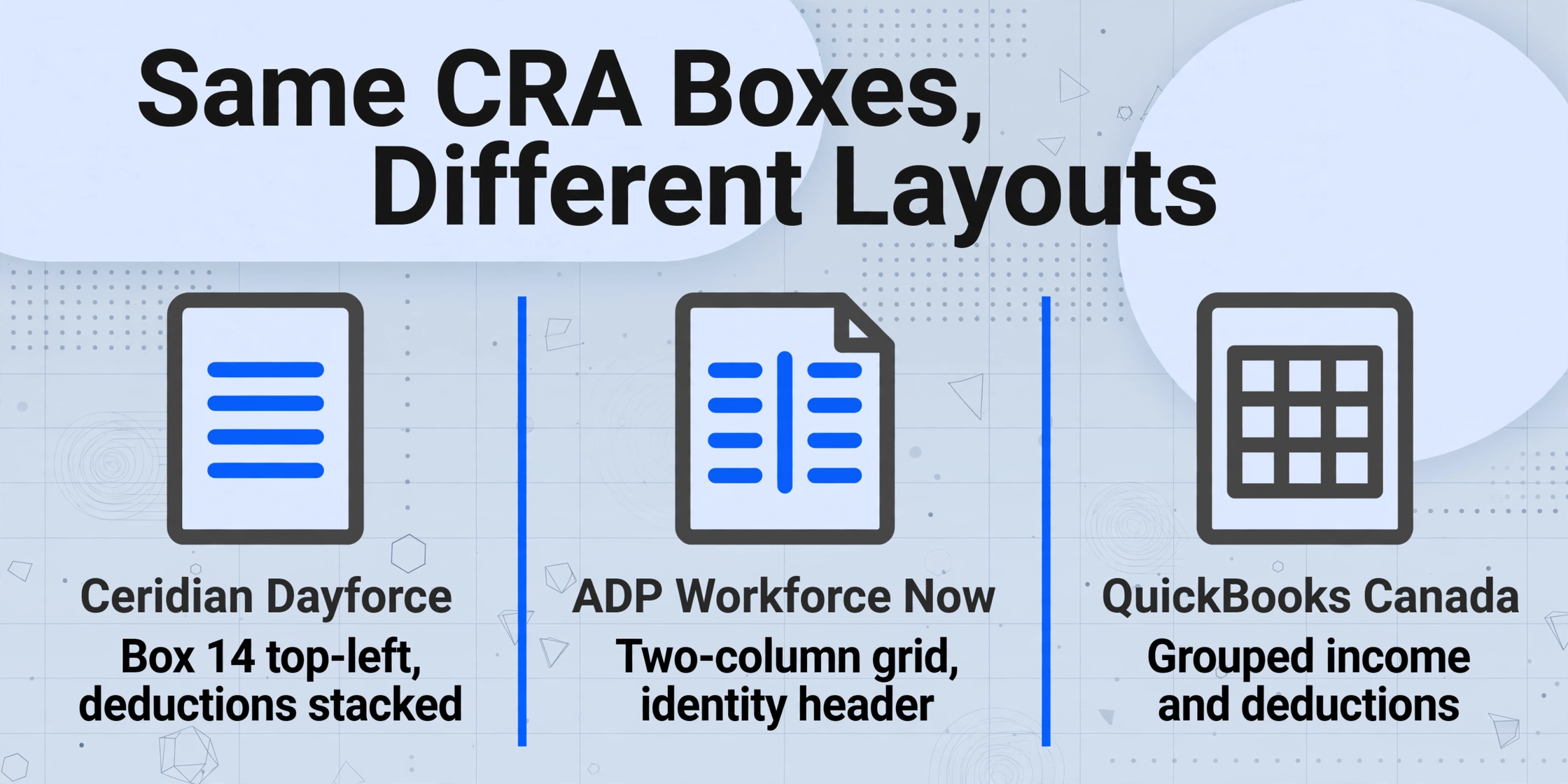
Many Canadian organizations run more than one payroll platform — not by design, but by acquisition. The company that acquired a regional competitor in 2023 inherited their ADP payroll data. The division that operates a separate collective agreement uses Ceridian Powerpay while head office runs QuickBooks Canada Payroll. The subsidiary doing project-based work in the territories uses Wagepoint. The CRA permits substitute T4 forms with layout variations, and every major payroll software provider exercises that permission. The result is that the same CRA-mandated Box data — 14, 16, 16A, 18, 20, 22, 24, 26, 40, 44, 46, 52 — appears in a different visual arrangement depending on which software generated the slip.
This is not a bug in the CRA's system. The RC4120 Employers' Guide mandates the data content — every box must appear, unambiguously numbered — but leaves visual layout to the software provider. For an employer with one payroll platform, this is irrelevant: every T4 looks the same. For an employer with two or three platforms, every print run produces visually distinct T4s that contain identical underlying data schemas, and the payroll administrator is the translation layer.
Template-based extraction tools — where you draw a rectangle around each Box on a sample T4 — fail at this point because a template tuned to Ceridian's layout misreads ADP's entirely. The payroll administrator either processes each provider's T4s separately with a different template for each — which reintroduces the manual merge step across three separate spreadsheets — or reverts to manual entry for the non-standard formats. Semantic extraction eliminates this by reading each Box for what it means rather than where it sits. The same column schema that locates "Box 16 CPP" on a Ceridian T4 also locates it on an ADP T4, a QuickBooks T4, and a scanned paper T4 — because the AI understands that "Box 16" and "Employee's CPP contributions" refer to the same data point regardless of their pixel coordinates.
Files are processed securely and not stored.
One Batch, Three Different Stakeholders: CFO, Auditor, and the T4 Summary
The people who need the output of a 300-T4 batch extraction need different things from the same data — but they all need it from one source of truth, not three separate spreadsheets assembled by the same payroll administrator under three different deadline pressures.
CFO: General ledger reconciliation
The CFO needs to confirm that Box 14 Employment Income across all 300 employees equals the salary and wage expense recorded in the general ledger for the calendar year — and that the difference, if any, is attributable to taxable benefits reported in Box 40 and stock option benefits, not to a data entry gap. A single spreadsheet with a SUM of the Box 14 column answers this in seconds. The CFO also needs Box 22 Income Tax Deducted totals to reconcile against the annual PD7A statement of account for remittances — the CRA's record of what was actually remitted to the payroll account. A mismatch between the spreadsheet's Box 22 total and the PD7A's tax remittance figure means something was remitted to the wrong payroll account or a payment was misallocated, and the February window is already too short to trace a misallocation.
External auditor: Sampling and cross-verification
The auditor selects a stratified random sample — 25 employees covering different pay frequencies, employment types, and tenure lengths — and needs to trace each sampled employee's T4 figures back to the payroll system's year-to-date registers. With a consolidated spreadsheet, the auditor filters by Employee Name or SIN, pulls the source T4 PDF with one click (the "File Name" column in the output maps each row to its source document), and completes the verification walkthrough in a structured sequence. Without the consolidated spreadsheet, the auditor has to request individual T4s one by one — a process that stretches the audit timeline into March and costs billable hours on both sides.
T4 Summary (T4SUM): CRA filing by the last day of February
The T4 Summary is an employer-level aggregate — every Box total across all T4 slips — that must be filed with the CRA along with the individual slips. Its core reconciliation is Line 80 (total deductions reported: CPP + EI + income tax) minus Line 82 (total remittances). A difference of $2 or less is ignored. Anything larger must be explained and either paid (balance due on Line 86) or claimed as an overpayment (Line 84). A consolidated spreadsheet with SUM functions on the Box 16, Box 16A, Box 18, and Box 22 columns gives the payroll administrator the Line 80 inputs instantly — no manual addition across 300 individual slips. For the employer's share (Box 17 — employer CPP contributions, Box 19 — employer EI premiums), the spreadsheet's column totals let you verify that the employer share equals 1.0 × Box 16 for CPP and 1.4 × Box 18 for EI (the 2025 employer multiplier).
Building a Batch Column Schema That Survives a 300-Row CRA Reconciliation
The column names you define before uploading a batch are the single most consequential decision in the entire workflow. A column schema designed for a five-employee test batch often fails at 300 rows because it does not account for the reconciliation edge cases — CPP2 contributions that need a separate column, Box 40 taxable benefits that aggregate an invisible category, employees with T4s from multiple provinces in the same tax year.
A column schema that survives a 300-row CRA reconciliation is built around three types of column, each serving a distinct function in the output spreadsheet:
1. Identity columns — the composite key that makes every row uniquely traceable
Employee Name, Social Insurance Number (SIN), Employer Business Number (BN — the 15-character identifier, e.g. 123456789RP0001), and Tax Year. Together these four fields form a composite key. SIN alone is not sufficient — an employee who worked for two related entities under the same parent company in the same tax year could appear on two T4s with the same SIN but different Business Numbers. Including the BN in the identity block prevents those rows from colliding during the merge-to-T4SUM step.
2. Income and deduction columns — the figures that populate the T4 Summary
Box 14 Employment Income, Box 22 Income Tax Deducted, Box 16 CPP Contributions, Box 16A CPP2 Contributions, Box 18 EI Premiums, Box 20 RPP Contributions, Box 24 EI Insurable Earnings, Box 26 CPP Pensionable Earnings, Box 40 Other Taxable Allowances and Benefits, Box 44 Union Dues, Box 46 Charitable Donations, Box 52 Pension Adjustment. Every one of these corresponds to a line on the T4 Summary. The most common reconciliation failure at 300-row scale is a missing Box 16A — CPP2 contributions introduced in 2024 on earnings between the YMPE ($68,500) and the Year's Additional Maximum Pensionable Earnings ($79,400). If your column schema lumps CPP2 into the Box 16 column, the T4SUM Line 16 total will not reconcile against your CRA remittance records because the CRA tracks CPP and CPP2 separately on the PD7A.
3. Verification columns — computed cross-checks that surface discrepancies during extraction
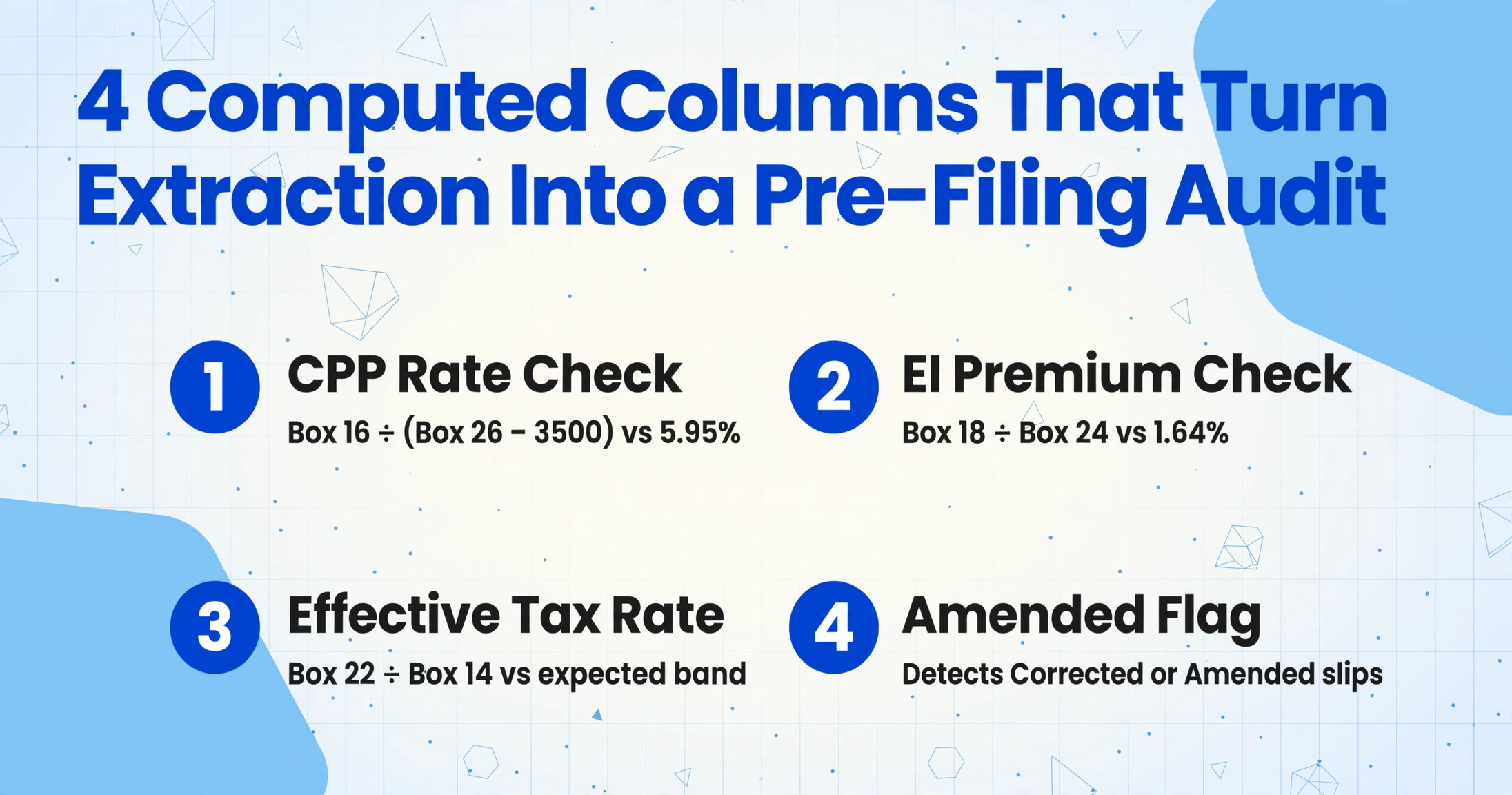
These are columns that do not appear on a T4 slip but are populated by Computation during extraction to flag anomalies before the spreadsheet reaches the CFO or auditor. A "CPP Rate Check (Box 16 ÷ Box 26)" column flags rows where the effective CPP rate deviates from the expected 5.95%. An "EI Rate Check (Box 18 ÷ Box 24)" column surfaces rows where EI premiums do not align with the 1.64% rate on insurable earnings. An "Amended Flag" column — where the AI detects a "Corrected" or "Amended" indicator printed on the T4 — separates original slips from corrected slips so the payroll administrator knows which version to use for final filing. These columns add zero transcription work because the AI populates them during the same extraction pass.
For teams managing T4s across multiple Business Numbers — a parent company with three subsidiaries, each with its own payroll account — the BN column doubles as a batch grouping key and a reconciliation pivot. Filter by BN, sum Box 14 and Box 22, and compare each subsidiary's totals against its own T4 Summary. One extraction pass, one column schema, three separate T4SUM filings generated from the same spreadsheet by filtering on a single column.
Computed Columns: Catching CPP and EI Discrepancies Before the CRA Does
The most valuable part of a 300-T4 batch extraction is not the extraction speed — it is the ability to embed CRA reconciliation logic into the extraction itself. Computed Columns execute calculations while each T4 is being read, flagging the handful of slips that carry a discrepancy before the output spreadsheet opens. The payroll administrator's role shifts from data entry to exception management — reviewing the 12 flagged rows out of 300 instead of retyping every row.
Four Computed Columns that turn a batch T4 extraction into a pre-filing audit:
CPP Contribution Rate Check. For the 2025 tax year, the employee CPP contribution rate is 5.95% on pensionable earnings between $3,500 and $68,500. A Computed Column defined as Box 16 ÷ (Box 26 − 3500) compared to 5.95% — if the result deviates by more than 1%, the row is flagged. The most common source of deviation: an employee who turned 18 or 70 during the calendar year and whose CPP contributions only apply to a portion of their earnings. A second source: the CPP2 (Box 16A) contributions on earnings above $68,500, which use a different rate (4%) and a separate box. Flagging the rows where Box 16 alone does not reconcile to Box 26 — before the CRA's PIER program catches them — prevents the PD101 notice cycle that consumes the employer's post-February bandwidth.
EI Premium Rate Check. For the 2025 tax year, the non-Quebec EI employee premium rate is 1.64% on insurable earnings up to the Maximum Insurable Earnings (MIE) of $65,700. A Computed Column comparing Box 18 / Box 24 against 1.64% flags deviations. The most common cause: a Ceridian Dayforce configuration that applied a Quebec EI rate (1.32% for 2025) to a non-Quebec employee whose province of employment was incorrectly set in the payroll system. One misclassified employee among 300 produces one flagged row and one correction before the T4 is filed — instead of one PIER notice that arrives in September.
T4SUM Line 80 Pre-Sum Check. A Computed Column that sums Box 16 + Box 16A + Box 18 + Box 22 for each row and surfaces the per-employee contribution to T4SUM Line 80. The column total across all 300 rows should equal Line 80 before employee and employer shares are separated. If the column total disagrees with the PD7A remittance total by more than $1.50 per employee (the $500 aggregate threshold given 300 employees), the batch contains at least one incorrectly extracted field — and the payroll administrator knows before the spreadsheet reaches the CFO that a reconciliation pass is required, not after the T4SUM is filed and the CRA sends a PD7D notice of assessment with a discrepancy.
Effective Tax Rate Outlier Detection. A Computed Column that divides Box 22 (Income Tax Deducted) by Box 14 (Employment Income) and flags rows where the effective rate is below 10% or above 40%. An employee earning $85,000 with $4,200 tax withheld (4.9%) is almost certainly a TD1 form error where the employee claimed excessive personal tax credits. An employee earning $85,000 with $42,000 withheld (49.4%) suggests the payroll system applied a lump-sum tax rate instead of the graduated rate schedule — often due to a mid-year payroll migration where the new system did not inherit the year-to-date tax withheld figure. Both scenarios need investigation before the employee receives their T4.
The single-T4 extraction workflow produces one row per employee. Batch extraction at 300-slip scale produces 300 rows and, with Computed Columns, 12 flagged rows — the 12 where a CPP contribution, EI premium, or effective tax rate fell outside the expected band. The payroll administrator reviews those 12 rows, not all 300. That is the difference between a February spent on data entry and a February spent on compliance verification.
Reconciling the Batch Output Against the T4 Summary (T4SUM)
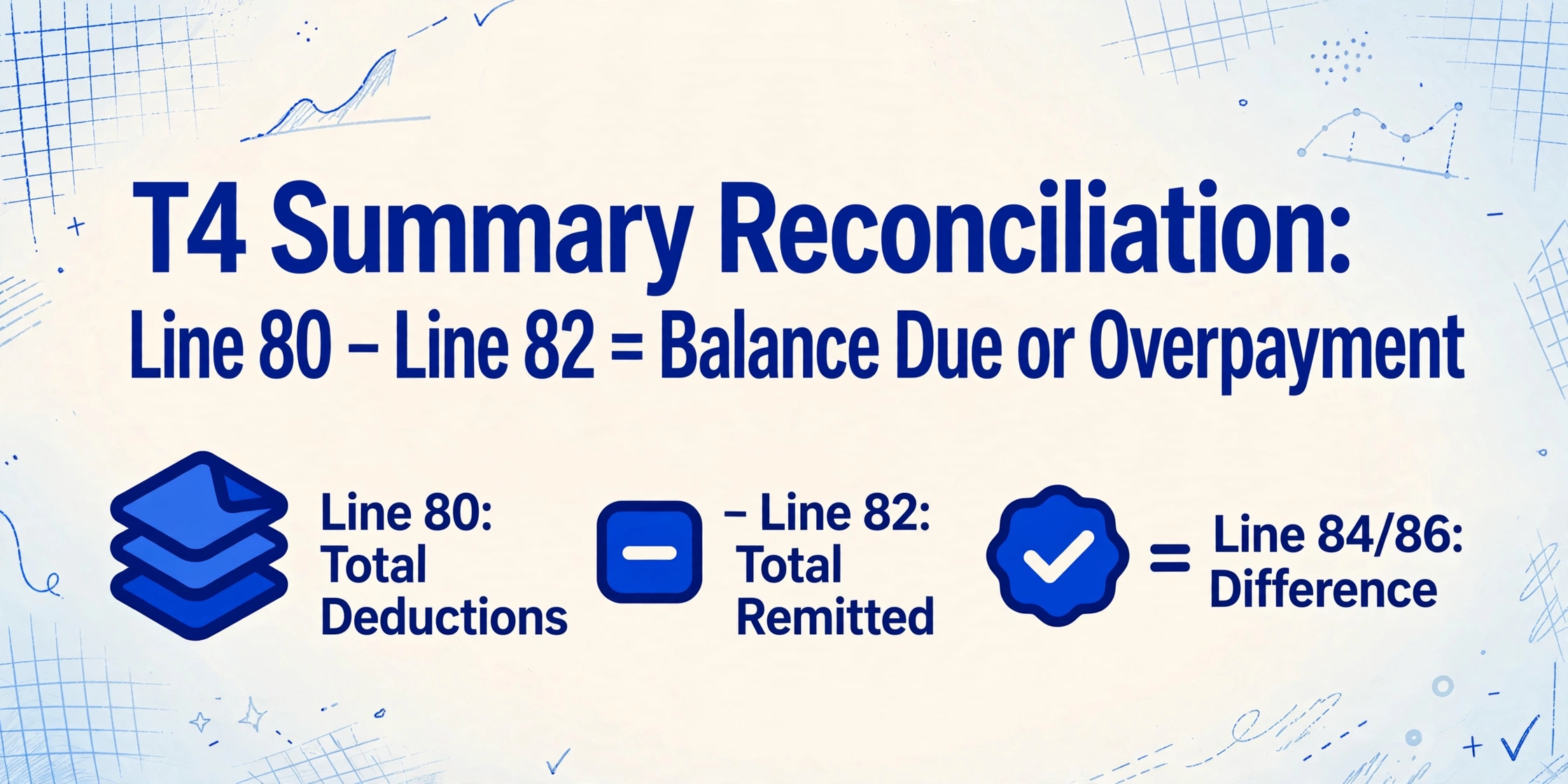
The T4 Summary converts 300 individual T4 slips into one employer-level aggregate. Its core mechanism is a single arithmetic check: Line 80 (total deductions reported across all slips) minus Line 82 (total remitted to the CRA during the calendar year). The difference, if any, is either an overpayment (Line 84) or a balance due (Line 86). The CRA does not charge or refund a difference of $2 or less — a tolerance that covers rounding but nothing else.
For a 300-employee batch extraction, the reconciliation workflow is:
Extract the batch and compute column totals
The output spreadsheet has 300 rows and roughly 18 columns including Computed Columns. Add a SUM row at the bottom: Box 14, Box 16, Box 16A, Box 18, Box 22, Box 20, Box 52. These column totals are the inputs to the T4SUM. If a Computed Column flagged a CPP or EI rate discrepancy, correct the source row before including it in the SUM — an incorrect Box 16 value produces an incorrect T4SUM Line 16 that disagrees with the PD7A remittance record.
Reconcile Box 22 against PD7A annual tax remittances
The CRA's PD7A Statement of Account for Current Source Deductions lists every remittance made to your payroll account during the calendar year — each cheque, each EFT payment, and the total. The SUM of the Box 22 column across all 300 employees must equal the annual income tax remitted figure on the final PD7A. A discrepancy usually means a remittance was applied to the wrong payroll account (e.g., a payment intended for account 123456789RP0001 was posted to 123456789RP0002) or a late-December payroll remittance crossed the calendar year boundary and appeared on January's PD7A instead of December's. Neither case is an extraction error — but catching it before the T4SUM is filed prevents a PD7D notice of assessment with an unexplained variance.
Verify employer share calculations for CPP and EI
The employer CPP contribution (reported on T4SUM Line 27, not on individual T4s) equals 1.0 × total Box 16. The employer EI premium (T4SUM Line 19) equals 1.4 × total Box 18. If your spreadsheet's Box 16 column total is $74,250, the employer CPP contribution must be $74,250 — not $74,000, not $74,500. Even a $250 variance on a 300-employee batch (less than $1 per employee) flags the T4SUM. This is the check most likely to fail at batch scale because it involves a multiplier that was calculated outside the extraction — and if the multiplier in the payroll administrator's T4SUM worksheet doesn't match the CRA's actual rate (1.0 for CPP employer, 1.4 for EI employer in 2025), the reconciliation fails on arithmetic, not data.
File the T4 return before February 28 and retain the extraction spreadsheet
For the 2025 tax year, the deadline is February 28, 2026 — which falls on a Saturday, pushing the effective deadline to Monday, March 2, 2026. More than 5 slips makes electronic filing mandatory via CRA's Internet File Transfer (XML) or Web Forms. The extraction spreadsheet — with 300 rows, column totals, and the Computed Column verification log — is the audit support document. If the CRA's PIER program flags a discrepancy six months later, the spreadsheet is what substantiates the employer's position. Retain it for six years, as required by CRA record-keeping regulations for payroll information returns.
Batch Edge Cases: What Changes When You Scale from 5 to 300 T4s
CPP2 Box 16A — The Silent Reconciliation Breaker
CPP2 was introduced for the 2024 tax year and applies to earnings between the first ceiling (YMPE, $68,500 for 2025) and the second ceiling (YAMPE, $79,400). If your payroll software was not updated for CPP2 — or if the extraction column schema does not include a separate Box 16A — the CPP2 contributions are either lumped into Box 16 (making the per-employee CPP contribution appear higher than 5.95% × Box 26) or omitted entirely (making the T4SUM Line 16 + Line 16A total fall short of the remitted amount). In a batch of 300 T4s, perhaps 40 employees exceed the YMPE — and every one of those 40 has a CPP2 contribution that must appear in its own column. The Computed Column that verifies Box 16 rate against Box 26 catches the inconsistency; the separate Box 16A column in the schema is what fixes it.
Multi-Province Employment — One Employee, Two T4s, One SIN
An employee who worked in Ontario for the first six months of the calendar year and Alberta for the last six months receives two T4s from the same employer — each reporting the provincial allocation of employment income, CPP, and EI. The CRA requires a separate T4 slip for each province of employment. In a manual workflow, the payroll administrator must recognize that the same employee appears twice and not double-count their total remuneration when verifying against the payroll register. In a batch extraction, include "Province of Employment" as a column, and group by SIN to verify that employees with multiple provinces have total employment income that equals their annual salary — not twice it.
Corrected and Amended T4s — Which Version Goes to the CRA?
If the CRA rejects a filed T4 — typically because the SIN does not match the name on file — the employer issues an amended T4 and refiles. If the amended T4 ends up in the same batch as the original, the spreadsheet contains duplicate rows for the same employee with different Box values. The Computed Column "Amended Flag" — where the AI detects a "Corrected" indicator on the slip — separates originals from amendments. The payroll administrator sorts by this column, excludes the original rows from the T4SUM aggregation, and files the corrected figures. Without this column, the payroll administrator finds the discrepancy when the spreadsheet totals don't reconcile, not before — and at 300 rows, finding the one duplicate among 300 is the manual problem the batch extraction was supposed to eliminate.
Quebec Employees — The T4 and RL-1 Coexistence
Employees in Quebec receive both a federal T4 and a Relevé 1 (RL-1) from Revenu Québec. The two forms overlap but carry different contribution rates: QPP at 6.40% in 2025 versus CPP at 5.95%, and Quebec EI (QPIP) at a different rate than federal EI. For a batch extraction, the T4 and RL-1 must be processed as linked but separate documents — the T4's Box 14 minus the RL-1's employment income equals income earned outside Quebec. Include a "Province" column, and filter for Quebec employees to verify that their T4 and RL-1 employment income totals are consistent. The RL-1 is filed with Revenu Québec, not the CRA, and carries its own deadline of February 28. For a detailed breakdown of the dual-document reconciliation, the T4 extraction guide covers the T4/RL-1 split in detail.
Reusing the Batch Schema Across Tax Years — and Across Borders
The column schema defined for a 2025 tax year T4 batch works for 2026, 2027, and every subsequent year — because the CRA's Box structure changes only when legislation changes, and when it does (as with CPP2 in 2024), you add one column to the schema without rebuilding the rest. The employees change, the figures change, the payroll platform may change mid-year (a company migrating from ADP to Ceridian uses the same schema on both providers' T4s), but the column definitions remain constant.
The same batch processing logic — one column schema, one upload, one consolidated spreadsheet — transfers directly to other year-end payroll reconciliation workflows. For Australian payroll teams, the equivalent approach applies to batch PAYG payment summary processing with ATO annual report lodgment. For UK employers, the same methodology handles batch P60 processing for payroll audit spreadsheets ahead of the 31 May HMRC deadline. The document type changes, the tax jurisdiction changes, the statutory fields change — but the batch principle of defining columns once and processing everything in a single pass transfers directly, because the bottleneck is never the extraction speed. It is the structural gap between what payroll software generates and what reconciliation requires.
FAQ: Batch-Processing Canadian T4 Slips
How long does batch extraction take for 300 T4 slips?
The upload and AI extraction for 300 T4s typically completes in a few minutes — the exact time depends on file sizes and the mix of digitally generated PDFs versus scanned paper copies. The time savings accumulate in the post-extraction phase: instead of ten hours retyping roughly 3,600 individual Box values across 300 slips, the payroll administrator spends 30-45 minutes reviewing the Computed Column flags — the 12 rows out of 300 where a CPP rate, EI rate, or effective tax rate fell outside the expected band — and reconciling the column totals against the T4SUM and PD7A remittance records. The extraction is the fast part; the verification phase is where the February work week shrinks from a data entry marathon to a structured compliance review.
What if some T4s in the batch are corrected or amended versions?
The extraction engine processes all T4s in the batch regardless of whether they are original, corrected, or amended, because it reads each Box by its number and semantic meaning — not by a slip-level status indicator. The Computed Column "Amended Flag" detects the "Corrected" or "Amended" indicator on the slip header and classifies each row accordingly. After extraction, sort by this column — original rows are excluded from the T4SUM aggregation, amended rows are included with their corrected figures. The "File Name" column preserves the source PDF for audit traceability. If both the original and amended versions of the same employee's T4 appear in the batch, the two rows will have the same SIN but different Box values and different Amended Flag values — a situation immediately visible when sorting by SIN, not a silent duplicate that corrupts the T4SUM totals.
Can the batch handle both digital PDFs and scanned paper T4s in the same upload?
Yes. A T4 PDF exported from Ceridian Dayforce, a T4 PDF from QuickBooks Canada, and a scanned paper T4 from an employee who lost their digital copy all process in the same batch with the same column schema. The extraction engine reads the visual content of each page — whether born-digital or scanned — and locates each Box by its number and label rather than by its pixel coordinates. Moderate skew, varying lighting quality, and aging paper stock do not prevent extraction because the AI reads by semantic meaning. Severely degraded scans — a faxed copy of a faxed copy — may produce lower accuracy, and the Computed Column verification values will flag the row for manual review. The rest of the batch continues processing normally.
Does the extraction handle the French-language Box labels on bilingual T4s?
Yes. T4 slips issued in Canada are bilingual — every Box is labelled in both English and French (e.g., "Employment income / Revenus d'emploi" for Box 14). The extraction engine reads both languages and maps the Box values to the English column names you define. The Box numbers (14, 16, 18, 22, etc.) are identical in both languages and serve as the anchor identifier. T4s issued exclusively in French — which can occur in Quebec-only operations — process identically because the Box numbers are language-independent. The RL-1 (Relevé 1) for Quebec employees is a separate form with its own field structure and must be extracted separately; the T4 and RL-1 data can be cross-referenced after extraction using the employee's SIN as the join key.
What happens if a T4 in the batch has a missing or illegible SIN?
The CRA's T4 filing system validates every SIN against its database and rejects slips where the SIN does not match the name or date of birth on file. A T4 with a missing or illegible SIN in the batch will have a blank SIN column in the extraction output. The payroll administrator can identify these rows immediately — sort by the SIN column, and every row with a blank SIN is a slip that cannot be filed until the SIN is corrected. The extraction does not guess a SIN; it extracts what is printed. The consequence is that the payroll administrator knows, before the T4 batch reaches the CRA, exactly which Slips need a SIN correction — rather than discovering it when the entire submission is rejected for a single non-matching SIN among 300.
Can I process T4s from multiple tax years in one batch?
Technically yes — the AI extracts data from any T4 regardless of the tax year printed on it — but it is better practice to batch by tax year. A merged spreadsheet containing 2024 and 2025 T4s requires the "Tax Year" column to be 100% accurate before any year-specific reconciliation begins, because the CPP rate (5.95% in 2025 versus a different historical rate), EI rate, and YMPE change each year. Processing each tax year as a separate batch — with the tax year encoded in a column or in the batch name — eliminates the risk of cross-year rate mismatches in the Computed Column checks. If you must process mixed-year batches (e.g., during a payroll system migration where historical T4s are being digitized), include a Computed Column that extracts the tax year from the slip header and cross-references it against the expected year — flagging any row where the year does not match.