How to Batch-Process Quarterly GST/HST Returns Into
One Annual Tax Summary
A Vancouver-based bookkeeping service with 12 small business clients files 48 GST/HST returns per year. Each client receives 30 to 50 supplier invoices per quarter from vendors in as many as five different provinces — an Ontario software subscription charging 13% HST, a BC logistics provider charging 5% GST only, a Nova Scotia supplier charging 15% HST, a Quebec vendor splitting TPS and TVQ on separate lines. The single-quarter extraction workflow handles one client's Q1 documents cleanly — define six columns, upload, review. What breaks at 48-return scale is not the extraction logic per quarter. It is that the same supplier in April sends a redesigned invoice where the GST/HST line moved to the second page, a different supplier vanished from the Q3 batch because the client switched vendors, and the Q2 spreadsheet's Rate Applied column says "13%" for a BC supplier — not because the AI misread, but because the bookkeeper manually retyped that field in Q2 because it was faster than looking up the supplier's province again. Those three types of drift — format drift, supplier turnover, and classification drift — compound silently across four quarters. By the time the annual tax summary lands on the bookkeeper's desk in January, the four quarterly spreadsheets no longer stack into a clean ledger without a manual reconciliation pass that erases most of the time saved by extracting in the first place.
Key Takeaways
- Fifty supplier invoices per quarter looks solved in Q1 — the real cost isn't two hours of typing, it is the silent cross-quarter drift that turns four individually correct spreadsheets into an annual reconciliation puzzle in January.
- A human verifier's pattern-matching exhausts itself after roughly 40 rows — by Q3, the verification step becomes a trust step that no longer catches when a BC supplier's 5% GST row is mentally filed as "probably 13% HST like most of them."
- Replace visual verification with one spreadsheet formula —
=IF(AND(H2="BC",G2<>5%),"VERIFY","")— that flags the five suspect rows instead of scanning all 200, so the annual ledger merges from structure rather than memory.
Why Four Quarters of Supplier Invoices Are a Fundamentally Different Problem from One
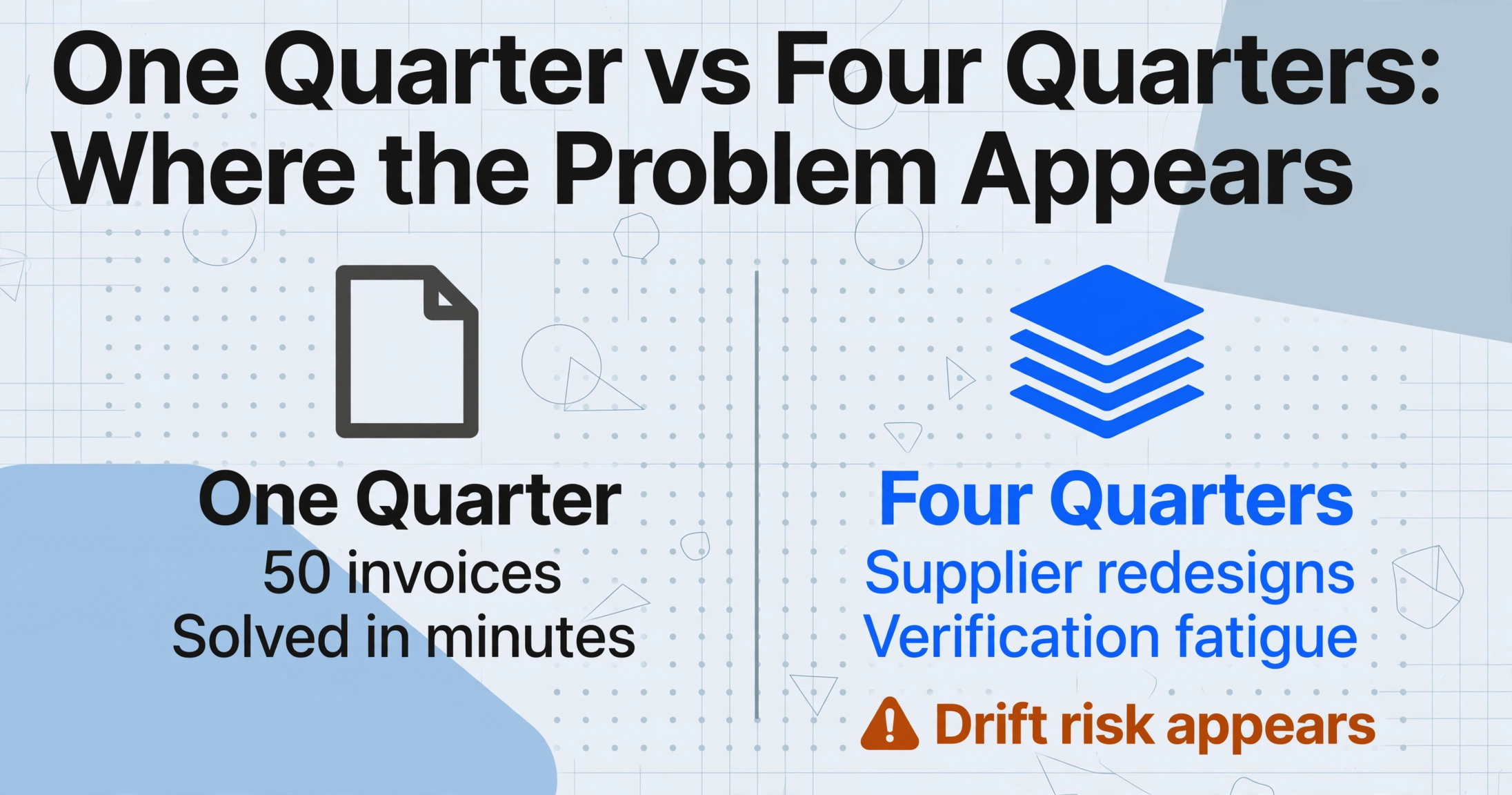
A single quarterly GST/HST return, prepared for one client using the Regular Method, involves roughly 50 supplier purchase invoices. The extraction workflow laid out in the single-quarter GST/HST extraction guide processes those 50 documents in a few minutes: define six columns — Supplier Name, Invoice Date, Invoice Total, GST/HST Paid, Tax Rate Applied, Province of Supplier — upload the batch, and review the output for empty cells that flag tax-exempt invoices or missing fields. At 50 invoices per quarter, the manual alternative of retyping tax amounts from each PDF into a spreadsheet consumes roughly two hours per filing cycle. Drop that to a few minutes, and the workflow for one quarter looks solved.
The structural problem does not appear in Q1. It appears in Q3, when three things have happened that Q1 never had to account for:
1. Supplier format turnover at the annual boundary
A December supplier invoice that arrived as a clean PDF with the HST line in the footer, and extracted flawlessly in Q4, comes from the same supplier in March with a redesigned invoice template that places the tax breakdown in a separate "Tax Summary" block on page two. The extraction still works — because the AI reads by field meaning, not position — but the bookkeeper who was used to the old layout may open the March invoice to verify the AI's read and spend 30 seconds locating the tax line in the new template. Across 50 invoices with 20% of suppliers redesigning their layouts per year, that verification overhead — roughly two extra minutes per batch — is negligible in Q1. It compounds to eight minutes of reorientation across Q2–Q4. Not fatal, but the first sign that quarterly batch processing is not simply repeating the same action four times.
2. Supplier turnover between quarters
A client who used a Manitoba-based supplier in Q1 switches to an Alberta-based supplier in Q3. The Manitoba supplier charged 5% GST only (Manitoba is not an HST participant). The Alberta supplier also charges 5% GST (Alberta has no PST or HST). The extracted numbers — tax amount, rate, province — are correct in both quarters. But the bookkeeper comparing Q1's GST/HST Paid column to Q3's notices the line items are different because the suppliers changed, and cannot tell by inspection whether the tax amounts shifted because of a rate change, a volume change, or a supplier change. Without per-supplier provenance preserved across quarters, cross-quarter comparisons devolve into manual reconciliation — opening the source PDFs to trace which supplier generated which row, which is the step the extraction workflow was supposed to eliminate.
3. Provincial rate recognition fatigue
Q1: the bookkeeper reviews 50 extracted rows and confirms the Tax Rate Applied column values against the supplier's Province. Ontario supplier → 13% HST, correct. BC supplier → 5% GST, correct. By Q3, the bookkeeper has processed 100 rows across two quarters and the rate verification becomes a pattern-matching check — "most of these say 13%, the rate looks fine" — rather than a row-level verification. A Quebec supplier whose invoice shows "TPS 5%" and "TVQ 9.975%" on separate lines, where only the TPS (GST) portion is claimable as a federal ITC, gets a Tax Rate Applied of "5%" in the spreadsheet — which is correct for the federal claim — but the bookkeeper comparing the earlier columns against the raw PDF notices the gap and spends time cross-referencing. The extraction is correct. The verification is what drifts. Across four quarters, verification drift introduces more friction than extraction errors.
These three failure modes have the same root cause: the single-quarter extraction workflow treats each quarter as a self-contained event. The quarterly batch workflow treats the four quarters as links in a chain — and the chain's integrity depends on the columns remaining identical from Q1 to Q4, the provenance of every row being preserved across periods, and the verification being structural rather than visual.
Designing a Column Schema That Survives Four Consecutive Quarters of Supplier Data
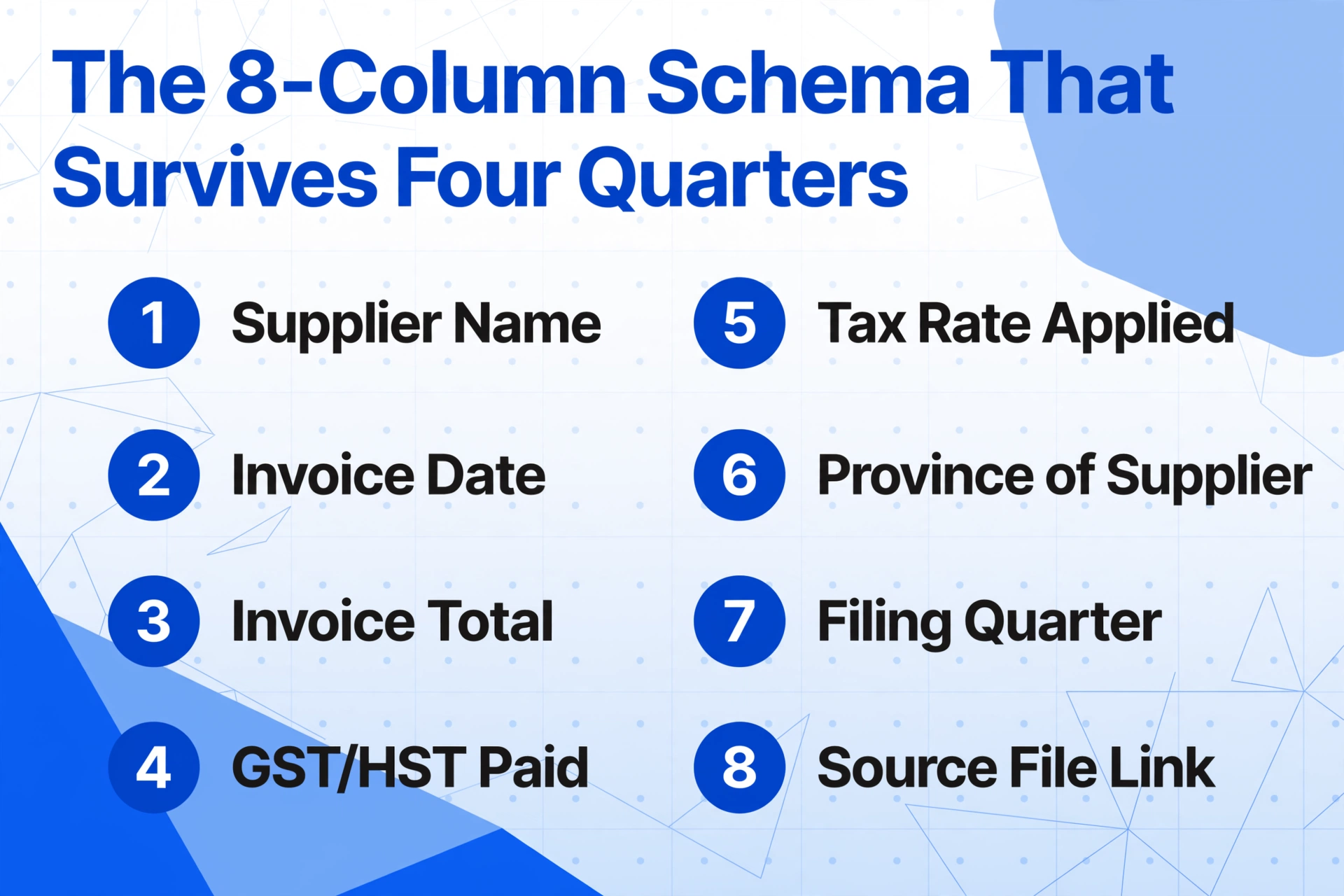
The six-column schema from the single-quarter guide works. But for a batch workflow spanning four quarters, the schema needs two additional column categories — columns that have no extraction function but are the only thing standing between a clean annual merge and a manual reconciliation exercise in January.
| Column Name | Type | Purpose Across Quarters |
|---|---|---|
| Supplier Name | Identity | The join key across quarters — a supplier named "Staples Canada" in Q1 must appear as "Staples Canada" in Q3, not "Staples" or "Staples Can." Small naming variations break the cross-quarter pivot table that shows each supplier's total GST/HST paid across the year. |
| Invoice Date | Period Allocation | Determines which quarter a purchase belongs to. An invoice dated September 28 received October 2 belongs to Q3 (July–September), not Q4. The CRA's period allocation follows the date the GST/HST became payable — generally the invoice date for accruals-basis taxpayers. |
| Invoice Total (tax-inclusive) | Cross-check | The envelope amount — used to verify that the extracted GST/HST Paid field is arithmetically plausible. An invoice total of $500 with a GST/HST Paid of $65 suggests a 13% HST charge. $500 with $75 suggests 15% HST. $500 with $115 suggests the field was misread or the supplier charged PST separately. |
| GST/HST Paid (ITC amount) | Core — feeds Line 106 | The input tax credit per supplier invoice. Summed across all rows and all quarters to produce the annual ITC total. |
| Tax Rate Applied | Verification | The percentage on the tax line — 5%, 13%, or 15%. Used to detect provincial rate mismatches: a BC supplier (Province = BC) with a Tax Rate of 13% is a red flag. BC does not participate in the HST system. |
| Province of Supplier | Verification | The supplier's address province. Cross-referenced against Tax Rate Applied to verify the correct provincial rate was charged. |
| Filing Quarter | Batch-Only (manual tag) | Populated by the bookkeeper, not the AI — "Q1 2026," "Q2 2026," etc. This column is not extracted from documents because a supplier invoice does not say which quarter it belongs to. When four quarterly spreadsheets merge into one annual ledger, this column is what preserves row provenance — every ITC row knows which filing period it came from, and a year-end audit can filter by quarter without opening source documents. |
| Source File Name | Batch-Only (auto-populated) | The filename of the source document — e.g., Staples_Invoice_Mar2026.pdf. When the CRA auditor requests the original invoice behind a specific ITC claim, this column traces the row to the exact PDF in the client's file. Without this column, the annual ledger is a set of numbers with no document trail. |
The schema has eight columns. Six extract data from documents. Two — Filing Quarter and Source File Name — preserve provenance. The bookkeeper adds the Filing Quarter label during batch naming, and the extraction tool auto-populates the Source File Name column. No extra typing. But without those two columns, four quarterly extraction spreadsheets contain 200 rows of identical column structure with no way to tell which rows belong to which period and which PDF produced which number. That is the difference between merge-ready quarterly output and a January puzzle.
Files are processed securely and not stored.
Processing Four Quarters: Same Schema, Same Columns, Four Batches
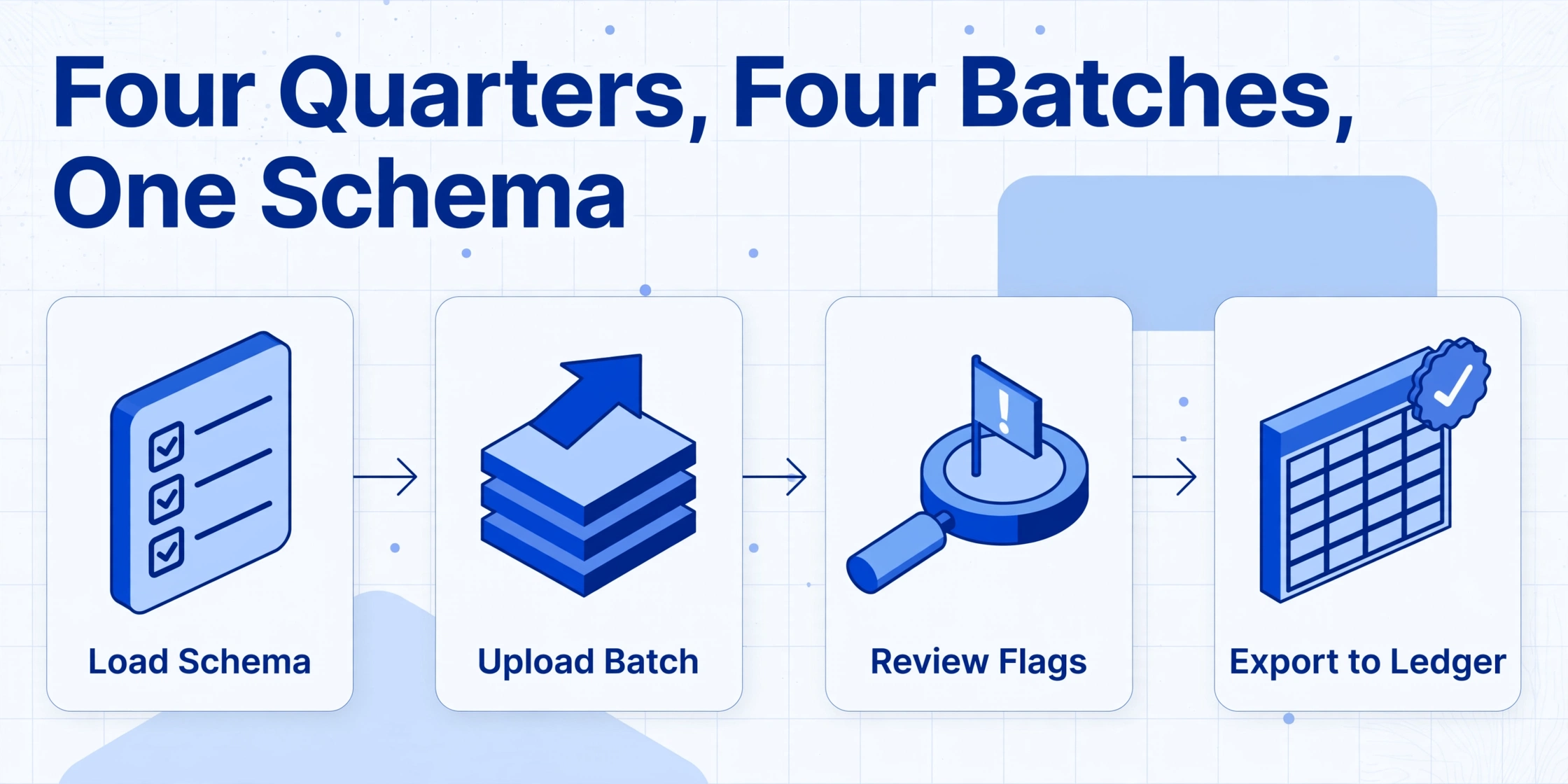
The batch workflow is simple in mechanics and demanding in discipline. Four times a year — at the end of March, June, September, and December for calendar-year filers — the bookkeeper runs the same schema against the current quarter's supplier document folder. Each run produces one spreadsheet with the same eight columns. The extraction step per quarter takes a few minutes. The discipline is in ensuring nothing about the column definitions drifts between runs.
The most common drift vector: a supplier in Q2 introduces a new field that the bookkeeper thinks should be tracked — a Purchase Order number that the client's procurement manager wants to cross-reference. The bookkeeper adds a ninth column to the schema for Q2 without adding it to the Q1 spreadsheet. Now Q1 has eight columns, Q2 has nine, and the annual merge breaks because the column sets don't align. The fix is straightforward but easily forgotten in the flow of a quarterly deadline: if you add a column in Q2, add the same column to Q1's spreadsheet — even if every cell in that column says "N/A" for Q1 — before starting the Q2 run. The extraction schema is a contract across time, not a per-quarter convenience.
Each quarterly run follows four steps that are identical in structure and vary only in the input folder:
Load the schema from the previous quarter — do not rebuild.
Open the template saved from Q1. Confirm all columns are present. If a new regulatory requirement appeared during the quarter — the CRA introduced a new reporting field — add the column now, and retroactively add it to all prior quarter spreadsheets before running the current quarter's batch.
Upload all supplier documents for the quarter in one batch.
One folder per client per quarter — /Clients/Café_Toronto/GST_HST/Q1_2026/. Every supplier invoice that arrived during the quarter goes in. PDF emails, phone photos of paper receipts from local vendors, screenshots of online purchase confirmations — same queue, same schema.
Review the output for outliers — not every row.
Sort by Tax Rate Applied. Scan for mismatches between the rate and the supplier's province — an Ontario supplier showing 5% instead of 13%, a BC supplier showing 13% when BC has no HST. Sort by GST/HST Paid from largest to smallest and verify the top five entries against source PDFs — the largest five ITC claims per quarter account for roughly 60% of the total ITC value and are the rows most worth a human second look. Blank cells in the GST/HST Paid column signal tax-exempt purchases that need a manual note for the CRA audit trail.
Tag the Filing Quarter and save the spreadsheet.
Add "Q1 2026" to the Filing Quarter column for every row in this batch. Save the file as Café_Toronto_Q1_2026_GST_HST.xlsx. The filename convention — Client Name, Quarter, Year, Tax Type — is the pattern that makes the year-end merge a structural operation instead of a reconstruction exercise.
At the end of the calendar year, four files sit in the client's folder: Q1, Q2, Q3, and Q4 spreadsheets, each with eight columns in identical order, each tagged with its Filing Quarter. The merge step — stack all four into one spreadsheet — is now a copy-paste operation that preserves every column and every row's provenance. No manual reconciliation required because the structure that makes the merge possible was built into the extraction design from Q1.
The Classification Drift Problem: Why the Same Supplier in Q1 and Q3 Produces Different ITC Totals
Of the three drift vectors described in the introduction, classification drift is the hardest to detect and the most damaging to an annual tax summary. It happens not because the extraction AI produces different results quarter to quarter — semantic extraction reads the tax line on a supplier's invoice the same way in April as it does in October — but because the human verification layer drifts under quarterly time pressure.
Consider a bookkeeper processing Q1 for a landscaping client. A BC-based equipment supplier invoice shows "GST (5%): $87.50" on a $1,750 purchase. The extraction output shows Tax Rate Applied = 5%, Province of Supplier = BC, GST/HST Paid = $87.50. Correct. The bookkeeper verifies and moves on.
Q3 arrives. The same BC supplier now shows their GST line in a different position — the invoice template was redesigned. The extraction output is still correct: Tax Rate Applied = 5%, Province of Supplier = BC, GST/HST Paid = $112.00. But the bookkeeper, processing 50 invoices against a CRA deadline, sees the $112 figure, glances at the supplier name, and thinks "this is a regular supplier, probably 13% HST like most of them." The verification muscle fails because verification fatigue sets in after roughly 40 rows — a well-documented phenomenon in any task that requires sustained pattern-matching against a visual reference.
The consequence: the Q3 spreadsheet contains a correctly-extracted ITC figure for the BC supplier — $112.00 at 5% — but the bookkeeper's mental model of the client's supplier base has drifted. By Q4, the bookkeeper cannot say with confidence which suppliers across the four quarters charged which provincial rate, because the verification step became a trust step ("the AI got it right") instead of a check step ("the rate matches the province"). Classification drift is not an extraction problem. It is a verification discipline problem that compounds with quarter count. Four quarters of 50 invoices each is 200 supplier rows — enough for a human verifier's pattern-matching threshold to exhaust itself before the last row.
The structural fix is to move rate verification from a visual scan to a spreadsheet formula — a column that automatically flags mismatches between Province of Supplier and Tax Rate Applied:
| Province | Expected Federal Tax Rate | Flag If Rate ≠ Expected |
|---|---|---|
| Ontario (ON) | 13% HST | Tax Rate ≠ 13% → verify |
| Nova Scotia (NS), New Brunswick (NB), Newfoundland & Labrador (NL), Prince Edward Island (PE) | 15% HST | Tax Rate ≠ 15% → verify |
| British Columbia (BC), Alberta (AB), Manitoba (MB), Saskatchewan (SK), Northwest Territories (NT), Nunavut (NU), Yukon (YT) | 5% GST | Tax Rate ≠ 5% → verify |
| Quebec (QC) | 5% GST (QST is separate, provincial — do not include in federal ITC) | Tax Rate ≠ 5% → verify; check that QST was not included in GST/HST Paid column |
A single formula — =IF(AND(H2="BC", G2<>5%), "VERIFY", "") — applied across all 200 rows of the merged annual ledger instantly identifies every row where the extracted tax rate does not match the expected rate for the supplier's province. The bookkeeper reviews the flagged rows — typically fewer than five per quarter — instead of visually scanning all 200 rows for rate mismatches. The formula is the discipline, and it does not fatigue.
What Changes Between Quarters — and What Must Not
The batch workflow is built on the assumption that most variables stay constant across quarters: the client's business, their GST/HST filing method, their supplier base structure, the provincial composition of their purchases. That assumption is wrong roughly 20% of the time — and the 20% is when the batch workflow's discipline is most valuable and most likely to break.
Supplier changes are the most common quarterly variable. A client switches logistics providers mid-year. The old supplier (BC, 5% GST) is replaced by a new supplier (Ontario, 13% HST). The extraction handles both without modification because the AI reads each invoice independently. The batch workflow's challenge is not extracting the new supplier's data — it is preserving the old supplier's data in the annual ledger so that the full-year ITC total includes both. A bookkeeper who deletes the Q1 spreadsheet column for the old supplier to "clean up" the ledger destroys the audit trail. The rule: quarterly spreadsheets are append-only. The annual ledger aggregates all rows from all quarters. If a supplier stopped being used in Q3, their Q1 and Q2 rows remain in the ledger with the Filing Quarter tag — the data is not removed, it is just not repeated after Q2.
Filing method transitions are rarer but higher-stakes. A client whose annual taxable supplies crossed $400,000 during the year must switch from the Quick Method to the Regular Method — in practice, this switch usually takes effect at the start of the next fiscal quarter. Under the Quick Method, the extraction workflow tracked only sales-side GST/HST collected (Line 103 input), because ITCs were calculated as a percentage of total sales rather than per invoice. Under the Regular Method, the extraction schema expands to include the purchase-side columns — GST/HST Paid, Tax Rate Applied, Province of Supplier — for every quarter where the Regular Method applies. The bookkeeper adds those columns to the Q2 schema (assuming the switch happened at the start of Q2), runs the extraction, and now Q2 through Q4 have purchase-side data while Q1 does not. The annual ledger reflects this: Q1 rows have blank purchase-side columns, Q2–Q4 rows are fully populated. The column structure is the same across all four quarters — the data in Q1 is simply sparser — so the merge still works.
Provincial rate changes happen at the legislative level, not the client level. When a province joins or leaves the HST system — as British Columbia did in 2013 when it transitioned from HST back to GST+PST, and as several provinces have discussed — the provincial rate reference table in the bookkeeper's spreadsheet must be updated. A Computed Column approach handles this: instead of hard-coding the expected rate for each province, the column references a rate table that the bookkeeper updates once when legislation changes. The extraction itself is unaffected because the AI reads the rate printed on the invoice — not the expected rate from a lookup table. The verification formula flags the discrepancy, and the bookkeeper determines whether the supplier charged the wrong rate or the rate table needs updating.
Scaling the Batch Workflow Across Multiple Clients and Multiple Filing Cycles
For a bookkeeping practice with 12 small business clients, the GST/HST filing calendar produces 48 quarterly batches per year. At two hours of manual retyping per batch, that is 96 hours — nearly two and a half weeks of full-time work spent transcribing tax amounts from PDFs into spreadsheets. The batch extraction workflow collapses the per-batch data entry from two hours to a few minutes of upload and verification, reducing the annual transcription burden from 96 hours to roughly 8 hours of verification — a workload shift that turns a year-round data-entry function into a quarterly verification task that fits inside the CRA's lodgement deadline window.
The practice-level folder structure that supports this:
One schema per client, stored in the client folder.
Each client's column template is saved once and loaded each quarter. The template defines whether the client uses the Regular Method (purchase-side columns included) or the Quick Method (sales-side only). A client who switches methods mid-year gets a new schema version, and the prior quarters' spreadsheets are annotated — not reformatted — to note the method transition date.
Per-client, per-quarter document folders.
The structure /Clients/[ClientName]/GST_HST/[Q1_2026]/ keeps each quarter's source documents isolated. When a client emails a supplier invoice, the bookkeeper saves it directly into the current quarter's folder. When the quarter ends, the folder contains every document for that period — no last-minute gathering required during lodgement week.
Batched quarterly processing during lodgement week.
For calendar-year filers, the GST/HST return is due one month after the end of each reporting period — January 31 for Q4 (October–December), April 30 for Q1, July 31 for Q2, October 31 for Q3. In lodgement week, the bookkeeper runs each client's quarter batch sequentially: load schema, upload folder, verify output, tag Filing Quarter, save. Twelve clients at a few minutes per batch is roughly an hour — the window between when the quarter's documents are final and when the CRA deadline hits.
Year-end merge into one annual tax summary per client.
In January, after Q4 closes, stack each client's four quarterly spreadsheets into one annual ledger. Apply the provincial rate verification formula across all rows. Filter by Filing Quarter to verify each quarter's GST/HST Paid total against the lodged GST34-2 Line 106 figure. Any quarter where the extraction total disagrees with the lodged figure by more than rounding tolerance gets flagged for a deeper review — the discrepancy is either a missing supplier invoice in the batch or a manually-adjusted entry in the lodged return that was not reflected in the spreadsheet. Either way, the ledger makes it visible.
The year-end ledger for a single client is a table of 200 rows (50 supplier invoices × 4 quarters) with eight columns. The bookkeeper who used to spend the first two weeks of January reconstructing quarterly tax data from lodged returns and scattered spreadsheets now opens one file per client, runs the verification formula, and hands the reconciled ledger to the accountant. The CRA's six-year record retention requirement for GST/HST source documents and working papers is met by the folder structure: four quarterly extraction spreadsheets, one merged annual ledger, and the original supplier PDFs — every row in the ledger traceable to a specific source document via the Source File Name column.
One schema, four quarters, one annual tax summary: When the column definitions stay locked from Q1 to Q4, the year-end merge is a copy-paste operation. The annual ledger is a byproduct of the extraction design — not a separate document you build in January from memory.
This batch-consolidation pattern is not specific to GST/HST. The same approach — one extraction schema applied across multiple reporting periods to produce one unified annual ledger — transfers directly to other quarterly tax reporting systems. The AU BAS batch workflow uses the identical three-step pattern for Australian bookkeepers managing 30 clients across 120 quarterly periods. The T4 batch workflow applies it to year-end Canadian payroll — 300 employee slips from two payroll platforms merging into one CRA reconciliation spreadsheet. Each jurisdiction changes the statutory fields. None change the batch principle: define the columns once, run the same schema every period, and let the merge emerge from the structure.
FAQ: Batch-Processing Quarterly GST/HST Returns
Can I use the same batch extraction schema if I switch from the Quick Method to the Regular Method mid-year?
Yes. Under the Quick Method, your extraction schema tracked only sales-side columns — total sale amounts and GST/HST collected. When you switch to the Regular Method, add the purchase-side columns (GST/HST Paid, Tax Rate Applied, Province of Supplier) to the same schema. The Q1 spreadsheet that was produced under the Quick Method will have blank cells in the purchase-side columns — do not delete those rows. Q2–Q4 spreadsheets will populate all columns. The annual ledger will show Q1 with sparse purchase data and Q2–Q4 fully populated, which is an accurate record of when the filing method changed. If the CRA requests supporting documentation for the method transition, the ledger makes the date visible by the absence of purchase-side data in Q1.
How does the batch workflow handle mixed supplier documents — PDFs, phone photos, and screenshots — in the same quarterly batch?
All three formats enter the same extraction pipeline. A Staples PDF invoice, a phone photo of a handwritten receipt from a local hardware store, and a screenshot of an Amazon Business Canada purchase confirmation all process in the same batch against the same schema. The AI reads each document by field meaning — it locates the GST/HST line on a clean PDF the same way it reads the tax amount scribbled "GST $12.40" on a receipt. If a photo is poorly lit or a receipt is creased and the tax line is partially illegible, the GST/HST Paid column will be blank for that row — which flags it for manual review instead of silently producing an incorrect ITC figure. The remaining rows in the batch process normally.
What if the AI extracts the tax amount from a Quebec supplier invoice that also includes QST — does it separate TPS from TVQ?
The AI extracts what is printed on the document. A Quebec supplier invoice typically lists TPS (GST) and TVQ (QST) on separate lines with separate labels. If your column is named "GST/HST Paid," the AI will extract the TPS amount — the federal GST component — and ignore the TVQ line. If your column is ambiguously named "Tax Paid," the AI may extract the combined TPS+TVQ total, which overstates the federal ITC. The column name is the instruction. For Quebec suppliers specifically, name the column "GST/HST Paid (federal portion only)" to disambiguate. After extraction, the Province of Supplier column will show "QC" and the Tax Rate Applied column will show "5%" — the correct federal rate for Quebec purchases. The 9.975% TVQ is a provincial tax and does not enter the federal GST/HST return.
How does this compare to batch-processing AU BAS returns — is the workflow the same?
The quarterly batch principle is identical — the AU BAS batch approach uses the same define-schema-once, run-per-quarter, merge-to-annual-logic. The differences are in the tax structure. AU BAS faces a single GST rate (10%) across all suppliers, so there is no provincial rate verification step — one of the most labor-intensive parts of Canadian GST/HST batch processing simply does not exist in Australia. Conversely, the AU BAS workflow adds a purchase type classification (Capital vs Non-Capital for G10 vs G11 labels) that has no direct equivalent in the Canadian GST/HST system, where the ITC eligibility depends on commercial-use percentage rather than purchase category. A bookkeeping practice that handles both Canadian and Australian clients runs the same batch workflow with different column schemas per jurisdiction.
Can the annual tax summary double as the CRA audit support document for ITC claims?
The annual tax summary spreadsheet — with its Source File Name column linking each ITC row to a specific supplier PDF — is a working paper that shows how the Line 106 figure on each quarterly GST34-2 was derived from individual supplier invoices. In a CRA GST/HST audit, the auditor typically requests the original supplier invoices that support specific ITC claims, not the working paper. The spreadsheet serves two roles: it is the bridge between the source documents and the lodged return figures, showing the arithmetic that connects them; and it is the cross-quarter consistency record — the same supplier's invoices across all four quarters in one view — that a stack of individual PDFs spread across four folders cannot provide. The source PDFs remain the authoritative record. The ledger is what makes them navigable.
What is the single most cost-effective verification check to run on the annual ledger before handing it to an accountant?
For each quarter, multiply the invoice total column sum by the applicable GST/HST rate for each province subset and compare the result to the GST/HST Paid column sum for that subset. For Ontario suppliers: Invoice Total Sum × (13 ÷ 113) should approximately equal GST/HST Paid Sum for rows where Province = ON. For BC suppliers: Invoice Total Sum × (5 ÷ 105) should approximately equal GST/HST Paid Sum for rows where Province = BC. A discrepancy larger than $2 per quarter per province suggests either a misread tax amount, an invoice with mixed taxable and zero-rated supplies, or a supplier whose invoice total included PST separately (common in BC and Saskatchewan, where PST is a provincial tax added on top of GST). This check takes 30 seconds per quarter and catches the error pattern that most commonly survives the quarterly verification passes — a tax rate that was extracted correctly but applied to the wrong purchase total.