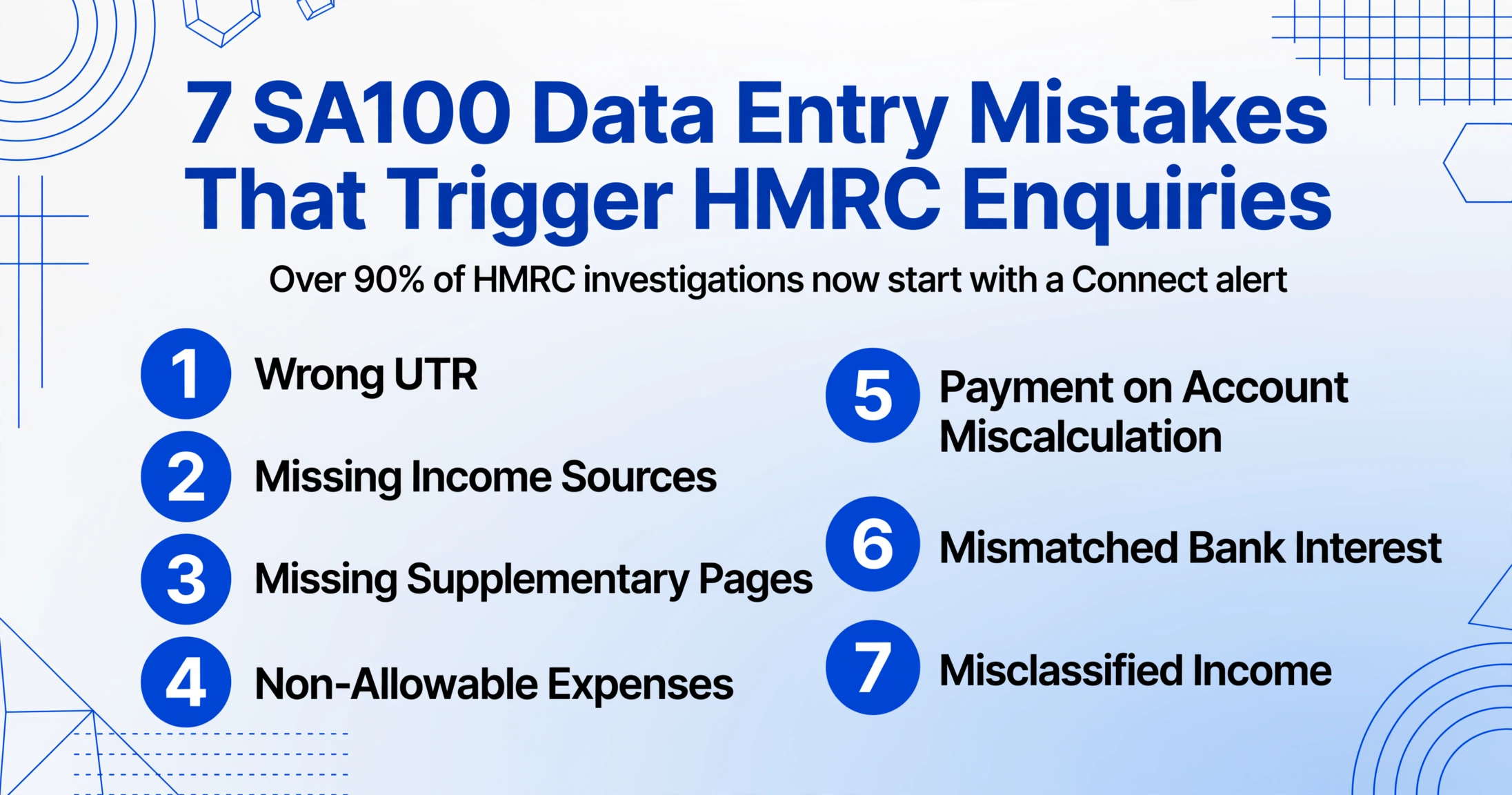
7 SA100 Data Entry Mistakes That
Trigger HMRC Enquiries
When an accounting firm took on a new client with a straightforward profile — a PAYE job, some rental income from a second property — the SA100 return went in without fanfare. What the taxpayer forgot to mention was an outstanding student loan. HMRC's data-matching detected the omission within weeks. The letter arrived asking for an explanation. The resolution was painless: first error, genuine oversight, corrected without penalty. But the letter itself — arriving weeks after filing, asking for an explanation, requiring a response — is the moment most self-employed workers describe as their worst tax experience. And in most cases, where SA100 errors go, the trigger was not random — it was data mismatch, plain and simple.
Key Takeaways
- 90% of HMRC compliance checks now start with an automated data mismatch flagged by Connect, not random selection — the system cross-references 55 billion data items against your SA100.
- All seven SA100 data entry mistakes that trigger enquiries trace back to the same root cause — a person typed a figure from a source document and the copy did not match what a third party already told HMRC.
- Extracting figures directly from your bank statement, dividend voucher, and HMRC letter — instead of typing them — removes the mismatch that Connect uses to assign a risk score to your return.
HMRC's Detection Machinery: Why Your SA100 Errors Don't Stay Hidden
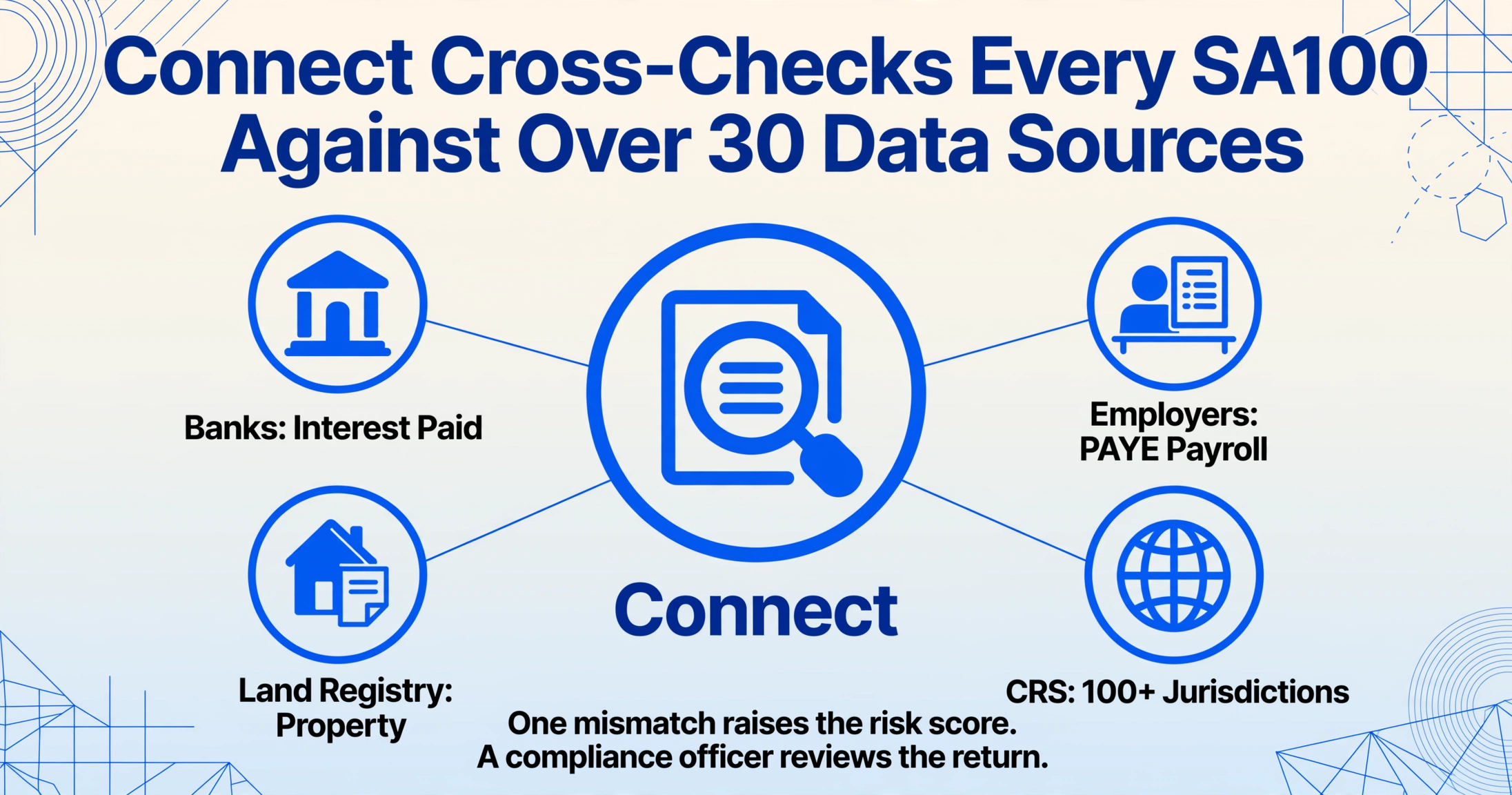
Before looking at individual mistakes, it is worth understanding what happens to your SA100 the moment HMRC receives it. The return does not sit in a queue waiting for a human to read it. It passes through Connect — a data-matching system developed with BAE Systems at a reported cost of £100 million — that cross-references every tax return against more than 30 external data sources: banks reporting interest payments, employers reporting payroll, the Land Registry recording property ownership, the DVLA tracking vehicle registrations, digital platforms reporting sales, and over 100 overseas tax jurisdictions under the Common Reporting Standard (CRS).
The system processes 55 billion data items. It knows what interest your bank paid you, what salary your employer reported, and — since January 2026 — what transactions your crypto platform recorded. It compares every figure on your SA100 against what third parties have already told HMRC. Where the two don't match, your return gets a higher risk score. Where the risk score crosses a threshold, a compliance officer reviews it. Over 90% of HMRC investigations now start with Connect alerts rather than random selection or tip-offs. In 2024/25 alone, the system helped recover an additional £4.6 billion in unpaid tax.
Beyond the automated flagging, HMRC runs targeted campaigns. The dividend nudge letters sent out in late 2025 are a textbook example: taxpayers whose dividend figures did not match bank and Companies House data received a letter saying "we believe you may have dividend income you haven't told us about." The letter was polite — ICAEW described it as "not a compliance check" — but recipients had until 31 January to amend their returns, and HMRC made clear that "failure to respond may lead to a compliance check being opened." A targeted nudge letter also means any subsequent disclosure is considered "prompted" for penalty purposes under Schedule 24 of the Finance Act 2007, which limits mitigation — the penalty floor is higher than if you had come forward unprompted.
This is the enforcement reality that most "common SA100 mistakes" articles leave out. The error itself is only half the story. The detection mechanism, the penalty framework, and the real-world timeline from filing to letter are the other half. Below are the seven errors that Connect catches most reliably — and what happens when it does.
Mistake #1: Wrong UTR — The Door That Locks Before You Can Even File
A Unique Taxpayer Reference is ten digits followed by a K — for example, 12345 67890 K. It is the key to your entire Self Assessment account. Mistype a digit and HMRC's online system refuses to authenticate. Transpose two digits and you may log in to a different person's account, or to no account at all. Write the number down incorrectly from a letter and by the time you realise, it is 30 January and HMRC's helpline has a 45-minute queue.
The Low Incomes Tax Reform Group (LITRG), part of the Chartered Institute of Taxation, has documented a scenario that catches first-time filers every year: someone "finally went online to do the tax return in late January" only to discover they could not file — because they had never registered and had no UTR in the first place. But even registered filers with a misplaced or mistyped UTR face the same wall: no UTR, no login, no filing. The £100 automatic late-filing penalty applies whether you owe tax or not. And if the UTR you enter routes your payment to the wrong account — a wrong UTR that happens to be someone else's valid reference — HMRC applies your payment to their record. Yours shows as unpaid. The penalty clock and interest clock keep running on your balance while you prove the payment was made.
According to Quality Company Formations, missing or incorrect UTR is "one of the most common tax return mistakes." It is also one of the most preventable. Your UTR appears on every piece of HMRC correspondence — the SA250 notice to file, previous years' returns, payment reminders. Copy it from the source document, don't type it from memory.
The structural fix: extracting the UTR directly from an HMRC letter or SA100 document eliminates five characters you don't type — which is five opportunities for a transposition error that blocks your entire filing.
Mistake #2: Missing Income Sources — The Dividends, Rent, and Interest Connect Already Knows About
The most common SA100 error by frequency is not a miscalculation — it is an omission. A freelancer forgets the £3,200 in dividends from their own company. A landlord omits the £6,000 in rental income because "it barely covered the mortgage." A contractor with a side consultancy forgets the £1,800 from a one-off project. HMRC's Connect knows about all of them — because the bank reported the deposit, Companies House recorded the dividend, and the letting agent's records are accessible under information powers.
When HMRC sent targeted dividend nudge letters in late 2025, they were not fishing. They were matching dividend data from UK companies against SA100 returns and flagging every return where the numbers did not align. Affinity Associates documented the reality for recipients: "Ignoring the letter is a gamble. The letter itself isn't a penalty or a formal investigation, but it could lead to one if you fail to respond." The same principle applies to interest from savings — banks and building societies report interest data to HMRC, and while about 20% of bank accounts remain unmatched to individuals, the other 80% cross-reference works automatically.
Missing rental income has its own detection path. HMRC's systems cross-reference the Land Registry — which shows you own a second property — against your SA100, which should show either a completed SA105 property page or a valid reason why no rental income needs reporting. The data matching framework covers bank and building society account information plus third-party payment platform transactions. If you are a self-employed worker who rents out a property on the side, two separate data trails point to the same conclusion: Connect sees the landlord registration and the rental income deposits. Your SA100 needs to show both.
Under Schedule 24 FA 2007, the penalty for a careless omission starts at 30% of the potential lost revenue — the tax that should have been paid on the missing figure. If HMRC determines the omission was deliberate but not concealed, the penalty rises to 70%. If deliberate and concealed — actively hiding the income — it reaches 100%, with offshore uplifts taking it to 200%. The penalty is calculated on the tax underpaid, not the income omitted. A forgotten £3,000 in dividends at the higher dividend rate of 33.75% means £1,012.50 of underpaid tax. A 30% careless penalty on that is £303.75. A 70% deliberate penalty is £708.75. The difference between "I forgot" and "they think I tried to hide it" is thousands of pounds — and what determines that difference is the quality of your response when the letter arrives.
Mistake #3: Missing Supplementary Pages — When the SA100 Alone Isn't Enough
The SA100 is the main Self Assessment return, but for most people with income beyond a single PAYE job, it is only the starting point. The supplementary page system works as a modular bolt-on: tick the box on page TR2 that says "I had self-employment income," and HMRC expects a completed SA103 (self-employment) page attached. Tick "UK property income," and an SA105 is required. Miss the tick box and HMRC sees a return that does not match the income it already knows about. Tick the box but forget the page, and the return is structurally incomplete — the declaration exists but the numbers are missing.
Audit Consulting Group, which handles SA100 filing and correction work, reports: "We frequently see issues caused by taxpayers completing the main SA100 return correctly while forgetting the additional pages needed to report dividends, rental income or overseas earnings. If income suddenly changes significantly, expenses increase unusually or supplementary pages are missing, HMRC may later query the filing."
The supplementary page system is particularly unforgiving for self-employed workers with multiple income streams. A freelance graphic designer who also does occasional consulting work and rents out a spare room needs three pages beyond the SA100 core: SA103S for the design business, SA105 for the property income, and — if dividends are involved — the dividend section within SA100 itself. Each page requires its own set of figures. Missing one page means one entire income stream goes unreported — and Connect sees the gap because the bank deposits tell a different story than the return.
The full supplementary pages list covers SA102 (employment/directors), SA103S/F (self-employment short/full), SA104S/F (partnership), SA105 (UK property), SA106 (foreign income), SA108 (capital gains), and SA109 (residence). The SA103S short form applies if your annual turnover is below the VAT threshold — currently £90,000. Above that, the full SA103F is required. Filing the wrong version — short when full is needed — is another error category that generates an HMRC query, because the short form collects fewer data points and may not provide enough detail for Connect to reconcile.
Mistake #4: Non-Allowable Expenses — The Claims That Invite Nudge Letters
HMRC publishes clear guidance on allowable business expenses for the self-employed — travel that is "wholly and exclusively" for business, office costs, professional fees, stock and materials. Commuting between home and a regular workplace is not allowable. Everyday clothing is not allowable, even if you only wear it to client meetings. Meals eaten while working alone are not allowable — subsistence applies when travelling outside your normal pattern or staying overnight.
The problem is not that these rules are obscure — they are well documented in HMRC's own guidance. The problem is that they create grey areas that self-employed workers interpret generously under time pressure. A freelancer who works from a home office claims their broadband bill at 100% rather than apportioning business versus personal use. A contractor claims lunch every day because they "had to eat to work." A landlord claims the cost of driving to show a property — but also the cost of driving past it on the way to the supermarket. Each individual claim is small. Across a full year's return, they add up to an expense-to-turnover ratio that is out of line with the sector norm — and that is what Connect flags.
HMRC's compliance approach has been evolving from full investigations toward targeted nudge campaigns. Receiving a nudge letter about expenses does not necessarily mean you have done something wrong — but it does require a response. The letter asks you to review your expense claims and confirm they are accurate. If you find errors, you amend the return. If not, you confirm and the file closes. But the time cost — finding the letter, reviewing the claims, consulting an accountant if necessary — is a consequence in itself, and it is a consequence that falls entirely on the taxpayer with no HMRC accountability for false positives.
Schedule 24 provides the escalation path if the nudge reveals a genuine error: careless claims attract a 30% penalty on the resulting underpaid tax, with possible suspension if conditions are met. The HMRC Compliance Handbook specifies that suspension requires the taxpayer to meet conditions — typically improving record-keeping — and that a further careless inaccuracy during the suspension period revives the original penalty. In other words, get caught claiming non-allowable expenses once, and you are on notice. Get caught again within the suspension window, and you owe the original penalty too.
Mistake #5: Payment on Account Miscalculation — The January Bill That Feels Wrong But Isn't
This mistake is different from the others. It is not a data entry error on the return. It is a misunderstanding that creates a cashflow shock so severe that some people respond by entering inaccurate figures to reduce the bill. And once inaccurate figures enter the return, Connect's cross-referencing picks them up just like any other discrepancy.
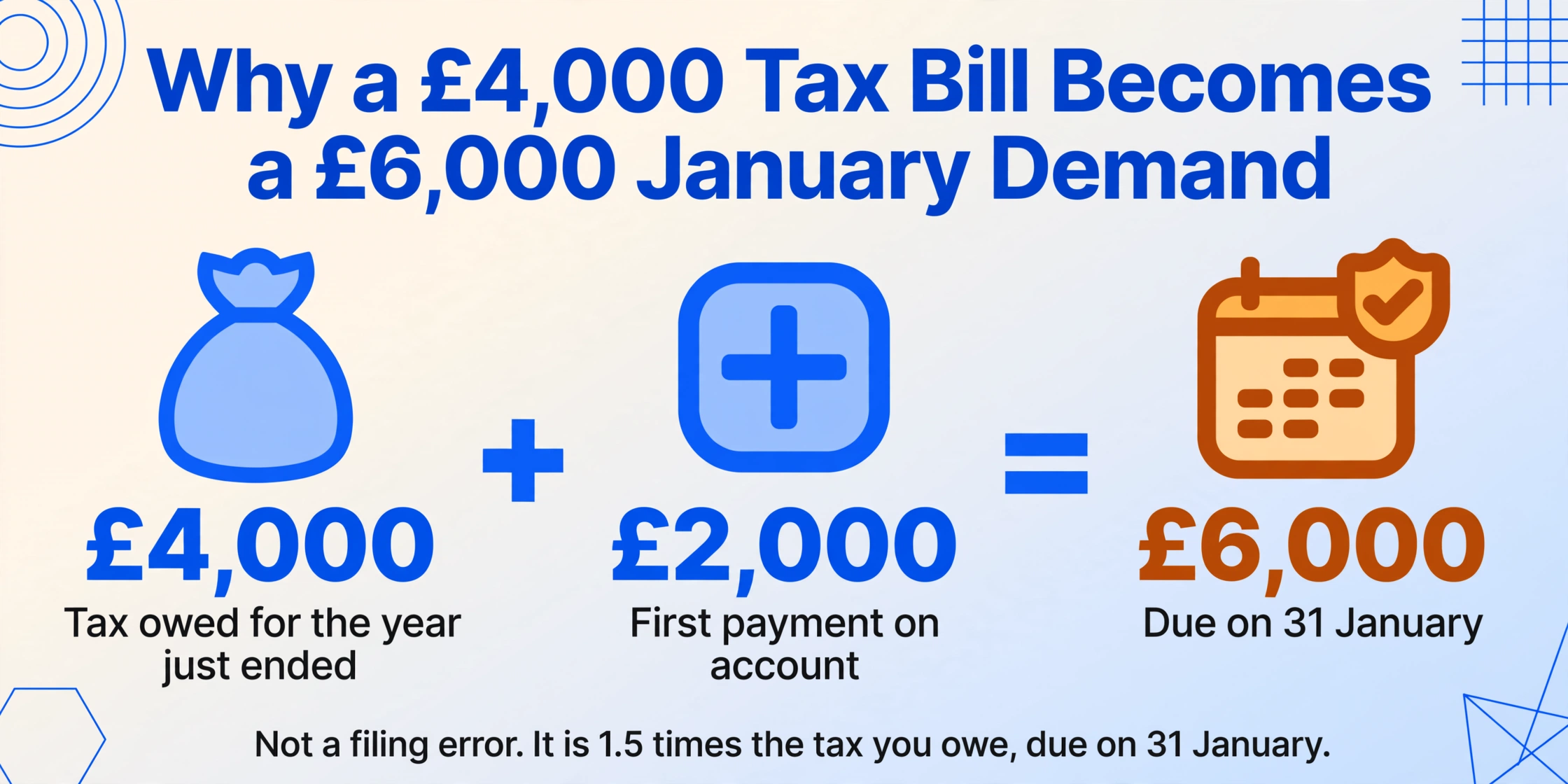
Payments on account apply when your Self Assessment tax bill exceeds £1,000 and less than 80% of your tax is collected at source. The mechanism: HMRC takes your previous year's tax bill, divides by two, and collects the first half on 31 January (alongside any balancing payment from the previous year) and the second half on 31 July. For a first-time filer with a £4,000 tax bill, the January demand is not £4,000 — it is £6,000. That is the £4,000 owed for the year just ended plus £2,000 as the first payment on account toward the next year. LITRG describes the impact bluntly: "up to 1.5 times your tax bill by 31 January — this can be quite a shock to your cash flow!"
The trap compounds in the second year. The freelancer who paid £2,000 in January and £2,000 in July toward their 2025/26 tax bill — total £4,000 advance — discovers their actual 2025/26 bill is £6,500 because income grew. The balancing payment due the following January is £2,500 (£6,500 minus £4,000), plus the first payment on account for 2026/27 at £3,250 (50% of £6,500). Total due: £5,750. The freelancer expected to pay around £2,000 — the pattern from the previous year — and instead faces nearly three times that amount.
At this point, some people try to reduce their payment on account by filing a lower income figure — claiming they expect to earn less next year. If HMRC later determines the reduction was unreasonable, they charge interest on the shortfall from the original due date. And if the lower income figure was entered to reduce the POA rather than reflecting genuine expectations, the inaccurate return itself opens the door to a compliance check. The mistake started as a cashflow problem and ended as a data accuracy problem — which is how most SA100 errors begin.
Mistake #6: Mismatched Bank Interest — The Data HMRC Already Has
Every UK bank and building society reports interest payments to HMRC. The data flows through the Common Reporting Standard for international accounts and through domestic reporting for UK accounts. When HMRC processes your SA100, the interest figure in box 2 (untaxed UK interest) is cross-referenced against what your bank reported. If your return says £0 and the bank reported £800, Connect assigns a discrepancy score. If the difference exceeds a threshold, the return is flagged.
This should be the most preventable error in Self Assessment. The interest figure is visible on your bank statement. Your bank reports it to HMRC automatically. If both you and your bank report the same number, there is no discrepancy. The error arises when a taxpayer assumes savings interest within the Personal Savings Allowance (£1,000 for basic-rate taxpayers, £500 for higher-rate) does not need to be reported at all — but the gross amount must still be declared on the SA100, even if no tax is ultimately due on it. The allowance is applied in the tax calculation, not by omitting the figure from the return.
The Tax Adviser magazine at CIOT reported in 2025 that HMRC is pushing for faster and more granular bank reporting, potentially moving toward pre-population of interest figures on tax returns — similar to what already happens with employment income under RTI. When pre-population arrives, the interest error will disappear because the return will show the figure HMRC already has. Until then, the burden sits entirely on the taxpayer to make the two numbers match — and the easiest way to match them is to read the number directly from your bank statement rather than estimating it from memory.
Mistake #7: Misclassified Income — Trading vs Employment, Dividend vs Other Income
This error category covers the structural mistakes in how income is categorised on the return, rather than the arithmetic of the figures themselves. A freelancer who also has a day job treats their freelance income as "casual" or "one-off" rather than self-employment — and files without an SA103 page because they didn't tick the self-employment box. A director takes dividends from their own company and reports them under "other income" on the SA100 main page rather than in the dividends section — the figure is declared, but in the wrong category, and Connect sees no dividend declaration to match against Companies House data.
The classification system is tightening. From the 2025/26 tax year, new regulations require directors of close companies to separately declare dividends from their own companies versus dividends from other sources. ICAEW reported that this change "may be difficult for taxpayers carrying on a trade and directors of close companies to comply with." The previous system masked an important distinction — HMRC could see total dividends but could not tell which came from the taxpayer's own company — and the new mandatory split means classification errors that went unnoticed under the old system will become visible in the new system.
Misclassification also cascades through the payment calculation. Self-employment income attracts Class 2 and Class 4 National Insurance contributions. Dividends do not. If a taxpayer classifies self-employment income as "other income" to avoid NIC, the NIC shortfall is a separate detection vector — and the penalty applies to the NIC underpayment as well as the Income Tax underpayment. Schedule 24 covers Income Tax, Capital Gains Tax, VAT, PAYE, and NIC — the penalty framework is unified, and one misclassification triggers multiple tax-head consequences.
Classification errors are detection magnets because they involve at least two mismatches: the return category doesn't match the income type Connect sees from third-party data, and the supporting page (SA103, SA105) is missing — creating a double discrepancy from a single error.
How AI Extraction Eliminates the Transcription Step That Causes Most SA100 Errors
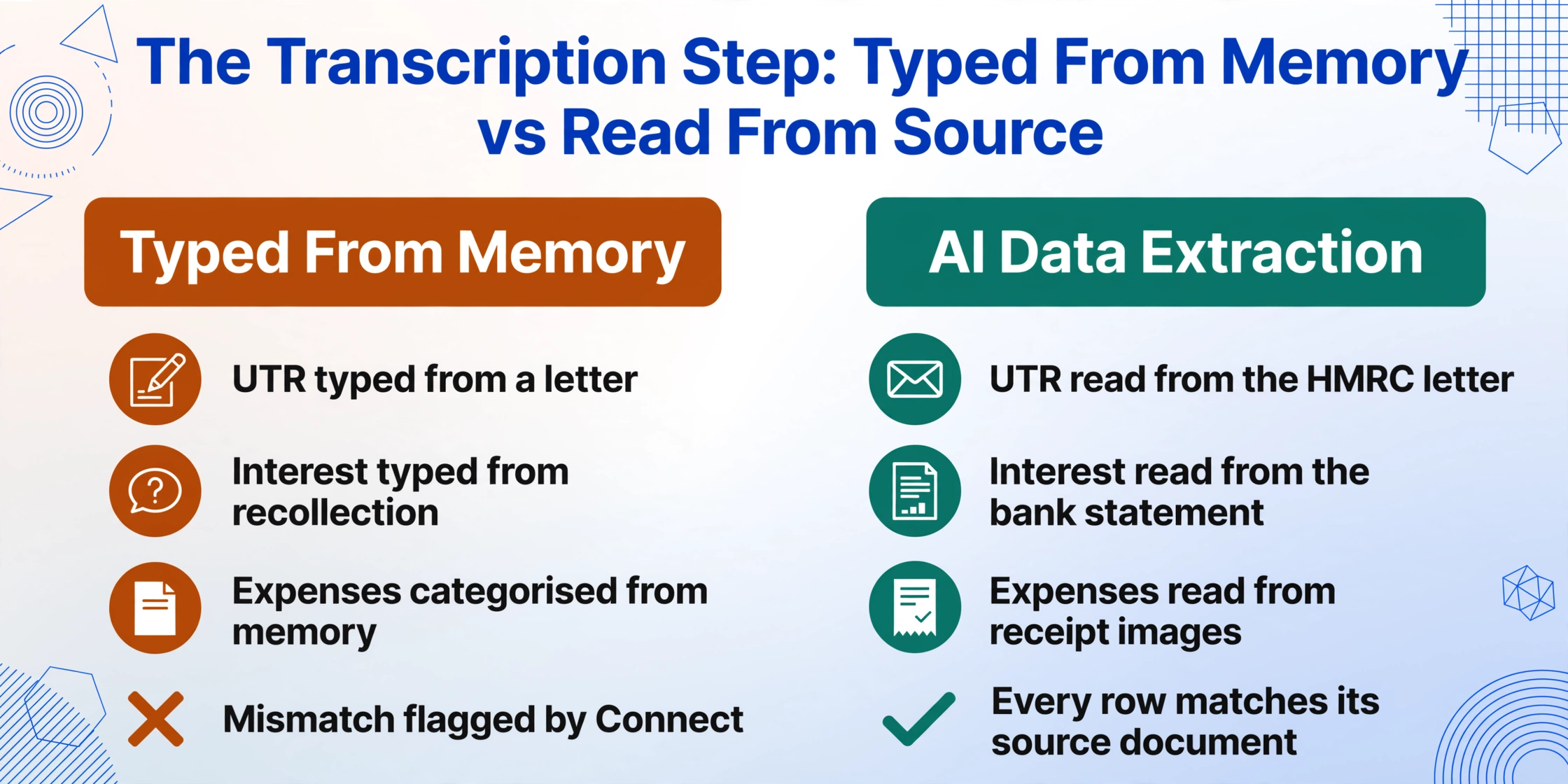
Run through the seven mistakes above and trace each back to its root cause. Wrong UTR: copied incorrectly from a letter. Missing income: a dividend voucher or rental statement that was not transcribed into the spreadsheet before completing the return. Wrong expenses: categorised by memory rather than cross-referenced against receipts. Mismatched bank interest: entered from recollection rather than read from the bank statement. In every case, the error enters the SA100 workflow during a transcription step — when a person reads a number from a source document and types it into a cell, a form box, or a calculator.
Removing that transcription step removes those errors at their source. When an AI extraction tool reads the UTR directly from an HMRC letter, there is no transposition opportunity. When it extracts interest amounts from a bank statement, dividend totals from a dividend voucher, and expense amounts from receipt images into a single structured spreadsheet, the workbook grows row by row from source data — not from memory, not from estimates, not from what "feels about right." The resulting spreadsheet is a direct mapping of source documents to rows, and entering SA100 figures becomes a verification step rather than a creation step. Reviewing is faster and less error-prone than typing from scratch.
This shift in workflow — from creation to verification — changes the error profile fundamentally. The remaining errors are extraction inaccuracies: an AI misread a poorly scanned figure, or mapped a value to the wrong expense category. These are surface-level errors that a human reviewer spots in seconds because they are comparing a highlighted extraction against the visible text on the source document — the digital equivalent of double-entry bookkeeping. They do not include the silent class of errors that pass format validation but are contextually wrong: a UTR that looks valid but belongs to someone else, a dividend declared in the wrong income category, a missing supplementary page nobody noticed was missing.
Files are processed securely and not stored.
For a complete walkthrough of extracting SA100 data into a structured spreadsheet — including which columns to define, how to handle multi-source income, and what validation checks to run before filing — see the complete SA100 extraction guide. For the step-by-step how-to, see extracting SA100 data into Excel. If you are processing multiple years or multiple taxpayers, batch SA100 extraction covers the multi-file workflow. And if you are trying to understand why manual SA100 work is so prone to error in the first place, the freelancer's SA100 paper problem and what manual SA100 entry costs you lay out the structural issue in full.
Two related UK tax document articles are worth reading alongside this one: the P60 data entry mistakes article covers a parallel class of transcription error on payroll year-end certificates, and the P45 error consequences piece traces what happens when a leaving-date transcription error overtaxes someone at their next job. Both follow the same detection logic — errors that survive format validation but surface downstream — applied to different HMRC documents.