The Complete Guide to
Shipping & Freight Document Extraction
A single cross-border shipment generates a packet of five to seven documents — a bill of lading, a cargo manifest, a packing list, a commercial invoice, a certificate of origin, a freight invoice, and sometimes a proof of delivery. Each document was designed by a different party (carrier, forwarder, warehouse, exporter) for a different purpose (contract of carriage, cargo inventory, customs valuation, billing). Yet at extraction time, their data must reconcile: the piece count on the packing list should match the piece count on the BOL, the HS code on the commercial invoice must match what the manifest declares, and the container number on every document in the packet must be identical. This is the fundamental challenge of shipping document extraction — not reading any single document, but reading all of them together so their shared fields agree. This guide covers what each shipping document carries, where its data overlaps with the others, and how to extract the full packet into one unified dataset.
Key Takeaways
- Every cross-border shipment generates five to seven documents from five different parties — and the container number, weight, and piece count must match across all of them.
- They rarely do in raw extraction, because the BOL records weight in kilograms, the manifest in pounds, and the packing list in hundredweight — same cargo, three different numbers, and a mismatch that costs $5,000 in customs amendment penalties if caught late.
- Process the full document packet in one batch with a single column definition, and the AI normalizes shared fields, reconciles cross-document values, and flags discrepancies — before your customs broker files the entry.
The Shipping Document Ecosystem — Five Documents, One Shipment
Before extraction begins, a logistics team needs a map of what they're extracting and how the documents relate. A typical FCL (full container load) ocean shipment generates these five core documents:
| Document | Issued By | Primary Purpose | Key Shared Fields |
|---|---|---|---|
| Bill of Lading (BOL) | Carrier or forwarder | Contract of carriage + document of title | Container #, port codes, shipper/consignee, weight, piece count |
| Cargo Manifest | Carrier or vessel agent | Complete cargo inventory for the voyage | BOL #, container #, HS code, gross mass, package count |
| Packing List | Shipper / exporter | Item-level breakdown of the cargo | Container #, PO #, item description, qty, net/gross weight, dimensions |
| Commercial Invoice | Exporter / seller | Customs valuation + payment record | HS code, Incoterms, total value, country of origin, shipment reference |
| Freight Invoice | Carrier | Billing for transportation services | BOL #, container #, charges, accessorials, payment terms |
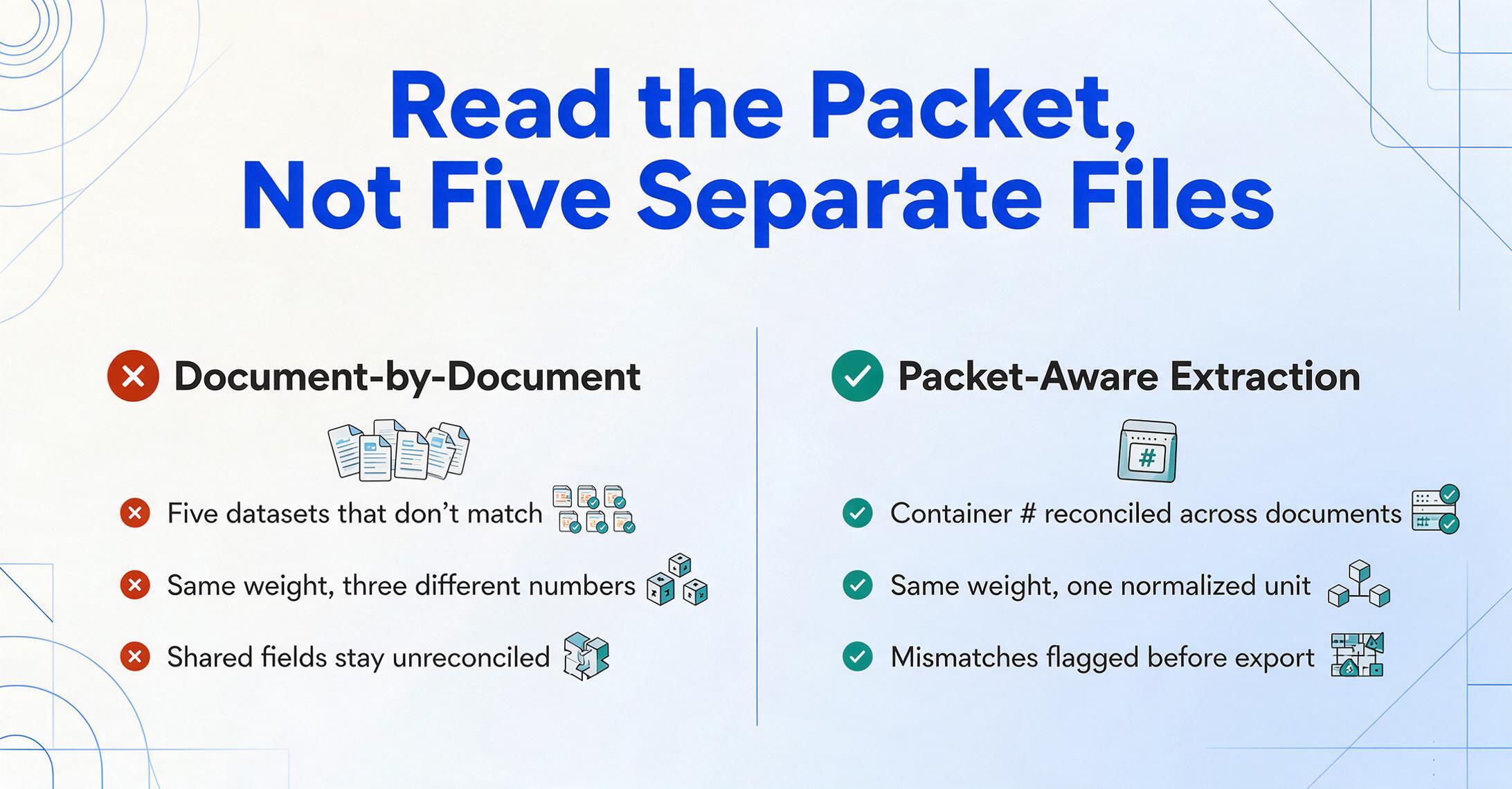
The shared-field problem is visible immediately: container number appears on the BOL, manifest, packing list, and freight invoice. BOL number links the manifest, commercial invoice, and freight invoice. Gross weight is declared on the BOL, manifest, and packing list — but rarely in the same unit (the BOL may show kilograms, the packing list pounds, and the manifest metric tons). An extraction process that reads each document in isolation produces five datasets that don't match. An extraction process designed for the shipping packet reads them together and flags the discrepancies.
For a deeper look at how semantic AI extraction handles these documents differently from traditional OCR, see our OCR for logistics guide and the fundamentals of what AI OCR is.
Bills of Lading — The Master Document
A bill of lading is the most legally complex document in the shipping packet. It is simultaneously a receipt for goods, a contract of carriage, and — in its negotiable form — a document of title. The field count alone explains why extraction here is non-trivial: a typical ocean BOL carries 30-40 data fields spread across 3-5 pages, governed by multiple international standards.
We have published a dedicated complete guide to BOL data extraction that covers BOL types (straight vs ocean vs multimodal, master vs house), extraction pipelines, and validation in full depth, and a step-by-step walkthrough of extracting BOL data to Excel. Here, we focus on what matters for the cross-document packet: the fields that every other shipping document references.
| Field | Example | Validation Standard | Also Appears On |
|---|---|---|---|
| Container number | MSCU 234781 6 | ISO 6346 — 4 letters + 7 digits, check digit at position 11 | Manifest, packing list, freight invoice |
| Seal number | SH-789012 | No global standard; carrier/terminal assigned | Manifest, packing list |
| Port of Loading / Discharge | CN SHA / NL RTM | UN/LOCODE — 5-character (2 country + 3 location) | Manifest, commercial invoice (routing section) |
| SCAC code | MAEU (Maersk) | NMFTA — 2-4 letter carrier identifier | Manifest (if US-bound ACE filing) |
| Gross weight | 15,420 KGS | VGM (verified gross mass) per SOLAS Chapter VI Reg 2 | Manifest, packing list |
| Piece count / Package type | 500 CTNS on 10 PLTs | NMFC / industry practice | Manifest, packing list |
| HS Code (commodity) | 6305.33 | World Customs Organization — 6-digit minimum, 10-digit for US imports | Commercial invoice, manifest |
The SCAC code is worth a closer look because it is the most commonly mis-extracted field in logistics. A BOL may print the carrier name as "Maersk Line" while the TMS expects MAEU. Another carrier may list their name alongside a SCAC that looks like a reference number. Semantic AI extraction handles this by recognizing the standard code pattern (2-4 uppercase letters, often in proximity to the carrier name or a SCAC label) and extracting it as a separate field from the full carrier name — but not all extraction tools are designed to look for SCAC codes at all. Many treat the carrier field as free text and output "Maersk Line" when their system needed MAEU.
For a field-level accuracy breakdown on shipping labels and their data points, see our companion article Can AI Extract Shipping Label & Manifest Data?
Cargo Manifests — The Shipment-Level Inventory
A cargo manifest is a complete list of all shipments loaded onto a conveyance — a vessel, a truck, an aircraft, or a train. Unlike the BOL, which is a single-shipment contract, the manifest is a multi-shipment inventory used primarily by customs authorities, port operators, and terminal handlers.
An ocean manifest typically contains one row per BOL on the vessel, with these key columns:
- Master BOL number — the carrier-issued BOL that covers the consolidated shipment
- House BOL number(s) — forwarder-issued BOLs for each underlying shipper, if applicable
- Container number(s) — all containers associated with each BOL
- Commodity description — often abbreviated or grouped (e.g., "General Department Store Merchandise" for a consolidated container)
- HS Code — 6-10 digit classification for customs
- Gross weight and volume — total per BOL
- Port of loading and port of discharge — in UN/LOCODE format
- Shipper and consignee — names and addresses
- Vessel name and voyage number — for maritime manifests
The format challenge with manifests is that they come in two fundamentally different structures. CBP-compliant ACE manifests for US-bound shipments follow the CBP 1301 (Inward Cargo Manifest) or CBP 1302 (Outward) format, with specific required fields for ISF filings. Commercial manifests used by freight forwarders internally may use completely different layouts, grouping fields per container rather than per BOL. An air cargo manifest (AWB manifest) uses a different header structure than an ocean manifest — flight number instead of vessel name, MAWB/HAWB instead of MBL/HBL.
The extraction challenge is that manifest data must reconcile with BOL data at the container level. If the manifest says container MSCU 234781 6 carries 500 cartons and the BOL says 480, that 20-carton gap is either a manifest entry error or a BOL error — and it will be flagged by customs or the receiver. Semantic extraction that reads both documents and compares their shared fields during processing catches this mismatch before it becomes a customs hold.
Packing Lists — The Item-Level Breakdown
A packing list is the most granular document in the shipping packet. While the BOL shows total weight and total piece count, the packing list breaks down what is inside each package — carton by carton, pallet by pallet. For LCL (less-than-container-load) shipments, the packing list is the document that tells the freight forwarder how to consolidate cargo from multiple shippers.
Standard packing list fields include:
| Field Group | Fields | Extraction Notes |
|---|---|---|
| Shipment identifiers | Packing list number, PO number, invoice number, BOL number, container number | The PO number is critical — it's the cross-reference key that ties the packing list to the purchase order and the commercial invoice |
| Party information | Shipper, consignee, notify party, exporter | Should match BOL; discrepancies suggest a forwarding instruction change mid-shipment |
| Package-level details | Carton/pallet marks & numbers, package type (CTN, PLT, BNDL), number of packages | Package marks are often handwritten or stamped — the highest-error field in packing list extraction |
| Item-level details | Item description, HS code, quantity per package, unit of measure (PCS, KGS, LBS), net weight, gross weight per package | Item descriptions on packing lists are more detailed than on BOLs — "Women's cotton knit sweaters, assorted colors" vs the BOL's abbreviated "Womens Sweaters" |
| Dimensions | Length × width × height per package, total cubic volume | Format varies widely: "48x40x36 in" vs "120x100x90 cm" vs a single CBM number. Dimensional weight computation (DIM factor 139 for US domestic, 6000 for international) depends on getting this right |
The packing list's role as the item-level truth document means it is the anchor for one of the most important cross-document checks in shipping: the quantity reconciliation. The commercial invoice says 2,000 units at $12.50 each. The packing list says 2,000 units in 40 cartons of 50. The BOL says 40 cartons. If any of these numbers disagree, the customs broker must decide which document to trust — and an extraction tool that reads all three can flag the mismatch in a single reconciliation column.
Packing list formats are surprisingly variable. A manufacturer's packing list may be a multi-page Excel export with 50 line items per container. A freight forwarder's house packing list may condense the same information into a single row per commodity. A consolidated container packing list must map multiple purchase orders into a single container — a format that traditional OCR tools struggle with because line-item borders cross PO boundaries.
Commercial Invoices — The Customs Valuation Document
A commercial invoice is the document that customs authorities use to assess duties and taxes. Unlike the packing list (which focuses on physical cargo) or the BOL (which focuses on carriage), the commercial invoice is about value: what was sold, for how much, under what trade terms, and where it originated.
The field structure is closer to a standard sales invoice but with additions specific to international trade:
- Seller and buyer — name and address (may differ from shipper/consignee on the BOL if a third-party logistics provider is involved)
- Invoice number and date — the exporter's reference, often cross-referenced on the packing list
- Shipment reference — PO number, BOL number, container number, booking number
- Line items — description, HS code, quantity, unit price, total value per line
- Incoterms — the trade term (FOB Shanghai, CIF Rotterdam, EXW Factory, DDP Buyer's Warehouse) that determines who pays for freight, insurance, and duties
- Country of origin — where the goods were manufactured or substantially transformed
- Total declared value — the basis for duty calculation
- Currency and payment terms — USD, EUR, JPY; Net 30, T/T, L/C
HS code extraction on commercial invoices deserves special attention because it is the field most likely to cause customs delays if incorrect. A six-digit HS code (the minimum under the Harmonized System) classifies a product into a specific chapter, heading, and subheading. An incorrect HS code can mean the wrong duty rate is applied — or worse, the goods are flagged for inspection because the code does not match the description. Extraction tools that treat the HS code as a generic alphanumeric field miss the opportunity to validate it against the first six digits of the WCO classification. A semantic extraction setup that knows the HS code pattern (XXXX.XX or XXXXXX.XX) and cross-validates it against the commodity description catches this before the customs broker sees it.
The commercial invoice also carries the single most important cross-document reference field: the Incoterm. The Incoterm determines whether freight charges are prepaid or collect on the BOL, who arranges insurance, and where the risk transfers from seller to buyer. An extraction that reads "FOB Shanghai" from the commercial invoice and "Freight Collect" from the BOL without flagging the inconsistency (FOB is collect under most carrier interpretations) misses a reconciliation that costs time at customs.
Freight Invoices and Shipping Labels
Two additional documents round out the shipping packet.
Freight invoices are the carrier's bill for transportation services. They reference the BOL number and container number and itemize charges: line-haul rate, fuel surcharge, chassis rental, detention, demurrage, pick-up and delivery fees, and accessorials. The extraction challenge with freight invoices is not reading the charges — it's matching each charge to the correct BOL and checking whether it was contractually agreed. A carrier might bill $250 for a lift-gate service that was not requested. The freight invoice extraction must preserve enough reference data (BOL number, container number, dates) to enable the AP team to cross-reference against the rate confirmation or booking. A computed column in the extraction setup — comparing the line-haul charge against a known contract rate and flagging any variance above 5% — turns a passive extraction output into an active audit tool.
Shipping labels are the last-mile touch point. A carrier-printed label carries tracking number, barcode, sender and recipient addresses, service level, package weight, and reference fields. Our shipping label and manifest extraction article breaks down field-by-field accuracy rates for thermal labels vs inkjet labels vs handwritten corrections. The key point for packet extraction is that the tracking number on the shipping label should resolve to the BOL number or a cross-reference in the manifest. When it doesn't, the shipment's last-mile tracking breaks.
Batch Processing the Full Shipping Packet
Reading a single BOL or packing list is table stakes. The efficiency gain comes from batch-processing a full shipment's document packet — all five (or more) documents — in one operation, with cross-document fields mapped to the same output columns.
Here is how a typical shipping packet batch processing workflow looks:
Weight Match? column that compares gross weight from the BOL vs the packing list, or a Qty Match? column that cross-references piece counts. The result is not just extracted data — it's a pre-audited shipment record.This workflow is what batch-first processing was designed for: the ability to upload a mixed-format packet of 5-15 documents, define your column schema once, and get a single output table with validated, cross-referenced data. No per-carrier template setup, no per-document-type reconfiguration.
Files are processed securely and not stored.
Field Validation — From Raw Text to TMS-Ready Data
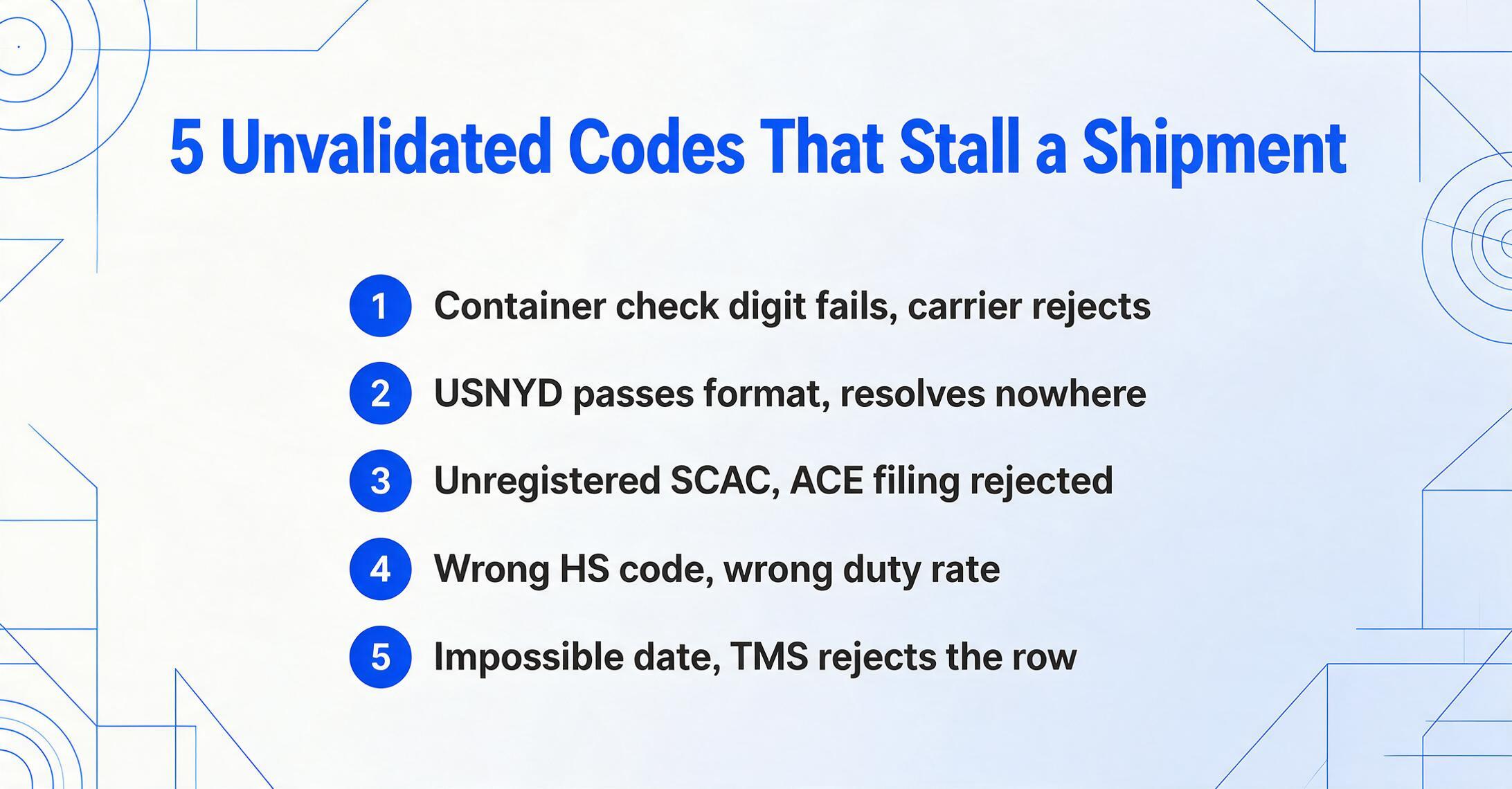
The difference between a useful extraction output and a generic text dump is the validation layer. Shipping documents use code systems that have built-in validation rules — an extraction tool that applies these rules catches errors that would otherwise reach your TMS or customs filing.
| Code System | Format Pattern | Validation Rule | What Happens If Wrong |
|---|---|---|---|
| Container number (ISO 6346) | AAAA-NNNNNN-N4 letters, 6 digits, 1 check digit | Check digit algorithm: owner code × position weights, mod 11 | Carrier's tracking system rejects the number; container shows "not found" for 3 days while someone retypes the correct digits |
| UN/LOCODE | XX-YYY2-letter country + 3-letter location | Country code must be valid ISO 3166; location code must exist in UNECE master database | "USNYC" resolves; "USNYD" (transposed) passes the format check but resolves to a different location — or none at all |
| SCAC code | AAAA2-4 uppercase letters | Must be registered with NMFTA; lookup against active carrier database | ACE eManifest filing rejected; carrier cannot be identified in CBP systems |
| HS Code (Harmonized System) | XXXX.XX or XXXX.XX.XXXX | First 6 digits must match WCO classification; digits 7-10 are country-specific | Wrong duty rate applied; customs inspection triggered; shipment held for re-classification |
| Date (various formats) | 06/30/2026, 30-JUN-2026, 2026-06-30 | Normalize to ISO 8601; flag impossible dates (month >12, future dates for departure) | TMS rejects date field; cargo release delayed while date format is corrected |
A validation pipeline that applies these rules during extraction does more than catch errors — it builds a dataset that is ready for downstream systems without a manual cleanup pass. The container number that passes ISO 6346 check-digit validation can be sent directly to a carrier's tracking API. The UN/LOCODE that passes the UNECE lookup can be loaded into a TMS routing table. The HS code that matches the commodity description can be submitted to customs with confidence.
Without validation, extraction produces a spreadsheet of raw text that looks correct — until the carrier's tracking API returns "container not found" because digit 7 and 11 were swapped. That delay, at $100-500 per day in demurrage charges, makes the difference between extraction that saves money and extraction that creates a different kind of cost.
Export Strategies — What Goes into the Final Spreadsheet
Shipping document extraction is not finished until the data is in a usable format. The output strategy depends on who uses it and what system it feeds.
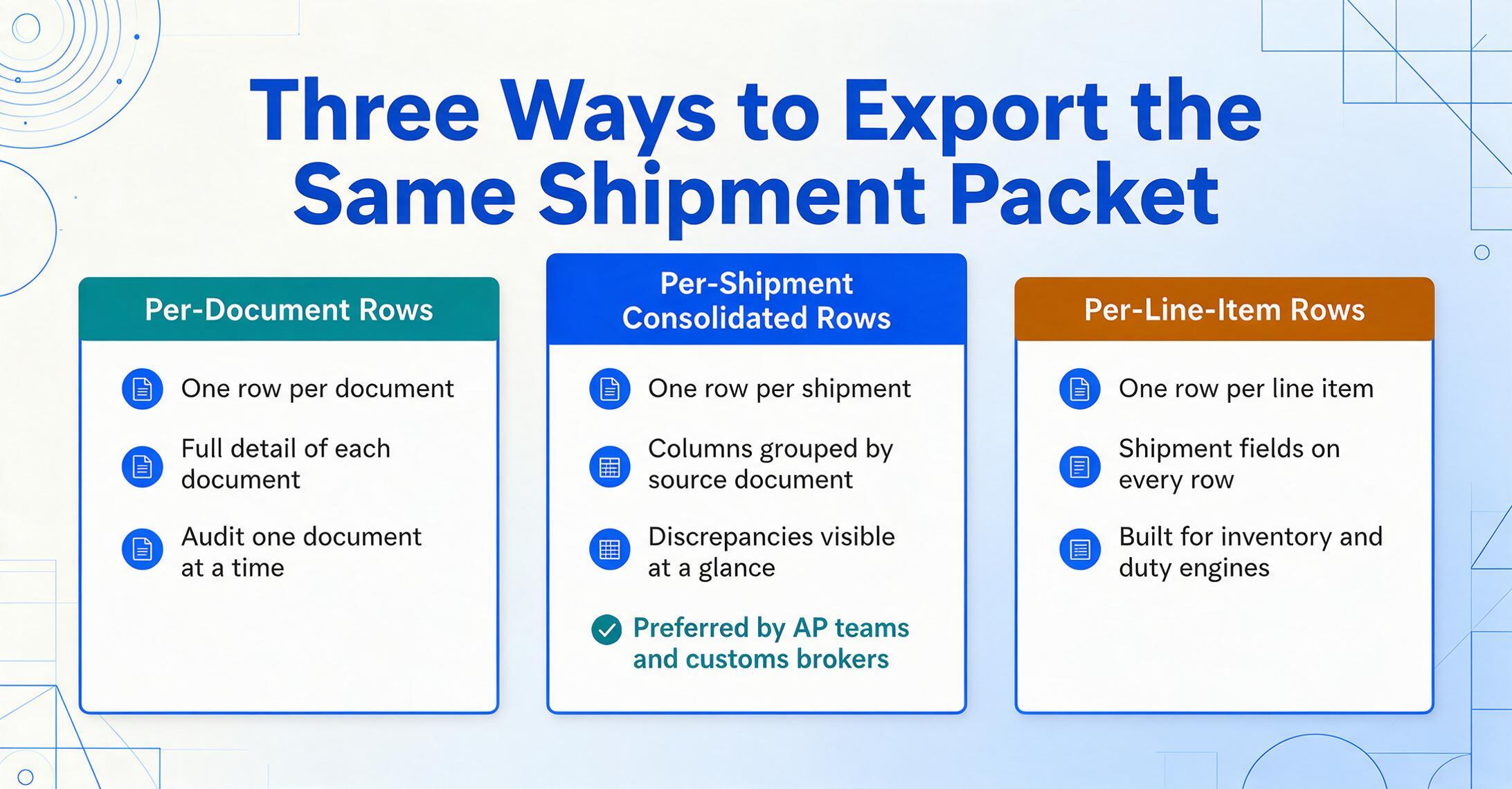
Per-document rows. Each document in the packet generates one output row. The BOL row contains all BOL fields. The packing list row contains all packing list fields. This preserves the full detail of each document but requires you to cross-reference across rows manually. Best for teams that need to audit each document individually.
Per-shipment consolidated rows. One row per shipment, with columns grouped by source document: BOL_Container_Number, Manifest_Container_Number, PL_Container_Number, followed by a reconciliation column. This is the format that AP teams and customs brokers prefer — all data for the shipment in one place, with discrepancies visible at a glance.
Per-line-item rows. One row per line item from the packing list or commercial invoice, with shipment-level fields (container number, BOL number, port codes) repeated on every row. This is the format for inventory management systems and duty calculation engines that need item-level detail.
ImageToTable.ai supports all three output formats via its batch processing pipeline. The export token system lets you generate Excel files on demand and share them with team members who don't have accounts — the receiver opens a link and downloads the output. This is particularly useful for freight forwarders who need to share shipment data with their clients without giving each client access to the tool itself.
Common Pitfalls in Shipping Document Extraction
Even with the right approach, shipping document extraction has traps that catch logistics teams who are new to automated processing.
Treating all BOLs as the same document. A straight BOL, an ocean BOL, a multimodal BOL, a house BOL, and a master BOL share a name but differ in field structure and legal effect. An extraction setup that works on a straight BOL (one shipper, one consignee, simple routing) will miss the HBL reference number on a house BOL and the onward carriage terms on a multimodal BOL. The solution is to design your column schema for the most complex document type you encounter and let simpler documents populate fewer fields.
Ignoring the consolidation layer. When a freight forwarder consolidates shipments from five shippers into one container, the packing list is not a single document — it is a collection of shipper-level packing lists plus a consolidation manifest. The extraction setup must understand that container MSCU 234781 6 may contain 15 separate purchase orders from five exporters, each with its own PO number, HS code, and country of origin. A tool that outputs one row per container misses all the item-level detail that customs requires.
Skipping weight normalization. The BOL may show 15,420 KGS. The manifest shows 34,000 LBS. The packing list shows 340 CWT (hundredweight). These are the same weight in different units — but raw text extraction outputs them as three different numbers. A computed column that normalizes all weights to a single unit (kilograms) and flags any actual discrepancies (after unit conversion) prevents weight-related customs holds and carrier invoice disputes.
Not validating codes at extraction time. An invalid container check digit, a non-existent UN/LOCODE, or a mismatched HS code that is caught at extraction time costs nothing to fix. The same error caught 48 hours later — after the ISF filing has been submitted, after the cargo has been loaded — triggers a $5,000 amendment penalty under US CBP regulations (19 CFR 149.3). Extraction without real-time validation is not extraction — it's typing at speed.
Frequently Asked Questions
Can one extraction tool handle all shipping document types (BOL, manifest, packing list, commercial invoice)?
Yes — but only if the tool uses semantic extraction rather than template-based OCR. Template tools require a separate configuration per document type per carrier format, which means maintaining 50+ templates. Semantic extraction identifies fields by what they mean, not where they sit, so the same column definition for "Container Number" works on a Maersk BOL, an MSC manifest, and a shipper's packing list without per-format configuration. The key prerequisite is that the tool's AI model has been trained on logistics documents — generic document extraction models that only saw invoices will miss SCAC codes and container number patterns.
How do you handle documents from different carriers with different layouts?
Semantic AI extraction eliminates the carrier-by-carrier template problem entirely. Instead of drawing bounding boxes for each carrier's BOL (Maersk, MSC, CMA CGM, COSCO, Hapag-Lloyd), you define columns by field meaning — "Container Number," "Port of Loading," "SCAC Code" — and the AI locates each value on any carrier layout by understanding the semantic relationship between field labels and data values on a shipping document. When a carrier redesigns their form, the extraction works on the new layout without any template update.
Can AI read handwritten packing list entries and handwritten BOL fields?
Modern vision AI reads handwriting at 85-95% accuracy on reasonable-quality images, which is significantly higher than traditional OCR's 50-70% range on the same handwritten input. However, the accuracy varies by field type: structured handwritten numbers (piece counts, weights, dates) are more reliable than cursive consignee names. For shipping documents specifically, handwritten package marks on packing lists and handwritten piece-count corrections on BOLs are the most common handwriting challenge — and the most important to get right, because those are the fields that trigger carrier invoice disputes. A practical approach is to flag handwritten fields with lower confidence scores for manual review rather than trusting all handwritten output blindly.
How do you handle multi-page documents like a 5-page ocean BOL with line items on pages 2-4?
A well-designed extraction pipeline treats multi-page documents as single logical units. The AI reads all pages in sequence, carrying the shipment-level context (BOL number, shipper, vessel name from page 1) forward into the line-item pages. The cargo description table that starts on page 2 and continues onto pages 3-4 is merged into one output block rather than being split across four separate extraction jobs. This requires the tool to understand document-page relationships — it is not a feature that all extraction tools support, and it is one of the main failure modes when logistics teams try to use invoice-focused tools on BOLs.
What output format is standard for shipping document extraction — Excel, CSV, or JSON?
Excel (.xlsx) is the most common output format for logistics teams because it supports computed columns (reconciliation formulas), multi-sheet workbooks (one sheet per document type), and is directly importable into most TMS and ERP systems. CSV is a lightweight alternative useful for EDI feeds and legacy system imports. JSON is preferred when the extracted data feeds an API or custom application. The best extraction tools support all three formats and let you choose per batch. For the per-shipment workflow described in this guide, Excel with computed reconciliation columns is the recommended format.
How do you validate container numbers during extraction?
Container numbers follow ISO 6346 format: four uppercase letters (owner code + category identifier) followed by seven digits, where the seventh digit is a check digit computed using a specific algorithm. A validation pipeline applies the check-digit algorithm to any extracted container number — if the computed check digit does not match the extracted check digit, the value is flagged with a validation warning. This catches the most common container number entry error (digit transposition) before it reaches your TMS. A container number that passes check-digit validation is not guaranteed to be correct (a valid check digit on the wrong owner code is still possible), but it eliminates 95%+ of entry errors.
Building a Repeatable Shipping Document Workflow
Shipping document extraction is not a one-time digitization project. It is a repeatable operational process: every day, a shipment's worth of BOLs, manifests, packing lists, commercial invoices, and freight invoices arrives as PDFs and images, and every day, that data needs to reach the TMS, the customs broker, and the AP system without a manual typing pass. The difference between extraction that works and extraction that creates new work is whether the tool handles the full packet together — with cross-document field mapping, code validation, and batch export — or whether it forces you to extract each document type separately and stitch the results by hand.
The tool that reads the BOL and stops — before the manifest, before the packing list, before the cross-document reconciliation — has read one document. It has not processed the shipment. A complete extraction captures the packet, validates the shared fields, and outputs a dataset where discrepancies are already flagged and codes are already standardized. That is the difference between a document-reading tool and a shipping document workflow.