The Complete Guide to
Packing Slip Data Extraction
WERC's 2024 Warehousing & Fulfillment Costs Survey pegs receiving labor at $40.79 per hour, and APQC benchmarks show a 44-hour spread in dock-to-stock cycle time between top and bottom performers — a gap driven not by forklift speed but by how long shipment data sits between "goods arrived" and "inventory updated." Packing slip data extraction sits at the center of that gap: it determines whether every supplier shipment that hits your dock becomes a usable record in your WMS the same shift, or whether it waits for manual entry that introduces errors and delays that compound across three-way matching, inventory accuracy, and supplier reconciliation.
Key Takeaways
- A 40-field packing slip has a 33 to 70% chance of carrying a keystroke error into your WMS that stays invisible until a three-way matching exception or cycle count surfaces it weeks later.
- The $32,000 visible data-entry cost per receiving position hides a far larger cost that nobody tracks because it is scattered across AP holds, supplier chargeback investigations, and phantom inventory corrections.
- You do not need to type fewer numbers — you need a column definition that preserves all three quantity fields per line item and a cross-check formula that flags mismatches, turning a 100-field shift from a typing job into a five-field review.
Before This Guide: What Packing Slip Extraction Is
New to the concept? Start with our what is packing slip data extraction article — it covers the core definition, a manual-vs-template-vs-AI comparison, and when you actually need extraction versus when you don't. This guide assumes that context and picks up from there: the operational cost of staying manual, the specific challenges that separate capable extraction from partial results, the full field checklist, and how to evaluate tools against your actual receiving operation.
The one distinction worth restating here because the rest of this guide depends on it: a packing slip is not an invoice. An invoice carries prices, payment terms, and tax amounts for accounts payable. A packing slip carries shipment data for warehouse receiving — and its defining structural trait is three quantity columns per line item (ordered, shipped, backordered) instead of an invoice's price/tax columns. Everything from here forward assumes that structure.
Why Manual Packing Slip Processing Costs More Than You Think
The visible cost is straightforward arithmetic. WERC's benchmark data shows receiving labor at $40.79 per hour. A receiving clerk processing 60 packing slips per shift at 3 minutes each spends 3 hours — 37.5% of the shift — on data entry alone. At $40.79 per hour, that is $122 per shift in typing labor, or roughly $32,000 per receiving position per year. For a mid-size warehouse with 3 receiving stations, that approaches six figures before a single error is counted.
But the visible cost is the smaller number. The hidden costs accumulate in three areas.
Three-way matching exceptions. Every mistyped quantity or transposed order number on a packing slip creates a mismatch when the AP team compares the PO against the packing slip against the supplier invoice. APQC benchmarks show that average procurement teams face a 22% exception rate on invoice matching, with each mismatch costing roughly 30 minutes to investigate across receiving, procurement, and finance. A packing slip where "80" was typed instead of "100" — a single keystroke error — triggers an AP hold, a call to the supplier, a re-check of what actually arrived, and an adjustment. The root cause is not the supplier or a dock error; it is the clerical step between the slip and the system. Best-in-class teams keep exception rates at 9%. The difference is largely whether the data entering the system is the data printed on the document or what someone typed.
Partial shipment reconciliation. When a supplier ships 80 of 100 units, the packing slip shows three numbers: ordered (100), shipped (80), backordered (20). The receiving clerk must type all three, and the WMS must track received quantities against each PO line item across multiple deliveries. Manual partial-shipment processing is where error rates spike — because the clerk is not typing one number, but distinguishing which of the three quantities belongs in which field, under time pressure, while the next truck is waiting. A single transposition — typing 100 in the "shipped" column and 80 in the "ordered" column — reverses the receiving quantity and creates a phantom 20-unit inventory surplus that will be discovered only at the next cycle count, weeks later.
Supplier chargebacks. Discrepancy-based chargebacks from suppliers are one of the most under-estimated operational costs. When a supplier ships 100 units, your receiving team enters 80, and the supplier's invoice for 100 units is disputed, the resolution process typically involves: (1) the supplier requests a proof-of-delivery photo, (2) someone in receiving physically locates the signed delivery receipt, (3) the AP team compares the carrier's delivery confirmation against the entry, (4) a chargeback or correction is issued. Each chargeback investigation consumes 30-60 minutes across multiple roles — and the cost is not tracked in any single department's budget. WERC research indicates that receiving accuracy directly correlates with chargeback incidence, yet few warehouses measure the cost of the data-entry errors that trigger them.
For a deeper look at the per-slip and per-shift costs, see our breakdown of packing slip manual processing costs.
The Unique Challenges of Packing Slip Extraction
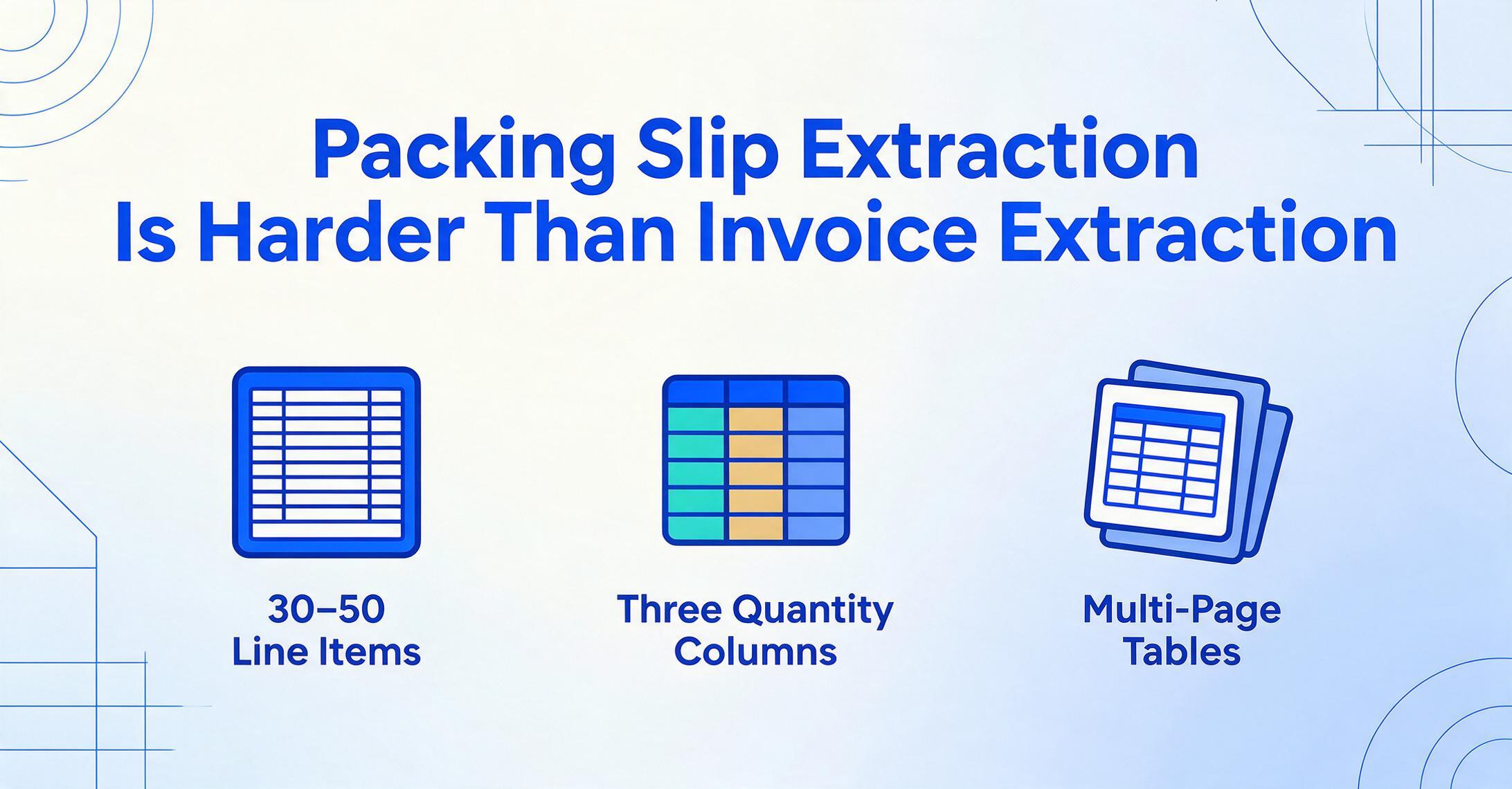
Packing slip extraction is harder than invoice extraction for reasons that matter to anyone evaluating tools. Understanding these challenges upfront determines whether the tool you choose will handle your actual daily workflow or only the demo scenario.
1. Line-Item Density
A typical packing slip from an industrial supplier like Grainger or MSC Industrial might contain 30–50 line items across two or three pages. Each line item has its own SKU, description, quantity ordered, quantity shipped, quantity backordered, and unit of measure. The line-item table is the critical payload — 80–90% of the data that needs extraction lives there — and it is where most extraction tools fail.
Multi-page tables introduce a continuity problem: when a 50-row table spans from page 1 to page 2, the extraction engine must recognize that this is a single table continuing, not two separate tables. Column headers may or may not repeat on continuation pages. Some suppliers print headers on every page; others print them on page 1 only. An extraction tool that loses column alignment at the page break silently shifts values into wrong columns from the break onward — a supplier item code lands in the description column, and a shipped quantity lands in the backorder column — and the output looks complete but is structurally corrupted.
2. Partial Shipments: Three Quantity Columns
This is the defining challenge of packing slip extraction. An invoice has one quantity column. A packing slip has three: Qty Ordered, Qty Shipped, and Qty Backordered. Every line item carries all three numbers, and the extraction must preserve their identity — not just capture the numeric values.
A partial shipment scenario: you ordered 100 units of SKU-00412. The supplier ships 80, backorders 20. The packing slip show columns titled "Ord" (100), "Shpd" (80), "B/O" (20). The extraction tool must understand which column is which and output them to the correct fields. A tool that treats all three as a single "Quantity" field, or that confuses "Shpd" with "Ord" in a partial-shipment layout, produces output that cannot be used for receiving verification — you cannot tell whether the shipment is complete or partial from the extracted data alone. The receiving workflow depends on seeing all three quantities side by side per line item, so that the dock team knows what needs follow-up with the supplier.
3. Handwritten Warehouse Annotations
Packing slips do not arrive in a sterile state. Receivers annotate them: circled quantities where the count was verified, handwritten "short" notations next to a line item, receiver signatures, timestamps, damage codes ("1 CTN crushed — refused"), and carrier remarks. These annotations carry operational significance — they are the primary record of what happened at the receiving dock — but they sit on top of the printed data, often overlapping table cells or crowding column headers.
Traditional OCR is particularly weak here: a handwritten "80" scrawled over a printed "100" produces conflicting character readings. A vision AI model, by contrast, uses the document context — the table structure, the column header labels, the surrounding printed data — to distinguish the annotation from the original text and capture both. The annotation is not a defect to work around; it is data that needs extraction alongside the printed fields. For a focused analysis of this problem, see our article on handwritten delivery note extraction in warehouse receiving.
4. Multi-Page Packing Slips
A supplier may attach a multi-page packing slip when the shipment contains mixed cartons: page 1 is the shipment summary and carrier information, pages 2–4 are carton-level detail, and page 5 is a return materials authorization. The extraction tool must navigate this structure, recognize where one document type ends and another begins, and extract only the relevant packing slip data without being confused by the RMA form or the carrier bill of lading appended at the end.
5. Mixed-Format Batch Intake
A single receiving shift might handle: a standard Grainger packing slip (PDF, one page, portrait), a McMaster-Carr delivery note (web-printed, two pages), a Fastenal thermal label (narrow format, landscape), and a photo of a handwritten delivery note from a local supplier — all in the same 30-minute window. Processing each format type through a separate template or tool defeats the purpose of automation. The extraction solution must handle mixed formats in a single batch, applying the same column definitions across all of them, because the output needs to land in the same WMS receiving table regardless of which supplier sent which format.
Key Fields to Extract from a Packing Slip
Packing slip fields fall into two categories. Header fields apply to the entire shipment; line-item fields repeat for every row in the table. Understanding which fields are critical for your downstream reconciliation workflow determines how you configure your extraction columns.
| Header Fields (one per slip) | Extraction Difficulty | Why It Matters |
|---|---|---|
| Packing Slip / Delivery Note Number | Low | Primary key for tracking, supplier lookup, and audit trail |
| Date (Shipped / Issued) | Low | Aging report for open receipts; determines dock-to-stock clock start |
| Purchase Order / SO Reference | Medium | Links shipment to the PO for 3-way matching; inconsistent label formats between suppliers |
| Ship-From Address (Supplier / Warehouse) | Medium | Multi-location suppliers may ship from different facilities; needed for returns routing |
| Ship-To Address (Your Receiving Location) | Low | Confirms delivery routing; flags cross-dock if wrong location receives the shipment |
| Carrier Name | Low | Receiving appointment matching, inbound freight cost allocation |
| Tracking / PRO Number | Medium | Carrier lookup, proof-of-delivery retrieval; formats vary widely |
| Number of Cartons / Pallets | Medium | Pre-receiving check: do the cartons on the dock match the slip? |
| Total Weight | Low | Freight audit, carrier billing verification |
| Receiver Signature | High | Proof of delivery; handwriting + contextual extraction needed |
| Line-Item Fields (multiple per slip) | Extraction Difficulty | Why It Matters |
|---|---|---|
| Item Code / SKU / Part Number | Medium | Supplier and internal SKUs often differ; cross-reference mapping needed |
| Item Description | High | Free text, multi-line, may embed specs or serial numbers; rich but variable |
| Quantity Ordered | Medium | Must match PO line item; baseline for partial-shipment comparison |
| Quantity Shipped | Medium | Actual received quantity; core field for receiving verification and 3-way matching |
| Quantity Backordered | High | Identifies incomplete shipments; drives supplier follow-up workflow |
| Unit of Measure (UOM) | High | "EA" / "PCS" / "CTN" / "BOX" — no standard; must preserve as-is for UOM mapping |
The three quantity columns — Ordered, Shipped, Backordered — are what distinguish packing slip extraction from any other document type. An extraction tool that flattens them into a single field, or that captures them without preserving which is which, has failed at the primary job. Verify this before committing to any tool: upload a packing slip with at least one partial-shipment line item and check whether all three quantities appear in the correct output columns.
Traditional vs AI-Powered Packing Slip Extraction

Not all extraction technology handles the challenges above equally. The fundamental distinction is between template-based (positional) extraction and semantic (AI-powered) extraction — and understanding this difference is the most important evaluation step you can make.
Template-based extraction requires configuring a parsing zone for each supplier's document layout. You draw a rectangle around where the PO reference appears on Supplier A's packing slip, another rectangle around the line-item table header, and define column widths. When Supplier A reformats their slip — changing the layout after an ERP upgrade — your template silently fails. Values land in wrong columns. You discover the problem when a receiving clerk notices that quantities are appearing in the description field, or not at all.
The template approach breaks most painfully on the line-item table. A template assumes the table starts at a fixed row and columns have fixed widths. But supplier packing slips vary in how many header rows precede the table, whether column headers repeat, whether lines span multiple text rows, and whether carton-level groupings are nested inside the table. A template that works for one supplier's 30-row table frequently misaligns on another's 50-row table with merged description cells. The Levvel Research survey on data entry costs notes that over 30% of document processing discrepancies trace back to inconsistent processing — which is exactly what template-based extraction introduces: consistent processing of inconsistency, producing wrong results that look correct.
Semantic extraction — AI-powered extraction using vision language models — works by meaning, not by position. You define the columns you want: "Packing Slip Number," "PO Reference," "SKU," "Qty Ordered," "Qty Shipped," "Qty Backordered," "UOM." The AI reads the entire document — the header section, the line-item table, the footer annotations — and locates each value by understanding what it represents semantically, regardless of where it sits on the page. A field labeled "Ord" on one supplier's slip, "Qty" on another's, and "Ordered" on a third is recognized as the same thing because the AI understands the semantic role. This is Custom Column Extraction: you define the output once, and the AI locates the matching data by meaning, not by coordinates.
The operational difference is template maintenance. With templates, every new supplier — or every format change from an existing supplier — requires template work. For a warehouse receiving from 50+ suppliers, each with its own format variations, template maintenance becomes an ongoing operational cost that offsets the labor savings from automation. With semantic extraction, the same column definition works across all suppliers because the extraction logic is format-independent. A packing slip from a supplier you have never processed before — with a layout the AI has never seen — is extracted correctly on the first upload, because the AI reads packing slip semantics, not packing slip coordinates.
For more on why supplier packing slip formats diverge and why they always will, see our article on packing slip format inconsistency.
Files are processed securely and not stored.
Batch Processing: Cross-Check Against PO Data
Single-slip extraction solves the data entry problem per document. Batch processing solves the throughput challenge — and it unlocks a capability that single-slip processing cannot: automated cross-checking of packing slip quantities against PO data.
In a batch workflow, you upload 20, 30, or 50 packing slips from different suppliers in a single batch — some PDF, some phone photos, some multi-page. The extraction engine processes all of them using the same column definitions and merges the results into a single spreadsheet. Each packing slip becomes a row in the header table; each line item becomes a detail row with the header fields repeated. For the step-by-step workflow, see our guide to batch packing slip extraction to Excel.
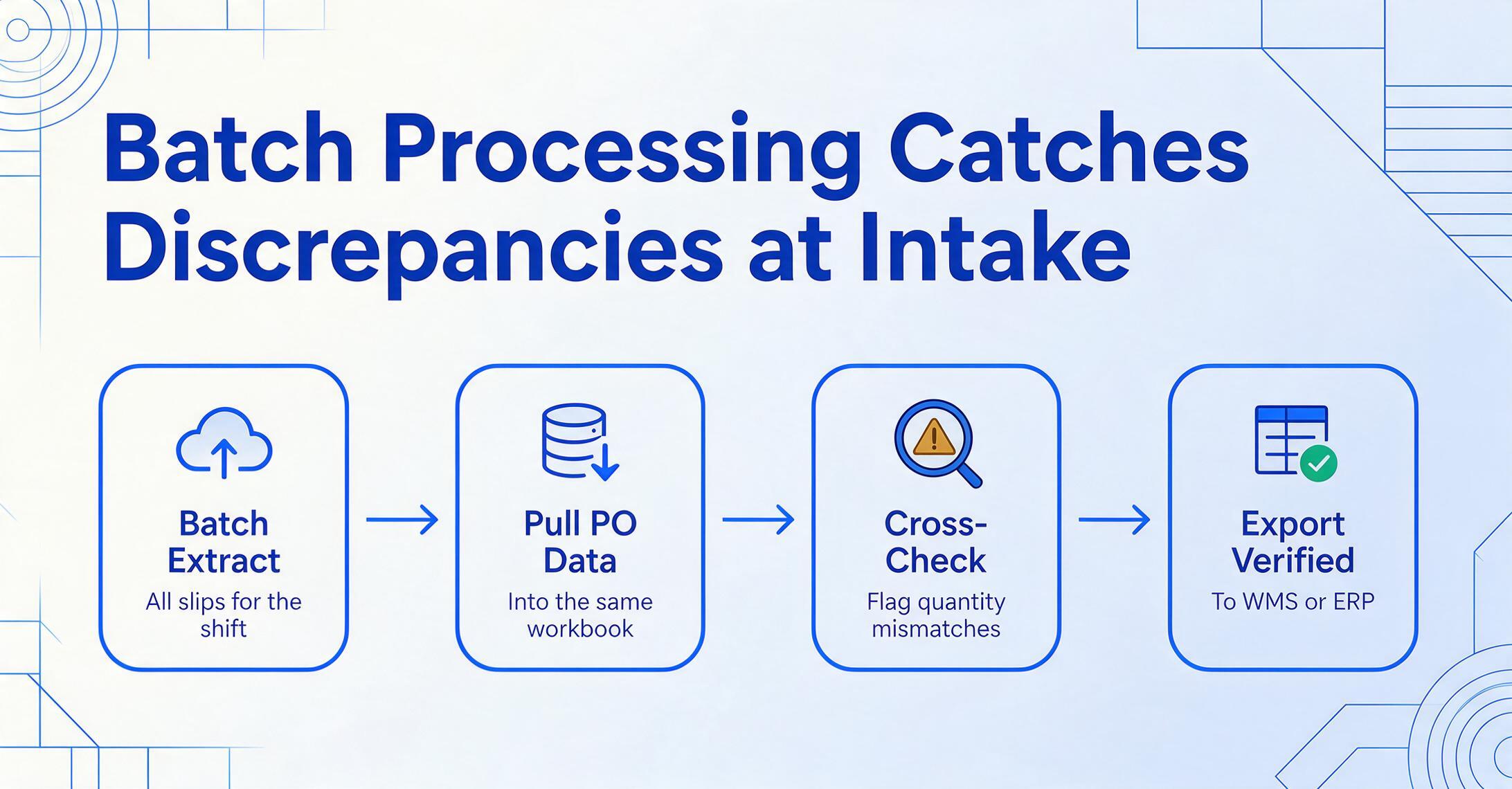
But batch processing becomes truly powerful when you combine it with a cross-check step against your PO data. Here is the workflow that separates a receiving operation that catches discrepancies at intake from one that discovers them weeks later during cycle counts:
Batch-extract all packing slips for the shift
Upload every packing slip received during the shift — regardless of supplier, format, or number of pages. The output is a single structured table with every line item identified: PO reference, SKU, quantity ordered, quantity shipped, and quantity backordered.
Pull the PO data into the same workbook
Export your PO data — from SAP, NetSuite, or your procurement spreadsheet — and load it alongside the extracted packing slip data. Each PO contains the ordered quantities that the packing slip quantities must match against. For a complete walkthrough of extracting PO data in the first place, see our complete guide to purchase order data extraction.
Use computed columns to flag mismatches automatically
Define a validation column that computes PO Ordered Qty − Packing Slip Shipped Qty. Any line item where the result is non-zero is flagged for review. This transforms the receiving workflow from "type every number and hope it's right" to "review only the exceptions" — reducing the verification workload from 100% of line items to the 5–15% that carry a discrepancy.
Export and import the clean data into your WMS
After review, the verified packing slip data — with discrepancies flagged and resolved — is ready for WMS import. Export as CSV or XLSX and load into Manhattan Associates, Blue Yonder, SAP WM, NetSuite WMS, or any system that accepts structured receiving data. The clean data becomes the goods receipt record that feeds into three-way matching.
This workflow turns extraction from a typing replacement into a discrepancy-detection engine. The key enabler is the computed column: a column that does not extract data from the document but calculates a new value from extracted fields. You can define computed columns for quantity matching (Qty Ordered − Qty Shipped), UOM consistency checks, or even carton-count verification by comparing extracted carton totals against what the carrier recorded. For a detailed explanation of how computed columns work in document extraction, see our overview of AI document extraction with computed columns.
Export and WMS Integration
The extraction output is not the destination. The data needs to enter a system — your WMS, your ERP, or your receiving spreadsheet — where it drives inventory updates, three-way matching, and supplier reconciliation. The export path you choose determines how much manual handling remains between extraction and system entry.
| Export Format | Best For | Considerations |
|---|---|---|
| XLSX (Excel) | Manual review, cross-check against PO data, partial-shipment audit, mid-market WMS import wizards | Dates and numbers must survive format conversion. PO numbers with leading zeros may be truncated by Excel — verify format preservation before relying on this path. |
| CSV | SAP WM/EWM, Oracle WMS, NetSuite WMS, Manhattan Associates (WMOS), Blue Yonder, HighJump/Körber import | Multi-line item descriptions with embedded commas will break CSV row boundaries unless properly escaped. Verify that the extraction output uses RFC 4180-compliant quoting. |
| JSON | Custom WMS/ERP integrations, automated receiving pipelines, API-based workflows | Nested line-item structures (header → cartons → items) preserve shipment hierarchy cleanly but are harder to review manually. Best when the receiver is a machine, not a person. |
| Google Sheets | Teams in Google Workspace, collaborative receiving review, shared receiving dashboards | Eliminates the export-import cycle entirely if the extraction tool supports direct Sheets output. A Google Sheets add-on for packing slip extraction can write receiving data directly into your tracking sheet without intermediate file handling. |
For most warehouse teams, the practical workflow is: batch-extract → review in Excel/Sheets → import CSV into WMS. This path works with every major WMS platform — Manhattan Associates (WMOS) accepts CSV goods-receipt imports, SAP WM/EWM uses batch input via LS24, Blue Yonder (formerly JDA) ingest flat-file receiving data, HighJump/Körber supports CSV through its data import framework, and Oracle WMS Cloud and NetSuite WMS both have CSV import wizards for receiving transactions.
The critical requirement across all formats is that the extraction output preserves the line-item-to-shipment relationship: each line item must carry its parent packing slip number and PO reference so the receiving system can match received quantities to the correct PO line. Flat output that drops this hierarchy — even temporarily during the review step — forces someone to reconstruct the relationship manually, negating the time savings from extraction.
How to Choose a Packing Slip Extraction Tool
The following criteria cut through marketing claims to what actually differentiates tools in daily warehouse receiving use. Test against these rather than feature checklists.
Test on your worst packing slip, not your best one
Every tool handles a clean one-page packing slip from a major supplier. Ask to test on a two-page slip with 30+ line items spanning the page break, a partial-shipment line with three quantity columns, and a handwritten annotation scrawled across a table cell. If the tool handles that, it will handle everything else. If the vendor demurs or offers only sample documents, that response is itself a signal.
Verify partial-shipment column preservation
Upload a packing slip where at least one line item shows different values in Qty Ordered, Qty Shipped, and Qty Backordered. Check the output: are all three numbers present in distinct columns, correctly labeled? Any tool that puts them into a single "Quantity" field, or that confuses which number belongs in which column, cannot support partial-shipment receiving. This is the single most important test.
Template-free is the baseline; test format resilience
A vendor that says "template-free" should handle a packing slip from a supplier whose format it has never seen — using only your column names as instructions. The acid test: upload the same packing slip but with a different supplier's layout — same data, different position. If the extraction breaks or the accuracy drops, the tool is template-dependent regardless of the marketing language.
Batch output must preserve the shipment-to-line-item hierarchy
When you batch-extract 30 packing slips, the output must identify which line items belong to which shipment — by including the packing slip number and PO reference on every detail row. Flat output that loses this relationship forces you to reconstruct it manually, which adds back the time extraction was supposed to save.
Export must survive the trip to your WMS
Take the tool's CSV output and attempt to import it into your actual WMS — not a demo environment, your real system with real data handling rules. Check that dates keep their format, quantities retain decimal places, item codes with leading zeros are not truncated, and multi-line descriptions do not break CSV row boundaries. This 10-minute test catches more integration issues than any feature comparison.
For a head-to-head comparison of how extraction tools perform on logistics documents including packing slips, see our review of the best logistics document extraction tools.
Frequently Asked Questions
How is packing slip extraction different from delivery note extraction?
In practice, the two terms refer to the same document type with a timing difference. A packing slip records what was packed at the point of shipment — it travels with the goods and documents carton contents. A delivery note (or proof of delivery) confirms what was received at the destination, typically carrying a receiver signature and timestamp. Many suppliers use the terms interchangeably. Warehouse teams encounter both from the same supplier for the same shipment, and a capable extraction tool handles them identically — the field structure (line items with three quantity columns) is the same.
Can packing slip extraction handle EDI 856 Advanced Ship Notices?
EDI 856 is an electronic data interchange standard — not a document format that extraction tools process directly. When a supplier sends an EDI 856, the data arrives in a structured EDI format that your WMS or ERP can ingest without extraction. Packing slip extraction fills the gap for the majority of suppliers who do not send EDI — or who send the EDI 856 but attach a PDF packing slip anyway. Most operations use EDI for large suppliers and extraction for the rest, treating them as complementary intake methods rather than alternatives.
What accuracy can I expect on packing slip extraction?
On clean digital PDF packing slips — supplier-printed, no handwriting, good contrast — field-level accuracy for header fields reaches 97–99%, and line-item fields reach 90–95%. On scanned slips or phone photos with shadows, skew, or handwritten annotations, accuracy drops to 80–90% depending on image quality. Compare this to manual entry: APQC benchmarks show a 1–3% error per typed field, meaning a 40-field packing slip has a 33–70% chance of at least one keystroke error. The advantage of extraction is not that errors are eliminated — it is that errors are surfaced for review during the verification step rather than buried in the WMS until a cycle count or matching exception reveals them.
Does packing slip extraction work with photo-quality images from a phone?
Yes, with image-quality caveats. A well-lit, in-focus phone photo of a packing slip extracts at 85–95% accuracy — close to scanned-PDF quality. The failure modes are: shadows across the document (common when photographing on a receiving dock), severe skew (the phone held at an angle, not flat), and partial cropping that cuts off column headers. A receiving workflow that includes phone photos should build in a quick image-quality check before extraction — reject blurry or heavily shadowed photos and retake them. Modern vision AI handles moderate degradation better than traditional OCR, because it uses context to fill in gaps, but it cannot reconstruct data that was never captured in the image.
How does extraction handle packing slips from international suppliers with non-English fields?
Vision AI models trained on multilingual documents can extract packing slip fields regardless of the language the labels are written in. "Quantité expédiée" (FR), "Versandte Menge" (DE), or "出荷数" (JA) are all recognized as quantity-shipped because the AI understands the semantic role of the column — not because it matches a dictionary of French or German column labels. The output field names stay in English (as you defined them), but the extracted values come from the document in whatever language the supplier used. This is relevant for warehouses receiving from international suppliers or dealing with multilingual delivery documentation — see our walkthrough on batch-processing French bon de livraison documents for a concrete example of this working across dozens of supplier formats at once.
What is the difference between packing slip extraction and goods receipt (GR) entry?
Packing slip extraction is the data capture step: turning the printed slip into digital fields. Goods receipt entry is the inventory transaction: recording that the items are now physically in stock and available. They are sequential steps in the same workflow. Extraction produces the structured data that feeds into the goods receipt entry. In a manual process, the receiving clerk types the packing slip data directly into the goods receipt screen. With extraction, the data is captured from the slip automatically and then reviewed before the goods receipt transaction is posted. The extraction step removes the typing; the goods receipt transaction remains as a control point.
How do I handle packing slips that combine multiple POs in one shipment?
Some suppliers consolidate items from multiple POs into a single shipment and packing slip. The line-item table then carries multiple PO references — each line item may reference a different PO. The extraction tool must capture the PO reference per line item, not assume a single PO applies to the entire shipment. This is standard behavior for semantic extraction tools because they read each row individually. After extraction, the output naturally splits: lines for PO-1001 go to one goods receipt, lines for PO-1002 go to another. The per-line PO reference is the critical field for this scenario — verify the tool captures it at the line-item level, not just at the header level.
Can packing slip extraction integrate with my existing WMS directly?
Most extraction tools do not offer pre-built WMS integrations. The standard workflow is: extract to CSV → import CSV into WMS. This path works with every major WMS because every WMS has a data import feature for receiving transactions — Manhattan Associates, SAP WM/EWM, Blue Yonder, HighJump/Körber, Oracle WMS Cloud, and NetSuite WMS all accept structured CSV goods-receipt data. A few tools offer API-based direct posting for custom integrations, but the CSV path is universal and requires zero IT setup. The key requirement is that the extraction tool's CSV output is structured the way your WMS expects its receiving data — with headers matching the WMS's import field mapping.
What volume of packing slips justifies investing in extraction?
As a general rule: if your receiving operation processes more than 30 packing slips per day from more than 5 different suppliers, extraction produces measurable time savings. Below that volume, the 5-minute review pass per batch may offset the typing savings. The real threshold, however, is supplier format diversity — not raw volume. Thirty slips per day from 20 suppliers with 20 different formats justifies extraction more than 100 slips from 2 suppliers with identical formats. Each unique format adds cognitive overhead: finding the PO reference in a different location on every slip, distinguishing Qty Ordered from Qty Shipped in layouts that label them differently. Extraction removes this overhead entirely — you define your columns once, regardless of how many formats your suppliers use.
What happens when the extraction tool misreads a field — can I correct it without reprocessing?
Yes. The extraction output — whether XLSX or CSV — is an editable file. If a field is misread, you correct it directly in the spreadsheet before importing to the WMS. The value of extraction is not 100% perfect accuracy — no extraction tool achieves that. The value is turning a process that requires typing 100 fields per shift into a process that requires verifying 5–10 fields. The review step is not a failure of extraction; it is the quality control gate that ensures the data entering your WMS is correct. The question is not "does it make mistakes?" but "does it reduce the number of fields you must handle from typing everything to checking a few?"
From Dock to Data: The Bottom Line
Packing slip extraction does not replace your WMS — Manhattan, SAP WM, Blue Yonder, and HighJump do the heavy lifting on inventory and warehouse control. What it does is close the gap between where shipment data arrives (a paper slip taped to a pallet on the receiving dock) and where it needs to land (a structured record in your receiving system ready for verification). That gap is currently bridged by human keystrokes carrying a 1–3% error rate per field, multiplied across hundreds of fields per shift — with consequences that ripple from inventory discrepancies to AP holds to supplier disputes.
The three things that separate a usable extraction deployment from a frustrating one: (1) the tool handles partial shipments with three distinct quantity columns, not one; (2) it processes mixed supplier formats in a single batch without per-supplier template work; (3) its export output imports cleanly into your actual WMS without format corruption. Everything else — accuracy percentages, AI claims, feature lists — is secondary to these three operational realities.
If you are evaluating extraction for your receiving operation, start by testing on your hardest packing slip — the multi-page industrial supplier slip with 40 line items spanning a page break, a partial-shipment line showing ordered vs shipped vs backordered, and a handwritten annotation in the margin. If a tool handles your worst case, it will handle your average case. If you are ready to see how packing slip extraction works on your own documents, upload a sample packing slip and see what structured data comes back — or if you already use Google Sheets, try the Sheets workflow for packing slip data.