What Is Packing Slip Data Extraction?
How It Works
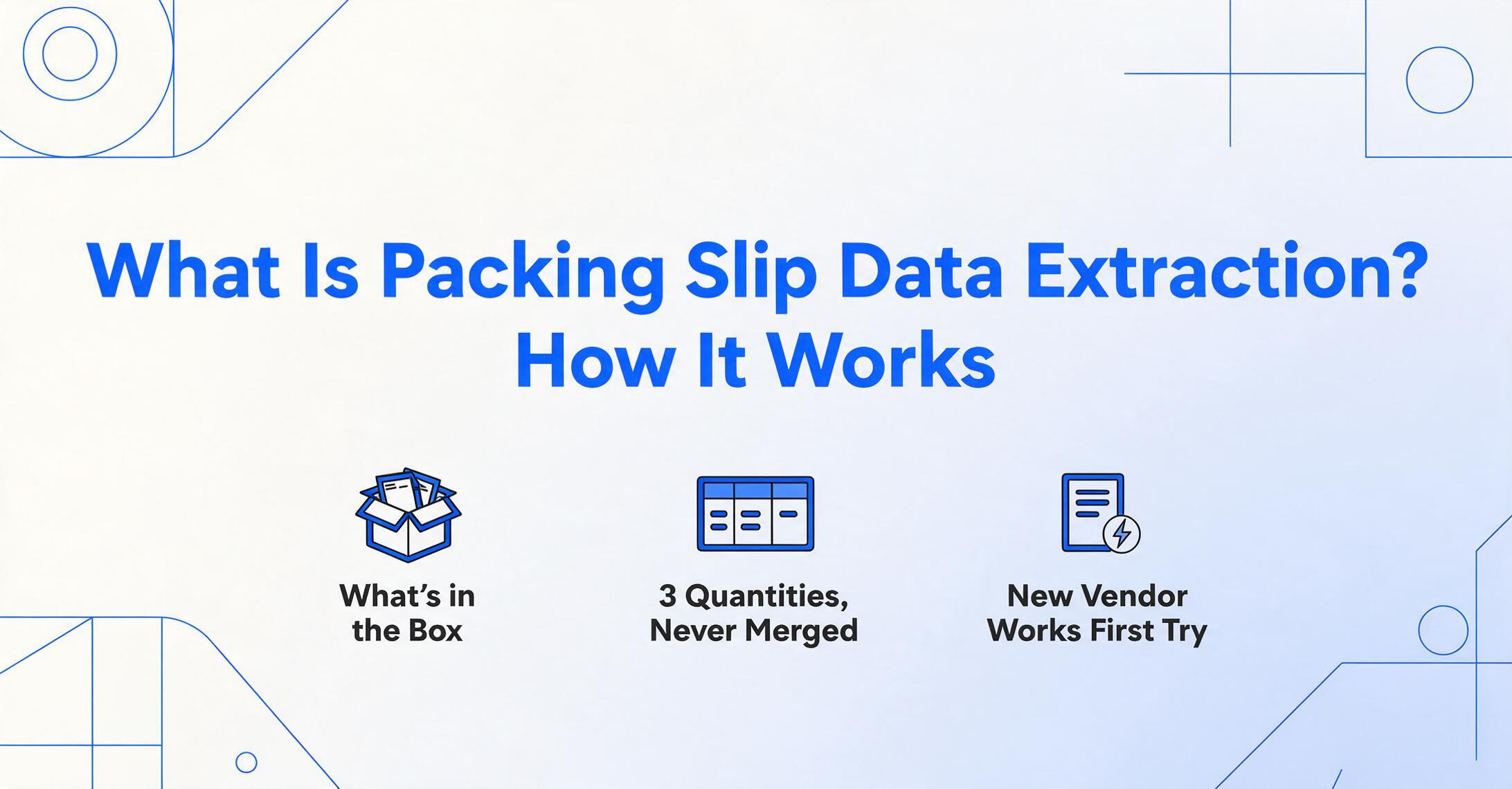
Packing slip data extraction is the automated process of reading key shipment fields — like order number, ship date, carrier, item descriptions, quantities shipped, and tracking numbers — from a PDF or scanned packing slip and converting them into structured spreadsheet rows. Instead of a receiving clerk opening each slip, visually scanning for every field, and typing the values into a WMS — a process that takes 2–5 minutes per slip with a 1–3% per-field error rate — the software reads the entire document, understands which line items belong to which carton, and outputs a spreadsheet ready for receiving verification.
Key Takeaways
- Over 3 hours per shift, per receiving clerk, is spent typing data that's already printed on the packing slip in front of them.
- A 1–3% per-field error rate means a 40-field packing slip enters your WMS with a 33–70% chance of carrying a wrong number — one that hides until the next inventory discrepancy, weeks later.
- Remove the typing step — upload the slip, get structured data — and your receiving team becomes verifiers who catch exceptions instead of data entry operators who create them.
What Packing Slip Data Extraction Actually Is
A packing slip is not an invoice — and that distinction is everything when it comes to data extraction. An invoice tells you what you're being charged: it carries prices, payment terms, and tax amounts, destined for accounts payable. A packing slip tells you what's in the box: order number, ship date, carrier, bill-to and ship-to addresses, and a line-item breakdown of what was packed. Its destination is the warehouse receiving dock, where someone needs to verify that what arrived matches what was supposed to arrive.
The same document travels under different names. "Packing slip" is standard in US operations. "Packing list" appears on international shipments or documents with carton-level detail. "Delivery note" is used in some industries — though technically it confirms what was delivered (post-handoff) while a packing slip records what was packed (pre-shipment). In practice, receiving teams encounter all three from the same supplier, and the extraction tool needs to handle them identically.
The fields a packing slip extraction tool captures fall into two groups: shipment header fields (order/SO number, ship date, carrier, ship-to/bill-to, tracking number, total weight) and line items (item code/SKU, description, quantity ordered, quantity shipped, quantity backordered, unit of measure). The structural challenge that distinguishes packing slip extraction from invoice extraction is the presence of three quantity columns — ordered, shipped, and backordered — on every line. A supplier might ship 80 of 100 units, and the packing slip must preserve all three numbers so the receiving team can identify the partial shipment. For the broader picture of how this technology fits into document processing, see our AI document extraction fundamentals.
Packing Slip Extraction vs Manual Warehouse Data Entry
The question most first-time searchers are really asking: "Why can't I just keep typing packing slip data into my WMS?" The answer isn't that you can't — it's that the cost compounds with every supplier format variation.
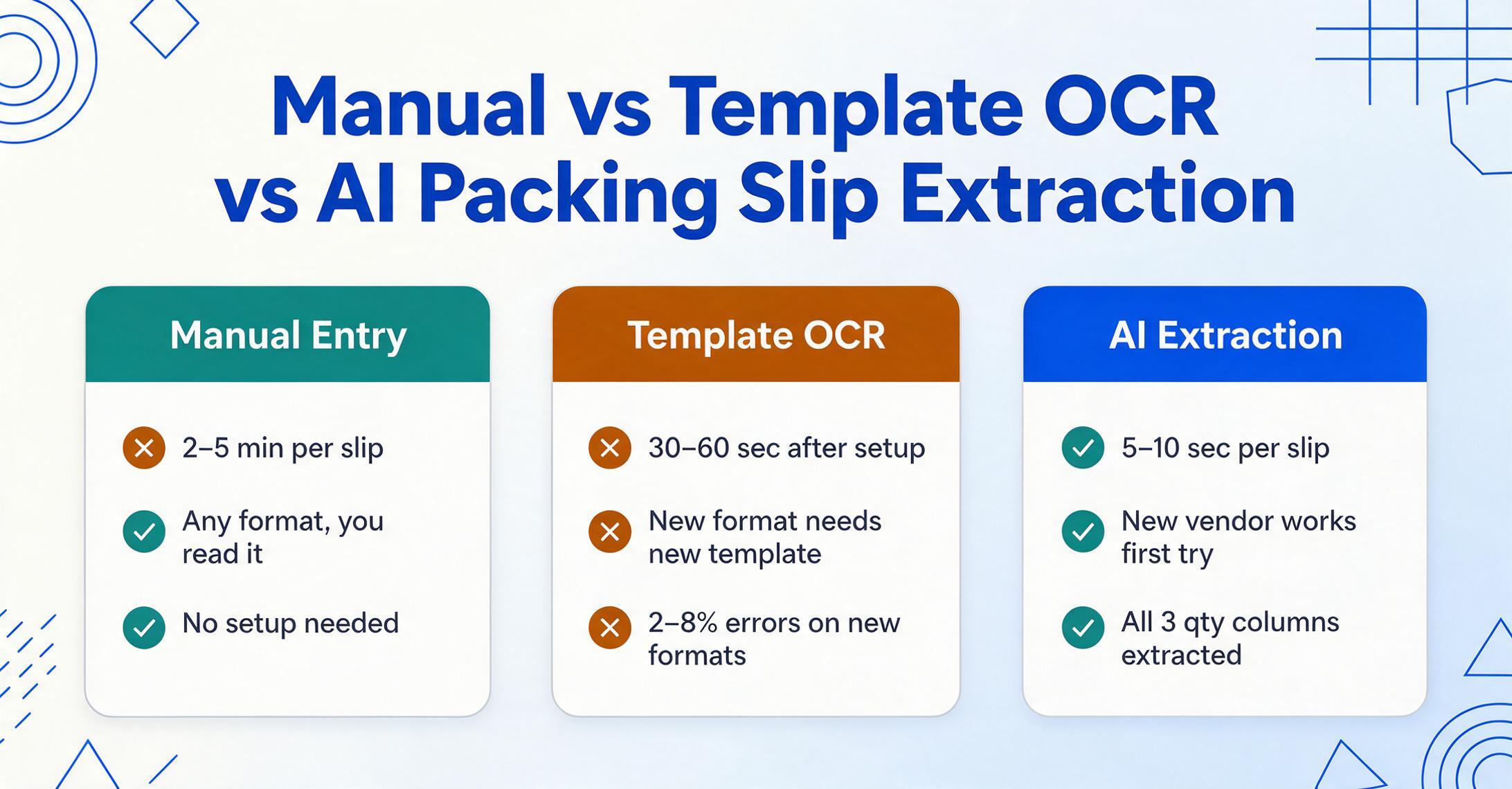
| Manual Data Entry | Template-Based OCR | AI Packing Slip Extraction | |
|---|---|---|---|
| Time per slip | 2–5 minutes | 30–60 sec (after template built) | 5–10 seconds |
| New supplier format? | Yes (you read it) | No — requires new template | Yes — reads by meaning, not position |
| Setup | None | One template per format | None — type columns once |
| Error rate (per field) | 1–3% | 2–8% (format-dependent) | 1–5% (reviewable) |
| Partial shipment handling | Manual comparison vs PO | Template-dependent | Automatic — all 3 qty columns extracted |
WERC's 2024 Warehousing & Fulfillment Costs Survey pegs receiving costs at $40.79 per hour or $2.50 per SKU. APQC benchmarks show a 44.1-hour spread in dock-to-stock cycle time between top and bottom performers, and the primary driver is not forklift speed — it's how long data sits between "goods arrived" and "inventory updated." For a detailed analysis of what manual packing slip processing costs at scale, see our breakdown of per-slip, per-shift manual entry costs.
How Packing Slip Data Extraction Works
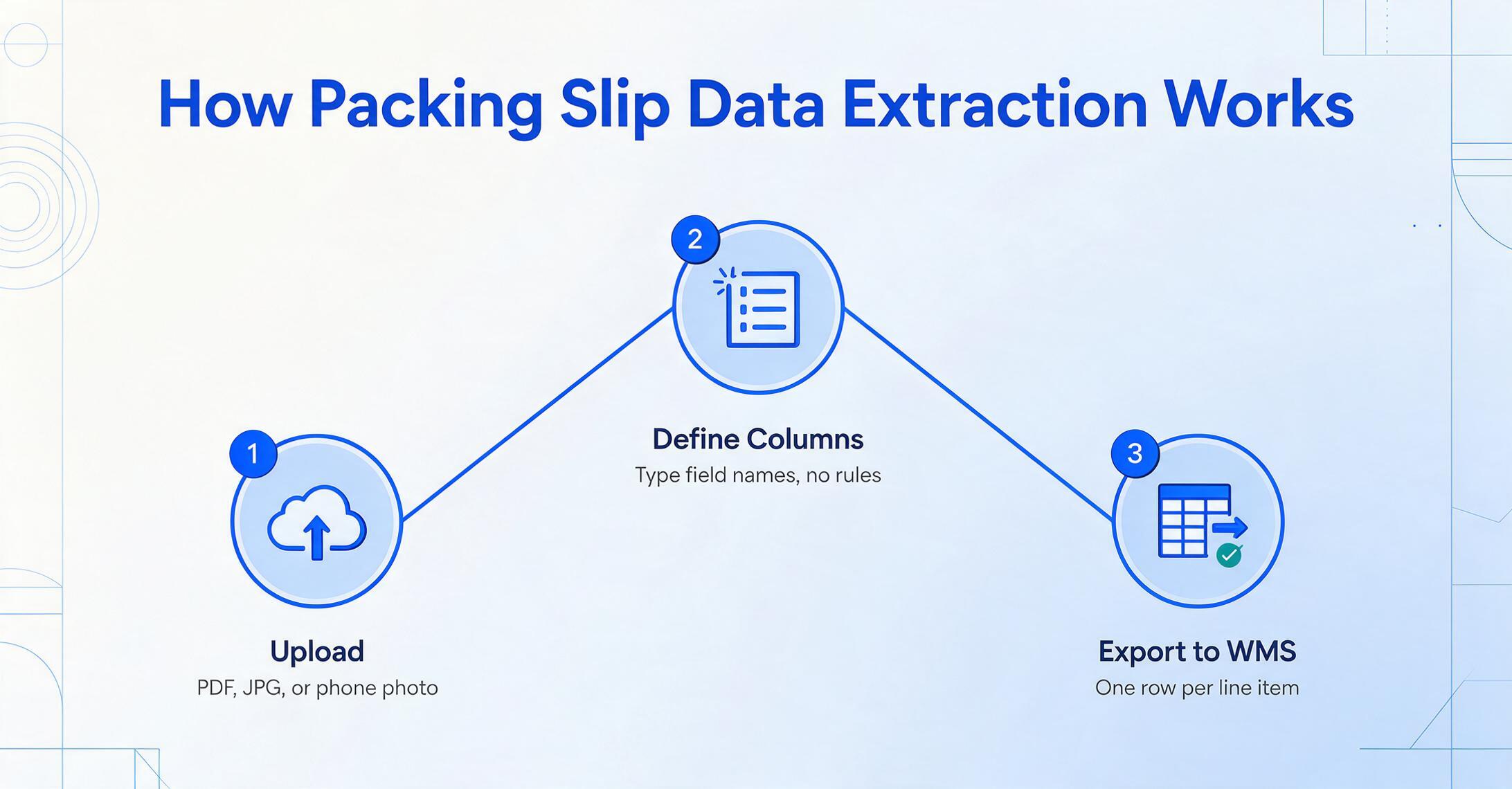
Packing slip extraction follows a three-stage pipeline, but the technology underneath is fundamentally different from template-based OCR.
Upload the packing slips
Drop in PDFs, scanned images, or phone photos from any supplier. The system accepts JPG, PNG, and PDF — no flatbed scanner or pre-processing required. Upload one slip or twenty from different vendors at once.
Define the columns you need
Instead of drawing rectangles around fields or writing parsing rules per supplier, you type the column names for your output: "SO Number," "SKU," "Qty Ordered," "Qty Shipped," "Tracking Number." The AI reads the entire document — header section, line-item table, footer notes — and locates each value by what it means, not where it sits on the page. A Grainger packing slip and a Fastenal delivery note look nothing alike, but "quantity shipped" means the same thing on both — and the AI finds it on both without a template for either.
Get a receiving-ready spreadsheet
The tool outputs a structured table — one row per line item per packing slip — with columns matching the field names you defined. Export to Excel or CSV and import into SAP, Oracle NetSuite, Manhattan Associates, Blue Yonder, or any WMS/ERP that accepts structured data. For batch workflows, upload an entire morning's deliveries at once and get one unified spreadsheet.
Files are processed securely and not stored.
What makes this fundamentally different from template-based OCR is the semantic understanding layer. Traditional OCR reads a packing slip as a grid of characters — it might correctly identify "80" in a table cell, but it doesn't know whether that's quantity ordered or quantity shipped. A template-free semantic extraction model reads holistically: it understands that a column labeled "Qty Shpd" contains shipped quantities, that the row belongs to a specific SKU, and that the relationship matters for receiving verification. This is why it handles supplier format variation without maintenance — it finds "quantity shipped" by understanding what the column represents, not by remembering where it was on the last layout. For why supplier formats diverge and why they always will, see why packing slip formats never match.
When You Need Packing Slip Extraction
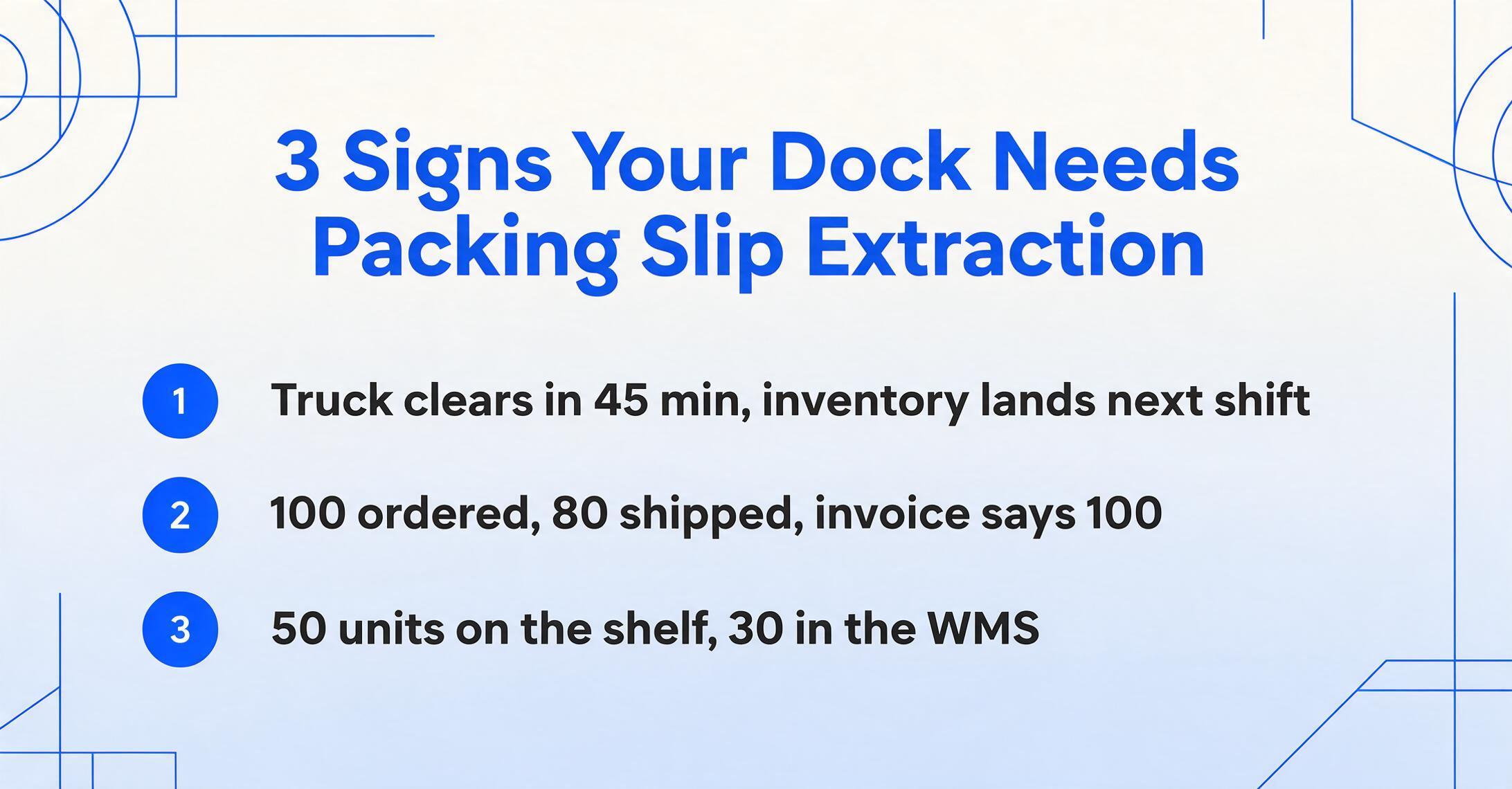
Not every receiving operation needs extraction. It crosses from "interesting" to "necessary" at these thresholds:
1. Dock-to-stock time is the bottleneck, not dock capacity. WERC benchmarks show best-in-class dock-to-stock under 3.5 hours, while mid-market operations run 12–24 hours. If your crew unloads a truck in 45 minutes but inventory doesn't show as available until the next shift, the bottleneck is data entry — and extraction collapses the data-entry window from minutes-per-slip to seconds.
2. Three-way matching triggers recurring AP holds. Three-way matching — comparing the PO, packing slip, and supplier invoice — is standard AP practice. But when packing slip data lives on paper, the matching process requires someone to read the slip and manually compare quantities. A single mismatch — 100 ordered, 80 shipped, invoiced for 100 — triggers an AP hold. Extracting packing slip data into a structured format lets matching happen automatically, flagging only exceptions for human review. For the end-to-end workflow, see how to extract packing slip fields for receiving and reconciliation.
3. Inventory discrepancies trace back to receiving entry errors. When cycle counts reveal 50 units on the shelf but 30 in the WMS, the investigation often traces to a data entry error from weeks earlier — a mistyped quantity on a packing slip that no one caught because the slip wasn't digitized. Extraction creates a digital record at the point of receipt, closing the gap between physical arrival and system record.
What to Look For in a Packing Slip Extraction Tool
Packing slip extraction tools range from generic PDF converters that lose table structure to AI platforms built for structured receiving data. Four criteria separate tools that reduce the workload from tools that move it:
Format independence. The single most important differentiator. A tool that requires a template per supplier format is not extraction — it's template maintenance. Template-free extraction reads by semantic understanding: a packing slip from a vendor you've never processed before works on the first upload because the AI understands what "quantity shipped" means regardless of where the supplier placed it. Ask: "If I receive a packing slip from a new vendor tomorrow, does it work?" If the answer involves "first define a parsing zone," you're buying maintenance, not automation.
Line-item table preservation. The tool must extract header fields and every row in the line-item table, preserving the relationship between each item and its three quantity columns (ordered, shipped, backordered). Tools designed for forms — one label, one value — break on multi-row tables. Worse, some tools flatten nested groupings (carton → items within carton), losing the carton-level detail receiving teams need for partial-shipment audits.
Batch processing. A morning's deliveries might include 15 packing slips from 8 suppliers. Processing them one at a time — upload, extract, review, next — is barely faster than manual entry once you account for tool interaction overhead. Batch processing — upload all 15 at once, get one unified spreadsheet — is where time savings compound. The receiver's shift shifts from data entry to verification: spot-check 2–3 slips for accuracy, flag discrepancies, push to WMS.
Spreadsheet-native output. Extracted data needs to land where your WMS or ERP can consume it — as Excel or CSV. Most WMS platforms (Manhattan Associates, Blue Yonder, HighJump/Körber) and ERPs (SAP, Oracle NetSuite, Dynamics 365) accept structured CSV import. If the tool exports only JSON or requires custom API integration, you've traded manual data entry for an IT dependency.
The four criteria above cover what to look for. For the deeper operational detail — multi-page line-item tables that span a page break, the full 3-way matching workflow with computed columns, and a field-by-field breakdown of header vs. line-item data — see our complete guide to packing slip data extraction.
Frequently Asked Questions
What's the difference between packing slip extraction and invoice extraction?
They extract from different documents for different systems. Invoice extraction captures financial fields — prices, tax, payment terms — and feeds accounts payable. Packing slip extraction captures shipment fields — quantities shipped, carrier, tracking number — and feeds warehouse receiving. The line-item tables differ structurally: a packing slip has quantity-ordered, quantity-shipped, and quantity-backordered columns; an invoice has unit price, extended price, and tax columns. A tool built for invoices often fails on packing slips because it wasn't designed to distinguish shipped-vs-ordered quantities.
Can packing slip extraction handle partial shipments?
Yes — if the tool preserves the multi-quantity columns. A partial shipment packing slip shows three numbers per line: quantity ordered, quantity shipped, and quantity backordered. The extraction tool must capture all three as separate fields. If it flattens everything into a single "quantity" column, partial shipments can't be verified — the receiving team can't see that 100 were ordered but only 80 arrived.
Does it work with handwritten packing slip annotations?
Modern vision AI reads handwritten annotations — carrier notes, receiver initials, circled quantities — with accuracy depending on legibility. Clear block-print annotations are reliably captured; rushed cursive is harder. The advantage over traditional OCR is that AI uses surrounding context — table structure, nearby printed text, document layout — to disambiguate characters a traditional OCR engine would guess at. If your suppliers routinely annotate packing slips by hand, test the tool on actual annotated samples before committing.
How is this different from EDI 856 (Advanced Ship Notice)?
EDI 856 is an electronic alternative — the supplier sends shipment data digitally before the truck arrives. When it works, it eliminates the need for extraction entirely. But adoption is inconsistent: large suppliers use it, mid-market and small suppliers rarely do, and EDI requires setup per trading partner. Packing slip extraction solves the problem from the other end: it processes whatever the supplier actually sends, whether EDI, PDF, or a thermal-print slip taped to a pallet. Most operations use both: EDI for suppliers who can send it, extraction for everyone else.
What accuracy can I expect?
On clean, printed packing slip PDFs, field-level accuracy reaches 95–99%. Scanned slips or phone photos with shadows or skew will be lower — around 85–95%. Compare this to manual data entry: APQC benchmarks show 1–3% error per field typed, meaning a packing slip with 40 fields has a roughly 33–70% chance of at least one keystroke error. The critical difference: extraction errors are visible for review before data enters your WMS; a mistyped "80" during manual entry may not be caught until the next cycle count.
Can I process packing slips from multiple suppliers in one batch?
Yes — and this is where time savings compound. Upload 15 packing slips from 8 different suppliers in a single batch, define your columns once, and get one unified spreadsheet. The extraction tool handles format variation internally: a Grainger slip and a Fastenal delivery note both get processed against the same column definitions. For the step-by-step workflow, see how to batch-process packing slips from multiple suppliers.
From Dock to Data
Packing slip data extraction doesn't replace your WMS — Manhattan, Blue Yonder, and SAP do that job. It closes the gap between where shipment data arrives (a paper slip on the dock) and where it needs to land (a row in your receiving system). That gap is currently bridged by human keystrokes carrying a 1–3% chance of error per field, multiplied across hundreds of fields per receiving shift — with consequences from inventory discrepancies to AP holds to customer disputes over what was delivered.
The technology to read any packing slip — to understand its table structure, distinguish quantity shipped from quantity ordered, and output structured data — exists today without templates, without per-supplier setup, and across any format. The best way to evaluate it is to test on your actual packing slips. Our packing slip data extractor runs this exact extraction — upload a sample and see the structured output — or start with our step-by-step guide to extracting packing slip fields.