Clinical Trial Document Extraction
Beyond One Row Per Patient
In 2021, clinical data management teams at seven pharmaceutical companies pooled twenty completed Phase III studies and counted every data query raised against them. The total came to 1,939,606 queries across 20,125 participants. The five form types that generated more than half of all that query traffic were concomitant medications, laboratory, adverse events, exposure, and drug accountability. Those five forms have one thing in common, and it is not their layout: none of them is one record per patient. This article is about that structural fact, and about what it means when you try to run clinical trial document extraction and end up with a spreadsheet that does not match the way the data actually behaves.
Key Takeaways
- 1,939,606 data queries across 20,125 participants, and more than half came from five form types that share one trait: none of them is one record per patient.
- Trial data arrives in arrays, one subject with many adverse events and one event with many related records, while a spreadsheet assumes one row is one thing, so the backlog is structural and not a matter of typing faster.
- Name the grain you need first, one row per event or one row per subject with visits as columns, and the columns define themselves with only the human review left.
The Clinical Trial Document Set, and What Each One Holds
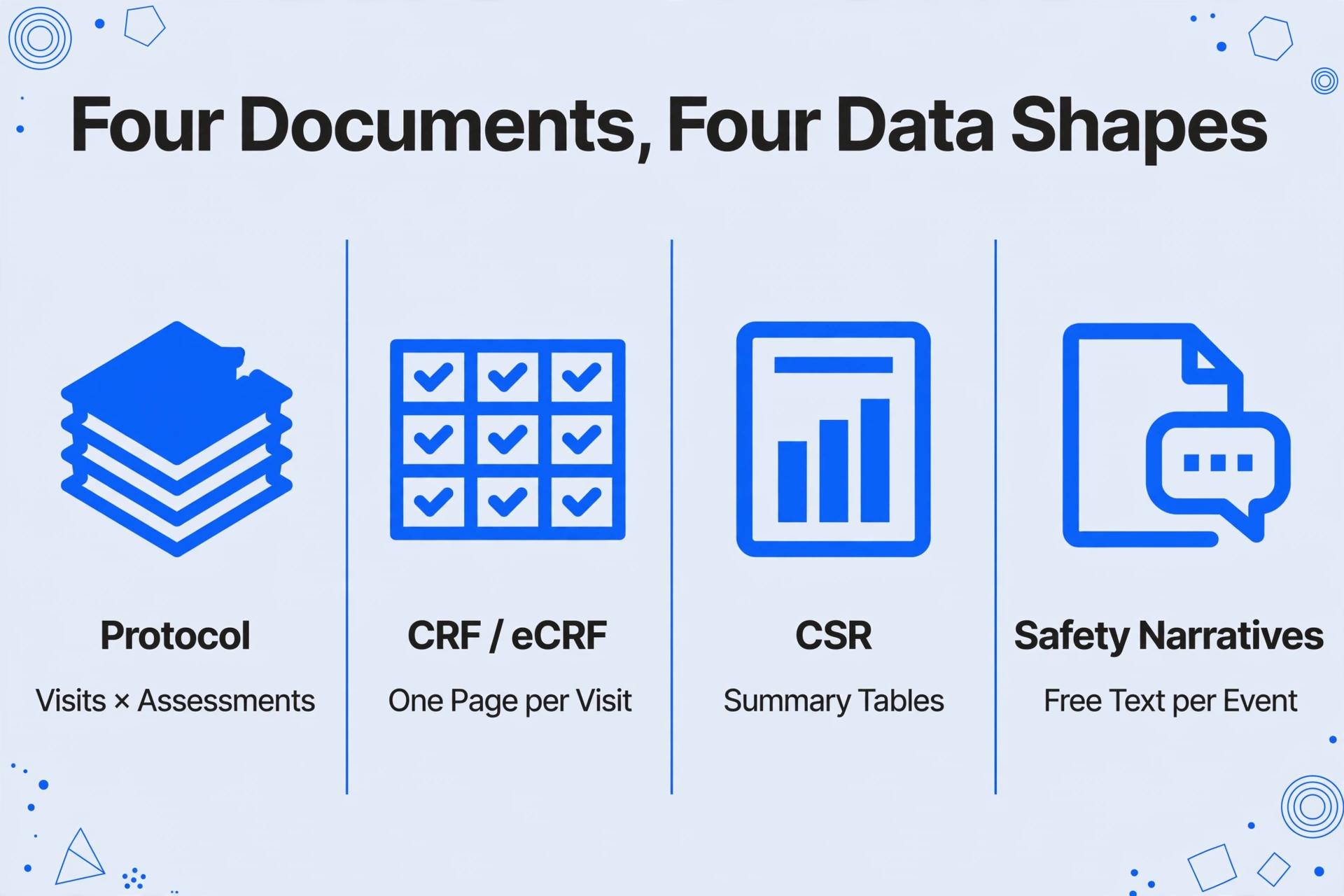
Clinical trial documentation is not one document type. It is a small family of documents that describe the same study from four different angles, and each angle produces a different data shape.
| Document | What it is | Shape of the data inside |
|---|---|---|
| Protocol | The study plan, including the schedule of assessments: which procedures happen at which visit for every participant | A grid of visits × assessments (one row per visit, one column per procedure) |
| CRF / eCRF | The case report form, the instrument that captures what happened at each visit | One page per visit per subject, with repeated blocks for events |
| CSR | The clinical study report, the integrated regulatory summary of the whole study | Summary tables, patient listings, and narratives, all describing the same events at different levels of detail |
| Safety narratives | Prose write-ups of deaths, serious adverse events, and other flagged events | Free text, one narrative per event |
The clinical study report has a fixed structure by design. ICH E3, the international guideline for the structure and content of clinical study reports, places the adverse event summary in section 12.2, the detailed adverse event displays in section 14.3.1, and the patient-by-patient adverse event listings in section 16.2.7. Section 12.2.2 asks for tables that list each adverse event, the number of patients in each treatment group in whom it occurred, and the rate of occurrence, grouped by body system and split by severity and causality. Section 16.2.7 is where the same events appear one subject at a time.
That is the first place clinical study report data extraction gets difficult: the same adverse event data exists in three shapes inside one document (an aggregated table, a per-subject listing, and a narrative), and a reader who asks the tool for "adverse events" without saying which shape they mean will get whichever one the model happens to find first.
Underneath the report, submissions data follows the CDISC Study Data Tabulation Model. Its adverse events domain is defined as one record per event per subject, which is a formal way of saying a single participant can appear many times in the same table. Related details that attach to one event, such as the sequence of toxicity grades it passed through, live in a separate domain connected to the adverse event record by a one-to-many relationship. If you have only ever extracted invoices or receipts, where one document equals one row, this is the part that will surprise you. The full model is documented by CDISC.
Where a Flat Table Meets an Array
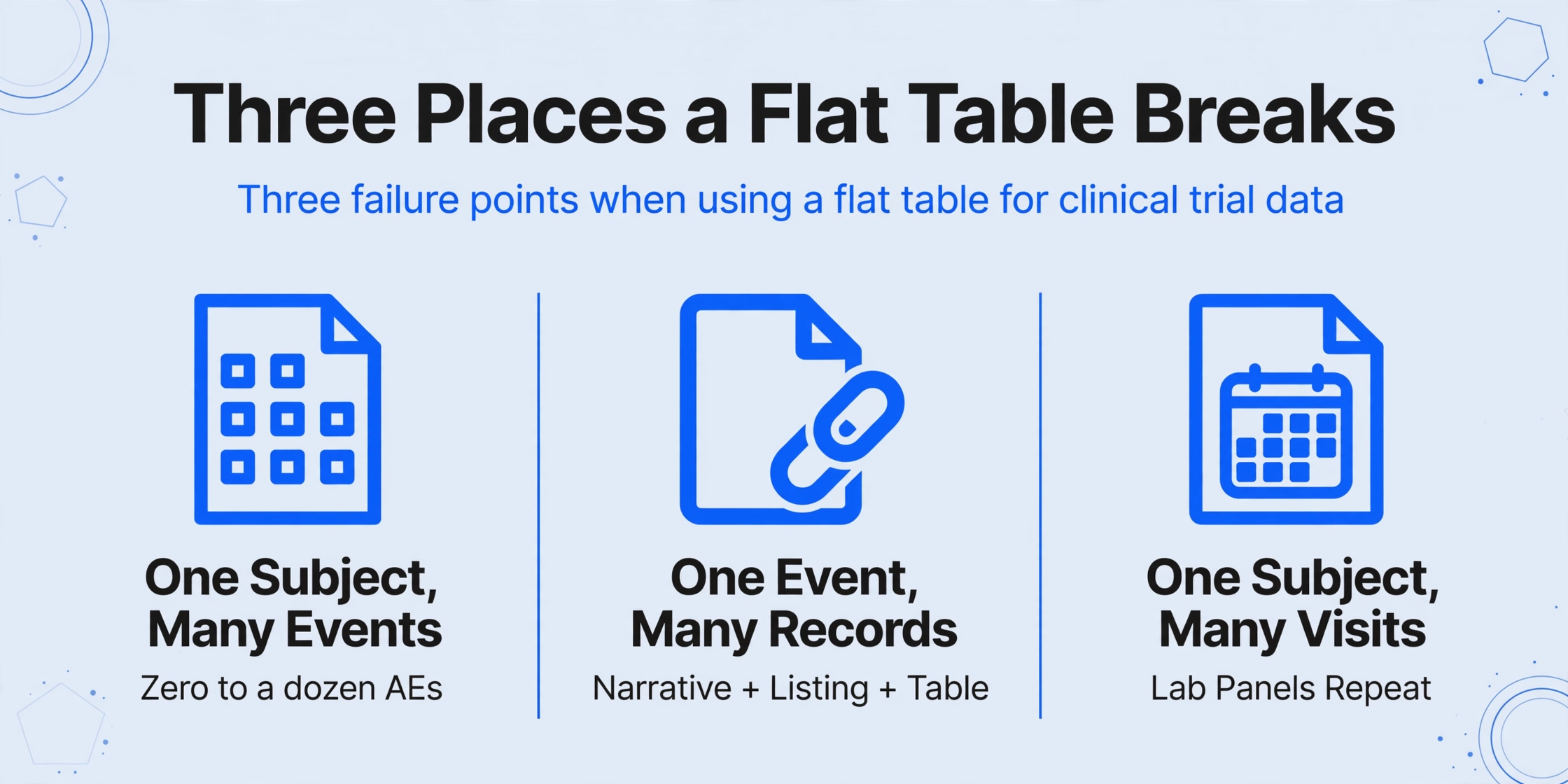
A spreadsheet assumes one row is one thing. Clinical trial data breaks that assumption in three specific places, and each one shows up in the documents named above.
One subject, many adverse events. A single participant can experience zero, one, or a dozen adverse events during a trial, each with its own term, start date, severity, seriousness, causality, action taken, and outcome. A table that gives each subject one row has to either drop events or cram them into one cell. This is the array that generated the query traffic in the opening statistic, because every event has to be reviewed and reconciled before it becomes a clean record.
One event, many related records. A serious adverse event is not a single cell. It has an onset and a resolution, a causality assessment, perhaps several follow-up entries as new information arrives. In the data model these are linked records, and in the printed report they become a narrative plus a line in a listing plus a line in a summary table.
One subject, many visits, many lab panels. Laboratory values repeat at every visit. A blood chemistry panel collected at screening, week 4, week 8, and week 12 is four sets of the same parameters attached to the same person. A protocol schedule of assessments is itself a two-dimensional grid, and the lab data fans out from it.
There is a separate, purely mechanical version of this problem: the printed tables often use merged header cells and indentation to express the body-system and preferred-term hierarchy, so a naive extractor reads the event terms correctly but loses which body system they sat under. That failure mode is covered in detail in why merged cells break table extraction, so this article stays on the structure rather than the grid.
The complaint from the people who live in this work is not subtle. On r/clinicalresearch, a coordinator writing under the thread "I hate data entry" put it plainly: "I sometimes also feel like I'm too slow and the tasks are too tedious. I've been working with a site right now that has over 200 queries." A separate thread on clearing a site's data entry backlog walks through the triage most teams already run: address the oldest queries first, work patient by patient, protect time for entry every day. None of that triage addresses the reason the backlog exists, which is that the data arrives in arrays and the destination is a row.
Clinical trial document extraction is slow because the output grain of the document and the output grain of the spreadsheet rarely match on the first try.
Choosing the Grain of Your Output Table
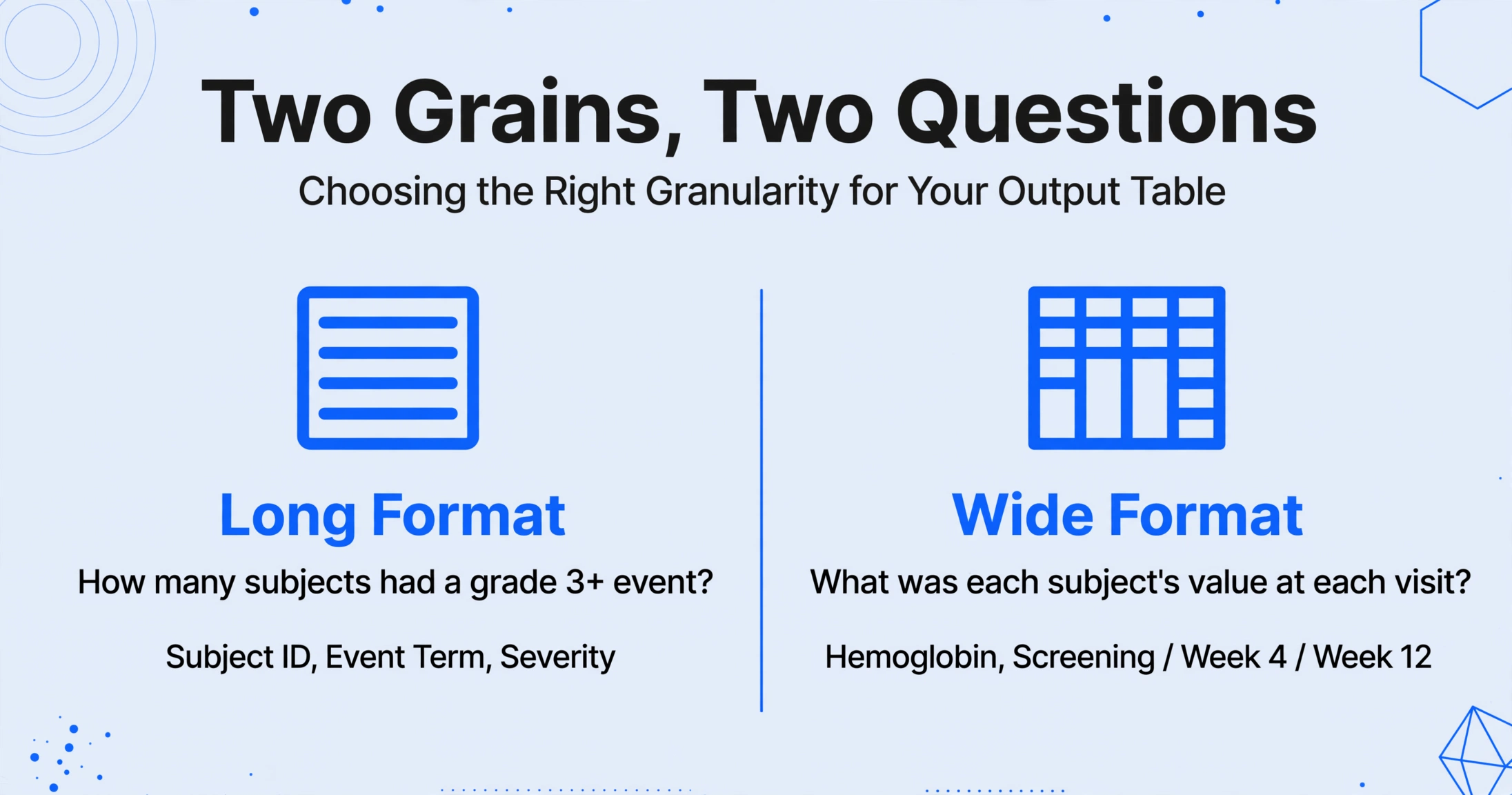
Before extracting anything, decide what each row of the result should represent. There are two workable answers, and they serve different questions.
Long format: one row per event
Each adverse event gets its own row, and the subject identifier repeats on every one of that subject's events. Useful columns: Subject ID, Event Term, Start Date, Severity, Serious (Y/N), Causality, Action Taken, Outcome. Choose this when your question is "how many subjects had a grade 3 or higher event" or when you need to pass the rows to a statistical tool. The subject identifier is what ties the repeated rows back together.
Wide format: one row per subject, visits as columns
One subject per row, with the visit value folded into the column name (Hemoglobin, Screening / Hemoglobin, Week 4 / Hemoglobin, Week 12). Useful when your question is "what was each subject's value at each visit" and you want to compare across time. The tradeoff is that the table grows wider with every added timepoint, and a long trial can push it past what is comfortable to read.
Decide the grain from the question you will ask of the sheet, then look at the source document. If the source is a per-subject listing and you want a per-subject comparison, you are converting long to wide, and that conversion is real work that no extraction tool does for free. If the source is a summary table and you want event-level rows, the detail simply is not there to extract, and you need the listing instead.
One caution on columns. It is tempting to add a "MedDRA Preferred Term" column to an adverse event table, because that is what the coded dataset contains. Unless the source document already shows the coded term, that column cannot be extracted, because assigning a preferred term is a coding step, not a reading step. The next section is about what extraction can and cannot carry out of the source.
How Semantic Extraction Handles Repeated Structures
The reason a template-based tool struggles here is that a template is tied to positions. Adverse event table extraction is where position-based logic fails first, because a subject with one event and a subject with six occupy completely different numbers of lines, so the same coordinates never line up twice. A vision model that reads for meaning does not depend on those coordinates.
Custom Column Extraction is the mechanism. Instead of drawing zones on a page, you type the column names you want, such as Subject ID, Event Term, Severity, and Serious, and the AI locates each value by understanding what the column name means. The column names you enter become the headers of your output table, and the reading logic holds steady whether a subject has one event row or ten. The general approach is described in what AI document extraction actually is if this is your first encounter with it.
Several capabilities line up with the array problems the last section described:
- Computed columns let the AI calculate a value during extraction rather than only copying one. For an adverse event listing, that covers a count of events per subject and conditional checks such as flagging a row when a subtotal does not reconcile with a stated total. The calculation is written into the column name or a rule, so it runs on every document in the batch the same way.
- Inferred columns let the AI assign a value the document does not print, drawn from what it does print. This is useful for a bucket such as a follow-up status, where the model reads whether an event is described as ongoing. It is not a substitute for medical judgment, and columns that require adjudication should not be built this way.
- Multi-Page Merge folds a document that spans pages back into one row. An adverse event listing continued across several printed pages, or a subject's records spread over separately scanned sheets, can be grouped by a shared value such as the subject identifier, with fields filling in from whichever page carries them. This is the same setting that helps with multi-page PDFs in general.
- Batch processing reads many files at once and merges the results into one table, so a folder of CRF pages or a set of CSR listings becomes a single sheet instead of a stack of one-document exports. The pattern is the same one used for batch clinical data extraction from other trial records.
- Model Tier matters when the source is a scanned form with handwritten entries. Adverse event forms filled in by hand are a known hard case, and a higher processing tier uses a stronger model for dense handwriting and complex layout.
- Review Mode with bounding-box verification is the part that makes an extracted safety table usable. Hovering a cell highlights exactly where that value came from on the original document, and clicking a region jumps back to the matching cell. For fields that matter, that turns "trust the extraction" into "spot-check the extraction" in seconds rather than reading the whole listing again.
Files are processed securely and not stored.
The same extraction pattern applies wherever a trial document repeats a structure per subject. A visit-panel table, a clinical lab report, and an adverse event listing are different content with the same underlying problem: the unit you care about repeats, and the tool has to preserve the repetition instead of flattening it.
What This Kind of Extraction Cannot Do
Being clear about the boundary is more useful than overselling the tool, especially in a regulated field where a claim in a blog post is not the same as a validated system.
It does not code adverse events. Term selection into MedDRA, the medical dictionary that maps a reported term to a preferred term under a body system, is a separate coding step governed by its own rulebook. The dictionary and its hierarchy are maintained by the MedDRA Maintenance and Support Services Organization. Extraction can read a coded term that is already printed, but it does not assign one.
It does not adjudicate safety. Causality, seriousness, and expectedness decisions belong to a qualified person. An inferred column is a reading of what the document says, not a medical assessment.
It does not de-identify. Subject identifiers in a trial document stay in the output. If the file is going somewhere without a data agreement, handling that is a separate, deliberate step.
It is not a validated, audit-certified system. Regulated electronic records carry requirements such as an audit trail for every change and documented system validation, set out in ICH E6(R3) and 21 CFR Part 11. This tool has no such certification, so it belongs upstream of the system of record, as a first pass that a human reviews, not as the database of record. The systems that hold validated trial data at scale are the electronic data capture platforms such as Medidata Rave, Veeva Vault EDC, and Oracle Clinical One, alongside lighter options like Castor and REDCap. The comparison here is not against those platforms. It is against a person reading a listing and retyping it.
What remains, once those limits are stated, is still the bulk of the work: getting the repeated values out of the documents and into a table a human can check, instead of typing them in one at a time. That gap is the same one that leaves coordinators juggling query backlogs and leaves data managers with clinical data that is already digital and still entered by hand.
FAQ
Can AI extract adverse event tables from a CRF or CSR? Yes, as long as you define which table you mean. A CSR can contain the same events as a summary table, a per-subject listing, and a narrative, so name the columns of the specific shape you want, such as Subject ID, Event Term, Start Date, and Severity. Extraction reads the values; it does not decide for you which of the three displays to pull from.
Does extraction replace adverse event coding in MedDRA? No. Coding a reported term to a preferred term and body system class is a separate step with its own conventions, and it requires human oversight. Extraction can carry a coded term out of a document that already contains one, but it does not perform the coding.
How do I keep every adverse event attached to the right subject? Extract the subject identifier as its own column and let it repeat on every event row. In long format the identifier is what ties the repeated rows back to one participant. If a subject's records arrive across separately scanned pages, use Multi-Page Merge grouped by that identifier so the pieces fold into one record before the events fan out.
Is this suitable for a regulated submission? Use it as a reviewable first pass, not as the system of record. It is not a validated or audit-certified platform and makes no ICH-GCP or 21 CFR Part 11 certification claim, and it does not de-identify or adjudicate. The validated database of record remains your electronic data capture system.
The Shape of the Document Should Drive the Shape of the Sheet
The reason clinical trial document extraction is harder than invoice extraction is structural, not technical. Invoices arrive one to a row. Trial documents arrive as arrays: one subject across many visits, one subject with many adverse events, one event with many related records. Once you name the grain of the output you actually need, defining the columns becomes a straightforward decision, and the work that is left is the review, which is exactly where a qualified person should be spending time anyway.
Start with one adverse event listing or one visit-panel document, define the columns you want, and see the table come back before you commit a whole batch.