Zalando Orders:
Find the Order Number, Variant, and Return Deadline
A Zalando order confirmation screenshot is different from any other e-commerce receipt you might save. You are not capturing it to prove you paid or to log a tracking number in most cases. You are capturing it because the one date that determines whether you can still send that dress or pair of sneakers back — the return deadline — is printed right on the page, and you want a copy you can check without logging in. Between that deadline, the order number you will need to start the return, and the product name with its size and color so you remember which item you ordered, three specific pieces of information do the whole job for you.
Key Takeaways
- Unlike Amazon, eBay, or Etsy, Zalando prints the exact return-by date on the order confirmation — a screenshot of that page is a portable return ticket you can check from any device without logging in.
- A Zalando product line is one composite string packing brand, size, and color behind " - " separators — parse it wrong and three sizes of the same sneaker collapse into one indistinguishable row.
- With 30 localized storefronts each using its own date format, size notation, and field labels, one extraction workflow that standardizes on output turns a multi-market order history into a single sortable spreadsheet.
Where the Order Number Lives on a Zalando Confirmation
Every Zalando order gets a unique reference number that serves as the key for returns, customer service inquiries, and payment lookups. The order number appears prominently at the top of the order confirmation page — both in the mobile app and on the desktop website — and follows a consistent format across all 30 European markets.
The standard format is "ZA-" followed by 8 to 9 digits, like ZA-12345678. The label varies by market — Bestellnummer in Germany, Numéro de commande in France, Bestelnummer in the Netherlands, Numero d'ordine in Italy, Order Number in the UK — but the underlying "ZA-" format never changes. This is deliberate: Zalando runs a centralized logistics network across Europe, and a single order number format works regardless of which country's storefront you used.
On a screenshot, the order number is always in the upper portion of the page, near the greeting line ("Thank you for your order" / "Vielen Dank für deine Bestellung"). It is the most prominent identifier on the screen and the one field you should anchor your extraction around.
Why the order number matters for returns: Zalando's return process requires either the order number or the delivery note number. Having it from a screenshot means you can initiate a return from any device — phone, laptop, even someone else's computer — without needing to log into your account or find the physical delivery note.
The Product Name Is Not Just the Product Name
On a Zalando order confirmation, the product line does not say "Nike Air Max 90" with a separate size selector and color chip. It shows one composite string combining brand, model, size, and color: "Nike Air Max 90 - EU 42 - Black/White". The separator is always " - " (space, dash, space), and the size and color are embedded as positional segments within that string.
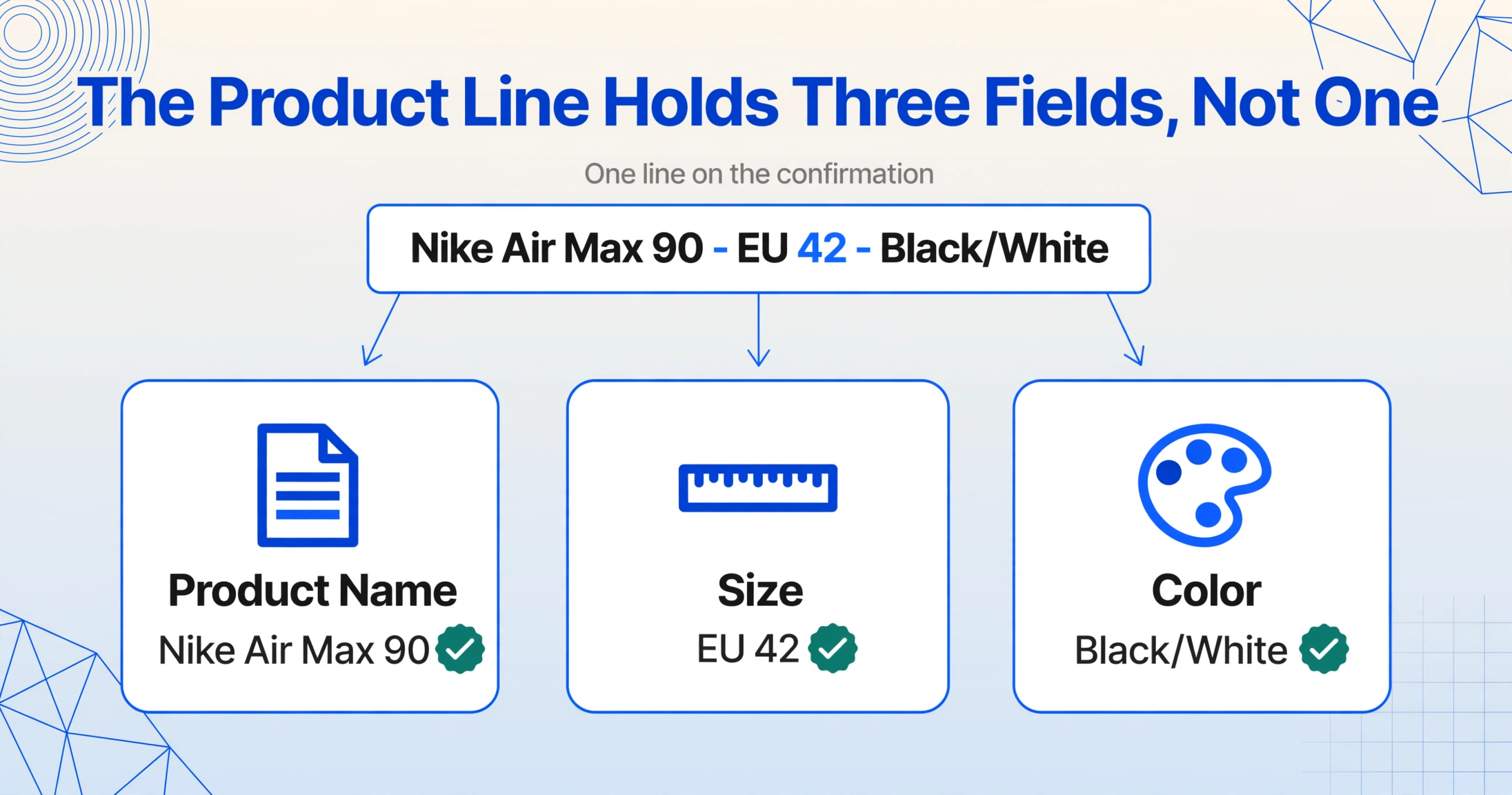
This creates two practical challenges. First, if you treat the product name as a single column, the size and color become buried in a longer text block rather than separate, sortable values. Defining "Product Name", "Size", and "Color" as three separate columns lets a semantic extraction tool parse the composite string and distribute the segments correctly. Second, the composite string is long — on a mobile screenshot, the edge of the viewport often truncates it: "Nike Air Max 90 - EU 42 - Black/White" might appear as "Nike Air Max 90 - EU 42 - ...", cutting off the color. The desktop page shows the full string in a wider table layout, so truncation is primarily a mobile concern.
Typical Zalando product line on a confirmation screenshot:
Note the " - " separator and how size notation varies (DE vs EU sizing, jean waist/length vs numeric dress size).
Zalando's particular combination of EU shoe sizing, DE sizing for certain brands, and jean sizing (W/L) for denim means the size segment format varies by category. An EU 42 is numeric, a DE 41⅓ uses a fraction notation, and W34/L32 uses a letter-prefix format. The color segment typically uses a slash to separate primary and secondary colors: "Black/White", "Dark Blue/Shale".
The Return Deadline — The Reason Most People Screenshot Their Zalando Order
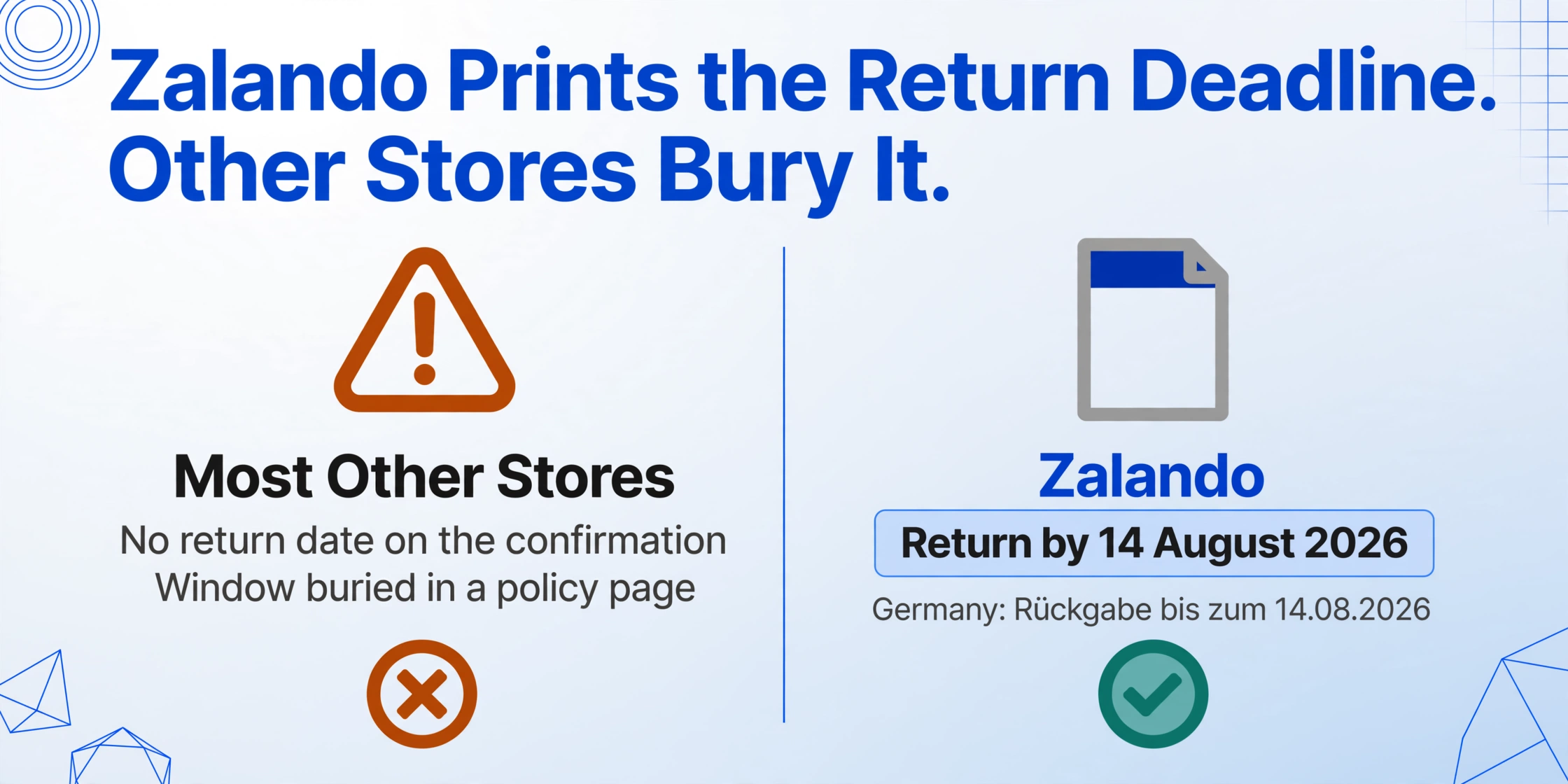
This is the field that sets Zalando apart from every other major e-commerce platform. Amazon, eBay, and Etsy do not show a return deadline on the order confirmation — the return window is buried in a policy page. Zalando does the opposite: the specific calendar date by which you must send items back is displayed directly on the order confirmation, often in a colored box near the top of the page.
Zalando's policy has historically offered 100 days for free returns — a generous window that was a major differentiator when the company expanded across Europe. In 2025, Zalando adjusted this to 30 days in select markets (Germany, Netherlands, Italy), while other markets continue to offer the extended period. Zalando Plus members in some markets receive an additional extension.
On the order confirmation, the return deadline appears as:
- English markets: "Return by [DD Month YYYY]" — e.g., "Return by 14 August 2026"
- German-speaking markets: "Rückgabe bis zum [DD.MM.YYYY]" — e.g., "Rückgabe bis zum 14.08.2026"
- French markets: "Retour possible jusqu'au [DD/MM/YYYY]"
- Dutch markets: "Retourneren tot [DD-M-YYYY]"
- Italian markets: "Reso entro il [DD/MM/YYYY]"
- Spanish markets: "Devolución hasta el [DD/MM/YYYY]"
The deadline is displayed as a fixed calendar date local to your market — not "100 days from now". This means it does not shift if you open the screenshot a week later. It is calculated from the estimated delivery date of the first item in the order and applies to all items collectively.
Real-world scenario: You order sneakers on 1 July. They arrive on 5 July. On 20 August you want to return them. With a screenshot showing "Return by 12 October 2026", you check the image in your photo library — still well within the window — and start the return without logging in. Without the screenshot, you would have to log into your account, find the order, and check the return status.
A screenshot that captures the return deadline becomes a portable return ticket. You do not need the account password, the delivery note, or the confirmation email. For resellers processing dozens of orders each month, having the return deadline alongside the order number in one record means you can sort by "return by" date and prioritize which orders need attention first.
When the Same Order Has Multiple Items in Different Sizes
Fashion e-commerce has a buying behavior most other categories do not: ordering the same product in multiple sizes and returning the ones that do not fit. A single Zalando order often contains the same pair of sneakers in EU 42, 43, and 44, or the same dress in EU 36, 38, and 40. The order confirmation lists these as three separate lines differing only in the size segment:
The extraction challenge is twofold. A traditional OCR tool that reads line by line may group all three as duplicate entries or merge them into a single row with quantity 3 — losing the size information entirely. For someone trying to remember which size fit best, the size per line is the whole point. Additionally, the column layout on a screenshot (product image left, name center, price right) can cause the size segment of one line to visually align with the price of the next line if the screenshot is cropped, creating misattribution. That pattern is not Zalando-specific: an ASOS order screenshot typically lists one product once per size, and a line-by-line reader collapses those rows just as easily.
A semantic extraction approach — where the AI understands that "EU 42", "EU 43", and "EU 44" are size values, not product names — handles this naturally. Defining "Product Name", "Size", and "Color" as separate columns lets the AI recognize the " - " delimiter and place each segment in the correct column. The result is three clean rows, each with its own size, so you can immediately see which size you ordered.
Multi-Market Labels and Format Differences
Zalando operates localized storefronts in 30 European markets, and while the platform logic is the same, the visible labels, date formats, and number conventions vary by country. A single user might order from Zalando.de, Zalando.fr, and Zalando.co.uk at different times, each with a different set of labels and date formats.
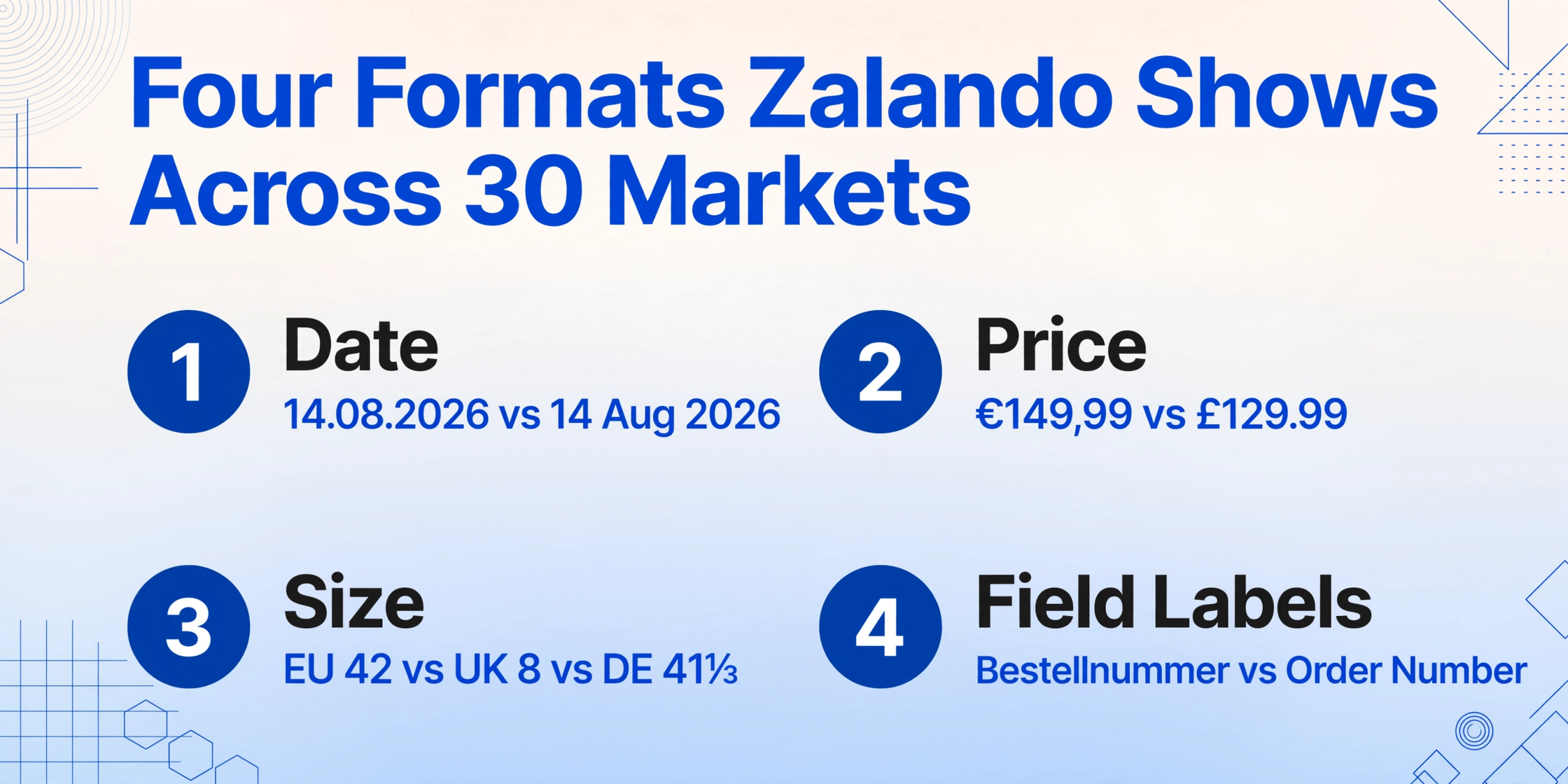
The variations that directly affect extraction include: date format (DD.MM.YYYY in Germany vs DD/MM/YYYY in France vs "14 Aug 2026" in the UK), price format (€149,99 with comma-decimal in Germany vs £129.99 with dot-decimal in the UK), size notation (EU 42 vs UK 8 vs DE 41⅓ for shoes; DE 38 vs UK 12 vs FR 40 for apparel), and localized field labels for both the order number and the return deadline.
For a single-market user, these are background noise — you know your own format. But for anyone managing orders across markets — a reseller sourcing from German and French sites, a personal shopper handling deliveries for clients in different countries — a spreadsheet mixing "14.08.2026" and "14 Aug 2026" becomes hard to sort. A well-structured extraction process that standardizes dates into ISO format (2026-08-14) and normalizes currencies removes this friction before the data reaches your spreadsheet.
This is also where batch processing really pays off. Processing ten Zalando order screenshots from five different markets through the same extraction workflow produces a single table with standardized dates, consistent currencies, and parsed size/color splits — even though the original screenshots used different labels.
Frequently Asked Questions
How long is the return window on Zalando?
It depends on your market and whether you are a Zalando Plus member. Historically the standard was 100 days across all markets. In 2025, Zalando reduced it to 30 days in Germany, the Netherlands, and Italy. Other markets may still offer the extended period. The exact deadline for your specific order is always shown as a fixed calendar date on the order confirmation — that date is your definitive reference, not the policy description.
Can I return some items from a multi-item order and keep others?
Yes. Zalando allows partial returns — you can return any subset of items and keep the rest. The return deadline applies to all items from the same delivery date. If items in the same order have different delivery dates, the deadline is calculated from the latest one.
Can I extract the size and color as separate columns from a Zalando screenshot?
Yes, if the extraction tool supports custom column definitions and understands the " - " delimiter pattern. A Custom Column Extraction approach lets you define Product, Size, and Color as separate columns. The AI reads each product line, identifies the delimiter positions, and distributes the segments accordingly — whether the size is EU numeric, DE numeric, UK letter prefix, or jeans W/L format.
Does Zalando Plus change anything about the order screenshot?
A Zalando Plus membership status may appear on the order confirmation as a badge or mention near the delivery information. Plus members typically receive priority 1-day delivery and an extended return window — so the return deadline shown on the screenshot may be farther out than the standard policy. If you are a Plus member, the date shown on your specific order confirmation is your binding deadline, regardless of the standard policy in your market.
What can I do with the extracted data beyond checking one order?
Processing multiple Zalando orders into a spreadsheet lets you sort by deadline (which orders need attention first), group by size (to see which sizes you tend to keep), or cross-reference with ecommerce order screenshots from Amazon or eBay in a single sheet for a unified view of all open returns.
What if the screenshot cuts off the return deadline or order number?
A partial screenshot that misses the top of the page (where the order number lives) or the lower section (where the return deadline sits) will not contain those fields. Most phones have a scrolling screenshot mode ("Scroll" or "Full Page") that captures the entire page beyond the visible viewport. On desktop, a standard browser window screenshot usually captures everything above the fold, but you may need to scroll down to confirm the deadline is visible.
Make Your Zalando Screenshots Work for You
The order number is the key to the return door. The product name with its size and color tells you what you actually bought. And the return deadline — the one date that determines whether that item can still go back — sits right on the order confirmation page, already displayed, waiting to be saved.
A single screenshot holds all three. The problem is not that the information is missing — it is that pulling all three out manually, from a growing collection of screenshots across different markets and date formats, does not scale past the first few orders. A reseller processing 30 Zalando orders a month needs those fields in a table, not scattered across 30 photo albums.
Instead of opening each screenshot individually, squinting at the composite product string for the size, and checking the return-by date against today's calendar, you can define the columns once — Order Number, Product Name, Size, Color, Return Deadline — and let the AI read every screenshot against those same columns. The output is a single spreadsheet row per order, standardized whether the original was in German, French, Dutch, or English.
Test it on your own Zalando screenshots. See if the return deadline extraction saves you a login the next time you wonder "can I still send this back."