Crypto Wallets on Telegram:
Grab the Address and Amount From a Chat Screenshot
In crypto Telegram groups — trading signals, P2P marketplaces, NFT communities — someone sends a wallet address in chat, someone else sends the amount, you screenshot it to record the transaction. The address itself is a 42-character hexadecimal string or a Base58 string with mixed casing. One wrong character when you retype it, and the funds go somewhere else. There is no chargeback, no customer service number — the blockchain executes what the address says. The fastest way to make a mistake is to copy-paste or rely on tools that were never designed to handle addresses like these. This is the same problem that makes payment screenshot extraction harder than it looks — the source is a chat message, not a structured document, and the field that matters (the address or the amount) sits inside a conversation, not a form.
Key Takeaways
- You trust OCR to read a wallet address from your Telegram screenshot — it is just a 42-character string, the most basic text extraction task there is.
- But OCR silently normalizes output to lowercase — stripping Ethereum's EIP-55 checksum, corrupting case-sensitive Solana addresses, and confusing 0/O/l/I in compressed screenshots. TRM Labs measured only 40% usable accuracy.
- Visual AI reads addresses by structural pattern — 0x followed by 40 hex characters equals Ethereum — preserving exact case and disambiguating characters by format constraint rather than pixel guesswork. Same screenshots, 98% accuracy.
What a Telegram Crypto Screenshot Actually Looks Like
A typical crypto address shared in a Telegram chat does not come with a structured form, a labeled field, or a QR code wrapper. Someone types or pastes a string of characters into the message box and hits send. The address appears in a chat bubble — sometimes with "Here's my ETH address" above it, sometimes just the string alone. The amount, if this is a payment instruction, gets written in a separate message or on the same line: "0.5 ETH to 0xAb5801a7D398351b8bE11C439e05C5B3259aeC9B".
The address format depends on the blockchain:
- Ethereum and EVM chains (ETH, BSC, Polygon, Arbitrum, etc.) —
0xfollowed by 40 hexadecimal characters (0-9, a-f), 42 characters total. Example:0xAb5801a7D398351b8bE11C439e05C5B3259aeC9B. Case-insensitive on the network, but EIP-55 checksum addresses mix upper and lower case. - Bitcoin — starts with
1(legacy P2PKH),3(P2SH), orbc1(SegWit, Bech32). 26-62 characters. Some formats (P2SH, P2PKH) are case-sensitive. Bech32 (bc1...) is case-insensitive but must be all-lowercase or all-uppercase. - Solana — Base58 encoded, 32-44 characters. Case-sensitive. Example:
7EcDhSYGxXyscszYEp35KHN8vvw3svAuLKTzXwCFLtV2. - Tron (TRX) — starts with
T, Base58, case-sensitive. - Monero (XMR) — starts with
4or8, 95 characters. Case-sensitive.
The key thing to notice: every one of these formats uses a specific visual pattern — a consistent prefix, a predictable character set, and a length that falls within a known range. The eye of an experienced crypto user recognizes "this looks like an ETH address" on sight, but translating that recognition into a correctly typed string when you have 20 screenshots to process is another matter entirely.
The "Copy-Paste" Problem: Why Manual Isn't Safe
The obvious approach is to copy the address from the Telegram message and paste it into your wallet or spreadsheet. The problem is that this simple action — one Ctrl+C — sits at the center of an entire ecosystem of clipboard hijacking malware designed specifically to exploit it.
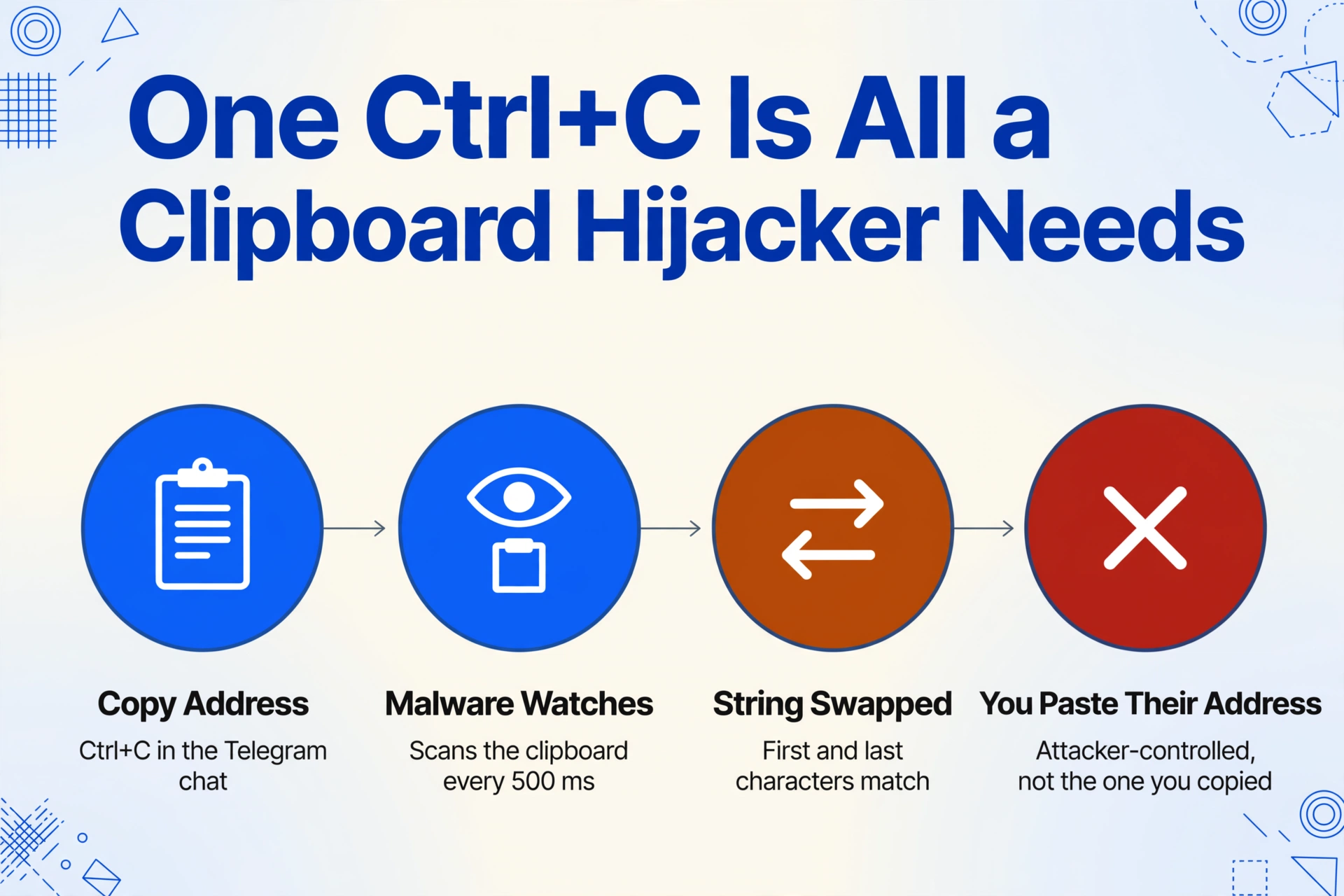
Clipboard hijackers like Laplas Clipper and Masad Stealer run silently in the background, monitoring the system clipboard for strings that look like cryptocurrency addresses. When they detect one, they replace it with an attacker-controlled address before you paste. The replacement is often crafted to start and end with the same characters as the original, so a quick glance at the first and last few characters won't catch the swap.
In February 2026, Microsoft disclosed Trojan:Win32/CryptoBandits.A — a USB-propagating worm that checks the clipboard every 500 milliseconds for wallet addresses across Bitcoin, Ethereum, Tron, and Monero. It replaces them with attacker addresses and routes stolen data through a portable Tor client. The campaign had been active since at least February 2026, infecting machines through malicious shortcut files on USB drives.
Even without malware, manual copy-paste is error-prone. A wallet address has no human-readable meaning — you cannot "sound it out" or check it against a mental reference the way you can with a US phone number or a street address. A single mistyped character on a 42-character hex string produces a valid but different address, and the blockchain will happily execute the transfer to it. Those funds do not come back.
Why Traditional OCR Fails on Wallet Addresses
Traditional OCR — the technology built into scanners, PDF tools, and many "text from image" apps — reads documents by recognizing individual character shapes. It was designed for printed text on structured documents: typed invoices, standardized forms, machine-printed addresses. When you run an OCR tool on a Telegram screenshot, it produces a string of text, but with consistent problems that matter a lot for crypto wallets.
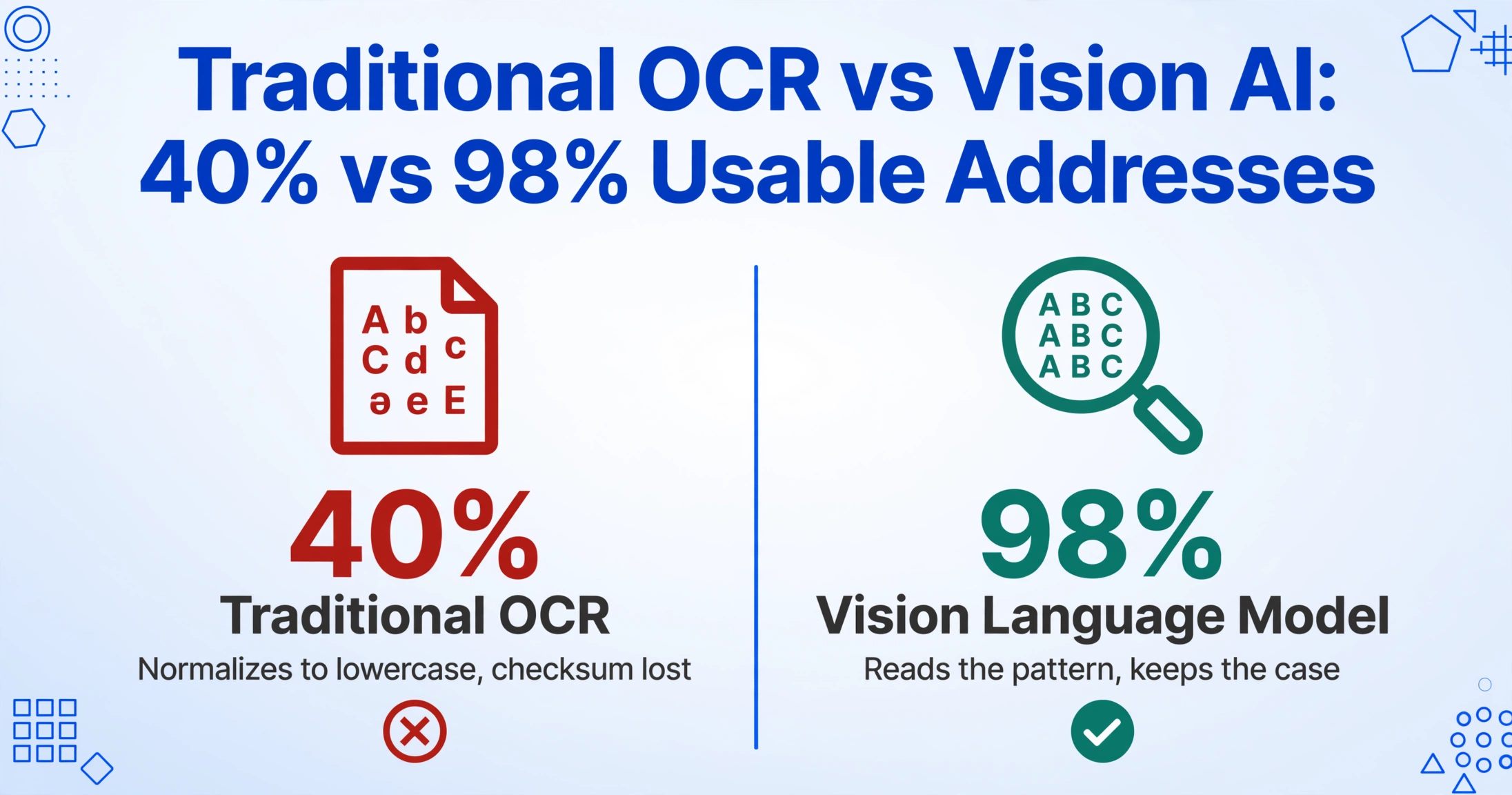
Case is the biggest issue. Most OCR engines normalize output to lowercase by default. For an Ethereum address, that does not break the address (the network is case-insensitive), but it strips the EIP-55 checksum information that helps wallets verify whether an address was entered correctly. For Bitcoin P2SH addresses (starting with 3), getting the case wrong does break the address — the checksum fails and the transaction bounces — but by then you have already lost the correct string from the screenshot. For Solana and Tron, which are fully case-sensitive, any lowercase-normalized output is simply wrong.
TRM Labs, a blockchain intelligence firm, documented this problem in practice. When they measured traditional OCR accuracy for extracting cryptocurrency addresses and transaction hashes from screenshots, they found roughly 40% usable accuracy. After switching to a Vision Language Model (VLM) approach, accuracy rose to 98%. The difference was not better character recognition — the difference was that the VLM understood the structure of what it was reading.
There is a deeper difference at work here. Traditional OCR reads a screenshot as a grid of pixels and tries to match each cluster to a known character shape. It does not know that 0x is the prefix of an Ethereum address — it sees a zero, a lowercase x, and then tries to figure out each subsequent character in isolation. If the font is unusual, if the background is dark, if the character is slightly blurry from compression — OCR guesses wrong.
How Visual AI Reads an Address — Not Character by Character, but Pattern by Pattern
Vision-based AI approaches the same screenshot differently. The model has been trained on millions of document images and understands text in its visual context. When it sees 0x followed by 40 characters from the set [0-9a-fA-F], it recognizes the pattern of an Ethereum wallet address. It does not need to identify every single glyph with perfect optical resolution — it uses the format constraints of the address to fill in ambiguous characters.
Several format-specific behaviors emerge from this pattern-based approach:
- Prefix recognition — The AI identifies
0x,bc1,T, or4as an address prefix and expects the rest of the string to match the corresponding format. This prevents it from splitting the address at a line break or mistaking a space within the chat bubble as a field boundary. - Case preservation — Because the model reads the address as a visual pattern (uppercase letters tend to have different visual profiles than lowercase), it retains the original casing. A
0xAb5801a7stays0xAb5801a7rather than becoming0xab5801a7. - Character disambiguation —
0(zero) andO(capital o),l(lowercase L) andI(capital i) — these pairs are nearly indistinguishable in many fonts, and they cause constant errors in OCR output. Visual AI resolves them by checking the character against the expected character set of the address format. In Ethereum's hexadecimal alphabet, there is noOorI— so if the model detects a shape that could be either0orO, it picks0based on the format constraint.
This approach matters most when the screenshot quality is not ideal. A Telegram screenshot taken on a phone, compressed by the chat app, and then re-screenshotted — a common scenario when someone forwards an address from one chat to another — loses enough resolution that character-by-character OCR becomes unreliable. Pattern-based extraction stays stable because it is using the address format itself as a signal, not relying on perfect pixel clarity.
The practical difference: a traditional OCR tool reads a crypto address and guesses each letter one at a time. A vision AI reads the address format, applies its structural rules, and extracts the exact string — case and checksum included.
From Screenshot to Spreadsheet: Getting Both Fields Out
The address and the amount — these are the two pieces of data that matter for anyone tracking a crypto transaction from a Telegram chat. The amount tells you what was sent (or what was requested), and the address identifies the destination. Together they form a complete record: "on this date, this amount of ETH was sent to this address."
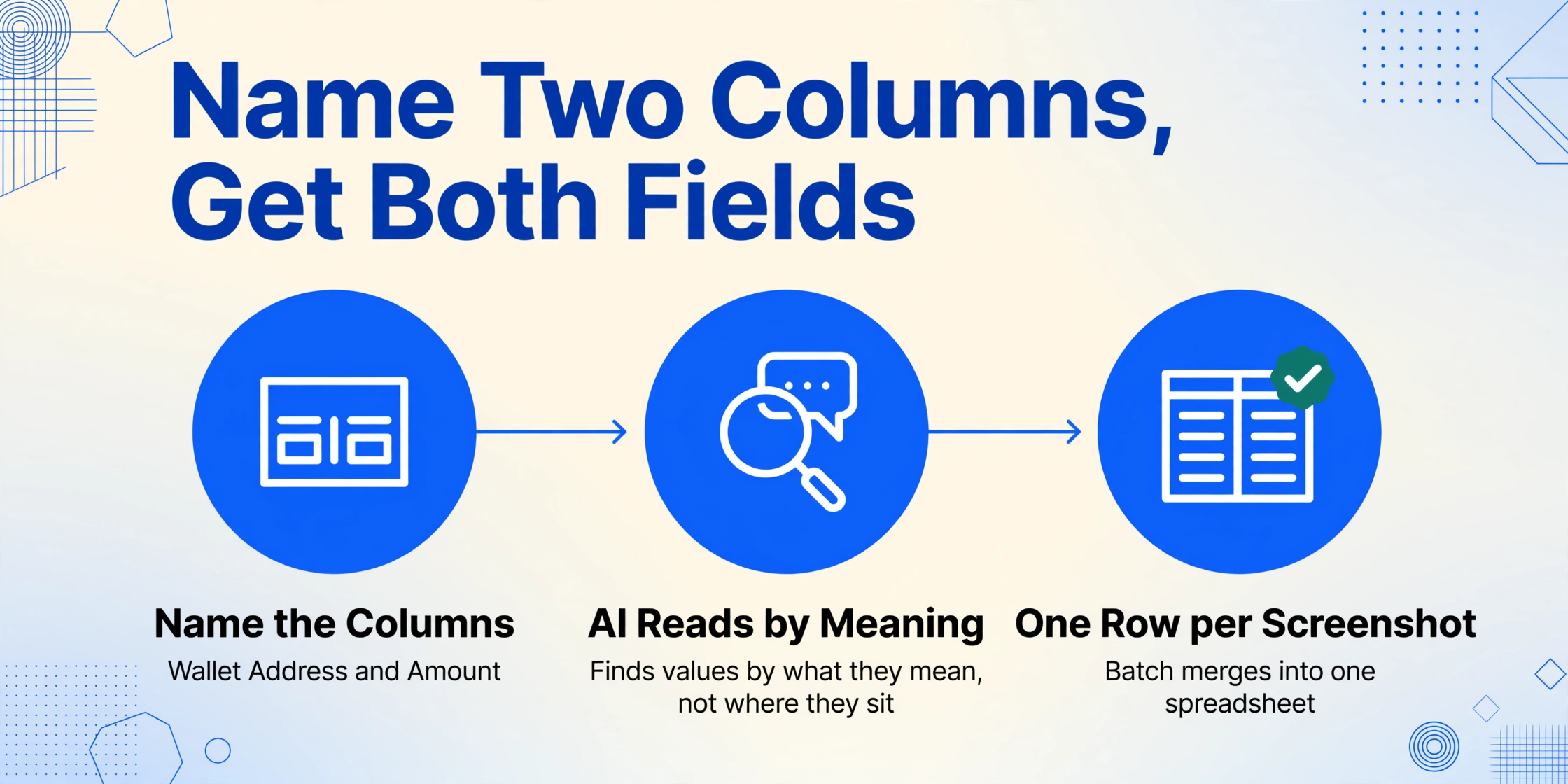
ImageToTable.ai handles this through Custom Column Extraction. You do not upload a Telegram screenshot and hope the tool figures out what you need. You name the columns: Wallet Address and Amount. The AI reads the screenshot, locates the text that matches those semantic descriptions, and extracts them into a table.
This is a fundamentally different workflow from traditional data extraction tools, which require you to draw bounding boxes or define parsing rules for each chat format. In a Telegram screenshot, the address might appear anywhere in the chat bubble — left-aligned, broken across two lines, preceded by a label or not. The amount could be in the same message or a different one. Custom column extraction bypasses the layout problem entirely because it finds values by what they mean, not where they sit on the page.
When applied across multiple screenshots — say, 15 Telegram wallet addresses shared in a trading group over the course of a week — batch processing merges the results into a single table. Each row shows the address and amount from one screenshot, in the order you uploaded them. No manual keying, no cross-referencing chat history against a notepad.
A few practical notes for clean extraction:
- Crop to the relevant area if the screenshot includes unrelated chat messages above and below. The AI works on the full screenshot but narrower inputs reduce the chance of pulling an address from an unrelated conversation.
- Name the columns as they appear in your use case. "Wallet Address" and "Amount" are natural. If you need the network too, add "Network (ETH/BTC/SOL)" as a column — the AI reads the address prefix and can infer the network.
- Include the full address in the screenshot. If the message is truncated in the chat preview, expand it before screenshotting. The AI can only extract what is visible.
FAQ
Can AI extract any crypto wallet address format from a Telegram screenshot?
Yes. The AI recognizes addresses by their structural patterns — prefix, character set, length — and does not depend on format-specific rules. ETH (0x + 40 hex), BTC (1/3/bc1), Solana (Base58), Tron (T-prefix), and others are identified correctly as long as the full address string is visible in the screenshot.
Will the extracted address keep its original case?
Yes. Visual AI preserves the case of characters as they appear in the screenshot. Unlike traditional OCR, which often normalizes output to lowercase, the AI reads each character in its visual context and retains the original capitalization. This is essential for case-sensitive formats like Solana, Bitcoin P2SH, and Tron.
What if the address is shown as a QR code in the screenshot?
If the screenshot shows a QR code rather than a text string, the address needs to be decoded from the QR code. Our current extraction reads visible text from the image. If the Telegram chat message shows the address and a QR code, the AI extracts the text version. If only the QR code is visible, you would need a QR scanner to decode the address first.
Can I batch-process multiple Telegram wallet screenshots at once?
Yes. Upload multiple screenshots in a single batch, define your columns (Wallet Address, Amount), and the AI processes them together. The results are merged into one spreadsheet, with each row corresponding to one screenshot. This is the primary workflow for anyone handling a volume of wallet addresses from Telegram chats — trading group screenshots, P2P payment confirmations, or records of outgoing transfers.
Can the AI determine the network from the address format?
Partially. The address prefix gives a strong signal — 0x indicates an EVM chain (Ethereum, BSC, Polygon, Arbitrum, etc.), bc1 indicates Bitcoin SegWit, T indicates Tron. However, EVM addresses look the same across multiple chains. If you know the network context from the Telegram chat, you can add a "Network" column and let the AI infer it from the address prefix, or fill it in manually during review.