KakaoTalk Payment Screenshots:
Grab the Amount (금액) and Bank Account Number (계좌번호)
KakaoTalk is where Korea transacts. The same app that handles everyday chats handles the money too — sending 50,000 won to a friend, paying a freelancer, or sharing bank account details for a deposit. When someone sends you a KakaoPay transfer, the confirmation appears as an embedded payment card in the chat. When they type out "은행명: 국민, 계좌번호: 123456-78-901234" in a message, that is the screenshot you save. Neither one is a receipt or an invoice. Both contain the two numbers most people need — the amount (금액) and the bank account number (계좌번호) — and both can be extracted without retyping a single digit.
Key Takeaways
- A KakaoTalk payment appears in one of two forms — a KakaoPay card (₩50,000 in a green-accented rectangle) or a typed message with 은행명, 계좌번호, and 예금주 — and both contain the amount and bank account number.
- Traditional OCR cannot distinguish ₩50,000 on a payment card from a phone number or a quantity mention in an adjacent chat bubble — both are just digit strings to the engine.
- Upload a mix of KakaoPay cards and text messages in one batch with Amount and Bank Account Number columns — the AI reads whichever format appears in each screenshot, populating both fields into one table.
What the KakaoTalk Payment Card Actually Shows
There are two common ways payment-related information appears in a KakaoTalk conversation, and they are visually quite different — which is exactly why treating them as "just a chat screenshot" misses the point.
Scenario one: the KakaoPay transfer card (송금 카드). When someone sends money through KakaoTalk, the app generates a visual card embedded in the chat thread. It shows the amount (금액) in Korean won figures, the sender (보낸분) and recipient (받는분) names, and the transaction time. Below the card, a "Claim" button lets the recipient accept the money into their KakaoPay balance. The card is a self-contained visual component with a distinct background and rounded corners — clearly separate from the text messages around it.
Scenario two: bank account details typed into the chat. The other common scenario is someone typing their banking info directly into a message. A typical example: "은행명: 국민은행 / 예금주: 김철수 / 계좌번호: 123456-78-901234" (Bank: KB Kookmin / Account holder: Kim Cheol-su / Account number: 123456-78-901234). No structured card, no highlighted fields — just plain text in the conversation. The amount may be in the same message or agreed upon separately. Account numbers follow Korean banking conventions — 10–14 digits with hyphens — and the bank name is almost always present alongside them.
Both scenarios share the same core problem for anyone trying to record the transaction: the information is trapped inside a screenshot. The KakaoPay card is not a downloadable receipt — it is a chat component that disappears from the view once the chat scrolls. The bank account message is just a line of text embedded in a longer conversation. In both cases, the only practical record is what you capture on screen.
Why Chat Screenshots Need a Different Approach Than OCR
Traditional OCR tools work well when a document has a predictable layout — an invoice places the total in the bottom-right corner, a receipt has the date at the top. The OCR engine reads all the characters and relies on fixed coordinates to figure out which text belongs to which field. A KakaoTalk screenshot has none of that predictability. The payment card appears in the middle of a chat thread whose length varies every time. The bank account message could be the second message in the conversation or the fiftieth. The surrounding text — emojis, stickers, profile names, timestamps — creates visual noise that a coordinate-based system cannot filter.
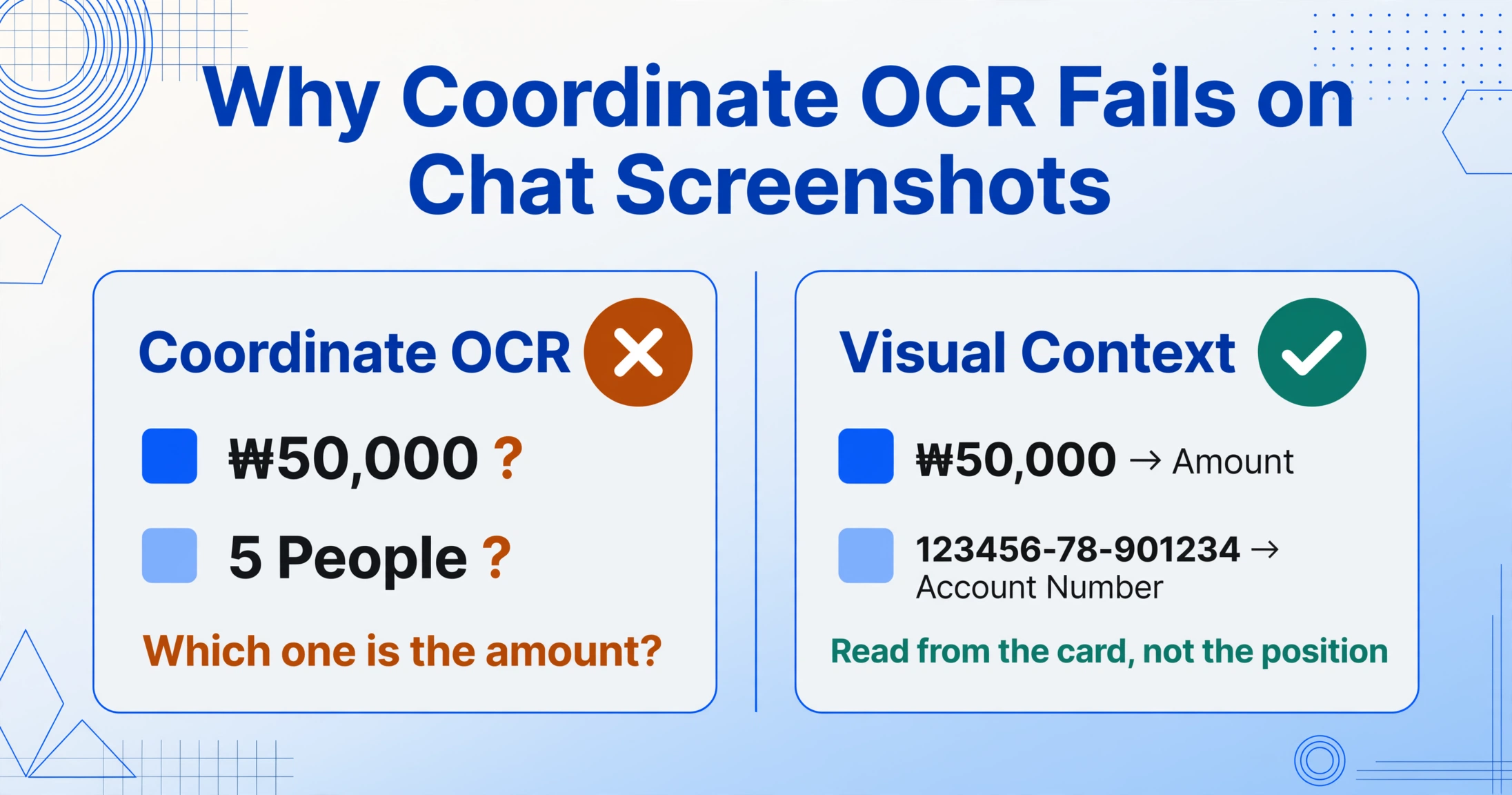
The practical failure mode looks like this: an OCR tool scans a KakaoTalk screenshot containing both a payment card showing "₩50,000" and a text message mentioning "5명" (five people). It returns both numbers, and the user has to decide which is the amount. The same problem applies to account numbers — an 11-digit string next to a phone number, and the OCR cannot tell them apart because it does not understand what either string means.
Visual language models approach the same screenshot differently. Instead of reading all characters by coordinates, a VLM processes the full visual context: "₩50,000" sits inside a rounded card with a distinct background, flanked by a profile photo and a "Claim" button — the AI recognizes this as a payment amount. "123456-78-901234" appears next to "은행명: 국민은행" — it identifies this as an account number. The difference is semantic understanding: the AI asks "what kind of information is this?" rather than "what coordinates does this character sit at?"
This distinction matters especially for KakaoTalk because payments happen inside a visually rich chat environment. Stickers, profile images, Kakao Friends emojis, and chat bubble colors create variety that a template-based system cannot pre-program for. A VLM reads whatever it sees.
Getting the Amount and Account Number Out
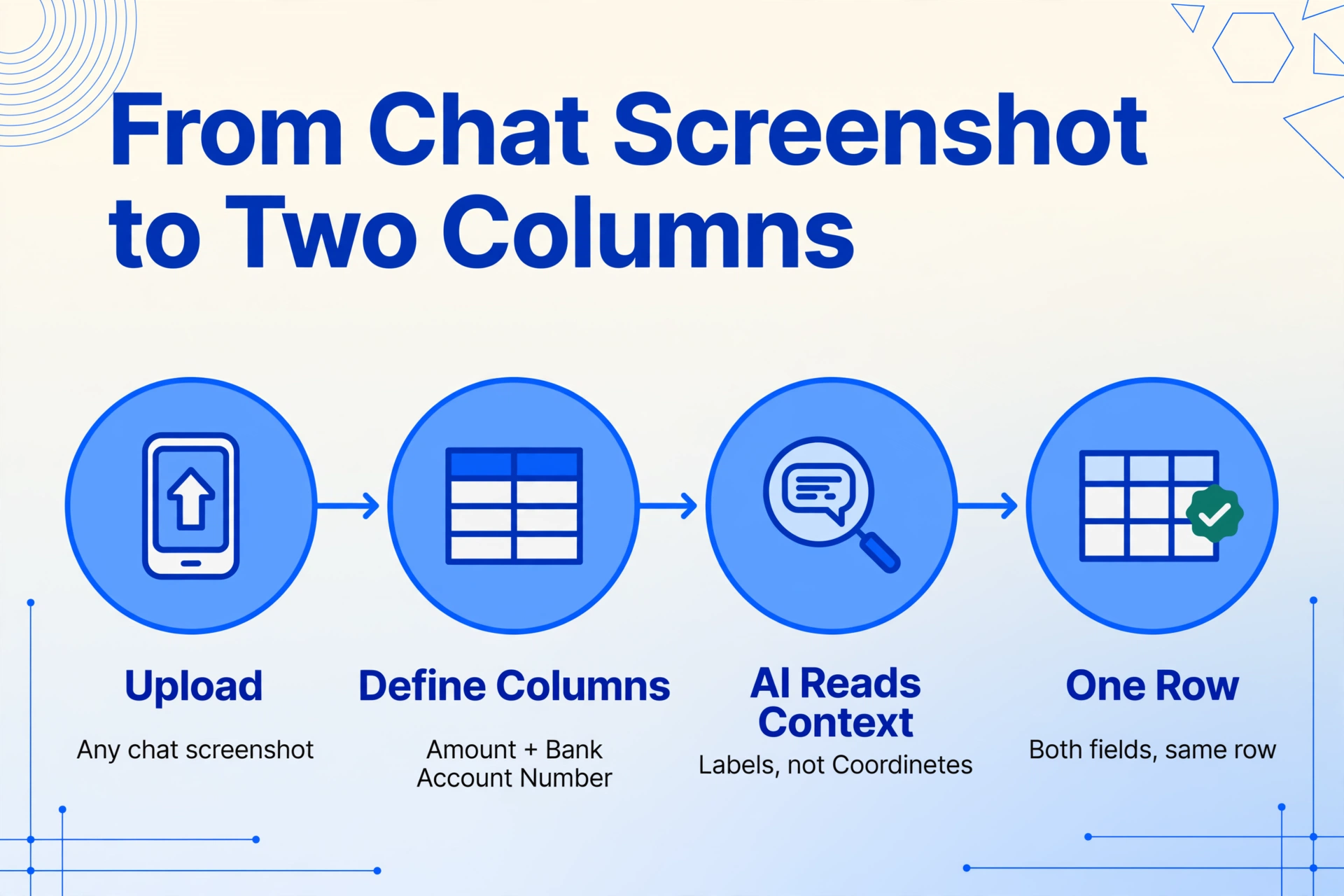
Here is what the workflow looks like. Take a KakaoTalk screenshot and upload it to a tool that supports Custom Column Extraction. Define two columns: Amount and Bank Account Number. That is it — no templates, no training samples, no zone drawing. The AI scans the screenshot and identifies the transfer amount (prefixed with ₩ or the Korean "원" suffix) and the account number (10–14 digits with hyphens, often preceded by "계좌번호"). Both values land in the same row of your output table.
If you have a batch of KakaoTalk screenshots — payment confirmations from multiple clients over a month — upload them all at once. Each screenshot becomes one row. The AI does not rely on the account number appearing at the same position in every screenshot, because in one screenshot it may be the third message and in another the first. It relies on the label and visual context — an approach that works regardless of where in the conversation the information appears. Group buy coordinators hit this batch problem hardest: a single KakaoTalk group buy screenshot thread can hold a payment confirmation for every buyer in the buy.
A few limitations worth stating clearly. If the screenshot cuts off part of the KakaoPay card — for example, only the top half showing the amount but not the full confirmation — the account number or recipient name may be missing from the image, and the AI can only extract what is visible. For bank account numbers typed into chat, the accuracy depends on the screenshot capturing both the label (계좌번호 or 계좌) and the digits together — if only the number string is visible without context, the AI can still identify it as a numeric sequence but with less confidence that it is specifically an account number versus a phone number. These are constraints of the source material, not of the extraction method.
For a broader look at how payment screenshots from different apps compare — including the parallels between KakaoTalk's payment card and LINE's LINE Pay card — see our comparison of LINE chat payment extraction. And for the address and order details that often accompany a payment conversation, the KakaoTalk address and order details guide covers the other half of what chat screenshots typically contain.
What These Two Numbers Let You Do Once They're in Your Sheet
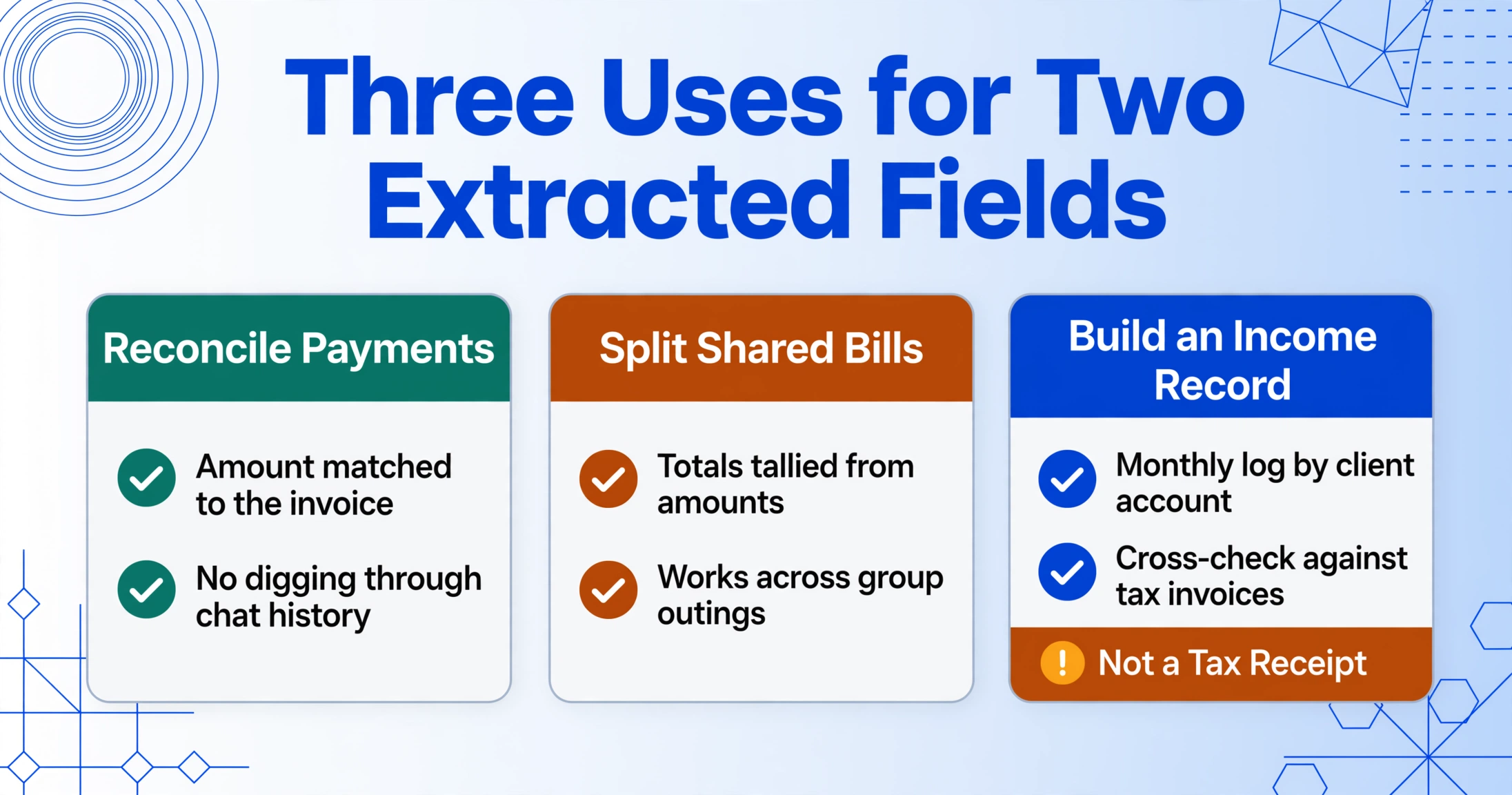
Having the amount and the bank account number in a spreadsheet row is more useful than it sounds, because these two fields together cover the most common downstream needs.
Recording a received payment. Freelancers and small business owners in Korea often receive payments via KakaoPay, followed by a message with the client's account number for future transfers. Having both fields extracted means reconciling against an invoice without digging through chat history each time.
Splitting shared expenses (n빵). KakaoTalk is where group dinner bills, trip expenses, and shared purchases get resolved — someone pays and sends the total to the group chat, then everyone else transfers their share. If you are the one tracking who paid what across multiple group outings, a spreadsheet with extracted amounts lets you tally totals without re-reading every chat message. The account number matters less here, but the amount is the critical field.
Building a payment record for tax or bookkeeping. For freelancers operating through KakaoTalk — common in Korea's gig economy — a monthly log of amounts received, matched against each client's bank account, provides a verifiable income trail. This is not a tax receipt (Korea requires a 세금계산서 — tax invoice — for official deductions), but it is the raw data to cross-check against your incoming tax invoices.
What connects all these scenarios is volume. One screenshot is easy to handle manually. Ten or twenty a month — from different clients, group outings, and amounts — is where the friction compounds. Each screenshot requires opening the image, reading the numbers, typing them into a spreadsheet, and verifying you did not transpose a digit in the account number (a genuine risk with Korean bank account formats that include dashes). An extraction workflow eliminates the transcription step entirely.
For a side-by-side look at how LINE handles its payment confirmations — including the Japanese-style payment card with 支払方法 (payment method) and 取引ID (transaction ID) — see the LINE chat payment screenshot guide. And for the broader concept of how payment screenshots from messaging apps can be extracted like structured data, the WeChat Pay article covers the hub-level argument: a payment screenshot is not a receipt, but the amounts come out cleanly.
FAQ
What if the screenshot is entirely in Korean — can the extraction still work?
Yes. Visual language models process text in whatever language it appears — Korean characters (Hangul) are handled natively, not through a separate OCR pipeline. The amount field is expressed as a numeric value with the ₩ symbol or the Korean "원" suffix, and the bank account number is a numeric string — both are language-independent fields that the AI identifies by visual context and surrounding labels. The bank name (은행명) and account holder name (예금주) will be extracted as written in Korean, which is exactly what you want for recordkeeping — no translation needed.
Does the extraction work differently for the KakaoPay card versus a text message with bank details?
The underlying mechanism is the same, but the visual cues differ. For the KakaoPay card, the AI identifies the amount by the card's distinct visual container — a rounded rectangle with a colored header — that separates it from surrounding chat messages. For bank account details typed in text, the AI relies more heavily on the labels (계좌번호, 은행명) that precede the digits. Both approaches use semantic understanding rather than coordinates, so they work regardless of where in the chat the information appears. If you are extracting from a text message, making sure the screenshot includes both the label and the number together gives the AI the strongest signal.
Does this work for all Korean banks?
Yes. Korean bank account numbers follow a consistent format regardless of the bank — typically 10–14 digits with one or two hyphens. Whether the account is with KB Kookmin, Woori, Shinhan, Hana, NongHyup, or KakaoBank, the numeric structure is similar, and the bank name is almost always included alongside the account number in the chat message. The AI does not need to know which bank the account belongs to — it identifies the string as an account number by its length, digit grouping pattern, and the label that precedes it.
Can I process multiple KakaoTalk screenshots at once?
Yes. Upload all the screenshots — payment cards, bank account messages, or a mix of both — and the AI creates one row per screenshot in a single output table. Screenshots that contain only a payment card with no account number leave that cell empty. This is especially useful for consolidating a month of KakaoTalk payment screenshots at month-end for reconciliation or recordkeeping.
Is this just OCR with better training?
No. Traditional OCR reads all visible text and outputs it as a block — it cannot distinguish the amount from a phone number without a template telling it where each field sits. A visual language model reads the screenshot as a whole and identifies fields by what they mean, not where they appear. That is why it works on a KakaoTalk payment card without any setup — semantic understanding is not a convenience feature for chat screenshots, it is a requirement.