Read a Korean Address and Order Details
From a KakaoTalk Chat Screenshot
A customer messages you on KakaoTalk with their order — "김치찌개 3개, 불고기 2인분, 주소는 서울시 강남구 테헤란로 123입니다." The address, the items, and the quantities are all there in a single chat bubble mixed with Hangul and numerals. You screenshot it to keep a record. Now you have an image that contains everything you need — but the address itself might be written in one of two coexisting Korean address systems, and the product names and quantities are embedded in conversational Korean text that no traditional OCR engine was designed to parse.
Key Takeaways
- A Korean address in KakaoTalk can be written in either 도로명주소 (road name: 테헤란로 123) or 지번주소 (land lot: 역삼동 123-45) — both systems coexist, and your customer uses whichever they know.
- One KakaoTalk order screenshot can contain three different visual formats — a plain-text address bubble, a green-accented KakaoPay card, and a KakaoMap location card — each carrying different pieces of the order.
- Define Shipping Address, Order Items, and Payment Amount as columns — the AI reads all three visual formats in one pass, placing each value into its correct column without mixing chat text with card data.
What a KakaoTalk Order Screenshot Actually Contains
KakaoTalk is South Korea's dominant messaging platform, used by more than 46 million people in a country of 52 million. When a Korean customer places an order with a small business — a restaurant placing a bulk food delivery, a reseller ordering beauty products, a supplier confirming raw materials — the entire transaction typically happens inside KakaoTalk. The customer sends their address, lists the items they want, and often also pays through KakaoPay, generating a styled payment confirmation card that appears in the same chat thread. Korean group buys (공동구매) run entirely on this chat-thread pattern: one organizer collects items and quantities from dozens of buyers, which makes KakaoTalk group buy screenshots the de facto order list.
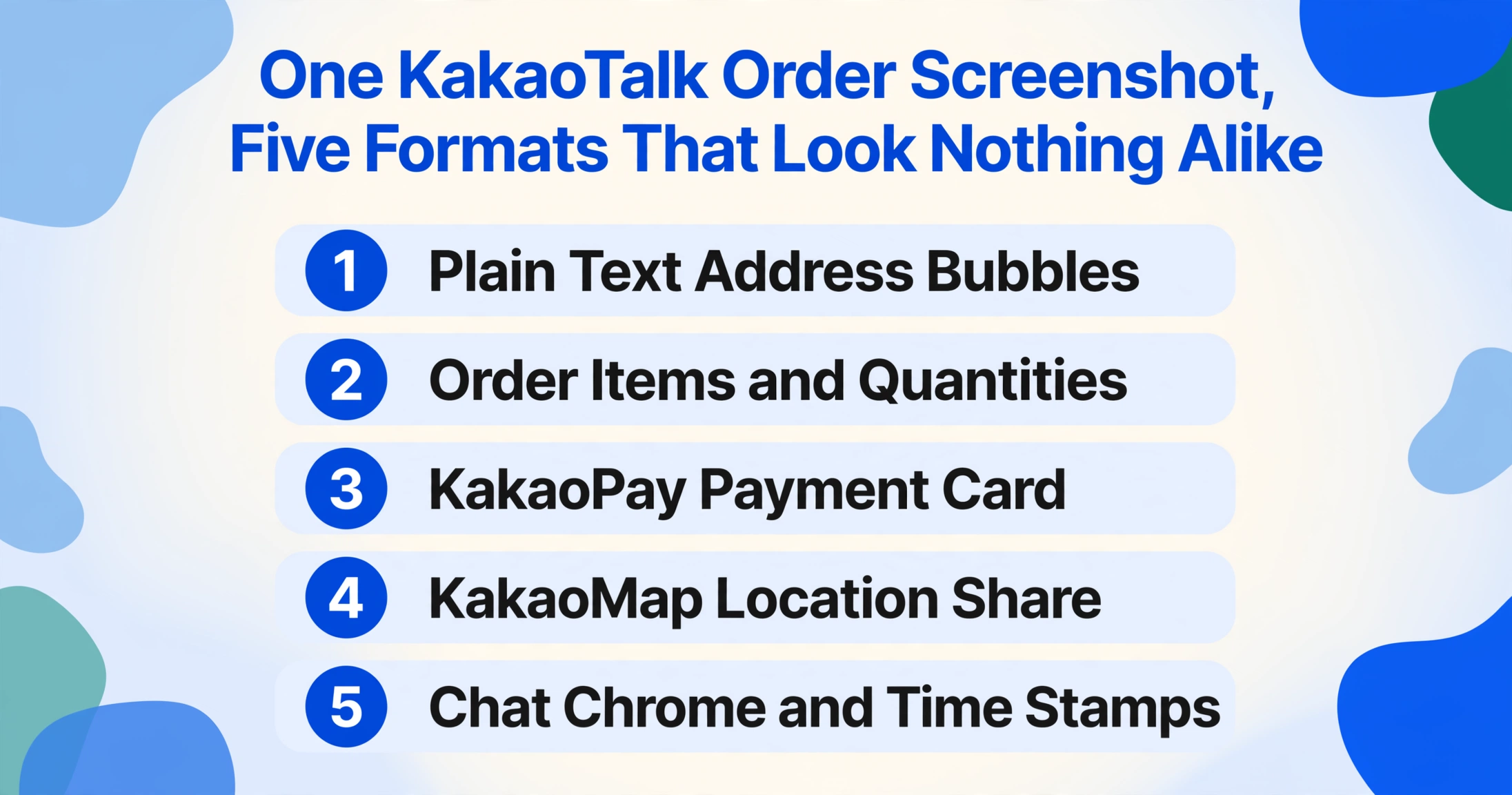
A single screenshot of this conversation can contain:
- Plain text chat bubbles with the customer's address in Korean, written in either the road name system (도로명주소) or the land lot system (지번주소)
- Order details — product names (상품명), quantities (수량), and optionally prices and special requests — all in conversational Korean
- A KakaoPay payment card — a visually distinct UI card with a green accent, showing the total amount paid, the merchant name, and a transaction status badge
- A KakaoMap location share — a preview card showing a map thumbnail and address text when the customer shares their location through the app's built-in map service
- Visual chrome — the chat room title bar showing the other person's name, the "KakaoTalk" branding, time stamps, read receipts, and the message input area
Each of these elements has a different visual format — plain text, styled card, map thumbnail — yet the data you need (the address and the order details) cuts across all of them. A traditional OCR tool reads the entire image as one block of text, producing a raw string of mixed Hangul, numerals, and UI labels that you then need to manually sort through. The challenge is not that the address is hard to read — it is clearly written in Korean. The challenge is picking it out from everything else on screen.
The Dual Address Problem: Street Name (도로명주소) vs Lot Number (지번주소)
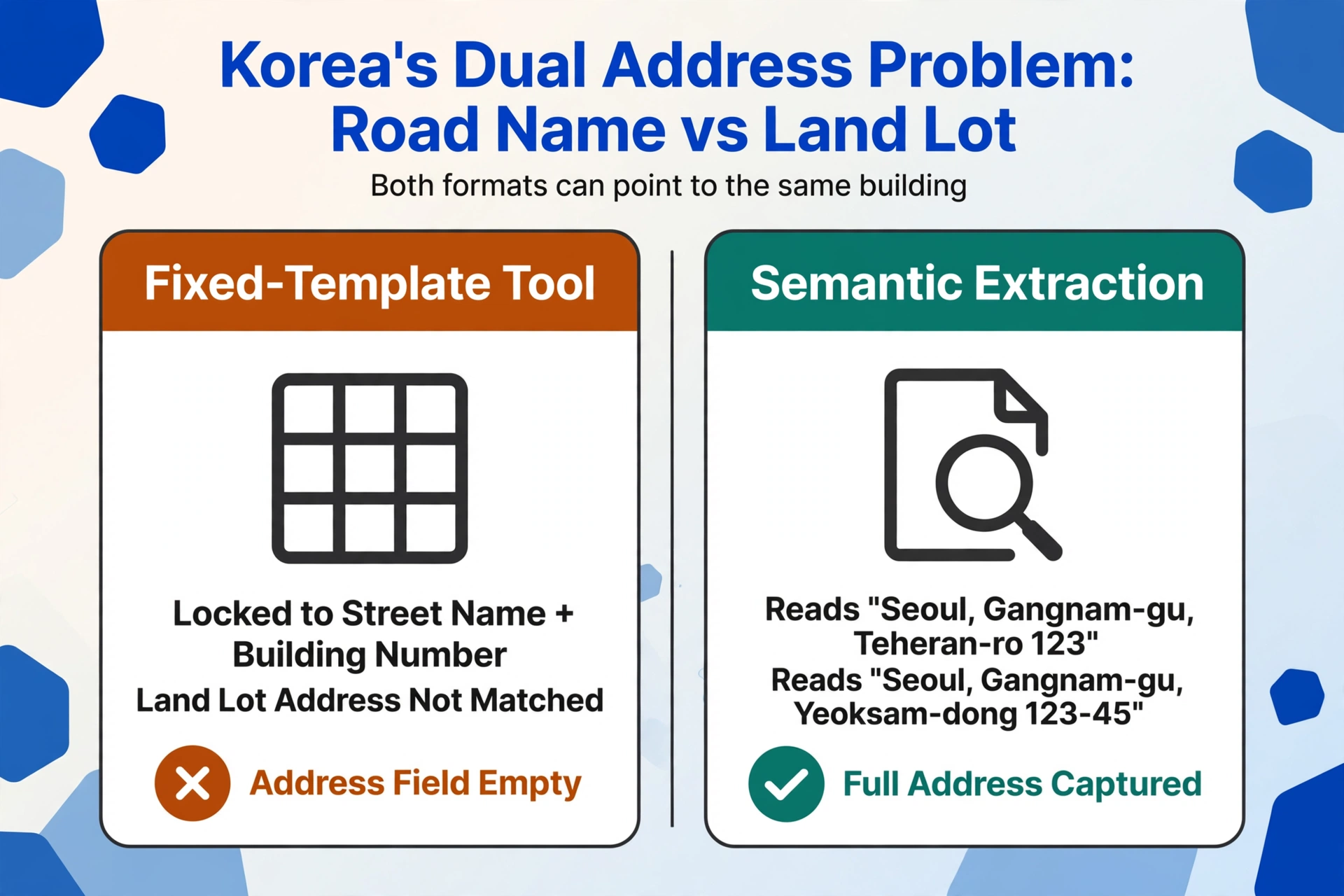
South Korea is one of the few countries in the world where two address systems operate side by side. The official system is the Road Name Address (도로명주소, Doro-myeong-juso), introduced in July 2011 and fully adopted by January 2014. Under this system, addresses follow a logical street-based format: province or city → district → street name → building number. A typical road name address looks like this:
서울특별시 강남구 테헤란로 123
(Seoul, Gangnam-gu, Teheran-ro 123)
But the older Land Lot Address (지번주소, Jibeon-juso) remains in widespread use. This system is based on land parcel numbers rather than street names, and it produces addresses that look completely different:
서울특별시 강남구 역삼동 123-45
(Seoul, Gangnam-gu, Yeoksam-dong 123-45)
Both addresses can refer to the exact same building. Naver Maps and KakaoMap display both versions side by side for any given location. In KakaoTalk chat, a Korean customer might send their address in either format — whichever they are more comfortable with or whichever is listed on their official documents. One person writes "서울시 마포구 서교동 456-7" (land lot), while another writes "서울시 마포구 와우산로 29길 45" (road name) for the same neighborhood.
This dual-system reality creates a problem for any extraction method that expects a single address format. A template-based tool configured to look for "Street Name + Building Number" will fail to recognize a land lot address when it encounters one in a screenshot. Conversely, a tool programmed to extract "동(Dong) + 번지(Beonji)" number patterns will miss road name addresses. The customer is not going to standardize their address format for you — they just type it however they know it. An extraction method that understands both systems by their semantic structure, rather than by their visual layout alone, is the practical way out of this bind.
Three Common KakaoTalk Order Scenarios
The visual makeup of the screenshot changes depending on how the customer placed their order and whether a payment was made through KakaoPay. Each scenario presents slightly different extraction considerations.
Scenario 1: Address and Order Details in Plain Chat Bubbles
The most common scenario: the customer types their address and order directly into the chat as regular text messages. The conversation might look like this:
Customer: "네, 주문할게요. 김치찌개 3개, 제육볶음 2개 주세요."
(Yes, I'd like to order. 3 kimchi jjigae, 2 jeyuk bokkeum please.)
Customer: "주소는 경기도 성남시 분당구 정자동 178-3번지 203호입니다."
(The address is 203-ho, 178-3 Jeongja-dong, Bundang-gu, Seongnam-si, Gyeonggi-do.)
The address appears in the land lot format (정자동 178-3) with a unit number (203호). The order items are listed separately in a preceding message. Both pieces of information are in plain text — no cards, no map shares — but they are in conversational Korean, not in labeled form fields. A traditional OCR tool would output "네, 주문할게요. 김치찌개 3개, 제육볶음 2개 주세요." as one continuous string alongside the address text, leaving you to separate the order items from the address manually.
With column-based semantic extraction, you define two columns — Shipping Address (배송지) and Order Items (주문 상품) — and the engine reads the screenshot knowing that it is looking for two distinct pieces of information within the same chat text. It finds the address by recognizing the Korean address structure (province → city → district → lot number → unit) and identifies the order items by their numeric quantity markers and product name patterns, outputting each into its correct column without mixing them.
Scenario 2: Address With a KakaoPay Payment Card
KakaoTalk is deeply integrated with KakaoPay, Korea's leading digital wallet. When a customer pays through KakaoPay within the chat, a payment confirmation card appears directly in the conversation. The card has a distinct visual identity — a white or light background card with Kakao's signature yellow-green accent, showing the total amount in large bold text, the merchant name, a transaction timestamp, and a status badge ("결제완료" — payment complete).
This card is a self-contained UI element that sits between the text bubbles. It contains the payment amount and transaction confirmation, but it does not contain the shipping address or the order items. Those remain in the text bubbles above or below the card. The screenshot now contains two completely different visual formats — plain chat text and a styled payment card — in the same image.
A column-based extraction engine built on visual AI interprets the entire screenshot as a composite scene. It recognizes the payment card as "a KakaoPay confirmation" and extracts the amount into a Payment Amount (결제 금액) column if you define one, while separately reading the text bubbles for the address and order information. Traditional OCR, by contrast, reads the card's text and the chat text into a single undifferentiated stream — "결제완료" from the card label appears right next to the address in the output.
This is the same principle that applies to payment screenshots on other platforms: the payment confirmation and the transaction details are visually distinct elements in the image, and the extraction method must recognize each one's role rather than reading all text as equal.
Scenario 3: Address Shared via KakaoMap Location Card
KakaoTalk allows users to share their current location or a pinned address through KakaoMap. When someone taps the location share button, a preview card appears in the chat showing a small map thumbnail, the address in text below the map, and the name of the location if the user pinned a named place. The address text on this card is rendered in a small font inside a compact preview — and it may be written in either address format depending on which system the map interface displays.
This scenario presents a harder extraction case. The address is present in the image, but it is rendered in a small font size within a card that takes up only a portion of the screenshot. If the text on the map card is partially cut off by the preview boundaries, or if the screenshot was taken before the map card fully loaded, the visible address may be incomplete. Additionally, KakaoMap defaults to showing the road name address in its preview, so even if the customer knows their address as a land lot number, the shared card is likely to show the road name equivalent — which means the format may differ from what the customer typed in previous messages.
For extraction purposes, the KakaoMap card is still readable as long as the address text is visible and not truncated. Define the column as you would for a text-bubble address, and the engine reads the text wherever it appears in the image — whether inside a chat bubble or on a map card. The risk is truncation: if the screenshot captures only the upper half of the map card, the address line at the bottom may be cut off. A full-height screenshot that includes the entire card from top to bottom avoids this issue.
How Semantic Extraction Handles Korean Addresses
The key to working with KakaoTalk order screenshots is the same principle that applies to every chat screenshot extraction scenario: you do not need to tell the engine which address format to expect or where on the screen to look. You define the columns you want — Shipping Address (배송지), Order Items (주문 상품), Quantity (수량), Payment Amount (결제 금액) — and the AI reads each screenshot as a complete visual scene, locating the data for each column by understanding what it means and where it typically appears in a KakaoTalk conversation.
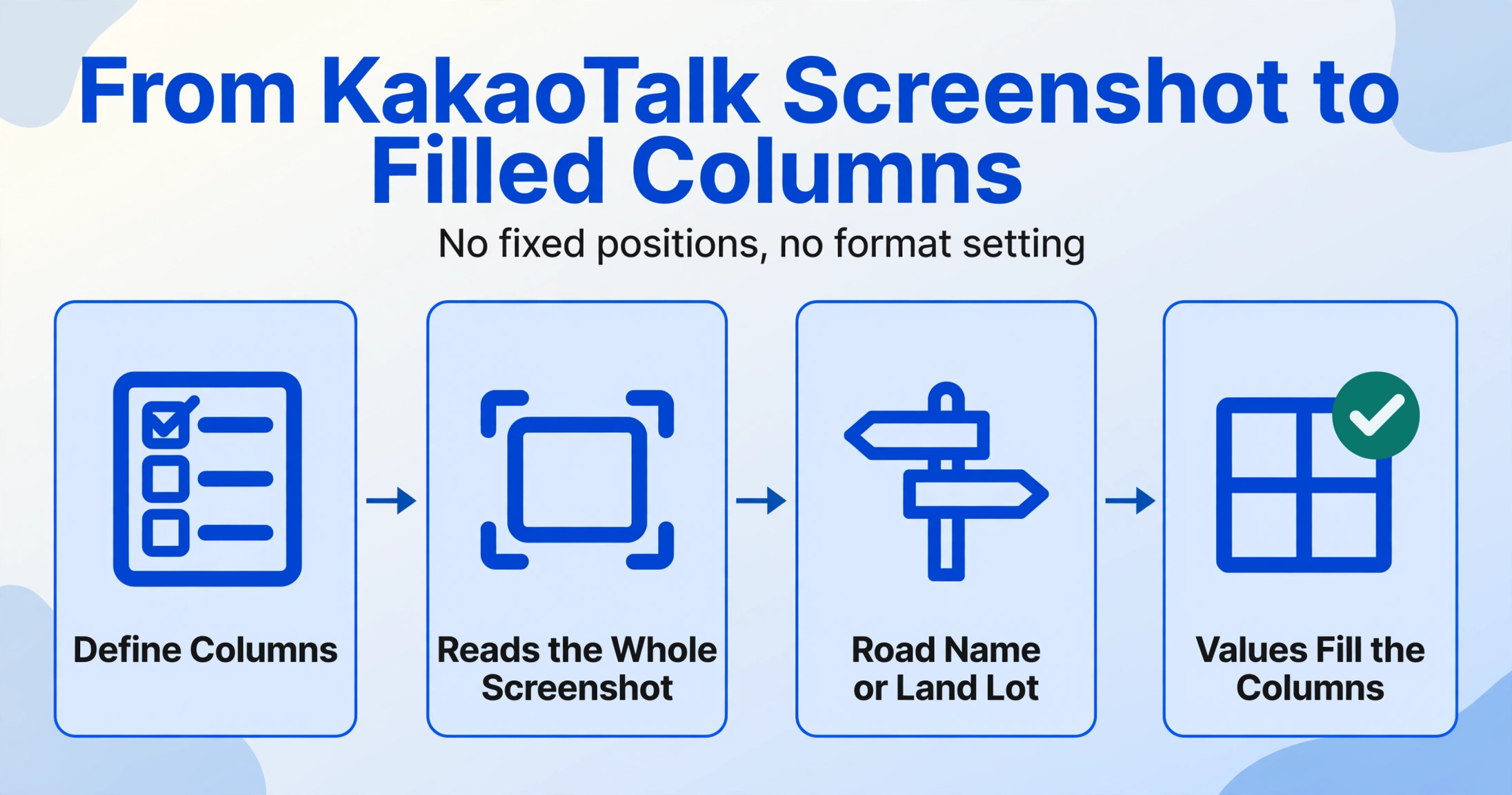
This is fundamentally different from template-based or position-based extraction. A traditional approach would require you to specify: "the address is in the chat bubble, the amount is in the green payment card, the items are in the preceding message." Any deviation — a customer who sends items first and address second, a KakaoPay card that appears above the item list instead of below it — breaks the preset layout. Semantic extraction does not depend on fixed positions or page layouts because it interprets content, not coordinates.
For Korean addresses specifically, this means the engine can recognize both the road name format ("서울시 강남구 테헤란로 123") and the land lot format ("서울시 강남구 역삼동 123-45") as addresses, because both follow internal structural patterns that the model has learned (administrative region hierarchy + numeric identifiers). It does not need to be told which one to expect — it reads whichever format the customer used and places the result into the "Shipping Address" column.
This blog covers the order-address use case. If your KakaoTalk screenshots also include payment data — the transfer amount (송금액) on a KakaoPay card, a bank account number (계좌번호), or sender metadata — the KakaoTalk screenshot extraction tool reads those fields in the same pass, using the same column-based approach.
The same column-based approach applies when customers place orders on other messaging apps — the extraction reads by meaning rather than by platform. The method that pulls a Korean address from KakaoTalk works just the same on WhatsApp Business order chats, iMessage, LINE, or WeChat: define the columns once, and the AI reads whichever address format the customer typed.
What You Can Extract and What the Limits Are
For a typical KakaoTalk order screenshot, a well-defined column set gives you the following data reliably:
| Column | Example Output | Reliability |
|---|---|---|
| Shipping Address (배송지) | 경기도 성남시 분당구 정자동 178-3번지 203호 | High — when visible in chat text |
| Order Items (주문 상품) | 김치찌개 3개, 제육볶음 2개 | High — product names with quantities are structurally distinctive |
| Quantity (수량) | 3, 2 | High — numerals next to product names |
| Payment Amount (결제 금액) | ₩28,500 | High — when KakaoPay card is visible in screenshot |
| Customer Name (고객명) | From chat header or sender label | Moderate — depends on what the screenshot frame includes |
There are limitations worth stating clearly. If the address appears only inside a KakaoMap location share card and the card text is truncated in the screenshot, you will get a partial address. If the customer's order details are spread across multiple consecutive messages and the screenshot captures only the last three bubbles, the full order list may not appear. If the customer sends address and order info in separate messages with unrelated chat in between, the result may include filler text in the same column if it is structurally ambiguous.
These are visual capture limitations, not extraction limitations. The solution for all of them is the same: take the screenshot wide enough to include all relevant messages, and define columns that match the data you actually need. The AI works with what the image contains — it does not hallucinate missing data.
Frequently Asked Questions
Can I extract both the Korean address and an English-romanized version from the same screenshot?
The extraction engine reads the text as it appears in the image. If the customer typed their address only in Korean (Hangul), that is what the engine will extract. It does not generate romanized versions — that would be a translation step, not extraction. If you need English output, the customer must have typed the address in English, or you add a post-processing step to romanize the extracted Korean address separately.
What if the address includes an apartment building number (동) and unit number (호)?
Korean apartment addresses typically end with "XX동 XX호" (building number and unit number). The extraction engine reads these as part of the full address string. If you want them in separate columns, define distinct columns such as "Building (동)" and "Unit (호)" — the engine recognizes 동 and 호 as structural address suffixes and can split them accordingly. An address like "102동 304호" would output "102" under Building and "304" under Unit.
Can I extract KakaoPay payment data and the shipping address in the same batch run?
Yes. Define columns for both "Payment Amount (결제 금액)" and "Shipping Address (배송지)" in the same column set. The engine processes the screenshot once and populates both columns — the payment amount from the KakaoPay card and the address from the chat bubble text. This works within a single screenshot that contains both elements, and it also works across a batch of mixed screenshots where some contain payment cards and others do not. The payment column will be blank for screenshots that lack a visible KakaoPay card.
How do I handle screenshots from KakaoTalk's dark mode vs light mode?
The extraction engine reads text content, not background color. Dark mode and light mode both use the same font family, message layout, and chat bubble positioning — only the background and text colors invert. As long as the text is legible (high contrast against the background), the engine extracts the same content from either visual theme. Screenshots captured in low-light conditions with reduced contrast between text and background may be harder to read regardless of theme.
What if the address is written in a mix of Korean and Chinese characters (한자)?
Some older Korean addresses or official building names include Hanja (Chinese characters) alongside Hangul, particularly in land lot addresses or historical district names. The extraction engine reads characters by visual recognition, not by a preloaded dictionary — it outputs whatever characters it sees on screen. A mixed script address like "종로구 慶雲洞 89-1" will be extracted with the Hanja characters included exactly as they appear in the screenshot. If you want only Hangul output, post-processing is required.
A KakaoTalk order screenshot is not a form, not an invoice, and not a structured document. It is a conversation — one where the address might be written in either of Korea's two coexisting addressing systems, the order details are mixed into conversational Korean, and the payment confirmation appears in a completely different visual card. The extraction method that works here is the same one that works across chat screenshots from any platform: define the fields you need, and let the AI locate each piece of data by understanding what it means within the visual context of the conversation.