Pull a Japanese Address
and Order Details From a LINE Chat Screenshot
The address arrives as a LINE message — a chat bubble containing a block of kanji, Arabic numerals, and the distinctive postal mark (〒) that begins every properly formatted Japanese address. For thousands of small Japanese businesses that take orders through LINE, this is how delivery information enters their workflow: one screenshot at a time, copied by hand into a shipping label or a ledger.
Key Takeaways
- A Japanese address in LINE uses the 〒 postal mark as its anchor, followed by prefecture, city, block, building name, recipient, and phone — all in mixed kanji, katakana, and numerals within one chat bubble.
- Traditional OCR reads 東京都渋谷区渋谷1-2-3 as characters but cannot label which part is the prefecture and which is the building — it sees text, not address structure.
- Define Postal Code, Prefecture, City, Building, Recipient, and Phone as columns — upload 20 LINE order screenshots at once, and each becomes one row with every field filled from the same chat message.
Why LINE Chats Become Order Forms in Japan
LINE is Japan's most widely used messaging platform, with roughly 96 million monthly active users in a country of 125 million. For small retailers, freelance tradespeople (一人親方), neighborhood bakeries, and craft sellers, LINE is not just how they talk to customers — it is how they take orders. A customer messages "Aを3つ、Bを2つください。住所はこれです" ("Three of A, two of B please. Here's my address"), attaches a note or just types the details, and the order is placed. No website, no order form, no shopping cart. At group-buy scale, one thread holds dozens of those messages, and LINE group buy chat screenshots become the order ledger.
The business owner then reads the address from the chat screenshot, copies it by hand into a shipping label system or ledger, and processes the order. When a shop handles 15 to 20 such orders per day — a volume that a single-person operation like a flower shop or a baker quickly reaches — manual address copying becomes the bottleneck in the fulfillment process.
The structure of Japanese addresses adds another layer of difficulty. Unlike Western addresses that typically fit on two or three short lines, a complete Japanese address often runs to six or seven distinct components packed into a single chat message. Each one matters for delivery, and missing or mis-copying any part means the package does not arrive.
What a Japanese Address in LINE Looks Like
A typical address sent through LINE looks something like this:
〒150-0002 東京都渋谷区渋谷1-2-3
メゾン渋谷 101号室
山田太郎
090-XXXX-XXXX
Every component in this block carries specific delivery information, and traditional address parsers expect them in a fixed pattern. Here is what each part means:
| Component | Example | Role |
|---|---|---|
| Postal Code (郵便番号) | 〒150-0002 | The 〒 mark (postal symbol) followed by a 3+4 digit code. This is the entry point for Japan Post's sorting system. |
| Prefecture (都道府県) | 東京都 | One of 47 prefectures. The kanji suffix (都, 道, 府, or 県) marks the administrative level. |
| City & District (市区町村) | 渋谷区 | The municipality followed by the ward or district name within the city. |
| Block & Number (丁目番地) | 渋谷1-2-3 | The chome (丁目), block (番地), and building number (号). Japanese addresses use this hierarchical numbering instead of street names. |
| Building Name (建物名) | メゾン渋谷 101号室 | The apartment or building name (often in katakana or kanji) and room number. |
| Recipient Name (氏名) | 山田太郎 | The full name of the person receiving the delivery, typically family name first. |
| Phone Number (電話番号) | 090-XXXX-XXXX | A mobile number, required by Japanese couriers for delivery coordination. |
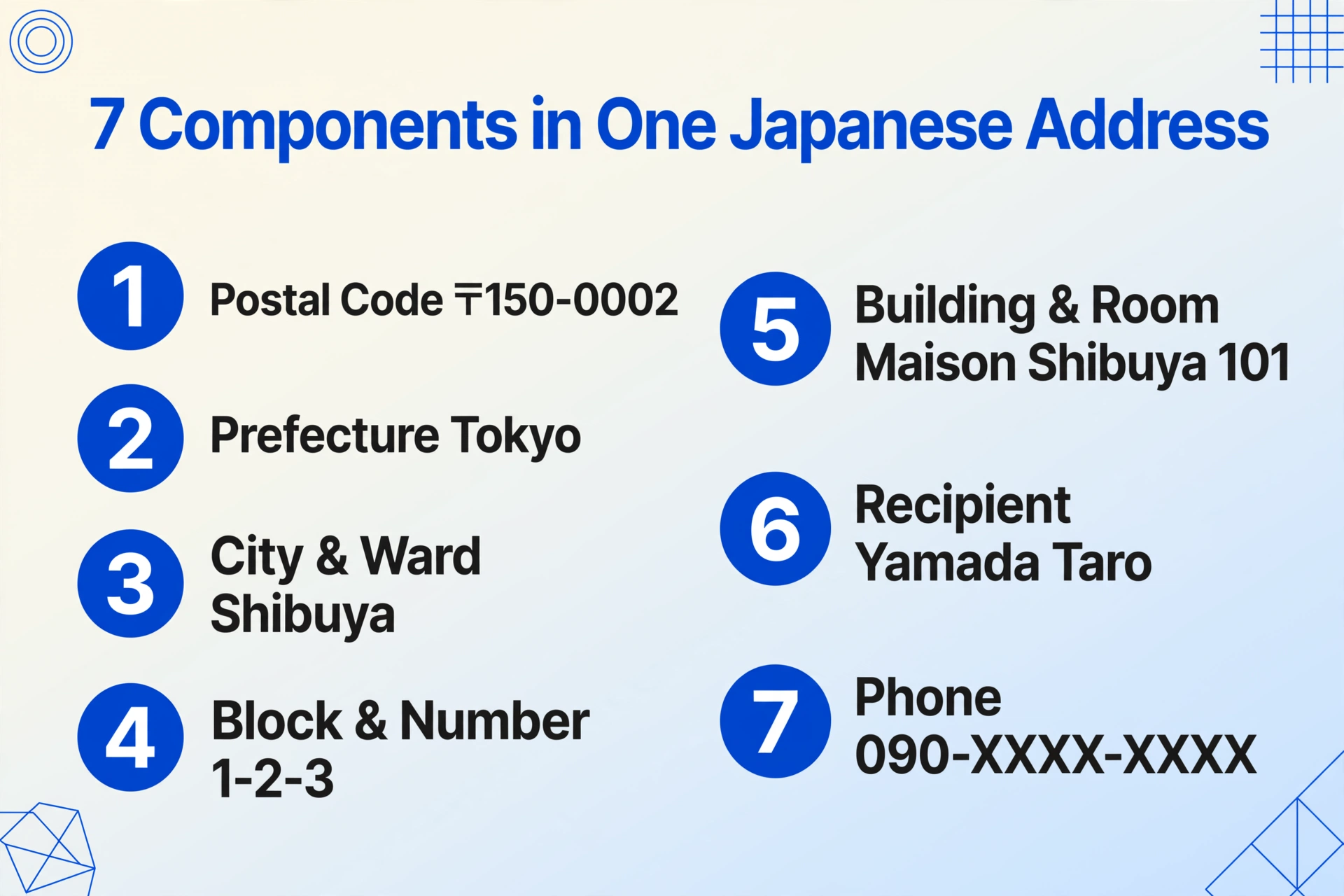
The address can appear in a single block of text, broken across multiple lines in the chat bubble, or even mixed with order-specific details such as item quantities or delivery time preferences. There is no fixed layout because there is no form — the customer simply typed it into a chat.
This variability is precisely where traditional OCR methods break down. The address is not in a labeled field or a standardized position. It is a paragraph of mixed-script text that happens to contain delivery information.
Why Traditional OCR Misses Most of It
Traditional OCR engines — whether Tesseract, cloud OCR APIs, or embedded scanner tools — are designed to read characters, not to understand document structure. When faced with a LINE chat screenshot containing a Japanese address, they encounter three fundamental problems.
First, mixed-script recognition. Japanese addresses blend kanji (東京都, 渋谷区), hiragana (sometimes used for building names), katakana (メゾン), and Arabic numerals (1-2-3, 150-0002) within a single sentence. Traditional OCR models, especially those originally trained on Western document corpora, have uneven accuracy across these scripts. The numeral 〒150-0002 may read the digits correctly but drop or corrupt the postal mark, and kanji characters with many strokes (such as 渋 or 藤) are frequently misrecognized or split into fragments.
Second, no fixed field locations. On an invoice or a standardized form, the postal code lives in a designated box, the prefecture name sits in a labeled row. In a LINE chat bubble, the address shares the same visual space as the customer's order request, a greeting, and sometimes a payment screenshot. A position-based OCR system that looks for "text near the top of the image" will pick up the wrong content entirely.
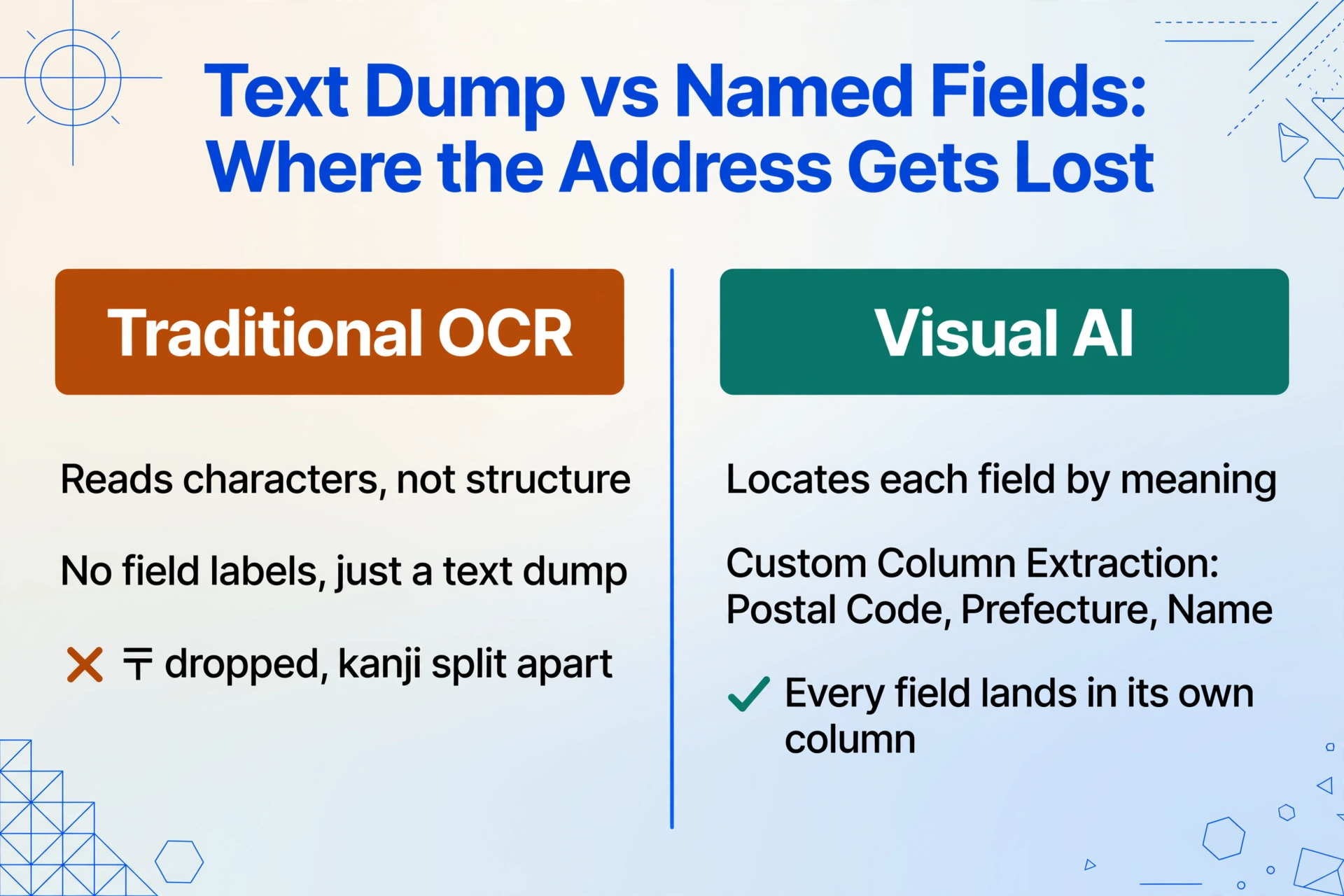
Third, flat text output. Traditional OCR returns a linear string of recognized characters with line breaks. It cannot distinguish "this kanji sequence is the prefecture name" from "this kanji sequence is the building name." The output for the address above would be a single block of text with no semantic labels — leaving the business owner to manually re-parse the OCR output into the correct fields, which defeats the purpose of automation.
How Visual AI Reads the Address as a Structured Field
Visual AI — the technology behind Custom Column Extraction — approaches the same screenshot from a fundamentally different direction. Instead of scanning for characters and outputting a text dump, it interprets the image as a whole, identifying semantic regions and assigning meaning to the text it finds in each region.
You define the fields you want. The AI locates them by understanding what each component is, not by guessing where it should sit on the page.
For a LINE address screenshot, you might define columns like:
- Postal Code (郵便番号) — the AI finds the 〒 symbol and reads the numeric code that follows it
- Prefecture (都道府県) — the AI identifies kanji ending in 都, 道, 府, or 県 as the prefecture name
- City / Ward (市区町村) — the municipality name that follows the prefecture
- Block & Building (番地・建物名) — the chome/block sequence and any building name
- Recipient Name (氏名) — the person's name, typically on its own line or after the address
- Phone Number (電話番号) — the mobile number, recognized by its digit pattern
Several visual cues help the AI correctly segment the address. The 〒 mark acts as a reliable anchor for the start of the address block. The kanji suffixes (都・道・府・県) give the prefecture boundary. The hyphenated number pattern (1-2-3) signals the chome-block-building sequence. And the name, when it appears alone on its own line after the address, is recognized as the recipient.
What matters is that the AI does not need to be told in advance that a Japanese address starts with the largest geographical unit and ends with the smallest. It understands the semantic hierarchy because the language itself provides structural markers that the AI is trained to read.
This is the same paradigm that applies to extracting data from payment screenshots, chat messages in other languages, or any document that lacks a fixed layout. You define the output columns, and the AI finds the matching values by understanding what the text means — not by matching a pre-built template for "Japanese address in LINE." As the hub article on screenshot data extraction from non-table sources explains, the data is present in the image even when the source is entirely unstructured. The difference is that semantic extraction reads the content for what it is, not for where it appears.
The same approach works when the order arrives in a different chat app. The column definitions you set up for LINE — Postal Code, Prefecture, City, Building, Recipient, Phone — apply just as well to an order placed in WhatsApp Business chats, iMessage, KakaoTalk, or WeChat. The address format changes with the country and the app, but the reading method stays the same.
Beyond the Address — What Else Is in That Screenshot
A LINE order screenshot rarely contains just the address. The same chat bubble or a nearby message typically includes the customer's order details, and extracting them alongside the address turns a single screenshot into a complete order record.
バスクチーズケーキ ホール × 2
焼き菓子アソート × 1
合計 4,800円
配送希望: 7/12 午前中
Sample order text that might appear alongside an address in a LINE chat message.
The fields commonly extractable from a LINE order screenshot include:
- Item names (商品名) and quantities (個数) — the products the customer is requesting
- Total amount (合計金額) — if the customer has calculated the total, or a payment screenshot is included
- Delivery date and time (配送希望日時) — often specified as a preferred window
- Special instructions (備考) — notes such as gift wrapping requests or substitution preferences
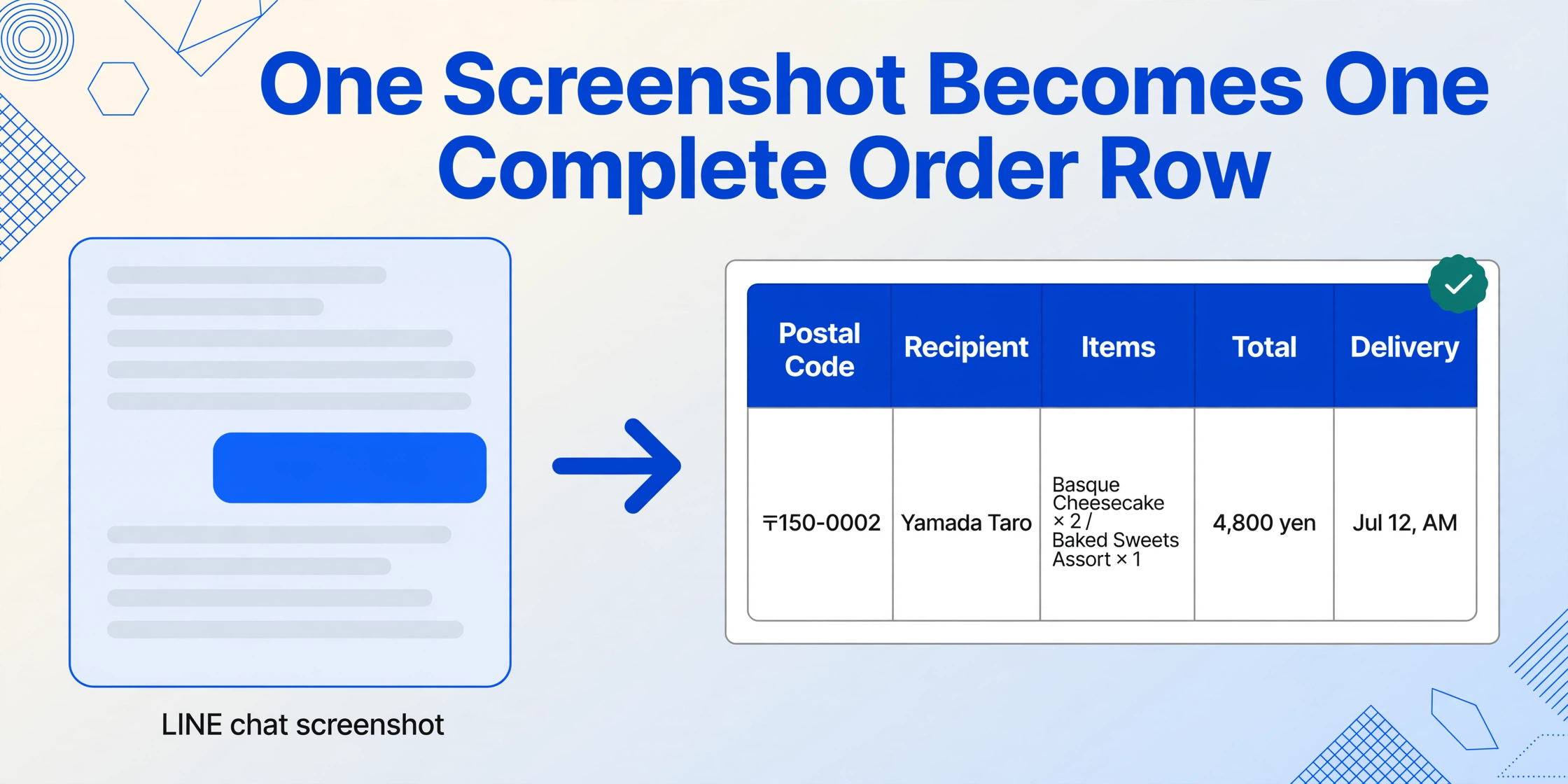
Because all of this information sits in the same screenshot — same chat thread, same image — it can be extracted in a single pass using the same column definitions that capture the address. The result is a row in a spreadsheet that contains the complete order: where to send it, what to send, and when. No manual matching of addresses to order items across different screenshots or messages. For a field-by-field walkthrough, see the LINE chat screenshot order and address extraction guide.
Frequently Asked Questions
Does it work when the kanji is handwritten or partly illegible?
Visual AI reads kanji by recognizing the overall character shape and context, not by attempting to decode individual strokes in isolation. Partly blurred or small kanji (such as 渋 in a low-resolution screenshot) can often still be identified correctly when the surrounding text provides semantic cues. However, severely degraded images where entire characters are unreadable remain a limitation. For the best results, capture the screenshot at the original resolution rather than a compressed version.
Can it distinguish between Taiwan and Japan addresses on LINE?
Yes. Taiwan also uses LINE extensively, but Taiwanese addresses follow a different format. They do not use the 〒 postal mark, they use a 3+3 digit postal code (not 3+4), and the administrative structure is different (counties and townships rather than prefectures and wards). The AI identifies the country by these structural signals and parses the address accordingly. The same Custom Column Extraction setup handles both formats because you define the columns by what you want (postal code, city, district), and the AI finds the matching content regardless of the address system.
What if the address is mixed with other chat messages in the same screenshot?
The AI processes the entire screenshot as a single visual and identifies the address block by its structural properties: the 〒 start marker, the multi-segment hierarchical pattern, and the presence of the phone number at the end. Other chat messages that appear before or after the address do not interfere with recognition. For best results, capture the screenshot closely around the address message rather than including a large scroll of chat history, though the tool can handle both.
Can I batch-process multiple LINE order screenshots at once?
Yes. Upload all the screenshots together in a single batch, use the same column definitions (Postal Code, Prefecture, City, Building Name, Recipient, Phone Number, Item Name, Quantity, Total Amount), and the output is a unified spreadsheet with one row per screenshot. This is where the value becomes clear: 20 LINE order screenshots from the day's chat conversations produce 20 rows of structured data without any per-message manual work.
The address, the items ordered, the delivery window — they are all present in the screenshot that the business owner already has on their phone. The question is whether that screenshot becomes another image in the gallery or the input record for today's fulfillment workflow.
Processing orders through LINE is not going away in Japan. It is the path of least resistance for both the customer and the business. The opportunity is to close the gap between "the customer sent it" and "the address is in the shipping system" — turning the screenshot from a visual reference into structured data that drives the next step in fulfillment, without retyping a single character.