Telegram Group Buy:
Pull Each Person's Name, Item, and Amount From a Chat Screenshot
The group buy organizer posts: "Group buy for Nike running shoes — $45 each. Sizes S / M / L / XL. Reply with your order by 8 pm." Within an hour, 50 replies stack up: "2 pcs size L please — pay later," "1 pc size M — transferred," "3 pcs size S — send me your number." One screenshot now holds fifteen people's names, their items, preferred sizes, quantities, and payment notes — all mixed into a vertical scroll of chat bubbles. The data is all there. But it looks nothing like a spreadsheet.
Key Takeaways
- A group buy with 50 replies takes an organizer 10–15 minutes to transcribe — scrolling through names, counting quantities, untangling payment notes, and typing every row into a spreadsheet.
- OCR flattens the entire screenshot into a single block — "2 pcs size L," "1 size M transfer," "3 size XL" all stitched together with no connection to who sent which order.
- Visual AI reads the chat as a conversation — it groups messages by sender, merges multi-bubble orders from the same person, and outputs one row per buyer in seconds.
What's in a Single Group Buy Screenshot
A Telegram group buy screenshot is not a document. It is not a form, an invoice, or a table. It is a vertical thread of chat bubbles — each one belonging to a different person, each one carrying a fragment of an order. When you screenshot a group buy thread, you are capturing a dozen simultaneous conversations in one frozen frame.
Here is what that frame typically contains:
| Information Layer | Example from a Real Screenshot |
|---|---|
| Organizer's announcement | "Jaket bomber kulit — Rp 350k. Size M/L/XL. Transfer ke BCA 123456 a/n Sari." |
| Member replies (10–30 messages) | "2 pcs size L — udah transfer ya" / "1 size M, ambil di tempat" / "3 size XL, bayar pas ambil" |
| Sender identity | Display name or username above each chat bubble — @rudi_90, @sari_wati, Budi Santoso |
| Payment notes | Scattered through replies — "transfer," "pay later," "ambil di tempat" (pick up on site) |
The information is threaded by person, not by field. Each person's name, item choice, quantity, size, and payment intent are spread across one or more chat bubbles. A traditional tool that reads text left to right, top to bottom would output a block of mixed-up replies — it would have no way of knowing that "2 pcs size L" belongs to the person who sent it, not the person above or below.
Why Chat Text and Spreadsheet Rows Are Different Things
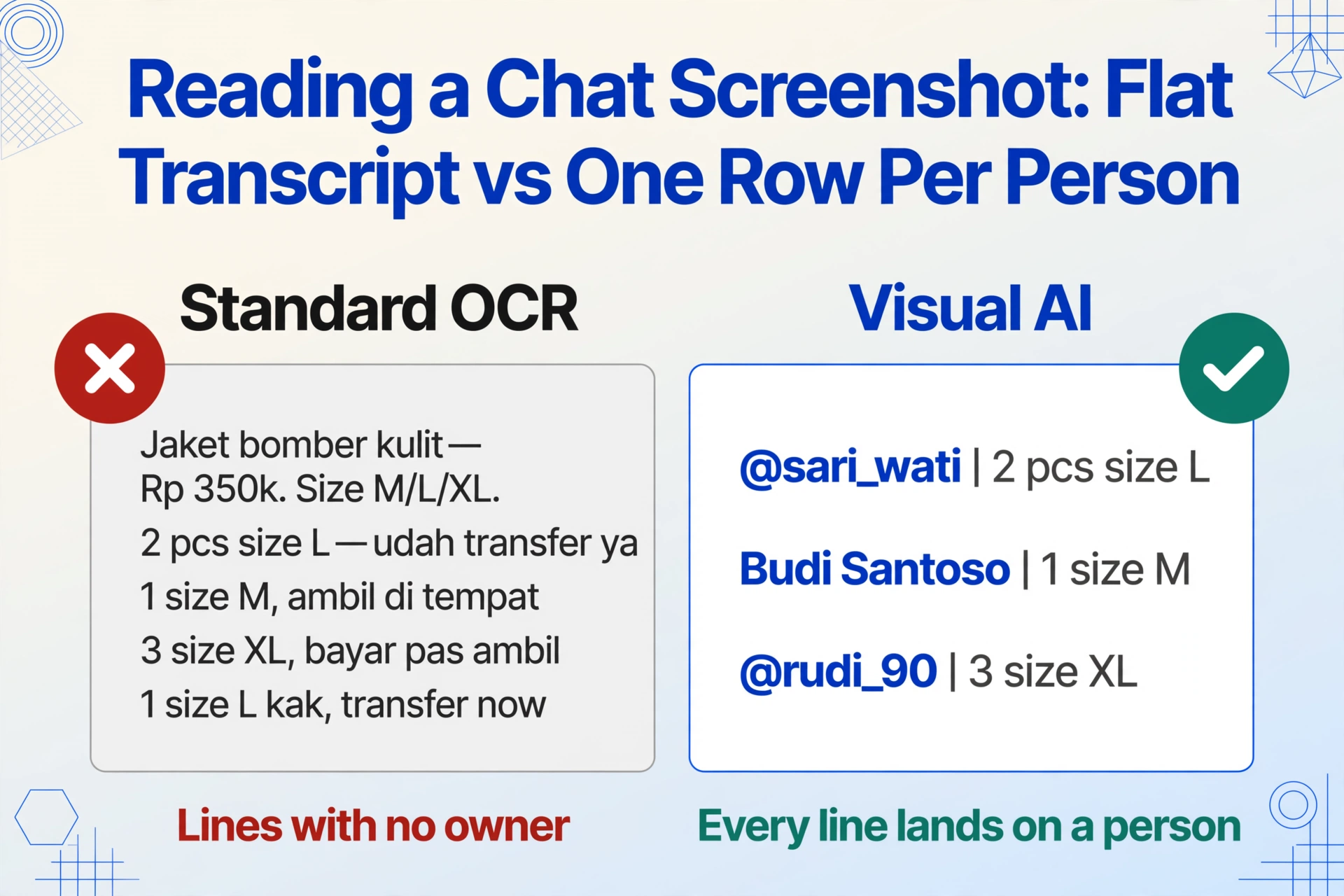
The gap between what the screenshot shows and what the organizer needs is not about missing data — it is about structure. The screenshot has all the information required to fulfill the orders. But the format (chat bubbles in a vertical thread) and the output format (spreadsheet rows, one per person) are completely different things.
Standard OCR treats the screenshot as a single page of text. It reads each line in sequence and dumps everything into a flat transcript:
// OCR output — flat, no structure
"Jaket bomber kulit — Rp 350k. Size M/L/XL. Transfer ke BCA 123456 a/n Sari."
"2 pcs size L — udah transfer ya"
"1 size M, ambil di tempat"
"3 size XL, bayar pas ambil"
"1 size L kak, transfer sekarang"
"2 size M — udah ya"
This transcript is useless for order fulfillment. It does not tell you who ordered what. The organizer still has to read the original screenshot, mentally map each reply to its sender, and retype everything manually into a spreadsheet. That is where the real bottleneck is — not in "reading the words," but in understanding which words belong to which person.
Visual AI — the technology behind semantic-based extraction — approaches the screenshot differently. It recognizes that the image contains multiple sender regions (each chat bubble with its display name), and it associates the text inside each bubble with the person who sent it. It does not read the screenshot like a page of text; it reads it like a conversation, understanding that each message belongs to its author. This is the same paradigm shift that lets AI extract structured data from payment screenshots that are not receipts — the input is not a document, but the data is still extractable because the AI understands what it is looking at.
The Fields That Matter for a Group Buy
When you strip away the chat formatting, a group buy order has the same core fields every time. These are the columns you actually need in your spreadsheet:
| Field | What It Looks Like in the Chat | Why It Matters |
|---|---|---|
| Name | Telegram display name or @username shown above the chat bubble | Who placed the order — needed for handover and tracking who has paid |
| Item / Variant | "Jaket bomber kulit" or just "size L" (the item is already in the announcement above) | What product and which variant — one group buy often covers multiple colorways or sizes |
| Quantity | "2 pcs," "3," or "1 size M" (quantity embedded in the same phrase as the size) | How many units — needed for inventory allocation and supplier ordering |
| Amount | "Rp 350k," "udah transfer," "total 700" — sometimes explicit, sometimes implied by quantity × unit price | Payment tracking — who has paid, who still owes, total collection |
| Notes | "ambil di tempat," "pay later," "transfer sekarang" | Payment method, pickup preference, special instructions |
What makes this challenging for traditional data entry is that multiple fields are often packed into a single, grammatically loose sentence: "2 size M transfer ya" contains quantity (2), size (M), and a payment note (transfer) in five words. A human organizer reads this and instinctively splits it into separate data points. Traditional OCR cannot.
When One Person's Order Spans Multiple Messages
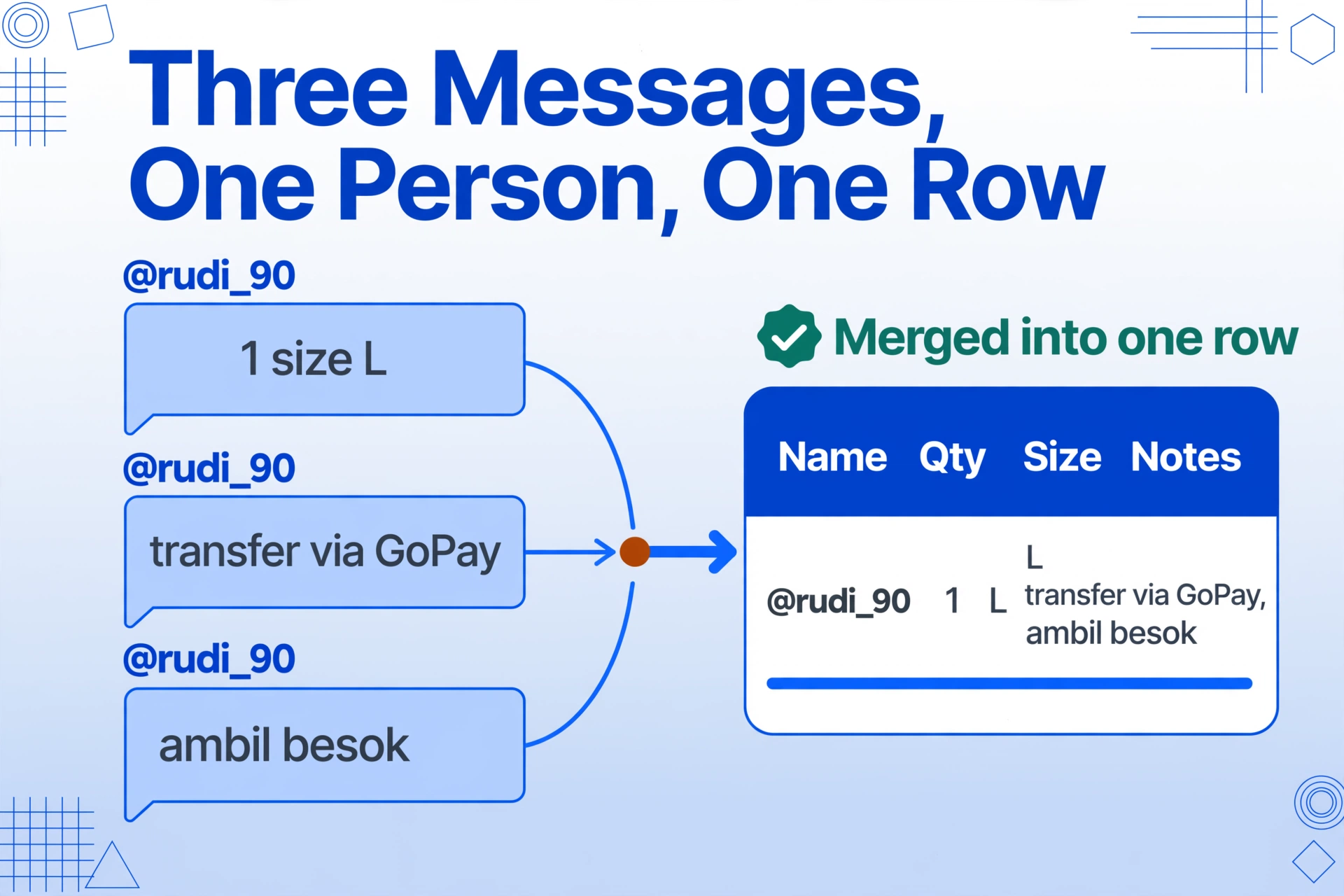
A common pattern in group buy threads makes extraction even trickier: the same person sends two or three replies in a row. They might type "1 size L" first, then immediately add "transfer via GoPay", then "ambil besok" (pick up tomorrow). These three messages appear as separate chat bubbles in the screenshot — but they all belong to the same person and collectively form a single order.
A visual AI that understands conversational grouping will recognize that consecutive messages from the same sender should be treated as one order entry. It combines the text, extracts the fields, and outputs a single row. This level of grouping is something no template-based OCR tool can do — it requires understanding the social structure of the conversation, not just the typographic structure of the page.
From One Screenshot to One Spreadsheet Row Per Person
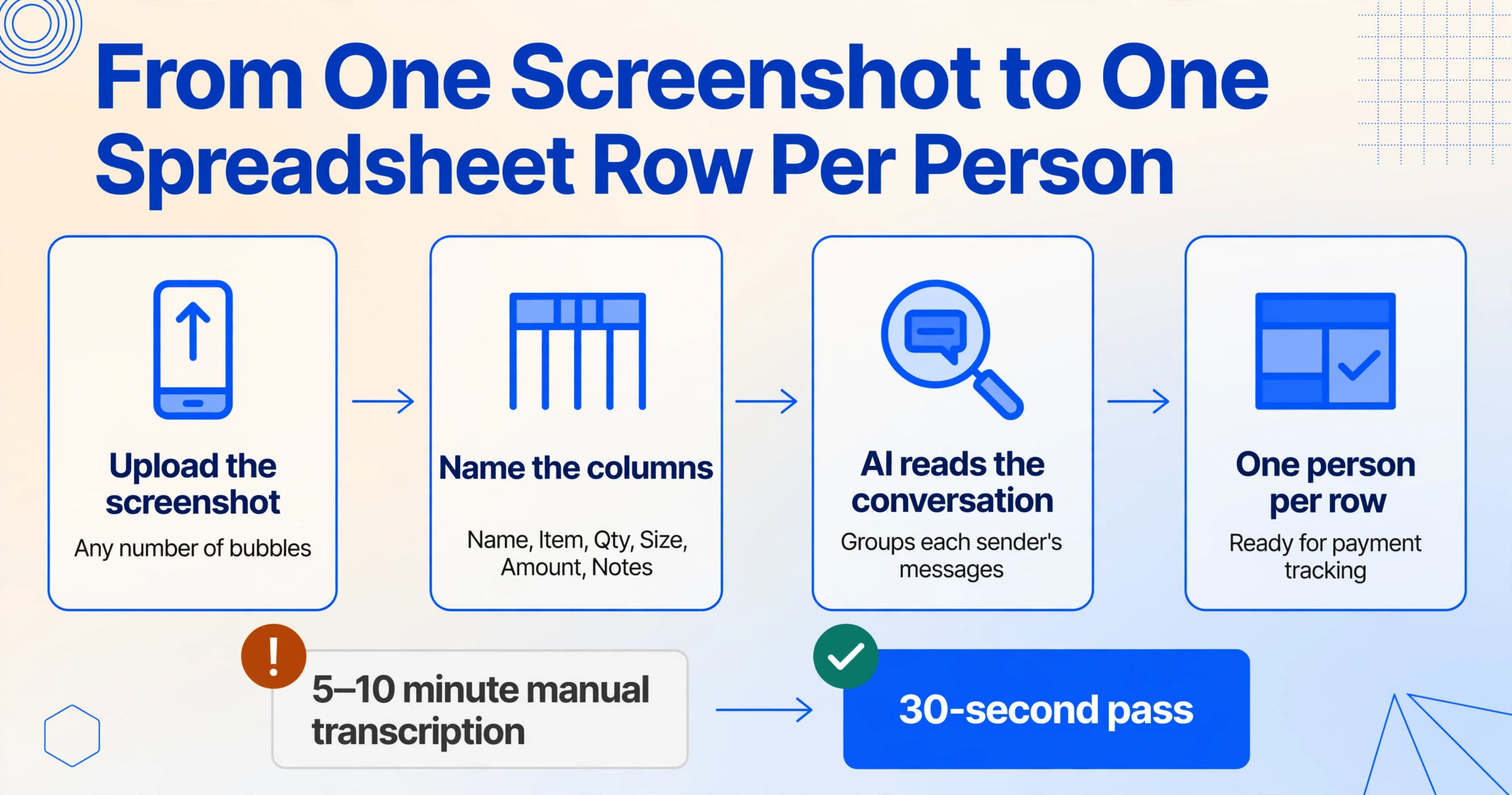
Custom Column Extraction turns this chaotic vertical thread into a clean table. You define the columns you need — Name, Item, Qty, Size, Amount — and the AI does the rest.
One image, any number of chat bubbles, any number of people.
Name, Item, Qty, Size, Amount, Notes — these become your spreadsheet headers. No templates, no setup.
It identifies each sender, groups their messages, and parses order details — including compound phrases like "2 size L transfer."
Clean output ready for procurement, payment tracking, and handover — no manual sorting needed.
The result turns a 5–10 minute manual transcription into a 30-second pass. For organizers running multiple group buys per month — fashion hauls, food co-ops, electronics orders — that saving compounds quickly.
What If the Order Thread Runs Beyond One Screenshot?
A popular group buy can generate 200+ replies. Organizers often take multiple screenshots to cover the full thread. Upload them into the same batch, define your columns once, and the AI processes every image together. The output merges into a single spreadsheet with each person's orders correctly attributed. Batch processing turns an error-prone chore — names spelled differently across screenshots, quantities mistyped — into a single operation.
What the Screenshot Won't Tell You
A group buy screenshot cannot tell you everything an order management system can. If someone's display name is an emoji or a single character, you may need to map it to a real name manually. If the chat uses heavy regional slang, accuracy may be slightly lower for non-standard abbreviations. But for the vast majority of group buy threads — where usernames are readable and orders follow patterns like "2 pcs size L" or "1 M transfer" — the extraction produces ready-to-use data in seconds. The goal is not to replace the organizer's judgment; it is to eliminate the mechanical work of reading 50 replies and typing each one into a cell.
Frequently Asked Questions
Can it handle multiple Telegram screenshots from the same group buy at once?
Yes. Upload all screenshots into the same batch, define your columns once, and the AI processes every image together. The output merges into a single spreadsheet with one row per person, even if their messages are spread across multiple screenshots.
What if someone's order is split across two separate messages in the screenshot?
The AI groups consecutive messages from the same sender and treats them as part of a single order. If someone types "2 pcs size L" then immediately adds "transfer via GoPay," both messages are combined into one row.
Does this work with other chat platforms like WhatsApp or LINE?
The same approach applies to any chat screenshot where the sender's name is visible above or beside their message. The visual AI reads the chat structure — it is not tied to Telegram's specific chat bubble design. LINE group buys add one twist the other platforms lack: buyers post the last five digits of their transfer (匯款末五碼) as payment proof, and LINE group buy screenshots carry that code in the same thread as the order. For on-platform references, see how we handle crypto wallet addresses shared in Telegram chats, or our broader look at payment screenshots that are not receipts.
What if the chat uses emoji reactions instead of text replies for ordering?
Emoji-only responses (like 👍 or ❤️ to indicate participation without specifying details) do not contain extractable order data. These cases require the organizer to follow up manually. However, if the screenshot also contains text replies from other participants with actual order information, those people will still be extracted correctly.
Are the screenshots stored or visible to anyone else?
No. Images are processed temporarily and are not stored on servers. Once the extraction is complete and the results are delivered, the original files are removed. No one else — including the platform — has access to your group buy screenshots or the extracted data.
A group buy screenshot is a conversation, not a spreadsheet. But the information you need from it — each person's name, item, quantity, and amount — is structured enough that a visual AI can pull it out in a single pass.
The next time your Telegram group buy thread hits 50 replies and you find yourself scrolling back to figure out who ordered what, take a screenshot and let the extraction do the sorting. The manual work was never about the data being missing — it was about the format not matching your spreadsheet. Format-independent extraction closes that gap.