Sri Lanka VAT Schedule 02 Reconciliation
Starts at the Invoice
VAT Schedule 02 looks like a small upload file. In practice it is a translation problem. Each row has to carry the supplier's taxpayer identification number, the tax invoice number, the invoice date, the value of the purchase without VAT, and the VAT charged on it. Get those rows right and the schedule agrees with what your suppliers reported and with the figures on your VAT return. Get them wrong and the mismatch surfaces only after submission, when digging through invoices, spreadsheets, ERP records, and email is the only way left to find it.
Key Takeaways
- Schedule 02 looks like a small upload file, but a wrong row stays invisible until the return totals refuse to reconcile.
- One batch error after the rate change is applying 18% to invoices dated before 1 January 2024 that were charged at 15%.
- Name your output columns after the nine IRD fields, then add a computed VAT check, so a mismatched rate is flagged before the file leaves your desk.
What Schedule 02 is and where it feeds the return
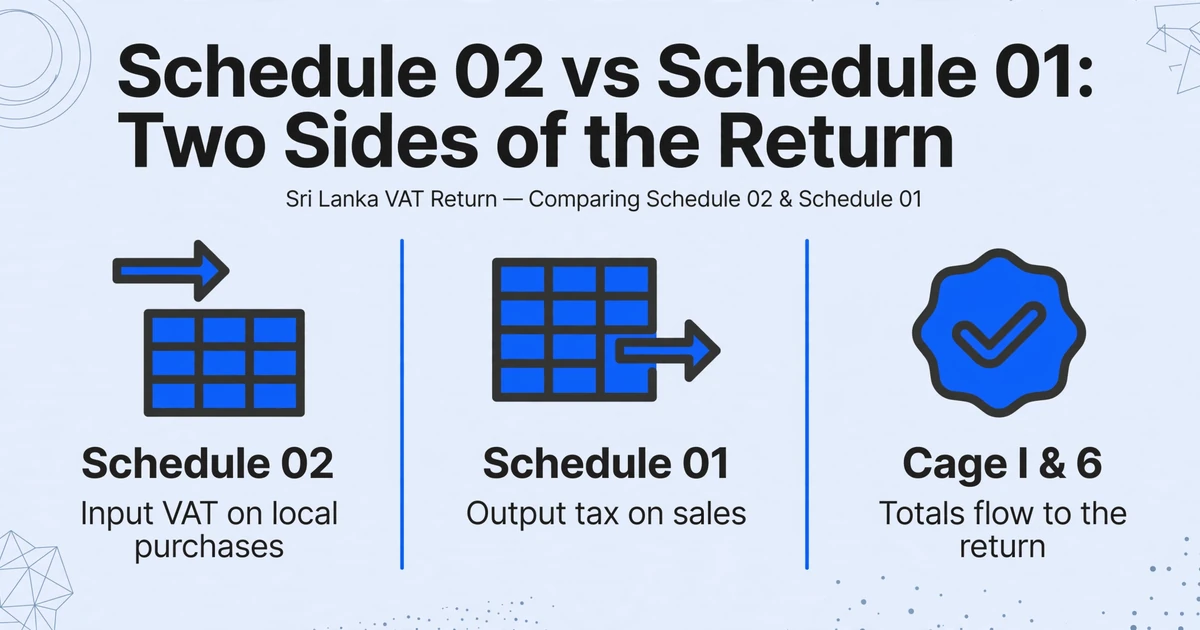
VAT Schedule 02 is the input schedule for local purchases in Sri Lanka. It sits alongside Schedule 01 (output tax), Schedule 03 (imports), Schedule 04 (credit and debit notes), and the export and deemed-input schedules. Schedule 02 is not a document you design. It is an annex to the monthly or quarterly VAT return, and its columns come straight from the Inland Revenue Department's own template.
The IRD's Quick Guide to filing VAT defines nine fields for the input VAT schedule. They are worth reading as a specification, because every one of them has to be sourced from an invoice that was never laid out to match them.
| Schedule 02 field | What the IRD expects |
|---|---|
| Serial No. | A running number inside the schedule file, not the invoice number. |
| Invoice Date | The invoice date in MM/DD/YYYY format. |
| Tax Invoice No | The tax invoice number, exactly as the supplier described it in the VAT Act. |
| Supplier's TIN | The supplier's nine-digit taxpayer identification number. |
| Name of the Supplier | The supplier's name as registered. |
| Description | A description of the supply. |
| Value of purchase | The invoice value excluding the VAT portion. |
| VAT Amount | The VAT, which should equal the value of purchase multiplied by the valid rate for the invoice date. |
| Disallowed VAT Amount | The portion of VAT that cannot be claimed, never more than the VAT amount itself. |
The schedule does not stand alone. The total value of local purchases from Schedule 02 is carried to cage I of the return, and the total VAT to cage 6. The sum of the Disallowed VAT column joins the disallowed figures from Schedule 03 and is declared in cage 8. Purchase-side credit and debit notes sit in Schedule 04 and adjust the purchase totals rather than forming a separate silo.
Schedule 02 is the evidence for the input VAT you claim. If the rows are wrong, the return figures built on them are wrong in the same direction.
Since 1 July 2025, returns and schedules must be submitted electronically through the IRD e-Services portal; manual submission needs prior IRD approval. That removes the paper fallback. Whatever you prepare has to be upload-ready before the portal matters.
Where supplier invoices and Schedule 02 fields diverge
The nine fields are simple on their own. The difficulty is that a supplier's tax invoice rarely presents them in that form, and a few of the mismatches are easy to make without noticing.
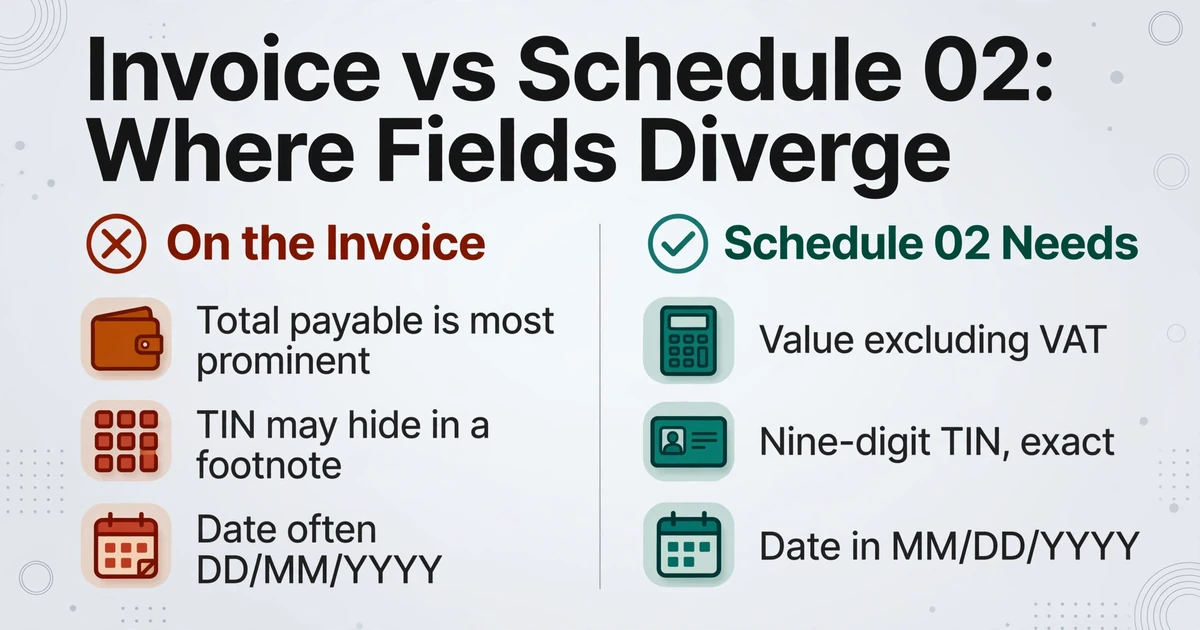
Value of purchase excludes VAT. Most invoices make the total payable the most prominent number on the page, and it is that number the eye lands on first. Schedule 02 wants the value before VAT. Enter the gross where the field expects the net and every downstream figure, including the VAT check against the invoice, will agree with itself while being wrong.
Supplier's TIN is nine digits. It is the supplier's taxpayer identification number, not a company registration number and not a phone number. If a supplier prints its VAT registration details in a footnote rather than a labelled box, the field still has to carry those nine digits, because the IRD matches purchases to suppliers on that identifier.
Tax Invoice No has to match, character for character. The number you enter is compared with the number the supplier reported. Under the revised tax invoice specification the serial number follows a structured format (year, month, an organisation code, and a numeric serial), and any spaces or transposed characters turn a genuine invoice into an unmatched record.
Invoice Date is MM/DD/YYYY in the file. Sri Lankan documents commonly show DD/MM/YYYY. Retyping a date is where 03/04 and 04/03 swap silently, which matters because the date helps decide the rate and the period.
On r/srilanka, a business owner described the reconciliation load in the same terms: "Invoices, VAT schedules, supplier details, export/Customs info, credit notes etc... and if something doesn't match you're basically digging through Excel, the ERP, emails and documents trying to figure out what went wrong" and asked whether anyone had found a way to "catch mismatches or missing stuff before it goes into RAMIS" (r/srilanka). The pain is not typing speed. It is not knowing, before submission, which rows are wrong. That is the stage where VAT return reconciliation is won or lost.
The rate and the date that decide the VAT amount
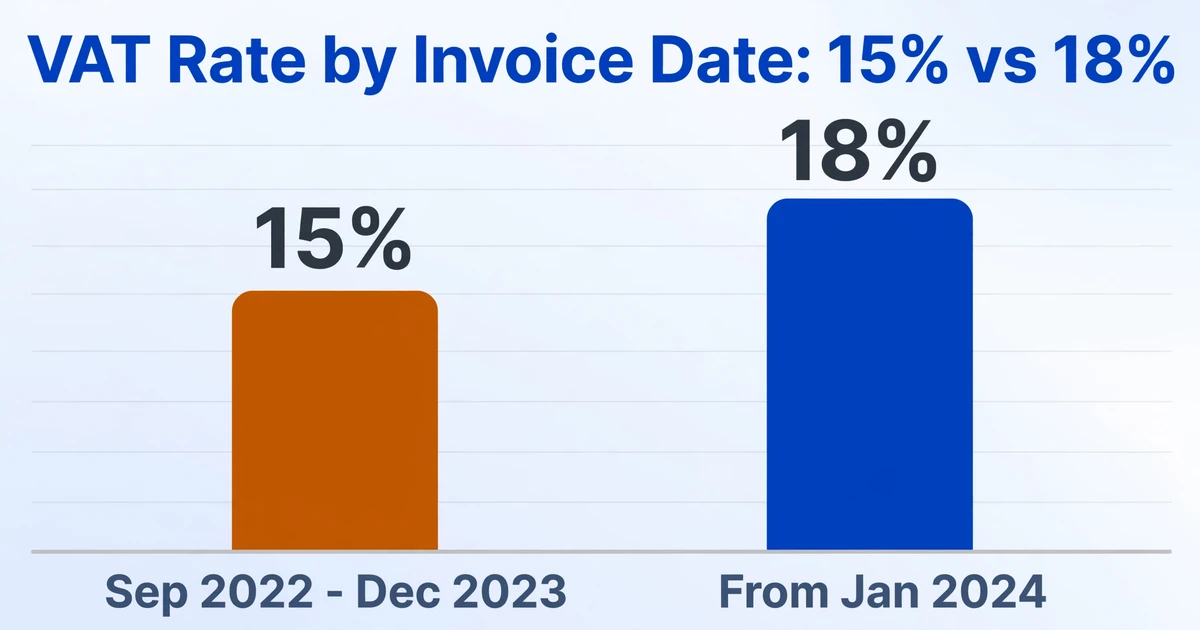
VAT Amount is not a field you can copy from a total. It should equal the value of the purchase multiplied by the rate in force on the invoice date. That rule becomes a real trap across the rate change. The IRD confirms the standard VAT rate moved to 18% with effect from 1 January 2024, up from 15%, which applied for taxable periods from 1 September 2022 to 31 December 2023 (IRD, Value Added Tax).
A batch prepared after the change invites one specific error: applying 18% to everything, including invoices dated before 1 January 2024 that were charged at 15%. The schedule file's own validation expects the VAT amount to move with the rate for the invoice date, so a uniform rate produces rows the arithmetic cannot accept.
The same invoice date decides which taxable period a purchase belongs to. A purchase entered in the wrong period is not a rounding issue, it is a claim that lands outside the window in which local-purchase input VAT can be claimed. The IRD's filing calendar compounds the pressure: payment for a month is due by the 20th of the following month, while the return itself is due by the last day of that following month. The preparation window is short, and it opens before many suppliers have finished filing their own side.
A comparable deadline-driven VAT workflow appears in Germany's monthly UVA preparation cycle, where the same logic holds: the filing step is quick, and the extraction step is what consumes the calendar.
Credit notes, duplicates, and the two RAMIS lanes
Two things push the Schedule 02 totals away from a simple sum of purchases, and both are handled outside the invoice rows themselves.
Credit and debit notes are Schedule 04. A tax credit note reduces the purchase value and the VAT; a tax debit note increases them. The schedule has an "Issued by Me" indicator: the supplier enters "Y" for a note it issued, and the purchaser enters "N" for the same note. A credit note entered with the wrong sign, or treated as another purchase, does not just skew one row. It changes the total that flows to the return.
RAMIS now has two sources for purchase records. When a supplier transmits invoice data through the IRD Web API, the supplier's Schedule 01 and Schedule 04 records automatically populate the purchaser's Schedule 02 and Schedule 04 in RAMIS. The purchaser must review and approve them, after which the status becomes "Matched". Purchases from suppliers who have not integrated with the Web API are submitted as an Excel (CSV) file or through the Schedule Record Submission interface. Submitted records cannot be edited or deleted, and any correction has to go through a tax credit or debit note (IRD notice on VAT invoice data integration).
The duplicate risk is structural. The same purchase can appear once in the auto-populated lane and again in the file you upload, and it will look like two purchases until the totals refuse to reconcile.
That is a workflow the preparation stage has to anticipate, not a feature any extraction tool supplies. What the preparation stage can do is give every row a source and a status, so a duplicate is visible before it reaches RAMIS.
Who prepares what
In many Sri Lankan SMEs one person wears both hats, but the work splits into two jobs that fail in different ways.
- The bookkeeper or accounts assistant gathers the period's supplier tax invoices and credit notes and turns them into rows: supplier TIN, invoice number, invoice date, description, value excluding VAT, and VAT. This is the extraction job.
- The accountant or tax preparer reviews those rows, decides whether any VAT is disallowed, reconciles the totals to cage I and cage 6, approves the auto-populated records in RAMIS, and files the return. This is the judgment and filing job.
The handoff between them is where hours disappear. Passing over a folder of PDFs pushes the extraction onto the person whose time is most expensive. Passing over a structured sheet with the nine columns already populated, plus a source file column and an exception column, lets the preparer spend the time on judgment instead of re-keying.
Turning invoices into the nine columns for review
This is the part where naming your output columns settles most of the mapping, and it is where Schedule 02 preparation actually happens. ImageToTable.ai uses Custom Column Extraction: instead of drawing boxes around fields or building a template per supplier format, you type the column names you want, and the AI reads each document and locates the matching value by what it means rather than where it sits. The column names you type become the headers of the output table.
Because of that, the cleanest approach is to name the columns after the IRD fields themselves: "Supplier's TIN", "Tax Invoice No", "Invoice Date", "Name of the Supplier", "Description", "Value of purchase", and "VAT Amount". A supplier who writes "Invoice No." and another who writes "Tax Invoice Number" both still resolve to the same column, and the output arrives already shaped like the schedule rather than like an invoice dump. If your first goal is simply a working spreadsheet, you can extract invoice data into Excel and rename later.
Upload the period's invoices together. The tool is batch-first: it processes multiple files and merges them into a single Excel sheet, one row per document, so the batch is one operation rather than one invoice repeated. The same pattern handles a month of supplier invoices from mixed formats in other jurisdictions, and country-specific tax invoice extraction for a different VAT regime.
Two column types do useful work on this batch. Computed columns let the AI calculate while it extracts, so a column such as VAT Check (VAT Amount = Value of purchase × 18%?) can flag the rows where the printed VAT does not match the value at the expected rate, which is exactly where the rate-and-date error shows up. Inferred columns let the AI fill a value the document does not print, for example a Document Type (options: Tax Invoice/Credit Note) column, so credit notes can be separated from purchases in one pass instead of two manual sorts.
Before the sheet leaves the preparation stage, review it by exception rather than row by row. Bbox-assisted review highlights where a value came from on the original invoice when you click that cell, so a wrong TIN or a VAT amount lifted from the wrong line is visible without re-reading the page. Then work the checks that catch systematic errors: filter Document Type, confirm the credit notes carry the right sign, sort by VAT Check and inspect the flagged rows, and look for blank Supplier's TIN or Tax Invoice No cells.
Keep the operational columns in the review workbook and out of the official upload: a Source File column so every row traces to an invoice, a status column that marks whether a row is auto-populated in RAMIS or needs submission, a duplicate-check column, and an exception reason. The official Schedule 02 file carries the nine fields only. The review workbook is what lets the preparer agree the complete population before anything is submitted.
For one period, the preparation runs in this order.
Name the columns after the Schedule 02 fields
Type "Supplier's TIN", "Tax Invoice No", "Invoice Date", "Name of the Supplier", "Description", "Value of purchase", and "VAT Amount" as your output columns, so the sheet arrives shaped like the schedule.
Batch-upload the period's supplier invoices
Upload the whole period in one batch. The tool processes the files together and merges them into a single sheet, one row per document.
Add the two working columns
Add a computed VAT Check column that tests the VAT amount against the value at the rate for the invoice date, and an inferred Document Type (options: Tax Invoice/Credit Note) column.
Standardize dates and amounts
Set Invoice Date to MM/DD/YYYY and confirm Value of purchase holds the ex-VAT figure, not the total payable.
Review by exception, not row by row
Filter Document Type to check the credit notes, sort by VAT Check and inspect the flagged rows, and scan for blank Supplier's TIN or Tax Invoice No cells.
Keep operational columns out of the upload
Leave Source File, RAMIS status, duplicate check, and exception reason in the review workbook. The official Schedule 02 file carries the nine fields only.
What this approach does and does not do
Be precise about the boundary. The extraction step produces the rows: the supplier TIN, invoice number, invoice date, description, value excluding VAT, and VAT, in columns named for the Schedule 02 fields, with source tracing and checks attached. That is where the tool's responsibility ends.
It does not submit a schedule to RAMIS, approve or match records, or change a status. It does not decide whether input VAT is deductible or how much should be disallowed, because that is an accounting and VAT question about the supply, not a data-extraction question. It does not make the credit or debit note tax correction, and it does not replace a tax adviser when a treatment question cannot be settled from the records and current IRD guidance.
The manual steps that remain are real. Suppliers who have not integrated with the Web API still require an uploaded file or record entry. The match and approval step in RAMIS is a taxpayer action. And a review step stays in place for handwritten invoices and poor scans, where accuracy is lower than on a printed tax invoice.
Frequently asked questions
Is Schedule 02 only for purchases from VAT-registered suppliers?
Schedule 02 is the input schedule for local purchases, and the input VAT credit it supports depends on a valid tax invoice from a registered supplier. Purchases from non-registered persons do not carry claimable VAT, but they still belong in your records and your costing. Keep them in a working sheet and let your accountant decide how they are treated.
What is the difference between Schedule 02 and Schedule 03?
Schedule 02 covers local purchases. Schedule 03 covers imports. They are separate schedules with separate claim windows, and the disallowed VAT from both feeds cage 8 of the return. Mixing an import into the local purchase schedule creates a reconciliation problem later, so keep the two populations apart from the start.
Can I upload my supplier PDFs directly to the IRD portal?
No. The IRD accepts a structured schedule file, not source invoices. The PDFs have to become rows in the nine Schedule 02 columns first, either by keying them into the portal, by uploading a prepared CSV, or by letting an integrated supplier's data populate the record automatically. The extraction step exists to produce those rows.
How do I stop the same invoice appearing twice?
Separate the two sources before you build the upload population. A purchase that a supplier already transmitted through the Web API is reviewed and approved in RAMIS; it should not also appear in the file you prepare. Mark each row's source, match on supplier TIN, invoice number, invoice date, value, and VAT amount, and treat a purchase that appears in both as an exception rather than two entries.
Does this tool submit to RAMIS or approve records for me?
No. It produces the reviewable rows. Submission, approval, the "Matched" status, and the return itself stay with you and your accountant in the IRD e-Services portal. The value of the extraction step is that what you carry to that portal is already structured and checked.
What about invoices dated before 1 January 2024?
They were charged at the older 15% rate. The VAT amount in the schedule should reflect the rate applicable on the invoice date, not the current rate, so a batch that applies 18% across the board will misstate those rows. A computed VAT check against the expected rate is the quickest way to surface them.
The schedule is only as good as its rows
The volume of line items in a VAT return should not be confused with the importance of the task. Schedule 02 is the direct evidence for the input VAT you claim, and its totals are read straight into the return. When each supplier invoice becomes a row already named for the IRD fields, carrying the supplier TIN, invoice date, ex-VAT value, and correctly rated VAT, the reconciliation stops being a hunt through folders and becomes a check on a sheet you can trust. The portal step was never the hard part.
Try it on a month of your own supplier invoices. Upload the batch, name the columns after the Schedule 02 fields, and check the resulting rows against the invoices and the return figures.
Start with your own invoices