Manual vs AI Customs Data Entry:
Which Survives 20 Entries a Day?
In FY2025, U.S. Customs and Border Protection processed 50 million entry summaries, issued 2,432 trade penalties, and recovered $34.41 billion from entry summary reviews. Every one of those entries began as data extracted from a commercial invoice, packing list, or bill of lading and transcribed into a declaration — a step that is still predominantly manual at most brokerages. This comparison measures what that step actually costs in time, error, and throughput, and at what volume the manual workflow stops being manageable.
Key Takeaways
- 60 to 70 percent of every customs entry's preparation time is consumed not by classification or compliance — the work a broker's license was earned for — but by reading values off supplier invoices and manually retyping them.
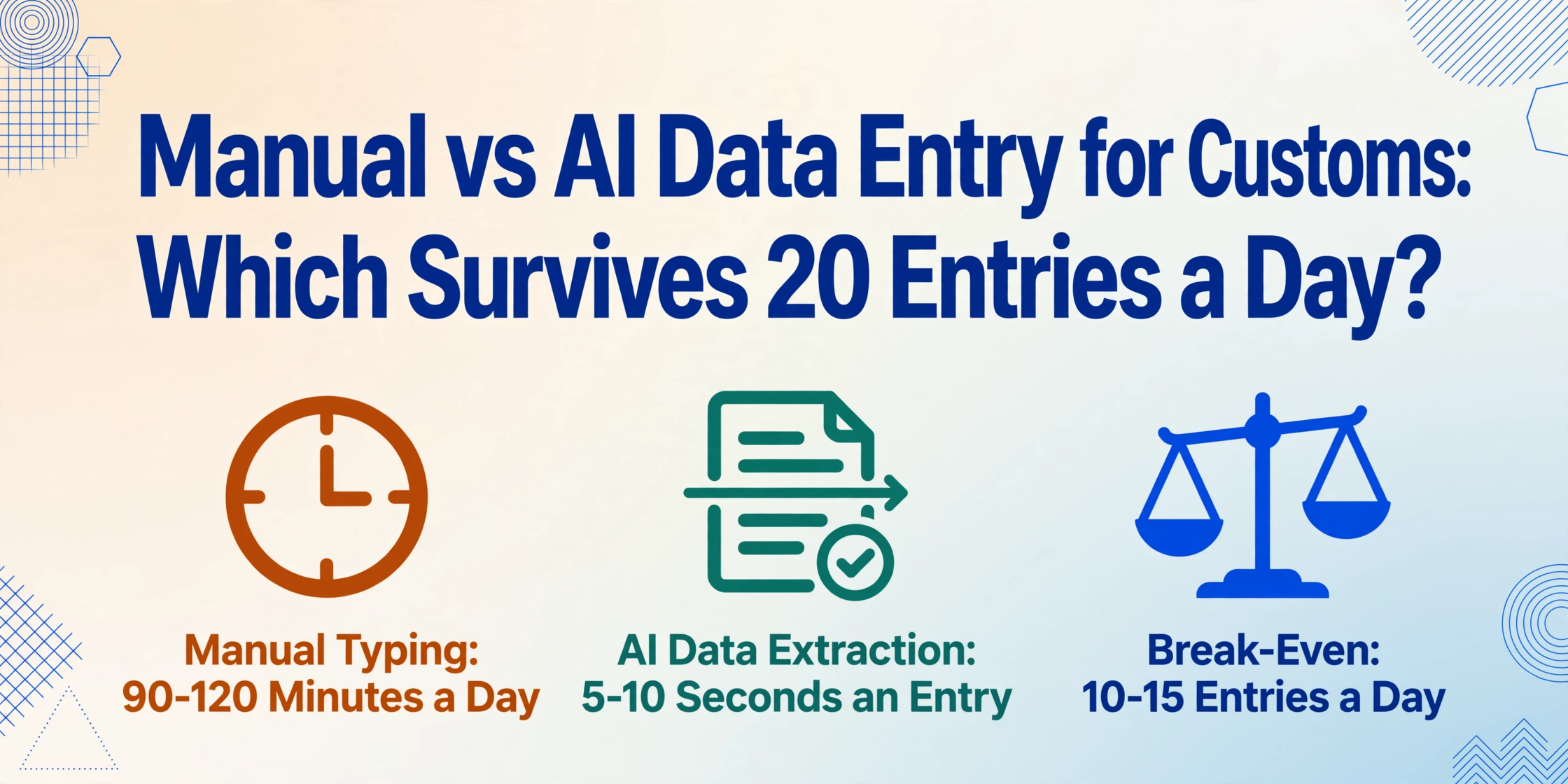
- At 20 entries a day, the manual transcription step consumes 7.5 to 10 hours weekly — one full workday — and every hour of that typing risks a wrong digit that can trigger a customs audit reaching back five years.
- Below 10 entries a day manual typing is economically rational but above 20 the numbers invert — hiring to keep pace costs more than removing the transcription step, and ImageToTable.ai extracts every field from every document in under 10 seconds per page.
What Actually Happens During Manual Customs Declaration Preparation
The customs declaration filing process — the formal submission of data to CBP's ACE system, to HMRC's CDS, to EU Member State customs authorities — is already digital. What isn't digital, at the majority of brokerages, is the step before filing: extracting trade data from the source documents and typing it into the declaration software. This is the gap most automation discussions skip past. EDI and API connections handle machine-to-machine transfer between systems that already contain structured data. They don't read a scanned packing list from a factory in Shenzhen.
The manual workflow for preparing a single customs entry breaks into five steps:
Receive and sort source documents
Commercial invoice, packing list, bill of lading or air waybill, certificate of origin — one shipment can generate 10+ documents from different parties, in different formats, arriving through different channels (email, shared drive, portal download). A freight forwarder study found 40% of customs delays originated from discrepancies between these documents before entry preparation even began.
Locate and transcribe data fields into declaration software
The operator reads the commercial invoice, finds the shipper name, consignee address, cargo description, quantity, weight, declared value, currency, Incoterms, country of origin, and HS code — then types each into the corresponding field in the declaration system. A CBP Form 7501 alone has 47 blocks of data. For a multi-line entry with 5 commodity lines, the operator handles roughly 35-50 distinct data points per entry, switching between windows for each one.
Cross-check data across documents for consistency
The quantity on the invoice must match the packing list. The declared value must be consistent with the commercial invoice total. The HS code must match the cargo description. These checks are manual and sequential — the operator reads document A, reads document B, compares mentally. At 4 PM on a Friday with 8 entries still in the queue, the consistency check is the first step that gets compressed or skipped.
Classify goods and apply trade program logic
The operator determines the correct HS code, applies any free trade agreement preferences, checks for ADD/CVD applicability, and confirms PGA requirements (FDA, USDA, EPA). This is the step where customs knowledge matters most — and it's also the step where even experienced brokers make classification errors that trigger CBP audits. A misclassified HTS code can underpay duties across months of entries before it's caught in a focused assessment.
Submit declaration, handle rejections, retrieve MRN
The declaration is transmitted electronically to the customs authority. If it passes validation, the Movement Reference Number (MRN) or entry number is returned in seconds. If it fails — because of a mismatched HTS code, a missing PGA data element, an invalid EORI — the rejection message comes back and the operator starts troubleshooting. A single rejected entry can consume as much time as three clean entries.
Steps 2 and 3 — locating data on documents and transcribing it — typically consume 60-70% of the total entry preparation time. Steps 4 and 5, which require customs expertise and judgment, account for the remaining 30-40%. This ratio is what makes the manual-vs-automated comparison meaningful: the time-intensive steps are the mechanical ones, not the expertise-demanding ones. DHL research confirms that 80% of customs delays originate from incorrect or missing documentation — not from physical inspection backlogs or port congestion — which means the document-to-system translation step is where the structural bottleneck lives.
This inversion of effort — where the rote work consumes more time than the skilled work — is the pattern that defines when manual workflows break down. It also defines where automation actually helps: not in replacing customs expertise, but in removing the transcription barrier that consumes the time before expertise can be applied. For a deeper look at why this pattern persists across the industry, see our analysis of the structural reasons customs data management remains a bottleneck in freight operations.
Speed: What "3 Minutes Per Document" Actually Means Across a Week of 100 Declarations
A single page of printed data takes roughly 3 minutes to manually transcribe — locate each field, type it, verify it. This is the average across experienced data entry operators under normal working conditions. Research on skilled data entry operators consistently finds error rates between 0.5% and 1% even under controlled conditions — and those rates climb through the workday. The same operator who types at 1% accuracy at 9 AM produces 3%+ errors by late afternoon as cognitive fatigue sets in.
For a customs broker handling 20 entries per day — a typical volume for a small to mid-size brokerage — the math is straightforward: 20 entries × 3 minutes of data extraction per entry = 60 minutes. In practice, with document sorting, cross-checking, and handling format inconsistencies, the real number is closer to 90-120 minutes per day spent purely on data transcription. Over a five-day week handling 100 entries, that's 7.5-10 hours — essentially one full workday per week consumed by a step that adds no customs knowledge and creates the majority of errors.
Here's how the per-entry timeline breaks down across both workflows for a standard single-line entry:
| Task | Manual Workflow (per entry) | AI-Assisted Workflow (per entry) |
|---|---|---|
| Receive and sort documents | 2-3 minutes | 2-3 minutes (unchanged — documents still arrive through existing channels) |
| Locate and transcribe data fields | 3-5 minutes | 5-10 seconds (upload all documents, AI extracts structured data) |
| Cross-check document consistency | 2-4 minutes | 1-2 minutes (review AI-extracted table for flagged discrepancies) |
| Classify goods, apply trade programs | 2-5 minutes | 2-5 minutes (unchanged — requires customs expertise) |
| Submit, handle rejections, retrieve MRN | 1-3 minutes | 1-3 minutes (unchanged — electronic filing is independent of extraction method) |
| Total per entry | 10-20 minutes | 6-13 minutes |
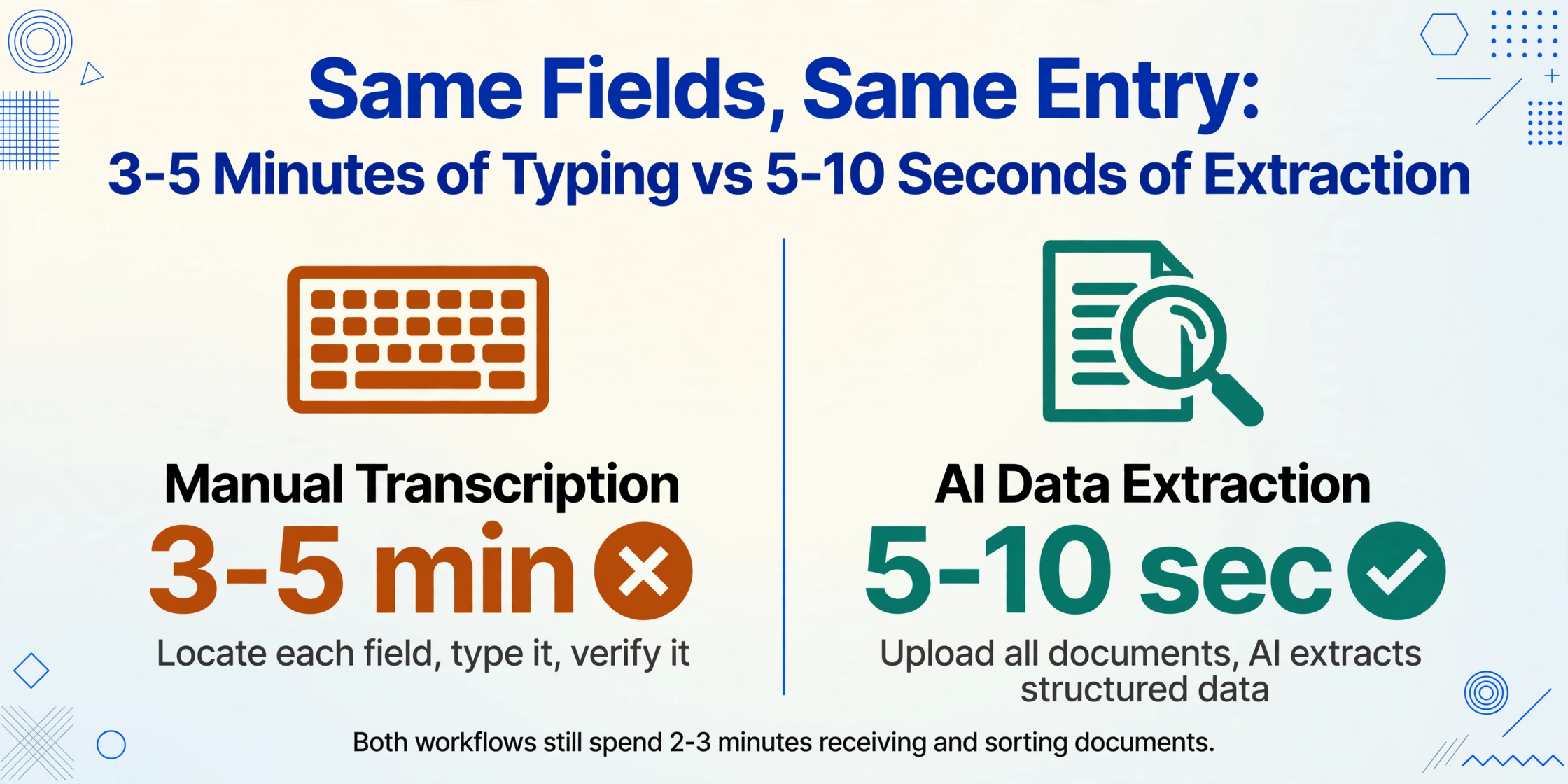
The extraction step alone shrinks from 3-5 minutes per entry to 5-10 seconds. At 20 entries per day, that recovers roughly 1-1.5 hours — not of the entire entry preparation process, but specifically of the mechanical transcription work. The classification, filing, and compliance steps are unchanged in both time and quality because they don't benefit from faster typing. They benefit from the operator having more mental bandwidth when they reach them.
The mechanism that produces this speed is column-name extraction: instead of reading each document and transcribing field by field, you define the data points you want — "HS Code," "Declared Value," "Country of Origin," "Consignee Name" — and the AI locates each value anywhere on the page by understanding its meaning semantically. A field labeled "商品编码" on a Chinese export declaration, "HS Code" on a CBP 7501, and "Commodity Code" on an EU SAD all map to the same column in your output, without per-format template configuration. For a detailed guide to this approach across declaration formats, see how to extract data from customs declaration forms to Excel.
Files are processed securely and not stored.
The 5-10 second per-page processing time compared to roughly 3 minutes per page of manual transcription means the speed advantage compounds directly with volume — but only for the extraction step. The decision-making steps remain at the same pace because customs expertise is the value, not the bottleneck. A broker who handles 10 entries per day saves roughly 30-50 minutes. One handling 50 saves 2.5-4 hours. The inflection point where time savings cross into "this changes how I structure my day" territory is around 20-25 entries daily.
Accuracy: Three Types of Customs Entry Errors — and Which Ones Automation Actually Eliminates
The word "accuracy" gets used loosely in automation marketing, but customs entry errors are not one category. They fall into three distinct types, and automation addresses each differently. Being precise about which ones it eliminates versus which ones it doesn't is the difference between an honest comparison and a sales pitch.
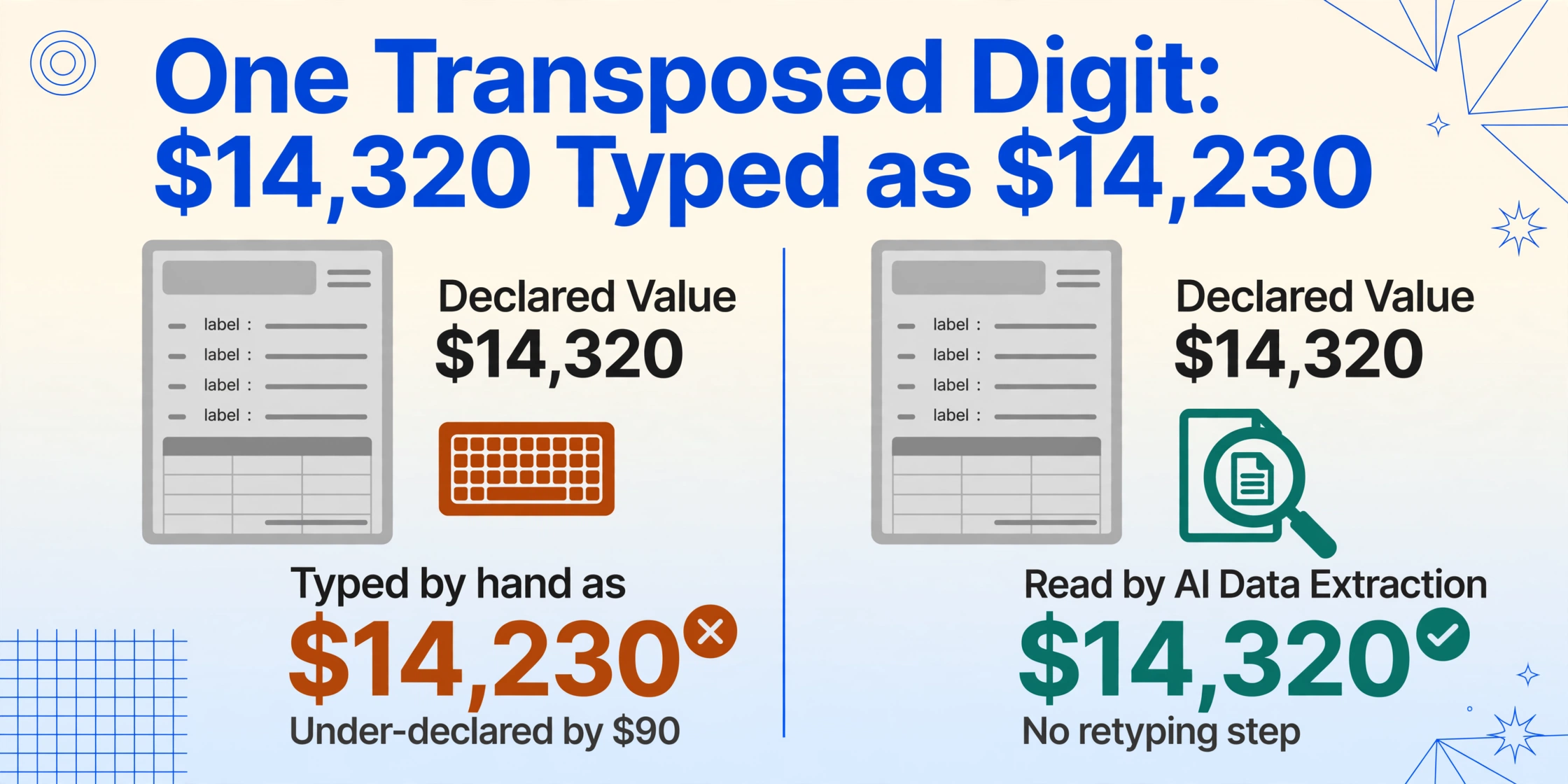
Transcription errors. The invoice says the declared value is $14,320. The operator types $14,230. One transposed digit. If this error survives through filing and CBP's validation doesn't catch it — which happens when the value is within a plausible range — the importer has under-declared by $90, creating a liability on every subsequent entry with the same error pattern. Research across decades of data entry studies places skilled human transcription error rates at 0.5-1% under controlled conditions and 2-5% under real-world conditions with varied document formats, time pressure, and end-of-day fatigue. For a broker filing 500 entries per month, a 1% error rate means 5 entries per month contain a transcription mistake — and those 5 entries, if caught in a CBP focused assessment, can trigger a review of every entry filed in the past five years under 19 CFR Part 163 recordkeeping requirements. AI extraction eliminates transcription errors entirely — the AI reads the value directly from the document without a human retyping step. If the AI reads it correctly, the value is correct. If the document is a low-quality scan where the AI might misread, the operator reviews that specific entry rather than manually typing every entry.
Classification and code errors. The operator assigns HTS 8471.30.0100 (portable automatic data processing machines) to what they believe is a tablet computer — but the product is actually a device with cellular capability that should be classified under 8517.12.0050. This is not a transcription error; the operator typed the code they intended. It's a classification judgment error, and it's the error type with the highest financial stakes. CBP penalties for negligence on dutiable imports range from 0.5 to 2 times the loss of duty; for gross negligence, up to 4 times; for fraud, up to 8 times the lost duty. On non-dutiable items, penalties can reach 50-80% of the goods value for fraud. AI extraction does not eliminate classification errors. What it can do is flag inconsistencies — the AI reads the cargo description from the invoice and the HS code from the declaration, and if the description says "lithium-ion battery pack" and the code is 8507.60.0020 (lithium-ion storage batteries), the operator gets a cross-check signal rather than finding the mismatch manually across three documents. But the classification decision itself remains a human judgment.
Cross-document consistency errors. The commercial invoice says 1,200 units. The packing list says 1,150. The bill of lading says 1,200. The operator types 1,200 from the invoice and never cross-references the packing list because they're on their 14th entry of the afternoon. The entry files with a quantity mismatch between source documents — and CBP's automated targeting system flags the inconsistency at the manifest level. This is the error type that a research study on freight forwarding documentation found affects 40% of shipments, with discrepancies between documents being the single most common documentation issue. AI extraction reduces this by processing all documents for a shipment together — the extracted data table shows the quantity field from the invoice, packing list, and BOL side by side. A 1,200 / 1,150 / 1,200 row is immediately visible. The operator doesn't have to open three separate documents and remember to compare.
| Error Type | Manual Workflow | AI-Assisted Workflow |
|---|---|---|
| Transcription (typos, transposition) | Present — 0.5-5% per field depending on conditions and fatigue | Eliminated — AI reads document directly; no human retyping step |
| Classification and HS code | Present — judgment error, not mechanical | Not eliminated — but cross-checked: AI flags description-to-code mismatches for review |
| Cross-document consistency | Present — sequential manual checking across documents, easily skipped under time pressure | Reduced — all documents processed together; mismatches visible side-by-side in output |
The CBP trade statistics for FY2025 put the stakes in concrete terms: 2,432 trade penalties issued, 53,052 liquidated damages, and $34.41 billion recovered from entry summary reviews. Each of those findings started with a data point that was wrong on a customs entry — a transcription mistake, a misclassification, a data inconsistency. Not all were caused by manual data entry, but every one of them was a data quality failure. The gap between a 1% error rate at 500 entries per month and a 99%+ extraction accuracy is the difference between 5 mistakes per month and potentially zero — and in a regulatory environment where a single error can trigger a five-year retroactive review, the compounding effect is what matters, not the per-entry rate.
Scalability: At 20 Declarations Per Day, Manual Entry Is Not a Process — It's a Hiring Problem
The scalability dimension is where the manual workflow's failure mode becomes structural rather than operational. Below 5 entries per day, manual data entry is fine — it's not fast, but hiring another person would be absurd. Between 5 and 15 entries per day, the inefficiency is visible but manageable: the operator spends 1-2 hours daily on transcription, which is frustrating but doesn't cap the brokerage's capacity.
At 20 entries per day — the threshold where a single operator working a standard day is spending 2-3 hours purely on data transcription — the manual workflow becomes a throughput ceiling. Adding another client or trade lane means adding another headcount, and the cost isn't just the salary. Savino Del Bene's South Africa operation provides a real-world calibration: processing 50,000+ commercial invoices per year for over 2,000 suppliers, the company dedicated 80% of its time to manual data entry. After implementing document processing automation, invoice processing became 11X faster, and the projected monthly savings exceeded $100,000.
This is the capacity arithmetic that matters for customs brokerages at scale:
| Daily Entry Volume | Manual Data Entry Hours/Day | Staff Required (Manual) | Staff Required (AI-Assisted) | Capacity Ceiling |
|---|---|---|---|---|
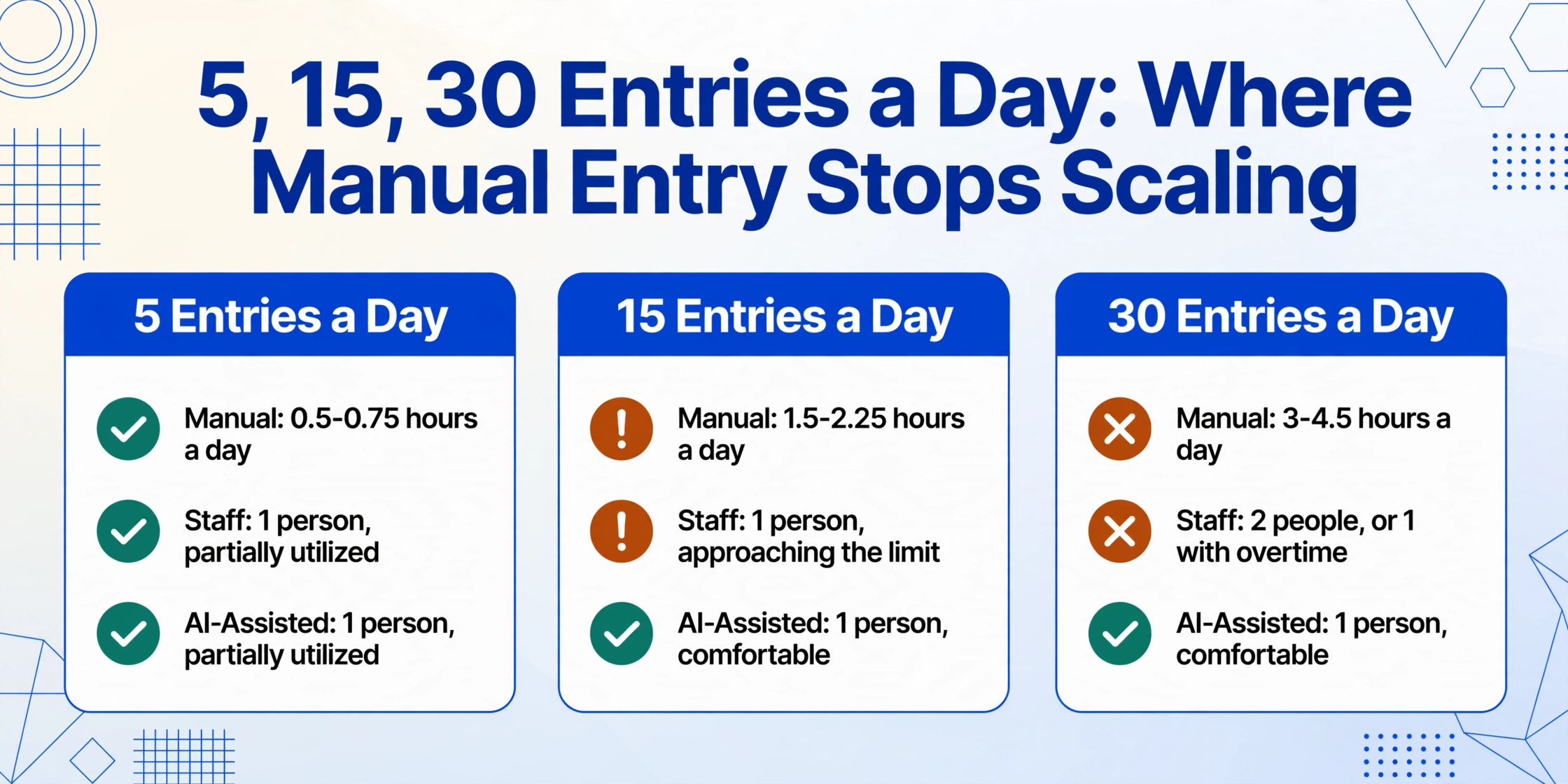
| 5 entries | 0.5-0.75 hours | 1 (partially utilized) | 1 (partially utilized) | Not relevant |
| 15 entries | 1.5-2.25 hours | 1 (approaching limit) | 1 (comfortable) | ~20-25 entries/day per person |
| 30 entries | 3-4.5 hours | 2 (or 1 with overtime) | 1 (comfortable) | Size of available trained workforce |
| 50+ entries | 5-7.5 hours | 2-3 (plus coverage) | 1-2 | Hiring pipeline limits throughput |
For a brokerage handling multi-line entries — shipments with 5 or more commodity lines, each requiring its own HTS code, value, quantity, and country of origin — the per-entry time multiplies. A 10-line entry with manual data entry can consume 30-45 minutes of transcription time across all lines. With AI extraction, all 10 commodity lines are read from the same source documents in the same processing cycle — 5-10 seconds per page of source document, not per commodity line. This is where batch processing multi-line customs declarations into a single spreadsheet transforms the arithmetic: 50 multi-line entries that would require 25-37 hours of manual transcription become a single upload-and-review session measured in minutes.
A Descartes Systems study of 400+ freight forwarders and customs brokers found that 67% view technology as fundamental or highly important to growth — yet 61% cited customer pricing pressure as a top challenge. The tension is clear: brokerages need to grow volume to maintain margins, but the manual workflow that works at 20 entries per day doesn't work at 50, and hiring trained customs professionals is one of the industry's most cited constraints. Automation doesn't solve the staffing shortage — it changes the staffing arithmetic so that existing staff can handle growth without each new client requiring a proportional headcount increase.
The Learning Investment: What It Actually Takes to Adopt AI-Assisted Customs Data Entry
The strongest argument for the manual workflow is that it requires zero technology adoption. A newly licensed customs broker who knows how to read a commercial invoice and navigate the ACE portal can start preparing entries on day one. Every customs broker already knows what data they need to extract, what format it needs to be in, and what happens if it's wrong. The manual process is slow, error-prone, and volume-limited — but it is universally accessible. Any alternative workflow has to earn its place against a process that costs nothing to start and requires no training.
The learning investment for AI-assisted extraction is concentrated in a single new pattern: instead of opening each document and typing values into declaration software, you upload all source documents for a shipment at once and define what you want to extract using column names — "Shipper Name," "Consignee Address," "HS Code," "Country of Origin," "Declared Value," "Net Weight." The AI reads each field by understanding what it means semantically, not by where it sits on a specific form. Once defined, these column sets can be saved and reused — an importer who files the same types of entries across the same trade lanes uses the same column template every time. The per-entry effort becomes: upload documents, select saved template, export the extraction table, review.
This is fundamentally different from traditional OCR template systems, which require configuring a separate template for each document format — the CBP 7501 template, the EU SAD template, the Chinese export declaration template, plus every supplier's invoice format. The template maintenance burden is what defeated earlier generations of customs automation, especially at brokerages dealing with suppliers across multiple countries whose document formats change without notice. AI extraction bypasses this because it reads for meaning, not for position on a known form layout.
For comparison: an EDI implementation connecting a customs brokerage to a client's ERP system can take months of mapping, testing, and certification — and it only works with that one client. A full customs management platform deployment can take weeks, requires IT involvement, and assumes all trade data flows through the same system. AI-assisted extraction has a learning curve measured in the time it takes to upload a document and type a column name. At 20 entries per day, the time investment of learning the new pattern — roughly 15-30 minutes of trying it on a few sample entries — is recovered within the first day of use.
The column definitions you create for customs entries can also be used for other trade documents — commercial invoices, packing lists, certificates of origin — because the extraction engine doesn't distinguish between document types. The same saved template that extracts HS codes and declared values from a customs form also extracts invoice numbers and totals from a commercial invoice when applied to that document. This cross-document reusability means the template library grows with use rather than with document format count.
Where Manual Entry Still Wins — and Where the Gap Is Unbridgeable
A dimensional comparison is only useful if it's honest about both sides. The manual workflow genuinely has advantages that AI-assisted extraction doesn't eliminate, and acknowledging those gives the rest of the comparison weight:
- Zero marginal cost. Manual entry requires a trained person and access to declaration software — both of which the brokerage already has. For operations handling fewer than 5 entries per day, the time savings of automation don't recover the tool cost. Below that volume, the manual workflow is the economically rational choice.
- Contextual judgment not present in documents. An experienced broker reading a commercial invoice may notice that the declared value is suspiciously low for the described goods — a transfer pricing red flag that an AI extraction doesn't flag because it only reads what's on the page, not what's missing. This institutional knowledge — "this supplier consistently undervalues electronics on their invoices and gets flagged at CBP" — lives in the broker's head, not in any document, and surfaces during manual review in a way that automated extraction doesn't replicate.
- Multi-party communication. When a customs entry triggers a CBP Request for Information (CBP Form 28) or a Notice of Action (CBP Form 29), the response requires communication with the importer, the supplier, and possibly a trade attorney. This workflow is inherently human — no extraction tool automates it, and none should try. The broker's relationship management and regulatory communication skills are the value here, not the data entry step that preceded the inquiry.
- Government filing interface integration. AI extraction produces a table of structured data. Getting that data into ACE, CDS, or ATLAS still requires either manual re-entry into the filing system or a software integration layer. Some customs management platforms (Descartes, AEB, iCustoms) provide API connections that accept structured data directly, but brokerages using standalone or legacy filing systems will still have a manual transfer step from the extracted data table into the declaration software — unless they use the extraction output as a verification source rather than a direct input.
The dimensions where manual entry loses — and loses in direct proportion to volume — are speed, transcription accuracy, and scalability. These dimensions compound: a brokerage that saves 1.5 hours per day on transcription at 20 entries can handle more entries without adding staff, can spend that recovered time on compliance review rather than data typing, and can reduce the error rate that drives the most common type of CBP penalty triggers. The 7 most common customs data entry mistakes that cause clearance delays are predominantly transcription and cross-document consistency errors — the exact categories AI extraction addresses.
The World Customs Organization's Time Release Study methodology — now in its 4th version — has repeatedly identified that the primary bottleneck in cargo clearance is not physical inspection, not port congestion, but the time between document arrival and declaration lodgment. In World Bank TRS pilot programs, border automation trimmed clearance from an average of 3.6 days to under 1 day in countries that adopted digital pre-clearance and Single Window coordination. The declaration preparation step — where manual data entry lives — is the single largest opportunity for time compression in the end-to-end clearance process. That's not a sales claim. It's what the WCO's own measurement methodology consistently finds.
Frequently Asked Questions About Manual vs AI Customs Data Entry
At what entry volume should a customs brokerage move from manual to AI-assisted data entry?
Around 10-15 entries per day. Below that, the time savings of automation may not recover the learning investment quickly enough to justify the switch — especially for brokerages with a stable client base using familiar document formats where the operator develops speed through repetition. At 20+ entries per day, the manual workflow is consuming 2-3 hours of transcription time that could be recovered, and the cost of automating that step is lower than the cost of hiring additional staff to handle the same volume. The break-even point depends on your loaded labor cost per hour and your daily entry volume, but for most brokerages, it lands between 10 and 20 daily entries.
How is AI extraction different from EDI for customs declarations?
EDI (Electronic Data Interchange) is a machine-to-machine exchange of structured data between systems that already understand the same format — for example, a client's ERP system transmitting purchase order data directly to a customs broker's filing system in a pre-agreed data format. EDI works when both parties have invested in the integration and maintain compatible data structures. AI extraction reads unstructured documents — PDFs, scans, images — that arrive from suppliers who will never implement EDI because they're factories in Shenzhen, distributors in Mumbai, or small manufacturers in Vietnam who send commercial invoices as email attachments. EDI and AI extraction address different parts of the document supply chain: EDI for large clients with integrated systems, AI extraction for the long tail of suppliers and formats that make up the majority of trade documentation.
Does AI extraction replace a customs broker?
No. It replaces the data transcription step — reading values from documents and typing them into software. It does not replace, and cannot replace, the classification expertise, regulatory knowledge, trade program analysis, client consultation, or CBP communication that constitute the actual professional service of customs brokerage. The automation discussed in this comparison operates on the document-to-data pipeline, not on the broker's judgment. A broker using AI extraction still classifies goods, still determines applicability of free trade agreements, still handles CBP inquiries, and still advises clients on compliance strategy. The difference is that the broker spends less time transcribing invoice data and more time on the steps that require a license and professional expertise.
What document formats does AI extraction work with for customs entries?
PDF files (both digitally generated and scanned), JPG/PNG images, WebP, and AVIF are all supported. This covers the real-world range of trade documents: ERP-generated PDFs, scanned commercial invoices, photos of paper packing lists, and screenshot captures from supplier portals. Handwriting on scanned documents is readable, though accuracy decreases with scan quality — a clean 300 DPI scan produces near-perfect extraction, while a low-resolution phone photo of a handwritten packing list at an angle may require manual verification of specific fields.
Can AI extraction handle trade documents in multiple languages?
Yes. The underlying visual language model reads text in any language. A Chinese export declaration, a German commercial invoice, a Spanish packing list, and a Korean certificate of origin are all processed the same way — column names defined in English guide the extraction, and the AI locates the corresponding values regardless of the source document's language. Numeric fields — values, weights, quantities, HS codes — are extracted cleanly independent of language. For brokerages handling multi-lane trade across Asia, Europe, and the Americas, this eliminates the language-specific friction that otherwise requires bilingual staff for data entry.
Can extraction column definitions be reused across entries and clients?
Yes. A standard import entry column set — Importer of Record, Consignee, Country of Origin, HS Code, Description of Goods, Quantity, Unit of Measure, Declared Value, Currency, Duty Rate, Gross Weight, Bill of Lading Number — can be defined once, saved to your account, and applied to every subsequent entry with a single click. For brokerages handling different entry types (formal consumption entries vs. informal entries vs. temporary importation bonds), multiple column templates can be saved for each entry type. The template library grows with use, not with the number of document formats you encounter.
Does AI extraction assign HS codes automatically?
Some specialized customs AI platforms (Digicust, iCustoms) offer HS code suggestion and classification assistance as a separate feature. ImageToTable.ai's extraction reads the HS code if it's already printed on the document — for example, when a supplier includes the HTS code on their commercial invoice. It does not classify uncoded products or suggest HS codes for items without a printed tariff classification. The classification step remains a human decision informed by the broker's expertise, the General Rules of Interpretation, and CBP ruling databases. If you need AI-assisted classification, look for customs-specific platforms that combine extraction with classification. If you need extraction from documents where HS codes are already present but buried in inconsistent formats, the tool handles that directly.
Does the extracted data integrate directly with CBP's ACE system?
No — and this is a meaningful distinction. The extraction produces structured data in Excel, CSV, or JSON format. Getting that data into the ACE portal, CDS, or ATLAS still requires either manual re-entry or a software integration layer. Brokerages using customs management platforms with API connectivity (Descartes, AEB, WiseTech's CargoWise) may be able to import structured data directly. Brokerages filing through the ACE Secure Data Portal directly will need to either manually transfer extracted data into the portal or use a broker management system with data import capability. The extraction eliminates the source-document-to-structured-data step. It doesn't eliminate the structured-data-to-filing-system step unless your filing software supports it.
Customs brokerage is a high-stakes profession where one misclassified HTS code can trigger a five-year retroactive audit. The question this comparison answers isn't whether AI makes manual entry obsolete — it doesn't, and for brokerages handling fewer than 10 entries a day, manual entry remains the rational default. The question is at what volume the economics invert. At 20 entries per day, the manual workflow is consuming 2-3 hours of transcription time that could be recovered. At 50 entries, it's consuming a full-time salary's worth of typing. The extraction technology exists. The WCO, FIATA, and national customs authorities are all moving toward digitized trade documentation. The decision for each brokerage is when — not whether — to separate the document-reading step from the customs-expertise step, and to stop paying licensed professionals to do work a machine can do better.
Related: How to extract data from customs declaration forms to Excel · Batch processing multi-country customs declarations into one spreadsheet · 7 customs data entry mistakes that cause clearance delays