Manual vs AI Vendor Quote Comparison:
The Real Workflow Difference
Why do procurement teams at mid-market manufacturers, construction firms, and logistics providers still compare vendor quotes in spreadsheets — when SAP Ariba, Coupa, and JAGGAER have been selling RFQ automation for over two decades? The answer is the gap this comparison examines: most procurement software addresses what happens after quotes enter the system. It doesn't address getting them there.
Key Takeaways
- 85% of vendor quote comparison time disappears before the sourcing decision even starts: locating unit prices across five differently formatted PDFs, retyping 35 values into Excel, and normalizing units when one supplier quotes per case while another quotes per unit.
- Push past 15 RFQs per month and manual quote comparison stops being tedious and becomes the ceiling on your team's sourcing capacity. The bottleneck isn't procurement expertise. It's the hours consumed by data entry, and the cost is the suppliers you never evaluate.
- ImageToTable.ai decouples data extraction from equivalency judgment: the reviewer starts from a populated comparison table rather than five open PDFs, and Review Mode highlights where on the original quote each value came from, so every "are these the same item?" call is explicit and checkable instead of a silent assumption buried in a spreadsheet cell.
A Five-Vendor RFQ Produces Five Different Document Structures — and One Universal Bottleneck
Send a standard request for quotation to five suppliers and the responses come back as: a formatted PDF exported from an ERP, a Word document converted to PDF with pricing buried in paragraphs, a scanned copy of a printed form with a handwritten signature, an Excel file with a different column layout from every other supplier, and occasionally just an email body with no attachment at all. This is not unusual — it is the default state of procurement at organizations that don't mandate a single supplier portal. APQC's Open Standards Benchmarking data shows that organizations spend anywhere from $14 to over $54 to process a single purchase order, with top performers approving 98% of POs electronically while the median manages about 80%. The gap between those two numbers is the data entry friction that manual comparison creates.
What actually happens during manual comparison, step by step:
Open each PDF and locate the fields
Supplier A's unit price sits in a table under "Unit Rate (500+)." Supplier B's is mid-sentence: "our unit cost for volumes exceeding 40 units per month would be $4.20." Supplier C has it handwritten in a form field labeled "Price Each." Finding the same data point across five documents is a visual search task repeated for every column in your comparison sheet.
Transfer values into the comparison spreadsheet
For five suppliers and seven comparison columns — Supplier Name, Unit Price, MOQ, Lead Time, Payment Terms, Quote Validity, Warranty — this is 35 manual entries. Each one requires switching windows, locating the value, typing it, and verifying it landed in the right cell. On a 300-line-item construction bill of quantities, this balloons to 1,500+ entries.
Normalize mismatched units and formats
Supplier A quotes per case of 24. Supplier B quotes per unit. Supplier C quotes per pallet of 120. The analyst performs mental or helper-column math to normalize everything to a common basis — a judgment call that, if wrong by one digit, shifts the cost comparison by an order of magnitude.
Align line items across suppliers
Vendor A lists "SSD-500-SATA." Vendor B writes "Solid State Drive, 500 Gigabytes." Are they equivalent? The analyst decides — and that decision, made at 4 PM on a deadline, determines which supplier appears cheaper. Nobody reviews it later because the spreadsheet doesn't flag it as a judgment call.
Apply scoring formulas, produce the recommendation
The spreadsheet math takes minutes. Weighted scoring, conditional formatting, pivot tables — all instant. The template work is the fastest part of the process. Everything before it consumed the day.
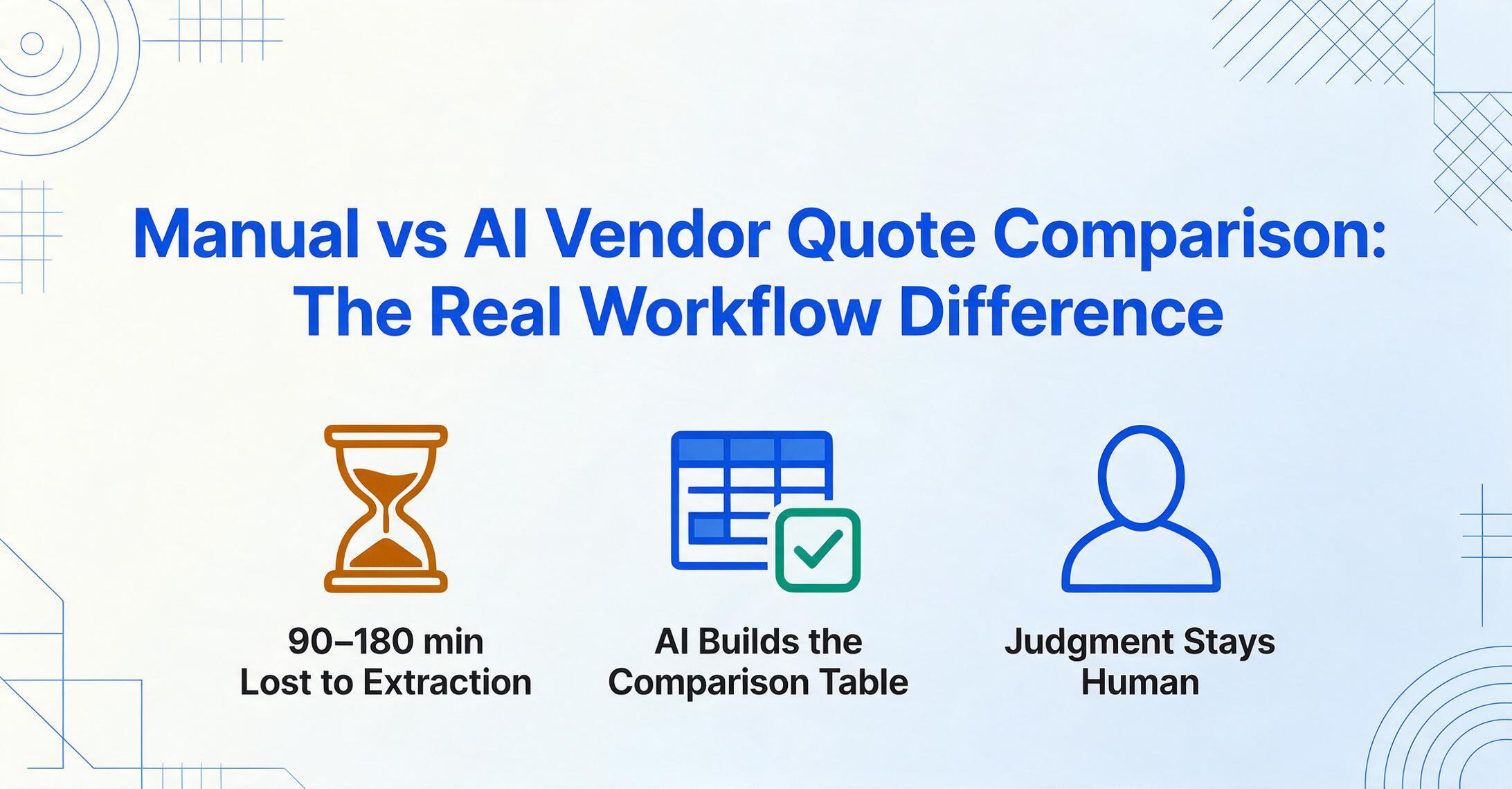
The comparison logic accounts for roughly 15% of the total task time. The remaining 85% is data logistics: locating, transferring, and normalizing values from documents into a structure where comparison can begin. That split shows up in the per-step timings above, and it is what turns a theoretically simple process into the bottleneck procurement teams live with every RFQ cycle.
A Five-Supplier RFQ Takes 3.25–6.5 Hours Manually. The Extraction Step Can Be Completed in the Time It Takes to Upload the Files.
The Hackett Group's benchmarks show its Digital World Class procurement teams running 58% shorter requisition-to-purchase-order cycle times than typical organizations. The hours that separate them are the administrative ones a five-supplier RFQ generates: reformatting quotes, building comparison tables, chasing values across documents. The breakthrough is removing the extraction barrier, so comparison is where the effort concentrates.
Measured per task for a standard five-supplier, seven-column RFQ:
| Task | Manual Workflow | AI Extraction Workflow |
|---|---|---|
| Open documents, locate fields | 30–60 minutes | Not required — AI reads documents directly |
| Transfer values to spreadsheet | 60–120 minutes | Not required — extraction produces the table |
| Normalize units and formats | 30–60 minutes | 5–10 minutes (review and adjust if needed) |
| Align line items across suppliers | 45–90 minutes | 15–30 minutes (review AI's data, map equivalencies explicitly) |
| Apply scoring, produce recommendation | 30–60 minutes | 30–60 minutes (unchanged — still requires human judgment) |
| Total per RFQ cycle | 3.25–6.5 hours | 1.3–2.7 hours |
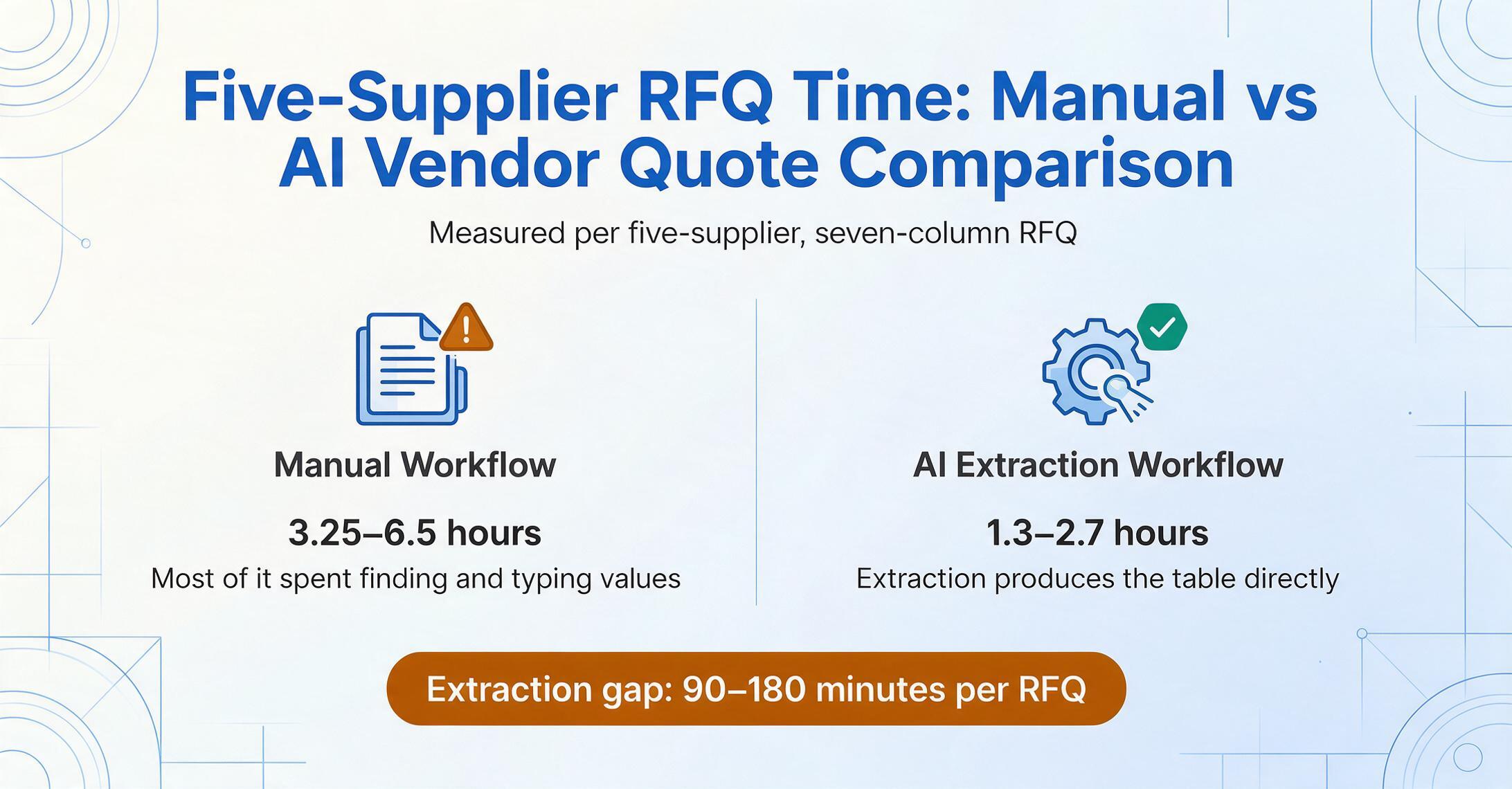
The extraction gap — finding values in documents and moving them to a table — accounts for 90–180 minutes per five-supplier RFQ. At a fully loaded procurement labor cost of $85/hour, that's $127–$255 in labor saved per RFQ, before considering the downstream cost of decisions delayed or quotes that expired while the spreadsheet was still being built. Over a month with 10 RFQs, the recovered hours alone pay for the extraction tool. The comparison and decision-making stages — the work that requires procurement expertise — remain unchanged in both time and quality.
What makes this speed possible is a fundamentally different approach to reading documents. In a manual workflow, you open each PDF, scan for the unit price, find it, and type it — then repeat for MOQ, lead time, payment terms, and so on. In an AI-assisted workflow using column-name extraction, you define what you want to extract — the column names like "Unit Price," "MOQ," "Lead Time (Days)" — and the AI locates each value anywhere on the page by understanding what it means semantically, not by remembering where a field was positioned in a previous document. The same column definitions work across every supplier's format without per-vendor configuration.
Files are processed securely and not stored.
The 5–10 second per-page processing time (compared to ~3 minutes per page of manual work) means the speed advantage compounds with document volume — but only for the extraction step. The decision-making step doesn't accelerate because it doesn't need to; the procurement professional's judgment is the value, not the bottleneck.
Manual Comparison Creates Three Error Types That Compound Across Line Items. AI Extraction Replaces Two of Them.
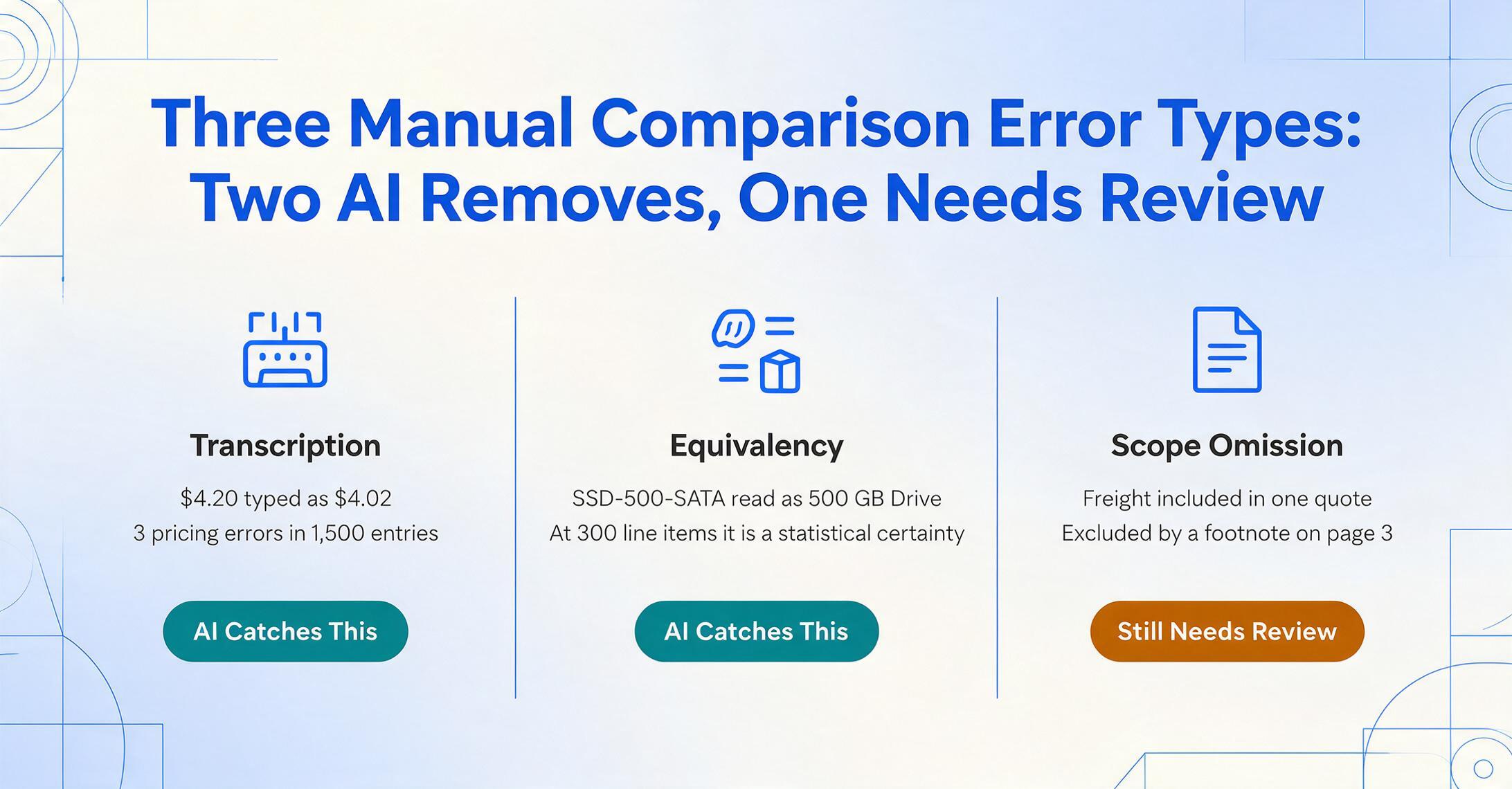
The conversation about quote comparison accuracy usually focuses on "typos" — a transposed digit, a missed decimal point. But the more expensive errors in manual comparison are structural, not typographical, and they fall into three categories:
Transcription errors. The value on the PDF is $4.20. The value in the spreadsheet is $4.02. A single transposition on a $500,000 materials contract is enough to change which supplier looks cheaper, and a 300-line bill of quantities asks a reviewer to key 1,500 values by hand. Error rates for unaided manual keying run in the low single digits per field, so a comparison built that way carries several wrong numbers before anyone reviews it. CAPS Research's 2022 cross-industry study put the spread in PO processing cost between top and bottom performers at 14x ($53 to $741); rework is one of the cost drivers behind the high end of that range.
Equivalency errors. The analyst decides "SSD-500-SATA" and "Solid State Drive, 500 Gigabytes" are the same item and puts them in the same row. If they're actually different product configurations — one enterprise-grade, one consumer-grade — the entire line-item comparison is invalid, and the error is invisible because the spreadsheet treats the equivalency assertion as a fact. This is the error type that manual processes create at a rate proportional to the number of line items, not the skill of the analyst. At 300 line items, it's a statistical certainty.
Scope omission errors. Supplier A's quote includes freight. Supplier B excludes it with a footnote on page 3. The analyst skims past the footnote and compares the base prices directly. The "cheaper" supplier turns out to be more expensive after the freight bill arrives separately — but the decision was already made based on the spreadsheet. One procurement manager on Reddit's r/procurement described this pattern bluntly: "If one supplier quotes hourly and another quotes fixed price, you'll spend half your time translating instead of evaluating." The translation step consumes the hours, but the scope assumptions it buries are what cost the money.
| Error Type | Manual Workflow | AI Extraction Workflow |
|---|---|---|
| Transcription | Present — every manual entry introduces a > 0 risk of typo or transposition | Eliminated — AI reads the document directly; no human retyping step |
| Equivalency | Present — made silently during data entry, not documented | Still present — but moved to a separate, reviewable step after extraction |
| Scope omission | Present — footnotes and exclusions easily missed during manual scanning | Reduced — AI reads the entire document, including footnotes; empty cells flag missing data |
AI extraction doesn't eliminate equivalency errors — two products with different descriptions still require a human to decide whether they're the same. But it separates the extraction of raw data from the equivalency judgment. The analyst reviews a table where every supplier's values are already populated, and the alignment decision is explicit and reviewable — not a silent assumption made while switching between windows. As detailed in our analysis of the hidden flaw in manual quote comparison, this decoupling is what makes the comparison auditable rather than assumed.
Verification is what makes that decoupling worth anything in practice. ImageToTable.ai includes a Review Mode for it: hover or click any extracted cell and the original quote highlights the exact spot the value came from, and clicking a region on the source document jumps back to its cell. Edited a field? One click shows the AI's original reading of it and lets you revert. For a buyer working through five suppliers, that turns "is this unit price really what Vendor B quoted?" from a hunt through a PDF into a glance at a highlighted line, and auto-annotate can run the same check across every file in a batch so the trace is waiting before review starts. The limit is worth stating plainly: Review Mode confirms where a value came from, not whether it belongs in your comparison. The equivalency call stays with you.
At Three RFQs Per Month, Manual Comparison Is a Minor Friction. At Fifteen, It Becomes the Team's Capacity Limit.
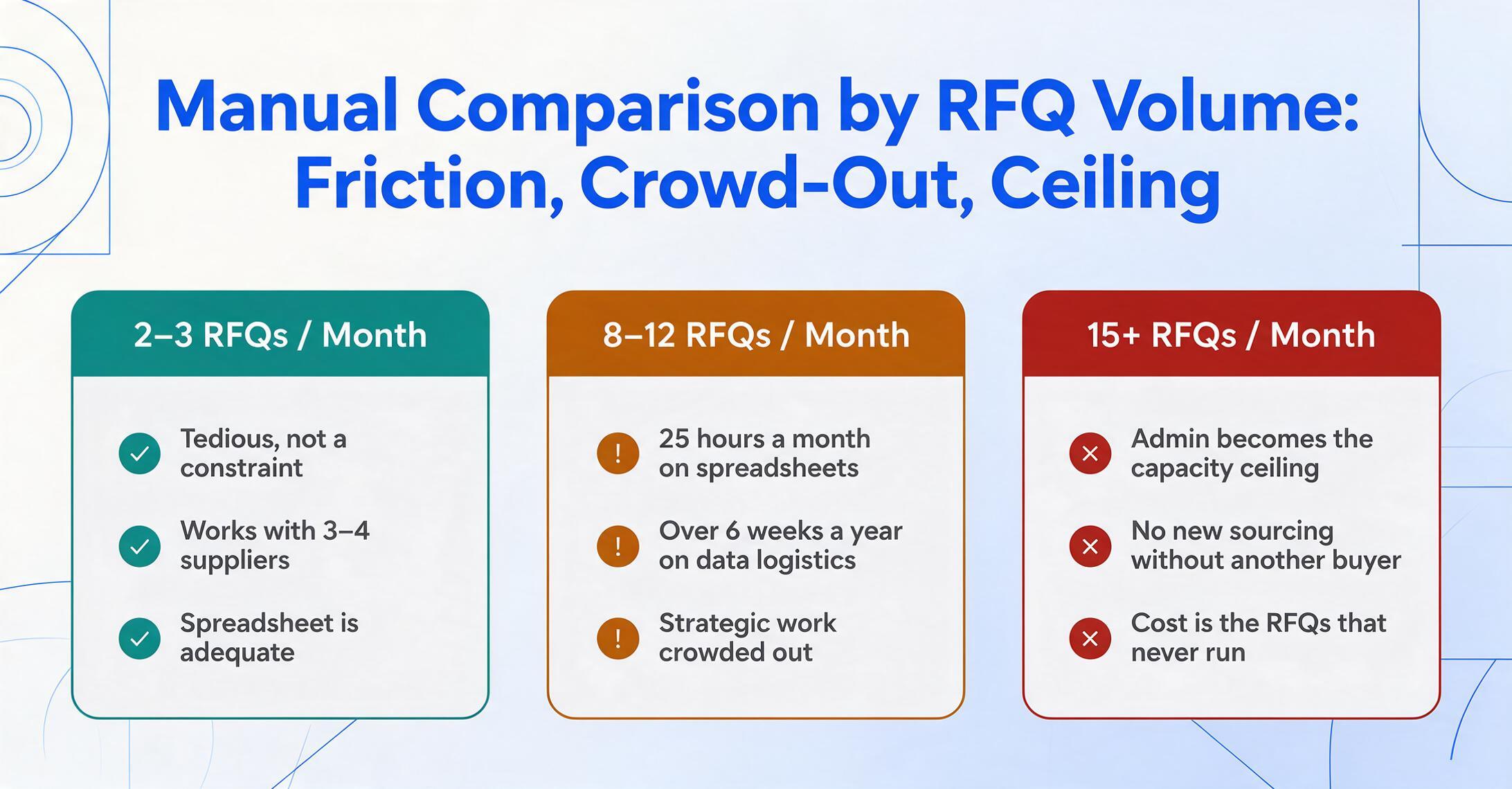
The scalability threshold is the dimension where the manual workflow breaks, and it's worth being precise about where. For a team running 2–3 RFQ cycles per month with 3–4 suppliers each, manual comparison works — it's tedious but not a structural constraint. A procurement professional on Reddit described this zone: "I take the data from quotes and put it in my own 'comparison' excel where i can compare each suppliers offer (this is for large RFQ situations)." For small RFQs, the spreadsheet is adequate.
At 8–12 RFQs per month, the administrative hours begin crowding out strategic work. A buyer who spends 25 hours per month building comparison spreadsheets from PDFs is spending over 6 weeks per year on data logistics rather than supplier negotiation, market analysis, or cost reduction initiatives. This is the threshold where the 85% data-logistics share stops being an abstraction: what looked like a small tax on each RFQ becomes the month's dominant workload.
At 15+ RFQs per month, manual comparison becomes the ceiling on procurement throughput. The team cannot run more sourcing events without hiring another buyer — not because the strategic work demands it, but because the administrative workload of comparison spreadsheet construction consumes all available hours. The cost isn't the labor — it's the RFQs that don't get run, the suppliers that don't get evaluated, the cost savings that aren't captured because the team was at capacity building spreadsheets.
This scalability gap is what makes batch extraction a distinct capability from single-document processing. With batch extraction, all supplier quote files are uploaded at once — regardless of their original formats — and processed into a single comparison table in one operation. The per-RFQ extraction time drops from hours to minutes regardless of whether the RFQ involves 5 suppliers or 15. The comparison and decision-making work remains proportional to volume, but the extraction barrier is removed completely.
Every Procurement Professional Already Knows How to Compare Quotes in Excel. The Learning Curve for Extraction Tools Is a Single New Pattern.
The strongest argument for the manual workflow is that it requires zero training. A new procurement hire who has used Excel — which is to say, every new procurement hire — can build a comparison spreadsheet on day one. The process is slow, error-prone, and capacity-limited — but it is universally accessible. This is not a minor advantage. Any alternative workflow has to clear a bar that the manual process meets by default: it must be faster to learn than the time it saves, measured within a single RFQ cycle.
The learning curve for AI-assisted extraction is concentrated in a single new pattern: instead of opening each PDF and typing values into a spreadsheet, the user uploads all files and defines what they want to extract. The column names are the same columns they'd type into Excel — "Unit Price," "MOQ," "Lead Time" — but the AI locates the values across documents rather than the human reading each PDF. Once defined, column sets can be saved as named templates and reused across RFQ cycles with one click.
For comparison: SAP Ariba's RFQ module takes weeks to implement and requires suppliers to use the platform. Coupa's bidding functionality requires supplier onboarding and portal adoption. JAGGAER's sourcing tools assume a structured spend management program already exists. These platforms have learning curves measured in months and adoption curves measured in supplier relationships, which is why, despite their scale in enterprise procurement software, they haven't replaced spreadsheet-based comparison for the mid-market. The AI extraction approach has a learning curve measured in the time it takes to upload a file and type a column name — a threshold that can clear within the first RFQ cycle.
For teams interested in the extraction approach applied to purchase orders, a similar dimensional comparison exists for PO data entry: ERP templates vs AI extraction, where the same gap between structured-system input requirements and real-world document variety creates an identical friction point.
Where the Manual Workflow Still Has Measurable Advantages — and Where It Doesn't
An honest manual vs AI comparison has to show both sides. The manual workflow genuinely wins on several dimensions, and acknowledging them is what gives the rest of the comparison its weight:
- Zero marginal cost. Excel is already licensed. No per-RFQ fee, no page-limit tier, no subscription evaluation. For organizations running fewer than three RFQs per month, the time savings of automation don't recover the tool cost — the manual workflow is the economically rational choice.
- Full format flexibility on output. The manual process can produce any layout, any scoring model, any pivot structure — because a human is building it. Extraction tools produce a standardized table; if the comparison workflow demands a highly customized format, a manual rebuild step may still be needed.
- Contextual judgment during extraction. When an experienced buyer reads a supplier's quote, they may notice things an AI extraction misses: "This supplier always quotes Net 30 but ships late — factor that into the scoring." This institutional knowledge lives in the buyer's head, not in the document, and it surfaces during manual review in a way that automated extraction doesn't capture.
- Government procurement documentation. Under FAR Part 6 (Competition Requirements), contracting officers must document and justify the basis for award decisions. The manual process, for all its inefficiency, produces an inherent paper trail: the original quotes, the comparison spreadsheet, the analyst's notes. AI-assisted workflows can produce the same documentation — but the extraction step must be configured to preserve original documents alongside extracted data for compliance purposes. In government procurement, automated tools work with the manual compliance framework, not as a replacement for it.
The dimensions where manual loses — and loses proportionally to volume — are speed, consistency (error rate per entry), and scalability. These dimensions compound: a team that saves 90 minutes per RFQ on extraction can run more RFQs, evaluate more suppliers, and capture more savings — without adding headcount. The typical procurement team running 10 RFQs per month recovers roughly 15–25 hours per month, or $1,275–$2,125 in monthly labor cost at standard procurement loaded rates. The real question is at what RFQ volume the manual workflow's cost exceeds the learning investment of switching.
Frequently Asked Questions About Manual vs AI Vendor Quote Comparison
At what point does manual quote comparison stop making sense?
Around 3–5 RFQs per month with more than 3 suppliers each. Below that threshold, the time investment of learning a new tool may not recover its cost quickly enough to justify the switch — especially for organizations with stable supplier relationships where each RFQ reuses familiar document formats. Above that threshold, the extraction time savings compound monthly, and the error reduction from eliminating manual transcription becomes measurable in real dollars. At 10+ RFQs per month, the manual workflow is costing more in labor alone than the extraction tool costs in subscription fees — before factoring in the value of additional RFQs the team can now run.
Does AI extraction eliminate the need for human review of vendor quotes?
No. The comparison and decision-making steps — determining which supplier offers the best value, factoring in past performance, evaluating scope assumptions — still require procurement expertise. What AI extraction changes is that the procurement professional's time is spent on those judgment-intensive steps rather than on extracting and transcribing data. The extraction produces a first-draft comparison table; the buyer reviews, corrects, and makes the award decision. The quality of the decision improves because more time goes into evaluation, not data entry.
Why not just use SAP Ariba or Coupa for quote comparison?
SAP Ariba, Coupa, and JAGGAER are enterprise procurement suites designed for organizations with formal supplier management programs, dedicated procurement IT support, and the budget to implement and maintain an enterprise platform. Their RFQ modules require suppliers to submit responses through the platform — which works well when your suppliers are large enterprises already networked on these systems, but often fails when your suppliers are mid-market or smaller companies who send quotes as email attachments. For the procurement manager at a $50M manufacturer sourcing from 40 different suppliers — most of whom will never log into Ariba — the enterprise suite solves the comparison workflow but never reaches the point in the process where the data exists to compare. This is the structural gap that lightweight extraction tools fill.
What document formats can AI extraction handle for vendor quotes?
PDF files (both digitally generated and scanned), JPG/PNG images, and WebP are all supported. This covers the full range of real-world vendor quote formats: ERP-generated PDFs, Word-to-PDF exports, scanned paper forms, photos of printed quotes, and screenshot captures from supplier portals. Handwriting on scanned documents is readable, though accuracy decreases with scan quality — a clean scan of a printed form produces high accuracy, while a low-resolution phone photo of handwritten pricing at an angle may require manual review.
Does the extraction work across different languages?
Yes. The underlying visual language model reads text regardless of language. A vendor quote in Chinese, German, Portuguese, or Spanish is processed the same way — column names guide the extraction, and values are returned as written. Numeric fields such as price and lead time produce clean outputs independent of the source language. For international procurement teams sourcing across regions, this eliminates the additional friction of language-specific manual data entry.
Can column definitions be reused across RFQ cycles?
Yes. Column sets — the list of fields you want to extract, such as Unit Price, MOQ, Lead Time, Payment Terms, Quote Validity — can be saved as named templates in your account. Your standard RFQ comparison columns are defined once and applied with one click to every future cycle. This means the recurring effort per RFQ is: upload files, select your saved template, export the comparison table. No column redefinition, no per-supplier configuration.
Does AI extraction normalize units of measure automatically?
The AI extracts values as stated in the document — if Supplier A writes "per case of 24" and Supplier B writes "per unit," both values are captured as-is. The normalization step — converting everything to a common unit basis — remains a spreadsheet operation performed after extraction. This design choice is intentional: the extraction step should be mechanical and not introduce assumptions. The normalization step is then visible, formula-based, and auditable, rather than a silent judgment made during data entry. For teams that need to convert PDF quotations to Excel as a first step before comparison, this separation keeps the audit trail clean.
Are there compliance implications for government procurement teams?
Under FAR Part 6 and FAR Part 13 (Simplified Acquisition Procedures), competitive quote comparison is a regulatory requirement, not just a best practice. The documentation burden — proving quotes were solicited, received, and compared fairly — adds an additional layer to the comparison workflow. AI extraction produces a consistent, time-stamped record: original documents plus extracted data in a standardized format. This does not replace the documented award justification required by FAR, but it reduces the administrative effort of compiling the supporting comparison evidence. Government contractors subject to FAR 52.244-5 (Competition in Subcontracting) face the same requirement to document competitive selection of subcontractors — the extraction workflow produces a defensible paper trail for those audit requirements.
The AI-assisted approach restructures the work so that extraction and comparison are separate, sequential steps, each verifiable and reviewable, instead of a single fused process where data entry and equivalency judgment happen in the same motion and produce the same indistinguishable cell. For teams running 5+ RFQs per month, that restructuring recovers hours and produces decisions you can stand behind when someone asks "how do we know these quotes are actually comparable?"
Related: What vendor quote comparison costs your team in hours per month · Batch extracting vendor quotes for comparison in Excel