Korean Year-End Tax (연말정산)
Cash Receipt Checklist: Prep Before the January Deadline
Can a 15-minute checklist save you from losing hundreds of thousands of won in 현금영수증 (cash receipt) deductions this January? The answer depends on whether you know where the system breaks — and whether you check those break points before the Hometax (홈택스) simplification service opens on January 15. Each year, employees who discover in mid-January that their phone number was never registered, or that an old number still had their receipts attached, are stuck scrambling to recover transactions that should have been automatic. The difference between a smooth year-end tax settlement (연말정산) and a rushed, deduction-losing one is often preparation done in the weeks before the deadline — not during it.
Key Takeaways
- The phone number you give the cashier does not automatically register your 현금영수증 with the NTS — without a pre-registration step, every cash receipt you generated this year could be an orphan record in Hometax.
- Most missing cash receipt deductions come from one of four fixable gaps: an unregistered number, an old number still active, a self-issued paper slip not manually registered, or a merchant that never transmitted the data to the NTS.
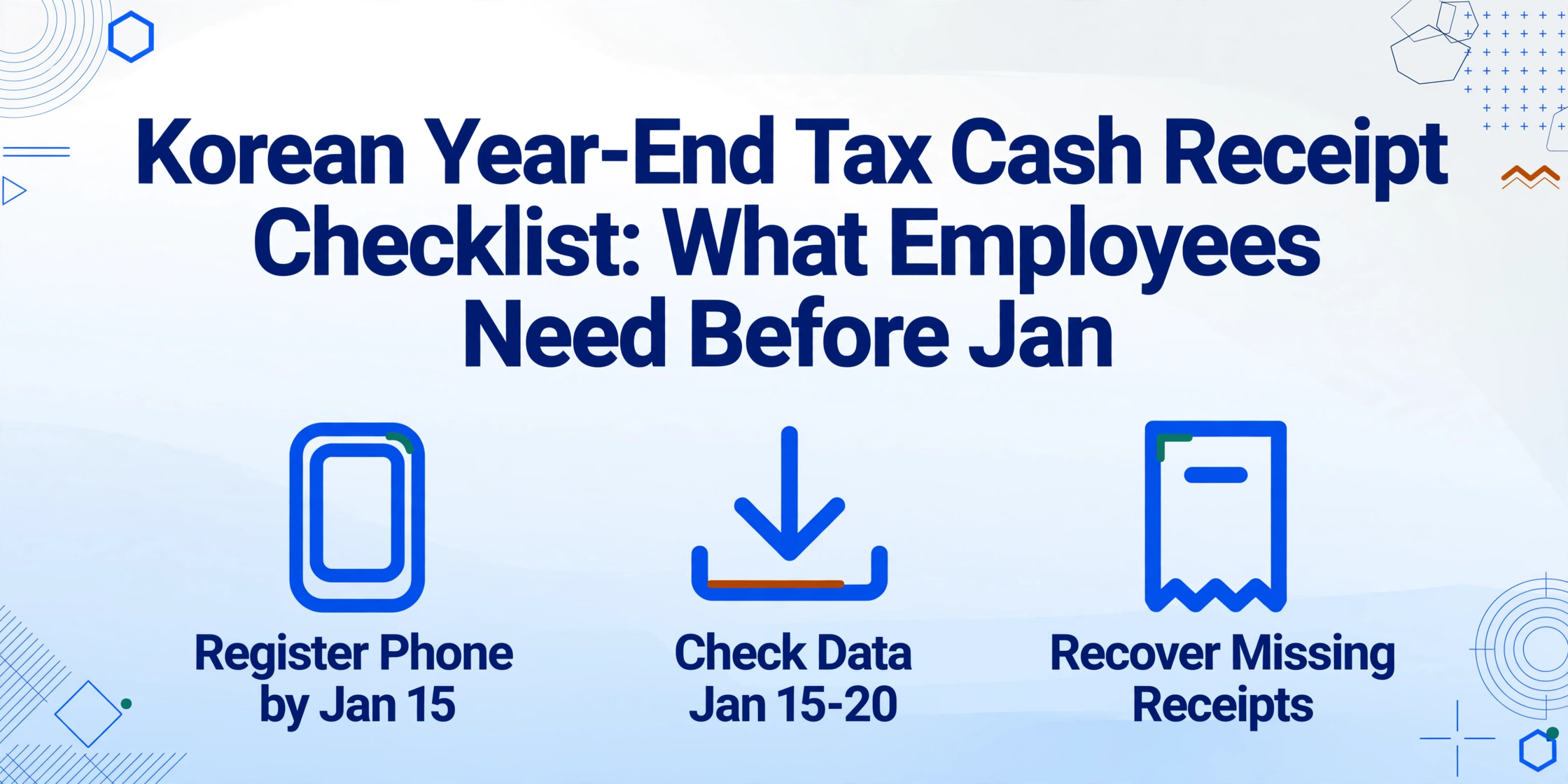
- Three checks done before January 15 — verify your Hometax phone registration, spot-check your download against your own records, and digitize paper slips — can recover 100,000 to 300,000 won in deductions.
The Year-End Tax Settlement (연말정산) Timeline: Three Windows You Cannot Miss
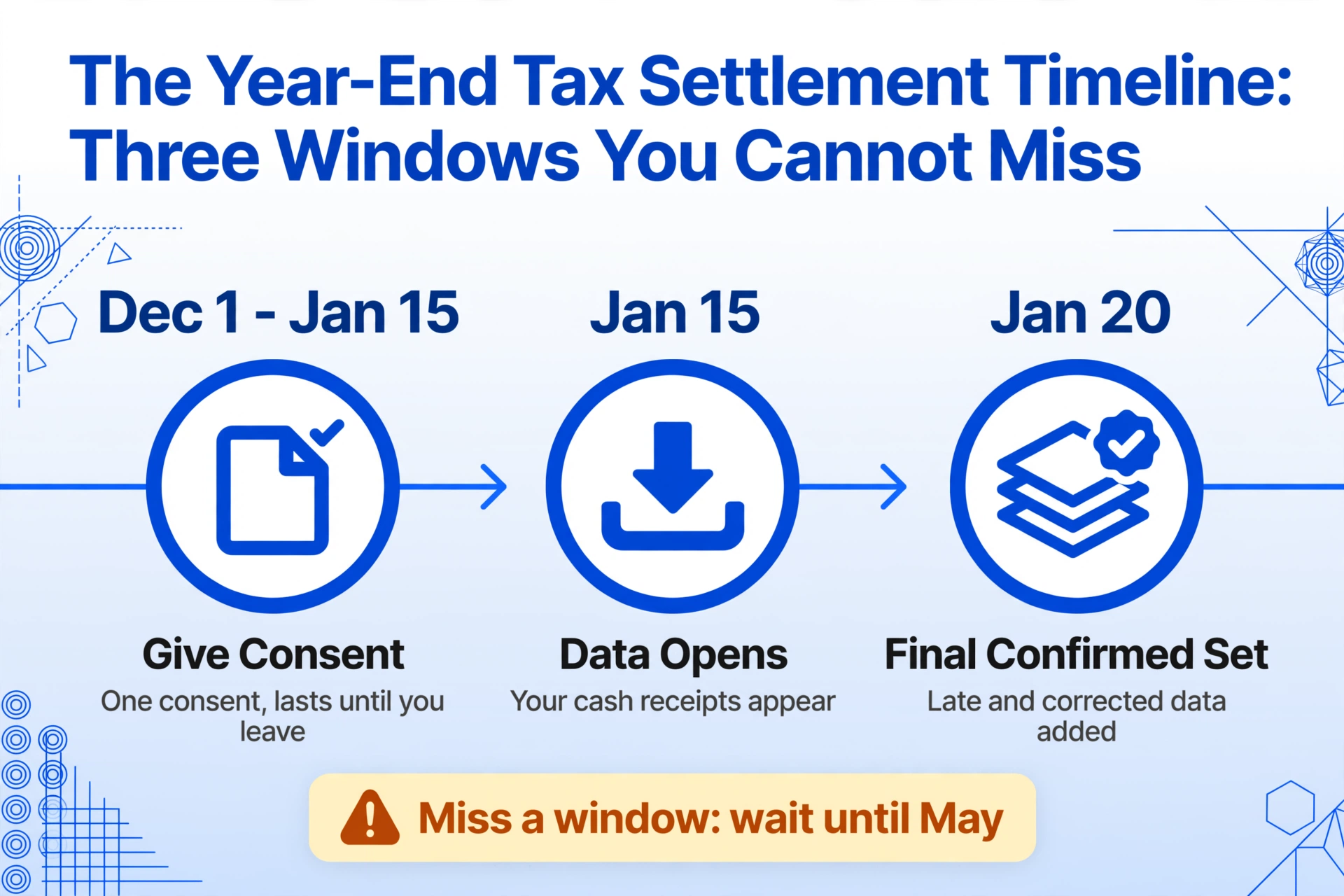
Korea's year-end tax settlement follows a fixed annual calendar set by the NTS (국세청, National Tax Service). Missing any of these windows means waiting until the following year's May comprehensive income tax filing — or filing a corrected return (경정청구) later — to claim the deduction you could have gotten in February. The three critical windows are:
Window 1 — Early December to January 15: Employer Registration and Consent. Your employer must register the list of employees eligible for year-end settlement (연말정산 대상자 명단) with Hometax by November 30. Then, from December 1 through January 15, each employee must consent to the simplified data bulk-provided service (간소화자료 일괄제공서비스) — a single consent that, once granted, lasts until you leave the company. Without this consent, your employer cannot download your tax data on your behalf, and you must handle everything manually through the main Hometax portal.[NTS Year-End Guide via Brunch]
Window 2 — January 15 to 20: Hometax Simplification Service Opens. The 연말정산간소화서비스 (year-end settlement simplification service) opens on January 15 each year. This is the date your NTS-verified data — including all electronic 현금영수증 transactions linked to your registered phone number — becomes available for download. The initial January 15 release reflects what the NTS has received from merchants as of that date. A final confirmed set, incorporating corrections and late-submitted data from issuing institutions, becomes available on January 20.[Chosun Ilbo, Jan 14 2026]
Window 3 — January 15 to mid-February: Document Submission to Employer. Most companies require employees to submit their year-end settlement documents — the Hometax PDF download plus any supplementary receipts — between mid-January and mid-February. Some employers using the bulk-provided service download the data automatically and only request additional documentation for items the NTS did not collect (private academy fees, certain rental expenses, specific donation receipts). The final employer deadline for submitting the year-end withholding statement (지급명세서) to the NTS is March 10, but your window as an employee closes much earlier — typically late January.
For more context on why the timeline itself creates pressure, see our analysis of why manual cash receipt matching costs more than Korean employees realize.
Before January 15: Register Your Phone Number in Hometax
This single step is the most common reason Korean employees see zero won (현금영수증 0원) when they open their simplification service data in January — and it takes under two minutes to fix, provided you do it before the deadline.
A 현금영수증 is only linked to you in the NTS database if the phone number you gave the cashier has been pre-registered as your cash receipt issuance method (현금영수증 발급수단). Handing your number at the register does not automatically register it — it's a separate step, and one that most employees either don't know about or assume happens automatically. The NTS's own guidance[NTS] is clear: without prior registration, the receipt data sits in the NTS database as an orphan record — the NTS has the transaction, but it cannot identify whose deduction it should be.
Here is the exact path to register (or verify) your number:
Log in to Hometax (hometax.go.kr)
Use your public certificate (공동인증서), financial certificate, or simplified authentication (간편인증) via Kakao, Naver, or Toss.
Navigate to Consumer Issuance Method Management
Menu path: 계산서·영수증·카드 (Invoices, Receipts, Cards) → 현금영수증 (Cash Receipts) → 소비자 발급수단·전용카드 (Consumer Issuance Method / Dedicated Card) → 현금영수증 발급용 휴대전화번호/카드관리.
Enter Your Active Phone Number
Input the phone number you currently use. The NTS will retroactively link up to 36 months of orphan receipts associated with this number. Make sure to delete any old numbers that may still be registered — an old number that was never removed continues to receive new receipt data, and those transactions will not appear under your current number.
Wait 24 Hours and Verify
The update is not instant. After registering, wait one full business day, then log back in to check: 계산서·영수증·카드 → 현금영수증 → 근로자·소비자 조회/변경 → 현금영수증 사용내역(소득공제) 조회. Your historical data should appear.
If your number was already registered, do not assume everything is fine. Verify that the currently registered number is the one you use at checkout — especially if you changed carriers or devices in the past year. Phone number changes are the most common reason for mid-year orphans even when registration was done correctly.
Mid-January: Download and Verify Your Hometax Cash Receipt Data
Once the simplification service opens on January 15, the first thing to do is not to rush everything to your employer. The first thing is to check whether the data matches what you actually spent.
The NTS aggregates 현금영수증 data from three sources: VAN providers (KICC, KG Inicis, NICE) that process in-store POS transactions, platform payment processors (Naver Pay, Kakao Pay, Toss) that transmit digital transaction data, and self-issuance records (자진발급분) that merchants submitted using the NTS code 010-000-1234. Each source has its own latency and completeness characteristics. A transaction at a convenience store registered on a VAN network appears within 24 hours. A self-issued receipt from a small merchant who submitted it on paper may take days or weeks to appear — or may not appear at all unless the consumer registers it manually.
Here is what to check in the Hometax download:
Check Total 현금영수증 Spending vs. Your Estimate
You do not need to remember every transaction. But if you regularly use cash at traditional markets, smaller restaurants, or taxis, estimate your monthly cash spending × 12. If the Hometax total is significantly lower, you likely have orphan receipts that were either not registered or were issued under a different identifier.
Spot-Check Recent Transactions
Pick 5 to 10 transactions from the last 3 months that you remember. Verify the amount and vendor name are correct. Discrepancies usually indicate a merchant keying error or a self-issued receipt that was not linked to your number.
Check the Final Confirmed Data on January 20
Some merchants submit late corrections or batch-send their November–December data after the initial January 15 snapshot. Re-download on January 20 — the NTS's "final confirmed" version — to capture these late additions before submitting to your employer.
Export and Cross-Reference Platform Data
If you use Naver Pay, Kakao Pay, or Toss, export the 현금영수증 transaction history from each app and compare against Hometax. Transactions paid via platform credit or points do not generate cash receipts — but funded transactions (charged to your bank account) should appear in both places.
For a complete walkthrough of how to structure a single year's worth of cash receipt data — including column recommendations for your own tracking spreadsheet — see our guide on extracting Korean cash receipt data to Excel for tax deduction.
Key timeline check: If your employer uses the bulk-provided service (일괄제공서비스), your consent must be registered by January 15. If you miss this window, you can still download your data individually from Hometax and submit it to your HR department manually — but the processing delay may push your refund into March instead of February.
The Deduction Rules: What Your Cash Receipts Are Actually Worth
To evaluate whether the effort of tracking down missing receipts is worth it, you need to know what each receipt is worth in tax terms. The math is straightforward once you understand the three-layer structure.
Layer 1 — The threshold. Under the Income Tax Act (소득세법) Article 126-2, your combined spending on credit cards, check cards, and cash receipts only qualifies for income deduction once it exceeds 25% of your total annual salary (총급여). For an employee earning 50 million won per year, the first 12.5 million won of spending generates zero deduction — regardless of payment method. The deduction formula only applies to spending above this threshold.[NTS]
Layer 2 — The deduction rates. Above the threshold, the rate varies by payment method:
| Payment Method | Deduction Rate |
|---|---|
| Credit card (신용카드) | 15% |
| Check card / Debit card (체크카드) | 30% |
| Cash receipt (현금영수증) | 30% |
| Traditional market (전통시장) | 40% |
| Public transit (대중교통) | 40% |
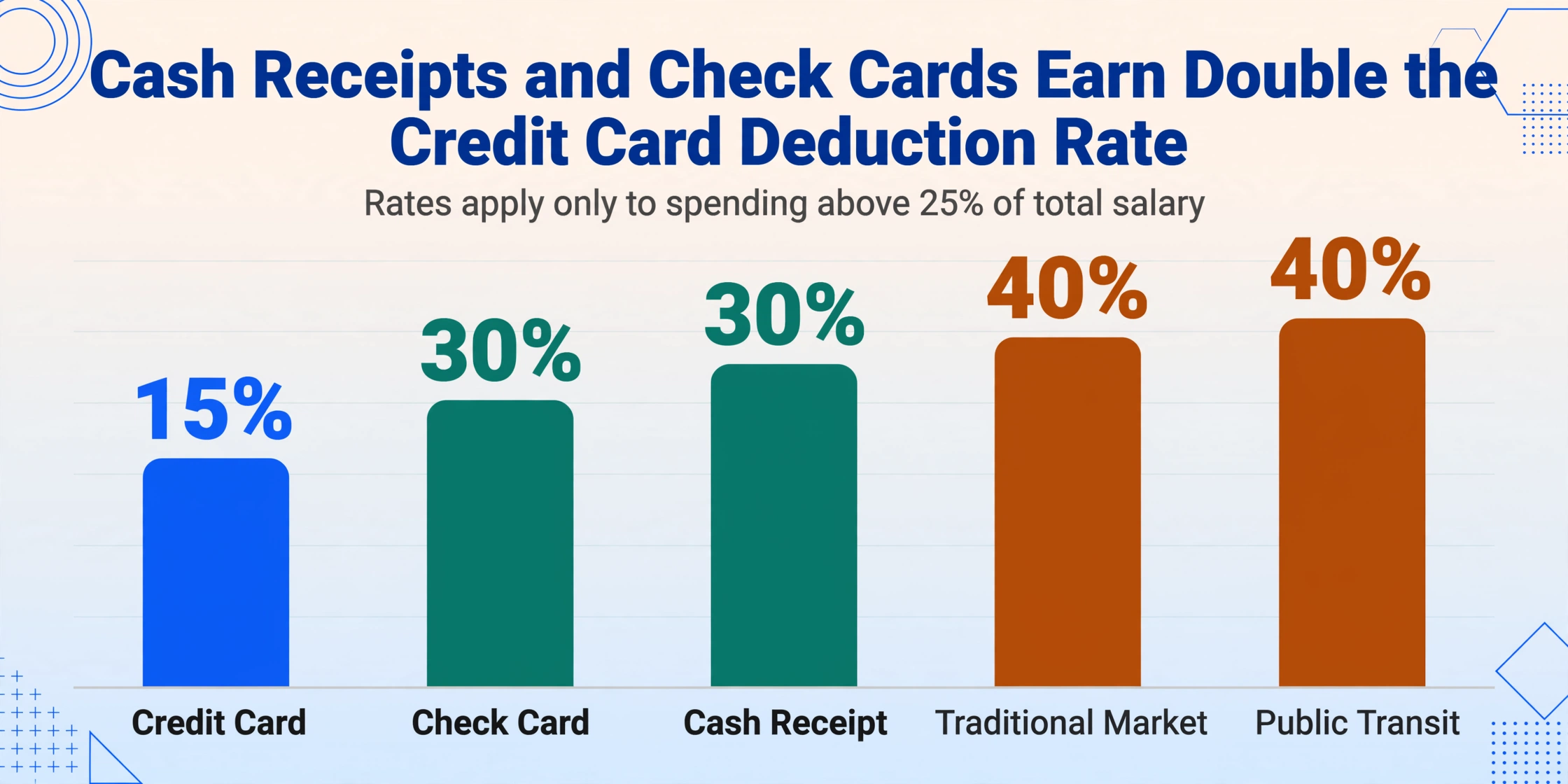
Cash receipts and check cards earn double the deduction rate of credit cards. The NTS applies the credit card spending first to the 25% threshold — this ordering rule means that once you pass the threshold, every additional won paid via cash or check card is effectively worth twice as much as a credit card won in deduction value.
Layer 3 — The limits. There are caps on how much deduction you can claim in total:
| Salary Bracket | Basic Deduction Limit | Additional Deduction Limit (Traditional Market / Transit / Culture) |
|---|---|---|
| 70 million won or below | 3,000,000 won | 3,000,000 won |
| Above 70 million won | 2,500,000 won | 2,000,000 won |
An employee earning 50 million won who spends 20 million won across all payment methods, with 4 million won of that in cash receipts, would calculate the deduction as follows: the first 12.5 million won (25% of salary) yields zero deduction. The remaining 7.5 million won is eligible for deduction, applied in the NTS's order (credit card first, then cash receipts). If 3 million of the remaining was on credit card and 4.5 million was on cash receipts, the deduction is roughly 3M × 15% + 4.5M × 30% = 450,000 + 1,350,000 = 1,800,000 won in income deduction. At a marginal tax rate of 15% this reduces tax by about 270,000 won — not a life-changing number, but real money for a 15-minute check.
For a practical example of what happens when 150 receipts are processed end-to-end through batch extraction, read our guide on batch-processing a year of Korean cash receipts into a tax deduction summary.
When Receipts Are Missing: A Recovery Plan
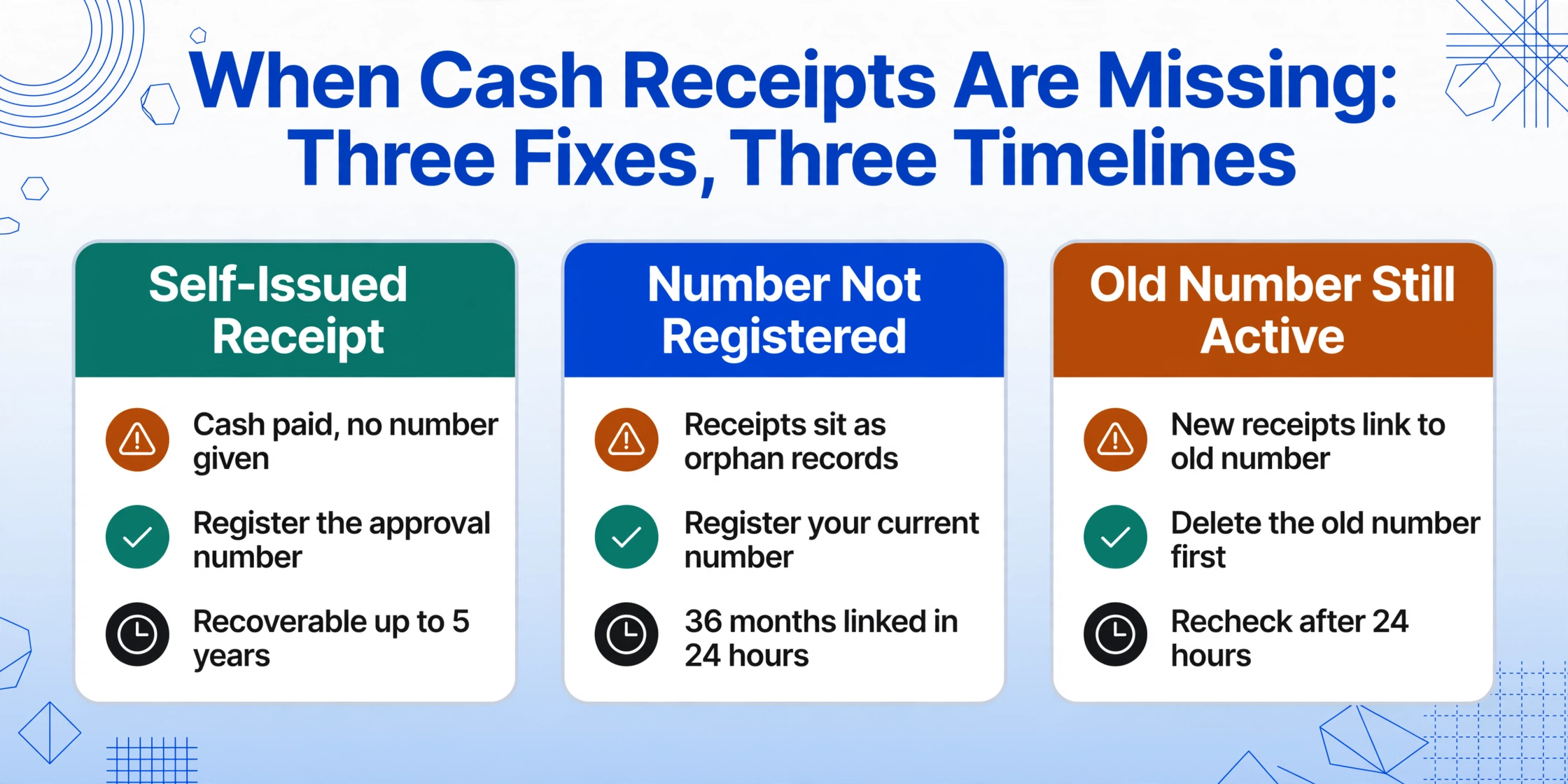
Even with a registered phone number and diligent data checking, some 현금영수증 will inevitably be missing from your Hometax download. The recovery options depend on why they are missing and how far back the transaction dates.
Scenario 1: Self-issued receipts (자진발급분). If you paid cash but did not provide a phone number — or the merchant used the NTS code 010-000-1234 — the transaction exists in the NTS database but is not linked to any consumer. You can recover these by going to Hometax → 계산서·영수증·카드 → 현금영수증 → 자진발급분 소비자 등록, and entering the approval number, transaction date, and amount from your paper receipt. This registration can be done retroactively for transactions up to five years old.[NTS]
Scenario 2: Phone number not registered at the time of transaction. Register your current number now (following the steps in section 2 above). The NTS retroactively links up to 36 months of receipts associated with that number. This fix takes effect within 24 hours, after which you can re-download your simplification service data.
Scenario 3: Old phone number still registered. If you changed numbers during the year but the old number was never removed from your Hometax profile, new transactions are still being associated with the old number. The fix: log into Hometax, delete the old number, register the new one, and wait 24 hours. The receipts from after your number change will then link to your new identity. The old-number receipts remain linked to the old number — but since that number was registered under your name originally, you can still claim them by re-downloading from the January 20 final confirmed data or by filing a corrected return (경정청구) within five years.
Scenario 4: Merchant never issued a receipt. For 현금영수증 의무발행업종 (mandatory-issuance industries — hospitals, academies, real estate agents), the merchant is legally required to issue a receipt for any cash transaction over 100,000 won. If they did not, you can report them to the NTS through the "미발급신고" (non-issuance report) system and receive a reward of 20% of the unreported amount. For non-obligatory merchants, you can request the merchant to issue a supplementary receipt retroactively.
When Physical Receipts Don't Match Hometax
The scenarios above cover the cases where the NTS does have the data but cannot connect it to you. A harder problem is the reverse: you have a physical 현금영수증 slip — from a traditional market stall, a taxi ride, a small hardware store — that was never transmitted to the NTS at all. These exist entirely outside the digital pipeline, and your Hometax dashboard will never show them unless you manually enter the transaction data.
This is where the real bottleneck of 연말정산 cash receipt preparation lives. Korea's electronic cash receipt system is remarkably comprehensive — roughly 95% of transactions follow the digital path — but the remaining 5%, multiplied across the tens of millions of 현금영수증 issued annually, represents a significant volume of manually managed data. And these are often the transactions that employees most need to track, because they occur at the small merchants where credit cards are less likely to be accepted.
The manual workflow for a paper slip goes like this: find the slip (often from a stack accumulated over months), read the date, vendor, supply amount, VAT, and approval number, type each into Hometax or a spreadsheet, categorize the expense type mentally, and repeat for every slip. At 2 to 3 minutes per slip, 20 paper receipts cost an hour of January time — time that could be spent checking deduction limits or verifying data completeness instead.
For employees who receive paper 현금영수증 slips regularly, the practical workaround is to digitize the slips as they are collected — not in January. Taking a photo of each paper slip with your phone and using an AI data extraction tool to read the fields (date, vendor, amount, approval number) converts the physical receipt into structured data in seconds. The output is a spreadsheet row that you can batch-compare against your Hometax download in January. If a slip does not appear in Hometax, you have the approval number ready for manual registration. If it does appear, you just saved yourself the typing.
The tool that enables this workflow — Custom Column Extraction — works differently from traditional OCR. Instead of requiring you to draw a box around each field or define a template for each receipt format, you simply name the columns you want extracted: "Transaction Date", "Vendor Name", "Supply Amount", "Approval Number". The AI reads each receipt photo and locates the values by understanding what each piece of text means — not by where it sits on the slip. A thermal receipt from a taxi, a hand-written slip from a market vendor, and a printed receipt from a pharmacy can all be processed in the same batch without separate setup per format. This capability is called format-independent extraction, and it is the practical difference between digitizing five paper receipts in a minute versus spending five minutes on each one. The same format-independent reading extends to tax invoices, delivery notes, and registration certificates in our Korean tax invoice extraction hub.
The One-Click Alternative: Process All Receipts in One Batch
The checklist above assumes you are working within the NTS system — registering numbers, verifying data, manually recovering missing receipts. But there is a complementary approach that bypasses several of these steps entirely for the employees who face the most fragmented receipt situation: those who regularly receive paper slips from small merchants, pay through multiple platforms, and need to reconcile everything against Hometax.
Instead of logging into Hometax, checking data source by source, and manually entering paper slips one at a time, you can collect all your receipt images — phone photos, screenshots, scanned paper slips, PDF exports from payment apps — and upload them to an AI extraction tool in a single batch. Define the columns you need, let the AI read every receipt, and export a consolidated spreadsheet. Then compare that spreadsheet against your Hometax download in a single pass to identify which receipts are missing from the official system and need manual registration.
This batch-first approach collapses the multi-hour January data check into a 15-minute process. The same AI that reads your paper slips also categorizes each one by expense type — 식대 (meals), 교통비 (transport), 의료비 (medical), 사무용품비 (office supplies) — using inferred columns, where you define a column like "Expense Category" with options and the AI assigns the correct category based on the vendor name and transaction context, not on any additional data entry from you.
You can test this workflow now with your own receipts — no registration required — using the demo below:
Files are processed securely and not stored.
The spreadsheet that comes out gives you a structured foundation for your year-end tax settlement. You can sort by category, sum by deduction type, and — most importantly — compare line by line against your Hometax download. Any row that exists in your spreadsheet but not in Hometax is a receipt you need to register manually. Any row that exists in both confirms the system is working. The verification process that used to take an evening of cross-referencing becomes a 10-minute column comparison.
For businesses or accountants who manage multiple employees' 현금영수증 data, the Collection Link feature allows each employee to upload their paper receipt photos to a shared processing queue without needing their own account — useful for HR teams or tax accountants collecting receipts from multiple staff members before the filing deadline.
Frequently Asked Questions About Year-End Tax Settlement (연말정산) Cash Receipt Preparation
Q: I just registered my phone number in Hometax today. Will my year-old receipts appear in time for the January 15 deadline?
Yes — the NTS retroactively links up to 36 months of orphan receipts once you register your number. The update takes about 24 hours, so even if you register on January 14, the data should be available in the simplification service when it opens on January 15. If some older receipts still do not appear, they may be self-issued receipts (자진발급분) that require manual registration using the approval number from the paper slip.
Q: Can I claim cash receipt deductions if I lost the paper slip?
It depends on whether the merchant transmitted the data to the NTS. If the merchant issued an electronic 현금영수증 through the VAN network, the transaction is in the NTS database and will appear in your Hometax download — no paper slip needed. If the merchant issued a paper receipt without electronic transmission (common at traditional market stalls or small independent vendors), the data is not in the NTS system, and you need the paper slip to manually register it. Without the slip, the deduction for that specific transaction is lost.
Q: My 카카오페이 transaction history shows a cash receipt, but it is not in Hometax. What happened?
This typically happens when the phone number registered on your Kakao Pay account differs from the one registered in Hometax as your 현금영수증 issuance method. The platform transmits the transaction to the NTS, but because the consumer identifier does not match, it arrives as an orphan. Solution: make sure the same phone number is registered in both Kakao Pay and Hometax. If they already match and the discrepancy persists, the transaction may have been funded by platform credit or points — those transactions do not generate deductible cash receipts.
Q: Do cash receipt deductions work the same way for small business owners (개인사업자)?
No. Business owners do not use the employee 연말정산 route for their personal spending. However, 현금영수증 issued to their business registration number (사업자등록번호) serve as expense verification for VAT input tax credit (매입세액공제) and deductible business expenses. The deduction mechanics are governed by different laws — the Value-Added Tax Act (부가가치세법) for VAT credit, and the Income Tax Act for deductible expenses. If you operate a small business while also receiving a salary, you must keep personal and business cash receipts separate, as mixing them can trigger an NTS audit.
Q: What if I miss the January 15 employer deadline? Can I still get the deduction?
Yes — but through a different route. If you miss your employer's submission window, you can claim the missed deduction by filing a comprehensive income tax return (종합소득세 신고) in May of the following year, or by submitting a corrected return (경정청구) within five years of the original filing. The practical downside is that your refund arrives months later (June instead of February) and requires you to prepare the paperwork yourself rather than having your employer's HR process it. The deduction value itself is not lost — only delayed.
Bottom Line: The 15-Minute Checklist Is Worth More Than Any Deduction Rate
The difference between an employee who maximizes their 현금영수증 deduction and one who loses 100,000 to 300,000 won in potential savings is not knowledge of tax law. The deduction rates and limits are published everywhere. The difference is knowing where the system breaks and checking those specific break points before the deadline.
Three checks, 15 minutes total, can recover receipts worth real money: (1) verify your phone number is registered in Hometax and that no old number is still active; (2) download and spot-check your simplification service data against your own estimates; (3) collect any paper slips you have and either register them via Hometax or digitize them with an extraction tool while you can still act. Do these three things before the January 15–20 window closes, and your tax settlement moves from "I hope I got everything" to "I know exactly what my deduction is."
The January scramble is optional. The receipts are trackable. The only thing missing is the five minutes it takes to check your phone number setting right now.