7 Korean Cash Receipt
Mistakes That Cost Your Tax Deduction
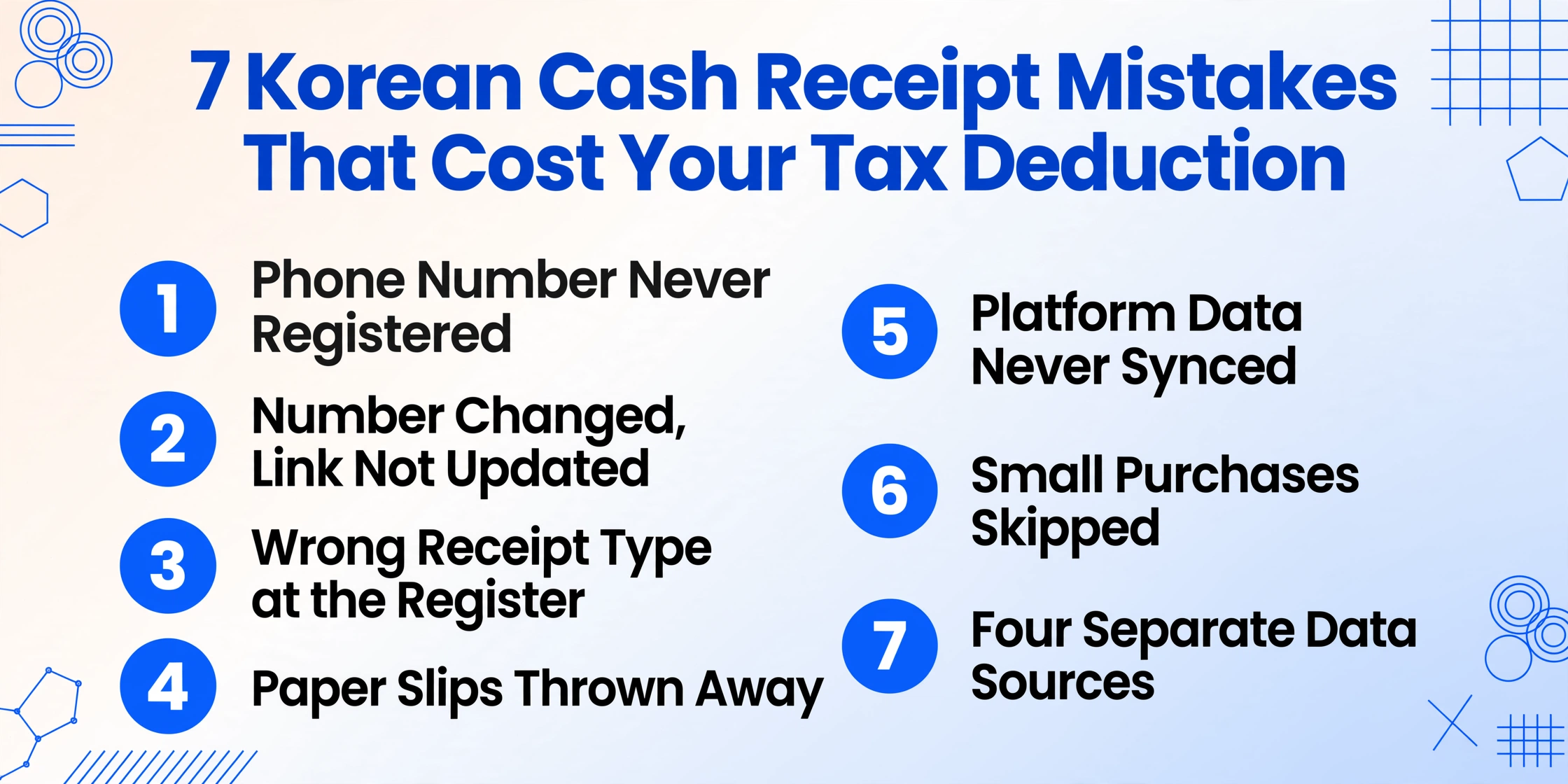
Every January, thousands of Korean employees open Hometax (홈택스) expecting to see a year's worth of cash receipt (현금영수증) data — and find the deduction column showing zero won. The panic is so common that "연말정산 현금영수증 0원" generates its own search results, community forum threads, and fintech app FAQ pages across Naver, 3o3, and Toss. In most cases, the data is actually in the NTS database. The problem is not that the transaction was never recorded. The problem is that a small, preventable error — an unregistered phone number, a receipt type chosen wrong, a paper slip thrown away — broke the link between "you paid cash" and "you get a deduction." This article maps the seven errors that cost real money, quantifies what each one costs, and shows how to fix them before next January.
Key Takeaways
- Eight million won of your orphaned cash receipt data is already in the NTS database and a single 90-second phone registration step links all of it to your tax account.
- Skipping one 3,000 won receipt feels harmless until enough of those gaps push your total below the 25% salary threshold and wipe out the deduction on every won above it.
- Reconciling receipt sources throughout the year instead of scrambling in January turns year-end settlement from crisis into routine verification by catching all seven mistakes before they compound.
Mistake #1: Giving Your Phone Number Without Registering It in Hometax
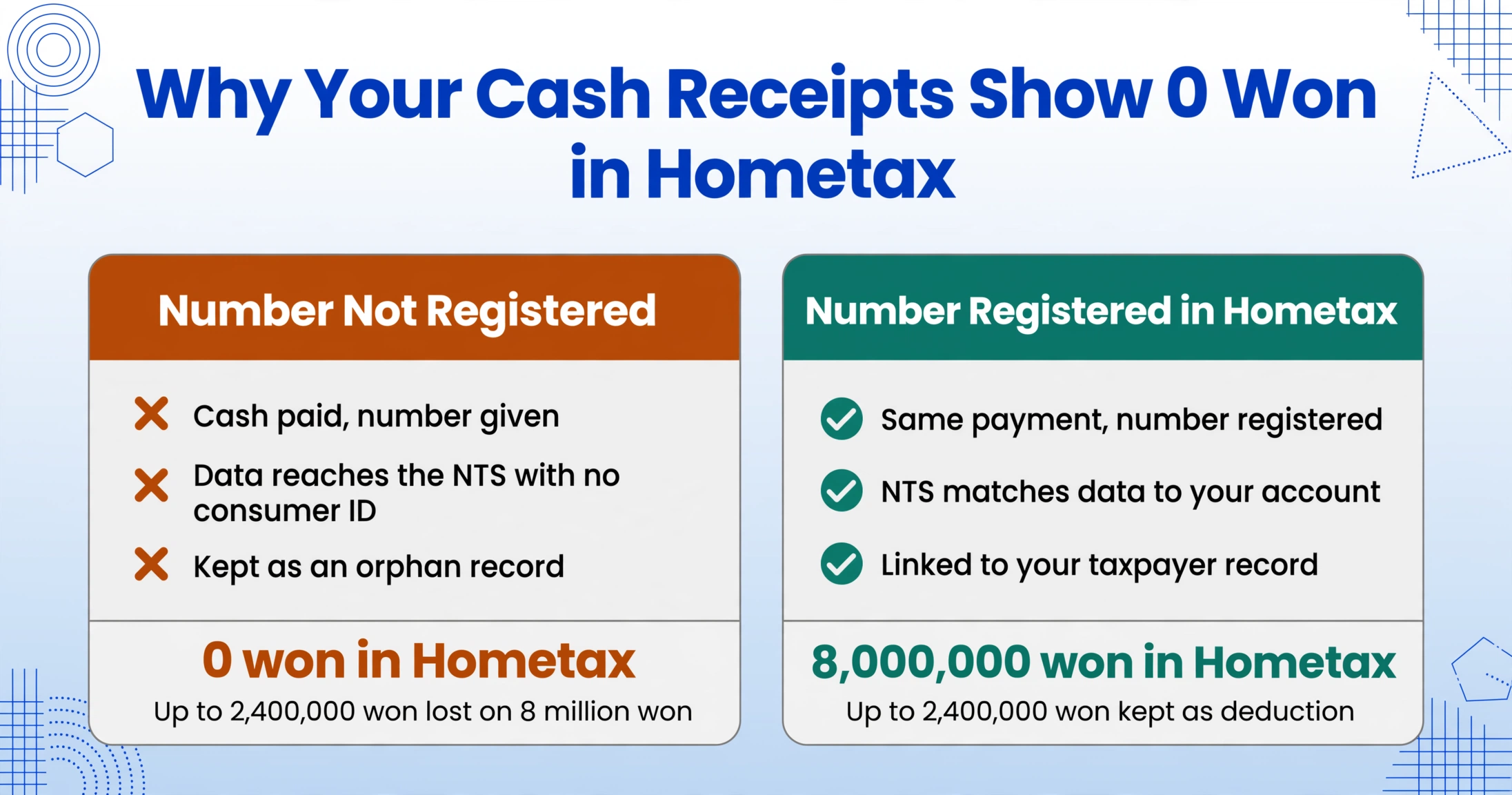
This is the single most common reason Korean employees see zero won in their year-end simplification service download — and it is also the easiest to fix. You hand the cashier your phone number, pay in cash, and assume the transaction is automatically linked to your tax record. The transaction is recorded at the merchant's end and transmitted to the NTS database. But the NTS only links that data to your account if your phone number has been pre-registered as a cash receipt issuance method (현금영수증 발급수단) in Hometax beforehand.
Without this registration, every transaction made with that number sits in the NTS database as an orphan record — the data exists, the NTS knows it happened, but no consumer identifier connects it to any specific taxpayer. When January arrives and you download the simplified year-end tax data (연말정산 간소화 서비스), the 현금영수증 section shows zero won. The 3o3 Help Center[3o3 Help Center] and countless Naver blog posts document variations of the same panicked question: "I've been using cash receipts all year, but year-end shows zero won (그동안 현금영수증 다 했는데, 연말정산 현금영수증 0원)?"
What it costs you: If your total annual 현금영수증 spending is 8 million won and none of it is linked because the number was never registered, you lose the entire deduction on that amount. At a 30% deduction rate for excess spending above the 25% salary threshold, and assuming a 40 million won salary (threshold = 10 million won), the loss on 8 million won of orphaned receipts could be up to 2.4 million won in deduction value — subject to the annual cap of 3 million won. In real tax refund terms, depending on your tax bracket, that is hundreds of thousands of won you never get back.
How to avoid it: Log into Hometax, navigate to 계산서·영수증·카드 (Invoices, Receipts, Cards) → 현금영수증 (Cash Receipts) → 소비자 발급수단·전용카드 (Consumer Issuance Method / Dedicated Card) → 현금영수증 발급용 휴대전화번호/카드관리, and register your current phone number. The NTS will retroactively link up to 36 months of orphan receipts associated with this number.
Mistake #2: Changing Your Phone Number Without Updating Hometax
Korea's high mobile carrier churn rate — driven by frequent device upgrade promotions — means many employees change their phone number every few years. When you change your number, the old number does not automatically detach from the NTS system. If you registered your old number as a 현금영수증 issuance method and never deleted it, the system continues to associate new transactions with the old number.
The consequence is a split data set: transactions made with your new number appear in the NTS database as orphans (because the system sees a phone number it doesn't recognize as belonging to anyone), while transactions somehow still reaching the old number appear under a number you no longer use. The result is that your Hometax dashboard shows neither set completely. The 3o3 Help Center notes that the system can take "until the next day at the earliest" to reflect a registration change[3o3], and if the change happens close to the January filing deadline, you may miss the window entirely.
What it costs you: If you changed numbers in July and accumulated 4 million won of 현금영수증 spending on your new number before discovering the split in January, those 4 million won are orphaned. At a typical marginal tax rate of 15–24% and the 30% deduction formula, that's approximately 180,000 to 288,000 won in lost tax benefit for just half a year's receipts. If the gap goes unnoticed for a second year, the loss doubles.
How to avoid it: Every time you change your phone number, log into Hometax and do two things: delete the old number from your issuance method list, and register the new one. Allow 24 hours for the system to propagate, then verify that historical data appears under the new number.
Mistake #3: Choosing the Wrong Receipt Type at the Register
When a merchant issues a cash receipt, they must classify it as either income deduction (소득공제용) or business expense proof (지출증빙용). This classification is determined by the identifier you provide: your personal phone number produces a 소득공제용 receipt, while your business registration number (사업자등록번호) produces a 지출증빙용 receipt. The problem arises when the identifier you give does not match the tax benefit you actually need.
A common scenario: a small business owner stops at a hardware store on the way home, buys supplies for the business using cash, and gives their personal phone number out of habit — receiving a 소득공제용 receipt. The business loses the VAT input tax credit (매입세액공제, 10% of the supply amount) and the expense deduction for comprehensive income tax (종합소득세 필요경비). Conversely, an employee making a personal purchase who gives their business registration number instead of their phone number will see that transaction missing from their personal year-end settlement data entirely.
What it costs you: For a business operator spending 5 million won annually on 현금영수증-eligible purchases through their personal number instead of their 사업자등록번호, the loss is the 10% VAT input credit (500,000 won) plus the income deduction for the supply amount — potentially 1 million won or more in combined lost tax benefit.
How to avoid it: Before you give any identifier at the register, pause and ask: is this a personal expense or a business expense? Personal → phone number → 소득공제용. Business → 사업자등록번호 → 지출증빙용. Carry both numbers saved in your phone so you don't have to recall them at the counter. If you realize the mistake after the fact, Hometax allows retroactive reclassification through the 용도변경 (purpose change) menu.
Mistake #4: Throwing Away Paper Slips From Small Merchants
Not all merchants are connected to the NTS digital pipeline. Small traditional market stalls, neighborhood hardware stores, street food vendors, and some taxi drivers still issue paper 현금영수증 slips — thermal-printed or handwritten. These are legally valid receipts with the same tax deduction weight as electronic ones. But they exist outside the automated data flow, which means they require a manual registration step to enter the system.
When a merchant does not have your phone number at the point of sale (or you did not provide one), they issue the receipt using the NTS-designated self-issuance code 010-000-1234 (자진발급, self-issuance). The transaction data reaches the NTS database, but because no consumer identifier is attached, it does not appear in anyone's Hometax dashboard. To claim the deduction, you must log into Hometax, navigate to 현금영수증 자진발급분 소비자 등록 (Cash Receipt Self-Issuance Consumer Registration), and manually enter the approval number, transaction date, and exact amount from the paper slip[NTS].
What it costs you: If you discard the paper slip before registering it, the approval number is lost and the transaction can never be claimed. Across a year, if 10% of your total 현금영수증 spending (say, 800,000 won out of 8 million) comes from paper slips that you throw away, you forfeit the deduction on that entire amount. The lost refund value, at the 30% deduction rate, is approximately 240,000 won per year.
How to avoid it: Take a photo of every paper 현금영수증 slip the moment you receive it — thermal paper fades over time, sometimes within months. Register the approval number in Hometax's self-issuance portal within 48 hours, while the slip is still in hand. For a deeper walkthrough of digitizing paper receipts, see our guide on extracting Korean cash receipt data to Excel.
Mistake #5: Assuming Digital Platforms Automatically Sync to Hometax
Large portions of Korean consumer spending now flow through digital platforms — Naver Pay (네이버페이), Kakao Pay (카카오페이), and Toss (토스). These platforms issue 현금영수증 for qualifying transactions, and many employees assume that because the transaction happens inside a digital app, the data automatically reaches their Hometax dashboard. This assumption is only partially correct.
Two conditions must be met for a platform transaction to appear in your year-end data. First, only transactions funded by cash-equivalent methods (Naver Pay Money, linked bank account transfers) qualify — transactions paid with Naver Pay points, for example, do not generate cash receipts. Second, the phone number registered on the platform must match the number registered as your 현금영수증 issuance method in Hometax. Many employees have different numbers on different platforms, or their platform account uses an email login with a different phone number attached, creating a mismatch that prevents the data from linking.
What it costs you: If you use Naver Pay and Kakao Pay for 30% of your annual spending (approximately 2.4 million won in 현금영수증-eligible transactions), and even half of those fail to sync because of a phone number mismatch, you lose the deduction on 1.2 million won. At the 30% deduction rate, that is 360,000 won in lost deduction value. The NTS's own year-end settlement FAQ[NTS Year-End FAQ] notes that late-submitted or mismatched platform data is one of the most common reasons for discrepancies between expected and actual deduction amounts.
How to avoid it: In November — before the simplification service opens in January — cross-check your Hometax 현금영수증 download against the transaction history in each platform you use (Naver Pay, Kakao Pay, Toss). Any transaction that appears in the app but not in Hometax needs to be investigated. The mismatch is usually a phone number issue. Update the phone number on each platform to match your registered Hometax issuance number.
Mistake #6: Skipping Cash Receipts for Small Purchases
"It's only 3,000 won. Not worth the hassle." This is the most expensive casual decision Korean employees make about their cash receipts — not because a single 3,000 won purchase matters, but because the mindset scales across hundreds of small transactions per year, and the cumulative effect determines whether you clear the 25% of salary threshold at all.
The Korean tax deduction formula is not a flat benefit on every receipt. It only applies to spending above 25% of your total annual salary. If your salary is 40 million won, the first 10 million won of combined credit card + cash receipt spending earns zero deduction. Everything above that threshold earns 30% for 현금영수증 and check cards, 15% for credit cards. Every skipped receipt shrinks the pool of spending above the threshold. A 3,000 won skipped receipt seems small, but multiplied across 100 similar transactions per year, that is 300,000 won of spending that could have contributed to crossing — or deepening — the deduction zone.
What it costs you: If you skip 현금영수증 on 500,000 won of small purchases over the year, and that 500,000 won would have been fully above the 25% threshold, you lose 150,000 won in deduction value (30% of 500,000). If the skipped receipts push your total spending below the 25% threshold entirely, the loss is larger — the entire year's cash receipt deduction is forfeited.
How to avoid it: Make "현금영수증 해주세요" an automatic phrase — the same automatic habit as fastening your seatbelt. The amount does not matter. Every won above the threshold earns 30% back. For a year-in-review perspective on whether your receipts are truly being tracked, see our year-end cash receipt checklist for a pre-January audit.
Mistake #7: Keeping Receipt Data in Four Separate Places
The first six mistakes all lead to the same structural problem: by the time January arrives, your 현금영수증 data lives in at least four places — a Hometax CSV download, a shoebox of thermal paper slips, a Naver Pay transaction log, and a Kakao Pay history — and none of them agree with each other on the total amount. Reconciling these sources is a manual spreadsheet exercise that adds 3 to 5 hours of work on top of the time already spent tracking down individual receipts.
This is the seventh mistake: treating scattered receipt sources as separate problems rather than a single data consolidation challenge. Each individual receipt may be correct, but without a unified, categorized spreadsheet that merges all sources, you cannot verify the total against the NTS data, you cannot identify which receipts are missing, and you cannot hand your tax accountant (세무사) a clean file.
What it costs you: The 3 to 5 hours of reconciliation time at a typical salary translates to 50,000 to 100,000 won in lost leisure or overtime value. More importantly, the reconciliation step is where hidden gaps get discovered — the Naver Pay transaction that never synced, the paper slip that lost its thermal print — but discovering them in January leaves no time to fix them before the filing deadline. The cost is not just the time; it is the missed deduction you only find out about when it is too late.
How to avoid it: Consolidate all receipt sources into one place throughout the year, not in January. Use a tool like ImageToTable.ai's Custom Column Extraction — instead of manually typing each receipt's data field by field, you define the columns you want (Date, Vendor, Supply Amount, VAT, Total, Expense Category) and the AI reads the values from each receipt image or PDF by understanding what the text means, not where it sits on the page. The same column-based reading handles the rest of the Korean tax document family — tax invoices, delivery notes, and registration certificates — in our Korean tax form extraction. For an in-depth walkthrough of consolidating a full year's worth of receipts, see the batch processing guide for Korean cash receipts.
What Seven Mistakes Add Up To
Running the numbers across all seven errors for a typical Korean employee earning 50 million won annually with 12 million won in total card and receipt spending:
| Mistake | Likely Annual Impact |
|---|---|
| #1 — Number never registered | Total loss if all receipts orphaned |
| #2 — Number changed mid-year | 180,000–288,000 won lost per half-year |
| #3 — Wrong receipt type | 500,000+ won lost VAT + expense deduction |
| #4 — Paper slips discarded | ~240,000 won lost per year |
| #5 — Platform transactions not synced | ~360,000 won lost per year |
| #6 — Small purchases skipped | ~150,000 won lost per year |
| #7 — No consolidated source | 50,000–100,000 won in time + missed deductions |
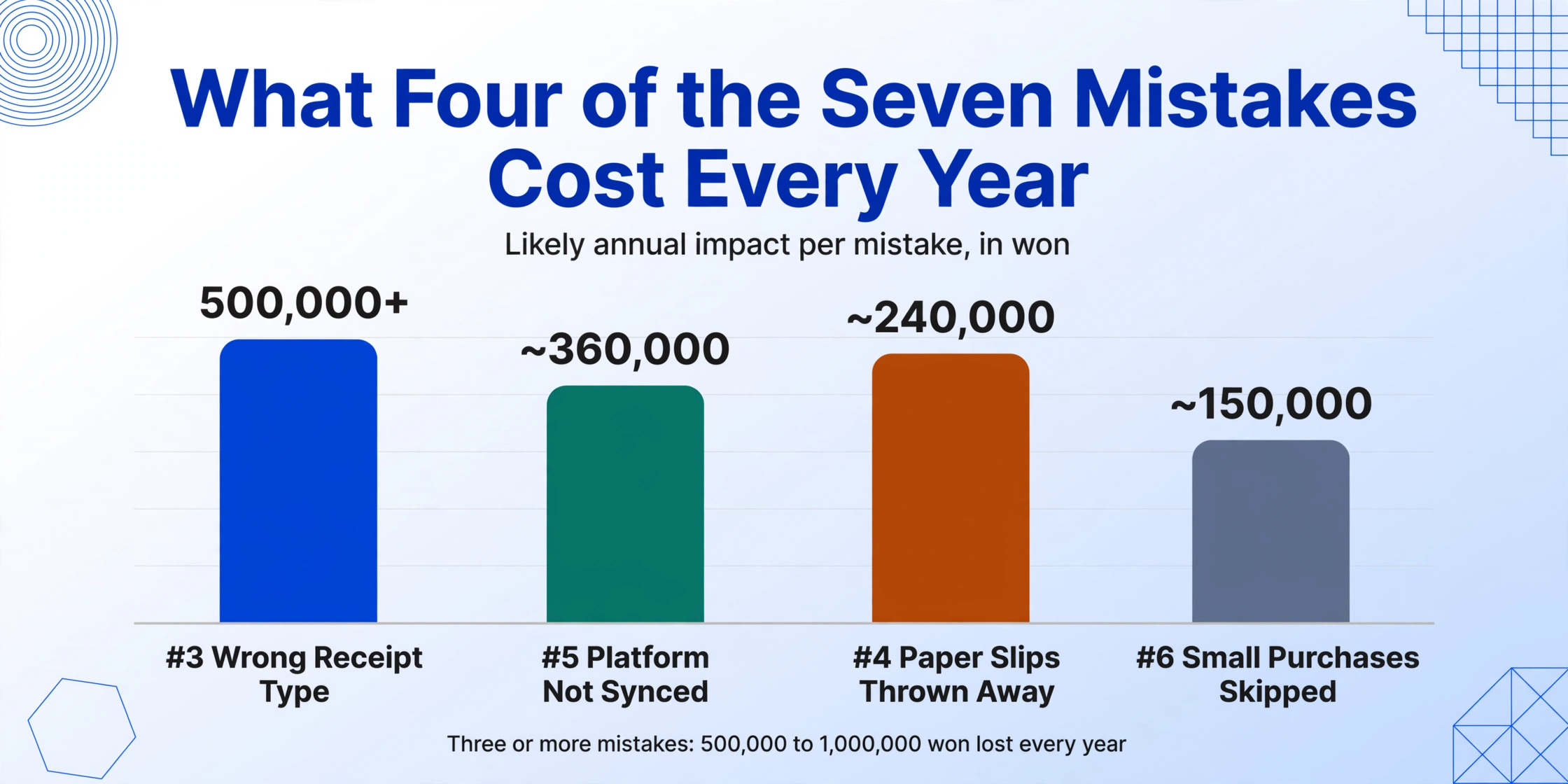
An employee affected by three or more of these mistakes could be losing 500,000 to 1,000,000 won or more in tax benefit every single year — not because the NTS doesn't have the data, but because the link between the data and their tax filing broke at a small, preventable point.
How to Recover If You've Already Made These Mistakes
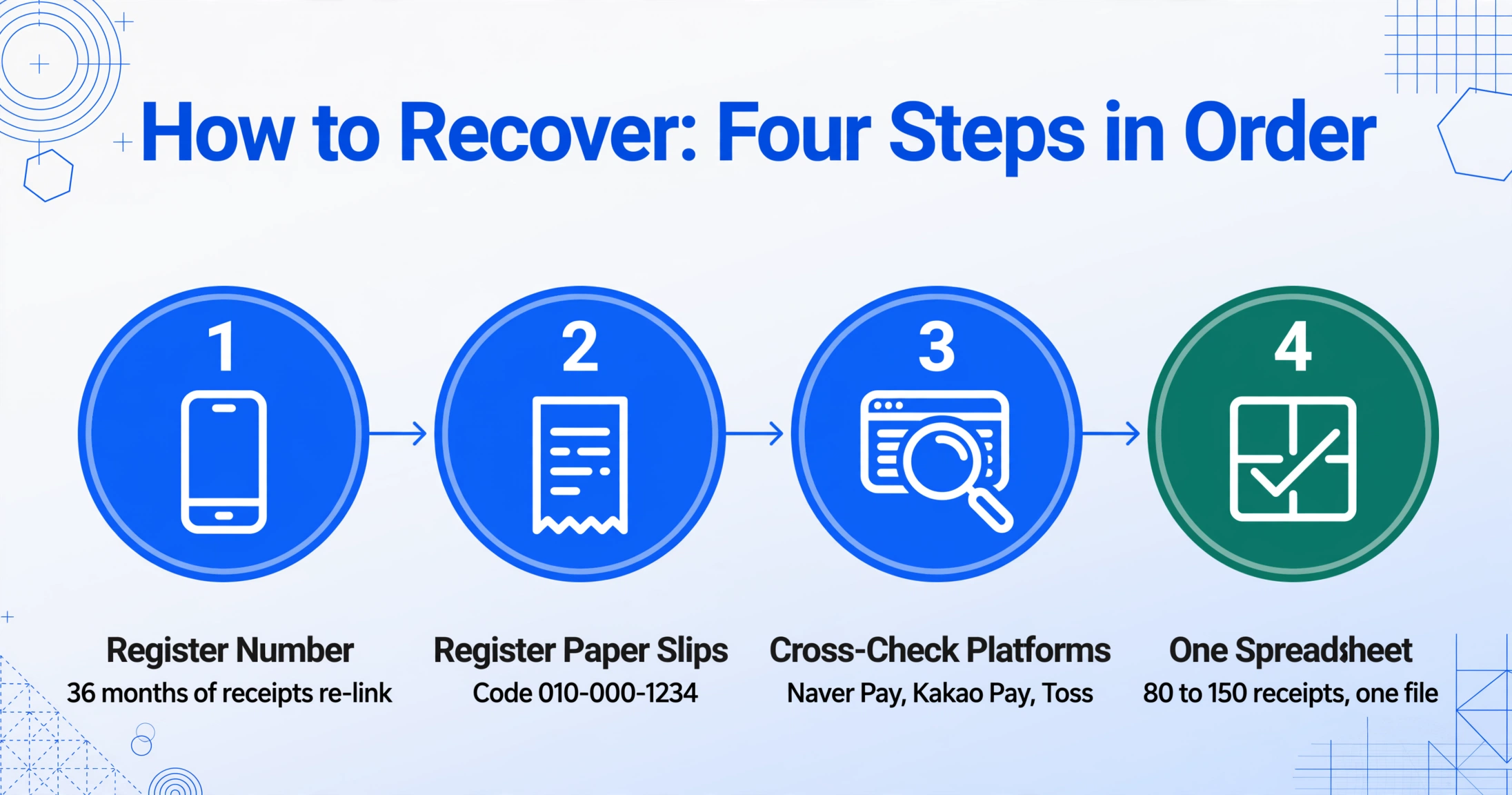
If you are reading this in December or January and your data is already scattered, you still have options. The recovery path depends on which mistake applies, but the sequence is the same regardless of the cause: consolidate, verify, and file.
Step 1: Register your phone number in Hometax now. Even if the January window is open, the NTS retroactively links up to 36 months of orphan receipts. This single step recovers more lost data than any other action. Log into Hometax, register your current number under 소비자 발급수단·전용카드, wait 24 hours, and re-download your simplification service data.
Step 2: Gather all paper slips in one place. For each slip that uses the self-issuance code 010-000-1234, enter the approval number, date, and amount into the 자진발급분 소비자 등록 portal in Hometax. If the thermal print has faded, you may still be able to read the slip under bright light or by scanning it at high contrast — the approval number is the critical field; without it, the transaction cannot be claimed.
Step 3: Cross-check platform data. Download transaction histories from Naver Pay, Kakao Pay, and Toss for the past 12 months. Compare the total to your Hometax download. Every transaction present in the platform but missing from Hometax is a candidate for manual registration.
Step 4: Consolidate everything into one categorized spreadsheet. This is where a data extraction tool becomes useful not as a luxury but as a time-saving necessity. Instead of manually entering 80 to 150 individual receipt rows, you can use Custom Column Extraction to define the columns your filing needs — Transaction Date, Vendor Name, Supply Amount, VAT, Total Amount, Receipt Type (소득공제용/지출증빙용/미표기), and Expense Category — and let the AI read and classify each receipt in one pass. For more details on the column strategy and the deduction math that determines which fields matter, see our complete guide to Korean cash receipt extraction.
The critical insight is that the mistakes are not independent — each one compounds the others. An unregistered number makes platform sync failures invisible. A discarded paper slip cannot be recovered after the fact. A wrong receipt type choice in July cannot be corrected in January without visiting the 용도변경 menu for every affected transaction. The most effective fix is not to repair each mistake individually, but to build a system that prevents them from happening in the first place.
Files are processed securely and not stored.
Frequently Asked Questions
Q: I registered my phone number in Hometax but my year-end data still shows zero won — what now?
If your number is registered but the data still does not appear, there are two likely causes. First, the phone number you registered may differ from the one you give at the register — check whether your mobile carrier assigned a different number than the one you think you have (this happens more often than expected, especially with eSIM transfers). Second, the data takes up to 24 hours to propagate after registration, and if you checked immediately, the link may not have been established yet. If both checks pass and data still does not appear after 48 hours, call the NTS cash receipt customer service center at 126 (without area code) and request a transaction trace for a specific approval number from one of your paper slips.
Q: I skipped cash receipts (현금영수증) for small purchases all year — can I still claim those deductions?
No — if a transaction was completed without requesting a cash receipt at the point of sale, and the merchant did not issue a self-issuance receipt (code 010-000-1234), the transaction is not recorded in the NTS system and cannot be claimed retroactively. The only exception is if the merchant is willing to re-issue a receipt for the transaction, which most merchants will not do for past transactions. This is why the habit of requesting 현금영수증 on every cash transaction, regardless of amount, is the single most important preventive measure.
Q: I'm a foreign employee in Korea — which mistakes should I watch out for most?
Mistakes #1 and #2 are the most common for foreign employees, because the Hometax phone registration process is documented primarily in Korean and many foreign workers do not know it exists until January. Make sure your phone number is registered as a 현금영수증 issuance method before December. If you changed your Korean mobile number since arriving (which is common when switching from a prepaid to a postpaid plan, or moving between carriers), Mistake #2 applies — your old number may still be linked to your Alien Registration Number (ARC) in the NTS system, and you need to delete it and register the new one. For a broader overview of the system, see our analysis of the year-end cash receipt problem that costs Korean employees time and money.
Q: I'm a small business owner — which mistake costs me the most?
Mistake #3 (wrong receipt type) is by far the most financially damaging for business operators. Using your personal phone number instead of your business registration number at the register means you lose both the VAT input tax credit (10%) under the Value-Added Tax Act (부가가치세법) Article 46 and the expense deduction under the Income Tax Act (소득세법) Article 160-2. For a small business spending 10 million won annually on 현금영수증-eligible purchases through the wrong identifier, that is approximately 1 million won in lost VAT credit plus the income tax deduction on the supply amount. If you have already made this mistake, log into Hometax and use the 용도변경 menu to reclassify affected receipts — this can be done retroactively but requires locating each incorrectly issued receipt individually.
Q: Is there a way to recover deductions from previous years?
Yes — through a process called 경정청구 (corrective claim), governed by the Framework Act on National Taxes (국세기본법) Article 45-2. If you discover that a previous year's year-end settlement (연말정산) or comprehensive income tax return (종합소득세 신고) omitted 현금영수증 deductions due to any of the seven mistakes above, you can file a corrective claim with the NTS within five years of the original filing deadline. The process is handled through Hometax: navigate to 신고/납부 (Report/Payment) → 종합소득세 (Comprehensive Income Tax) → 경정청구 (Corrective Claim), select the affected tax year, and upload the 증빙자료 (supporting documents) — in this case, the Hometax data that was retroactively linked after you registered your phone number. The NTS typically processes corrective claims within two to three months and will deposit the refund plus statutory interest (국세환급가산금, approximately 1.8% annually) into your registered bank account.[3o3 Corrective Claim Guide]
Prevention Is Cheaper Than Repair — By a Factor of 36 Months
Here is the asymmetry that defines the Korean cash receipt system: the NTS gives you 36 months to retroactively link orphan receipts by registering your phone number. That is a generous grace period — most countries do not offer any retroactive data recovery at all. But the catch is that the grace period only covers Mistake #1. For Mistake #3 (wrong receipt type), the retroactive fix exists but requires locating every incorrectly classified receipt one by one. For Mistake #4 (discarded paper slip), there is no recovery at all once the slip is gone. For Mistake #6 (skipped receipts), the deduction is simply lost forever.
The cost of prevention is near zero — registering a phone number takes 90 seconds. The cost of repair, when possible at all, is measured in hours of manual data entry across multiple Hometax menus. The third option — consolidating and extracting receipts as you accumulate them throughout the year, rather than scrambling in January — is the only approach that addresses all seven mistakes at once. Handling the data as it arrives, rather than waiting for the annual fire drill, is what turns the year-end settlement from a crisis into a routine verification.
See how one pass through your receipts can catch all seven mistakes before they cost you.
Try It on a Cash Receipt →No sign-up required. Your file is processed securely and not stored.