Korean Tax Deduction Data:
The Spreadsheet Gap in a Digital System
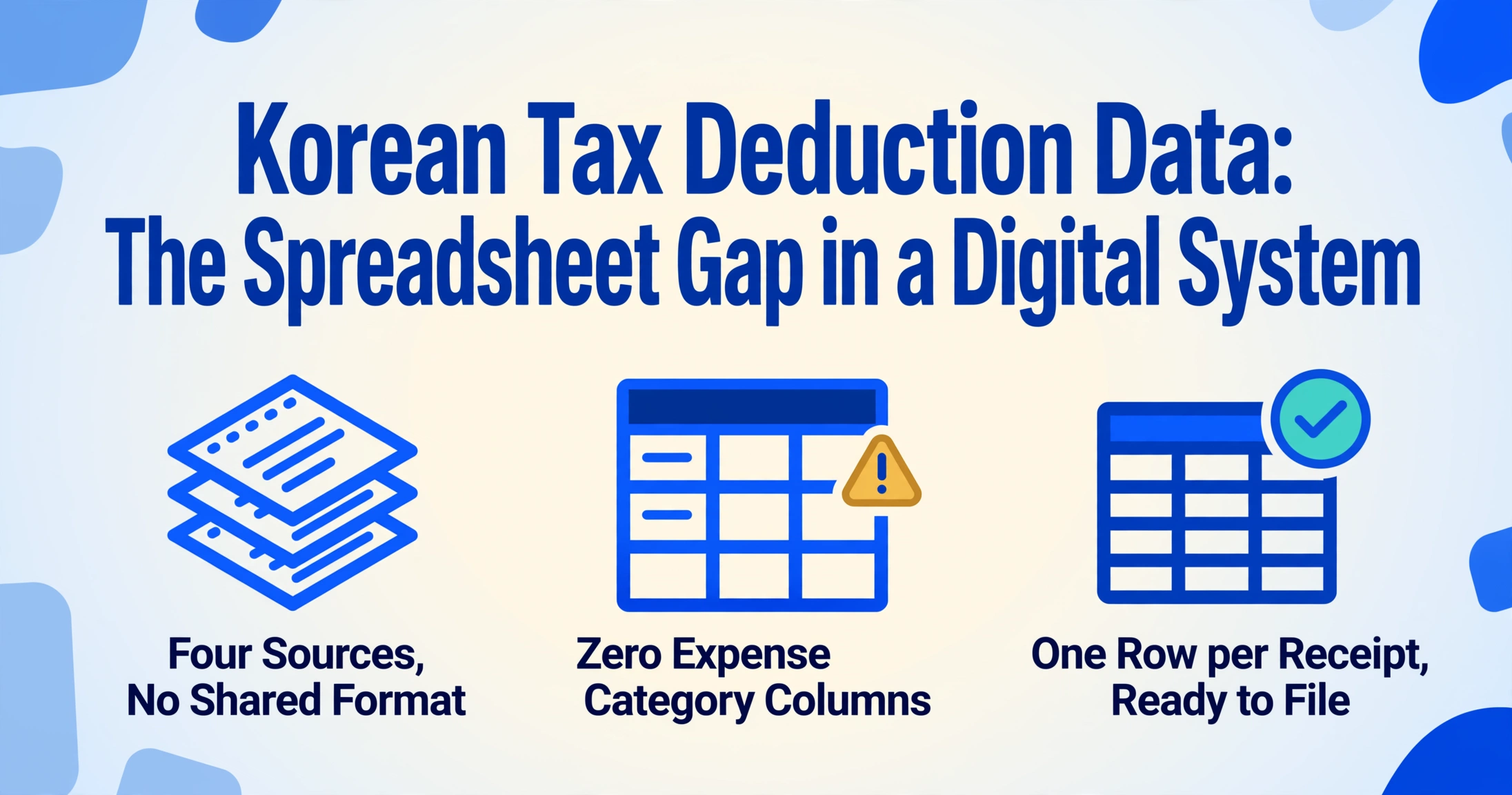
South Korea's National Tax Service (NTS) already has a digital record of every cash receipt (현금영수증) you received last year. The moment you hand your phone number to a cashier, the transaction — date, amount, vendor registration number — flows through the KFTC payment network and lands in the NTS database by the next morning. And yet every January, when year-end tax settlement (연말정산) season begins, the actual bottleneck isn't tax law knowledge. It's the pile of paper cash receipt slips on your desk — the ones from the corner hardware store, the lunch spot with the broken card terminal, the taxi driver who handed you a thermal-printed slip — that never made it into the digital flow.
Key Takeaways
- Korea's NTS already knows the date, vendor, and amount of every cash receipt you received last year — and every January, your tax settlement still starts with a shoebox of faded thermal paper.
- The 5 to 10 hours of manual work each January has nothing to do with missing data — Hometax already has the numbers — the bottleneck is the one field no system generates: expense category.
- Set seven tax-filing columns once — Date, Vendor, Supply, VAT, Total, Classification, Category — and 150 cash receipts process in under 15 minutes, producing a single categorized spreadsheet ready for your tax accountant.
What Makes a Korean Cash Receipt Different from an Ordinary Receipt
A receipt in most countries is a record. A Korean cash receipt (현금영수증) is a tax document — and the difference is not subtle. Since January 2005, Korea has operated a dedicated cash receipt issuance system that transforms every cash transaction into a tax-validated record reported directly to the NTS. The law governing this is the Income Tax Act (소득세법) Article 162-3, which mandates that registered merchants must issue a cash receipt upon customer request for any amount over 1 won — and for businesses in mandatory-issuance industries (의무발행업종), any cash transaction over 100,000 won must be issued even without the customer asking.[NTS]
This has a specific tax consequence that ordinary receipts don't carry. A cash receipt is classified at issuance into one of two categories: income deduction (소득공제용) for individual consumers, or expense verification (지출증빙용) for business operators. The classification determines which tax benefit applies — and which fields on the receipt actually matter. For individuals, the key number is the total transaction amount, because the year-end tax settlement (연말정산) deduction formula is: (cash receipt spending — 25% of total annual salary) × 30%. For business operators filing comprehensive income tax (종합소득세), the supply amount (공급가액) and VAT (부가세) must be separated because VAT input tax credit (매입세액공제) operates on the supply amount alone.
This is not the same thing as the general receipt (일반영수증) you get from a convenience store or a restaurant. A general receipt proves you paid but carries no tax deduction weight — the NTS doesn't track it. We covered the extraction workflow for those in our Korean receipt extraction guide, but cash receipts are a different document type because the tax system already tracks the meta-data. What it doesn't track is the column you actually need: what expense category does this belong to?
The Deduction Math That Determines Which Fields Matter
If you're extracting data for year-end settlement, the fields you choose are not just about "what's on the paper." They're about what the tax calculation needs — and what your tax accountant (세무사) will ask for.
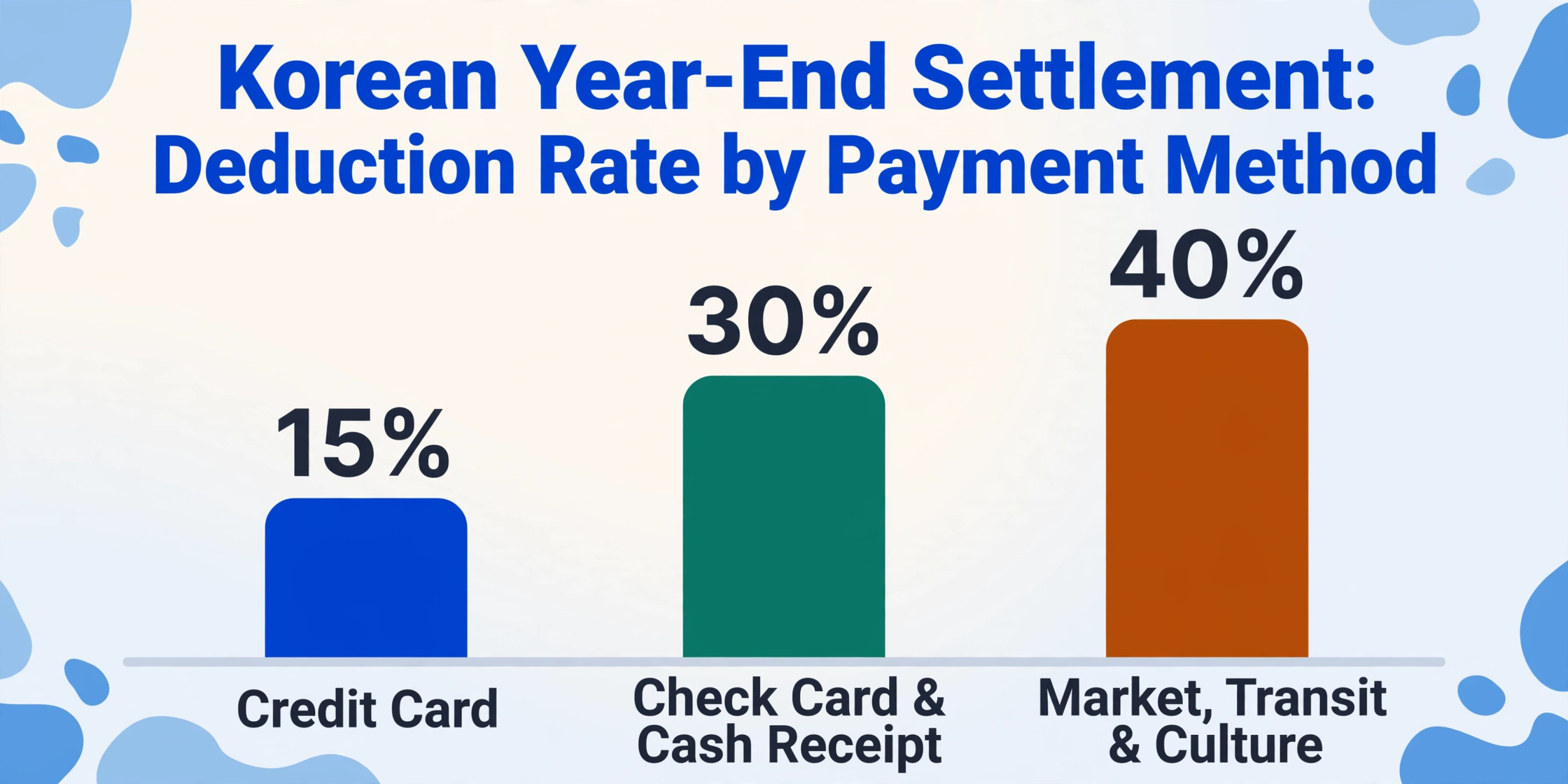
Here's the math that drives the extraction requirements. Korea's credit card deduction system[NTS] applies different deduction rates by payment method: credit cards at 15%, check cards and cash receipts at 30%. The 2024 basic deduction limit is 3 million won for those earning 70 million won or less, and 2.5 million won for those above. An additional deduction of up to 3 million won (or 2 million for higher earners) covers traditional market spending, public transit, and cultural expenses — each at 40% deduction rates. A new provision introduced in 2024 adds 10% deduction on the amount by which current-year spending exceeds the previous year's spending (capped at 1 million won).
The ordering rule is what makes this relevant to data extraction: the NTS always applies credit card spending to the 25% threshold first, then cash receipt spending. The practical message is straightforward — once you pass the 25% of salary threshold, every additional won spent via cash receipt earns a 30% deduction rate, double what a credit card would give. Getting those cash receipts properly counted in your year-end filing is worth real money.
What does this mean for column selection? Five fields matter for year-end settlement, and each serves a different tax purpose:
| Field | Korean Name | Why It Matters for Tax |
|---|---|---|
| Transaction Date | 거래일시 | Determines which tax year the deduction applies to. Cash receipts are dated by transaction, not by issuance. |
| Vendor (Business Name) | 상호/사업자명 | Identifies the merchant for category assignment — a restaurant vs. an office supply store. |
| Supply Amount | 공급가액 | The pre-VAT amount used for income deduction calculation — the actual base for the (spending − 25% threshold) × 30% formula. |
| VAT | 부가세 | Needed by business operators claiming input tax credit. For individual income deduction, only the total (sum of supply + VAT) matters. |
| Total Amount | 총금액 | Used for verification — the sum of supply amount + VAT should match this field, confirming the receipt's integrity. |
You'll also want the business registration number (사업자등록번호), not for your own filing but because your tax accountant might need it to cross-reference against the NTS electronic records on Hometax (홈택스), the NTS online portal. And the receipt classification — 소득공제용 vs. 지출증빙용 — matters when you're processing a mix of personal and business expenses. The AI can't read your intent, but it can extract what's printed; you decide which column tells the classification story.
Where Your Cash Receipts Actually Live (And Why That's Part of the Problem)
Before you can extract anything, you need to gather your sources. And the reality of Korean cash receipts in 2026 is that they live in at least four different places — none of which are organized by the category you need for tax filing.
Hometax electronic records. Every cash receipt issued against your phone number or registered card is viewable on the Hometax portal (hometax.go.kr). You can download the history as an Excel file under 조회/발급 → 현금영수증 → 사용내역조회. The CSV contains: 거래일자 (date), 공급가액+부가세 (amount breakdown, separated), 승인번호 (approval number), and 상호 (vendor name). What it does not contain: any expense category. A taxi ride, a business lunch, and a monitor cable from an electronics store all look identical in the output.
Paper cash receipt slips. Small merchants — the neighborhood hardware store, the traditional market vendor, the local print shop — still hand you a paper cash receipt (종이현금영수증). These are thermal-printed slips that fade within months and don't look like receipts from major chains. Each one contains the same fields the electronic version does, but they accumulate in a shoebox, not a database.
Payment app receipts. If you use Naver Pay, Kakao Pay, or Toss to pay with account-linked money (not a registered credit card), those transactions generate cash receipts that live inside each app's transaction history — not in a single consolidated export. Naver Pay shows them under 결제내역 → 주문상세 → 영수증조회. Kakao Pay surfaces them in 설정 → 발급정보관리. Each app has its own interface, its own export format, and its own rules about what counts as a cash receipt and what counts as a card transaction.
Self-issued receipts (자진발급분). A merchant can issue a cash receipt using the NTS-designated code 010-000-1234 when you don't provide your phone number or when the transaction falls under mandatory-issuance rules (over 100,000 won). These receipts are issued without your personal identifier attached — which means they won't appear in your Hometax dashboard by default. You need to manually register them: Hometax → 조회/발급 → 현금영수증 수정 → 자진발급분 소비자등록, entering the 승인번호 (approval number), 거래일자 (date), and 금액 (amount) printed on the paper slip.
The common thread: each of these sources contains structured fields (date, amount, vendor), but none of them organize the data the way your tax filing needs it — by expense category, sorted by deduction type, ready to hand to your accountant.
From Mixed Sources to One Spreadsheet: The Extraction Workflow
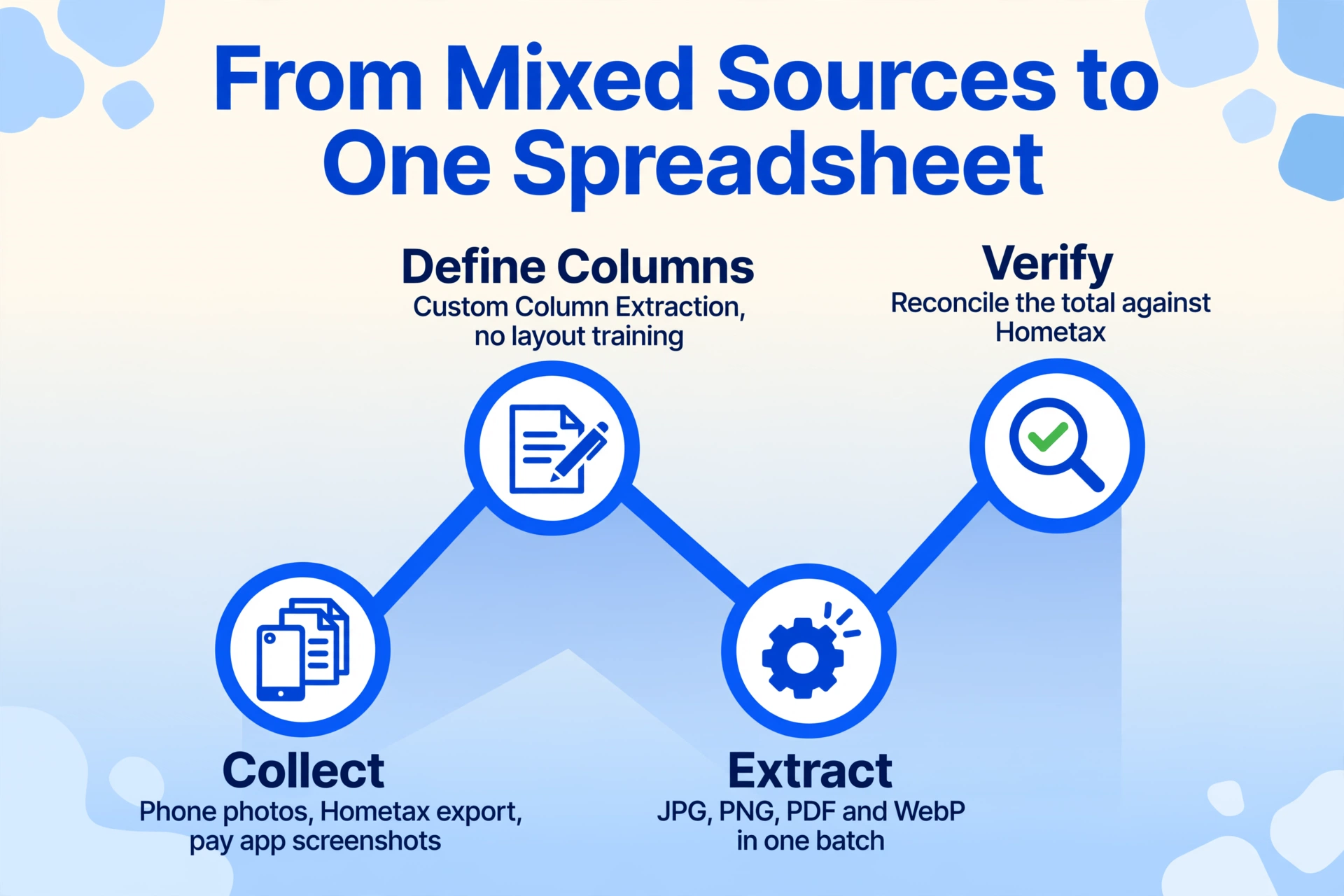
The extraction approach that actually works for year-end preparation doesn't separate the gathering phase from the processing phase. It treats them as one continuous pipeline: collect → define columns → extract → verify.
Files are processed securely and not stored.
Step 1: Gather Everything — Regardless of Format
Take photos of paper cash receipt slips with your phone. Download the Excel export from Hometax. Screenshot the transaction details from Naver Pay and Kakao Pay for any transactions that aren't in the Hometax download. The extraction tool handles JPG, PNG, PDF, and WebP — so mixing a phone photo of a thermal receipt with a PDF bank record and a screenshot of a payment app creates no additional steps. Upload them all at once.
Step 2: Define the Columns That Match Your Tax Filing
This is where the extraction tool's Custom Column Extraction approach changes the workflow. Instead of training the tool on where fields sit on the page — which would break the moment a format changes — you simply name the columns you want. The AI reads each receipt and locates the matching values by understanding what the text means, not where it sits. For a cash receipt extraction aimed at year-end settlement, a practical column set is:
Transaction Date (YYYY-MM-DD)Vendor NameSupply AmountVATTotal AmountReceipt Classification (options: 소득공제용/지출증빙용/미표기)Expense Category (options: 식대/교통비/사무용품비/임차료/통신비/소모품비/기타)The last two columns use inferred columns — the AI reads the receipt content and determines the classification and expense category even when those words don't appear anywhere on the receipt. A restaurant cash receipt gets 식대 (meals). A taxi receipt gets 교통비 (transport). An office supply store receipt gets 소모품비 (supplies). The category assignment happens during extraction — no second pass through 500 rows required.
Step 3: Verify the Total Column
Before exporting, check that Supply Amount + VAT = Total Amount for each row. If the totals don't match, the receipt may have a 봉사료 (service charge) or a discount applied — common in restaurant and service-industry receipts. The extraction output makes this verification a single glance at a spreadsheet column rather than a manual calculation per receipt.
For business operators filing 종합소득세: If you also process tax invoices (세금계산서) alongside cash receipts, you can include both document types in the same batch upload. Define one set of columns that covers both — date, supplier, supply amount, VAT, total, and document type — and the AI handles the variation in layouts. See our Korean tax invoice extraction guide for the specific field considerations when combining these document types, and the Korean VAT invoice hub for the full range of document types one column set can cover.
What Changes When You Process Cash Receipts in Batches
Year-end settlement is not a single-receipt problem. The average Korean salaried worker generates between 80 and 200 cash receipt transactions per year — and most of them surface in the January scramble when Hometax opens the previous year's final consolidated data. Processing them one at a time — typing transaction date, vendor, amount into Excel — takes roughly 3 minutes per receipt. That's 5 to 10 hours of manual data entry concentrated in the tight window between the January data release and the February filing deadline.
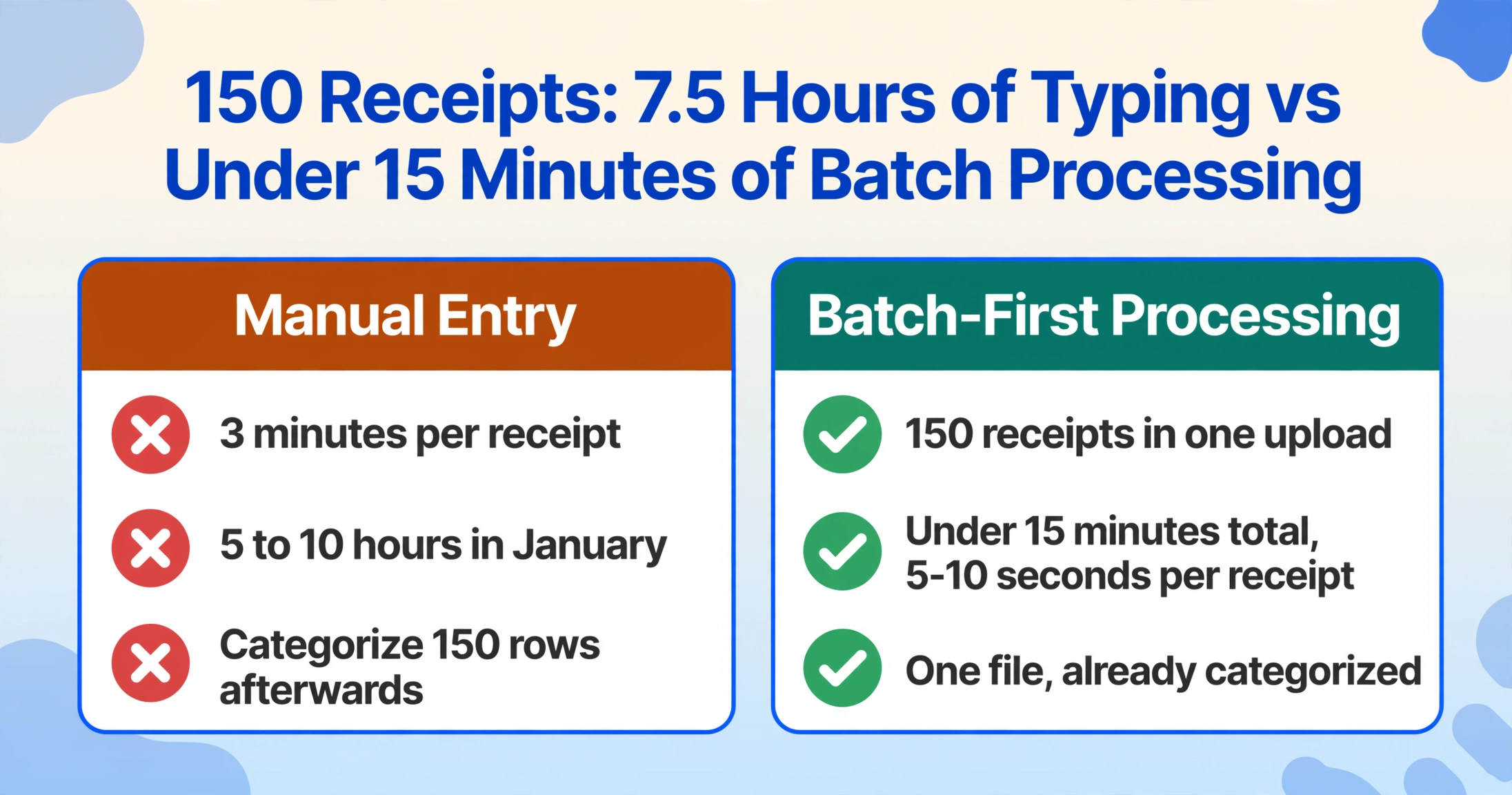
Batch processing changes the arithmetic. Upload all 150 receipts as one batch. Define the columns once. The AI processes them simultaneously and outputs a single spreadsheet where each receipt occupies one row. At 5–10 seconds per receipt, 150 receipts process in under 15 minutes — not the 7.5 hours of equivalent manual entry. But the deeper change isn't speed. It's that extracted and categorized data arrive together. Manual entry forces a sequential workflow: enter 150 rows → go back and categorize 150 rows. Batch extraction collapses those two steps into one.
The merging logic matters too. When you process receipts individually, you end up with separate files that need to be combined — more Excel copy-paste operations, more chances for a misplaced row. Batch-first processing produces one file from the start. The spreadsheet that lands on your desktop is already the version you'd email to your tax accountant — one consolidated table, all receipts in one sheet.
Data quality note: Cash receipts printed on thermal paper degrade over time — a receipt from March may be barely legible by January. For physical receipts, photograph them soon after the transaction. The AI's recognition accuracy depends on legible input just as much as it depends on the model itself. Printed text on clean paper achieves up to 99% accuracy; faded thermal paper with creases will be lower. For more on how AI handles Korean-language documents specifically, see our discussion on whether AI can accurately read Korean invoices.
What Happens After Extraction: From Spreadsheet to Tax Filing
The extraction output is a spreadsheet. The next step is getting it into the hands — or the software — that files your taxes.
Most Korean workers file year-end settlement through their employer's payroll system (the employer submits on behalf of employees) or through a tax accountant. In both cases, the raw spreadsheet is the deliverable — but formatting expectations vary. A tax accountant (세무사) typically expects columns in a specific order: date, vendor, amount, and evidence type — with separate sheets or filters for 소득공제용 and 지출증빙용 receipts. A tax platform like 삼쩜삼 (which has served over 7 million users for tax refund filing as of 2026) or SSEM imports data through its own interface, but the underlying input is the same categorized spreadsheet — date, expense category, amount.
The 황금비율 (golden ratio) calculators on platforms like BankSalad (뱅크샐러드) and Card Gorilla (카드고릴라) tell you the optimal split between credit card and cash receipt spending to maximize your deduction. But those calculators assume you have the data categorized. The extraction step gives you what the calculators assume you already have: a sorted, labeled, ready-to-compare record of your cash receipts for the year.
FAQ: Korean Cash Receipt Data Extraction
Can I mix cash receipts and regular receipts (일반영수증) in the same batch?
Yes. Define columns that cover both document types — date, vendor, amount, receipt type — and the AI handles the layout differences. The output will include a receipt type column that lets you filter cash receipts vs. regular receipts after extraction. For a detailed walkthrough of general Korean receipt processing, see our Korean receipt extraction guide.
Does photographing a faded thermal receipt work?
It depends on legibility. The AI reads visual text — if you can make out the characters with your own eyes on the photo, the AI can extract them. Thermal receipts that are completely blank or severely creased will have lower accuracy. The best practice is to photograph cash receipts within a week of the transaction, not at year-end.
Do I still need to download the Hometax Excel file?
Only for verification, not for data entry. If you've been consistently photographing your cash receipts, the AI extraction output is your primary dataset. The Hometax download serves as a reconciliation check — verify that the total spending amount in your extraction output roughly matches the Hometax total for the year. Discrepancies usually mean a missing receipt, not an extraction error.
Can the AI distinguish between 소득공제용 and 지출증빙용 receipts?
Yes — when the receipt explicitly prints this classification. Most cash receipts clearly state "현금(소득공제)" or "현금(지출증빙)" near the top of the slip. If a receipt doesn't display this label, the extracted field will be blank or return 미표기, and you'll need to classify it manually based on the nature of the expense — which is the same decision you'd make regardless of tool.
Are my cash receipt images stored or used for training?
No. Uploaded images are processed in memory and discarded after extraction completes. No receipt data is retained, and no content is used for AI model training.
Year-end tax settlement arrives on the same date every year. What changes is whether you walk into it with a shoebox of thermal slips or with a single spreadsheet where every receipt — digital and paper — is already categorized, sorted, and ready for the deduction it was designed to deliver. The gap between Korea's digital tax infrastructure and the paper receipts still in your wallet isn't a technology problem. It's an extraction problem. And extraction, unlike tax law, is something you can automate in an afternoon.